
ADP1 - Intercom Bogen - Free user manual and instructions
Find the device manual for free ADP1 Bogen in PDF.


| Product Type | Paging Adapter |
| Dimensions (H x W x D) | 4.5 x 2.5 x 1.5 inches |
| Weight | 0.5 lbs |
| Power Supply | 24V DC, 500 mA |
| Input Type | Microphone (balanced) or Line level |
| Output Type | Speaker level, 8 ohms |
| Frequency Response | 50 Hz – 15 kHz |
| Material | Steel chassis, black finish |
| Mounting | Wall-mountable with included bracket |
| LED Indicators | Power (green), Signal (amber) |
| Controls | Volume knob, On/Off switch |
| Compatibility | Bogen Paging Amplifiers |
| Warranty | 2 years limited |
| Safety Certifications | UL, CE, RoHS |
| Cleaning Instructions | Wipe with dry cloth; do not use liquids |
| Spare Parts Availability | Contact Bogen support for replacement parts |
| Repairability | Serviceable only by authorized technicians |
Frequently Asked Questions - ADP1 Bogen
User questions about ADP1 Bogen
0 question about this device. Answer the ones you know or ask your own.
Ask a new question about this device
Download the instructions for your Intercom in PDF format for free! Find your manual ADP1 - Bogen and take your electronic device back in hand. On this page are published all the documents necessary for the use of your device. ADP1 by Bogen.
USER MANUAL ADP1 Bogen
Analog Door Phone Model ADP1
Installation and Use Manual
Notice
Every effort was made to ensure that the information in this manual was complete and accurate at the time of printing. However, information is subject to change.
Important Safety Information
Always follow these basic safety precautions when installing and using the system:
- Read and understand all instructions.
- Follow all warnings and instructions marked on the product.
- DO NOT block or cover the ventilation slots and openings.
- Never spill liquid on the product or drop objects into the ventilation slots and openings. Doing so may result in serious damage to the components.
- Repair or service must be performed by a factory authorized repair facility.
- DO NOT install telephone wiring during a lightning storm.
- DO NOT install telephone jacks in a wet location unless the jack is specifically designed for wet locations.
- Never touch uninsulated wires or terminals, unless the line has been disconnected at the paging or controller interface.
- Use caution when installing or modifying paging or control lines.
Service Requirements
In the event of equipment malfunction, all repairs should be performed by Bogen or an authorized agent. It is the responsibility of users requiring service to report the need for service to Bogen or to one of our authorized agents. Service can be facilitated through our office at:
Bogen Communications, Inc.
50 Spring Street, Ramsey, NJ 07446, USA
Tel. 201-934-8500
Bogen's Applications Department may be reached at: 1-800-999-2809.
Description
The ADP1 is a convenient remote, weatherproof, hands-free two-way terminal device for telephone systems.
The unit is telephone line powered and includes adjustable microphone and speaker volume levels as well as a selectable Auto Answer feature to allow for remote monitoring.
The ADP1 also includes an adjustable and defeatable call timer and can respond to forward disconnect signals.
The ADP1 features a heavy-gauge stainless steel gasketed faceplate, plastic cone speaker, and faceplate to electrical box (user supplied) gasketing to protect against vandals and varying weather conditions. A dress bezel is included with the unit for trimming out rough openings in flush mount applications.
Package Contents
• ( 1) ADP1
• (4) Hex drive screws
• ( 1) Hex wrench
• ( 1) Bezel
• ( 1) Bezel gasket
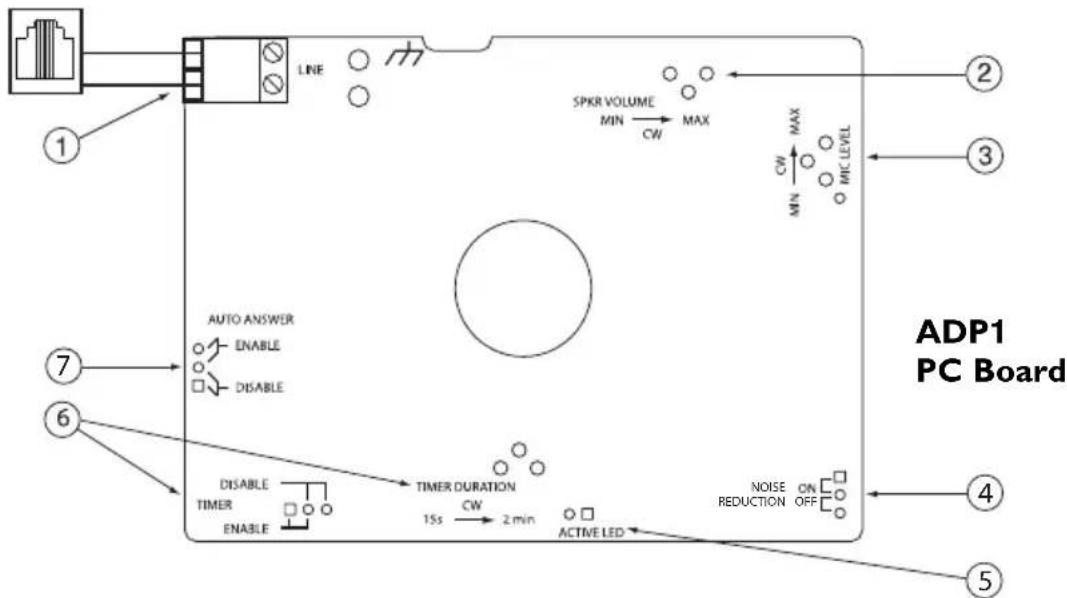
-
TEL Line Connector - Analog station line connection (Tip and Ring) is made via an RJ11 connector that is pre-wired to a 2-position pluggable terminal block. The connections to the terminal block are not polarity sensitive. (See Wiring, pg. 5.)
-
Speaker Volume POT - The Speaker Volume POT controls the speaker volume level of the unit. Clockwise rotation (looking at POT) increases the volume.
-
Microphone Level POT - The Microphone Level POT adjusts the microphone return talk level of the unit. In certain noisy locations (e.g., background traffic, machinery, or wind) the microphone threshold level may need to be decreased, otherwise the unit might detect the background noise as valid audio thereby causing the unit to remain in the talk mode. Clockwise rotation (looking at POT) increases the return talk level.
-
Noise Reduction - Slowly mutes the level to the phone when only background noise, not active audio, is detected.
-
Active LED - For use when installing and troubleshooting, the LED indicates that the unit is active (off hook) when lit.
-
Timer / Timer Duration POT - The ADP1 can be configured to automatically disconnect a call after a preset amount of time has elapsed. The timer can be set between 15 seconds and 2 minutes. The

timer is activated by pressing the button on the unit or when the unit answers (Auto Answer) an incoming call. With the timer disabled, the call time will be unlimited and the ADP1 will not disconnect the call until a 300 ms or longer loss of loop current is detected. If the telephone line/phone system extension does not supply a loop current break when the calling party hangs up, then the call timer feature must be used (enabled). Clockwise rotation of the POT increases the duration.
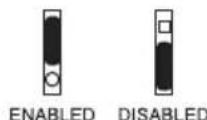
- Auto Answer - The ADP1 can be configured to automatically answer an incoming call. This feature can be enabled or disabled using a jumper located on the PC board.

Wiring
Phone Connection
The ADP1 comes with an RJ11 wired to the pluggable terminal block. Connect the ADP1 to the phone system's analog station line programmed for ring down operation using the RJ11 or directly to the screw terminals depending on how the lines are terminated. The connections to the terminal block are not polarity sensitive.
Surge Protection
To increase surge protection, connect a protective Earth Ground to the spare lug provided. A ring lug is provided to which the protective ground lead is crimped. Reassemble the lug to post as shown.


Installation
The ADP1 is designed to fit in most standard dual gang electrical boxes. Make sure to use the proper box type for intended installation (e.g., flush or surface mount, indoor or outdoor location, etc.).
Flush Mounting the ADP1 (Indoor/Outdoor)
-
Cut rough opening and install appropriate electrical box. Note: The box must be flush with the surface within 1/16".
-
For outdoor installations, caulk around the box, filling any gaps between the box and the rough opening.
-
Attach the self-adhesive gasket to the back side of the bezel.
-
Make electrical connections and attach the faceplate to the electrical box while capturing the bezel between the two using the four hex drive screws (tool provided). The faceplate fits into the depression in the bezel.

Surface Mounting the ADP1 (Indoor/Outdoor)
- Mount electrical box.
- Make electrical connections and attach the faceplate to the electrical box using the four hex drive screws (tool provided). Do not use the bezel for surface mount installations as the elevated sharp corners of the bezel could pose a hazard.

Power: Telephone line powered
(18V DC / 20 mA minimum)
Timer Duration: 15 seconds to 2 minutes
Loop Current Loss Disconnect: 300 ms minimum
Ring Voltage: 40V AC RMS minimum
REN: 0.7A
Connections: 2-position pluggable terminal block
Earth Ground lug
Dimensions: 5" W x 5" H x 2 1/4 " D (fully assembled)
45/8 " W × 4/8" H × 2" D (aluminum box)
Product Weight: 4 lb.
Warranty
The ADP1 is warranted to be free from defects in material or workmanship for two (2) years from the date of sale to the original purchaser. Any part of the product covered by this warranty that, with normal installation and use, becomes defective will be repaired or replaced by Bogen, at our option, provided the product is shipped insured and prepaid to: Bogen Factory Service Department, 50 Spring Street, Ramsey, NJ 07446, USA. The product will be returned to you freight prepaid. This warranty does not extend to any of our products that have been subjected to abuse, misuse, improper storage, neglect, accident, improper installation or have been modified or repaired or altered in any manner whatsoever, or where the serial number or date code has been removed or defaced.
THE FOREGOING LIMITED WARRANTY IS BOGEN'S SOLE AND EXCLUSIVE WARRANTY AND THE PURCHASER'S SOLE AND EXCLUSIVE REMEDY. BOGEN MAKES NO OTHER WARRANTIES OF ANY KIND, EITHER EXPRESS OR IMPLIED, AND ALL IMPLIED WARRANTIES OF MERCHANTABILITY OR FITNESS FOR A PARTICULAR PURPOSE ARE HEREBY DISCLAIMED AND EXCLUDED TO THE MAXIMUM EXTENT ALLOWABLE BY LAW. Bogen's liability arising out of the manufacture, sale or supplying of products or their use or disposition, whether based upon warranty, contract, tort or otherwise, shall be limited to the price of the product. In no event shall Bogen be liable for special, incidental or consequential damages (including, but not limited to, loss of profits, loss of data or loss of use damages) arising out of the manufacture, sale or supplying of products, even if Bogen has been advised of the possibility of such damages or losses. Some states do not allow the exclusion or limitation of incidental or consequential damages, so the above limitation or exclusion may not apply to you. This warranty gives you specific legal rights, and you may also have other rights which vary from state to state.
Products that are out of warranty will also be repaired by the Bogen Factory Service Department — same address as above or call 201-934-8500. The parts and labor involved in these repairs are warranted for 90 days when repaired by the Bogen Factory Service Department. All shipping charges in addition to parts and labor charges will be at the owner's expense. All returns require a Return Authorization number.
8/10/2004
Brand : Bogen
Model : ADP1
Category : Intercom