
XS8991TWT6A - Wine cellar Fhiaba - Free user manual and instructions
Find the device manual for free XS8991TWT6A Fhiaba in PDF.


| Product Type | Built-in Wine Cellar |
| Model | XS8991TWT6A |
| Brand | Fhiaba |
| Capacity | Approximately 150 bottles (standard 0.75L) |
| Dimensions (H x W x D) | 38 x 24 x 24 inches (96.5 x 61 x 61 cm) |
| Weight | 220 lbs (100 kg) |
| Power Supply | 220-240 V, 50/60 Hz |
| Energy Consumption | Approximately 200 kWh per year |
| Temperature Range | 5°C - 20°C (41°F - 68°F) |
| Number of Temperature Zones | 2 (dual zone for red and white wines) |
| Cooling System | Compressor with low vibration technology |
| Humidity Control | Active humidity management (50-80% RH) |
| Door Type | Triple-pane tempered glass with UV protection |
| Door Hinge | Reversible (left or right opening) |
| Interior Lighting | Soft LED lighting with dimmer |
| Lock | Key lock for security |
| Shelving | 6 wooden shelves with chrome trim, slide-out |
| Vibration Dampening | Anti-vibration system |
| Noise Level | Less than 35 dB |
| Climate Class | SN-ST (subnormal to subtropical) |
| Installation | Built-in or freestanding (ventilation required) |
| Certifications | CE, UL, Energy Star (varies by region) |
Frequently Asked Questions - XS8991TWT6A Fhiaba
User questions about XS8991TWT6A Fhiaba
0 question about this device. Answer the ones you know or ask your own.
Ask a new question about this device
Download the instructions for your Wine cellar in PDF format for free! Find your manual XS8991TWT6A - Fhiaba and take your electronic device back in hand. On this page are published all the documents necessary for the use of your device. XS8991TWT6A by Fhiaba.
USER MANUAL XS8991TWT6A Fhiaba
natural_image
Illustration of a hand using a power plug to install a wall socket (no text or symbols present)natural_image
Illustration of a multi-tiered storage rack with multiple circular objects on each shelf, one highlighted in gray (no text or symbols)Modello OF

natural_image
Illustration of a wine bottle and a glass on a neutral background (no text or symbols)Vini rossi
da + 1 0 ^ irc Ca + 1 8 ^ irc C
natural_image
Illustration of a wine bottle and a glass on a neutral background (no text or symbols)Vini bianchi.
da + 4 ^ irc Ca + 9 ^ irc C
www.fhiaba.com/it/supporto/video "Bottom Condenser Cleaning".
natural_image
Illustration of hands installing or maintaining a tray with rollers inside a storage cabinet (no text or symbols)Cassettone TriMode (1T, 0T, 0H)
natural_image
Illustration of a hand opening a laptop with a small globe icon above (no text or symbols)7.1 Illuminazione
natural_image
Two identical rectangular panels with light reflections, each containing a patterned surface and a small rectangular base (no text or symbols)
natural_image
Illustration of a smartphone with abstract wave patterns on its screen (no text or symbols)www.fhiaba.com/it/supporto/
video "Care and Cleaning".

Nota
www.fhiaba.com/it/supporto/video "Bottom Condenser Cleaning".
Condensatore sopra.
natural_image
Diagram of a kitchen appliance with airflow arrows indicating movement (no text or symbols)natural_image
Illustration of a hand inserting a pipe into a blue-patterned container (no text or symbols)natural_image
Diagram of a door frame with blue arrows indicating direction, showing structural components and a wooden panel (no text or symbols)natural_image
Illustration of a hand inserting a pipe into a blue-patterned panel (no text or symbols)www.fhiaba.com/it/supporto/video "Care and Cleaning".

1.1 For your safety.... 38
1.2 Important information when using the appliance.... 38
1.3 Caring for the environment.... 39
2 INSTALLATION 39
2.1 Installation.... 39
2.2 Connection to the electrical power 39
2.3 Refrigerant 39
3 BEFORE STARTING 40
3.1 Know your fhiaba.... 40
3.2 Main components.... 41
3.3 Electronic control.... 43
3.4 Main control panel (models 1T, 0T, 0H and 0F).... 43
4 APPLIANCE SWITCHING ON AND OFF 45
4.1 Switching on and off 45
4.2 How to adjust the temperature for different requirements.... 47
4.3 Segnali informativi di anomalia sul display.... 48
5 FUNCTIONS AND SETTINGS 49
5.1 Functions.... 49
5.2 Settings.... 53
6 INTERNAL LAYOUT 60
6.1 Internal layout (positioning, adjustment, removal).... 60
7 LIGHTING 60
7.1 Lighting.... 60
8 USE THE TRIMODE COMPARTMENT 60
8.1 Use the trimode compartment 60
9 CONsertION OF WINES 61
9.1 General directions.... 61
9.2 Conservation temperature.... 62
9.3 Time of conservation.... 64
9.4 Consumption temperature.... 64
9.5 Position of bottles.... 65
10 CARE AND CLEANIG 65
10.1 Care and cleanig.... 65
10.2 Cleaning of the ventilation grill and condenser.... 66
10.3 Internal cleaning.... 67
11 TROUNBLESHOTTING GUIDE 68
11.1 Trounbleshotting 68
11.2 Malfunction indications appearing of the display.... 68
1.1 For your safety
If this appliance is replacing an existing appliance which must be removed or disposed of, make sure that it does not become a dangerous trap for children by cutting its power supply cable and rendering it impossible to close the door. Use the same caution at the end of the lifespan of the new appliance.
This appliance is designed to refrigerate beverages and foods and is intended for domestic use.
The appliance must be installed by following the instructions in the Installation Guide, particular care should be taken not to obstruct the vent openings of the appliance and of the built-in units.
The appliance features a concentrated lighting system with LED lamps. Do not stare into these lamps when they are on to avoid possible eyesight damage.
This warning is also contained on the label attached to the inside of the refrigerator door.
When the freezer is functioning do not touch the inner surfaces in stainless steel with wet or damp hands, since skin may stick to the very cold surfaces.
Do not use any type of electrical equipment inside of the food conservation compartments.
When positioning the shelves, do not place fingers in the shelf slide guides.
Do not position containers of flammable liquids near the appliance.
Completely switch off the appliance and unplug the power supply cable during cleaning operations. If the plug is not easily reached, it is a good idea to turn off the breaker or remove the fuse that controls the socket that the appliance is connected to.
The packaging parts can be dangerous for children: do not allow children to play with the plastic bags, plastic film or Styrofoam.
Any repairs must be performed by a qualified Fhiaba Service technician.
This appliance is not intended for use by persons (including children) with reduced physical, sensory or lack of experience and knowledge unless they have been given supervision or instruction concerning use of the appliance by a person responsible for their safety. Children should be supervised to ensure that they do not play with the appliance.
Do not damage the appliance refrigerant circuit pipes.
Do not store explosive substances such as aerosol cans with a flammable propellant in this appliance.If the power cord of this appliance is damaged, it must be replaced by the manufacturer, customer service or a similarly qualified person.
Improper installations and repairs may put the user at considerable risk.
Repairs may be performed by the manufacturer, customer service or a similarly qualified person only.
Plug into a grounded 3 prong outlet.
Do not remove ground prong.
Do not use an adapter.
Do not use an extension cord.
Disconnect power to all units before servicing.
If the SUPPLY CORD is damaged, it must be replaced by the manufacturer, its service agent or similar qualified person in order to avoid a hazard.
Children should be supervised to ensure that they do not play with the appliance.
1.2 Important information when using the appliance
Never use electrical appliances inside the appliance (e.g. heater, electric ice maker, etc.). Explosion hazard!
Never defrost or clean the appliance with a steam cleaner! The steam may penetrate electrical parts and cause a short-circuit. Risk of electric shock!
Do not use pointed and sharp-edged implements to remove frost or layers of ice. You could damage the refrigerant tubes. Leaking refrigerant may cause eye injuries or ignite.
Do not store products which contain flammable propellants (e.g. spray cans) or explosive substances in the appliance.
Explosion hazard!
Do not stand on or lean heavily against base of appliance, drawers or doors, etc.
Before cleaning the appliance, pull out the power cord plug or switch off the fuse. Do not pull out the power cord plug by tugging on the power cord.
Store high-percentage alcohol tightly closed and standing up.
Keep plastic parts and the door seal free of oil and grease. Otherwise, parts and door seal will become porous.
Never cover or block the ventilation openings for the appliance.

Warning
To avoid contamination of food, please respect the following instructions:
Opening the door for long periods can cause a significant increase of the temperature in the compartments of the appliance.
Clean regularly surfaces that can come in contact with food and accessible drainage systems.
Clean water tanks if they have not been used for 48 h; flush the water system connected to a water supply if water has not been drawn for 5 days.
Store raw meat and fish in suitable containers in the refrigerator, so that it is not in contact with or drip onto other food.
Two-star frozen-food compartments are suitable for storing pre-frozen food, storing or making icecream and making ice cubes.
One-, two- and three-star compartments are not suitable for the freezing of fresh food.
If the refrigerating appliance is left empty for long periods, switch off, defrost, clean, dry, and leave the door open to prevent mould developing within the appliance.
Symbols used in the Guide:

Note Recommendations for correct use of the appliance

Important Directions for avoiding appliance damage

Warning Indications for avoiding injury to people
1.3 Caring for the environment


Pay special attention to correct disposal procedure for all the packaging materials.
The appliance must not be disposed of with urban waste. Contact local waste disposal centres for on how to dispose of recyclable waste.
Prior to disposal, cut the power supply cord and make it impossible to close the door.
During disposal, avoid damage to the refrigeration circuit.
The appliance does not contain hazardous substances for the atmospheric ozone layer, neither in the refrigeration circuit nor in the insulation.
2.1 Installation
Make sure that installation is performed correctly, adhering to all of the instructions in the specific installation guide provided with the appliance.
natural_image
Illustration of hands using a power plug to install an electrical socket (no text or symbols present)The appliance is equipped with a Schuko type 16A plug.
It must be connected to the electrical mains by means of a corresponding Schuko socket.
Do not use extension cords and/or multiple adapters for connection.

Important
Do not use extension cords and/or multiple adapters for connection.

Warning
If energy is supplied through an alternative energy power source (solar, geothermal, etc..) or if home automation systems are installed, it is necessary to install the Alternative Energy Kit to integrate the unit into the power grid.
2.3 Refrigerant
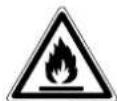
The refrigerant isobutane (R600a) is contained within the refrigerant circuit of the appliance, a natural gas with a high level of environmental compatibility, which is nevertheless flammable.
During transportation and installation of the appliance, be certain that none of the components of the refrigerant circuit become damaged.
If the refrigerant circuit should become damaged: - avoid open flames and sources of ignition;
– thoroughly ventilate the room in which the appliance is situated.
ISO 7010 W021
3.1 Know your Fhiaba
Congratulations for having purchased your new Fhiaba: from now on you can use our innovative conservation system, which will allow you to keep all of your food in the best way possible.

Important
Before calling, write down the model type and serial number which are available on the warranty certificate and on the rating plate located on the bottom left-hand corner of the appliance, behind the bottom drawer.
This manual will answer most of your questions about the product's features. Should you require further information, please
Our green number
800-344222 (800-FHIABA)
cale use: +39 0434 420160
write us an e-mail at care@fhiaba.com
check our website www.fhiaba.com

natural_image
Line drawing of a multi-tiered storage rack with circular objects on each shelf (no text or symbols)Position of the serial number inside the compartment.

3.2 main components
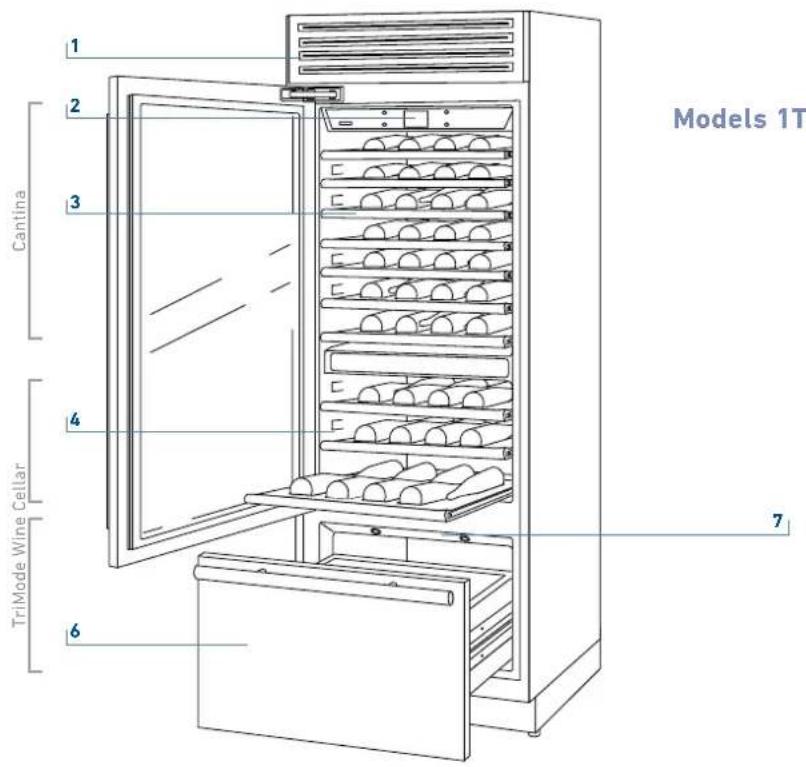
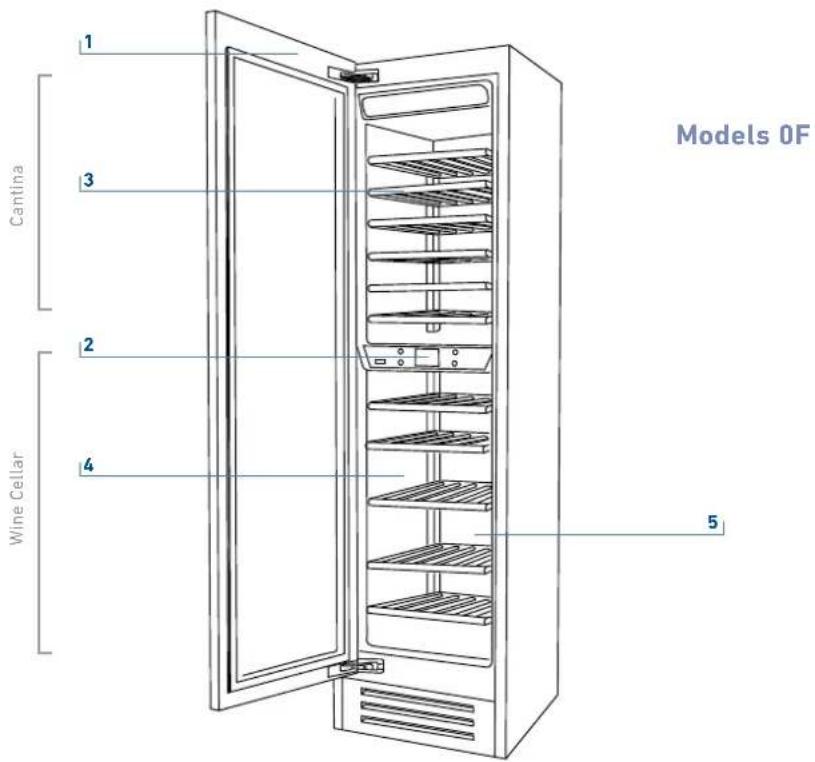
1 Structure in stainless steel with aluminium trim.
2 Interactive control panel.
3 Cantina Compartment.
4 Sliding bottle shelves, mounted on wheels for easy extraction.
5 Wine Cellar compartment.
6 Freezer bottom drawer compartment convertible into Fridge compartment or Fresco compartment (TriMode functionality).
7 LED illuminations for the freezer compartment bottom drawer.

1 Structure in stainless steel with aluminium trim.
2 Interactive control panel
3 Wine Cellar Compartment
4 Sliding bottle shelves, mounted on wheels for easy extraction.
5 Freezer bottom drawer compartment convertible into Fridge compartment or Fresco compartment (TriMode functionality).
6 LED illuminations.

3.3 Electronic Control
The innovative electronic control system designed by Fhiaba maintains constant temperature on the three compartments and visualizes it on the control panel display. It also allows user interaction making it possible to personalize settings of the various functions and to receive sound and/or visual messages should any malfunction occur in the appliance.
3.4 Main control panel (models 1T, 0T, 0H and 0F).


Turnign On / Turning Off:
Touch the icon for turning on or off the unit.

Home
Touch the icon home for going back to the main display screen.

Allarm
Touch the icon to view the alarm tone functions and to deactivate them.

Back
Touch the arrow icon for going back to the previous display screen.
4.1 Switching on and off
First time starting the unit
Touch the button Ⓤ. The display shows the following launch screens:

1) Fhiaba Logo.

2) Initial test (last 3 minutes).
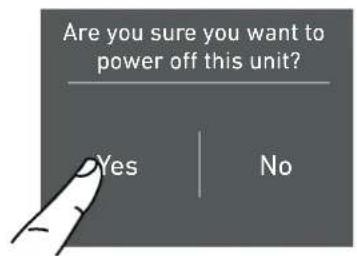
2) Touch the icon Yes to switch on.
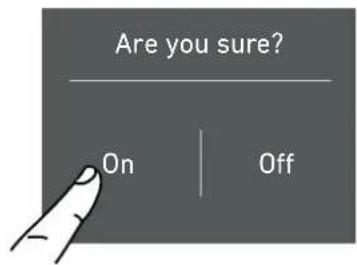
3) Conferm shutdown by touching the yes icon.

3) The display shows the main screen with the environment temperature measured from the fridge inside the compartments. Automatically the unit start to cool down until reaching the set temperatures.

4) Home screen (*).
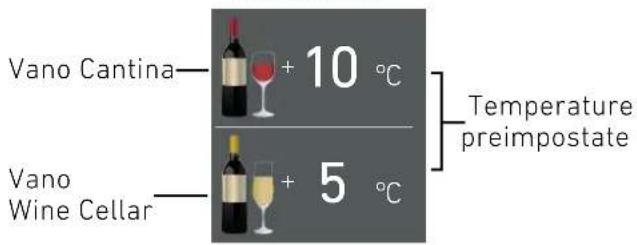
- cantina compartment +8°C.
- wine cellar compartment +5°C.
- TriMode compartment -18°C.
(*) The home screen varies depending on the models; (vedi paragrafo 4.2 pag 12).
The TriMode compartment is set in the freezer mode (-18°C). For changing this setting look up the function 5 page 21.
When the appliance is first switched on is recommended to wait at least 12 hours without opening the doors and before placing any food inside the unit. During such period deactivated any error message by pressing the Alarm button.
Shutdown.

1) Touch the buttom ⏻ off.
Switching off Cantina and Wine Cellar compartment. (Models 1T, OT e OH)
The cantina compartment and the wine cellar compartment, can be shutdown individually whereas the TriMode drawer can't be turned off unless through the complete shutdown of the unit.

1) Home screen.

2) Touch the icon off.

3) Touch the icon Yes to turn compartment off.
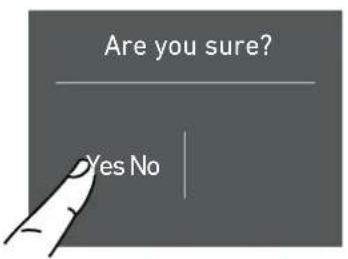
4) Touch the icon Yes for confirming the disactivation.
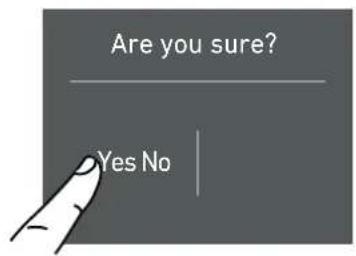
4) Touch the yes icon for confirming the disactivation.

5) On the home screen appears the icon off, which indicates that the cantina compartment is off

5) Turn on again the cantina compartment. Home screen will open up.
For turning off the wine cellar compartment follow the same directions.

The same procedure is required if you want to restart the wine cellar compartment.
Turning on again, the cantina and wine cellar compartment.
For turning on the unit again press the button, ⏻ the display will turn on and the launch screen will appear again with the temperatures measured inside the fridge compartments. The fridge will start to cool down until reaching the set temperatures.
Restart the compartments.
In the case you wish to turn on again the fridge and fresco compartments.

1) Home screen. For example for turning back on the cantina compartment, touch the icon off.
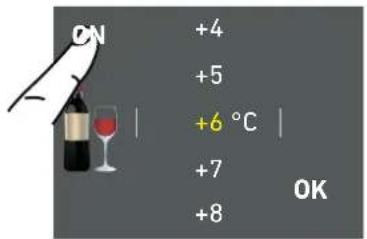
2) Touch the icon on.
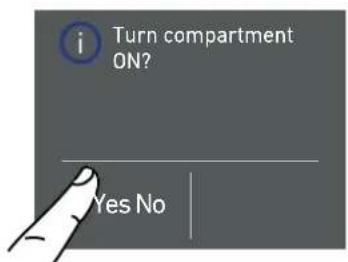
3) Touch the icon yes.
Switching off for long periods
During long absence periods it is recommended to switch off the refrigerator by pressing the Unit button ⏻ for three seconds and disconnecting the electrical plug or the breaker controlling the socket.
Completely empty the refrigerator, clean and dry it and leave the doors and drawers partially open to prevent unpleasant odors.

If at the first startup the Standby message does not appear, but another message appears, it means that the appliance has already started the cooling process.
During the first startup, it will not be possible to use the Menu to modify the factory settings until the preset temperature has been reached. During the first startup, it will not be possible to use the Menu to modify the factory settings until the preset temperature has been reached.
Each time the appliance is switched on it goes through a self-diagnosis procedure lasting three minutes before completely starting up. If only the refrigerator compartment or the Fresco compartment is switched off, the specific fan will continue to operate to prevent the formation of unpleasant odours and mould.
4.2 How to adjust the temperature for different requirements.
Each model has been carefully tested before leaving the factory and is adjusted in such a way to ensure high performance and low consumption. Usually, it is not necessary to modify the settings.
How it looks to the home screen in the various models:


Modify the temperatures compartment
Example: How to modify the Cantina compartment temperature.

1) Home screen. Touch icon of cantina compartment.
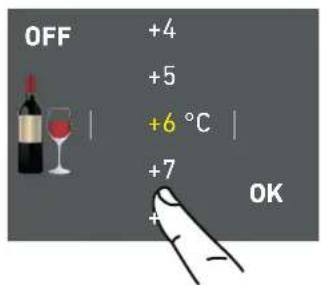
2) Scoll up/down to select the desided temperature. Cantina Compartment from +4°C to +18°C

3) Touch the icon ok to confirm the desider temperature.
The same procedure is required to set the temperature in the Cantina compartment from +4°C to +18°C and in the Trimode bottom drawer from -15°C to -22°C.

The temperature shown can vary slightly in respect to the set temperature following frequent openings of the doors or insertion of room temperature foods or large quantities of foods.
6 to 12 hours are necessary reach the selected temperature.
Padlock icon.
The padlock icon shows up when the temperatures are set up.
The padlock open/close shows that is or isn't possible to modify the compartment's temperatures anymore.


Usually an open yellow padlock can be seen open; in that case you can scroll up or down with a finger on the display, select the desired temperature and press OK for confirming.

Whereas a closed padlock can be seen if the user has activated some functions (described in the paragraph 5.1 page 15) that modify the settings of the Frigo Compartment, Fresco Compartment and Freezer Compartment therefore the user in that situation will not be able anymore to change the temperature of the compartments.

If the icon function is touched and a specific function is set (for example holiday, shopping trimode, ect...), the yellow padlock will be seen closed and it won't be possible to change the temperature of the compartments as long as the function won't be completed or if it is manually deactivated.
4.3 Information signals of anomaly on the display.
An integrated control system will give information through bright textual signals messages you can see on the display.
The voiced signal that goes along with some of the anomalies signals and can be turned off by touching the button allarm ⏻ on the main control panel. You can find the list of the anomalies signals at the end of this manual. (see paragraph 12.2 page 34).

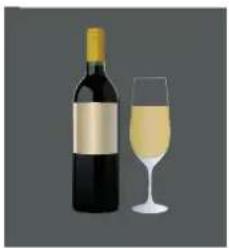
4.4 Wine Cellar temperatures.
For a better conservation the red wines need a warmer temperature.

natural_image
Illustration of a wine bottle and a glass on a neutral background (no text or symbols)Red Wine.
from + 1 0 ^ irc C to + 1 8 ^ irc C

natural_image
Illustration of a wine bottle and a glass on a neutral background (no text or symbols)White Wine.
from + 4 ^ irc C to + 9 ^ irc C
For example if a temperature higher than +9°C is set for white wine, the display will change icon from white wine to red wine.
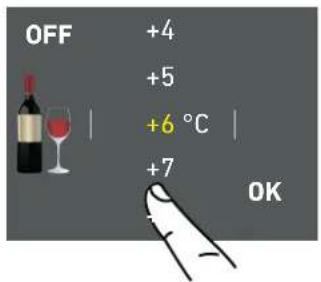
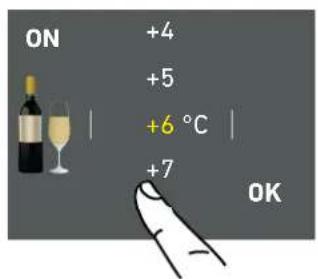


INFORMATION FOR USING THE DISPLAY.
It is possible to personalize the operation of your Fhiaba unit in order to adapt it to the different ways you might want to use it.
5.1 Functions.
After touching the functions icon 📄 on the home screen will be shown the following icons with the following availables functions.

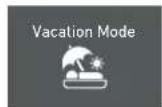

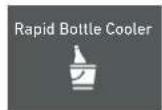


1) Dual Zone (models OT-OH).
2) Vacation Mode.
3) Shopping Mode: Trimode.
4) Rapid Bottle Cooler.
5) Humidity Control.
6) Light 12h.
7) Prosciutteria. (optional models 0T-0H-0F)
1) Dual Zone mode (Models 0T e 0H)
This function enables to keep a warmer temperature in the upper part of the fridge (for red wines) and a colder one in the lower part of the fridge (for white wines).
The refrigeration system Fhiaba enables to maintain the cold on the lower part of the fridge.
2) Vacation Mode
This function (recommended in case of prolonged absences since it allows considerable energy savings) brings the refrigerator compartment temperature to +14°C (57.2°F)
It is possible to program the duration, or it can be manually deactivated upon re-entry after a period of absence. This function remains active even if during the period of absence there is a prolonged interruption of electrical power.
It is possible to program a period from 1 to 90 days.

A) Home screen. Touch the icon function.
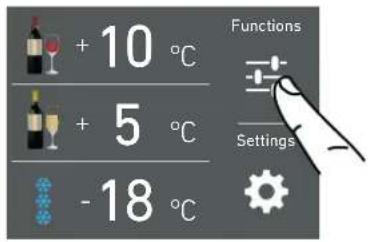
A) Home screen. Touch the icon function.
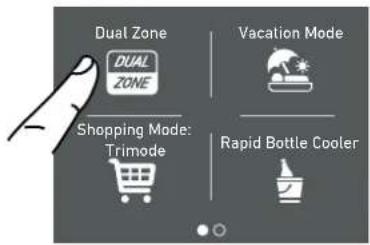
B) Touch the icon Dual Zone.

B) Touch the icon Vacation.

c) Touch the button On to activate the function.
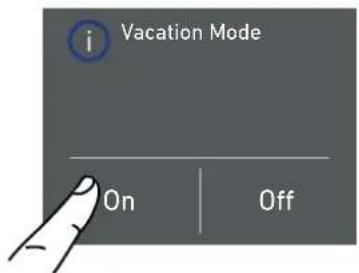
C) Touch the button On to activate the function.
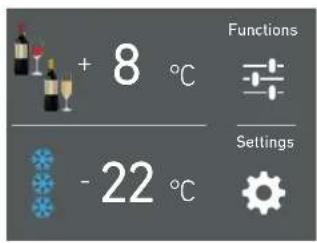
D) The home screen will change and the dual zone icon will appear.
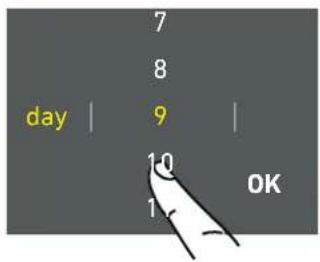
D) Scroll up / down to set the desired time (in days) and then pres ok.
It is possible to pro-
gram a period from 1
to 90 days.
3) Shopping Mode: TriMode (no in OFR models).
This function must be activated at least 24 hours before inserting room temperature items into the freezer, or several hours before placing into the freezer previously frozen items which have been subject to a slight temperature rise.
This function is automatically deactivated when the programmed time period expires. It is possible of program timed activation of the function.
If interrupted by a prolonged interruption of the electrical power, it is necessary to reactivate the function.
4) Rapid Bottle Cooler
This function can be activated when it is necessary to cool off beverages quickly, by placing them inside the freezer compartment.
It is possible to select a duration of 1 to 45 minutes. A sound signal will indicated when the optimal temperature has been reached.
After removing the beverages, deactivate the sound signal by pressing the Alarm button ⏻.

A) Home screen. Touch the icon function.
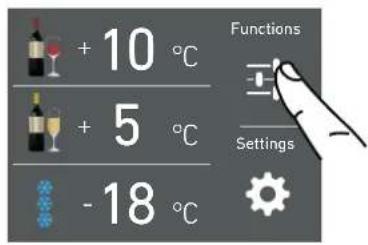
A) Home screen. Touch the icon function.

B) Touch the icon Shopping Trimode.

B) Touch the icon bottle cooler.
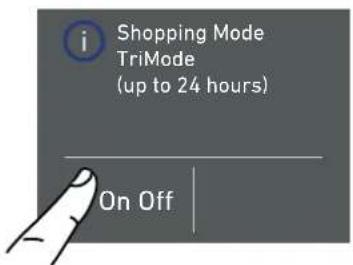
C) Touch the button On to activate the function.

c) Touch the button On to activate the function.
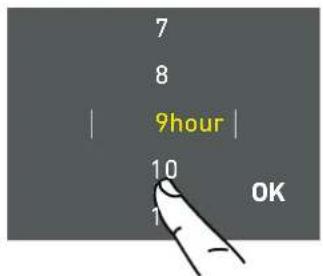
D) Scroll up / down to set the desired time (in hours) and then pres ok.
It is possible to program a period from 1 to 24 hours.

D) Scroll up or down, for setting the desired time range (in minutes) and press ok.
5) Humidity Control.
This function enables to set the humidity of the cantina and wine cellar compartments. The default setting is set to "Medium".
6) Inner lighting for 12 h.
This function enables to set the timing of the inner lighting and it stays on 12 hours when the wine cellar door is closed, in order to see the inner part lighted up, through the glass.

A) Home screen. Touch the icon function.

A) Home screen. Touch the icon function.

flowchart
graph TD
    A["Humidity Control"] --> B["Light 12h"]
    C["Prosciutteria"] --> D["Light 12h"]
    style A fill:#f9f,stroke:#333
    style B fill:#ccf,stroke:#333
    style C fill:#cfc,stroke:#333
    style D fill:#fcc,stroke:#333
B) Scroll right twice and touch the icon humidity.
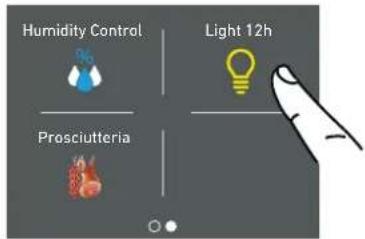
B) Scroll right until reaching the 12h light icon.

c) Scroll until setting the desired humidity and press ok.

c) Push On if you want to activate 12h light Mode.
7) Prosciutteria. (optional per OT-OH-OF).
This function enables to set the Wine Cellar compartment (with temperature and humidity) in order to make it suitable for the conservation of hams, salamis and cheeses.
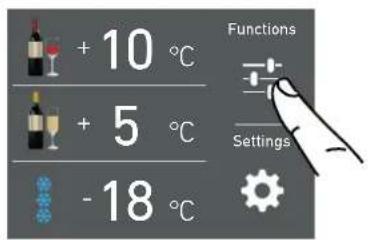
A) Home screen. Touch the icon function.

B) Scroll right twice and touch the icon prosciutteria.

C) Touch the icon Yes to activate the functions.
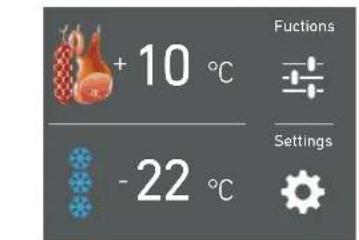
D) On the home screen, appeaes the icon salami instead of wine icon. Automatically the compartment will keep a +10 °C temperature and it will be set the medium humidity.
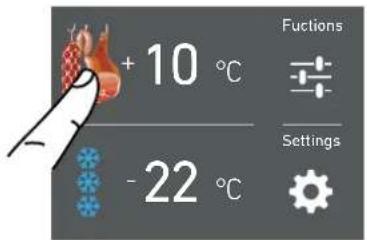
E) Touch the salu-mi icon for setting the functions.

F) Scroll until setting the desired temperature and press from +8°C to +17°C and then touch ok.
5.2 Settings.
It is possible to personalize the settings of your Fhiaba fridge for adapting it to the different ways you might want to use it.
1) Date.

2) Time.

3) Celsius and fahrenheit degrees.

4) Language.

5) Trimode.

6) Sabbath.

7) Reset.
8) Demo Mode.
9) Maintenance.

10) Service.

11) Info System.
1) Date
The display will show the date in the format (day:month:year).
By touching the display you can modify the settings.

A) Home screen. Touch the icon settings.
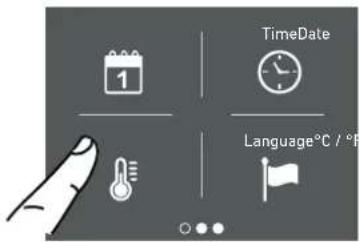
B) Touch the icon date.

C) Scroll up or down until selecting the desired year and them press ok.

D) Scroll up or down until selecting the desired month and press ok.
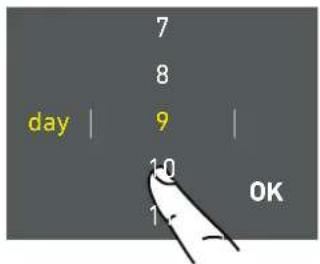
E) Scroll up or down until selecting the desire day and press ok.
2) Time
The display shows the hours and minutes in the format hh:mm.
This function selects the display at 12 or 24 h.

A) Home screen. Touch the icon settings.

B) Touch the icon time.

c) Touch in which way you want to see the time: 12 or 24 hours.

D) Scroll up / down to set the hours and then press ok.

E) Scroll up / down to set the minutes and then press ok.
3) SET °C/°F
This function permits visualizing the temperature in Centigrade or Fahrenheit degrees. Normally, the appliance is set for visualization in centigrade degrees.

A) Home screen. Touch the icon settings.
4) Language
To set the language of the fridge, simply touch the settings button on the display.

B) Touch the icon °C/°F.
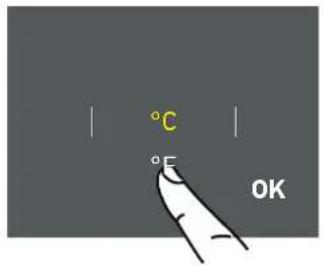
c) Scroll up / down to select either centigrade or fahrenhe it degrees and press ok.

A) Home screen. Touch the icon settings.

B) Touch the icon language.
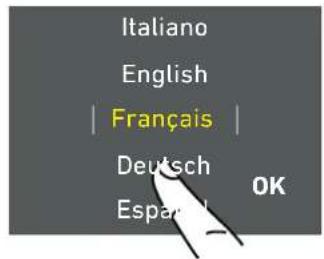
C) Scroll up / down to select the desired language and press ok.
5) TriMode
The freezer compartment can, if required, be converted to the refrigeration of Fresco operating mode.
6) Sabbath Mode (Optional)
The function makes it possible to comply to certain religious observances requiring that the operation of the appliance is not affected by the opening or closing of the doors (the thermostatic control, the inner lighting and the ice maker are deactivated).

A) Home screen. Touch the icon settings.

A) Home screen. Touch the icon settings.

B) Scroll twice right and touch the trimode button.
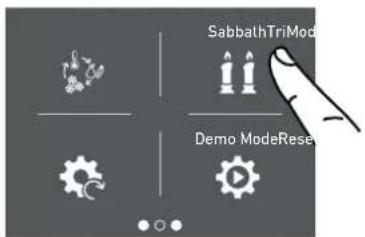
B) Scroll right twice and touch the icon sabbath.

c) Scroll up / down and select one of the three functions.
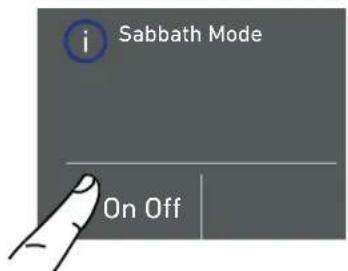
c) Touch the Yes button to activate the function.

D) Touch yes to confirm the function.

D) Touch the yes button to activate the function.

E) The fridge will work accordingly to this configuration.
7) Reset
It gives the possibility to restore the base settings that were set in the factory, cancelling all the changes that has been made from there onward.
8) Demo Mode
It is possible to simulate the functioning of the fridge, for showroom display or for fairs.

A) Home screen. Touch the icon settings.

A) Home screen. Touch the icon settings.

B) Scroll right twice and toch icon reset.

B) Scroll right twice and toch demo mode.

c) Touch the Yes button to activate the function.

C) Insert the password for the activation.
Default password 1-2-3-4

E) The reset has been performed. The fridge's factory settings have been restored.

Important
If you restore the base settings("reset"), it is necessary to set again the choice of the functioning of the trimode drawer that has been made, in case they were set before as fridge or fresco.
9) Maintenance (through allarm sign).
Te units requires, for a correct operation, the cleaning of the ventilation grille, of the filter and the condenser.
The default setting of the unit is "Warning disabled".
See instruction 11.2 and the video tutorial available in the support area in the fhiaba's website at
www.fhiaba.com/it/support
video "Bottom Condenser Cleaning".
The recurring cleaning every 12 months is reminded by an acoustic and optical signal on the display. It is possible to disable the warning signal and see the time left before the next cleaning that has to be done. For details see pages 30 e 31.

A) Home screen. Touch the icon settings.
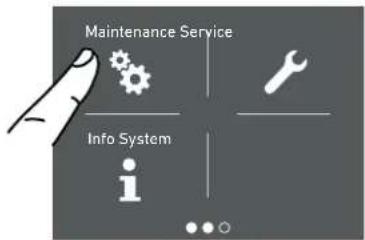
B) Scroll to the right three times and touch the icon maintenance.

c) To enable it, touch the Yes icon.

D) To enable it, touch the Yes icon.
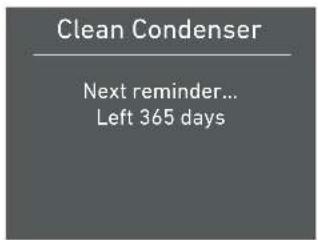
E) The display shows the remaining time before the next cleaning.

F) Instead, if you want to disable the warning previously set, touch the icon reset.

G) To disable the warning, touch the yes button.
10) Service
The service function 📋 is reserved for the Fhiaba assistance.
11) Info System
The function Info System shows the data of the products for example the software's code, serial number and the factory's codes of the fridge.

A) Home screen. Touch the icon settings.

B) Touch the icon Info System.

C) Here are shown the data of the fhiaba unit.
6.1 Internal Layout (positioning, adjustment, removal)
Wine shelf
The shelves can be easily removed for cleaning. Remove the bottles, completely extract the shelf, tilt it upward until the wheels are free of their seat and extract it.

natural_image
Illustration of hands installing or adjusting a tray with rollers inside a storage cabinet (no text or symbols visible)TriMode drawer (1T, 0T, 0H)
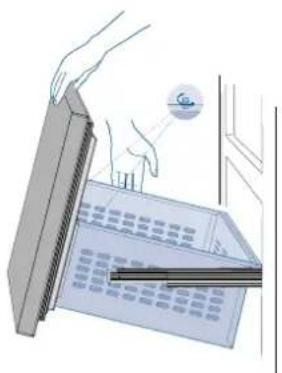
Fixed to the slide guides with two locking nuts
to remove the drawer, unscrew the locking nuts and remove the drawer.
to remove the inner TriMode drawer unscrew the locking nuts.
natural_image
Illustration of a hand inserting a device into a device with a circular icon above (no text or symbols)7.1 Lighting
To provide optimum interior lighting, LED strips illuminate the refrigerator compartment from the top and sets of LED lights directly illuminate different areas of the refrigerator compartment, of the Crisper-Fresco drawers and the freezer drawer.
In case of malfunction and/or failure of the lighting system, you should contact an authorized Fhiaba Service Agent.

Once activated, the light of the top compartment will automatically shut off after 6 hours.
0T/0H1T

natural_image
Illustration of two rectangular windows with light reflections, no text or symbols present
natural_image
Pure diagram of a rectangular device with internal wave patterns and two light fixtures at the bottom (no text or symbols)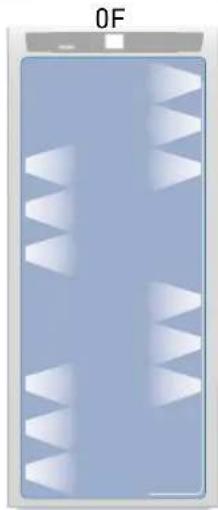
natural_image
Diagram of a device with white triangular patterns on a blue background, labeled 'OF' at top (no readable text or symbols)8.1 Use of the TriMode compartment
The TriMode compartment, used in conjunction with the Wine Cellar and Cantina compartment, allows great flexibility in the use of the appliance. Some possible uses:
Freezer mode
Liquors, such as vodka, gin, tequila, schnapps, limoncello and the glasses to serve them
Rapid cooling of beverages, by activating the bottle cooler function
Storage of large amounts of ice.
Refrigerator mode
As expansion of the Wine Cellar or of the Cantina
For refrigeration of beer and soft drinks
For storage of cold dishes and snacks.
Cooler mode
For conservation of ham, salmon
gourmet preparations.
9.1 General directions
As is known, wine can be stored for long periods of time if this is done under the following conditions:
Suitable temperature without appreciable variations over time
Controlled level of humidity
Protection from light
Absence of noise and vibrations
Absence of odours
Bottle kept horizontal.
All of these conditions are fully met in the Fhiaba Wine Cellar.
9.2 Conservation temperature
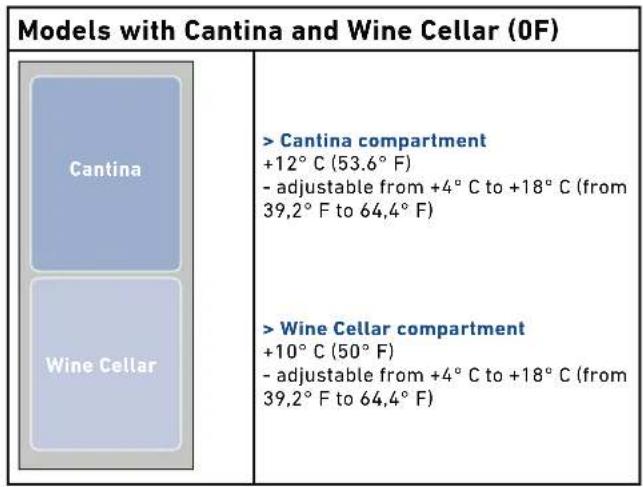
The space offered by the Wine Cellar and Cantina compartments, which can be expanded as necessary by using the TriMode compartment as a wine cellar, allows conservation of your best wines at three different temperatures.
The three compartments are initially set to the following temperatures:
Cantina compartment
+12°C (53.6°F) - adjustable from +4°C to +18°C (from 39,2°F to 64,4°F)
Wine Cellar compartment
+10°C (50°F) - adjustable from +4°C to +18°C (from 39,2°F to 64,4°F)
TriMode drawer
-18° (0° F) - adjustable from -15° C to -22° C (from 5° F to -7.6° F) (freezer mode)
To transform the TriMode compartment into a wine cellar space, you must access the Menu, set it as a refrigerator compartment, and adjust it to a temperature between +4°C and +8°C (from 39.2°F to 46.4°F).
All the temperatures can be modified according to the characteristics of the wines and personal preferences. However, you should attempt to keep the temperature as constant as possible over time.
Rapid and large-scale temperature variations can in fact cause dilation of the liquid and early aging of the wine.
You should also avoid very low temperatures (below 4irc C - 39.2irc F) which may lead to the formation of deposits and damage the aesthetic qualities of the wine.
All the compartments offer optimal conditions and take into account all these needs. It should however be noted that the Cantina compartment, in particular, is thermostatically controlled in a very precise manner and ensures the utmost care and attention over time of your most prized bottles. When the Cantina compartment is set below +10°C (50°F) the Wine Cellar must not be set beyond +12°C (53.6°F).
Models with Cantina and Wine Cellar (1T)
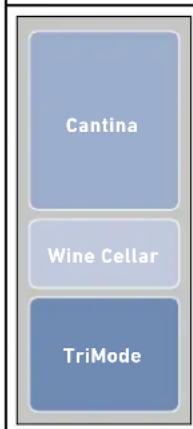
Cantina compartment
+12°C (53.6°F)
- adjustable from +4°C to +18°C (from 39,2°F to 64,4°F)
Wine Cellar compartment
+10°C (50°F)
- adjustable from +4°C to +18°C (from 39.2°F to 64.4°F)
TriMode drawer
-18° (0° F)
- adjustable from -15irc C to -22irc C (from 5irc F to -7.6irc F)(freezer mode)

9.3 Time of conservation
Improvement of wine over time and its duration usually depends on the character of the variety and its type. The following chart shows the best period of conservation and aging for various types in ideal conservation conditions offered by your appliance.
However, you should always follow the instructions of the winemaker, especially for fine wines.
TYPE OF WINE CONSERVATION TEMPERATURE TIME OF CONSERVATION
| New wines (Vin Nouveau) da 12° a 14°C 6 months | |
| Sweet sparkling wines da 8° a 10°C 1 year | |
| Rosé da 10° a 14°C 1 year | |
| Semi-sparkling wines da 10° a 12°C 1-2 year | |
| Normal white wines da 10° a 14°C 1-2 year | |
| Light red wines da 12° a 14°C 2 year | |
| Dry sparkling wines da 8° a 10°C 2 year | |
| Classic sparkling wines da 8° a 10°C 3-4 year | |
| Barrique and Vigorous white da 8° a 12°C 3-5 year | |
| Normal red wines | da 14° a 16°C 3-5 year |
| Barrique and Vigorous red wines | da 14° a 18°C 7-10 year |
| Straw wines or Liquorous wines | da 16° a 18°C 10-15 year |
9.4 Consumption temperature
As a general rule, white wines should be served at a temperature between 10 and 12°C (50 and 53,6°F) and red wines between 12 and 14°C (53,6 and 57,2°F).
Some wines may however be best enjoyed at higher or lower temperatures.
You should also keep in mind that, during the summer, wine is generally enjoyed at lower temperatures than during the winter.
You should also consider the following:
White wines
White wines are normally not served at high temperatures, since they are generally more acidic that red wines and not very tannic. Therefore they are more enjoyable at low temperatures.
It is preferable to serve these wines between 10irc C and 14irc C ( 50irc F and 57,2irc F). Young, fresh and aromatic wines can also be served at 10irc C ( 50irc F), while less aromatic ones are served at 12irc C ( 53,6irc F).
Temperatures between 12irc C and 14irc C ( 53,6irc F and 57,2irc F) are for soft, mature white wines that have been aged for some years in the bottle.
Higher temperatures would favour the exaltation of the sweet character of the wine, at the expense of the acidity and flavour, which are considered pleasant and desirable characteristics of this type of wine.
Rosé
Rosé wine is served at the same temperature as white wines. It should be noted that these wines may include a certain amount of tannin and may therefore be preferable at higher temperatures. Therefore, they are served between 10°C and 12°C (50°F and 53,6°F), if young and fresh, and between 12°C and 14°C (53,6°F and 57,2°F) if robust and mature.
Due to the special processing they undergo, new vintage wines contain a low tannin content and are therefore more enjoyable if served between 12irc C and 14irc C (53,6 and 57,2°F).
Red wines
Since they contain more tannin and are less acidic, red wines are normally served at higher temperatures.
Younger wines with less tannin are normally served between 14irc C and 16irc C (57,2 and 60,8irc F), while more full-bodied ones that are more tannic may be served at up to 18irc C ( 64,4irc F). Some wines that have aged for years in the bottle, still full-bodies and tannic, may be served at 18irc C ( 64,4irc F) or even 20irc C ( 68irc F).
Young red wines with little tannin and slightly structured may be enjoyable at lower temperatures, between 12irc C and 14irc C (53,6 and 57,2°F).
Sparkling wines
It is difficult to provide instructions to cover the wide variety of sparkling wines in available.
As a general rule, sweeter and more aromatic sparkling wines should be served at lower temperatures, down to 8irc C (46,4°F), whereas more tannic sparkling wines may be served at higher temperatures, up to 14irc C (57,2°F).
Dry sparkling wines are usually served between 8irc C and 10irc C (46,4 and 50irc F).
"Classic" sparkling wines are normally served at these temperatures, which may be as high as 12ircC (53,6°F) for sparkling wines that have been aged for some time.
It is however advisable, especially for finer wines, to follow the suggestions and recommendations of the winemaker on the bottle.
These types of wines can be served at temperatures between 16irc C and 18irc C (60,8 and 64,4irc F), depending on personal tastes, to attenuate the sweet taste of straw wines, it can also be served at 10irc C ( 50irc F).
9.5 Position of bottles
The sliding shelves are made of fine wood and contoured so as to hold bottles of the most classical traditional shape or of the most modern design.
Whether your collection holds fine bouteilles or petit bouteilles, they will be right at home in the Fhiaba Wine Cellar. A special accessory, available on request, will let you place them in an inclined position, in order to display the labels of your most prized items.
Also Magnum bouteilles can be stored, provided you remove the shelf just above the one that will hold them.

Warning
After a prolonged interruption of electrical power, once the electrical power is re-activated, an audible signal will indicate if the temperature has raised above normal levels. In addition to this the display will show for one minute the highest temperature detected inside the compartments, to allow the user to decide how to better use the food items.
After one minute the display will resume normal operation, while the Alarm button ⏻ will continue to blink.
Press the Alarm button ⏻ to display the highest recorded temperatures.


10.1 Care and Cleaning
To clean the parts made of steel use a microfiber cloth and the sponge provided in the kit with the appliance. Always use the cloth and sponge in the direction of the steel's satin finish.
Every now and then, to polish the steel, wipe with a slightly damp microfiber cloth.
Do not use the sponge on aluminium parts, such as the handles and the profiles of the glass shelves.
You should use special care to keep the ventilation openings in the appliance or in the cabinet that houses it free of obstructions.
See the video tutorial:
www.fhiaba.com/en/support/
video "Care and Cleaning".

Nota
Scrupulously follow the detailed directions that can be found in the provided kit and never use abrasive or metallic products which could scratch and damage the satin finishing on the appliance permanently.
Before performing any sort of cleaning, disconnect the appliance from the electrical power supply.
Make sure you do not damage the refrigerant circuit in any way.

Warning
The use of chlorine-based detergents or similar that contains it should be avoided (bleach, hypochlorite, etc).
10.2 Cleaning of the ventilation grille, filter and condenser.
The unit requires, for a correct operation, the cleaning of the ventilation grille, filter and condenser.
The recurring clenaning every 6 months is reminded by an acoustic and optical signal on the dispaly. It is possible to disable the warning signal and see the time left before the next cleaning has to be done.
Behind the frontal ventilation grille (situated in the upper part of the units in the series StandPlus, Country e X-Pro, in the lower part of the units in the series Integrated, Brilliance e Classic) there is the condenser. See page 7 paragraph 3.2.
To clean it use a vacuum cleaner with a soft brush attachment at maximum power, sweeping it along the vent slits. In case of a significant dust build up, the ventilation grille can be removed to allow a more accurate cleaning of the filter.
On the maintenance settings, Maintenance after the installation of the unit and after it has been turned on, you can set the condenser cleaning warning.
In the case the warning sign will be enable, there will be an acoustic signal every 6 months, that tells that is time to clean the condenser.
After cleaning it, touch the reset icon in order to reactivate the warning signal in 6 months.
In the case you do not want the warning cleaning signal of the condenser anymore, touch the off icon.
For knowing how to use the maintenance display, see page 23.
See instruction point 11.2 through the video tutorial available on the Fhiaba's website.
www.fhiaba.com/en/support/video "Bottom Condenser Cleaning".
Upper condenser.
For cleaning the condenser in the models X-Pro, StandPlus e Country follow the instructions:
Switch off the appliance by pressing the Unit button ⏻ on the main control panel for approx 3 seconds.
Wait approx 30 minutes, until the finned condenser cools down to room temperature.
Lifting up the removable grille.

natural_image
Diagram of a kitchen appliance with ventilation grilles and airflow arrows (no text or symbols)Clean it thoroughly from any dust build up as shown in the picture, taking care not to damage it.
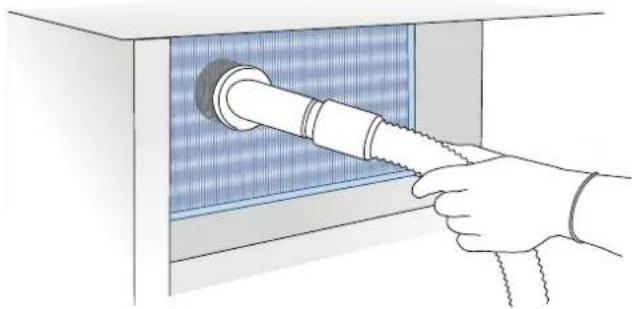
natural_image
Illustration of a hand inserting a pipe into a blue-patterned insulation panel (no text or symbols)Restart the unit pressing for 3 seconds on the on button Ⓤ.

Warning
The edges of the condenser are sharp, therefore use adequate protection for the hands and arms when cleaning the condenser.
Lower condenser.
For cleaning the condenser in the models Classic, Integrated or Brilliance follow the instructions:
Switch off the appliance by pressing the Unit button ⏻ on the main control panel for approx 3 seconds.
Wait approx 30 minutes, until the finned condenser cools down to room temperature.
Remove the removable grille under the door.
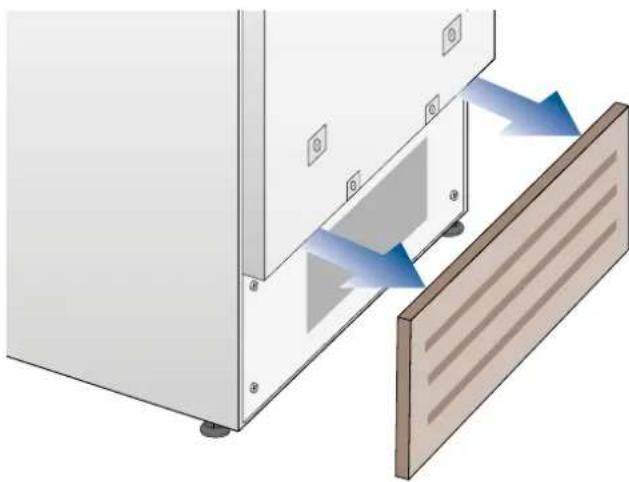
natural_image
Diagram of a door opening with blue arrows indicating direction, showing structural components and a wooden panel (no text or symbols)Clean it thoroughly from any dust build up as shown in the picture, taking care not to damage it.
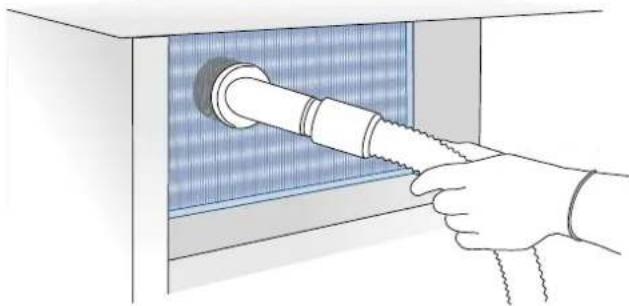
natural_image
Illustration of a hand inserting a pipe into a blue-patterned panel (no text or symbols)Restart the unit again, pressing on the unit bottom ⏻ for three second.

Warning
The edges of the condenser are sharp, therefore use adequate protection for the hands and arms when cleaning the condenser.
10.3 Internal cleaning
Clean the internal and removable parts by washing them with a solution of lukewarm water and a small amount of dishwashing detergent.
Rinse and dry right away.
Do not use mechanical devices or other methods to speed up defrosting.
video "Care and Cleaning".

Warning
Do not use water on the electrical parts, lights and control panel.

Warning
The use of chlorine-based detergents or similar that contains it should be avoided (bleach, hypochlorite, etc).

Note
Do not bring cold glass parts into contact with boiling water.
Do not wash any parts of the refrigerator in a dishwashing machine since this could damage or irreparably deform the parts.
11.1 Troubleshooting guide
If you notice malfunctions in your appliance, use this guide before calling Service. This guide may help you resolve the problem yourself or could provide important information to ensure rapid and effective service.
Malfunction message
A malfunction is usually indicated on the display. Problems that cannot be resolved by the user are signalled through a malfunction code.
The appliance does not work
Is the appliance connected to the electrical power supply?
Does electrical power arrive at the electrical socket?
Is the Unit key ⏻activated?
Is the condenser clean?
The internal temperatures are higher than normal
Does the display show a malfunction code?
Is the temperature adjusted correctly?
Is the condenser clean?
Were the doors or drawers open for a long period of time?
Were large quantities of food recently inserted?
The appliance remains in function for a long time period
Bear in mind that during a very hot weather and with very high temperatures in the room it is normal that the compressor remains in operation for prolonged periods of time.
Were the doors or drawers open for a long period of time?
Were large quantities of food recently inserted? Is the condenser clean?
Check that the doors are closed and that the food or containers do not obstruct the perfect closure of the door.
If you hear strange noises
It is normal to hear noise from the fans or compressors during the defrost phase.
Noise could be louder depending on the position of the appliance and the surrounding environment.
Condensation forms both inside and out
If the climate is very humid, the formation of condensation is normal. Opening the door or drawers for prolonged periods of time can contribute to the formation of condensation.
In any case, make sure that the doors are always perfectly closed.
The Refrigerator or Freezer has frost or ice
Did you leave the doors open for a long period of time?
Do the doors close perfectly?
If the doors do not close perfectly, contact your installer.
Unpleasant odours inside the refrigerator
Clean the appliance completely as indicated in this manual.
Hermetically cover all the food. Do not conserve food for prolonged periods of time.
The doors are difficult to open
The appliance was designed to permit hermetic closure.
When the door is closed, a vacuum situation can occur: in this case it is necessary to wait a few seconds until the pressure balances before opening the door.
11.2 Malfunction indications appearing on the display
| Display message Malfunction description | |
| Power Failure | Prolonged interruption of electrical powerThe appliance starts up again automatically and indicates the highest recorded temperatures. |
| Door open | Door openthis message appears few minutes from the door opening |
| Drawer open | Drawer openthis message appears few minutes from the drawer opening |
| Cellar too warm | Cellar (Wine Cellar) compartment too warmSee the troubleshooting guide |
| Cellar too cold | Cellar (Wine Cellar) compartment too coldWait 12 hours. If the problem persists, contact Customer Care |
| Cantina too warm | Cantina compartment too warmSee the troubleshooting guide |
| Cantina too cold | Cantina compartment too warmWait 12 hours. If the problem persists, contact Customer Care |
| Fridge too warm | TriMode compartment (refrigerator mode) too warmSee the troubleshooting guide |
| Fridge too cold | TriMode compartment (refrigerator mode) too coldWait 12 hours. If the problem persists, contact Customer Care |
| Cooler too warm | TriMode compartment (cooler mode) too warmSee the troubleshooting guide |
| Cooler too cold | riMode compartment (cooler mode) too coldWait 12 hours. If the problem persists, contact Customer Care |
| Freezer too warm | TriMode compartment (freezer mode) too warmSee the troubleshooting guide |
| Freezer too cold | TriMode compartment (freezer mode) too coldWait 12 hours. If the problem persists, contact Customer Care |
| Error Code... | Functional problemscall Customer Care who may help you to salve the problem or put you in contact with the nearest Service Agent |
| Check condenser | Check CondenserEvery 6 months the display shows the message “Check Cond”, clean the condenser and press for 5 seconds the Enter button to reset. |
In case of anomalies, touch the button Alarm Ⓞ and the display will show the anomaly message with its error number code.
The message will be shown for 3 seconds, then it will go back to the home screen.
For blocking the message on the screen, press on the display, the button info (i). The message will be on the screen for 30 seconds, then it will go back to the home screen.
In the case there is more than one error message, the display will show in time sequence the different anomalies messages.
- Cassettone TriMode (1T, 0T, 0H)
- Illuminazione
- Nota
- Condensatore sopra.
- INSTALLATION 39
- BEFORE STARTING 40
- APPLIANCE SWITCHING ON AND OFF 45
- FUNCTIONS AND SETTINGS 49
- INTERNAL LAYOUT 60
- LIGHTING 60
- USE THE TRIMODE COMPARTMENT 60
- CONsertION OF WINES 61
- CARE AND CLEANIG 65
- TROUNBLESHOTTING GUIDE 68
- For your safety
- Important information when using the appliance
- Explosion hazard!
- Warning
- Caring for the environment
- Installation
- Important
- Refrigerant
- Know your Fhiaba
- main components
- Electronic Control
- Main control panel (models 1T, 0T, 0H and 0F).
- Turnign On / Turning Off:
- Home
- Allarm
- Back
- Switching on and off
- First time starting the unit
- Shutdown.
- Switching off Cantina and Wine Cellar compartment. (Models 1T, OT e OH)
- Turning on again, the cantina and wine cellar compartment.
- Restart the compartments.
- Switching off for long periods
- How to adjust the temperature for different requirements.
- Modify the temperatures compartment
- Padlock icon.
- Information signals of anomaly on the display.
- Wine Cellar temperatures.
- INFORMATION FOR USING THE DISPLAY.
- Functions.
- 1) Dual Zone mode (Models 0T e 0H)
- 2) Vacation Mode
- 3) Shopping Mode: TriMode (no in OFR models).
- 4) Rapid Bottle Cooler
- 5) Humidity Control.
- 6) Inner lighting for 12 h.
- 7) Prosciutteria. (optional per OT-OH-OF).
- Settings.
- 1) Date
- 2) Time
- 3) SET °C/°F
- 4) Language
- 5) TriMode
- 6) Sabbath Mode (Optional)
- 7) Reset
- 8) Demo Mode
- 9) Maintenance (through allarm sign).
- www.fhiaba.com/it/support
- 10) Service
- 11) Info System
- Internal Layout (positioning, adjustment, removal)
- Wine shelf
- TriMode drawer (1T, 0T, 0H)
- Lighting
- Use of the TriMode compartment
- Freezer mode
- Refrigerator mode
- Cooler mode
- General directions
- Conservation temperature
- Models with Cantina and Wine Cellar (1T)
- Time of conservation
- Consumption temperature
- White wines
- Rosé
- Red wines
- Sparkling wines
- Position of bottles
- Care and Cleaning
- Cleaning of the ventilation grille, filter and condenser.
- On the maintenance settings, Maintenance after the installation of the unit and after it has been turned on, you can set the condenser cleaning warning.
- Upper condenser.
- For cleaning the condenser in the models X-Pro, StandPlus e Country follow the instructions:
- Lower condenser.
- For cleaning the condenser in the models Classic, Integrated or Brilliance follow the instructions:
- Internal cleaning
- Note
- Troubleshooting guide
- Malfunction message
- The appliance does not work
- The internal temperatures are higher than normal
- The appliance remains in function for a long time period
- If you hear strange noises
- Condensation forms both inside and out
- The Refrigerator or Freezer has frost or ice
- Unpleasant odours inside the refrigerator
- The doors are difficult to open
Brand : Fhiaba
Model : XS8991TWT6A
Category : Wine cellar