
MX330-F - PC Case Cougar - Free user manual and instructions
Find the device manual for free MX330-F Cougar in PDF.


| Product Type | PC Case (Mid Tower) |
| Model | Cougar MX330-F |
| Motherboard Support | ATX, Micro-ATX, Mini-ITX |
| Dimensions (W x H x D) | 8.9 x 18.1 x 15.7 in (226 x 460 x 400 mm) |
| Weight | 5.0 kg (11.0 lbs) |
| Material | Steel, Tempered Glass (left side panel) |
| Front I/O Ports | USB 3.0 x2, HD Audio (Mic & Headphone) |
| Drive Bays | 2x 3.5" (internal), 2x 2.5" (internal) |
| Expansion Slots | 7 |
| Max GPU Length | 350 mm (13.8 in) |
| Max CPU Cooler Height | 155 mm (6.1 in) |
| Max PSU Length | 160 mm (6.3 in) |
| Fan Support (Front) | 3x 120mm or 2x 140mm (1x 120mm included) |
| Fan Support (Rear) | 1x 120mm (included) |
| Fan Support (Top) | 2x 120mm or 2x 140mm |
| Radiator Support | Front: 240mm / 280mm; Top: 240mm |
| Power Supply Mount | Bottom, dust filter included |
| Dust Filters | Front, Top, Bottom |
| Side Panel | Tempered Glass (tool-less) |
| Cable Management | Smart cable routing with velcro straps |
| Cleaning Instructions | Use a soft, dry cloth to clean surfaces. For dust filters, rinse with water and dry completely. |
| Safety Information | Handle glass panel with care. Keep away from children. Ensure proper grounding. |
| Spare Parts Availability | Contact Cougar support for replacement parts (fans, filters, screws). |
Frequently Asked Questions - MX330-F Cougar
User questions about MX330-F Cougar
0 question about this device. Answer the ones you know or ask your own.
Ask a new question about this device
Download the instructions for your PC Case in PDF format for free! Find your manual MX330-F - Cougar and take your electronic device back in hand. On this page are published all the documents necessary for the use of your device. MX330-F by Cougar.
USER MANUAL MX330-F Cougar
MX330-F

Assembly Drawing

• Tax specification or the code depending on the country or region
A Power motor
B Reset button
C USB 30/USB23/HO audopots
D Front panel, removable to easily install 5.25" devices
E 529* shield
F full-synyl side panel sintera
G Right side cover
H vented slot covers for better cooling performance
1 2.5" HDD/SSD printer banks
J 3.5° HDD trays (compatible for 25° HDD/SSO)
K LED 120mm fire x 2 for front panel (pre-installed), effectively cool the HDD
- All the robot are over in respect to dust from a wire to the outer surface.
M. LLU 120mm (for rear panel (pre-installed))
N Top panel fan filter can present dust from entering the chassis
© 160.123mm fars x 2 for top cover (pre installed)
Accessory Kit
| M-32 for M10 &umper Card | X 7 | Cable-line for cable trans packaged | X6 |
| M 32 to 35 M20 | X 5 | Succoons | X1 |
| for V/Unloaded | X 3 | M-32 for mm. an | X4 |
| M10 for a brand GOD 25 - M 0050 | X 14 | M-32 for a 35 M20 and a ring | X2 |
Features
MX30-1 is a elegant look, functional design, and durable construction don't need to be any you can work a lesson, adult and side perspective for new views.
components
-FSU&3.5N
Fucking all tables and less-actactive drives behind a clear, refined PSU cover
-EST COOLING SOLUTION
FULL ACRYUC SIDE PANEL WINDOW
SUFFICIENT FLEXIBILITY FOR MULTIPLE GRAPHICS SOLUTIONS UP TO 350MM
-CABLE FEEDTHROUGH ON THE MB TRAY FOR EASY ROUTING AND HIDING OF CABLES.
• PERSOIRS PROVIDE FLEXIBLE FOR MULTIPLE GRAPHICS LABUS SOLUTIONS
| Case type | Middle case | Exposure dose | T |
| Moistive tissue type | Mild-1/2 Mild-3/4 A/KK | UH Base | USB 50 μL (USB 50 μL, M L, A, A, B, C) |
| Dimensate (mm) | 109/16/17/18/19/21/20 | Coding for support | Fused ED 100 mm (for 2.1 µm in bed)For ED 120 mm (2.1 µm in bed)For ED 120 mm (2.1 µm in bed) |
| 5.25° Close Day | 1 | ||
| 10.5° Day | 2 (week) | ||
| 25° Close Day | 3 (week) | ||
| Wetted cooking radiation Support | Front 200 mmTop 100 mmLower 150 mm | Main supply sand length | 350 mm |
| Inlet C: U block heat, | 120 mm |
[Unreadable]
GLOBAL WARRANTY POLICY
WARRANTY PERIODS OF COUGAR GAVING DEVICES
Prod. = 20,856 kg / Cap. (kg + kg) = 1,200
The currently given you are a legal right.
722 147, 505 men 2019, 8600 3734 level 140
[Illegible]
(1) 2017年1月1日
for more information, please call www.caupargaming.com
The following table is in English:
1
C
10.75
T+1.05
26.53
(四) 所有
4
1.000元
07007/46
2016年1月2日
[Unreadable]
100%
The image is too blurry to recognize any text content.
2015年
Mr. Smith
1
0 0
√ √
РУССКИЯ
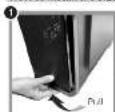
How to install the 5.25" devices
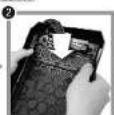


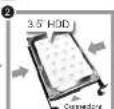
How to install the 3.5* HDD


How to install the 2.5" HDD/SSD


How to install a water cooler (front)


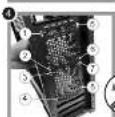

How to install a water cooler (top)


Brand : Cougar
Model : MX330-F
Category : PC Case