
Gemini T - PC Case Cougar - Free user manual and instructions
Find the device manual for free Gemini T Cougar in PDF.


| Product Type | PC Case |
| Brand | Cougar |
| Model | Gemini T |
| Form Factor | Mid Tower |
| Motherboard Support | ATX, Micro-ATX, Mini-ITX |
| Dimensions (L x H x D) | 200 x 440 x 460 mm |
| Weight | 6.5 kg |
| Material | Steel, Tempered Glass |
| Window Side Panel | Yes, tempered glass |
| PSU Support | Standard ATX (not included) |
| PSU Location | Bottom mount |
| Expansion Slots | 7 |
| Drive Bays – 3.5" | 2 |
| Drive Bays – 2.5" | 3 (including 2 convertible from 3.5") |
| Fan Support – Front | 3 x 120mm or 2 x 140mm |
| Fan Support – Top | 2 x 120mm or 2 x 140mm |
| Fan Support – Rear | 1 x 120mm |
| Radiator Support – Front | Up to 360mm |
| Radiator Support – Top | Up to 280mm |
| Radiator Support – Rear | 120mm |
| Front I/O Panel | 2 x USB 3.0, 1 x USB 2.0, Audio & Mic |
| Maximum GPU Length | 350 mm |
| Maximum CPU Cooler Height | 160 mm |
| Dust Filters | Front, top, bottom |
| Cleaning & Maintenance | Remove dust filters regularly; clean with dry cloth |
| Safety | Rounded edges, tempered glass panel shock resistant |
| Spare Parts & Repairability | Replacement parts available via Cougar support; components modular |
Frequently Asked Questions - Gemini T Cougar
User questions about Gemini T Cougar
0 question about this device. Answer the ones you know or ask your own.
Ask a new question about this device
Download the instructions for your PC Case in PDF format for free! Find your manual Gemini T - Cougar and take your electronic device back in hand. On this page are published all the documents necessary for the use of your device. Gemini T by Cougar.
USER MANUAL Gemini T Cougar
GEMINI T
RGB GLASS-WING MID-TOWER
GEMINI T IS NOT DIFFERENT. IT'S BETTER. THIS NEW CASE FROM COUGAR BREAKS CONVENTIONS WITH AN INTELLIGENT DESIGN THAT COMBINES PERFORMANCE AND INNOVATION IN A GORGEOUS RGB-LIT PACKAGE WITH VERTICAL GPU SUPPORT.
TRELUX RGB LIGHTING
COUGAR's new Trelux technology provides Gemini T with a powerful lighting system of its own: three long RGB-powered lenses cover the front and top of the case. Trelux's dynamic RGB capabilities will amaze everybody!
Controllable directly through a convenient front panel button, Trelux can also work connected to a COUGAR Core Box v2 or compatible motherboards' 5V connection for enhanced compatibility and integration.
GLASS WINGS
Two massive gull-wing tempered glass side panels flank Gemini T. This unique design gives you a clear view of the computer's components and makes tool-less maintenance very convenient. Apart from cooling, the two side fans facing the glass window allow you to set up a fantastic lighting spectacle inside Gemini T!
VERTICAL GPU SUPPORT
Gemini T is both about performance and aesthetics. To bring your system's awesomeness to the limit, Gemini T supports vertical GPU installation. This joins the two supported side fans to produce one of the most incredible side windows a PC case has ever had.
INTELLIGENT COOLING
Up to seven fans and three water cooling radiators match Gemini T's support for the latest components with top-end cooling capabilities.
Two big frontal vents with detachable filters guarantee a clear air intake, while two side vents on both sides of the top cover create an excellent way for the exhaust to leave the case without dust getting in.
| Case Type | Mid Tower |
| Motherboard Type | Mini iTX / Micro ATX / ATX / CEB |
| Dimensions | 227 (W) x 535 (H) x 527 (D/mm x 8.9 (W) x21.0 (H) x 20.7 (D)inch |
| Case Drive Bays | 35°: 2 |
| 25°: 3 (With five possible locations within the case) | |
| I/O Panel | USB 3.1 Type x 1, USB3.0 x 2, Mcc x 1, Audio x 1, RGB Control Button |
| Cooling Fan Support | Front : 120mm x 3 / 140mm x 2 (1 x 120mm fan pre-installed)Top : 120mm x 3 / 140mm x 2Rear : 120mm x 3 (pre-installed)Side : 120mm x 2 (Choose either of front or side to install fans) |
| Maximum Number of Fans 7 Max. | |
| Water Cooling Radiator Support | Front : 360mm / 180mm / 240mm / 140mm / 120mmTop : 240mm / 120mmRear : 120mmSide : 240mm / 120m(Choose either of front or side to install radiators) |
| Expansion Slots | 7+2 |
| Max. Graphic Card Length | 400mm / 15.7inch |
| Max. CPU Cooler Height | 170mm / 6.7inch |
| Max. PSU Length | 200mm / 7.9inch |
| Standard ATP PS2PSU | |
| Onboard Lighting System | Teklus Lighting with Addressable RGB LEDs and Dynamic LightingEffects in the Front and Top Panels |
| Cable Management | Yes |
Specifications might vary depending on the country or region of sale.
Assembly Drawing
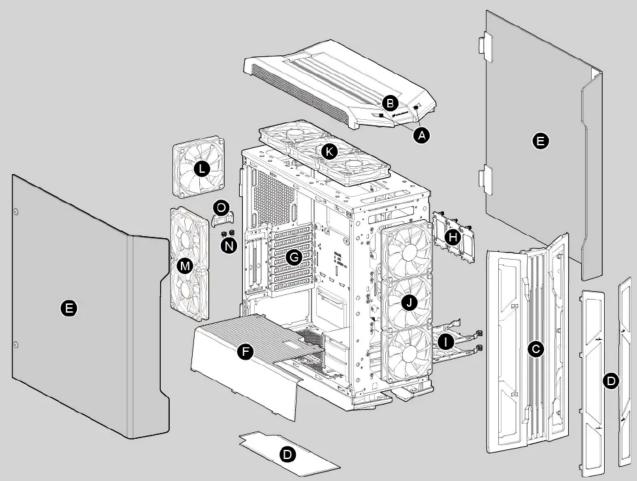
FEATURES
ENGLISH
• Trelux RGB System with 5V RGB Motherboard Synchronization
• Support for Vertical GPU (up to 400mm-long)
• Mini ITX / Micro ATX / ATX / CEB Motherboard Support
• Gull-Wing Opening Tempered Glass Side Panels • Intelligent Cooling Design with Big Front Vento and Upper Side Vento
• Intelligent Cooling • Up to Seven Fans
• Up to Three Radiators (Frontal Radiator Max. Length 360mm)
• Up to Three Radiators (Frontal Radiator) • Up to Three 425mm Graphics Cards
• Up to Three 425mm Graphics Cards • Convenient Upgrades and Maintenance
DEUTSCH
• Find a Settle Vehicle
C Removable front panel
D Fan filters to prevent dust from getting into the chassis
E Gull-Wing Opening Tempered Glass Side Panels
F Power supply cover
G Vented slots
H 2.5" HDD/SSD trays
3.5" HDD trays
J 2 x 140 / 3 x 120mm fans for front panel (1 x 120mm fan pre-installed)
2 x 140 / 3 x 120mm fans for top panel (optional, purchased separately)
1 x 120mm fan for rear panel (1 x 120mm fan pre-installed)
2 x 120mm fan for side panel (optional, purchased separately)
N Thumb screws
Slot cover
Installing the Front I/O Connectors
| USB 3.1 TYPE C | USB 3.0 HD | AUDIO POWER | POWER LED | LIGHTING CONTROL | ||
한국어
WARRANTY PERIODS OF COUGAR GAMING DEVICES
WARRANTY PERIODS OF CO Product : COUGAR Gemini T
Warranty: 1 Year
- This warranty gives you specific legal rights. You may also have other rights granted under local law. These rights may vary. - Only for electrical components.
Removing the side panels

Installing an internal 2.5" HDD/SSD
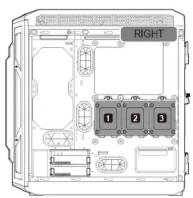

■ 2.5" Storage Device Installation:
Three brackets for installing 2.5" SSD are included. Please choose three of the five numbered locations shown in the pictures above to install them. Only three SSDs may be installed simultaneously. SSD brackets are not sold separately.
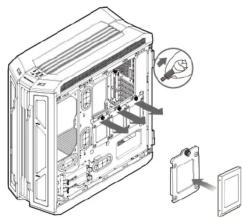
natural_image
Technical illustration of a computer case with internal components and a magnified inset showing a close-up view (no text or symbols present)Installing an internal 3.5" HDD


natural_image
Technical line drawing of a computer case with internal components and an external housing (no text or symbols)Installing water cooling radiators & cooling fans

Installing PCI-E cards
■ Up to three 425mm graphics cards
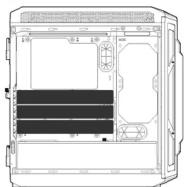
■ Support for one vertical graphics card up to 400mm-long

Removing the dust filters

natural_image
Technical line drawing of a device casing with internal compartments and external panel (no text or symbols)
Gemini T's Trelux lighting system offers you several ways to control it: Lighting Mode Indicator
Please connect the power cable of the I/O panel to an appropriate SATA connector from the PSU in order to use the case's lighting functionality.
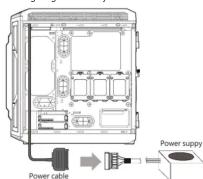
■ First Mode: Lighting Button
You can use the front panel's dedicated button to switch between the fourteen beautiful lighting effects we have preset for you.

■ Second Mode: Motherboard Synchronization
Second, you can use the included adaptor (see picture below) to connect the Trelux system to a compatible motherboard's 3-pin 5V Addressable RGB header and enjoy system-wide RGB synchronization
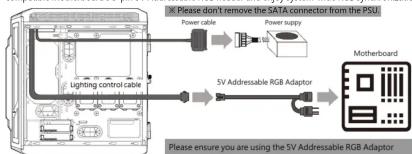
flowchart
graph LR
    A["Lighting control cable"] --> B["5V Addressable RGB Adaptor"]
    B --> C["Motherboard"]
    D["Please not remove the SATA connector from the PSU"] --> E["Power cable"]
    E --> F["Power supply"]
    F --> G["Please ensure you are using the 5V Addressable RGB Adaptor"]
■ Third Mode: Core Box v2
You can also benefit from integrated control of Gemini T's Trelux lighting system, up to eight fans and two RGB LED Strips by connecting the case with the included adaptor to a COUGAR Core Box v2 (sold separately). This control box will allow you to enjoy 100 different synchronized lighting effects in all the above devices and manage them through the remote controller. As an alternative, you can also connect the Core Box v2 to a compatible motherboard's 3-pin 5V Addressable RGB header for system-wide synchronization.

Note: When using the Trelux lighting in the second or third modes, the lighting control button will have no functionality assigned to it.
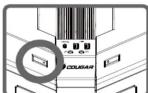
When using the first lighting mode (i.e., control through the I/O panel's button), the lighting control button to the left of the I/O panel will be lit. When using the second or third mode, the LED of the lighting control button will be off.
ACCESSORY KIT
| Motherboard / HDD screws | X 18 | |
| SSD screws | X 12 | |
| Power supply screws | X 5 | |
| Stand-off | X 2 | |
| Cable ties | X 4 | |
| Cable hook | X 1 | |
| 5V Addressable RGB Adaptor | X 1 | |
| Core Box v2 Adaptor | X 1 |
COUGAR USA Technical Service
Tel: (833) 256-3778
Mail: rma@compucaseusa.com
https://cougargaming.com/support/contact/upload/
2.1.1.3.4.5.6.7.8.9.10.11.12.13.14.15.16.17.18.19.20.21.22.23.24.25.26.27.28.29.30.31.32.33.34.35.36.37.38.39.40.41.42.43.44.45.46.47.48.49.50.51.52.53.54.55.56.57.58.59.60.61.62.63.64.65.66.67.68.69.70.71.72.73.74.75.76.77.78.79.80.81.82.83.84.85.86.87.88.89.90.91.92.93.94.95.96.97.98.99.100
Compucase Enterprise Co., Ltd.
No. 225, Lane 54, An Ho Road Sec
Tel: +886-6-356-0606
Service E-Mail:service@cougargaming.com
For more information, please visit www.cougergaming.com
Compucase Enterprise Co., Ltd.
All rights reserved.

Made in China


Brand : Cougar
Model : Gemini T
Category : PC Case