
MobilePar Mini Hex 4 Bundle - Lighting ColorKey - Free user manual and instructions
Find the device manual for free MobilePar Mini Hex 4 Bundle ColorKey in PDF.


| Product Type | Portable LED Par Light Bundle |
| Model | MobilePar Mini Hex 4 Bundle |
| Brand | ColorKey |
| Number of Units | 4 |
| LED Type | 6-in-1 Hex (RGBAW+UV) |
| LED Quantity per Unit | 6 x 6W |
| Total Power Consumption | Approx. 144W (36W per unit) |
| Beam Angle | 25° |
| Control Protocol | DMX512 (3-pin XLR) |
| DMX Channels | 6 / 7 / 10 / 18 ch selectable |
| Operating Modes | DMX, Master/Slave, Sound Active, Auto, Static Color |
| Display | 4-digit LED + 4 buttons |
| Power Input | AC 100-240V, 50/60Hz (IEC PowerCon compatible) |
| Power Linking | Up to 8 units (120V) / 16 units (230V) |
| Dimensions (per unit) | 150 x 150 x 150 mm |
| Weight (per unit) | 1.0 kg |
| Housing Material | Aluminum die-cast |
| Cooling | Passive convection |
| IP Rating | IP20 (indoor use) |
| Included Accessories | 4x fixture, 4x mounting bracket, 4x power cord, 4x DMX cable, 1x carrying case |
| Maintenance & Cleaning | Wipe with dry cloth; avoid liquids; keep ventilation slots clear |
| Safety | Class I, grounded; max ambient temperature 40°C; minimum distance 0.5m from flammable surfaces |
| Spare Parts & Repairability | Contact ColorKey support for LED modules, power supply, and control board replacements |
| General Info | Compact battery-powered? (No, line-powered); suitable for mobile DJs, small venues |
Frequently Asked Questions - MobilePar Mini Hex 4 Bundle ColorKey
User questions about MobilePar Mini Hex 4 Bundle ColorKey
0 question about this device. Answer the ones you know or ask your own.
Ask a new question about this device
Download the instructions for your Lighting in PDF format for free! Find your manual MobilePar Mini Hex 4 Bundle - ColorKey and take your electronic device back in hand. On this page are published all the documents necessary for the use of your device. MobilePar Mini Hex 4 Bundle by ColorKey.
USER MANUAL MobilePar Mini Hex 4 Bundle ColorKey
natural_image
Hexagonal pattern composed of colored hexagons (red, blue, yellow, green, cyan) within a black border (no text or symbols)ColorKey
creative lighting
MobilePar Mini Hex 4
CKW-6020

natural_image
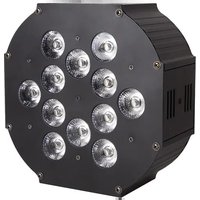
Black rectangular device with four circular transparent domes on a light background (no text or symbols visible)USER MANUAL
Introduction
Thank you for purchasing the ColorKey MobilePar Mini Hex 4. Please read these instructions carefully before use. Operating this fixture according to these instructions is important to avoid any possible damage or accidents caused by misuse.
Packing list
■ 1x MobilePar Mini Hex 4
■ 1x IR Remote
■ 1X DMX Cable (Data to XLR Male)
■ 1x DMX Cable (Data to XLR Female)
■ 1x Power Cord
■ User Manual
Safety
Caution! Opening this unit voids warranty. Contact ColorKey for any service requests.
Warning! To avoid electrical shock, be sure to disconnect power before any service or when moving or setting up the fixture.
Caution! Avoid direct eye exposure with the fixture when on.
This fixture is for indoor use only.
This fixture must be installed a minimum distance of 5 meters (16'4") away from any lighted objects.
Do not install or operate this fixture near flammable materials.
This device must be installed, operated, and maintained by a qualified professional.
Do not touch the fixture with bare hands during operation as the surface temperature of the fixture can exceed 60^ C ( 140^ F). Turn off power and wait 15 minutes for the fixture to cool before attempting to touch it.
➢ Please check if the voltage is in accordance with the rated power before installing.
Do not operate this fixture if the power cord has been damaged. Turn off fixture and replace with a power cord of similar rating.
Display Operation

➢ MENU: Access the menu/Scroll through menu options
ENTER: Open/Select the current menu option
UP: Scroll through menu selection or parameter increase
DOWN: Scroll through menu selection or parameters decrease
MASTER: Master indicator
▶ SOUND: Sound control indicator
DMX: DMX512 indicator
SLAVE: Slave indicator
WIRELESS INDICATOR: Wireless signal indicator
DMX SELECT: DMX selection indicator
DMX Settings & Connections
① Wired DMX Cable Connections
Use the provided DMX to Data cables to connect to the in/out network sockets on the light for use with a cabled connection.
Note: 1. Turn off the wireless DMX when using a DMX cable connection. 2. This can be done by accessing (SnAL) in your Menu and changing the setting to (Uire)
② Wireless DMX Connection
Operational instructions:
- Firstly, ensure that you are outputting signal from your wireless DMX controller
- Verify light is set to (ULee) in your (SnAL) menu
- Press the (Menu) button and (Enter) to display the current DMX address. Set as necessary.
- Reading the Wireless Indicator / Group ID Light:
• Red LED Flash: Sending Signal
- Green LED Flash: Receiving Signal
This unit features seven wireless groups for multiple applications.
| Group | Wireless Indicator LED Color |
| 1 | Red |
| 2 | Green |
| 3 | Yellow |
| 4 | Blue |
| 5 | UV |
| 6 | Cyan |
| 7 | White |
*Receiving unit Group ID must be on the same Group ID as the transceiver i.e. red-red
Setting a Wireless Connection
- In menu (SnAL) select (ULee) (Wireless) to enable wireless mode.
- Press the (DMX Select) button to set the Group ID of the receiving light to be the same as the transmitter
- After receiving DMX data, the transmitter will automatically choose the best band for non-interference frequency to send the data, communicated by red LED flashing, and the receiver will change its communication frequency until it receives the same ID Group ID code and band data. Correct data will be indicated by a green LED flash,
A strong DMX data connection will be indicated by a faster LED flash
- Congrats, Correct communication is now established!
Menu Guide
| Display | Numerical | Function and description |
| Addr | 1-512 | DMX512 address setting |
| ChNd | 6/10Ch | 6/10 channel selection |
| SLNd | nASt/SL 1/SL | Master/Slave mode |
| ShNd | SoUn | on/off |
| CoLo | Co1-Co24 | |
| dFin | yes | |
| FAde | SP1-SP9 | |
| SnAL | ULee/Uire | Wireless DMX control |
| BLnd | no/yes | |
| ir | On/oFF | IR remote control |
| Led | On/oFF | ON/OFF |
| diSp | dsip | Positive and negative display |
| bALA | red | 125-255 |
| Grn | 125-255 | |
| blUe | 125-255 | |
| ndeF | red | 000-255,Red dimming from dark to bright |
| Gree | 000-255,Green dimming from dark to bright | |
| blUe | 000-255,Blue dimming from dark to bright | |
| Uhte | 000-255,White dimming from dark to bright | |
| Aber | 000-255,Amber dimming from dark to bright | |
| Uu | 000-255,UV dimming from dark to bright | |
| bAtt | Battery Time | |
| teSt | Auto test | |
| tenP | Temperature | |
| FhrS | Use time | |
| PASS | 000-999 | |
| uer | 10 |
DMX Values
6 channels mode
| Channel | Value | Function |
| 1 | 0-255 | Red |
| 2 | 0-255 | Green |
| 3 | 0-255 | Blue |
| 4 | 0-255 | Amber |
| 5 | 0-255 | White |
| 6 | 0-255 | UV |
10 channels mode
| CH | Value | Function |
| 1 | 0-255 | Red |
| 2 | 0-255 | Green |
| 3 | 0-255 | Blue |
| 4 | 0-255 | Amber |
| 5 | 0-255 | White |
| 6 | 0-255 | UV |
| 7 | 0-255 | Master Dimmer |
| 8 | 3-255 | Strobe |
| 9 | 000-002 | No function |
| 003-127 | Color1-Color32 | |
| 128-191 | Color Macro 1-16 | |
| 192-255 | Color Fade 1-16 | |
| 10 | 000-255 | Speed (Color Macro and Fade)(Slow to Fast) |
Master/Slave Mode Operation
Master/Slave
Master/Slave mode allows you to connect multiple units together using one (1) unit to control others in a chain. When a fixture is set to ‘Master Mode,’ this unit will always act as a controlling unit until it is switched out of ‘Master Mode’. The Master unit will send out signal via DMX to Slave units which will react in synchronization. When a fixture is set into ‘Slave Mode’, this fixture will receive the Master signal. To avoid master signal and DMX signal interference, do not connect DMX when using Master/Slave mode. If using a DMX run longer than 60 meters and/or over 32 units, a signal amplifier may be required.
Troubleshooting
| Problem | Solutions |
| No DMX control | ◆ Make sure that the DMX cable is properly connected◆ Make sure that the DMX controller is operational◆ Check the DMX cable for tears or breaks◆ Make sure that the fixture is in DMX mode |
| Fixture does not respond to sound | ◆ Make sure that the fixture is in Sound Active mode. |
Technical Information
Power supply: AC100-240V;50-60Hz
Light source: 4x12W 6-in-1 LEDs
Red, Green, Blue, Amber, White, UV
Power consumption: 110W
Control: Wireless DMX, IR Remote, DMX512 control, Auto Run,
Master /Slave, Sound Active
Channel: 6/10 channels
Working temperature: up to 40^ C
IP rate: IP20
Lamp rated life: >50000 Hours
Beam angle: 40 degree
Dimming: 0-100%
Features: Wireless DMX & IR remote control
Strobe: Independent electronic strobe, 0-20 times / second, the speed can be adjusted
Battery working time: (+/-) 4 hours Full color, (+/-) 15 hours single color or auto run
Product size: 130 x 130 x 122 mm
Net Weight: 1.9 kgs
Notice to consumer: ColorKey offers a 2-year limited warranty. Please visit our website at www.ColorKeyLED.com to register your product.
Please note: As we continue to work towards improving our products and your experience as a user, we recommend that you check our website periodically for updates to user manuals and specifications at www.ColorKeyLED.com or you may contact us directly at info@colorkeyled.com.

- ColorKey
- MobilePar Mini Hex 4
- Introduction
- Packing list
- Safety
- Display Operation
- DMX Settings & Connections
- ① Wired DMX Cable Connections
- ② Wireless DMX Connection
- Operational instructions:
- Setting a Wireless Connection
- Menu Guide
- DMX Values
- Master/Slave Mode Operation
- Master/Slave
- Troubleshooting
- Technical Information
Brand : ColorKey
Model : MobilePar Mini Hex 4 Bundle
Category : Lighting