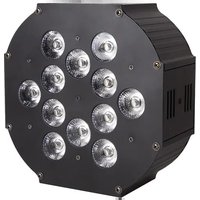
WaferPar HEX 12 MKII - Lighting ColorKey - Free user manual and instructions
Find the device manual for free WaferPar HEX 12 MKII ColorKey in PDF.


| Product Type | LED Par Can |
| Model | WaferPar HEX 12 MKII |
| Light Source | 12 x 15W 6-in-1 LEDs (Red, Green, Blue, Amber, White, UV) |
| Power Consumption | 110W |
| Power Supply | AC100-240V, 50-60Hz |
| DMX Channels | 6, 10, or 12 selectable |
| Control Protocols | DMX512, RDM, Master/Slave, Sound Active, Auto |
| IP Rating | IP20 (Indoor use only) |
| Working Temperature | Up to 40°C (104°F) |
| Safety Distance | Minimum 5m (16'4") from lighted objects |
| Housing Temperature | Can exceed 60°C (140°F) during operation |
| Connector | 3-pin XLR DMX in/out |
| Warranty | 2-year limited warranty |
Frequently Asked Questions - WaferPar HEX 12 MKII ColorKey
User questions about WaferPar HEX 12 MKII ColorKey
0 question about this device. Answer the ones you know or ask your own.
Ask a new question about this device
Download the instructions for your Lighting in PDF format for free! Find your manual WaferPar HEX 12 MKII - ColorKey and take your electronic device back in hand. On this page are published all the documents necessary for the use of your device. WaferPar HEX 12 MKII by ColorKey.
USER MANUAL WaferPar HEX 12 MKII ColorKey
ColorKey
creative lighting
WaferPar HEX 12 MK II
Part# CKU-2142

USER MANUAL
Introduction
Thank you for purchasing the ColorKey WaferPar HEX 12 MKII. Please read these instructions carefully before use. Operating this fixture according to these instructions is important to avoid any possible damage or accidents caused by misuse.
> Packing list
■ 1x WaferPar HEX 12 MK II
■ 1x Power cord
■ User Manual
Safety
Caution! Opening this unit voids warranty. Contact ColorKey for any service requests.
Warning! To avoid electrical shock, be sure to disconnect power before any service or when moving or setting up the fixture.
Caution! Avoid direct eye exposure with the fixture when on.
This fixture is for indoor use only.
This fixture must be installed a minimum distance of 5 meters (16'4") away from any lighted objects.
Do not install or operate this fixture near flammable materials.
This device must be installed, operated, and maintained by a qualified professional.
Do not touch the fixture with bare hands during operation as the surface temperature of the fixture can exceed 60°C (140°F). Turn off power and wait 15 minutes for the fixture to cool before attempting to touch it.
Please check if the voltage is in accordance with the rated power before installing.
Do not operate this fixture if the power cord has been damaged. Turn off fixture and replace with a power cord of similar rating.
Display Operation


MENU

UP

DOWN

ENTER
MENU: Access the menu/Scroll through menu options
ENTER: Open/Select the current menu option
UP: Scroll through menu selection or parameter increase
DOWN: Scroll through menu selection or parameters decrease
Menu Guide
| ITEM | MENU | SUB MENU | FUNCTION | MODE |
| Addr | A.(001-512) | DMX mode | DMX MODE | |
| CH-- | 10CH | 10 channel mode | ||
| 6CH | 6 channel mode | |||
| 12CH | 12 channel mode | |||
| Au-- | Pr.01 | T.(00-99) | Macro mode 1 from slow to fast | ATUO MODE |
| Pr.02 | T.(00-99) | Macro mode 2 from slow to fast | ||
| ... | ... | |||
| Pr.10 | T.(00-99) | Macro mode 10 from slow to fast | ||
| Soun | Sou | So.(00-99) | Sound Active | SOUND MODE |
| Colo | r.(000-255) | Static Red | STATIC COLOR | |
| g.(000-255) | Static Green | |||
| b.(000-255) | Static Blue | |||
| u.(000-255) | Static White | |||
| A.(000-255) | Static Amber | |||
| u.(000-255) | Static UV | |||
| S.(0-20) | Strobe from slow to fast | |||
| Di-- | nod.0 | Close dimming speed | SETUP | |
| nod.1 | Dimming speed 1 | |||
| nod.2 | Dimming speed 2 | |||
| nod.3 | Dimming speed 3 | |||
| Dimming speed 4 | ||||
| nod.4 | Show the led PCB temperature | |||
| Temp | -25~100 | No Function | ||
| rSET | no | Load the default setup | REST | |
| yes | Close dimming speed |
DMX Values
6 channels mode
| CH | VALUE | FUNCTION |
| 1 | 0-255 | Red |
| 2 | 0-255 | Green |
| 3 | 0-255 | Blue |
| 4 | 0-255 | White |
| 5 | 0-255 | Amber |
| 6 | 0-255 | UV |
10 channels mode
| CH | VALUE | FUNCTION | DISCRIPTION |
| 1 | 0-255 | 0~100% | Master dimmer |
| 2 | 0-255 | 0~100% | Dimming Red |
| 3 | 0-255 | 0~100% | Dimming Green |
| 4 | 0-255 | 0~100% | Dimming Blue |
| 5 | 0-255 | 0~100% | Dimming White |
| 6 | 0-255 | 0~100% | Dimming Amber |
| 7 | 0-255 | 0~100% | Dimming UV |
| 8 | 0-13 | no function (0Hz) | Strobe from slow to fast |
| 14-255 | 1~20Hz | ||
| 9 | 0-50 | no function | Macro function |
| 51-100 | Static color | ||
| 101-109 | Macro mode 1 | ||
| 110-119 | Macro mode 2 | ||
| ... | ... | ||
| 190-199 | Macro mode 10(Run Macro-1 to 9) | ||
| 200-255 | Sound active | ||
| 10 | 0-255 | Speed for macro mode from slow to fast | When CH9=51~100, Static color as form-1 |
12
channels
mode
| CH | VALUE | FUNCTION | DISCRIPTION |
| 1 | 0-255 | 0~100% | Master dimmer |
| 2 | 0-255 | 0~100% | Dimming Red |
| 3 | 0-255 | 0~100% | Dimming Green |
| 4 | 0-255 | 0~100% | Dimming Blue |
| 5 | 0-255 | 0~100% | Dimming White |
| 6 | 0-255 | 0~100% | Dimming Amber |
| 7 | 0-255 | 0~100% | Dimming UV |
| 8 | 0-10 | no function | Static color |
| 11-30 | Red 100%, Green0-100%, Blue 0% | ||
| 31-50 | Red 100-0%, Green 100%, Blue 0% | ||
| 51-70 | Red 0%, Green 100%, Blue 0-100% | ||
| 71-90 | Red 0%, Green 100-0%, Blue 100% | ||
| 91-110 | Red 0~100%, Green 0%, Blue 100% | ||
| 111-130 | Red 100%, Green 0%, Blue 100-0% | ||
| 131-150 | Red 100%, Green 0-100%, Blue 0-100% | ||
| 151-170 | Red 100-0%, Green 100-0%, Blue 100% | ||
| 171-200 | Red 100%, Green 100%, Blue 100% | ||
| 201-205 | Color temperature 1 | ||
| 206-210 | Color temperature 2 | ||
| 211-215 | Color temperature 3 | ||
| 216-220 | Color temperature 4 | ||
| 221-225 | Color temperature 5 | ||
| 226-230 | Color temperature 6 | ||
| 231-235 | Color temperature 7 | ||
| 236-240 | Color temperature 8 | ||
| 241-245 | Color temperature 9 | ||
| 246-250 | Color temperature 10 | ||
| 251-255 | Color temperature 11 | ||
| 9 | 0-13 | no function (0Hz) | Strobe mode |
| 14-255 | 1~20Hz | ||
| 10 | 0-20 | no function | Macro |
| 21-30 | Auto1 | ||
| 31-40 | Auto2 | ||
| 41-50 | Auto3 | ||
| 51-60 | Auto4 | ||
| 61-70 | Auto5 | ||
| 71-80 | Auto6 | ||
| 81-90 | Auto7 | ||
| 91-100 | Auto8 | ||
| 101-110 | Auto9 | ||
| 111-120 | Auto10 | ||
| 121-255 | Sound (Sound active mode) | ||
| 11 | 0-255 | Dimming speed from slow to fast | Speed for macro |
| 12 | 0-5 | Depend on the operation setup | Speed for dimming |
| 6-55 | Close dimming speed | ||
| 56-105 | Dimming speed 1 | ||
| 106-155 | Dimming speed 2 | ||
| 156-205 | Dimming speed 3 | ||
| 206-255 | Dimming speed 4 |
DMX Connections
DMX Cable :
The WaferPar HEX 12 MK II can be controlled via DMX also with RDM function, using a 3-pin XLR connection. The standard DMX connection is XLR is: one end connects to the male plug, and the other connects to the female. As below: pin 1: ground, pin 2: negative signal, pin 3: positive signal

| XLR Pin Configuration |
| Pin 1 = Ground |
| Pin 2 = Data Compliment (negative) |
| Pin 3 = Data True (positive) |
DMX512 OUT 3-PIN XLR

DMX512 IN 3-PIN XLR
Noted : In order to avoid failures and interference signal transmission, we connect a
resistance120Ω (1/4W) at the end of the DMX connecting as below:
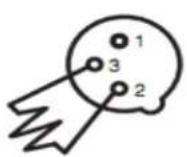
Termination reduces signal errors and avoids signal transmission problems and interference. It is always advisable to connect a DMX terminal, (Resistance 120 Ohm 1/4 W) between PIN 2 (DMX-) and PIN 3 (DMX +) of the last fixture.
The Conversion between 3 pin and 5 pin XLR
If the output cable of DMX512 controller is the 5PIN, please use 1pc 5PIN to 3PIN cable
| 3-Pin XLR to 5-Pin XLR Conversion | ||
| Conductor | 3-Pin XLR Female (Out) | 5-Pin XLR Male (In) |
| Ground/Shield | Pin 1 | Pin 1 |
| Data Compliment (- signal) | Pin 2 | Pin 2 |
| Data True (+ signal) | Pin 3 | Pin 3 |
| Not Used | Do Not Use | |
| Not Used | Do Not Use | |
Master/Slave Mode Operation
Master/Slave
Master/Slave mode allows you to connect multiple units together using one (1) unit to control others in a chain. When a fixture is set to ‘Master Mode,’ this unit will always act as a controlling unit until it is switched out of ‘Master Mode’. The Master unit will send out signal via DMX to Slave units which will react in synchronization. When a fixture is set into ‘Slave Mode’, this fixture will receive the Master signal. To avoid master signal and DMX signal interference, do not connect DMX when using Master/Slave mode. If using a DMX run longer than 60 meters and/or over 32 units, a signal amplifier may be required.
Troubleshooting
| Problem | Solutions |
| No DMX control | ◆ Make sure that the DMX cable is properly connected◆ Make sure that the DMX controller is operational◆ Check the DMX cable for tears or breaks◆ Make sure that the fixture is in DMX mode |
| Fixture does not respond to sound | ◆ Make sure that the fixture is in Sound Active mode. |
Technical Information
Power supply: AC100-240V;50-60Hz
Light source: 12x15W 6-in-1 LEDs
Red, Green, Blue, Amber, White, UV
Power consumption: 110W
Control: Auto, Master/Slave, DMX 512 w RDM Function, Sound Active
Channel: 6/10/12 channels
Working temperature: up to 40° C
IP rate: IP20
Notice to consumer: ColorKey offers a 2-year limited warranty. Please visit our website at www.ColorKeyLED.com to register your product.
Please note: As we continue to work towards improving our products and your experience as a user, we recommend that you check our website periodically for updates to user manuals and specifications at www.ColorKeyLED.com or you may contact us directly at info@colorkeyled.com.


Brand : ColorKey
Model : WaferPar HEX 12 MKII
Category : Lighting