
G10 - Guitar amplifier Hartke - Free user manual and instructions
Find the device manual for free G10 Hartke in PDF.


| Product Type | Guitar Amplifier |
| Brand | Hartke |
| Model | G10 |
| Power Output | 10 Watts |
| Speaker | 6.5 inches |
| Channels | 1 |
| Controls | Volume, Bass, Treble |
| Inputs | 1/4" Instrument Input |
| Outputs | Headphone Output |
| Dimensions (W x H x D) | 12.6 x 10.6 x 7.9 inches |
| Weight | 9.5 lbs |
| Power Supply | AC 120V 60Hz |
| Enclosure Material | Wood with Black Vinyl Covering |
| Grille Cloth | Black Mesh |
| Mounting | Freestanding |
| Recommended Use | Practice, Small Rehearsals |
| Cleaning Instructions | Wipe with dry cloth; avoid solvents |
| Safety Certifications | CE, RoHS |
| Warranty | 1 Year Limited |
Frequently Asked Questions - G10 Hartke
User questions about G10 Hartke
0 question about this device. Answer the ones you know or ask your own.
Ask a new question about this device
Download the instructions for your Guitar amplifier in PDF format for free! Find your manual G10 - Hartke and take your electronic device back in hand. On this page are published all the documents necessary for the use of your device. G10 by Hartke.
USER MANUAL G10 Hartke
Caution: To reduce the hazard of electrical shock, do not remove cover or back.
No user serviceable parts inside. Please refer all servicing to qualified personnel.

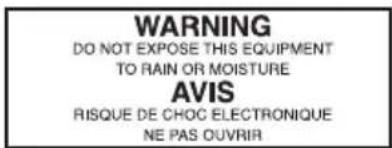

WARNING: To reduce the risk of fire or electric shock, do not expose this unit to rain or moisture.
The lightning flash with an arrowhead symbol within an equilateral triangle, is intended to alert the user to the presence of uninsulated "dangerous voltage" within the products enclosure that may be of sufficient magnitude to constitute a risk of electric shock to persons.
The exclamation point within an equilateral triangle is intended to alert the user to the presence of important operating and maintenance (servicing) instructions in the literature accompanying the product.
Important Safety Instructions
-
Please read all instructions before operating the unit.
-
Keep these instructions for future reference.
-
Please heed all safety warnings.
-
Follow manufacturers instructions.
-
Do not use this unit near water or moisture.
-
Clean only with a damp cloth.
-
Do not block any of the ventilation openings. Install in accordance with the manufacturers instructions.
-
Do not install near any heat sources such as radiators, heat registers, stoves, or other apparatus (including amplifiers) that produce heat.
-
Do not defeat the safety purpose of the polarized or grounding-type plug. A polarized plug has two blades with one wider than the other. A grounding type plug has two blades and a third grounding prong. The wide blade or third prong is provided for your safety. When the provided plug does not fit your outlet, consult an electrician for replacement of the obsolete outlet.
-
Protect the power cord from being walked on and pinched particularly at plugs, convenience receptacles and at the point at which they exit from the unit.
-
Unplug this unit during lightning storms or when unused for long periods of time.
-
Refer all servicing to qualified personnel. Servicing is required when the unit has been damaged in any way, such as power supply cord or plug damage, or if liquid has been spilled or objects have fallen into the unit, the unit has been exposed to rain or moisture, does not operate normally, or has been dropped.
Table of Contents
Introduction 2
Hartke G10 Guitar Amplifier Features ....3
Guided Tour - Front Panel 4
Setting Up and Using Your Hartke G10 Guitar Amplifier ....5
G10 Sample Settings 7
Setting Templates 8
Specifications 9
Copyright 2006 - 2008, Samson Technologies Corp.
Printed November, 2008 v1.2
Samson Technologies Corp.
45 Gilpin Avenue
Hauppauge, New York 11788-8816
Phone: 1-800-3-SAMSON (1-800-372-6766)
Fax: 631-784-2201
www.samsontech.com
Introduction
We know you don't like reading owners manuals, but you've just purchased one of the finest guitar amplifiers around, and we want to tell you about it! So, before you plug in and start strumming and shredding, we'd like to suggest you take just a few moments to scan these pages. We'll make it as painless as possible, we promise—and, who knows, you might just pick up a tip or two.
Like all Hartke guitar amplifiers, the G10 has been designed for modern guitar players looking for a new sound that respects the tone of a classic amp. This combo is the perfect first amp for a beginner, and also makes a great practice amplifier for the professional guitarist. With an amazingly wide variety of tone, guitar players can rediscover the sound from a favorite old vintage amp, or dial up a new sound that's uniquely their own. The G10 features Hartke's G Series burn'in-hot pre amp, switchable CRUNCH control for clean and dirt and a matching Hartke GXL speaker custom voiced for harmonic overtones that add to the warmth and richness of the sound. Plus, the versatile, and musical, equalizer provides BASS and TREBLE to shape the sound the best complements your playing style. The G10 features a steel amplifier chassis, enclosures made of rugged Plywood and MDF construction, with durable vinyl covering. Plus, the onboard headphone output makes it an awesome practice amp day or night! Whether your a gig-tested professional or just starting out, the G10 assures powerful output, robust construction and that great Hartke sound.
In these pages, you'll find a detailed description of the many features of your G10 amplifier, as well as a guided tour through its front panels controls, step-by-step instructions for setting up and using the amp, plus full specifications. You'll also find a warranty card enclosed—please don't forget to fill it out and mail it so that you can receive online technical support and so we can send you updated information about this and other Hartke and Samson products in the future. Also, be sure to check out our website (www.hartke.com and www.samsontech.com) for complete information about our full product line.
SPECIAL NOTE: Should your Hartke G10 Amplifier ever require servicing, a Return Authorization (RA) number is necessary. Without this number, the unit will not be accepted. If purchased in the United States, please call Samson at 1-800-372-6766 for a Return Authorization number prior to shipping. Please retain the original packing materials and, if possible, return the unit in its original carton and packing materials. If purchased outside the United States, please contact your local distributor for warranty information.
Hartke G10 Guitar Amplifier Features

The Hartke G10 amplifier has been designed for modern guitar players looking for a new sound that respects the tone of a classic amp. Here are some of its main features:
- Ample power, the G10 combo offers a 10-Watts of shredding power.
- CRUNCH control for 2-channel selection built around a Hartke burn'in-hot G Series pre-amp.
- The G10 combo features an 6.5-inch, custom designed Hartke GXL speaker installed in an enclosure with open-back configuration.
- Musical equalizer comprised of BASS and TREBLE custom voiced for ultimate guitar response.
- The G10 features a separate headphone output, which automatically disconnects the speaker output, allowing use as a high-quality practice amp.
- Hartke guitar cabinets are constructed from Plywood and MDF (medium density fiberboard) and feature mesh fabric grill and durable vinyl covering.
- Rugged construction makes the G10 Series eminently road-worthy.
Guided Tour - Front Panel
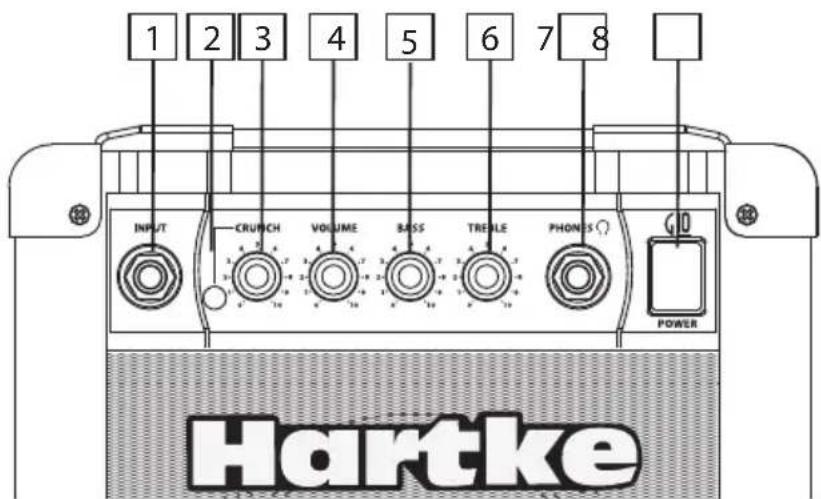
1 INPUT - Connect your guitar to this standard 1/4" unbalanced jack. This G Series Input was designed to handle the signals from a guitar with a wide range of output levels from lipstick single coils to the beefiest humbucker.
2 CHANNEL switch - The switch allows you to select either CHANNEL 1 or CHANNEL 2.
3 CRUNCH – CHANNEL 1's pre-amp level control used to dial up tube overdrive tone for just a touch of harmonic warmth for blues all the way to a dirty rhythm of classic and modern rock
4 VOLUME - This is the overall volume control for CHANNEL. 1
5 BASS - This tone control allows you to adjust the low frequency tone of your amp. The G10's tone controls uses electronic circuits based around those of the best sounding classic amplifiers. The normal Bass tone (that is, flat response) is when the knob is at the 12 o'clock ("5") position. As it is turned clockwise from the "5" position, the frequency area is boosted; as it is turned counterclockwise from the "5" position, the frequency area is attenuated.
6 TREBLE - This tone control allows you to adjust the high frequency tone of your amp. The G10's tone controls uses electronic circuits based around those of the best sounding classic amplifiers. The normal Treble tone (that is, flat response) is when the knob is at the 12 o'clock ("5") position. As it is turned clockwise from the "5" position, the frequency area is boosted; as it is turned counterclockwise from the "5" position, the frequency area is attenuated.
7. PHONES - Connect any stereo headphone (600 ohms or less) to this standard 1/4" stereo jack. When a plug is inserted into the headphone jack, the speaker output is disconnected, allowing you to use your GT10 as a practice amplifier. The level of the signal sent to the headphones is determined by the setting of the Volume knob—at the point where a connected speaker would clip, the headphones will clip.
WARNING: Because even the smallest G Series amplifier is capable of generating extremely high headphone signal levels, always start with the Volume knob at minimum and then slowly turn it up. In particular, a clicking sound is an indication of distortion and possible damage to the headphones (and/or your hearing!); don't let things get to that point!
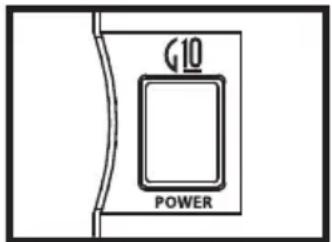
- POWER switch - Use this to power the G10 on or off. When powered on, an LED inside this switch is lit.
Setting Up and Using Your Hartke G10 Guitar Amp
- Remove all packing materials (save them in case of need for future service) and decide where the amplifier is to be physically placed. To avoid potential overheating problems, make sure that the rear panel is unobstructed and that there is good ventilation around the entire unit.
- Before you plug-in the power cable, be sure the POWER switch is in the off (down) position. Then, plug-in the 3-pin AC plug into any grounded AC socket. Don't turn the G Series on just yet, though.
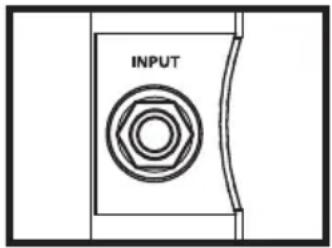
- Use a standard shielded musical instrument cable to connect your guitar to the INPUT jack on the front panel.
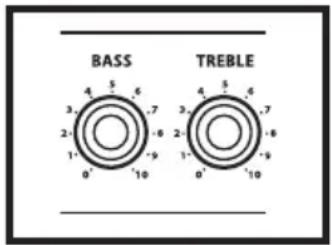
- On the front panel of the G10, turn the CRUNCH and VOLUME controls to their minimum (fully counterclockwise) position. Set the BASS and TREBLE controls to their "0" position.
- Let's start with a clean sound, so press the front panel CRUNCH SWITCH to the out position
- Press the front panel Power switch in order to turn on your G Series amp; the switch will light up and you will see the power LED illuminate.
- Set the output of your guitar to maximum and then, while playing, slowly turn the VOLUME control up until the desired level is achieved. You will get a nice clean tone when using just VOLUME (no CRUNCH) for level, so set it to the level you like. Eventually, the amp will clip on its own and you will hear distortion even with the CRUNCH off. Try using a little amplifier clipping with a little distortion for a gtreat blues tone.

Using Your Hartke G10 Guitar Amplifier

-
Next, adjust the BASS and TREBLE equalizer controls to taste. (When you get a great setting that complement your instrument and playing style, it's a good idea to write it down for future use.)
-
Now, let's get a burnin overdrive tone. First, turn the VOLUME KNOB to 0 (fully counterclockwise) and press the CRUNCH SWITCH to the in position.
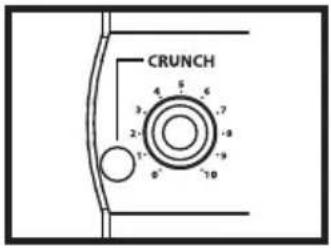
- Set the CRUNCH to "10" position (fully clockwise) and then, while playing, slowly turn the G10 VOLUME control up until the desired level is achieved.
NOTE: With the CRUNCH control on "10" you will get the most overdrive. You can turn down the CRUNCH control for less distortion.

- Adjust the CHANNEL BASS and TREBLE equalizer controls to taste. (When you get a great setting that complement your instrument and playing style, it's a good idea to write it down for future use.)

- Test the headphone output by turning the Volume control to its minimum (fully counterclockwise) position and then connect a standard stereo headphone to the front panel Phones jack. While playing your guitar, slowly turn the Volume control up—you should hear sound from the headphones and none from the connected speaker.
WARNING: Because even the smallest G Series amplifier is capable of generating extremely high headphone signal levels, always start with the Volume knob at minimum and then slowly turn it up. In particular, a clicking sound is an indication of distortion and possible damage to the headphones (and/or your hearing!); don't let things get to that point!
G10 Sample Settings
The G Series combos are powerful amps with a lot of personality. The amplifiers offer guitarist a wide range of sounds and after playing just a short time; you'll find the tone that's perfectly suited for your playing style and your sound. To get you started, try some of the samples settings below. Remember, different guitars are made of different wood and have different pick-ups, so the sound will vary a little bit on each individual set up. But still, the sample settings will get you close enough, so you can use you ears to tweak up the sound that's perfect for you.
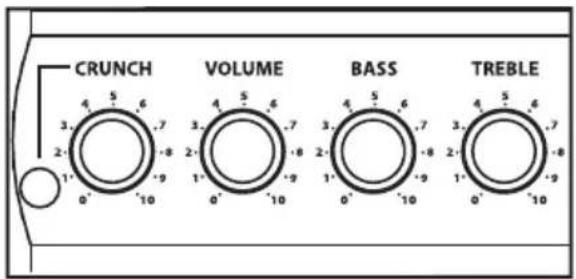
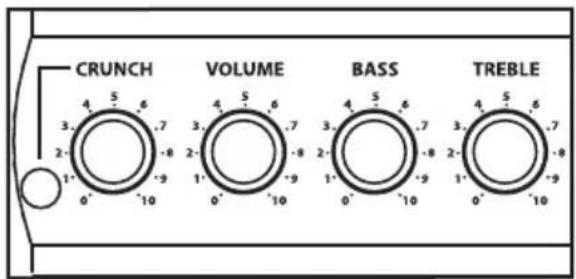
On the next page, you'll find blank templates of the front panel. Use these templates to write down the settings for your favorite sounds. Feel free to photocopy or scan the template page if needed.
CLEAN - (CRUNCH OUT)
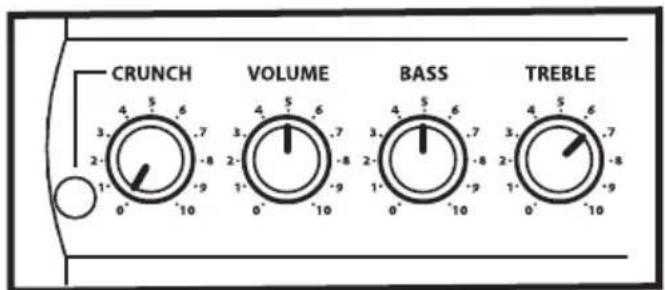
NU-METAL- (CRUNCH IN)
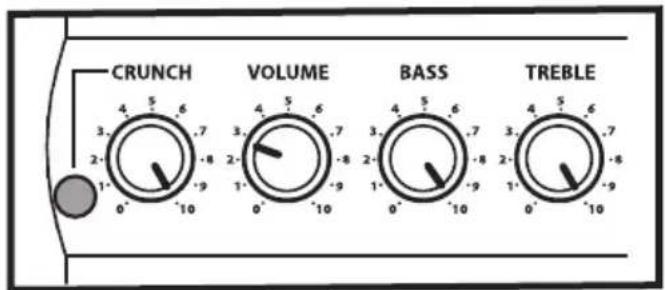
BACK IN BLACK - (CRUNCH IN)

80's METAL - (CRUNCH IN)

G10 Setting Templates


Specifications
Rated Output Power 10 w
Input Impedance 1M OHM
Headphone Output 200 mW (typical) @ 600 ohms
Connector 1/4-inch Phone Jack
Fuse Rating
US & Japan 1A
UK & European 2A
Weight
8.8 lbs. (3.99 kg)
Dimensions
12.05" (306 mm) H x 10.75" (273 mm) W x 6.5" (165 mm) D
Hartke
45 Gilpin Avenue
Hauppauge, New York 11788-8816
Phone: 1-800-3-SAMSON (1-800-372-6766)
Fax: 631-784-2201
www.hartke.com

- Important Safety Instructions
- Table of Contents
- Introduction
- Hartke G10 Guitar Amplifier Features
- Guided Tour - Front Panel
- Setting Up and Using Your Hartke G10 Guitar Amp
- Using Your Hartke G10 Guitar Amplifier
- G10 Sample Settings
- CLEAN - (CRUNCH OUT)
- NU-METAL- (CRUNCH IN)
- BACK IN BLACK - (CRUNCH IN)
- 80's METAL - (CRUNCH IN)
- G10 Setting Templates
- Specifications
Brand : Hartke
Model : G10
Category : Guitar amplifier