Gamdias Chione M3-240W - Laptop cooler

Chione M3-240W - Laptop cooler Gamdias - Free user manual and instructions

Find the device manual for free Chione M3-240W Gamdias in PDF.

📄 24 pages English EN Download 💬 AI Question 10 questions ⚙️ Specs
Notice Gamdias Chione M3-240W - page 13
Pick your language and provide your email: we'll send you a specifically translated version.
Product Type All-in-One CPU Liquid Cooler
Model Chione M3-240W
Brand Gamdias
Radiator Size 240mm (dual 120mm fan support)
Fan Size 120mm x 2
Fan Speed 800-2000 RPM (PWM controlled)
Fan Noise Level 20-35 dBA
Fan Airflow Up to 72 CFM
Pump Speed 2800 ±10% RPM
Pump Noise Level <25 dBA
Thermal Design Power (TDP) Up to 240W
Socket Compatibility Intel LGA 1366/115X/1200/1700/2066/2011/2011-3; AMD AM4/AM3+/AM3/AM2+/AM2/FM2+/FM2/FM1/CTR4
RGB Support 5V Addressable RGB (ARGB) with motherboard sync or included wired controller (30 effects)
RGB Connector 5V 3-pin ARGB header
Pump Dimensions Not specified (typical ~72mm diameter)
Radiator Dimensions Approx. 274 x 120 x 27 mm
Material Copper base, aluminum radiator, rubber tubes
Tube Length Approx. 300mm
Power Supply 12V DC fan, SATA power for RGB controller
Warranty 2 to 3 years (varies by region)
Package Contents Radiator, pump block, 2x120mm fans, mounting kit, RGB controller, thermal paste, manual

Frequently Asked Questions - Chione M3-240W Gamdias

What sockets does the Gamdias Chione M3-240W support?
It supports Intel LGA 1366/115X/1200/1700/2066/2011/2011-3 and AMD AM4/AM3+/AM3/AM2+/AM2/FM2+/FM2/FM1/CTR4 sockets.
Can I control the RGB lighting without a compatible motherboard?
Yes, the included wired lighting controller offers 30 different effects, or you can use an adapter cable to connect to a Gamdias Aeolus Box.
What is the maximum CPU TDP the cooler can handle?
The Chione M3-240W is rated for CPUs up to 240W TDP.
How do I install the cooler?
First, turn off the computer. Then mount the backplate, apply thermal paste, install the pump block, attach the radiator and fans, and connect the cables diagonally for even pressure. Refer to the manual for step-by-step details.
Does the cooler support Intel LGA 1700?
Yes, it includes a separate installation step for LGA 1700 with an insulating plate.
What fan speed range does the cooler have?
The 120mm PWM fans operate from 800 to 2000 RPM.
Is the pump noisy?
The pump runs at 2800 RPM with noise levels under 25 dBA, making it very quiet.
Can I use the cooler with AMD AM5 sockets?
The manual lists AM4 and previous sockets, but AM5 is not explicitly supported. However, it may be compatible with AM5 using the same mounting holes as AM4. Check compatibility before purchase.
How do I clean the cooler?
Dust the radiator and fans with compressed air. Avoid liquid cleaners. The pump is sealed and requires no maintenance.
What is the warranty period?
Gamdias typically offers a 2-year warranty, but it may vary by region. Check with your retailer for precise terms.

User questions about Chione M3-240W Gamdias

0 question about this device. Answer the ones you know or ask your own.

Ask a new question about this device

The email remains private: it is only used to notify you if someone responds to your question.

No questions yet. Be the first to ask one.

Download the instructions for your Laptop cooler in PDF format for free! Find your manual Chione M3-240W - Gamdias and take your electronic device back in hand. On this page are published all the documents necessary for the use of your device. Chione M3-240W by Gamdias.

USER MANUAL Chione M3-240W Gamdias

STEP BY STEP INSTALLATION GUIDE

Abstract geometric pattern with nested triangles and a central arrow (no text or symbols)

Two white CPU fans with rainbow-colored heat sinks, one emitting a glowing lens (no text or symbols visible)

GAMDIAS

CHIONE

Gamdias Chione M3-240W - STEP BY STEP INSTALLATION GUIDE - 3

CPU Liquid Cooler

M3

240W

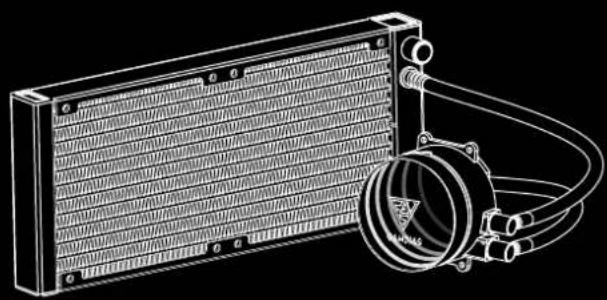
Package Contents

ADiagram of a GARDIAA fan connected to three U-shaped connectors (no text or symbols)

A1M

A1F

A2

X2

BPure electrical circuit lines without any symbols

X1

CPure electrical circuit lines without any symbols

X1

DTechnical line drawing of a heat exchanger with cooling fins and a coiled hose (no text or symbols)

X1

EPure electrical plug diagram without any text, numbers, or symbols

X1

FGamdias Chione M3-240W - Package Contents - 6

GHIJGamdias Chione M3-240W - Package Contents - 7

Gamdias Chione M3-240W - Package Contents - 8

Gamdias Chione M3-240W - Package Contents - 9

Gamdias Chione M3-240W - Package Contents - 10

X1X4 X8 X4 X4

KPure mechanical component diagram without any text or symbols

LL S X1

MSimple line drawing of a tool or tool handle (no text or symbols)

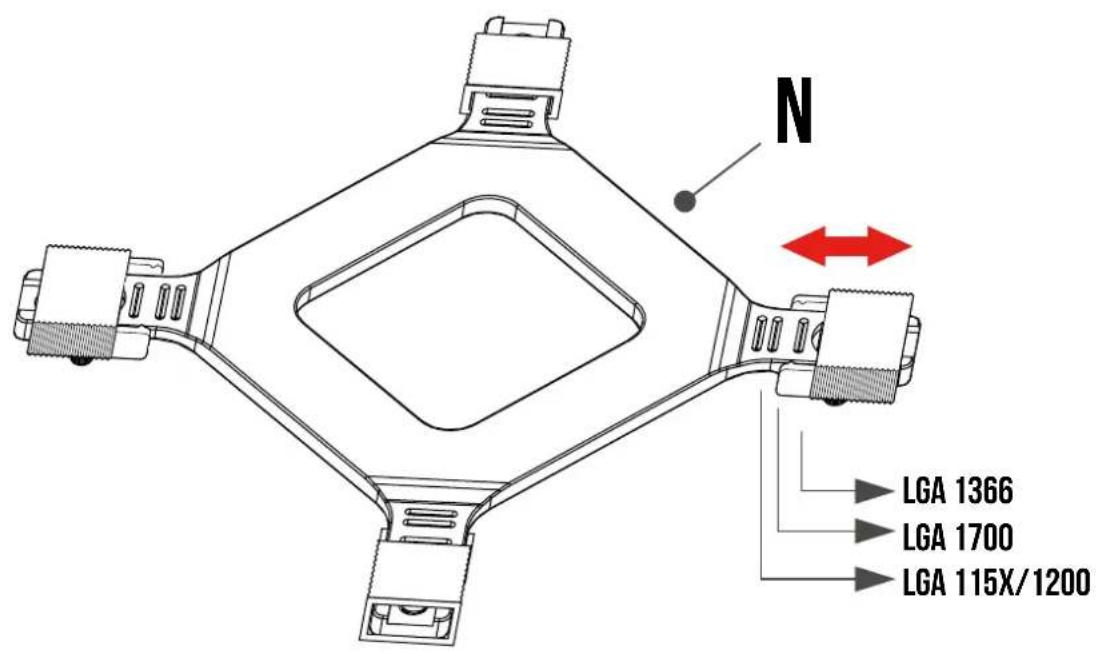
N

X1

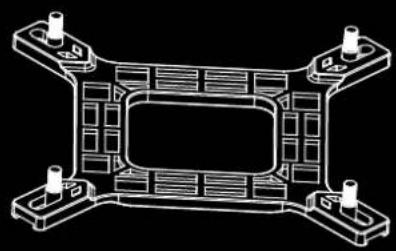
Technical line drawing of a mechanical component with four mounting holes and internal channels (no text or symbols)

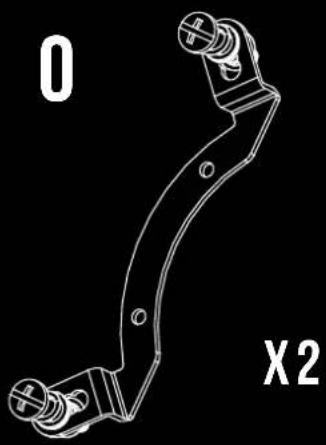
Technical line drawing of a mechanical bracket with mounting holes and a labeled section (X2), no readable text or symbols present.

PPure curved line drawing without any text, numbers, or symbols

QTechnical line drawing of a mechanical bracket component (no text or symbols)

RTechnical line drawing of a bolt with threaded end (no text or symbols)

S

X4

Gamdias Chione M3-240W - Package Contents - 19

X4

TTechnical line drawing of a mechanical bracket or clamp component (no text or symbols)

UTechnical line drawing of a mechanical bracket component (no text or symbols)

Pump Dimensions

79 mm 84 mm 53 mm 63 mm

50 mm

1GAMSYS J

Technical diagram showing mechanical assembly with labeled parts and checkmark indicators

2N LGA 1366 LGA 1700 LGA 115X/1200

INTEL (LGA1366/115X/1200)

3G N

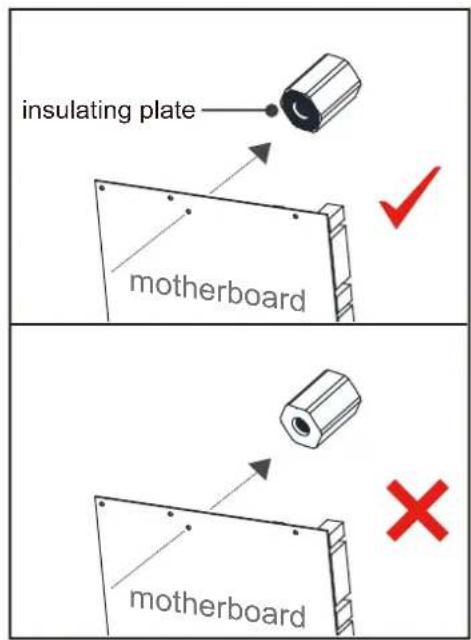
insulating plate motherboard motherboard

The insulating plate should face with motherboardGamdias Chione M3-240W - INTEL (LGA1366/115X/1200) - 3

4CPU G

F G

INTEL [ LGA1366/115X/1200 ]

5Please Peel off label before you use it Warning M L

Technical diagram of a mechanical device with numbered components and red arrows indicating motion or assembly steps.

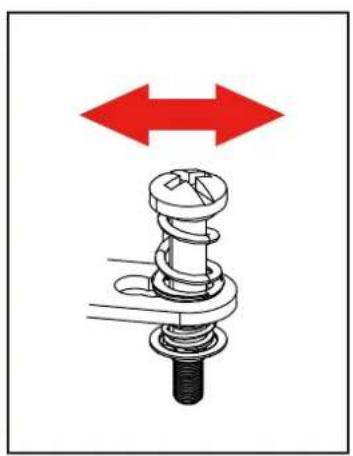
Mechanical assembly diagram showing a spring-loaded component with red bidirectional arrows indicating motion (no text or symbols)

graph TD 1 --> 2 2 --> 3 3 --> 1 3 --> 4 4 --> 1

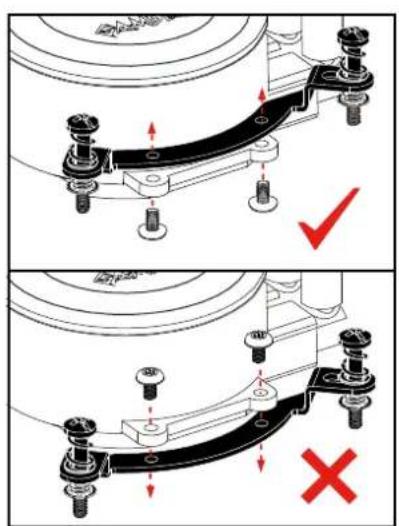
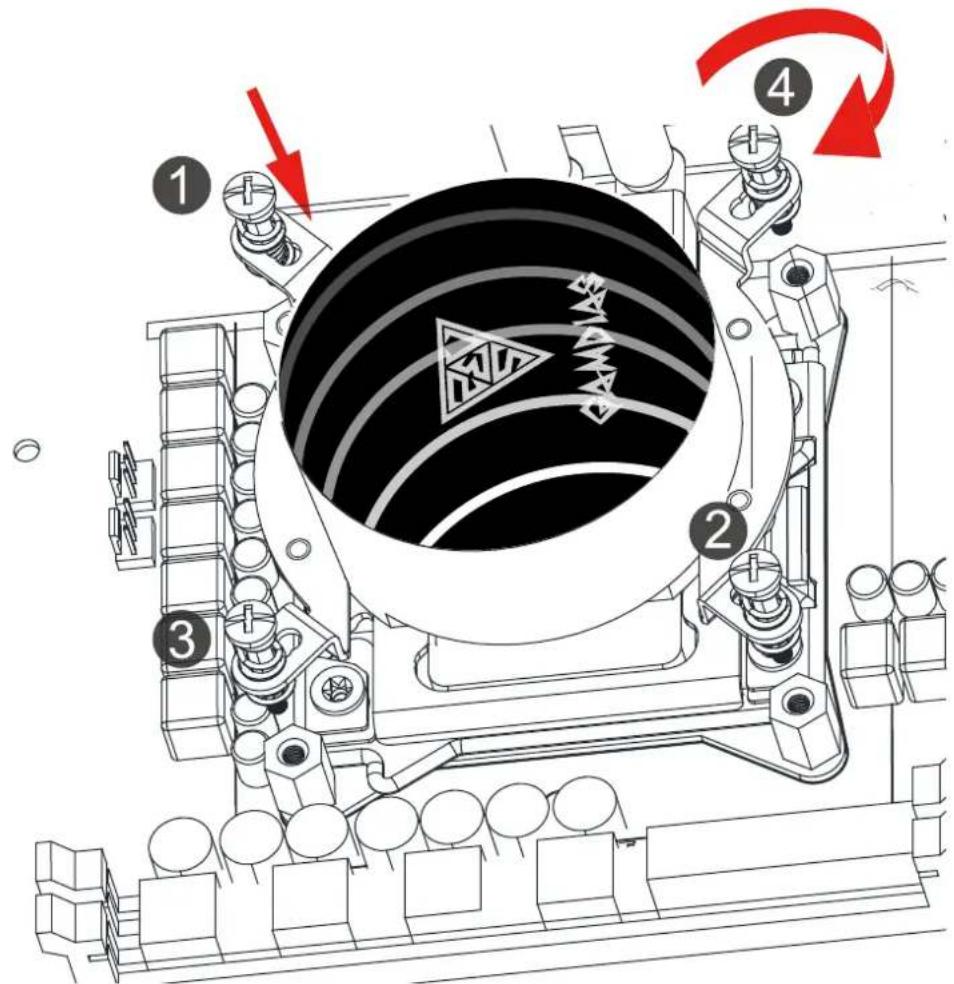
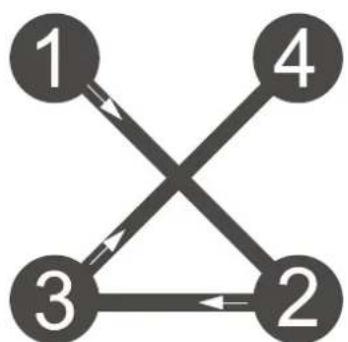
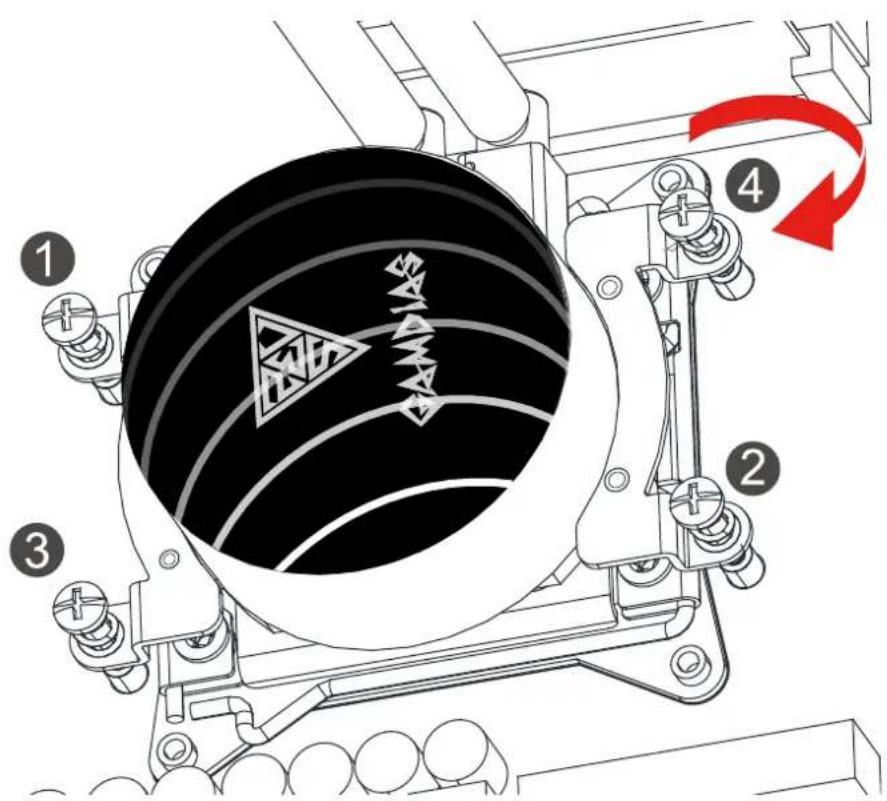
Please tighten the screws in a diagonal sequence to spread the tension properly.Gamdias Chione M3-240W - INTEL [ LGA1366/115X/1200 ] - 5

1P O

2O+P P O

3O+P GAMBIAS J

Technical diagram showing mechanical assembly with labeled parts and red checkmark indicators.

4N LGA 1366 LGA 1700 LGA 115X/1200

INTEL [ LGA1700 ]

5Technical diagram showing a mechanical assembly with labeled components and directional arrows, including a red arrow pointing to a central component labeled 'N'.

insulating plate motherboard motherboard

The insulating plate should face with motherboardGamdias Chione M3-240W - INTEL [ LGA1700 ] - 3

6CPU

H I

7 Please Peel off label before you use it Warning 40000000000 M L

Technical diagram of a mechanical assembly with numbered components and red arrows indicating motion or rotation.

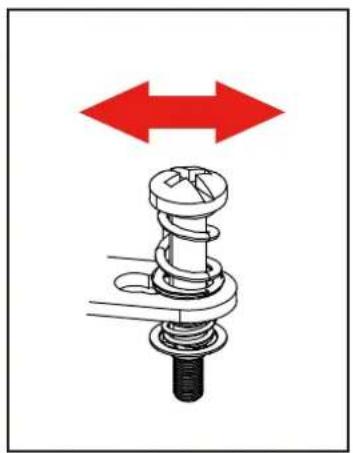
Please tighten the screws in a diagonal sequence to spread the tension properly.Gamdias Chione M3-240W - INTEL [ LGA1700 ] - 8

Mechanical assembly diagram showing a spring-loaded component with red bidirectional arrows indicating motion (no text or symbols).

graph TD 1 --> 3 1 --> 2 2 --> 3 2 --> 4 3 --> 1 3 --> 2 4 --> 1 4 --> 2

INTEL [ LGA2066/2011/2011-3 ]

10 0 J

Technical diagram showing mechanical assembly with red checkmark and cross symbols indicating failure or rejection states.

2CPU

F I

INTEL [ LGA2066/2011/2011-3 ]

3 Please peel off label before you use it. Warning M L

Technical diagram of a mechanical assembly with numbered components and red arrows indicating motion or rotation.

Mechanical assembly diagram showing a spring-loaded component with red bidirectional arrows indicating motion (no text or symbols).

graph TD 1 --> 2 2 --> 3 3 --> 1 3 --> 4 4 --> 1

Please tighten the screws in a diagonal sequence to spread the tension properly.Gamdias Chione M3-240W - INTEL [ LGA2066/2011/2011-3 ] - 5

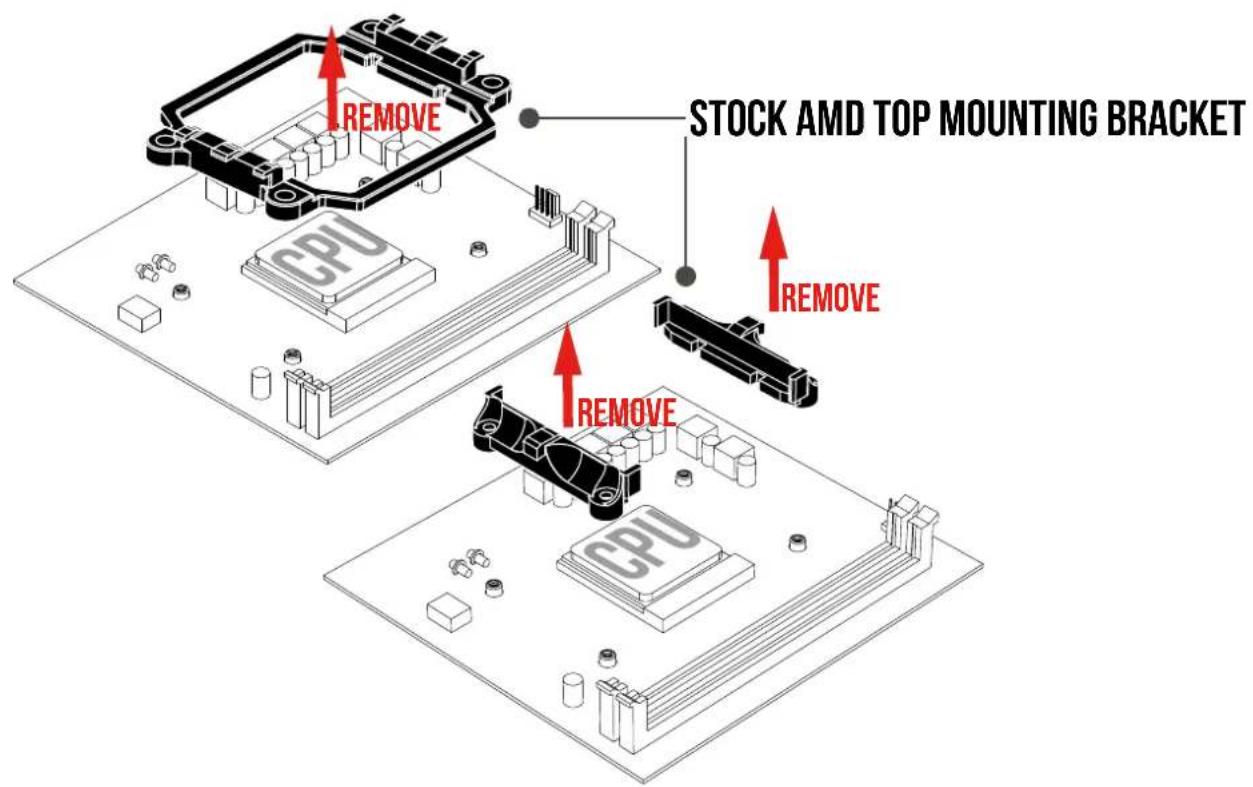
AMD (AM4/AM3+/AM3/AM2+/AM2/FM2+/FM2/FM1)

1REMOVE CPU STOCK AMD TOP MOUNTING BRACKET REMOVE REMOVE CPU
2Q GAMDIA5 J

Technical diagram showing mechanical assembly with labeled components and red checkmark indicators.

AMD (AM4/AM3+/AM3/AM2+/AM2/FM2+/FM2/FM1)
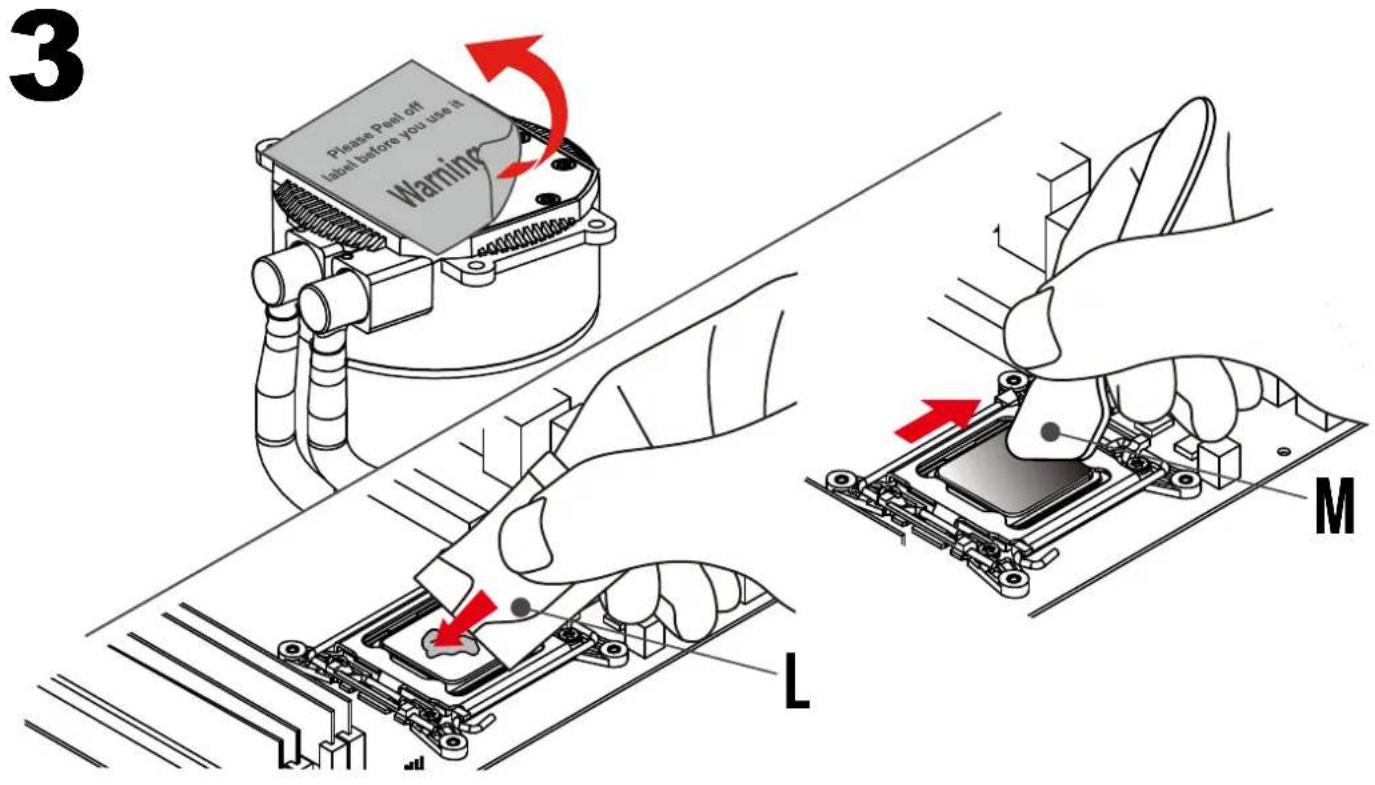
3 Please peel off label before you use it. Warning M L

Technical diagram of a mechanical device with numbered components and directional arrows indicating motion or assembly.

Mechanical assembly diagram showing a spring-loaded component with red bidirectional arrows indicating movement or force (no text or symbols).

graph TD 1 --> 3 2 --> 3 3 --> 1 3 --> 2 4 --> 1 4 --> 2

Please tighten the screws in a diagonal sequence to spread the tension properly.

AMD (CTR4)

1R S U T J

Technical diagram showing mechanical assembly with red checkmark and cross symbols indicating failure or error states.

22 Please peel off label before you use it. Warning M L

1 2 3 4 PANDIA

Please tighten the screws in a diagonal sequence to spread the tension properly.Gamdias Chione M3-240W - AMD (CTR4) - 5

graph TD 1 --> 2 2 --> 3 3 --> 1 3 --> 2 2 --> 4 4 --> 1

1. Turn off the computer before installing.
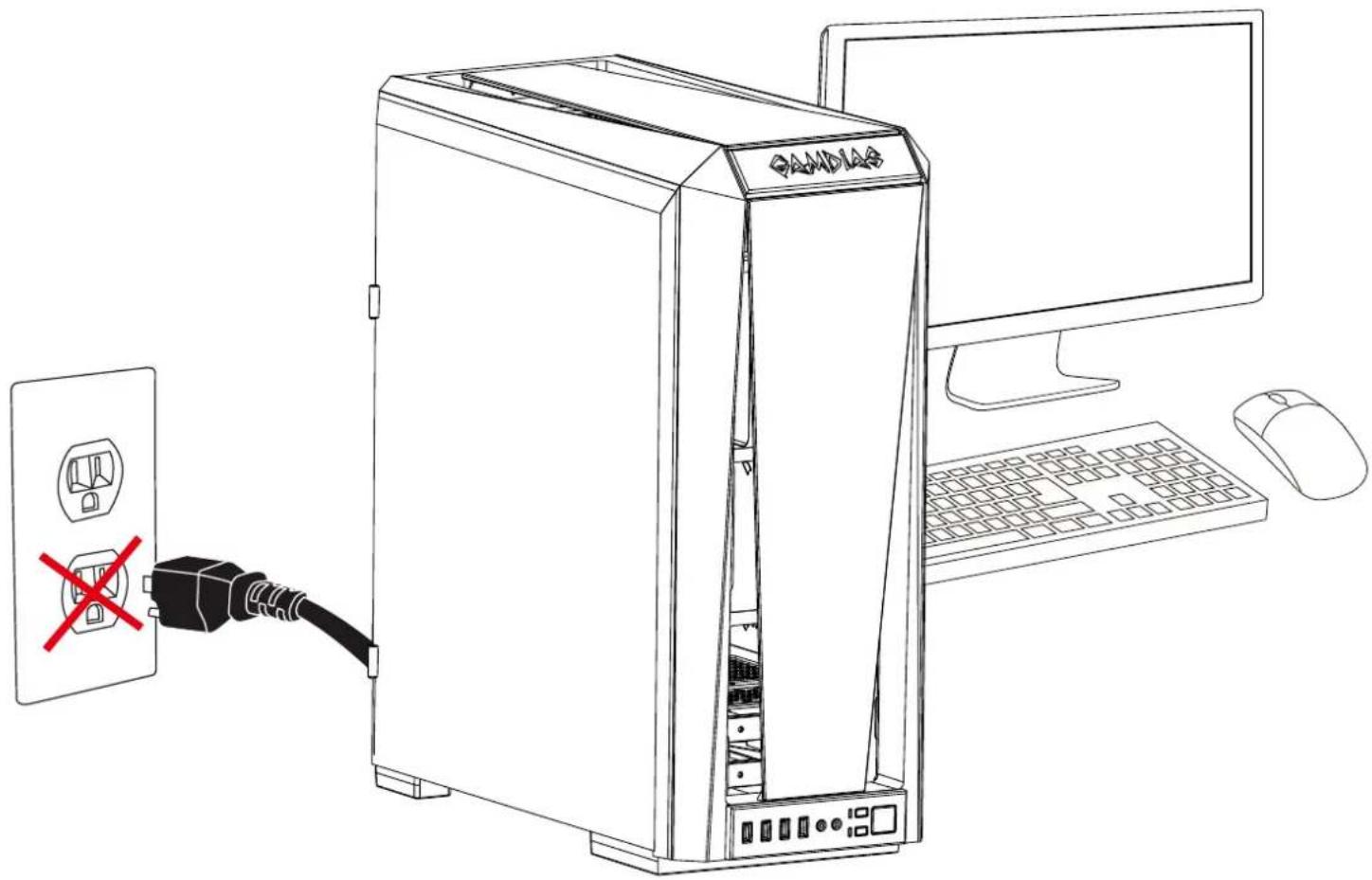
Line drawing of a desktop computer setup showing a CPU, mouse, and power outlet with a red X mark indicating disconnection.

2Technical diagram showing two mechanical assembly states with red checkmark and cross symbols indicating failure or failure conditions.

Gamdias Chione M3-240W - Turn off the computer before installing. - 3

Make sure pump firmly touches CPU.

3D A K H

4graph TD A["CPU"] -->|A1M| B[" fans "] B -->|A2| C[" motherboard"] C -->|A1F| D[" CPU "] style A fill:#f9f,stroke:#333 style B fill:#ccf,stroke:#333 style C fill:#cfc,stroke:#333 style D fill:#fcc,stroke:#333

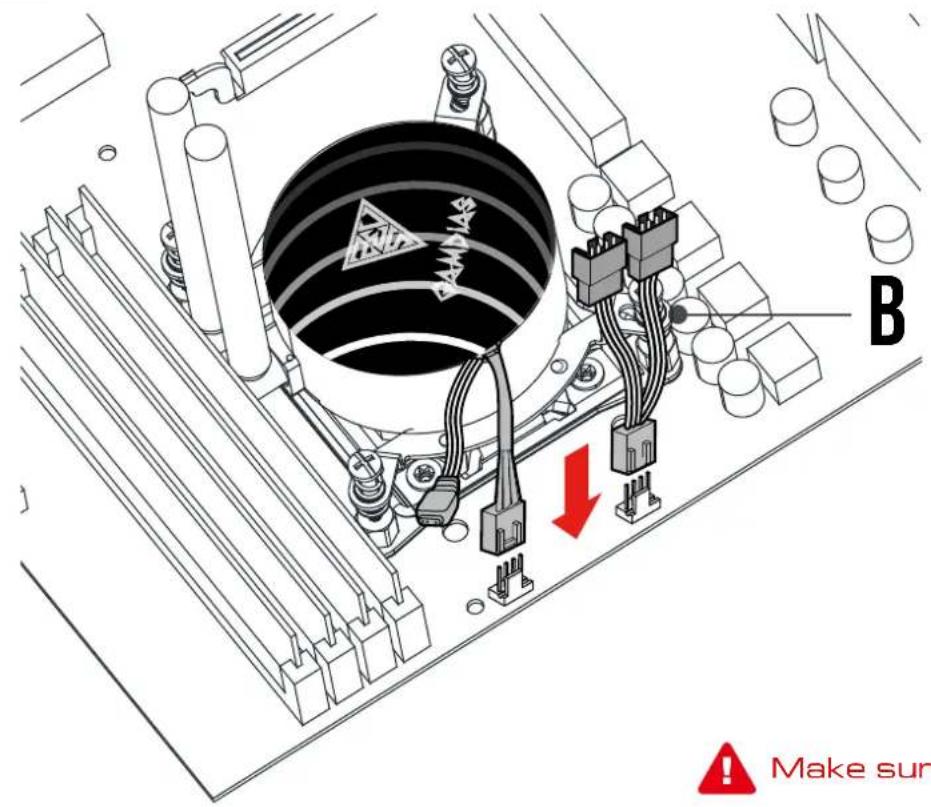
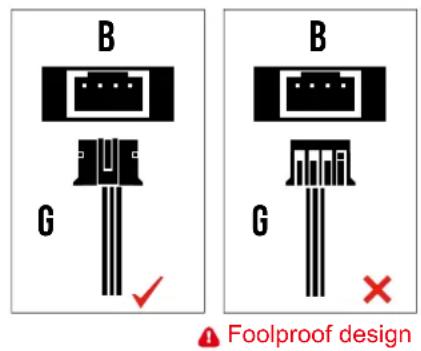
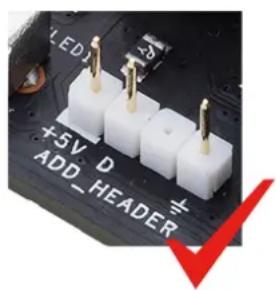
5. If your motherboard has a 5V 3-Pin addressable (digital) RGB header, you can customize RGB lighting via the motherboard manufacturer's sync software.

Isometric line drawing of a computer motherboard with visible CPU socket, RAM slots, and heatsink (no text or labels)

OR

Option:

Wired lighting controller (30 different lighting effects)

graph LR A[" wired lighting controller (30 different lighting effects) "] --> B[" A1F "] B --> C[" C "] C --> D[" PSU "] style A fill:#f9f,stroke:#333 style B fill:#ccf,stroke:#333 style C fill:#cfc,stroke:#333 style D fill:#fcc,stroke:#333

OR

Option:

Adapter Cable to GAMDIAS AEOLUS BOX

graph TD A[" fan "] -->|A1F| B[" LED "] B --> C[" Light "] B --> D[" E "] style A fill:#f9f,stroke:#333 style B fill:#ccf,stroke:#333 style C fill:#cfc,stroke:#333 style D fill:#fcc,stroke:#333

B G B G Foolproof design

Gamdias Chione M3-240W - OR - 3

LED +5V D ADD_HEADER

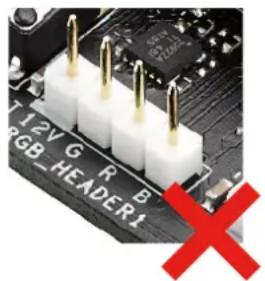
Close-up of a circuit board with LED and VDG labels and a red X symbol (no readable text or symbols beyond standard electronic symbols)

Close-up of a circuit board with three white 3-pin connectors and a red X symbol (no readable text or symbols)

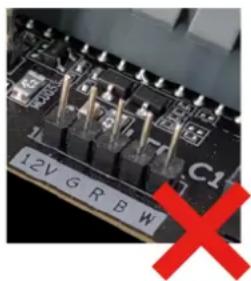
12V G R B W C1

Gamdias Chione M3-240W - OR - 8

CHIONE M3-240RW only supports 5V addressable (digital) RGB header

6

Turn on the computer after installing
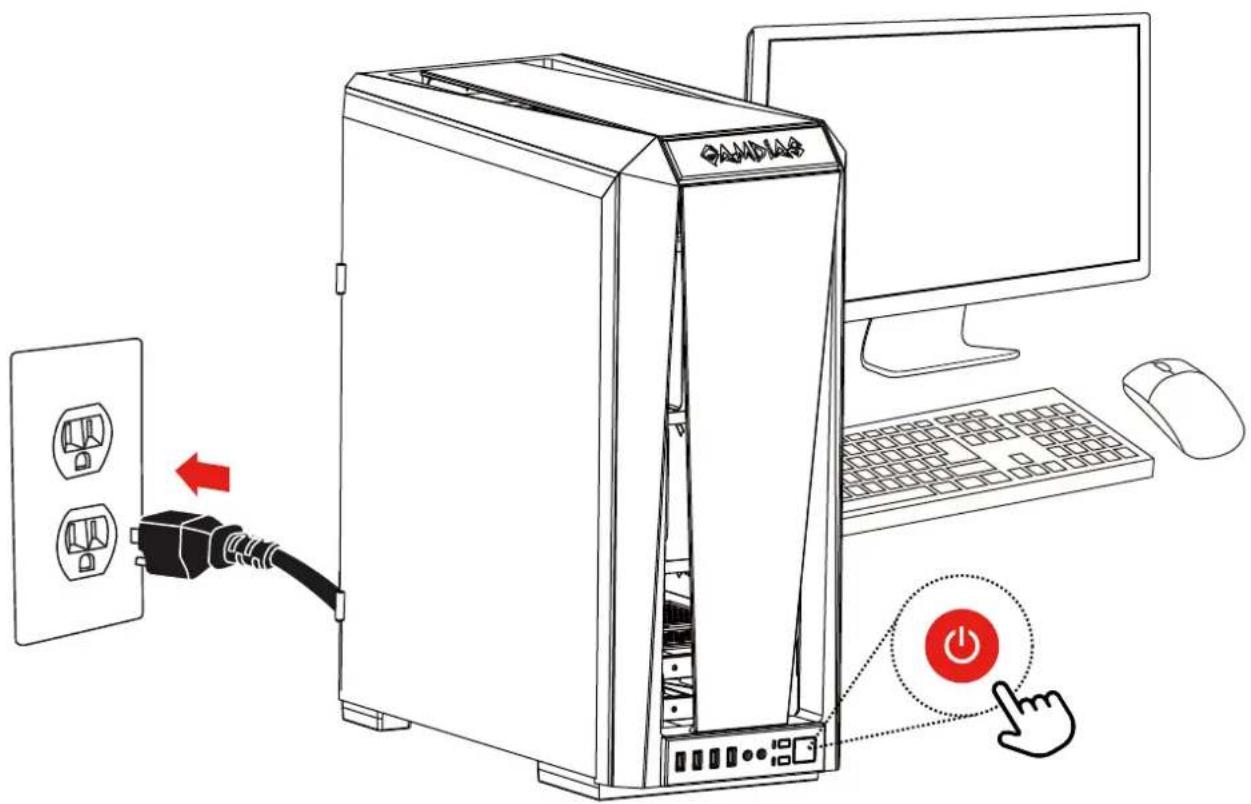
Diagram showing computer setup with a desktop tower, power plug, mouse, and mouse cursor, highlighting a button labeled 'Power' with a red arrow.

Abstract geometric logo with interlocking black and gold shapes forming a triangular pattern (no text or symbols)

GAMDIAS

GAMING ART IN MOTION

Manual assistant
Powered by Anthropic
Waiting for your message
Product information

Brand : Gamdias

Model : Chione M3-240W

Category : Laptop cooler