Aura GL240 - Computer cooling Gamdias - Free user manual and instructions
Find the device manual for free Aura GL240 Gamdias in PDF.


Pick your language and provide your email: we'll send you a specifically translated version.
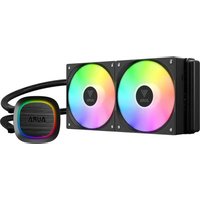
| Type of product | All-in-one liquid CPU cooler |
| Radiator size | 240 mm |
| Fan size | 2 × 120 mm |
| Radiator material | Aluminum |
| Waterblock material | Copper |
| Pump speed | Up to 3200 RPM |
| Fan speed | 800 – 2000 RPM |
| Maximum airflow | 52 CFM |
| Maximum static pressure | 2.5 mm H₂O |
| Noise level | 20 – 35 dBA |
| Bearing type | Hydro dynamic bearing |
| RGB lighting | Addressable RGB (ARGB) |
| Socket compatibility | Intel LGA 1150/1151/1155/1156/1200/1700/2011/2066, AMD AM4/AM5 |
| Pump connector | 3-pin |
| Fan connector | 4-pin PWM |
| RGB connector | 3-pin ARGB (5V) |
| Rated voltage | 12V DC (fan/pump), 5V DC (ARGB) |
| Power consumption | Pump: 4.8 W, Fan: 3.6 W each |
| Waterblock dimensions | 80 × 80 × 50 mm |
| Radiator dimensions | 272 × 120 × 27 mm |
| Weight | 1.4 kg |
| Maintenance | Sealed, maintenance-free loop |
| Cleaning | Use soft brush or compressed air on radiator and fans |
| Safety | Ensure secure mounting; use included thermal compound |
| Spare parts | Replacement fans and mounting brackets available via support |
| General information | 2-year limited warranty |
Frequently Asked Questions - Aura GL240 Gamdias
What socket types does the Gamdias Aura GL240 support?
The Gamdias Aura GL240 supports a wide range of sockets, including Intel LGA 1150/1151/1155/1156/1200/1700/2011/2066 and AMD AM4/AM5. Always verify compatibility with your motherboard before installation.
How do I install the Aura GL240 cooler?
Installation involves attaching the backplate and mounting brackets for your specific socket, then securing the waterblock onto the CPU with thermal compound. Finally, mount the radiator and fans to your case. Full step-by-step instructions are in the manual.
Can I control the RGB lighting on the Aura GL240?
Yes, the ARGB lighting can be controlled via the 3-pin ARGB header on your motherboard, or through compatible RGB software from your motherboard manufacturer. A separate ARGB controller is not included.
What is the maintenance required for this liquid cooler?
The Aura GL240 is a sealed and maintenance-free liquid cooling loop. You do not need to refill or replace the liquid. Simply clean the radiator and fans periodically using a soft brush or compressed air to prevent dust buildup.
How do I clean the radiator and fans?
Turn off and unplug your PC. Use a soft brush or low-pressure compressed air to gently remove dust from the fan blades and radiator fins. Avoid using water or harsh chemicals, and hold the fans to prevent them from spinning during cleaning.
What is the expected noise level of the Aura GL240?
The fans operate at 20 – 35 dBA, depending on speed. At lower RPM, the cooler is nearly silent, while at 2000 RPM it produces a noticeable but acceptable airflow noise. The pump is designed to be quiet as well.
What should I do if the pump stops working?
If the pump fails, your CPU will overheat quickly. First, check the pump connector is firmly attached to the motherboard header. If it still doesn't turn, contact Gamdias support for warranty service. Do not continue using the system until the cooler is replaced.
It is also recommended to monitor CPU temperatures with software to catch failures early.
Is there a risk of leakage with this liquid cooler?
The Aura GL240 uses a pre-sealed, low-permeability tubing and robust fittings to minimize leakage risk. However, improper installation or physical damage can cause leaks. Ensure all screws are tightened to the specified torque and check for damage before installation.
Does the Aura GL240 come with thermal compound pre-applied?
Yes, the waterblock has thermal compound pre-applied, so you can install it straight out of the box. If you remove the cooler for reuse later, you will need to clean off the old paste and apply fresh thermal compound to maintain optimal heat transfer.
What is the warranty period for the Gamdias Aura GL240?
The Aura GL240 comes with a 2-year limited warranty. This covers defects in materials and workmanship. The warranty does not cover physical damage, misuse, or leakage caused by improper installation. Keep your proof of purchase for warranty claims.
User questions about Aura GL240 Gamdias
0 question about this device. Answer the ones you know or ask your own.
Ask a new question about this device
No questions yet. Be the first to ask one.
Download the instructions for your Computer cooling in PDF format for free! Find your manual Aura GL240 - Gamdias and take your electronic device back in hand. On this page are published all the documents necessary for the use of your device. Aura GL240 by Gamdias.
USER MANUAL Aura GL240 Gamdias
Manual assistant
Powered by Anthropic
Waiting for your message
Product information
Brand : Gamdias
Model : Aura GL240
Category : Computer cooling