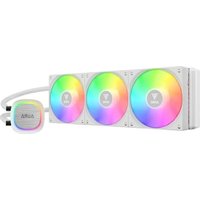
Aura GL360 V2 - Computer cooling Gamdias - Free user manual and instructions
Find the device manual for free Aura GL360 V2 Gamdias in PDF.


Pick your language and provide your email: we'll send you a specifically translated version.
| Product Type | All-in-One Liquid CPU Cooler |
| Model | Aura GL360 V2 |
| Radiator Dimensions | 397 x 120 x 27 mm |
| Fan Dimensions | 120 x 120 x 25 mm (3 fans included) |
| Fan Speed | 600 - 2000 RPM ±10% |
| Fan Airflow | 72 CFM (max) |
| Fan Noise Level | ≤ 35 dBA |
| Pump Speed | 2800 RPM ±10% |
| Pump Noise Level | ≤ 20 dBA |
| Bearing Type | Hydro Dynamic Bearing (Fans) |
| Lighting | Addressable RGB (ARGB) on pump and fans |
| Socket Compatibility | Intel LGA1700/1200/115x/20xx; AMD AM5/AM4/sTRX4/sTR4 |
| Material | Aluminum radiator, Copper cold plate |
| Weight (Net) | 1.6 kg |
| Power Consumption (Pump) | 6.8 W (12V DC) |
| Voltage (Fans) | 12V DC |
| Warranty | 2 years (refer to manufacturer) |
| Maintenance | Periodically clean radiator fins and fans with compressed air |
| Safety | Use only with compatible CPU sockets; avoid bending tubing; ensure proper mounting pressure |
| Spare Parts | Replacement fans, mounting kits, and thermal paste available from Gamdias |
Frequently Asked Questions - Aura GL360 V2 Gamdias
What is the socket compatibility of the Gamdias Aura GL360 V2?
The Aura GL360 V2 supports Intel LGA1700/1200/115x/20xx and AMD AM5/AM4/sTRX4/sTR4 sockets. Always verify your motherboard's socket type before purchase.
Does the cooler come with pre-applied thermal paste?
Yes, the cold plate has pre-applied thermal paste for convenient installation. You can also replace it with your preferred paste if needed.
How do I control the ARGB lighting?
The ARGB lighting can be controlled via your motherboard's 3-pin ARGB header using software like ASUS Aura Sync, Gigabyte RGB Fusion, MSI Mystic Light, or ASRock Polychrome Sync. A separate ARGB controller may be included for non-ARGB motherboards.
Can I mount the radiator at the top or front of my case?
Yes, the 360mm radiator can be mounted at the top or front of most mid-tower and full-tower cases. Ensure your case has clearance for a 360mm radiator (typically 397mm length and 120mm width).
What is the noise level of the fans at maximum speed?
At 2000 RPM, the fans produce up to 35 dBA, which is relatively quiet. For lower noise, use the included PWM control or adjust fan curves in BIOS.
How often should I clean the radiator?
It is recommended to clean the radiator fins and fans every 3-6 months using compressed air to maintain optimal cooling performance. Avoid using water or solvents.
The pump makes a clicking sound. Is this normal?
A slight clicking or gurgling sound during startup is normal as air bubbles pass through. If the sound persists, check that the pump is running at full speed and ensure the radiator is mounted higher than the pump to trap air in the radiator.
What is the warranty period for the Aura GL360 V2?
Gamdias typically offers a 2-year warranty against manufacturing defects. Keep your purchase receipt and register the product on the Gamdias website for warranty support.
Can I use this cooler with Intel LGA 1700?
Yes, the Aura GL360 V2 includes LGA 1700 mounting brackets in the package. Ensure you use the correct screws and backplate for that socket.
What is the pump speed specification?
The pump operates at 2800 RPM ±10% and is powered via a standard 3-pin fan header. It is designed for silent operation with a noise level under 20 dBA.
User questions about Aura GL360 V2 Gamdias
0 question about this device. Answer the ones you know or ask your own.
Ask a new question about this device
No questions yet. Be the first to ask one.
Download the instructions for your Computer cooling in PDF format for free! Find your manual Aura GL360 V2 - Gamdias and take your electronic device back in hand. On this page are published all the documents necessary for the use of your device. Aura GL360 V2 by Gamdias.
USER MANUAL Aura GL360 V2 Gamdias
Manual assistant
Powered by Anthropic
Waiting for your message
Product information
Brand : Gamdias
Model : Aura GL360 V2
Category : Computer cooling