
ML II-C4 - Microphone GODOX - Free user manual and instructions
Find the device manual for free ML II-C4 GODOX in PDF.


| Product Name | MoveLink II Smart Charging Case |
| Model | ML II-C4 |
| Product Type | Charging Case |
| Dimensions | Approx. 3.54 x 2.72 x 2.28 inches |
| Net Weight | Approx. 227 g |
| Battery Parameters | 3.7V, 3500mAh, 12.95Wh |
| USB-C Input | 5V ~ 2A |
| Self-Charging Time | Approx. 2 hours |
| Number of Devices Charged | 3 devices (transmitters/receivers) |
| Full Charges for Devices | Approx. 3 times |
| Charging Time for Devices | Approx. 1 hour 30 minutes |
| Battery Level Display | Digital display on case, shows remaining battery |
| Charging Indicator | Green LED flashes when charging, off when fully charged |
| Protections | Over-current, over-voltage, over-temperature |
| Working Environment Temperature | -5°C to 50°C |
| Storage Temperature | Not to exceed 50°C |
| Compatible Devices | Godox MoveLink II transmitters and receivers |
| Maintenance | Avoid drops, keep dry, avoid sudden temperature changes, keep away from strong magnetic fields |
| Safety | Do not disassemble, keep away from children, avoid flammable environments |
Frequently Asked Questions - ML II-C4 GODOX
User questions about ML II-C4 GODOX
0 question about this device. Answer the ones you know or ask your own.
Ask a new question about this device
Download the instructions for your Microphone in PDF format for free! Find your manual ML II-C4 - GODOX and take your electronic device back in hand. On this page are published all the documents necessary for the use of your device. ML II-C4 by GODOX.
USER MANUAL ML II-C4 GODOX
- International University of Economics & Communications
深圳市神舟速宏教育有限公司
电话:(0755-2387)812185242 传真:(0755-25723423)
00800 Phone Equipment (c., Ltd. Asia: Beijing 13 Zhongnan Industrial Group, Tianyuan Community, Fuzhou City, Beijing District, Shenzhen 57303. China - Tel: +86-718-2960181610762) Fax: +86-755-25723923 - E-mail: gpxx@gpxx.com
www.gcdex.com
UK CA CE FC
Warning
• Do not disassemble. Should repairs become necessary, this product must be sent to our Company or an authorized maintenance center.
• Always keep this product dry. Do not use in rain or damp conditions.
- Do not leave or store this product in the environment of direct sunlight, near heating devices, or in hot, humid or dusty.
- Keep out of reach of children.
- Do not use in flammable and explosive environments. Pay attention to the relevant warning signs.
- Do not leave or store the product if the ambient temperature reads over 50°C.
- Please read carefully and follow the warnings or instructions provided by the manufacturer.
Names of Parts
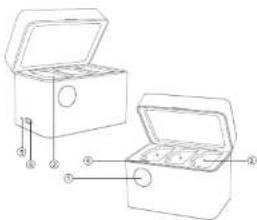
- Battery Level Display of Charging Case
-
Charging Compartment
-
Charging Point
- Charging Indicator
- Reset Hole
- USB-C Port
What's Inside
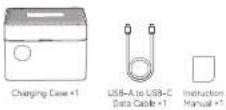
Note: Due to continuous updates and upgrades of the products, there may be differences between the actual products and the pictures. Therefore, the pictures are for reference only, products to prevail in kind
Charging Instructions
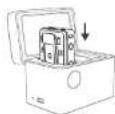
① Please aim the charging points of the transmitter/receiver at the charging points of the charging compartment, then insert in to get it properly charged.
② Connect the charging case to the power source via USB-C port and adapter can charge the charging case.
③ In order to get the transmitter/receiver fully charged, make sure to power it off before putting into the charging compartment to charge. The transmitter and receiver may be paired and keep working when charged in power on status, making them difficult to be fully charged.
| Digital display flashes incrementally | Changing case is changing |
| Digital display is constant on with 100 | Changing case is fully changed |
| Digital display is constant on with 20 | Changing case is low battery level |
| Changing indicator flashes green | Transmitter/Receiver in the charging compartment is changing |
| Changing indicator is off | Transmitter/Receiver in the charging compartment is fully changed |
Supplemental Notes
- The battery level display will show the remaining battery level when the lid is opened, and will turn off after 5s when the lid is closed.
- If the transmitter/receiver can not be charged after inserted into the charging case, please check whether its charging points have fully contacted with those of charging compartment. If not, please take out and insert it again until the charging
- It takes about 2 hours to fully charge the charging case itself, it can charge three devices of MoveLink II for about 3 times after fully charged, and it takes about 1 hour and 30 minutes to fully charge the three devices.
- Take out the transmitter/receiver after fully charged then insert it back immediately, the charging indicator will still flash. This is normal for the charging case to re-test whether the transmitter/receiver is fully charged.
- The charging case has over-current protection, over-voltage protection and over-temperature protection, please use it in the environment of -5°C\~+50°C.
- It is recommended to use the original mobile phone adapter or third-party brand adapter and data cable to charge the charging case. Due to the standby power consumption of the lithium battery, please charge the charging case regularly about every 3 months to ensure normal use.
Technical Data
| Product Name | MoveLink II Smart Charging Case |
| Model | ML II-C4 |
| Lithium Battery Parameters | 3.7V, 3500mAh, 12.95Wh |
| USB-C Input | 5V ≈ 2A |
| Self-Charging Time | Approx. 2h |
| Working Environment Temperature | -5-50°C |
| Dimension | = 3.54^ × 2.72^ × 2.28^ |
| Net Weight | = 227 g |
Specifications and data may subject to changes without notice.
Maintenance
Avoid falling. Strong collision or vibration may malfunction the device. Keep dry. This product is not water-proof. Malfunction, rust, and corrosion may occur and go beyond repair if soaked in water or exposed to high humidity.
Avoid sudden temperature changes.
Condensation happens in sudden temperature changes such as the circumstance when taking the product out of a building with higher temperature to outside in winter. Please put the product in a handbag or plastic bag beforehand.
Keep away from strong magnetic field. The strong static or magnetic field produced by devices such as radio transmitters leads to malfunction. Specifications and data may subject to changes without notice.
FCC Statement
This device complies with part 15 of the FCC Rules. Operation is subject to the following two conditions:
(1) This device may not cause harmful interference, and
(2) this device must accept any interference received, including interference that may cause undesired operation.
Any Changes or modifications not expressly approved by the party responsible for compliance could void the user's authority to operate the equipment.
Note: This equipment has been tested and found to comply with the limits for a Class B digital device, pursuant to part 15 of the FCC Rules. These limits are designed to provide reasonable protection against harmful interference in a residential
installation. This equipment generates uses and can radiate radio frequency energy and, if not installed and used in accordance with the instructions, may cause harmful interference to radio communications. However, there is no guarantee that interference will not occur in a particular installation. If this equipment does cause harmful interference to radio or television reception, which can be determined by turning the equipment off and on, the user is encouraged to try to correct the interference by one or more of the following measures:
-Reorient or relocate the receiving antenna
-Increase the separation between the equipment and receiver.
-Connect the equipment into an outlet on a circuit different from that to which the receiver is connected.
-Consult the dealer or an experienced radio/TV technician for help.
Declaration of Conformity
GODOX Photo Equipment Co., Ltd. hereby declares that this equipment are in compliance with the essential requirements and other relevant provisions of Directive 2014/35/EU, 2014/30/EU. They are allowed to be used in all EU member states. For more information of DoC, Please click this web link
https://www.godox.com/eu-declaration-sf-conformity
Warranty
Dear customers, as this warranty card is an important certificate to apply for our maintenance service, please fill in the following form in coordination with the seller and safe-keep it. Thank you!
| Product Information | Model | Product Code Number |
| Name | Contact Number | |
| Customer Information | Address | |
| Seller Information | Name | |
| Contact Number | ||
| Address | ||
| Date of Sale | ||
| Note | ||
Note: This form shall be sealed by the seller.
Applicable Products
The document applies to the products listed on the Product Maintenance Information (see below for further information). Other products or accessories (e.g. promotional items, giveaways and additional accessories attached, etc.) are not included in this warranty scope.
Warranty Period
The warranty period of products and accessories is implemented according to the relevant Product Maintenance Information. The warranty period is calculated from the day(purchase date) when the product is bought for the first time, and the purchase date is considered as the date registered onthe warranty card when buying the product.
How to Get the Maintenance Service
If maintenance service is needed, you can directly contact the product distributor or authorized service institutions. You can also contact the Godox after-sale service call and we will offer you service. When applying for maintenance service, you should provide valid warranty card. If you cannot provide valid warranty card, we may offer you maintenance service once confirmed that the product or accessory is involved in the maintenance scope, but that shall not be considered as our obligation.
Inapplicable Cases
The guarantee and service offered by this document are not applicable in the following cases: ①. The product or accessory has expired its warranty period; ②. Breakage or damage caused by inappropriate usage, maintenance or preservation, such as improper packing, improper usage, improper plugging in/out external equipment, falling off or squeezing by external force, contacting or exposing to the improper temperature, solvent, acid, base, flooding and damp environments, etc; ③. Breakage or damage caused by
Inapplicable Cases
non-authorized institution or staff in the process of installation, maintenance, alternation, addition and detachment; ④ The original identifying information of product or accessory is modified, aternated, or removed; ⑤. No valid warranty card; ⑥. Breakage or damage caused by using illegally authorized, nonstandard or non-public released software; ⑦. Breakage or damage caused by force majeure or accident; ⑧. Breakage or damage that could not be attributed to the product itself. Once met these situations above, you should seek solutions from the related responsible parties and Godox assumes no responsibility. The damage caused by parts, accessories and software that beyond the warranty period or scope is not included in our maintenance scope. The normal discoloration, abrasion and consumption are not the breakage within the maintenance scope.
Maintenance and Service Support Information
The warranty period and service types of products are implemented according to the following Product Maintenance Information:
| Product Type | Name | Maintenance Period/Duration | Warning Service Type |
| Parts | Product Main Body | 12 | Customer needs (the product to designated site) |
| Battery | 3 | Customer needs (the product to designated site) | |
| Charger, Eléctoral Parts etc. | 12 | Customer needs (the product to designated site) | |
| Other Items | Battery Case, Windscreen Room, Wind Edge, Smoking, Denna, Lymphoid, Na Yaola Leaf Edge, Pig, Packaged | No | Without warranty |
Godox After-sale Service Call 0755-29609320-8062
Godox
日期:2024/7/10
料号 705-ML2C40-01
项目 ML II-C4
成品尺寸 按图纸
公差 ±0.5mm
材质 105g 碎粉纸 折页 双色印刷
工 艺
颜色要求
其他
设计师 胡宾
包装结构 江叶群
文案 伍青蕾
项目产品王震
Brand : GODOX
Model : ML II-C4
Category : Microphone