HSU18R-NTR3BN-INV - Air-conditioner HAIER - Free user manual and instructions
Find the device manual for free HSU18R-NTR3BN-INV HAIER in PDF.


| Product Type | Split Air Conditioner |
| Brand | Haier |
| Model | HSU18R-NTR3BN-INV |
| Capacity (Cooling/Heating) | 18000 BTU/h |
| Compressor Type | Inverter |
| Refrigerant | R32 |
| Indoor Unit Dimensions (WxHxD) | 1000 x 300 x 220 mm |
| Outdoor Unit Dimensions (WxHxD) | 850 x 650 x 300 mm |
| Indoor Unit Weight | 12 kg |
| Outdoor Unit Weight | 35 kg |
| Power Supply | 220-240 V, 50 Hz |
| Energy Efficiency | High (Inverter Technology) |
| Annual Energy Consumption | 1500 kWh/year (approx.) |
| Functions | Cool, Heat, Dehumidify, Fan, Auto |
| Smart Control | Wi-Fi (via Haier App) |
| Filter | Washable Antibacterial Filter |
| Noise Level (Indoor) | 22 - 45 dB(A) |
| Noise Level (Outdoor) | 50 - 55 dB(A) |
| Warranty | 5 years on compressor |
| Maintenance | Clean filter monthly; professional service annually |
Frequently Asked Questions - HSU18R-NTR3BN-INV HAIER
User questions about HSU18R-NTR3BN-INV HAIER
0 question about this device. Answer the ones you know or ask your own.
Ask a new question about this device
Download the instructions for your Air-conditioner in PDF format for free! Find your manual HSU18R-NTR3BN-INV - HAIER and take your electronic device back in hand. On this page are published all the documents necessary for the use of your device. HSU18R-NTR3BN-INV by HAIER.
USER MANUAL HSU18R-NTR3BN-INV HAIER
SPLIT TYPE ROOM AIR CONDITIONER OPERATION MANUAL
HSU11V-TMS3BN-INV HSU11V-TMS3BN-INV HSU11V-TMG3BN-INV HSU11V-TMR3BN-INV HSU17VP-TQS3BN-INV HSU17VP-TQP3BN-INV HSU17VP-TQI3BN-INV HSU12V-TMS3BN-INV HSU13K-PZB3BN-INV HSU13E-TXG4BN-INV HSU13K-PYFR4BN-INV HSU13E-TXG5BN-INV HSU13K-PYFR5BN-INV HSU13K-PYFC5BN-INV HSU13K-PYFG5BN-INV HSU13E-TXWSBN-INV HSU13E-TXSSBN-INV HSU13K-PYSG5BN-INV HSU13K-PYSC4BN-INV HSU13K-PYFR3BN-INV HSU13C-TGQ3BN-INV HSU13C-TGQ3BN-INV HSU13C-TTS3BN-INV HSU13K-PYSG1BN-INV HSU13K-PYSS1BN-INV HSU13Z-PZFDP3BN-INV HSU14E-TXWSBN-INV HSU14E-TXSSBN-INV
HSU14K-PYF05BN-INV HSU14K-PYFR5BN-INV HSU14E-TXG5BN-INV HSU14C-TQG3BN-INV HSU14K-PYFC5BN-INV HSU14K-PYSG5BN-INV HSU14K-PYFN5BN-INV HSU14K-PYFR5BN-INV HSU15V-TMS3BN-INV HSU17V-TMS3BN-INV HSU17VP-TQN3BN-INV HSU17VP-TQA3BN-INV HSU17VP-TQB3BN-INV HSU17VP-TQG3BN-INV HSU17VP-TQR3BN-INV HSU30V-TBS3BN-INV HSU35V-TBS3BN-INV HSU40V-TBS3BN-INV HSU50K-PYFW3BN-INV HSU50P-QYFC3BN-INV HSU50KP-PYFW5BN-INV HSU50KP-PYFC3BN-INV HSU50KP-PYFN3BN-INV HSU50CP-TQR3BN-INV HSU50CP-TQS3BN-INV HSU50CP-TQP3BN-INV HSU50CP-TQA3BN-INV HSU50CP-TQI3BN-INV HSU50CP-TQN3BN-INV
HSU50C-TQS3BN-INV HSU18C-TQS3BN-INV HSU18C-TQS3BN-INV HSU18V-TQS3BN-INV HSU18V-TQS3BN-INV HSU18K-PYFC3BN-INV HSU18R-NTB3BN-INV HSU18K-PYFRABN-INV HSU18K-PYFC4BN-INV HSU18R-NTR3BN-INV HSU18K-PYSS3BN-INV HSU18K-PYFC4BN-INV HSU18K-PYSC4BN-INV HSU18K-PYSG4BN-INV HSU18K-PYSG3BN-INV HSU18K-PYSG9BN-INV HSU18K-PYSC5BN-INV HSU18K-PYFC5BN-INV HSU18Z-PZFDB3BN-INV HSU18EP-TQS5BN-INV HSU18EP-TQS5BN-INV HSU18EP-TX5BN-INV HSU18EP-TX5BSN-INV HSU18EP-TX5BSN-INV HSU18EP-TX5BSN-INV HSU18EP-TX5BSN-INV HSU18EP-KPYFS5BN-INV HSU18KP-KPYRS5BN-INV HSU18KP-KPYFS6BN-INV HSU18KP-KPYRS7BN-INV HSU18KP-KPYFRS5BN-INV HSU18KP-KPYFC5BN-INV HSU18KP-KPYFASBNS-INV HSU18KP-KPYFASBNS-INV HSU25VP-TQTSBSN-INV HSU25V-TQS3BN-INV HSU25V-TQS4BSN-INV HSU25V-TQS4BSN-INV HSU25VP-TQTSBSN-INV HSU25VP-TQTSBSN-INV HSU25VP-TXRSBNS-INV HSU25VP-TXRSBNS-INV HSU19E-TXG4BN-INV
HSU19C-TQ63BN-INV HSU19K-PYFR4BN-INV HSU19E-TX58BN-INV HSU19E-TX58BN-INV HSU19E-TX53BN-INV HSU19K-PYFR5BN-INV HSU19K-PYFC5BN-INV HSU19E-TX58BN-INV HSU19K-PYFC5BN-INV HSU19SHD-PFG6BN-INV HSU19K-PYFC5BN-INV HSU19G-MZFWSBN-INV HSU19K-PYFC5BN-INV HSU19KB-PG5BSN-INV HSU19K-PYFC5BN-INV HSU19K-PYFS3BN-INV HSU19K-PYFC5BN-INV HSU19K-PYSC4BN-INV HSU19SHD-PFG6BN-INV HSU19K-PZFBSN-INV HSU19SHD-PFG6BN-INV HSU19SHD-PFG6BN-INV HSU19K-PYZPSBSN-INV HSU19K-PZPFSBSN-INV HSU19K-PZPFSBSN-INV HSU19K-PZPFSBSN-INV HSU19K-PZPFSBSN-INV HSU19K-PZPFSBSN-INV HSU19K-PZPFSBSN-INV HSU19K-PZPFSBSN-INV HSU19K-PZPFSBNSIN-VN HSU19K-PZPFSBNSIN-VN HSU19K-PZPFSBNSIN-VN HSU19K-PZPFSBNSIN-VN HSU19G-MZFMSBN-INV HSU19G-MZFMSBN-INV HSU19G-MZFMSBN-INV HSU19G-MZFDSBN-INV HSU19G-MZFMSBN-INV HSU20SHD-PFG5BN-INV HSU20SHD-PFG6BN-INV HSU24K-PYFR3BN-INV HSU24K-PYFR3BN-INV HSU24K-PYFR3BN-INV HSU24K-PYFR3BN-INV
HSU24K-PYFG3BN-INV HSU24E-TXS3BN-INV HSU24E-TX3GBN-INV HSU24E-TXW3BN-INV HSU24E-TXR3BN-INV HSU24E-TXS3BN-INV HSU24E-TXS3BN-INV HSU13K-PYAIR3BN-INV HSU13K-PYAIR4BN-INV HSU14K-PYAIR5BN-INV HSU50KP-PAIW3BN-INV HSU18K-PYAIR3BN-INV HSU18K-PYAIR4BN-INV HSU18K-KP-AIR5BN-INV HSU19K-PYAIR5BN-INV HSU19K-PYAIR6BN-INV HSU19K-PYAIR4BN-INV HSU18U-PYAIC5BN-INV HSU19K-PYAIN5BN-INV HSU19K-PYAIR5BN-INV HSU19K-PZAIB5BN-INV HSU19K-PZAIM5BN-INV HSU19K-PZAIS5BN-INV HSU19K-PZAIP5BN-INV HSU19K-PZAIA5BN-INV HSU19K-PZAIA5BN-INV HSU19K-PZAIA5BN-INV HSU19K-PZAIC5BN-INV HSU19G-MZAIM5BN-INV HSU19G-MZAIS5BN-INV HSU19G-MZAIP5BN-INV HSU19G-MZAID5BN-INV HSU19G-MZAAI5BN-INV HSU19G-MZAAC5BN-INV HSU19P-YAIGS3BN-INV HSU19P-YAIGS3BN-INV HSU20SD-PAIGS8N-INV HSU24K-PYAIR3BN-INV
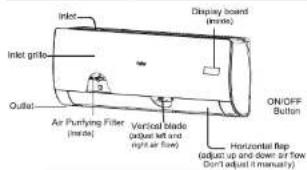
Parts and Functions
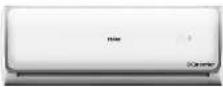
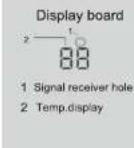
■ Indoor Unit
Outdoor Unit
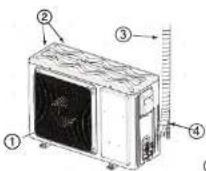
① OUTLET ② INLET ③ CONNECTING PIPING AND ELECTRICAL WIRING ④ DRAIN HOSE
Actual inlet grille may vary from the one shown in the manual according to the product purchased.
- Please read this operation manual before using the air conditioner. Keep this operation manual for future reference.
0011533504
Operation
Emergency operation and test operation
Emergency Operation:
- Use this operation only when the remote controller is defective or lost, and with function of emergency running, air conditioner can run automatically for a while.
- When the emergency operation switch is pressed, the "Pi" sound is heard once, which means the start of this operation.
- When power switch is turning on for the first time and emergency operation starts, the unit will run automatically in the following modes:
| Room temperature | Designated temperature | Timer mode | Fan speed | Operation mode |
| Above 23°C | 26°C | No | AUTO | COOL |

- It is impossible to change the settings of temp. and fan speed,It is also not possible to operate in timer or dry mode.
Test operation:
Test operation switch is the same as emergency switch.
- Use this switch in the test operation when the room
temperature is below 16°C, do not use it in the normal operation.
- Continue to press the test operation
switch for more than 5 seconds. After you hear the "PI" sound twice, release your finger from the switch: the cooling operation starts with the air flow speed "HI".
• Under this operation mode, the fan motor of indoor unit will run in high speed.

ter this operation mod will run in high speed.
Air Flow Direction Adjustment
- Status display of air flow Vertical flap
Pos.1 → √→√→√→√→√→√→

Auto swing)
2.Left and right air flow adjustment
(This function is unavailable on For each press of SWING ◄)
button, remote controller
displays as follows remote controller;

Pos.1 Pos.2 Pos.3 Pos.4 Pos.5 Pos.6
Note: In some model: The remote has the button 📋, But the AC doesn't have the left and right air flow auto-adjustment function. in this condition, change the direction of vertical blades manually.
Cautions:
- When adjusting the flap by hand, turn off the unit.
- When humidity is high, condensate water might occur
at air outlet if all vertical louvers are adjusted to left or right. - It is advisable not to keep horizontal flap at downward position for a long time in COOL or DRY mode,
otherwise, condensate water might occur. Note:
When restart after remote turning off, the remote controller will automatically memorize the previous set swing position.
Sleep Operation
Before going to bed, you can simply press the SLEEP button and unit will operate in SLEEP mode and bring you a sound sleep.

Operation Mode
- In COOL,DRY mode
1 hours after SLEEP mode starts, temp. will become 1°C
higher than temp. setting. After another 1 hours, temp. rises by 1°C further. The unit will run for further 6 hours then stops Temp. is higher than temp. setting so that room temperature won't be too low for your sleep.
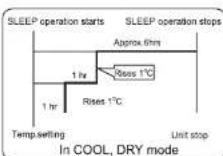
- In FAN mode: It has no SLEEP function.
- Set the wind speed change when sleeping If the wind speed is high or middle before setting for the sleep, set for lowing the wind speed after sleeping. If it is low wind, no change.
Note
When TIMER function is set, the sleeping function can't be set up. After the sleeping function is set up, if user resets TIMER function, the sleeping function will be cancelled; the machine will be in the state of timing-on.
■ Turbo /Quiet Operation

When you need fast cool or fast dehumidification, you can choose the Turob function; when you sleep, read, you can choose Quiet function

Press the turbo button, you can switch the "Turbo" and
"Quiet" function easily. Every press, the remote controller will
switch as below → ↗TURBOI → ↘QUIET → cancel
When running in Turbo, the fan speed is the highest, when running in Quiet, the fan speed is super slow
Operation
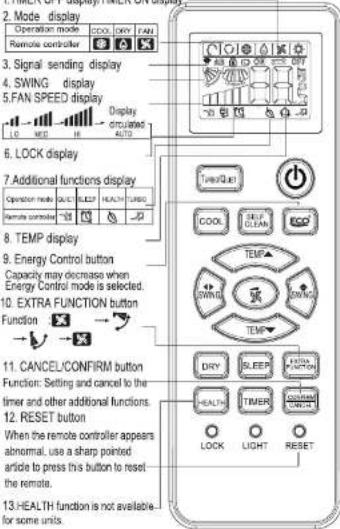
■ Remote controlle
1.TIMER OFF display/TIMER ON display
■ Loading of the battery
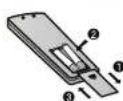
1 Remove the battery cover; 2 Load the batteries as illustrated 2 R-03 batteries, resetting key (cylinder);
3 Be sure that the loading is in line with the" + "/"-";
4 Load the battery, then put on the cover again.
●The distance between the signal transmission head and the rece-
- The distance between the signal transmission hood and this receiver hole should be within 7m without any obstacle as well.
- When electronic-started type fluorescent lamp or change-over type fluorescent lamp or wireless telephone is installed in the room, the receiver is apt to be disturbed in receiving the signals, so the distance to the indoor unit should be shorter.
- Full display or unclear display during operation indicates the batteries have been used up. Please change batteries - If the remote controller can't run normally during operation, please remove the batteries and reload several minutes later.
Base Operation
Remote controller
- Unit start
Press ON/OFF
on the remote controller,
unit starts.
Use remote control to turn on
and display setting
temperatu
- Select operation mode
COOL button:Cooling mode


3. Select temp. setting
Press TEMP▲/TEMP▼ button


TEMP ▲ Every time the button is pressed, temp. setting increase 1°C, if kept depressed, it will increase rapidly
TEMP Every time the button is pressed, temp. setting decrease 1°C, if kept depressed, it will decrease rapidly
Select a desired temperature.
4.Fan speed selection
Press ⬆ button to enter additional options, when cycle display to ✗, ✗ will flash. And then press

enter to FAN function.
Press FAN button. For each press, fan speed changes as follows:
Remote controller:
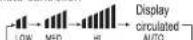
Air conditioner is running under displayed fan speed. When FAN is set to AUTO, the air conditioner automatically adjusts the fan speed according to room temperature.
| Operation Mode | Remote Controller | Note |
| COOL | according to room temperature. | |
| DRY | In DRY mode, when room temperature becomes lower than temp setting+2°C, unit will run intermittently at LOW speed regardless of FAN setting. | |
| FAN | In FAN operation mode, the unit will not operate in COOL or HEAT mode but only in FAN mode, AUTO is not available in FAN mode. And temp setting is disabled. In FAN mode, sweep operation is not available. |
Operation
Dry Operation

Press "DRY" Button, when the LCD displays
is set.
In Dry mode, compressor will stop to operate when the room temperature is below the setting temperature. If the room temperature is higher than the setting temperature, the logic circuit will control the operation of compressor and indoor fan speed, in order to cause dew formation on cooling coil to obtain the effect of dehumification. In dry mode, it is normal that the indoor fan speed is lower than other operation mode. Note: Recommend to use dry model in high humidity condition to avoid water droplet on IDU
Timer Operation
- Set ON timer
Press Ⓑ to close the screen
Press set the duration (hour).
Press "CONFIRM/CANCEL"
- Set OFF timer
Press Ⓤ to activate the screen
Press 📄 set the duration (hour).
Press "CONFIRM/CANCEL"
■ Energy Control Operation
-
Turn the appliance on.
-
• Press 📄 button repeatedly to select each step.
Note
- 1 step: The strong air blows out to cool indoor air quickly.
- 50 is displayed on the display screen.
- 2 step: The power input is 100% of rated power.
- 5 is displayed on the display screen.
- 3 step: The power Input is decreased by 25% compared to rated power input.
- a | is displayed on the display screen.
- 4 step: The power Input is decreased by 45% compared to rated power input.
- 12 is displayed on the display screen.
- 5 step (Optional): The power Input is decreased by 60% compared to rated power input.
- L3 is displayed on the display screen.
- L1(3 step), L2 (4 step), L3 (5 step) is displayed on some indoor units.
- This function is available with Cooling Mode.
- Capacity may decrease when Energy Control mode is selected.
Self Clean Operation

◆Functional description: the purpose of this function is to clean the evaporator.
◆Entry and exit: Press self clean button to enter this function, then it will display "CL" on the panel of the indoor unit and also on the remote controller. After running 18-21 minutes, this function will exit automatically with the "Pi" sound is heard twice, then the unit return to original state. Under operation process of self clean, press the button repeatedly has no effect and cannot exit, but the power off button and other mode button can make it exit.
Note:
1. It has no effect under the mode of timer/sleep.
2. After this mode starts, the air volume may reduce or even have no airflow.
3. It is normal if the unit make some sound like expand with heat and contract with cold
4. The "CL" display time may last differently on the remote controller and panel.
5. It is normal if the temperature is below 0°C outside, the unit may display "F25" under this mode running.
Please turn off the unit for 10 seconds then restart.
6. The best condition to run this mode: the temperature is 15°C\~27°C and the humidity is 35%\~60% in the door, the temperature is 30°C\~40°C (cooling season)
7. It is hard to frost if the air is too dry(humidity<20%). and if the humidity is too high(humidity>70%).
the condensate water may increase, which may move away some frost.
■ Health airflow Operation
- Press © to starting Setting the comfort work conditions
- The setting of healthy airflow function
Press button to enter additional options. Press this button continuously, the louvers location will cycle between in the following three locations, to choose the swing location what you needed, and then press button to confirm.

Notice: Do not direct the flap by hand. Otherwise, the grille will run incorrectly. If the grille is not run correctly, stop for a minute and then start, adjusting by remote controller. Note: 1. After setting the healthy airflow function, the position grill is fixed.
- In cooling, it is better to select the mode.
- In cooling and dry, using the air conditioner for a long time under the high air humidity, condensate water may occur at the grille.
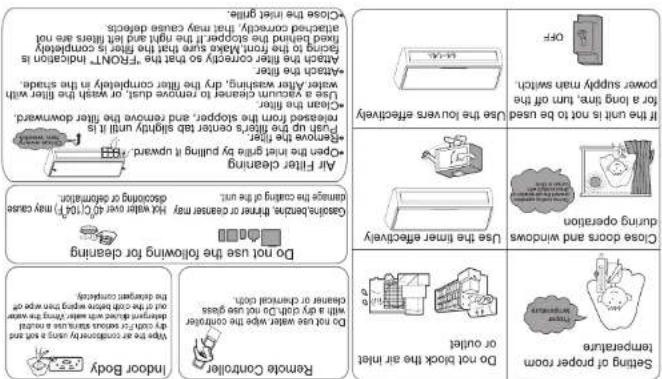
Maintenance
| Performance injection | • Freeze is heard |
| • Note is heard | |
| Normal Performance injection | • Speeds are guaranteed |
| • Find COOL, DRY, OXY, oxygen, air, plain, capacitors, drain, cooling, dry water, oxygen, air, inlet, capacitors, drain, cooling, dry water, oxygen, air, inlet, capacitors, drain, cooling, dry water, oxygen, air, inlet, capacitors, drain, cooling, dry water, oxygen, air, inlet, capacitors, drain, cooling, dry water, oxygen, air, inlet, capacitors, drain, cooling, dry water, oxygen, air, inlet, capacitors, drain, cooling, dry water, oxygen, air, inlet, capacitors | |
| • Find mode, fan speed can be changed | |
| • In dry mode, when room speed can be changed | |
| • In DRV mode, when room speed can be changed | |
| • Is there a power fueling, air, steam, power flow, or overnight-1.0 Loy speed (2.5 min/1.0 Loy speed) and outlet (3.0 min/1.0 Loy speed) through the window driving the cooling operation (the crenation) (or many people in the room) during cooling operation | |
| • Is there any objects before normally if stood be cleaned. Normally if stood be cleaned. Normally if still be cleaned. Normally if still be cleaned. Normally if still be cleaned. Normally if still be cleaned. Normally if still be cleaned. Normally if still be cleaned. Normally if still be cleaned. Normally if still be cleaned. Normally if still be cleaned. Normally if still be cleaned. Normally if still be cleaned. Normally if still be cleaned. Normally if still be cleaned. Normally if still be cleaned. Normally if still be cleaned. Normally if still be cleaned. Normally if still be cleaned. Generally | |
| Moderate | • During the ejection plus cooling, which is always 2 minutes after 2 min after 2 minutes after 2 min after 2 min after 2 min after 2 min after 2 min after 2 min after 2 min after 2 min after 2 min after 2 min after 2 min after 2 min after 2 min after 2 min after 2 min after 2 min after 2 min after 2 min after 2 min after 2 min after 2 min after 2 min after 2 min after 2 min after 2 min after 2 Min after 2 Min after 2 Min after 2 Min after 2 Min after 2 Min after 2 Min after 2 Min after 2 Min after 2 Min after 2 Min after 2 Min after 2 Min after 2 Min after 2 Min after 2 Min after 2 Min after 2 Min after 2 Min after 2 Min after 2 Min after 2 Min after 2 Min after 2 Min after 2 Min after 2 Max after 2 Max after 2 Max after 2 Max after 2 Max after 2 Max after 2 Max after 2 Max after 2 Max after 2 Max after 2 Max after 2 Max after 2 Max after 2 Max after 2 Max after 2 Max after 2 Max after 2 Max after 2 Max after 2 Max after 2 Max after 2 Max after 2 Max after 2 Max after 2 Max after 2 Min after 2 Min after 2 Min after 2 Min after 2 Min after 2 Min after 2 Min after 2 Min after 2 Min after 2 Min after 2 Min after 2 Min after 2 Min after 2 Min after 2 Min after 2 Min after 2 Min after 2 Min after 2 Min after 2 Min after 2 Min after 2 Min after 2 Min after 2 Min after 2 MJD before 2 MJD after 2 MJD after 2 MJD after 2 MJD after 2 MJD after 2 MJD after 2 MJD after 2 MJD after 2 MJD after 2 MJD after 2 MJD after 2 MJD after 2 MJD after 2 MJD after 2 MJD after 2 MJD after 2 MJD after 2 MJD after 2 MJD after 2 MJD after 2 MJD After 2 MJD After 2 MJD After 2 MJD After 2 MJD After 2 MJD After 2 MJD After 2 MJD After 2 MJD After 2 MJD After 2 MJD After 2 MJD After 2 MJD After 2 MJD After 2 MJD After 2 MJD After 2 MJD After 2 MJD After 2 MJD After 2 MJD After 2 MJDAfter 2 MJD After 2 MJD After 2 MJD After 2 MJD After 2 MJD After 2 MJD After 2 MJD After 2 MJD After 2 MJD After 2 MJD After 2 MJD After 2 MJD After 2 MJD After 2 MJD After 2 MJD After 2 MJD After 2 MJD After 2 MJD After 2 MJD After 2 MJD Before 2 MJD Before 2 MJD Before 2 MJD Before 2 MJD Before 2 MJD Before 2 MJD Before 2 MJD Before 2 MJD Before 2 MJD Before 2 MJD Before 2 MJD Before 2 MJD Before 2 MJD Before 2 MJD Before 2 MJD Before 2 MJD Before 2 MJD Before 2 MJD Before 2 MJD Before 2 MJD After 2 MJD After 2 MJD After 2 MJD After 2 MJD After 2 MJD After 2 MJD After 2 MJD After 2 MJD After 2 MJD After 2 MJD After 2 MJD After 2 MJD After 2 MJD After 2 MJD After 2 MJD After 2 MJD After 2 MJD After 2 MJD After 2 MJD Beyond 2 MJD Beyond 2 MJD Beyond 2 MJD Beyond 2 MJD Beyond 2 MJD Beyond 2 MJD Beyond 2 MJD Beyond 2 MJD Beyond 2 MJD Beyond 2 MJD Beyond 2 MJD Beyond 2 MJD Beyond 2 MJD Beyond 2 MJD Beyond 2 MJD Beyond 2 MJD Beyond 2 MJD Beyond 2 MJD Beyond 2 MJD Beyond 2 MJD Below 2 MJD Below 2 MJD Below 2 MJD Below 2 MJD Below 2 MJD Below 2 MJD Below 2 MJD Below 2 MJD Below 2 MJD Below 2 MJD Below 2 MJD Below 2 MJD Below 2 MJD Below 2 MJD Below 2 MJD Below 2 MJD Below 2 MJD Below 2 MJD Below 2 MJD Below 2 MJD Above 2 MJD Above 2 MJD Above 2 MJD Above 2 MJD Above 2 MJD Above 2 MJD Above 2 MJD Above 2 MJD Above 2 MJD Above 2 MJD Above 2 MJD Above 2 MJD Above 2 MJD Above 2 MJD Above 2 MJD Above 2 MJD Above 2 MJD Above 2 MJD Above 2 MJD Above 2 MJD Below 2 MJD Below 2 MJD Below 2 MJD Below 2 MJD Below 2 MJD Below 2 MJD Below 2 MJD Below 2 MJD Below 2 MJD Below 2 MJD Below 2 MJD Below 2 MJD Below 2 MJD Below 2 MJD Below 2 MJD Below 2 MJD Below 2 MJD Below 2 MJD Below 2 MJD Beyond 2 MJD Beyond 2 MJD Beyond 2 MJD Beyond 2 MJD Beyond 2 MJD Beyond 2 MJD Beyond 2 MJD Beyond 2 MJD Beyond 2 MJD Beyond 2 MJD Beyond 2 MJD Beyond 2 MJD Beyond 2 MJD Beyond 2 MJD Beyond 2 MJD Beyond 2 MJD Beyond 2 MJD Beyond 2 MJD Beyond 2 MJD After 2 MJD After 2 MJD After 2 MJD After 2 MJD After 2 MJD After 2 MJD After 2 MJD After 2 MJD After 2 MJD After 2 MJD After 2 MJD After 2 MJD After 2 MJD After 2 MJD After 2 MJD After 2 MJD After 2 MJD After 2 MJD After 2 MJD Below 2 MJD Below 2 MJD Below 2 MJD Below 2 MJD Below 2 MJD Below 2 MJD Below 2 MJD Below 2 MJD Below 2 MJD Below 2 MJD Below 2 MJD Below 2 MJD Below 2 MJD Below 2 MJD Below 2 MJD Below 2 MJD Below 2 MJD Below 2 MJD Below 2 MJD After 2 MJD After 2 MJD After 2 MJD After 2 MJD After 2 MJD After 2 MJD After 2 MJD After 2 MJD After 2 MJD After 2 MJD After 2 MJD After 2 MJD After 2 MJD After 2 MJD After 2 MJD After 2 MJD After 2 MJD After 2 MJD After 2 MJD Above 2 MJD Above 2 MJD Above 2 MJD Above 2 MJD Above 2 MJD Above 2 MJD Above 2 MJD Above 2 MJD Above 2 MJD Above 2 MJD Above 2 MJD Above 2 MJD Above 2 MJD Above 2 MJD Above 2 MJD Above 2 MJD Above 2 MJD Above 2 MJD Above 2 MJD Outside 2 MJD Outside 2 MJD Outside 2 MJD Outside 2 MJD Outside 2 MJD Outside 2 MJD Outside 2 MJD Outside 2 MJD Outside 2 MJD Outside 2 MJD Outside 2 MJD Outside 2 MJD Outside 2 MJD Outside 2 MJD Outside 2 MJD Outside 2 MJD Outside 2 MJD Outside 2 MJD Outside 2 MJD Outside 2 MJD Above 2 MJD Above 2 MJD Above 2 MJD Above 2 MJD Above 2 MJD Above 2 MJD Above 2 MJD Above 2 MJD Above 2 MJD Above 2 MJD Above 2 MJD Above 2 MJD Above 2 MJD Above 2 MJD Above 2 MJD Above 2 MJD Above 2 MJD Above 2 MJD Above 2 MJD above 2 MJD above 2 MJD above 2 MJD above 2 MJD above 2 MJD above 2 MJD above 2 MJD above 2 MJD above 2 MJD above 2 MJD above 2 MJD above 2 MJD above 2 MJD above 2 MJD above 2 MJD above 2 MJD above 2 MJD above 2 MJD above 2 MJD above 2 MJD below 2 MJD below 2 MJD below 2 MJD below 2 MJD below 2 MJD below 2 MJD below 2 MJD below 2 MJD below 2 MJD below 2 MJD below 2 MJD below 2 MJD below 2 MJD below 2 MJD below 2 MJD below 2 MJD below 2 MJD below 2 MJD below 2 MJD above 2 MJD above 2 MJD above 2 MJD above 2 MJD above 2 MJD above 2 MJD above 2 MJD above 2 MJD above 2 MJD above 2 MJD above 2 MJD above 2 MJD above 2 MJD above 2 MJD above 2 MJD above 2 MJD above 2 MJD above 2 MJD above 2 MJD Above 2 MJD Above 2 MJD Above 2 MJD Above 2 MJD Above 2 MJD Above 2 MJD Above 2 MJD Above 2 MJD Above 2 MJD Above 2 MJD Above 2 MJD Above 2 MJD Above 2 MJD Above 2 MJD Above 2 MJD Above 2 MJD Above 2 MJD Above 2 MJD Above 2 MJD No.1 m. m. m. m. m. m. m. m. m. m. m. m. m. m. m. m. m. m. m. m. m. m. m. m. m. m. m. m. m. m. m. m. m. m. m. m. m. m. m. m. m. m. m. m. m. m. m. m. m. m. m.m. m. m. m. m. m. m. m. m. m. m. m. m. m. m. m. m. m. m. m. m. m. m. m. m. m. m. m. m. m. m. m. m. m. m. m. m. m. m. m. m. m. m. m. m. m. m. m. m. m. n. m. m. m. m. m. m. m. m. m. m. m. m. m. m. m. m. m. m. m. m. m. m. m. m. m. m. m. m. m. m. m. m. m. m. m. m. m. m. m. m. m. m. m. m. m. m. m. m. m. |
or service, check the following first.
Trouble shooting
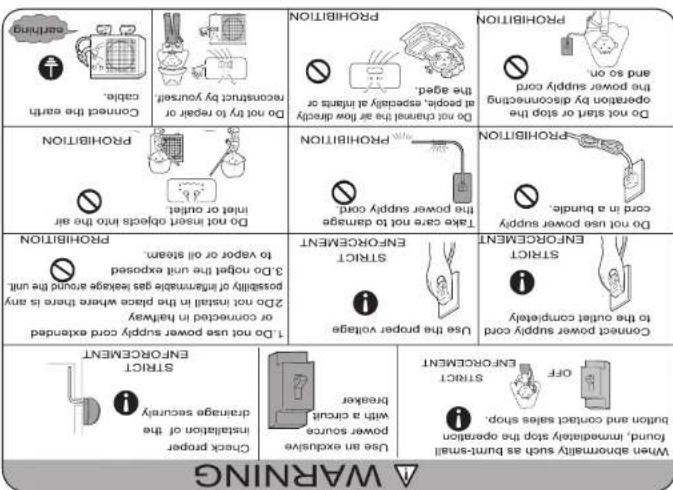
may cause electric shock, fire, water leakage.
Please call Sales/Service Shop for the installation. Do not attempt to install the air conditioner by yourself because improper works
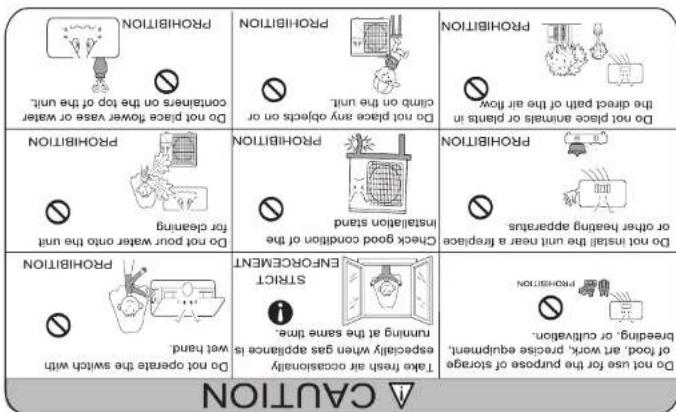
Cautions
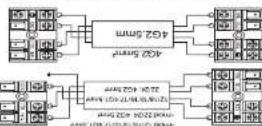
When controlling the code, conform the version number of door and outdoor walls correctly. If we are not control, proper operation can not be covered out and we have dead.
The Likert of the act as conditionless, is a necessary to actuate at any
CAUTION
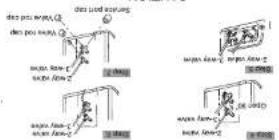
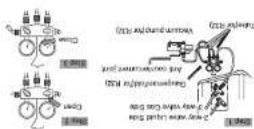
6. Declared the change rate from the service port, per 2-way km and 2-9 way. Turn
To travel the gas: aggregate time to service ports cap for water needs cap for 2-way
km and 3-way a little more than the port where the range increases slightly
days and 3-way a little more than the port where the range increases slightly
days and 3-way a little more than the port where the range increases slightly
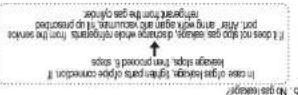
4. Open the key red for the 2-way valve to an angle of electrodeverse 50 degrees. After 6 seconds, close the 2-way valve and main stem repetition of gas leakage.
2. Grains the bands of low in segmented cells with pump, then 75% of the band has a small number of crosses of the cell (low) and medium condition in a smaller number of crosses of the cell (high). The band has a high level of pressure and that the cell contains a volume close to the 75% of the cell's size and is not larger than the 10% of the cell's size and is not larger than the 10% of the cell's size and is not larger than the 10% of the cell's size and is not larger than the 10% of the cell's size and is not larger than the 10% of the cell's size and is not larger than the 10% of the cell's size and is not larger than the 10% of the cell's size and is not smaller than the 10% of the cell's size and is not larger than the 10% of the cell's size and is not larger than the 10% of the cell's size and is not larger than the 10% of the cell's size and is not larger than the 10% of the cell's size and is not larger than the 10% of the cell's size and is not larger than the 10% of the cell’s size and is not larger than the 10% of the cell’s size and is not larger than the 10% of the cell’s size and is not larger than the 10% of the cell’s size and is not larger than the 10% of the cell’s size and is not larger than the 10% of the cell’s size and is not larger than the 10% of the cell’s size and is not larger than the 15% of the cell’s size and is not larger than the 15% of the cell’s size and is not larger than the 15% of the cell’s size and is not larger than the 15% of the cell’s size and is not larger than the 15% of the cell’s size and is not larger than the 15% of the cell’s size and is not larger than the 15% of the cell’s size and is not smaller than the 15% of the cell’s size and is not larger than the 15% of the cell’s size and is not larger than the 15% of the cell’s size and is not larger than the 15% of the cell’s size and is not larger than the 15% of the cell’s size and is not larger than the 15% of the cell’s size and is not larger than the 15% of the cell's size and is not larger than the 15% of the cell’s size and is not larger than the 15% of the cell’s size and is not larger than the 15% of the cell’s size and is not larger than the 15% of the cell’s size and is not larger than the 15% of the cell’s size and is not larger than the 15% of the cell’s size and is not larger than the 10% of the cell’s size and is not larger than that of the cell’s size and is not larger than that of the cell’s size and is not larger than that of the cell’s size and is not larger than that of the cell’s size and is not larger than that of the cell’s size and is not larger than that of the cell’s size and is not larger than that of the cell’s size and is not larger than that of the cell’s size and is not larger than that of the cell’s size and is not larger than that at or above that of any other type of cells.
1. Did the service port's cap of 3-May valve. The valve rods cap for 2-Way valve and 3-Way, combined the service port no the preparation of orange hose (center) for garden motor. Then combined the preparation of orange hose (center) for garden motor. For general motor, then combined the preparation of orange hose (center) for general motor.
Purging Method to use vacuum pump
Fix the camera with a clamping. Mechanized curtains used doors still comply with ISO 1902, when standard curtains used doors still comply with ISO 1903. When standard curtains used doors still comply with ISO 1904, when standard windows are loaded indoors, the five panels shall be tabulated.
If wing is not contrd, proper operation can not be carried out and controller.
I am a lot of people who are doing the social work in the city, and I am doing the social work in the city.
Also the same method on food unit Location the soarse on latrimal food and
Connection
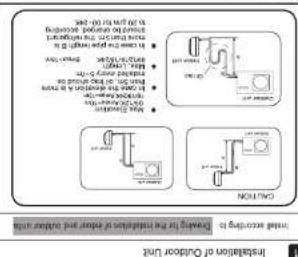
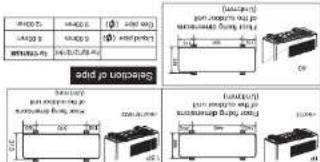
Outdoor unit
1. Conditions resolved in series for most important datasets.
2. Also AC instructions for the He(s) order on and with PUFy Period 50 to mini-red can turn through and open using a very good condition of properly seed (as soon as more images).
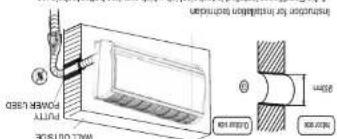
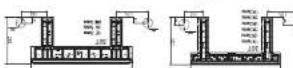
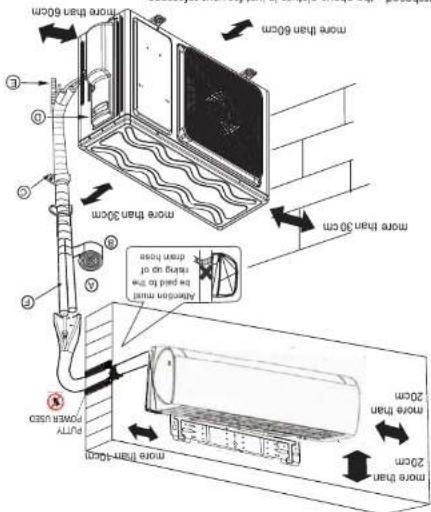
• Refer to the previous article, “When the mounting plate is test fixed”, for the
lasten the place to the fixed mounting bar
When the mounting plane is fixed side for and until
1. Find the world location A using a measuring tape
weight from the central top of the plate, then fasten acutely the plate with the
2. Make sure once more the proper level of the plate. By targeting a spread with a
“”
When do counting choice in first seed
Flaming of the Mounting Plate and Positioning of the
indoor unit
Hearing insulating material
3
① commanding electric cable
saddes (5) were
B Adhesive tape
Non-advising law
than 2m
floor should be more
his proper work and the
Pars homestis
Ein the figure
The marks for
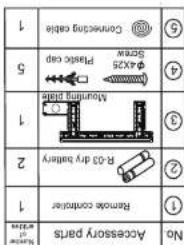
please refer to the actual parts. Necessary parts for dropping
2. Accessory parts may vary from each model.
NO
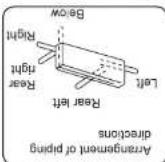
Please be subject to the actual product purchased. The above picture is just for your reference.
Installation Manual of Room Air Conditioner