
Creator C2L-CP - Pregnant MONITOR AUDIO - Free user manual and instructions
Find the device manual for free Creator C2L-CP MONITOR AUDIO in PDF.


| Product Type | In-ceiling speaker |
| Speaker Configuration | 2-way |
| Driver Complement | 1x 8.5" C-CAM bass/mid, 1x 1" C-CAM tweeter |
| Frequency Response | 40 Hz - 25 kHz (-6 dB) |
| Sensitivity | 88 dB (1W@1m) |
| Impedance | 8 ohms |
| Power Handling (RMS) | 100 W |
| Recommended Amplifier Power | 30 - 150 W |
| Dimensions (Cut-out Diameter) | 245 mm (9.65 in) |
| Dimensions (Overall Diameter) | 275 mm (10.83 in) |
| Depth (Below Ceiling) | 118 mm (4.65 in) |
| Weight | 2.7 kg (6.0 lbs) |
| Grille Type | Magnetic, paintable |
| Mounting Type | Tri-grip dog leg |
| Installation | New construction or retrofit |
| Back Box | Optional closed-back box available |
| Safety Certification | CE, RoHS |
| Warranty | 5 years (limited) |
| Recommended Use | Ceiling surround or stereo |
Frequently Asked Questions - Creator C2L-CP MONITOR AUDIO
User questions about Creator C2L-CP MONITOR AUDIO
0 question about this device. Answer the ones you know or ask your own.
Ask a new question about this device
Download the instructions for your Pregnant in PDF format for free! Find your manual Creator C2L-CP - MONITOR AUDIO and take your electronic device back in hand. On this page are published all the documents necessary for the use of your device. Creator C2L-CP by MONITOR AUDIO.
USER MANUAL Creator C2L-CP MONITOR AUDIO
Register your Creator Series speakers to ensure the best possible product and customer support
Register your speakers using the QR code or visit. monitoraudio.com/registration

Welcome to Creator Series
Thank you for purchasing this Creator Series architectural speaker.
In this product manual, you'll find information about setting up your system and how to maintain your speakers for a lifetime of enjoyment.
If you need any further assistance, please contact our technical team at monitoraudio.com/support
Contents
Preparing your installation 2
Installation - In-Ceiling speaker 3
Installation - In-Wall speaker 4
In-Wa|Mid-Pod rotation 5
Setting up a surround sound system 6
Quik-Link terminals 10
Painting the grilles 11
Speaker controls 12
Warranty 14
Specifications 15
Preparing your installation
Before you unpack your speakers, please make sure that there is plenty of available floor space. Inside the carton, you will find a cut-out template that you can use the mark and cut into your ceilings or walls to the correct size, you'll also find your Quik Link terminal and grille in the box.

CAUTION: The Creator Series loudspeakers can only be fixed into plasterboard (dry-lined) or suspended ceilings (in-ceiling models), with a thickness of up to 35mm (excluding the Super Slim series, which can be fixed up to 15mm) and walls (in-wall models), with a thickness of up to 30mm. Solid wall installation will require channelling out and framework constructed to provide a structure for the Tri Grip dog legs to clamp to. For safety reasons, if you are unsure of your ability to provide a secure and safe fixing, do not attempt to fix these speakers, please obtain the services of a competent and qualified trades person.

CAUTION: Ensure that there are no water pipes or electricity cables running within the wall or ceiling structure before cutting the speaker apertures. Work from secure steps and avoid trailing wires.
Overtightening warning
Do not over tighten the Tri-Grip Dog Leg clamps. Over tightening the clamping mechanism on any in ceiling/in wall speaker can result in damage to the speaker mounting hardware, ceiling/wall or speaker frame, and/or deflection in the speaker frame during installation.
If you notice any of the above during installation, you have over tightened the Tri Grip Dog Log. Back off the mounting screw until deflection is reduced to allow the product to sit firmly against the ceiling or wall.

IMPORTANT: Do not exceed 5Kgf/cm (4.34 lbf/inch.) or 0.5 NM when tightening the Tri Grip dog leg screws.
When using a cordless screwdriver/ drill to install this product ensure the clutch is set to it's lowest setting to avoid over-tightening and damaging the mounting hardware.
Installation - In-Ceiling speaker
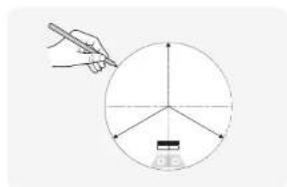
natural_image
Simple line drawing of a hand holding a pen over a circular diagram with axes and a small object at the bottom (no text or symbols)Draw around cut-out template
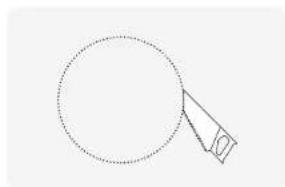
natural_image
Simple line drawing of a circle with a triangular extension, no text or symbols presentCut around traced lines
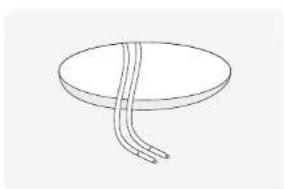
natural_image
Simple line drawing of a circular object with three curved lines extending from its center (no text or symbols)Feed speaker wire to hole insert speaker wire into Quik Link
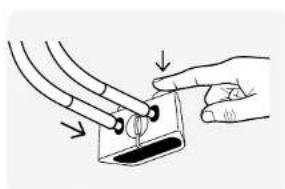
natural_image
Illustration of a hand holding a small object with arrows indicating direction (no text or symbols).ink
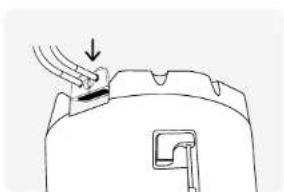
natural_image
Simple line drawing of a hand pressing down on a mechanical component (no text or symbols)Attach Quik-Link to terminal panel
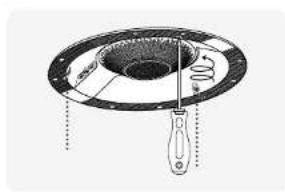
natural_image
Diagram of a mechanical device with a central component and supporting legs, showing internal structure without any text or symbols.Push speaker into hole and tighten all 3 Tr-Grip dog legs
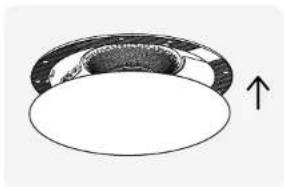
natural_image
Diagram of a circular object with an arrow indicating upward direction (no text or symbols)Attach magnetic grille
Installation - In-Wall speaker In-Wall mid pod rotation
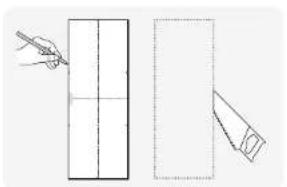
natural_image
Simple line drawing of a pencil and a folded paper sheet with grid lines (no text or symbols)Draw and cut around cut-out template
natural_image
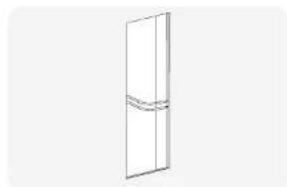
Simple line drawing of a door with a handle and a small curved band (no text or symbols)Run cabling to the cut-out hole
natural_image
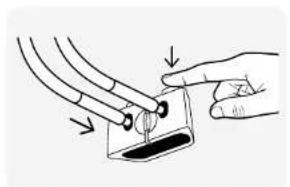
Illustration of a hand holding a tool interacting with a small object, no text or symbols presentConnect cable to Quik Link terminal
natural_image
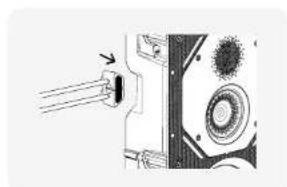
Diagram of a mechanical component with arrows indicating direction (no text or symbols)Connect Quik Link terminal to speaker
natural_image
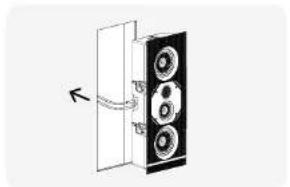
Diagram of a speaker with three speakers inside a door, showing no text or symbolsGuide speaker into cut-out hole
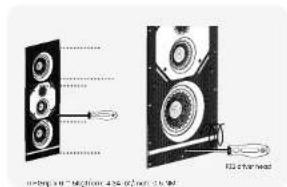
Tighten Tri-Grip II screws
natural_image
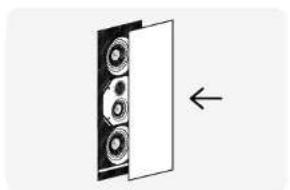
Diagram showing a speaker or audio component with three speakers inside a door, no text or symbols presentAttach magnetic grille
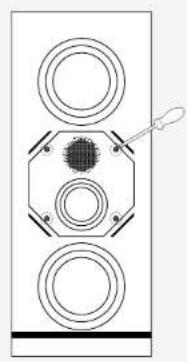
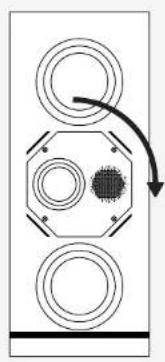
You can rotate the mid-pod section of Creator Series In-Wall models (excluding WI-M) when using in a centre-channel configuration.
natural_image
Pure diagram of a symmetrical mechanical or electrical component with three circular holes and a central dot, no text or symbols present.Unscrew holding screws
natural_image
Pure diagram of three circular components with a central dot and curved arrow, no text or symbols presentTurn Mid-Pod 90°
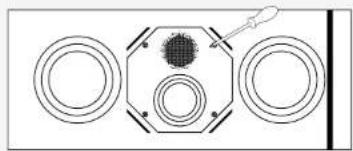
natural_image
Top-down schematic of a mechanical or electrical component with three circular components and a central hub (no text or symbols)Tighten Screws
Setting up a surround sound system
AV positioning
Please refer to the illustration on the right for the ideal angles and positions of each speaker in your surround system.
If setting up a 5.1 system you should place your surrounds in position (A).
If setting up a 7.1 surround system you should place your side speakers in position (B) and rear speakers in position (C) to create a full 360° soundstage.
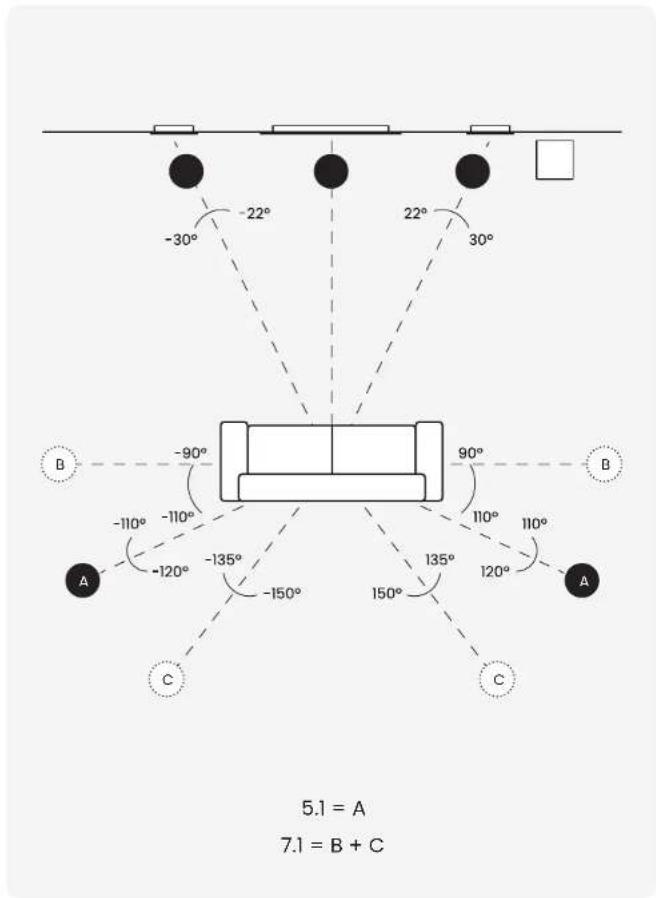
Setting up a surround sound system
Dolby Atmos
Please see the diagram on the right for ideal positioning of 2 or 4 Do by Atmos® speaker setups.
Typically these would be in line with the front left and right speakers.
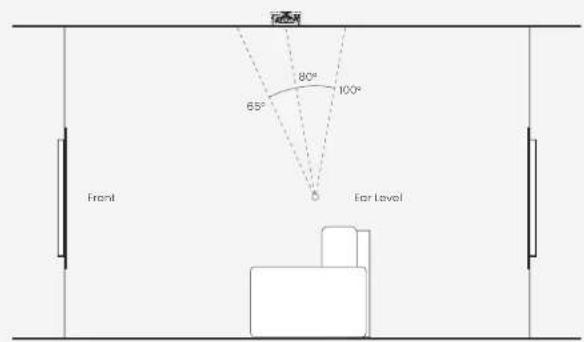
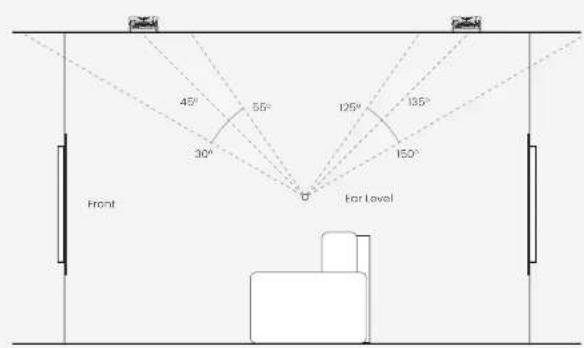
Dolby, Dolby Armos, and the double D symbol are tracers of Dolby Laboratories.
Quik-Link terminals Painting the grilles
Oulk Link has been invented to make the installation of in ceiling and in wall speakers as safe and as quick as possible. You simply take the terminal off the speaker prior to installing (possibly even at first fix) pre-installation stage) and connect the terminal to the speaker cables using the sprung terminals.
Once the installation is complete the terminal, which is now connected with the speaker cables, magnetically snaps and locks into place on the rear of the speaker as you place the speaker into ceiling or wall.
A second (purple) Quik-Link terminal is included with the T2X speakers for when used in a stereo installation.

NOTE: Replacement grille scrims are not supplied. If you wish to paint your grilles, contact your place of purchase to obtain the replacement grille scrims. Do not paint the IW260X and 460X grilles as spare scrims are not available for after you have painted the grille.
-
Remove the grille scrim from the inside of the grille.
-
Paint all grilles required for the installation with the same batch of paint (if they are to be the same colour). Spray paint is easier to apply or use a stippling action when brushing to avoid blocking the holes of the grille.
-
When dry, attach the replacement membrane scrim into the inside of the grille.
-
Fit the grille to the speaker.
Speaker controls
| Switch Options | Effect | Usage | |
| Comet. | (On) / (Off) | -8dB cut at low frequency | Use when speaker is near to a wall/corn or when speaker installed in a smaller than recommended MDF back box. |
| MusicMovie.(7X only). | Music/Movie. | Two is the phase of the speaker classed in the switch for use as a circle speaker. | Music for music (work dispersion, 60/90/120deg coverage with 150000)Movie for dipole configurationNote: Movie should only be used in Mono. |
| Vonx/Sterno(.2X only). | Mony/Sterno. | Mono or Stereo configuration. | Stereo sound from a single speaker. Food with both ball and light speaker cases.Note: Mono for single feed movie/music use. |
| Switch Options Effect Usage | ||
| HF - / - / - Cut/boost | high frequency coverage and recommendation listening window | C2S, C2M, C2M-CP, C2L, C2L-CP H^F = 30 × 30^ H^F = 80 × 80^ H^F = 50 × 50^ C2M-T2X, C2L-T2X H^F = 60 × 60^ H^F = 90 × 90^ H^F = 120 × 20^ C3M, C3L, C3L-CP H^F = 45 × 45^ H^F = 75 × 75^ H^F = 105 × 105^ C3L-ANote: MI / II on axis at 25°, hence symmetric vertical dispersion/listening window H^F = 45 × 45^ / H^F = 90 × 90^ H^F = 120 × 50^ W2M, W2M-CP H^F = 45 × 30^ H^F = 90 × 45^ H^F = 120 × 50^ W3MH = 45 × 30^ H^F = 90 × 45^ H^F = 120 × 50^ |
| M - / - / - Cut/boost | md frequency coverage and recommendation listening window | C3M, C3L, C3L-CP M^F = 45 × 45^ M^F = 90 × 90^ M^F = 105 × 105^ C3L-AXnote: MI / II on axis at 25°, hence symmetric vertical dispersion/listening window M^F = 45 × 45^ / M^F = 90 × 45^ M^F = 120 × 50^ W3MN/NT = 45 × 30^ M^F = 90 × 45^ M^F = 120 × 50^ |

NOTE: As with all audio, the settings you chose to use are subject to your own personal tastes and the affect your room has on the acoustics. Experimentation is strongly advised to find the best setting for you.
Warranty
In the unlikely event that there is a defect with this product, it is covered by the Monitor Audio manufacturer's warranty, provided that the product was supplied by an authorised Monitor Audio retailer.
For the period of cover please refer to the product page on our website at monitoraudio.com
Register your Creator Series speakers
to ensure the best possible product and customer support
Register your speakers using the QR code
or visit monitoraudio.com/registration

Specifications
Mode Name: GRS C'M CIL C2S 02M 02N-12X C2M-CF
Santory 34cB 86dB 88dB 34cB 86dB 86dB 97dB
(2139) (84%)
| Cement Use (m3) | *16.22 mm (3) | *18.29 mm (4) | *21.00 mm (5) | *24.22 mm (6) | *27.22 mm (7) | *30.22 mm (8) |
| Verming Cap (mm3) | 36 m ^2 (3) | 40 m ^2 (3) | 90 m ^2 (3) | 80 m ^2 (3) | 28 m ^2 (3) | 175 m ^2 (3) |
| Feeded Water Solution | 2.04 x 0.8 mm | 0.56 x 0.5 mm | 2.08 x 0.8 mm | 0.74 x 0.6 mm | 0.52 x 0.5 mm | 2.24 x 0.8 mm |
| No Ads (g/ha) | (0.74 x 0.44) | (0.91 x 0.44) | (0.10 x 0.44) | (0.74 x 0.44) | (0.91 x 0.44) | (0.65 x 0.34) |
| Supervision | 20-50 W | 30-50 W | 40-50 W | 50-50 W | 60-80 W | 80-100 W |
| Average Total (MM) | 75 W | 100 W |
| Continuity Power | 50 W | 65 W | 75 W | 60 W | 75 W | 100 W (Maro) | 65 W |
| Ending 2M$ mn | 2 x 75 W (Spread) | ||||||
| Nominal impedance, | 34k ohms with 65E | ||||||
| C and P (in) |
| Vertical exposure | 8 Ohms | 8 Ohms | 8 Ohms | 8 Ohms | 4 Ohms (Wert) 2 Ohms (Stokes) | 3 Ohms |
| Minimum Impervance (20Hz to 25Hz) | 3.5 Ohms @ 150 Hz | 6.5 Ohms @ 152 Hz | 2.4 Ohms @ 150 Hz | 5.6 Ohms @ 150 Hz | 6.6 Ohms @ 152 Hz | 3.4 Ohms @ 150 Hz |
| On-Unit | 5 (22 mm) | 7 (18 mm) | 37 (23 mm) | 5 (27 mm) SST I | 7 (28 mm) SST II | 7 (28 mm) SST II | 7 (28 mm) SST I |
| Complement | C: CAM | C: CAM | C: CAM | m/kPa cm/sec | m/kPa cm/sec | m/kPa cm/sec | m/kPa cm/sec |
| m/kPa cm/sec | m/kPa cm/sec | m/kPa cm/sec | 1 (25 mm) | 1 (25 mm) | m/kPa cm/sec | 1 (25 mm) | |
| 1 (25 mm) | 1 (25 mm) | 1 (25 mm) | 0 C: CAM teacher | 0 C: CAM teacher | 2.1 X (25 mm) | 0 C: CAM teacher | |
| C: CAM teacher | C: CAM teacher | C: CAM teacher | C: CAM teacher |
| Frequency (Hz) | 40 Hz - 30 kHz | 35 Hz - 30 kHz | 30 Hz - 25 kHz | 40 Hz - 30 kHz | 35 Hz - 30 kHz | 30 Hz - 35 kHz |
| Maximum 10th Stl. | 15th | 13th | 18th | 11st | 12th | (1000) 14th | 18th |
| Single speaker (y) 1y 7.5x4x6.0 | 1y | 1y | 1y | 1y | 1y | 1y | 1y |
| Channels | 1 | 1 | 1 | 1 (Max)2 (Max) |
| Schematic Control | 7 MHz | 8 MHz | 7 MHz | 6 MHz | 7 MHz | 8 MHz | 7 MHz |
| Peak Algymant | - | - | - | - | - | - | Sealed |
| Current Voltage | 5H/5.5Hz | 1H/F · 2Hz | 1H/F · 2.5Hz | 1H/F · 2.5Hz | 1H/F · 2.5Hz | 1H/F · 2.5Hz | 1H/-· 2.5kHz |
| Boundary Search | - | - | - | On/OH | On/OI | On/OII | On/OI |
| VF Switch | |||||||
| HF Switch | - | - | - | 50 | 50 | 50 | 50 |
| Music/Move Switch | - | - | - | - | - | Music/Move | - |
| Home/Write Switch | Home/Write | ||||||
| Ceratocicron Natural Mineral Black LPS Mineral Black LPS Mineral Black LPS Mineral Black LPS Mineral Black LPS Mineral Black LPS Mineral Black LPS |
| clock, RoHS2 Compliant | plastic, RoHS2 Compliant | clock, RoHS2 Compliant | clock, RoHS2 Compliant | plastic, RoHS2 Compliant | plastic, RoHS2 Compliant | clock, RoHS2 Compliant |
| 时间 | 18:00-24:00 | 15:00-20:00 | 7:30-9:30 | 13:30-18:30 | 7:30-9:30 | 17:00-22:00 | 7:30-9:30 |
| (€ million) | 2017 | 2016 | 2015 | 2014 | 2013 | 2012 |
| Construction market | ||||||
Model Name: C21 C21 T2X C21 CF 03M C51 C3 CF 03C A
| Generalty(2.3mm avg, Insulated) | 800 HPB (150x150x150x150x150x150x150x150x150x150x150x150x150x150x150x150x150x150x150x150x150x150x150x150x150x150.0 | |||||||
| Overall Cost 2.25 mm () | 10.25 mm () | 9.56 mm () | 8.25 mm () | 7.24 mm () | 6.24 mm () | 5.24 mm () | ||
| Mounting Depth 250 mm () | 198 mm () | 175 mm () | 143 mm () | 179 mm () | 175 mm () | 169 mm () | ||
| Fascial Dimensions for Collores (2 x 5) | 0.778 x 103 mm(2 x 5 x 4.5 x 3.5 x 2.5) | 0.778 x 103 mm(10 x 5 x 4 x 3.5 x 2.5) | 0.778 x 103 mm(10 x 5 x 4 x 3.5 x 2.5) | 0.743 x 103 mm(2 x 5 x 4 x 3.5 x 2.5) | 0.778 x 103 mm(10 x 5 x 4 x 3.5 x 2.5) | 0.778 x 103 mm(2 x 5 x 4 x 3.5 x 2.5) | 0.778 x 103 mm(2 x 5 x 4 x 3.5 x 2.5) | |
| Requivalents Amplicator Works (MMS Incl. 2nd, 3rd, 5th Sigral) | 40 x 200 g | 50 x 200 g | 50 x 200 g | 45 x 200 g | 60 x 200 g | 75 x 200 g | 60 x 200 g | |
| Continuous Power Handling (MMS in the 2nd, 3rd, 5th Sigral) | 120 W | 210 W (Max of 2 x 30 W)(Max of) | 120 W | 120 W | 50 W | 120 W | 120 W | |
| Internal impedance & Chama | 4 Once (Max of 4.0x Max of 3.0x Max of 2.0x Max of 1.0x Max of 0.5x Max of 0.5x Max of 0.5x Max of 0.5x Max of 0.5x Max of 0.5x Max of 0.5x Max of 0.5x Max of 0.5x Max of 0.5x Max of 0.5x Max of 0.5x Max of 0.5x Max of 0.5x Max of 0.5x | |||||||
| Minimum inductance (20 L/s, 20 L/d) | 3.700 ms (g)1st (Max of 6.4 GHz max of 8 L/s) | 3.200 ms (g) 5th (Max of 10 L/s) | 6.6 GHz max (10 L/s) | 16.0 GHz (g)2nd (Max of 2 L/s) | 4.8 GHz (g)2nd (Max of 2 L/s) | 4.9 GHz (g)2nd (Max of 2 L/s) | 7.6 GHz (g)2nd (Max of 2 L/s) | |
| Credited Compliance | 4.250 mm (LBT mid base on 1st (30% C.C.M.) | 4.250 mm (LBT mid base on 1st (30% C.C.M.) | 4.250 mm (LBT mid base on 1st (30% C.C.M.) | 4.150 mm (LBT intermediate drive 1.250 mm (DCI maximum drive 1.250 mm (DCI maximum drive 1.250 mm (DCI maximum drive 1.250 mm (DCI maximum drive 1.250 mm (DCI maximum drive 1.250 mm (DCI maximum drive 1.250 mm (DCI maximum drive 1.250 mm (DCI maximum drive 1.250 mm (DCI maximum drive 1,250 mm (DCI maximum drive 1,250 mm (DCI maximum drive 1,250 mm (DCI maximum drive 1,250 mm (DCI maximum drive 1,250 mm (DCI maximum drive 1,250 mm (DCI maximum drive 1,250 mm (DCI maximum drive 1,250 mm (DCI maximum drive 1,250 mV) | ||||
| Frequency Response Insulated (≥5 dB) | 10 Hz - 25 kHz | 30 Hz - 30 kHz | 25 Hz - 25 kHz | 45 Hz - 35 kHz | 45 Hz - 35 kHz | 50 Hz - 35 kHz | 45 Hz - 35 kHz | |
| Maximum Phase SRL (60Hz max/Max/Max/Max/Max/Max/Max/Max/Max/Max/Max/Max/Max/Max/Max/Max/Max/Max/Max/Max/Max/Max/Max/Max/Max/Max/Max/Max/Max/Max/Max/Max/Max/Max/Max/Max/Max/Max/Max/Max/Max/Max/Max/Max/Max/Max/Max/Max/Max/Max/Max/Min | 10 Hz | 30 MHz (Pb) | 12 kHz | 16 kHz | 19 kHz | 12 kHz | 19 kHz | |
| Channels | 1 | 1 (Max)2 (Stated) | 1 | 1 | 1 | 1 | ||
| System Operator | 2-Way | 2-Way | 2-Way | 3-Way | 3-Way | 3-Way | 3-Way | |
| Resist Agglomer | - | - | Reserved | - | - | Reserved | - | |
| Boundary System | On/OFF | On/OFF | On/OFF | On/OFF | On/OFF | On/OFF | On/OFF | |
| RF Switch | - | - | - | 100 | 100 | 100 | 100 | |
| RF Switch | 400 x 200 x 200 x 200 x 200 x 200 x 200 x 200 x 200 x 200 x 200 x 200 x 200 x 200 x 200 x 200 x 200 x 200 x 200 x 200 x 200 x 199 | |||||||
| Motor/Wake Switch | - | Motor/Wake | - | - | - | - | - | |
| Motor/Storage Switch | - | Motor/Storage | - | - | - | - | - | |
| Onshore Motor Motor | Mineral feed ABS plastic to FMD Compliant | Mineral feed ABS plastic to FMD Compliant | Mineral feed ABS plastic to FMD Compliant | Mineral feed ABS plastic to FMD Compliant | Mineral feed ABS plastic to FMD Compliant | Mineral feed ABS plastic to FMD Compliant | Mineral feed ABS plastic to FMD Compliant | |
| Worker | 25 kg (≤ 8 kg) | 22 kg (≤ 8 kg) | 35 kg (≤ 8 kg) or 4 kg (≤ 8 kg) | 34 kg (≤ 8 kg) or 4 kg (≤ 8 kg) | 5 kg (≤ 8 kg) | 57 kg (≤ 8 kg) or 6 kg (≤ 8 kg) | 53 kg (≤ 8 kg) or 6 kg (≤ 8 kg) | |
| Pro. Onshore Control | 0.5 x 0.5 x 0.5 x CMX | CMX | CMX | CMX | CMX | CMX | CMX | |
| Back-up | CMX FOX | CMX FOX | CMX FOX | CMX FOX | CMX FOX | CMX FOX | CMX FOX | |
| Vola Bina | W/W | WM | WM | WM/CP | WM | |||
| Bosbyx (250mm gal/min) | 910 | 600 | 940 | 940 | 990 | |||
| Cassal (kg 520 x 98 mm)(2000x7 mm2) | 575 x 166 mm(2000x7 mm2) | 575 x 166 mm(2000x7 mm2) | 575 x 98 mm(2000x7 mm2) | 575 x 98 mm(2000x7 mm2) | ||||
| Wumung Appli diurem (g) | *MI | 50 mm (60°) | 95 mm (200°) | 95 mm (60°) | 35 mm (200°) | |||
| Peters, Dimensions of Cable (ft × N) | 500 x 250 x 60 mm(2000x500x300°) | 560 x 250 x 60 mm(2000x300x300°) | 560 x 250 x 60 mm(2000x500x300°) | 560 x 250 x 60 mm(2000x500x300°) | 560 x 250 x 60 mm(2000x500x300°) | |||
| Rescensioner Angle Angle (RMS, m A-0.45, Mio) Supell | 25 100 W | 50 100 W | 45 80 W | 45 80 W | 50 250 W | |||
| Continuous Power Lending RMS to External impedance, Well Reference in dB Credit (kcal) | 50 W | 75 W | 120 W | 120 W | 50 W | |||
| Vertical impedance | 800 ms | 500 ms | 600 ms | 600 ms | 800 ms | |||
| Vertical Impedance (20Hz to 25kHz) | 8.5 Ohms (g 200 H)-12 Ohms (g 25 kHz) | 1.8 Ohms (g 15 kHz) | 1.8 Ohms (g 1 Hz)(1.12 ms (g 15 kHz) | 1.8 Ohms (g 1 kHz)(1.2 Ohms (g 5 kHz) | 1.8 Ohms (g 50 Hz) | |||
| SvLuff Compliance | 5127 mV; 0 CAM loadings for 1250 ns to 0 CAM loadings | 2 x 3 (27 mm); C CAM loadings for 1250 ns to 0 CAM loadings | 2 x 3 (27 mm); RTI Loadings; RTI Loadings; RTI Loadings; RTI Loadings; RTI Loadings; RTI Loadings; RTI Loadings; RTI Loadings; RTI Loadings; RTI Loadings; RTI Loadings; RTI Loadings; RTI Loadings; RTI Loadings; RTI Loadings; RTI Loadings; RTI Loadings; RTI Loadings; RTI Loadings; RTI Loadings; RTI Loadings | 2 x 3 (27 mm); RTI Loadings; RTI Loadings; RTI Loadings; RTI Loadings; RTI Loadings; RTI Loadings; RTI Loadings; RTI Loadings; RTI Loadings; RTI Loadings; RTI Loadings; RTI Loadings; RTI Loadings; RTI Loadings; RTI Loadings; RTI Loadings; RTI Loadings; RTI Loading; RTI Loadings; RTI Loadings; RTI Loadings; RTI Loadings; RTI Loadings; RTI Loadings; RTI Loadings; RTI Loadings; RTI Loadings; RTI Loadings; RTI Loadings; RTI Loadings; RTI Loadings; RTI Loadings; RTI Loadings; RTI Loadings; RTI Loadings; RTI Loadings; RTI Loadings; RTI Loading; RTI Loadings; RTI Loadings: RTI Loadings; RTI Loadings; RTI Loadings; RTI Loadings; RTI Loadings; RTI Loadings; RTI Loadings; RTI Loadings; RTI Loadings; RTI Loadings; RTI Loadings; RTI Loadings; RTI Loadings; RTI Loadings; RTI Loadings; RTI Loadings; RTI Loadings; RTI Loadings; RTI Loadings; RTI Loadings: RTI Loadings; RTI Loadings; RTI Loadings; RTI Loadings; RTI Loadings; RTI Loadings; RTI Loadings; RTI Loadings; RTI Loadings; RTI Loadings; RTI Loadings; RTI Loadings; RTI Loadings; RTI Loadings; RTI Loadings; RTI Loadings; RTI Loadings; RTI Loadins; RTI Loadings; RTI Loadings; RTI Loadings; RTI Loadings; RTI Loadings; RTI Loadings; RTI Loadings; RTI Loadings; RTI Loadings; RTI Loadings; RTI Loadings; RTI Loadings; RTI Loadings; RTI Loadings; RTI Loadings; RTI Loadings; RTI Loadings; RTI Loadings; RTI Loadings; RTI Loadins; RTI Loadings; RTI Loadings: RTI Loadings; RTI Loadings; RTI Loadings; RTI Loadings; RTI Loadings; RTI Loadings; RTI Loadings; RTI Loadings; RTI Loadings; RTI Loadings; RTI Loadings; RTI Loadings; RTI Loadings; RTI Loadings; RTI Loadings; RTI Loadings; RTI Loadings; RTI Loadin; RTI Loadings; RTI Loadings; RTI Loadings; RTI Loadings; RTI Loadings; RTI Loadings; RTI Loadings; RTI Loadings; RTI Loadings; RTI Loadings; RTI Loadings; RTI Loadings; RTI Loadings; RTI Loadings; RTI Loadings; RTI Loadings; RTI Loadings; RTI Loadings; RTI Loadings; RTI Loadin; RTI Loadings; RTI Loadings: RTI Loadings; RTI Loadings: RTI Loadings; RTI Loadings: RTI Loadings; RTI Loadings: RTI Loadings; RTI Loadings: RTI Loadings; RTI Loadings: RTI Loadings; RTI Loadings: RTI Loadings; RTI Loadings: RTI Loadings; RTI Loadings: RTI Loadings; RTI Loadings: RTI Loadings; RTI Loadings; RTI Loadings: RTI Loadings; RTI Loadings: RTI Loadings; RTI Loadings: RTI Loadings; RTI Loadings: RTI Loadings; RTI Loadings: RTI Loadings; RTI Loadings: RTI Loadings; RTI Loadings: RTI Loadings; RTI Loadings: RTI Loadings; RTI Loadings: RTI Loadings; RTI Loadin; RTI Loadings; RTI Loadings; RTI Loadings; RTI Loadings; RTI Loadings; RTI Loadings; RTI Loadings; RTI Loadings; RTI Loadings; RTI Loadings; RTI Loadings; RTI Loadings; RTI Loadings; RTI Loadings; RTI Loadings; RTI Loadings; RTI Loadings; RTI Loadings: RTI Loadings; RTI Loadin; RTI Loadings; RTI Loadings; RTI Loadings; RTI Loadings; RTI Loadings; RTI Loadings; RTI Loadings; RTI Loadings; RTI Loadings; RTI Loadings; RTI Loadings; RTI Loadings; RTI Loadings; RTI Loadings; RTI Loadings; RTI Loadings: RTI Loadings; RTI Loadings; RTI Loadings; RTI LoadINGS; RTI Loadings; RTI Loadings; RTI Loadings; RTI Loadings; RTI Loadings; RTI Loadings; RTI Loadings; RTI Loadings; RTI Loadings; RTI Loadings; RTI Loadings; RTI Loadings; RTI Loadings; RTI Loadings; RTI Loadings; RTI Loadings; RTI Loadings; RTI Loadings; RTI Loadings; RTI Loadeins; RTI Loadings; RTI Loadings; RTI Loadings; RTI Loadings; RTI Loadings; RTI Loadings; RTI Loadings; RTI Loadings; RTI Loadings; RTI Loadings; RTI Loadings; RTI Loadings; RTI Loadings; RTI Loadings; RTI Loadings; RTI Loadings; RTI Loadings; RTI Loadings; RTI Loadings; RTILoadings; RTI Loadings; RTI Loadings; RTI Loadings; RTI Loadings; RTI Loadings; RTI Loadings; RTI Loadings; RTI Loadings; RTI Loadings; RTI Loadings; RTI Loadings; RTI Loadings; RTI Loadings; RTI Loadings; RTI Loadings; RTI Loadings; RTI Loadings; RTI Loadings; RTI Loadings; RTILoadins; RTI Loadings; RTI Loadings; RTI Loadings; RTI Loadings; RTI Loadings; RTI Loadings; RTI Loadings; RTI Loadings; RTI Loadings; RTI Loadings; RTI Loadings; RTI Loadings; RTI Loadings; RTI Loadings; RTI Loadings; RTI Loadings; RTI Loadings; RTI Loadings; RTILoadins; RTI Loadin; RTI Loadin; RTI Loadin; RTI Loadin; RTI Loadin; RTI Loadin; RTI Loadin; RTI Loadin; RTI Loadin; RTI Loadin; RTI Loadin; RTI Loadin; RTI Loadin; RTI Loadin; RTI Loadin; RTILoadins; RTI Loadins; RTI Loadins; RTI Loadins; RTI Loadins; RTI Loadins; RTI Loadins; RTI Loadins; RTI Loadins; RTI Loadins; RTI Loadins; RTI Loadins; RTI Loadins; RTILoadins; RTI Loadins; RTI Loadins; RTI Loadins; RTI Loadins; RTI Loadins; RTI Loadins; RTI Loadins; RTI Loadins; RTI Loadins; RTILoadins; RTI Loadins; RTI Loadins; RTI Loadins; RTI Loadins; RTI Loadins; RTI Loadins; RTI Loadins; RTI Loadins; RTILoadins; RTI Loadins; RTI Loadins; RTI Loadins; RTI Loadins; RTI Loadins; RTI Loadins; RTI Loadins; RTILoadins; RTI Loadins; RTI Loadins; RTI Loadins; RTI Loadins; RTI Loadins; RTI Loadins; RTI Loadins; RTILoadins; RTI Loadins; RTI Loadins; RTI Loadins; RTILoadins; RTI Loadins; RTI Loadins; RTI Loadins; RTI Loadins; RTILoadins; RTI Loadins; RTI Loadins; RTI Loadins; RTI Loadins; RTILoadins; RTI Loadins; RTI Loadins; RTI Loadins; RTI Loadins; RTILoadins; RTI Loadins; RTI Loadins; RTI Loadins; RTI Loadins; RTILoadins; RTILoadins; RTI Loadins; RTI Loadins; RTILoadins; RTILoadins; RTILoadins; RTILoadins; RTILoadins; RTILoadins;RTILoadins;RTILoadins;RTILoadins;RTILoadins;RTILoadins;RTILoadins;RTILoadins;RTILoadins;RTILoadins;RTILoadins;RTILoadins;RTILoadins;RTILoadins;RTILoadins;RTILoadins;RTILoadins;RTILoadins;RTILoadins;RTILoadins;RTILoadins;RSU | *MI | *MI | *MI | *MI |
| Frequency Response (ranged in dB) | 40 Hz - 30 Hz, 40 Hz - 30 Hz, 40 Hz - 35 Hz, 60 Hz - 35 Hz, 45 Hz - 60 Hz | |||||||
| Vacuum Split (ml/kg) | 1000 | 1000 | 1000 | 1000 | 2250 | |||
| White Plastic (ml/kg) | 1 | 1 | 1 | 1 | 1 | |||
| Concrete Box | 2 Box | 7 Box | 3 Box | 3 Box | 3 Box | |||
| Panel Aggregate | N/A | N/A | N/A | Sealed | N/A | |||
| Concrete Frequency | 1/3Hz 25Hz | 1/3Hz 25Hz 25Hz 25Hz 25Hz 25Hz 25Hz 25Hz 25Hz 25Hz 25Hz 25Hz 25Hz 25Hz 25Hz 25Hz 25Hz 25Hz 25Hz 25Hz 25Hz 25Hz 25Hz 25Hz 25Hz 25Hz 20Hz 25Hz 25Hz 25Hz 25Hz 25Hz 25Hz 25Hz 25Hz 25Hz 25Hz 25Hz 25Hz 25Hz 25Hz 25Hz 25Hz 25Hz 25Hz 25Hz 25Hz 25Hz 25Hz 25Hz 25Hz 225Hz 25Hz 25Hz 25Hz 25Hz 25Hz 25Hz 25Hz 25Hz 25Hz 25Hz 25Hz 25Hz 25Hz 25Hz 25Hz 25Hz 25Hz 25Hz 25Hz 25Hz 25Hz 25Hz 25Hz 25Hz | ||||||
| Conductor Switch | N/A | N/A | N/A | CryOff | CryOff | |||
| VR Switch | N/A | N/A | N/A | N/A | N/A | |||
| RF Switch | N/A | N/A | N/A | COP | COP | |||
| Construction Material | White filled AFR products, KCHS2 Compliant | White filled AFR products, No KCHS2 Compliant | White filled AFR products, KCHS2 Compliant | Mixed red AFR products, KCHS2 Compliant | Mixed red AFR products, KCHS2 Compliant | |||
| Weight | 26 kg (lb ft) | 3.4 kg (lb ft) | 4.8 kg (lb ft) | 4.4 kg (lb ft) | 4.7 kg (lb ft) | |||
| Side Construction Insulator | W/8 | W/8 | W/8 | W/8 | W/8 | |||
| Back Box | W/HBOX | W/H-BOX | W/H-BOX | W/H-BOX | W/H-BOX | |||
Listen Again.
Monitor Audio Ltd.
24 Brook Road
Rayleigh, Essex
SS6 7XJ
England
Tel: +44 (0)1268 740580
Email: info@monitoraudio.group
monitoraudio.com
Brand : MONITOR AUDIO
Model : Creator C2L-CP
Category : Pregnant