
CR510R - Electric hair styling device Conair - Free user manual and instructions
Find the device manual for free CR510R Conair in PDF.


| Product Type | Auto Curler (Unbound® Auto Curler) |
| Model | CR510R |
| Brand | Conair |
| Power Supply | Rechargeable lithium-ion battery (2 x 18650, 3.7V, 5200mAh total); USB charging 5V/1.5A |
| Charging Input | Micro USB, recommended adapter 5V/2A for fastest charging |
| Temperature Settings | 320°F, 360°F, 400°F (with Instant Heat technology) |
| Curl Direction Options | Left, Right, or Mix |
| Timer Settings (seconds) | 6, 8, 10, 12 |
| Auto Shutoff | After 5 minutes of inactivity |
| Heating Time | 60 seconds to reach set temperature |
| Display | LCD with temperature, timer, battery indicator, and settings |
| Motor | DC motor for precision styling |
| Safety Features | Auto shutoff, safety tangle feature, beep indicators, overheating protection |
| Battery Preservation | Recharge every 3 months for 5 hours if not used |
| Curl Chamber Material | Ceramic easy-glide coated surface |
| Cleaning | Wipe with soft, damp cloth after cooling; do not submerge in water |
| Maintenance | No lubrication needed; keep vents clear; remove hair and debris after each use |
| Storage | Use heat-resistant pouch; store in cool, dry place away from children |
| Warranty | Limited 2-year warranty (U.S. and Canada) |
| Certifications | FCC Part 15 compliant; contains lithium-ion batteries (airline restrictions apply) |
Frequently Asked Questions - CR510R Conair
User questions about CR510R Conair
0 question about this device. Answer the ones you know or ask your own.
Ask a new question about this device
Download the instructions for your Electric hair styling device in PDF format for free! Find your manual CR510R - Conair and take your electronic device back in hand. On this page are published all the documents necessary for the use of your device. CR510R by Conair.
USER MANUAL CR510R Conair
www.conair.com/registration
CENTRO DE SERVICIO
Conair Corporation
Service Department
7475 N. Glen Harbor Blvd.
Glendale, AZ 85307
©2021 CONAIR CORPORATION
20PA072575
IB-16535E
Unbound.
BEAUTY IN MOTION
Instruction and Styling Guide Model CR510R

natural_image
Close-up of a metallic cylindrical device with a digital display showing temperature and radius (no readable text or symbols beyond basic markings)BROUGHT TO YOU BY CONAIR®
U.S. Patents 8,651,118; 9,629,434; 9,788,625; and 10,238,196, and other pending/granted U.S. and international patents.
NOTE: CONTAINS 2 LITHIUM ION BATTERIES. AIRLINE RESTRICTIONS MAY APPLY. CHECK WITH YOUR CARRIER.
IMPORTANT SAFETY INSTRUCTIONS
When using electrical appliances, especially when children are present, basic safety precautions should always be taken, including the following:
READ ALL INSTRUCTIONS BEFORE USING KEEP AWAY FROM WATER
DANGER — Any appliance is electrically live even when the switch is off. To reduce the risk of death by electric shock:
- Always unplug appliance immediately after using.
-
Do not use while bathing or in the shower.
-
Do not place or store appliance where it can fall or be pulled into a tub or sink.
- Do not place in, or drop into water or other liquids.
- If an appliance falls into water, unplug it immediately. Do not reach into the water.
WARNING — To reduce the risk of burns, electrocution, fire, or injury to persons:
- This appliance should never be left unattended when plugged in.
- Do not pull, twist, or wrap line cord around appliance.
- This appliance should not be used by, on or near children or individuals with certain disabilities.
- Use this appliance only for its intended use, as described in this manual. Do not use attachments not recommended by the manufacturer.
-
Never operate this appliance if it has a damaged cord or plug, if it is not working properly or if it has been dropped or damaged, or dropped into water. Return the appliance to an authorized service center for examination and repair.
-
Keep the cord away from heated surfaces.
- Never use while sleeping.
- Never drop or insert any object into any opening or hose.
- Do not use outdoors or operate where aerosol (spray) products are being used or where oxygen is being administered.
- Unit is hot when in use. Do not let heated surface touch eyes or skin.
- Do not place the heated unit directly on any surface while it is hot or plugged in.
- Never block the air openings of the appliance or place it on a soft surface such as a bed or couch, where the air openings may be blocked. Keep the air openings free of lint and other debris.
- Do not use an extension cord with this appliance.
-
Do not touch hot surfaces of the appliance. Use handles or knobs.
-
Do not attempt to touch the housing of your appliance near the curl chamber, as it is hot when in use.
- If using another charging cable, please use one that can be charged with a charging current of 2A or more.
- When the product is charging, do not leave it unattended. Be sure to remove the charger when it is full.
- Do not pull the charging cable directly.
- When the product is in use, the display temperature symbol display area flashes “E,” indicating that the temperature sensing probe is invalid. The product should be sent to the manufacturer’s maintenance department or a qualified professional maintenance organization for repair.
- This product is for household use only.
- This product is not a toy. Keep away from children.
CAUTION: Risk of fire and burns. Do not open, crush, heat above 140°F or incinerate.
SAVE THESE INSTRUCTIONS OPERATING INSTRUCTIONS
Charging volt/current: DC 5V/1.5A
18650 battery cell volt: 3.7V
Battery capacity: 5200mAh (2600mAh-2p)
- Plug the USB cable into the USB port on a computer or into an adapter.
- Charge the unit fully overnight before your first use. Once battery icon is no longer flashing and 4 bars are displayed, it is fully charged and ready to use.
-
The unit may become a little warm when charging or during use. This is normal.
-
Preserving the batteries: In order to maintain the optimum capacity of the rechargeable batteries, the curler should be recharged for 5 hours approximately every 3 months.
NOTE: Charge time may vary depending on type of adapter and power source being used. For fastest charging time, use a 5V/2A adapter.
USER MANUAL
Before using the supplied USB charging cord, read these instructions carefully.
Rating required when connecting the USB port to a computer or adapter:
Rated input voltage: 100-240V AC, 50/60Hz 0.5A
Rated output: 5V DC 2A
OPERATION
-
For dry location use only. Do not expose to water.
-
Unit will become warm during operation.
- Unplug USB charging cord when not in use.
CAUTION
- Dry location use only. Do not expose to liquids, vapor, or rain.
- If using a USB power adapter, be sure the micro USB input is plugged into the unit before plugging the USB charging cord into the adapter and outlet.
- Do not operate any appliance that has a damaged output cord or housing.
- Always unplug the unit before cleaning or when not in use.
- This appliance is not intended for use by persons (including children) with reduced physical, sensory or mental capabilities, or lack of experience and knowledge, unless they have been given supervision or instruction concerning use of the appliance by a person responsible for their safety.
- Children should be supervised to ensure that they do not play with the appliance.
OPERATING PRECAUTIONS
This curler has a built-in rechargeable batteries. Do not burn, apply heat, charge, or use or leave in a high-temperature environment.
TROUBLESHOOTING
If your rechargeable curler does not seem to be taking a charge, follow these steps before returning it for repair:
- If using a USB power adapter in an electrical outlet, check to see if the outlet is working by plugging in another appliance to test it.
- If using a USB power adapter, check to see if the adapter is working by plugging in another USB device.
- If both the adapter and outlet are working, try another micro USB cord.
-
Make sure the micro USB connector is pushed all the way into the micro USB input on the unit.
-
Make sure the environment is not too cold or too hot.
- Make sure unit is completely cool before charging.
CURLER CHARGING PRECAUTIONS
Avoid charging the batteries at temperatures below 41^ F ( 5^ C) or above 104^ F ( 40^ C).
Avoid charging the batteries in direct sunlight or near a radiating heat source.
Even though the curler may not be used for an extended period of time, charge for 5 hours once every 3 months to preserve battery life.
GETTING TO KNOW YOUR AUTO CURLER
Effortlessly create long-lasting beautiful curls with the Unbound ^® Auto Curler. Hair is automatically drawn into the ceramic curl chamber where it is gently held and heated from all directions to effortlessly form the curl. Then, simply release and repeat. The result is beautiful, effortless curls or waves.
Features:
- DC motor for precision styling and longer life
- Auto beep indicator
- Safety tangle feature
- 60-second heat-up
- Auto off (unit turns off after 5 minutes if left on and idle to preserve battery life)
- Micro USB for charging
- LCD display
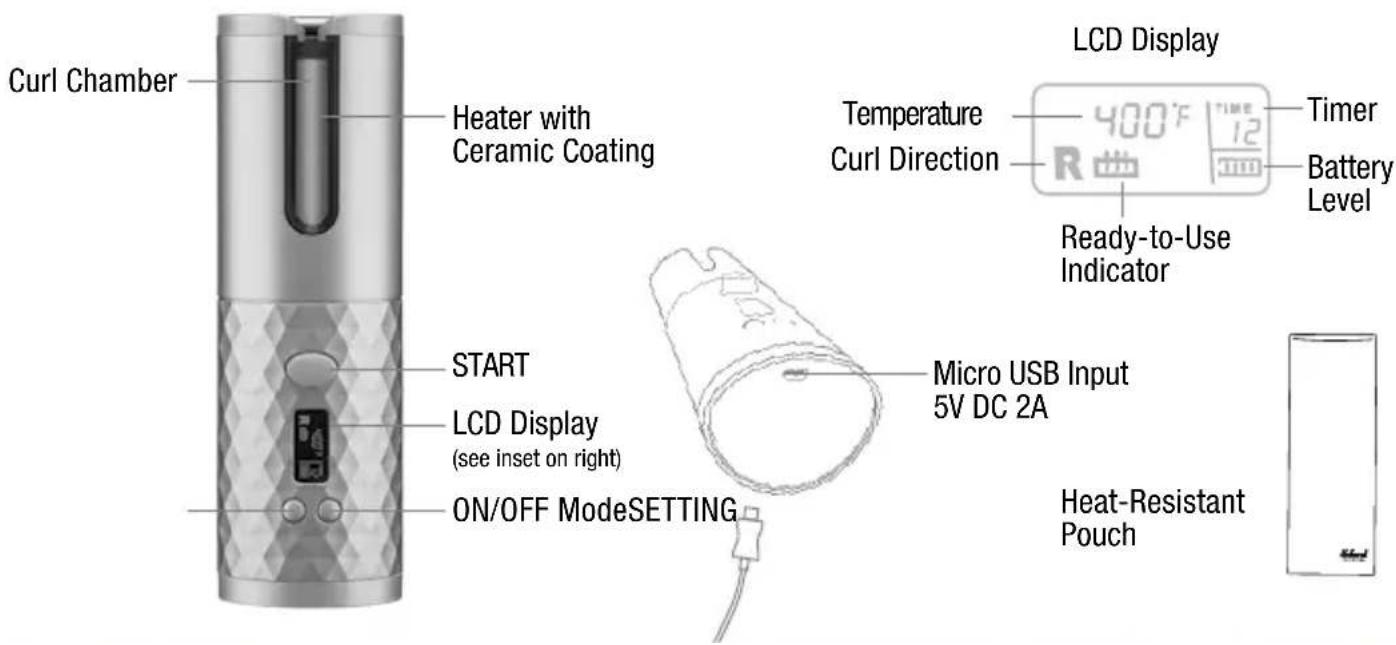
GETTING STARTED
- Before using, fully charge the product overnight for maximum battery performance, and always be sure to read all the instructions.
- Press and hold ON/OFF Mode button for 2 seconds to turn curler on. You will hear a beep and the LCD display will turn on.
NOTE: Press and hold the ON/OFF Mode button for 2 seconds to turn curler off. If you forget to turn it off, it will shut itself off automatically after 5 minutes if not used.
- Press ON/OFF Mode button to choose Temperature, Curl Direction and Timer; press SETTING button to scroll through options.
Temperature: 320^ F, 360^ F, 400^ F.
Curl Direction: Left or Right or MIX
Timer (seconds): 6s, 8s, 10s, 12s
NOTE: Heating symbol will blink when it is heating, and will stop blinking and 2 beeps will sound when it reaches your temperature setting.
The styler's three high-heat temperature settings and Instant Heat technology provide styling versatility for all hair types. If you have fine hair, the lower temperature will produce the best results. If you have thick, wavy or hard-to-curl hair, keep the heat setting on high. Create a variety of curls with different combinations of heat, time, and curl direction!
CHOOSE YOUR CURL TYPE
| CURL TYPE TEMP TIMER | ||
| LOOSE CURLS 320°F 6 or 8 | ||
| MEDIUM CURLS 360°F 8 or 10 | ||
| TIGHT CURLS 400°F 10 or 12 | ||

natural_image
Abstract wavy line pattern with no text or symbols
natural_image
Abstract wavy line drawing with no text or symbols
natural_image
Abstract wavy line drawing with no text or symbolsLoose Curls Medium Curls Tight Curls
THE CERAMIC EASY-GLIDE AUTO CURLER
The Unbound® Auto Curler has a ceramic easy-glide coated surface. This is the newest technology. It not only makes it simpler to clean off styling product residue, etc., after each use, but you'll find that hair glides easily over the coated surface of the curl chamber. The ceramic-coated surface also helps smooth down flyaways and frizzies for added shine.
The curler evenly distributes heat so that the style you create has a salon-perfect, silky smooth, shiny finish. And hair slips right out of the curl chamber after it's curled.
Ceramic technology makes styling hair easier, and gives you professional results.
TO CURL HAIR
- Comb through to remove any tangles and divide hair into sections, no more than 12 inch wide. For longer hair, use smaller sections.
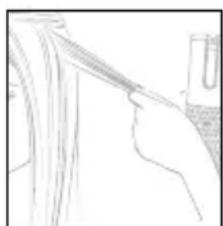
- With the opening of the curl chamber facing up, lay the section of hair across the opening. Make sure the hair falls inside the curl chamber. Press and hold the START button to activate the motor and draw hair into curling chamber.
- Continue holding the START button until you hear a beep, letting you know automatic curling is finished.
NOTE: The number of beeps matches your Timer setting. For example, there will be eight beeps if your setting is for 8 seconds.
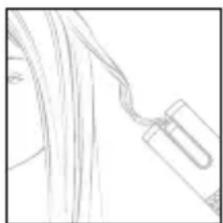
- When you hear 2 rapid beeps, release the START button and simply pull the auto curler down and away to reveal the curl.
natural_image
Line drawing of a hand holding a pen, with no visible text or symbols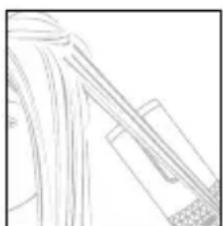
natural_image
Pure technical line drawing of a mechanical component without any text, numbers, or symbols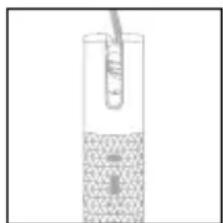
natural_image
Simple line drawing of a curved pipe or tube passing through a circular opening (no text or symbols)STYLE TIP
- For curls that curl away from your face, select the "R" curl direction. For styling the left side of your head, use the "L" for the right side of your head.
- For a more natural look, select MIX curl direction to alternate curls.
TIPS
Before using, fully charge the product to get the best performance. Charge time will vary depending on type of adapter and power source being used.
Before preparing to store your curler for a long time, fully charge it. Always be sure to charge it at least once every 3 months to keep the auto curler in the best condition.
- When the product is in the charging mode, the LCD display shows the battery indicator light, which will flash.
- When the product is fully charged and the charger is still connected, the battery indicator light remains solid.
NOTE: LCD display will be off after removing the charger if the product is off.
- When the product is charging, other functions are disabled.
- If using a USB power adapter, check to see if the adapter is working by plugging in another USB device.
- If both the adapter and outlet are working, try another micro USB cord.
- Make sure the micro USB connector is pushed all the way into the micro USB input on the unit.
- When the battery is lower than the factory setting, the LCD display will flash three times and the unit will automatically shut off.
ADDED FEATURES
The curler comes with added safety and energy savings:
Auto Shutoff: If the appliance is switched to ON for more than 5 minutes without use, it will automatically switch off. If you wish to continue using the appliance, press ON/OFF Mode button for 2 seconds.
NOTE: Curl chamber will be hot to the touch.
FEDERAL COMMUNICATIONS COMMISSION NOTICE
WARNING: Changes or modifications to this unit not expressly approved by the party responsible for compliance could void the user's authority to operate the equipment.
This device complies with Part 15 of the FCC Rules. Operation is subject to the following two conditions: (1) This device may not cause harmful interference, and (2) This device must accept any interference received, including interference that may cause undesired operation.
NOTE: This equipment has been tested and found to comply with the limits for a Class B digital device, pursuant to Part 15 of the FCC Rules. These limits are designed to provide reasonable protection against harmful interference in a residential installation. This equipment generates, uses and can radiate radio frequency energy and, if not installed and used in accordance with the instructions, may cause harmful interference to radio communications. However, there is no guarantee that interference will not occur in a particular installation. If this equipment does cause harmful interference to radio or television reception, which can be determined by turning the equipment off and on, the user is encouraged to try
to correct the interference by one or more of the following measures:
- Reorient or relocate the receiving antenna.
- Increase the separation between the equipment and receiver.
- Connect the equipment into an outlet on a circuit different from that to which the receiver is connected.
- Consult the dealer or an experienced radio/TV technician for help.
SUPPLIER'S DECLARATION OF CONFORMITY
Brand: Conair
Model No.: CR510/CR510R
Description: Unbound® Auto Curler
Responsible Party: Conair Corporation,1 Cummings Point Road, Stamford, CT 06902 (203) 351-9000
Standards: FCC Part 15 Subpart B, ANSI C63.4-2014
This device complies with Part 15 of the FCC Rules. Operation is subject to the following two conditions:
(1) This device may not cause harmful interference, and (2) This device must accept any interference received, including interference that may cause undesirable operation.
DATE OF ISSUE: 08/01/19
DISPOSAL OF LITHIUM ION BATTERIES
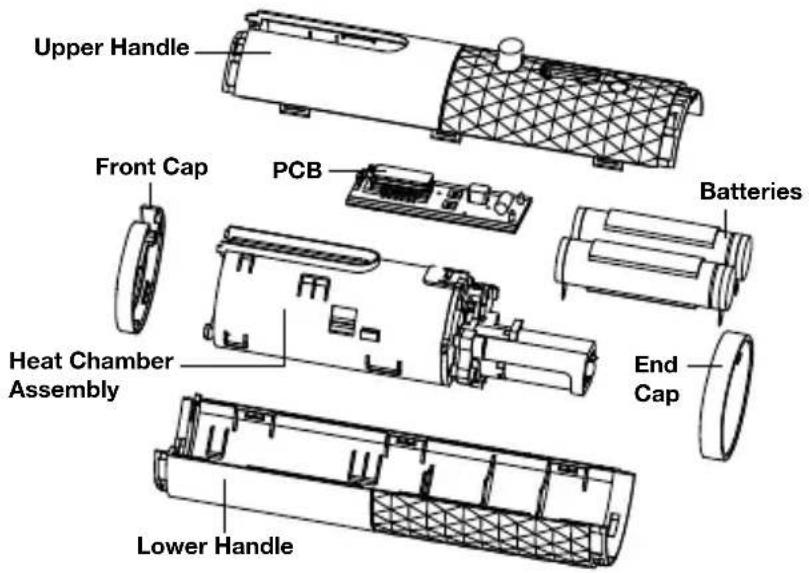
This unit has 2 lithium ion batteries. To protect the environment, these batteries should be removed and properly disposed of when the unit is no longer operating. To remove the battery block for disposal or recovery, follow these instructions:
- First unplug the unit.
- Open the unit and remove the batteries using wire cutters.
- To protect the environment, do not dispose of your batteries with your ordinary household waste.
For more details on recovery of materials and waste treatment facilities, please contact the waste disposal services in your region.
NOTE: CONTAINS 2 LITHIUM ION BATTERIES. AIRLINE RESTRICTIONS MAY APPLY. CHECK WITH YOUR CARRIER.

CONTAINS LITHIUM ION BATTERY. MUST BE COLLECTED, RECYCLED OR DISPOSED OF PROPERLY. DO NOT DISPOSE OF IN THE MUNICIPAL WASTE.

USER MAINTENANCE
Your styler is virtually maintenance free. No lubrication is needed. Keep all vents and openings clear of dirt and dust. If cleaning becomes necessary, disconnect the unit from the power source, allow to cool and wipe exterior with a cloth. If any abnormal condition occurs, unplug the unit, allow it to cool, and return it for repair to an authorized service representative only. No repairs should be attempted by the consumer.
CAUTION
NEVER allow the USB charging cord to be pulled, twisted, or severely bent. Never wrap the cord tightly around the appliance. Damage will occur at the high flex point of entry into the appliance, causing it to rupture and short circuit. Inspect the cord frequently for damage. Stop use immediately if damage is visible or if unit stops or operates intermittently.
STORAGE
This appliance comes with a heat-resistant storage pouch for use during and after styling. During use, do not place the appliance on any heat-sensitive surface, even when using the storage pouch provided. After use, switch off and unplug the appliance. Immediately wrap the appliance in the storage pouch provided and allow to fully cool down. Do not jerk or strain cord at plug connections. Do not wrap the line cord around the appliance. Allow the cord to hang or lie loose and straight at the point of entry into the appliance. Continue to keep it out of the reach of children, as it will remain hot for several minutes. Store out of reach of children in a safe, dry location.
IMPORTANT! The outer material is not heat resistant and the appliance should not be placed on this material while hot.
CLEANING AND MAINTENANCE
- Do not put this product in a dishwasher or washing machine for cleaning.
- This product does not have waterproof function. When cleaning, care should be taken to prevent water or other liquids from entering the product from the product gap or interface, resulting in short-circuit of the product.
- Please clean up the foreign matter such as hair and dander remaining in the curl chamber after each use.
- Please carry out cleaning, maintenance and care while ensuring that the product has cooled down.
- Do not use sharp or corrosive, volatile thinner cleaners.
- Use a soft, damp cloth (with a small amount of nonirritating, volatile, flammable detergent) to clean and wipe the product. When finished, dry with a soft, dry cloth.
WARNING: IF YOU THINK THE POWER IS OFF WHEN THE SWITCH IS OFF, YOU'RE WRONG.
KEEP AWAY FROM WATER

natural_image
Simple line drawing of a wall socket with two outlets and a plug inserted (no text or symbols)Everyone knows that electricity and water are a dangerous combination. But did you know that an electric appliance is still electrically live even if the switch is off? If the plug is in, the power is on. So when you are not using your appliances, keep them unplugged.
ALWAYS UNPLUG SMALL APPLIANCES
LIMITED TWO-YEAR WARRANTY (U.S. AND CANADA ONLY)
Conair will repair or replace (at our option) your unit free of charge for 24 months from the date of purchase if the appliance is defective in workmanship or materials.
To obtain service under this warranty, return the defective product to the service center listed on back, together with your purchase receipt. California residents need only provide proof of purchase and should call 1-800-3-CONAIR for shipping instructions. In the absence of a purchase receipt, the warranty period shall be 24 months from the date of manufacture.
ANY IMPLIED WARRANTIES, OBLIGATIONS, OR LIABILITIES, INCLUDING BUT NOT LIMITED TO THE IMPLIED WARRANTY OF MERCHANTABILITY AND FITNESS FOR A PARTICULAR PURPOSE, SHALL BE LIMITED IN DURATION TO THE 24-MONTH DURATION OF THIS WRITTEN, LIMITED WARRANTY.
Some states do not allow limitations on how long an implied warranty lasts, so the above limitations may not apply to you.
IN NO EVENT SHALL CONAIR BE LIABLE FOR ANY SPECIAL, INCIDENTAL, OR CONSEQUENTIAL DAMAGES FOR BREACH OF THIS OR ANY OTHER WARRANTY, EXPRESS OR IMPLIED,
WHATSOEVER. Some states do not allow the exclusion or limitation of special, incidental, or consequential damages, so the above limitation may not apply to you.
This warranty gives you specific legal rights, and you may also have other rights, which vary from state to state.
Please register this product at
www.conair.com/registration
SERVICE CENTER
Conair Corporation
Service Department
7475 N. Glen Harbor Blvd.
Glendale, AZ 85307
©2021 CONAIR CORPORATION
20PA072575
U.S. Patents 8,651,118; 9,629,434; 9,788,625; and 10,238,196, and other pending/granted U.S. and international patents.
For info on any Conair product,
call 1-800-3-CONAIR or
visit us on the web at www.conair.com
IB-16535E
Unbound.
natural_image
Top-down view of a handheld electronic device with a digital display showing temperature and radius (no readable text or symbols beyond basic markings)PRESENTADO POR CONAIR®
natural_image
Abstract wavy line pattern with no text or symbolsRizos sueltos

natural_image
Abstract wavy line drawing with no text or symbolsRizos medios

natural_image
Abstract wavy line drawing with no text or symbolsRizos apretados
REVESTIMIENTO DE CERÁMICA DE FÁCIL DESLIZAMIENTO
natural_image
Line drawing of a hand holding a pen, with a small object partially visible on the right (no text or symbols)
natural_image
Pure line drawing of abstract geometric shapes without any text, numbers, or symbols

natural_image
Simple line drawing of a curved pipe or tube passing through a circular opening (no text or symbols)CONSEJOS DE PEINADO
Parte responsible: Conair Corporation,1 Cummings Point Road, Stamford, CT 06902 (203) 351-9000
ESTE APARATO CONTIENE UNA BATERÍA DE IONES DE LITIO, LA CUAL DEBE RECICLARSE SEGÚN LAS LEYES VIGENTES AL FINAL DE SU VIDA ÚTIL. NO LA TIRE CON EL RESTO DE LA BASURA.

natural_image
Line drawing of a hand holding two electrical socket (no text or symbols)- CENTRO DE SERVICIO
- Unbound.
- IMPORTANT SAFETY INSTRUCTIONS
- READ ALL INSTRUCTIONS BEFORE USING KEEP AWAY FROM WATER
- WARNING — To reduce the risk of burns, electrocution, fire, or injury to persons:
- SAVE THESE INSTRUCTIONS OPERATING INSTRUCTIONS
- USER MANUAL
- OPERATION
- CAUTION
- OPERATING PRECAUTIONS
- TROUBLESHOOTING
- CURLER CHARGING PRECAUTIONS
- GETTING TO KNOW YOUR AUTO CURLER
- Features:
- GETTING STARTED
- THE CERAMIC EASY-GLIDE AUTO CURLER
- TO CURL HAIR
- STYLE TIP
- TIPS
- ADDED FEATURES
- FEDERAL COMMUNICATIONS COMMISSION NOTICE
- SUPPLIER'S DECLARATION OF CONFORMITY
- DISPOSAL OF LITHIUM ION BATTERIES
- USER MAINTENANCE
- STORAGE
- CLEANING AND MAINTENANCE
- ALWAYS UNPLUG SMALL APPLIANCES
- LIMITED TWO-YEAR WARRANTY (U.S. AND CANADA ONLY)
- IN NO EVENT SHALL CONAIR BE LIABLE FOR ANY SPECIAL, INCIDENTAL, OR CONSEQUENTIAL DAMAGES FOR BREACH OF THIS OR ANY OTHER WARRANTY, EXPRESS OR IMPLIED,
- SERVICE CENTER
- REVESTIMIENTO DE CERÁMICA DE FÁCIL DESLIZAMIENTO
- CONSEJOS DE PEINADO
Brand : Conair
Model : CR510R
Category : Electric hair styling device