
DS11 - Video Intercom Dahua Technology - Free user manual and instructions
Find the device manual for free DS11 Dahua Technology in PDF.


| Type of Product | Security Camera |
| Dimensions | 120 mm x 70 mm x 60 mm |
| Weight | 500 g |
| Power Supply | 12V DC via included adapter |
| Night Vision | Up to 30 meters IR range |
| Motion Detection | Built-in PIR sensor |
| Remote Viewing | Compatible with Dahua app (iOS/Android) |
| Video Resolution | 2MP (1920x1080) at 25fps |
| Lens | 3.6mm fixed lens |
| Field of View | 78° horizontal |
| Weatherproof Rating | IP66 |
| Operating Temperature | -30°C to 60°C |
| Storage | MicroSD card up to 128GB (not included) |
| Connection | Ethernet (PoE not supported) |
| Audio | Built-in microphone and speaker |
| Mounting | Wall or ceiling mount with included bracket |
| Maintenance | Clean lens with soft, dry cloth |
| Safety | Use only certified power adapter |
| Compliance | CE, FCC, RoHS |
Frequently Asked Questions - DS11 Dahua Technology
User questions about DS11 Dahua Technology
0 question about this device. Answer the ones you know or ask your own.
Ask a new question about this device
Download the instructions for your Video Intercom in PDF format for free! Find your manual DS11 - Dahua Technology and take your electronic device back in hand. On this page are published all the documents necessary for the use of your device. DS11 by Dahua Technology.
USER MANUAL DS11 Dahua Technology


Start to Use
Step 1: Download and Log in to App
① Connect your mobile phone to Wi-Fi, and then scan QR code below to download and install the app.
- Run the app, and register an account for the first-time use.
Step 2: Add Device
Tap "+" at the upper-right corner on the Home page and tap SN/Scan
Scan QR code on the device or the packaging box to get the SN, or
manually enter the SN.
Power on the chime, tap the pairing button to enable Wi-Fi hotspot, the voice prompts "Wi-Fi hotspot is enabled", and the indicator light flashes blue.


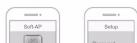
Connect your mobile phone with hotspot. Hotspot Wi-Fi name is
Doorbell-device serial number.
- Go back to the app, and then set a password for your chime. - Follow the app guide to connect your chime.
Follow the app guide to connect your crime.

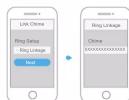
Step 3: Link Chime
Note:
Make sure that you have added a video doorbell.
On app Home interface, select the video doorbell, and then tap
Device Details.
Tap Ring Linkage. The wireless chime list is displayed.
Select the chime on the list, and then tap Save to add it.

Troubleshooting
Q: How to restore factory settings? Tap and hold the pairing button or the reset button for 10 seconds. The blue light will be on and then off, and voice prompts "Device is undergoing hard reset."
Q: The device cannot work normally? Restore default settings of the device, and then configure the device again.
Q: How to enter wireless configuration mode? Tap the pairing button, the indicator light flashes blue and voice prompts "Wi-Fi hotspot is enabled."
Q: The device is not online? Check the LED indicator light. If it is flashing blue, it means that the device failed to connect to the network. Make sure that the wireless router can connect to the network. If the network connection is successful, please configure network for the device again.
Q: Connection is overtime? a. After the device has enabled hotspot, your smartphone doesn't connect to the hotspot for a long time, which leads to connection overtime.
b. Before the app prompts waiting to connect to the network, the device already starts configuration.

Important Safeguards and Warning
This chapter describes the contents covering proper handling of the device, hazard prevention, and prevention of property damage. Read these contents carefully before using the device, comply with them when using, and keep it well for future reference.

CAUTION
If your Wi-Fi network signal is weak during the setup process, please move your router closer to your chime or add a Wi-Fi extender. Note that ordless product might affect the Wi-Fi signal.
Operation Requirements
- Do not place or install the device in a place exposed to sunlight or near the heat source.
- Keep the device away from dampness, dust or oot.
- Keep the device installed horizontally on the stable place to prevent it from falling
- Do not drop or splash liquid onto the device, and make sure there is no object filled with liquid on the device to prevent liquid from flowing into the device.
• Install the device in a well-ventilated place, and do not block the ventilation of the device.
- Operate the device within the rated range of power input and output.
- Do not dissemble the device.
- Transport, use and store the device under the allowed humidity and temperature conditions.
About the Manual
• The manual is for reference only. If there is inconsistency between the
manual and the actual product, the actual product shall prevail. We are not liable for any loss saved by the operations that do not
- We are not liable for any loss caused by the operations that do not comply with the manual.
- The manual would be updated according to the latest laws and regulations of related regions. For detailed information, see the paper manual, CD-ROM, QR code or our official website. If there is inconsistency between paper manual and the electronic version, the
electronic version shall prevail.
All the designs and software are subject to change without prior written notice. The product updates might cause some differences between the actual product and the manual. Please contact the customer service for the latest program and supplementary documentation.
• There still might be deviation in technical data, functions and operations
description, or errors in print.
• If there is any doubt or dispute, please refer to our final explanation.
- Upgrade the reader software or try other mainstream reader software if the manual (in PDF format) cannot be opened.
• All trademarks, registered trademarks and the company names in the
manual are the properties of their respective owners.
Please visit our website, contact the supplier or customer service if
there is any problem occurred when using the device.
- If there is any uncertainty or controversy, please refer to our final explanation.
Quick Start Guide
Wireless Chime

V1.1.01.2.51.32.16560

Brand : Dahua Technology
Model : DS11
Category : Video Intercom