GP108 - Portable audio player Emerson - Free user manual and instructions
Find the device manual for free GP108 Emerson in PDF.


| Product Type | Digital Clock |
| Model | GP108 |
| Brand | Emerson |
| Dimensions | 4.5 x 2.5 x 1.2 inches |
| Weight | 0.5 lbs |
| Power Supply | 2 x AAA batteries (included) |
| Display | LCD with 1.5-inch digits |
| Time Format | 12/24 hour selectable |
| Alarm | Single daily alarm with snooze |
| Backlight | Blue LED backlight |
| Temperature Display | Indoor temperature (°F/°C) |
| Calendar | Date display (month/day) |
| Battery Backup | Preserves settings during power loss |
| Operating Temperature | 32°F to 122°F (0°C to 50°C) |
| Cleaning Instructions | Wipe with a soft, dry cloth; avoid liquids |
| Safety | Not a toy; keep away from children |
| Replacement Parts | Batteries (standard AAA) |
| Warranty | Limited 1-year warranty |
Frequently Asked Questions - GP108 Emerson
User questions about GP108 Emerson
0 question about this device. Answer the ones you know or ask your own.
Ask a new question about this device
Download the instructions for your Portable audio player in PDF format for free! Find your manual GP108 - Emerson and take your electronic device back in hand. On this page are published all the documents necessary for the use of your device. GP108 by Emerson.
USER MANUAL GP108 Emerson
100. PROOF ELECTRONICS
This player has a 60 seconds jog PROH Electronic Skip Projection system that prevents supping during many active users' as each track begends to play the player continuously stores. 60 seconds of music in an electronic memory! In the player is bumped or shaken the player reads from the stored memory so you do nor hear any saps.
The Electronic Sup Projection System turns on automatically every time you begin to play a echo. The ESP indicator appears in the display and begins to fill with "bars." When 5 bars appear the memory conjugates 60 seconds of music and is built if the player is spoken one or more of the bars may disappear if all the bars disappear the ESP memory is empty and the player may stop or stop if the sharing conjugates. When the shading stops the ESP memory will begin to fill up again.

The jog PROOF ESP system in this personal CD player is designed with a special mini recovery circuit that allows the laser to recover from a break and he focuses in less time than it takes for the average jogger to complete one step.
The ESP memory system goes increase the battery drain so if you are using the CD player in a single position where it will not be turned or switch to press the ESP button again to turn the ESP system for. This will increase the battery line.

PLAKING CHINESE
NORMAL PLAYBACK
Now: Make sure the HOLD button is set to the 'Off position'

* Since the OPEN button to the right to open the CD door. Remove the dummy CD rental protection card from the player and dispose of it property.

Place a CD on the center spindle band side up. Press down gently near the center hole until the disc is properly seated on the spindle close the door
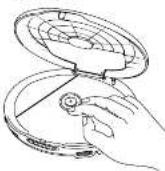
S Connect to Common Phones to the green Headphone pick and set the VOLUME control to a low level. Put on the Common Phones

4 PRESS THE PLAY PAUSE The disc begins to spin the display will momentarily show the toil number of racks and toil playing time of the disc and then playback will begin on track 1. The ESP circuit turns on automatically and the ESP level indicator begins to fill matters. August the VOLUME control to a comprehensive learning lamp

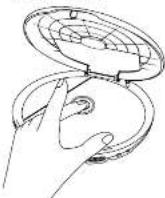
- Side the OPEN button to open the CD door. Press down on the corner range to release the CD remove it and close the CD door.
DYNAMIC BASS BOOST SYSTEM
For increased bass response side the DBRS switch to the 'Off position' set to the 'Off position for normal bass response

- To pause momentarily press the PLAY/PAUSE button during playback. The sound stops the time display flashes but the disc continues to spin Press the PLAY/PAUSE button once more to cancel, Pause and resume normal playback.
* TO SKIP TO OTHER TRACKS PREPS the SKIP/SEARCH or
• To Search for a particular section in a track press and hold other the SKIP/SEARCH or Buttons until you hear the section you want then release the bumona to resume normal playback.
• To stop playback at any time press the STOP button. The disc stops and the display shows the total tracks and playing time of the disc. After 30 seconds the power shuts off and the display goes blank to preserve the batteries.
5 When all tracks have played the disc scope and the display shows the tool tracks and playing time. After 30 seconds the power will stay on automatically or you may press the STOP button again to share the power off immediately and save battery life.
DEBEAT PLUGOLOK

REPEAT ONE TRACK
* Start playback * Stop to the track you want to repeat * Press the PMODE button once. The Repeat 1 (RPT-1) finger appears and the selected track will be repeated continuously

REPEAT ALL TRACKS
* Start playback * Press the REPEAT BUTTON twice The Repeat AI (RPT ALL) indicator appears. The entire disc will be repeated continuously

CANCEL REPEAT PLAYBACK * Press the P'MODE button unit at Repeat indicators disappear or press 1-0 STOP ■ button


(NT20-21/PS40V) (NT30)
* If the disc is playing press the STOP button and wait until the post track number and playing time appears on the display


Press the PMODE button free (S) \$1055 INTRO APPARES IN THE DISRU
PRESS P.MODE 3 TIMES
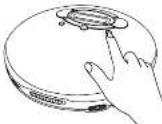

Press the PLAY.PAUSE billion to begin into playbox. The player will play the first 10 seconds of each track on the disc and then step automatically.


BANANA OF BRAK
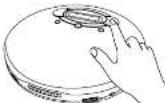
You can play all the racks on a disc in random order
Press 10 PLAYPULSE button 10 BEGIN PLAYBACK
Press the PMODE button 4 times until the Random (RND) indicator appears
PRESS P.MODE 4 TIMES


Press the PLAYPAUSE "button" all tracks will play in random order and then the player stops automatically
Note: During Random Playback, you can press the SKIP/SEARCH button to skip ahead to the note random track but it is no possible to skip backward
PROGRAMMED
you can program up to 20 tracks on a go to play back in any desired order you may enter the same track several times in the program if you want
1 Press the PLAY/Pause button and wait for playback to begin
2 Press the PROGRAM button. The Program (PROG) indicator and flag number will be in the display


- P#SS THE SKIP-SEARCH or buttons to select a stack so be programmed

4 Press the PROGRAM button again to enter the track in the program memory
5 Repeat steps 3 and 4 to enter up to 20 tracks in the program memory
8 Press the PLAY.PAUSE "button" to begin programmed playback. The program (PRO3) indicates steps flashing and remains in the display. The tracks will play in the order you selected: when the last programming track has played the player stops automatically
To clear the programmed memory press the STOP button twice The Program (PROC) indicator disappears
EMERSON PAINO 2172031B 905701
Emerson Radio Corp Consumer Agency Dept 1901 Diplomatic Drive Farmers Brandy TX75234 T 800 996 9020


PERSONAL CD PLAYER with HEADPHONES
OWNER'S MANUAL
GP108
Visit our web site at www.emersonradio.com
Thank you for purchasing the Girlpower personal CD player from Emerson. This unique product has been designed to provide you with many years of exceptional performance with a minimum of care and maintenance.
please review the contents of the instruction manual completely and carefully before operating your unit. All of the functions and operations of the unit are fully explained in the manual to enable you to again the maximum benefit out of all the great product features.
The serial number of your unit can be found at bottom of cabinet. For future reference, we suggest that you record the serial number in the space provided below.
Model No. GP108
Serial Number:
CLASS 1 LASER PRODUCT
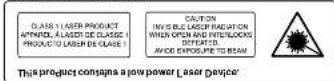
CAUTION
THIS LASER COMPACT DISC PLAYER FUNCTIONS BY HELP OF INVISIBLE LASER LIGHT AND IS EQUIPPED WITH SAFETY SWITCHES TO AVOID EXPOSURE WHEN DOOR IS OPEN AND SAFETY INTERLOCKS ARE DEFEATED IT IS DANGEROUS TO DEFEAT OR BYPASS SAFETY SWITCHES
This device complies with part 15 of the FCC rules' operation is subject to the condition that this device does not cause harmful interference/
Cupson@16548:88 52873 145 PA2
LIMITED WARRANTY
Emerson Radio Corp. warrants manufacturing defects in original material, including original parts and workmanship, under normal use and conditions, for a period of ninety (90) days from the date of original purchase in the U.S. With your dated proof of purchase, we will provide repair service at no charge for labor and parts at an authorized Depot Registrar Facility, or replace the product in our discretion. For repair or replacement, pack your unit in a padded box, enclose your check or money under payable to Emerson Radio Corp. in the amount of \$9,000 (not required by California residents) to cover shipping and handling costs, and enclose a copy of your proof of purchase. Should your unit to:
Emerson Radio Corp.
1901 Diplomat Drive
Farmers Branch, TX 75214.
This warranty does not cover damage from negligence, misuse, abuse, accident, failure to follow operating instructions, commercial use, rental, repairs by an unauthorized facility, or products purchased, used, serviced or damaged outside of the United States.
THIS WARRANTY GIVES YOU SPECIFIC LEGAL RIGHTS, AND YOU MAY ALSO HAVE OTHER RIGHTS WHICH VARY FROM STATE TO STATE.
AU898M
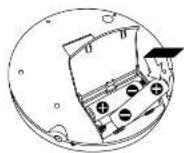
INSTALLING BATTERIES
The battery compartment is on the gasket carrier. Slide the battery door in the direction of the arrow unit it opens. To prevent loss the battery door does not come off the unit

Name: AA*28 Rejre bateras' not included Follow the polarity markings (17) Inside the battery compartment If the batteries are installed correctly the CD player will not work.
Close the battery compartment security

BATTERY INDICATOR
When the Battery Indicator appears in the display the batteries are getting weak and should be changed as soon as possible.

[Non-Text]
The jack allows you to connect your personal CD player in a home stereo system: a car radio (with CD input jack) a computer a tape recorder and the connection type is not required. Be sure to use a connection type that is compatible with the external equipment you are using.
![Emerson GP108 - [Non-Text] - 1](/content/2026/05/982691/images/ce69140aa34221e304b9a34cd7f7257e11367fab945f41d180c59ec4922c1b84.jpg)
USING AC POWER
The AC adapter is not required if you decide to purchase an AC adapter make sure the adapter has the following specifications:
INPUT: 120V 50Hz AC
OUTPUT 45V DC 500mA
PLUG TYPE: Campan PHP
If you purchase a Universal type adjustable AC adapter make sure to set the output voltage to 45VDC


IMPORT MANT
Before you begin playing a CD be sure to set the volume to a low setting.
Then put the Comorl Phones on begin playback and gradually raise the volume compo to a commerce level. Remember that many CDs consist very soft passages as well as much louder passages. Do not raise the volume too high during the soft passage to avoid high sound pressure level during the louder passages.


The earpieces on the Company Phones are marked by "R" (right) and "L" (left). Hold the L'earpiece in your left hand and the R'earpiece in your right hand. Slide the Company Phones downward over your head with the plastic hand against the bars or your neck. The earpieces should be postponed on the outside of your ears and the plastic hand should be between your ears and the side of your hand. Just like the earpieces on a pair of sunglasses.

BATTERY PRECAUTION
Follow these precautions when using batteries in this device:
1. Use only the size and type of batteries specified
2 Be sure to follow the correct priority when installing the batteries as required in the battery compartment. Reversed batteries may cause damage to the device
3' Do not mix different types of batteries together; 16' Alkaline and Carbon-Zinc) or the batteries with resistors.
4. If the device is not to be used for a long period of time remove the batteries to prevent damage or injury from possible battery leakage
5. Donority to recharge batteries not intended to be recharged they can overheat and rupture (follow battery manufacturers' directions)

Brand : Emerson
Model : GP108
Category : Portable audio player