
FZ-5 - Guitar amplifier BOSS - Free user manual and instructions
Find the device manual for free FZ-5 BOSS in PDF.


| Product Type | Guitar Amplifier |
| Brand | Boss |
| Model | FZ-5 |
| Power Source | 9V DC (battery or AC adapter) |
| Current Draw | 30 mA |
| Weight | 0.5 kg |
| Dimensions | 150 x 120 x 50 mm |
| Input Connector | 1/4 inch phone jack |
| Output Connector | 1/4 inch phone jack |
| Controls | Gain, Tone, Volume, Mode Selector |
| Modes | Fuzz, Distortion, Overdrive |
| Indicator | Check indicator (battery check) |
| Construction | High-impact plastic chassis |
| Cleaning | Use a dry cloth, avoid solvents |
| Battery Life | Approximately 20 hours (carbon-zinc) |
| Safety | Remove battery when not in use; do not disassemble |
| Spare Parts | Contact Boss service center or authorized dealer |
| Warranty | One year limited warranty |
| Manual | Available for download at Boss website |
Frequently Asked Questions - FZ-5 BOSS
User questions about FZ-5 BOSS
0 question about this device. Answer the ones you know or ask your own.
Ask a new question about this device
Download the instructions for your Guitar amplifier in PDF format for free! Find your manual FZ-5 - BOSS and take your electronic device back in hand. On this page are published all the documents necessary for the use of your device. FZ-5 by BOSS.
USER MANUAL FZ-5 BOSS
Before using this unit, carefully read the sections entitled: "USING THE UNIT SAFELY" and "IMPORTANT NOTES" (supplied on a separate sheet). After reading, keep the document(s) where it will be available for immediate reference.
Main Features
The FZ-5 uses COSM technology to replicate three types of vintages fuzz boxes especially prized for their sound quality. These fuzz boxes incorporated germanium transistors in their circuitry, a key component to their sound. Germanium transistors are extremely rare today; the FZ-5 models these hard-to-find transistors at the component level to authentically reproduce the classic fuzz sounds of the 1960s and 1970s.
- The FZ-5's FUZZ knob features a BOOST range that allows you to achieve a deeper distortion than is possible with the original vintage models. Even single-coil pickups can be made to satisfyingly distort just like humbucking pickups.
COSM (Composite Object Sound Modeling) Composite Object Sound Modeling—or "COSM" for short—is BOSS/Roland's innovative and powerful technology that's used to digitally recreate the sound of classic musical instruments and effects. COSM analyzes the many factors that make up the original sound—including its electrical and physical characteristics—and creates a digital model that accurately reproduces the original.
Panel Descriptions
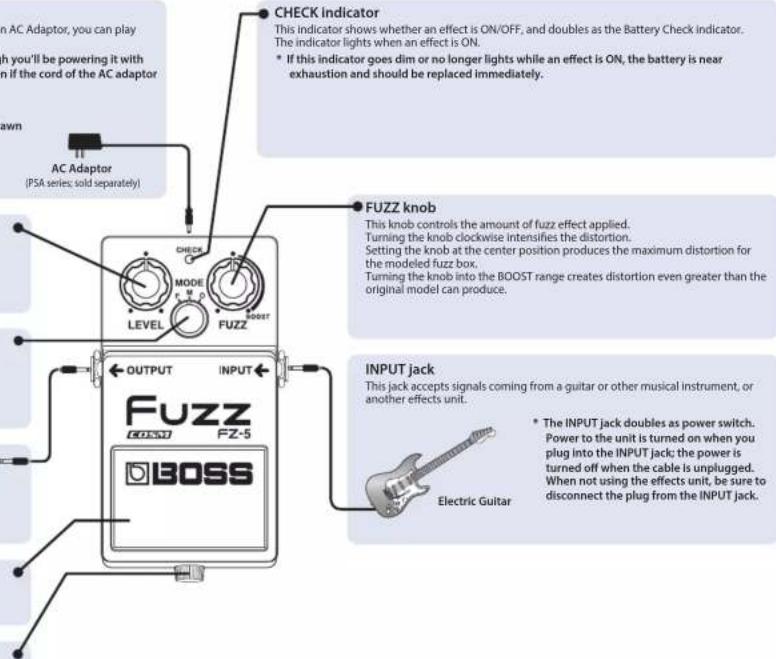
DC IN Jack
Accepts connection of an AC Adaptor (PSA series; sold separately). By using an AC Adaptor, you can play without being concerned about how much battery power you have left.
* We recommend that you keep batteries installed in the unit even though you'll be powering it with the AC adaptor. That way, you'll be able to continue a performance even if the cord of the AC adaptor gets accidentally disconnected from the unit.
* Use only the specified AC adaptor (PSA-series).
* If the AC adaptor is connected while power is on, the power supply is drawn from the AC adaptor.
LEVEL knob
This knob controls the volume of the fuzz effect.
MODE knob
This knob selects the fuzz box model. For details, refer to "MODE List."
OUTPUT jack
Connect this jack to the input of a guitar amp or another effects processor.
Pedal switch
This switch turns the effects ON/OFF.
Thumbscrew
When this screw is loosened, the pedal will open, allowing you to change the battery.
* For instructions on changing the battery, refer to "Changing the Battery."

Guitar Amp
Precautions When Connecting
- To prevent malfunction and equipment failure, always turn down the volume, and turn off all the units before making any connections.
- Once the connections have been completed, turn on power to your various devices in the order specified. By turning on devices in the wrong order, you risk causing malfunction and/or damage to speakers and other devices.
When powering up: Turn on the power to your guitar amp last. When powering down: Turn off the power to your guitar amp first.
- Before turning the unit on/off, always be sure to turn the volume down. Even with the volume turned down, you might hear some sound when switching the unit on/off. However, this is normal and does not indicate a malfunction.
Use of Battery
- A battery is supplied with the unit. The life of this battery may be limited, however, since its primary purpose was to enable testing.
- If you handle batteries improperly, you risk explosion and fluid leakage. Make sure that you carefully observe all of the items related to batteries that are listed in "USING THE UNIT SAFELY" and "IMPORTANT NOTES" (supplied on a separate sheet).
- When operating on battery power only, the unit's indicator will become dim when battery power gets too low. Replace the battery as soon as possible.
- Batteries should always be installed or replaced before connecting any other devices. This way, you can prevent malfunction and damage.
- The use of an AC adaptor is recommended as the unit's power consumption is relatively high.
- If operating this unit on batteries, please use alkaline batteries.
Changing the Battery
-
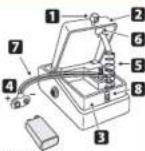
Hold down the pedal and loosen the thumbscrew 1
then open the pedal upward.
The pedal can be opened without detaching the thumbscrew completely. -
Remove the old battery from the battery housing ③nd remove the battery snap ④ connected to it.
-
Connect the battery snap to the new battery, and place the battery inside the battery housing.
Be sure to carefully observe the battery's polarity (+ versus -).
- Slip the coil spring to the spring base on the back of the pedal, and then close the pedal.
Carefully avoid getting the battery snap cord 7. Light in the pedal, coil spring, and battery housing.
- Insert the thumbscrew into the guide bush hole #d tighten it securely.
9 V Battery
Operating the Unit
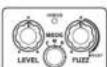
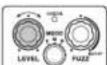
- When you have made the necessary connections, set the knobs as shown in the illustration.
-
Depress the pedal switch to turn the effect on. (The CHECK indicator lights when the effect is on.)
-
Select the fuzz box model with the MODE knob.
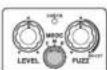
- Adjust the amount of distortion with the FUZZ knob.
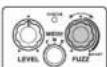
The original distortion range of the selected fuzz box model is reproduced when the FUZZ knob is set anywhere from fully counterclockwise to the center position.
Turning the knob past the center position enables the BOOST range, which produces distortion that exceeds that available on the original model. The BOOST range provides plenty of distortion, even when using single-coil pickups.
- Adjust the output volume with the LEVEL knob.
Normally, you should adjust the LEVEL knob so there's no difference in the volume when switching the effect on and off.
MODE List
| F (FACE) | Models the Dallas-Arbiter FUZZ FACE. This unique round-shaped pedal was indispensable to the psychedelic fuzz sound of the late '60s. This modeled tone reproduces the fat sound of the Dallas-Arbiter units that used AC128 germanium transistors. |
| M (MST FUZZ) | Models the Maestro FZ-1A. It faithfully reproduces the sound of models equipped with 2N2614 germanium transistors. A characteristic of this fuzz sound is a prominent boost in the high-frequency range. If the FUZZ knob is set to the left of center, the sound might be interrupted or have insufficient volume. This is because the original unit is being faithfully modeled; it is not a malfunction. |
| O (OCTAVE FUZZ) | Models the Octavia fuzz. This model reproduces the original's characteristic of overlaying sound an octave higher as the sound decays. This distinctive sound can be obtained especially with single note in high pitch. Please try playing single note higher than 12th fret on 1st - 3rd string. Lowering the volume on the guitar or turning down the FUZZ knob makes it easier to obtain this effect. |
Main Specifications
| Nominal Input Level | 20 dBu |
| Input Impedance 1 MΩ | |
| Nominal Output Level | -20 dBu |
| Output Impedance 1 kΩ | |
| Recommended Load Impedance | 10 kΩ or greater |
| Power Supply Alkaline battery (9 V, 6LR61)AC adaptor (PSA series: sold separately) | |
| Current Draw | 60 mA* Expected battery life under continuous use:Alkaline: 4 hoursThese figures will vary depending on the actual conditions of use. |
| Dimensions | 73 (W) x 129 (D) x 59 (H) mm2-7/8 (W) x 5-1/8 (D) x 2-3/8 (H) inches |
| Weight | 405 g / 15 oz (including battery) |
| Accessories | Leaflet ("USING THE UNIT SAFELY," "IMPORTANT NOTES," and "Information")Alkaline battery (9 V, 6LR61) |
| Options(sold separately) | AC adaptor (PSA-series) |
* 0 dBu = 0.775 Vrms
* This document explains the specifications of the product at the time that the document was issued. For the latest information, refer to the Roland website.
Brand : BOSS
Model : FZ-5
Category : Guitar amplifier