PXDCS-018 - Uncategorized Ozito - Free user manual and instructions
Find the device manual for free PXDCS-018 Ozito in PDF.


| Product Type | Cordless Drill Driver |
| Model | PXDCS-018 |
| Brand | Ozito |
| Voltage | 18 V |
| Battery Type | Lithium-Ion |
| Chuck Type | Keyless |
| Chuck Capacity | 1.5 - 13 mm (1/16 - 1/2 in) |
| No-Load Speed (Low) | 0 - 400 RPM |
| No-Load Speed (High) | 0 - 1500 RPM |
| Max Torque | 30 Nm |
| Clutch Settings | 18+1 |
| Drilling Capacity (Wood) | 25 mm |
| Drilling Capacity (Metal) | 10 mm |
| Weight (without battery) | 1.2 kg |
| Dimensions (L x W x H) | 210 x 65 x 180 mm |
| Variable Speed Trigger | Yes |
| Forward/Reverse Switch | Yes |
| LED Work Light | Yes |
| Belt Clip Included | Yes |
| Battery and Charger Included | No (sold separately) |
| Warranty | 3 years |
| Recommended Use | Drilling and screwdriving in wood, metal, and plastic |
Frequently Asked Questions - PXDCS-018 Ozito
User questions about PXDCS-018 Ozito
0 question about this device. Answer the ones you know or ask your own.
Ask a new question about this device
Download the instructions for your Uncategorized in PDF format for free! Find your manual PXDCS-018 - Ozito and take your electronic device back in hand. On this page are published all the documents necessary for the use of your device. PXDCS-018 by Ozito.
USER MANUAL PXDCS-018 Ozito
- Keep the ventilation slots of the tool clean at all times to ensure efficient operation.
- After each use, blow air through the tool housing to ensure it is free from all dust, dirt, etc. Build up of dust or dirt particles may cause the tool to overheat and shorten the life of the tool.
- If the housing of the tool requires cleaning, do not use solvents. Use of a cloth only is recommended.
- Never allow any liquid to get inside the tool, never immerse any part of the tool into liquid.
Storage
When not in use, the tool should be stored in a dry, frost free location, keep out of children's reach.
Note: Ozito Industries will not be responsible for any damage or injuries caused by repair of the tool by an unauthorised person or by mishandling.
DESCRIPTION OF SYMBOLS
| [85W7] | Ampere hour | [2XK3] | Volts | |
| [AHS4] | Direct Current | [→×] | No load speed | |
| [1×4] | Revolutions or reciprocations per minute | [→×] | Left | |
| [→×6] | Right | [0W07] | Warning | |
| [1×8×2] | Neutral | [→××2] | Regulatory Compliance Mark (RCM) | |
| [A8XW] | Wear eye, ear & breathing protection | [→×7×] | Use Gloves | |
| [→854] | Keep hands away from rotating parts | [→647] | Keep long hair away from rotating parts | |
| [85ZW] | Read Instruction Manual | |||
CARING FOR THE ENVIRONMENT
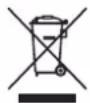
Power tools that are no longer usable should not be disposed of with household waste but in an environmentally friendly way. Please recycle where facilities exist. Check with your local council authority for recycling advice.

Recycling packaging reduces the need for landfill and raw materials. Reuse of recycled material decreases pollution in the environment. Please recycle packaging where facilities exist. Check with your local council authority for recycling advice.
SPARE PARTS
Spare parts can be ordered from the Special Orders Desk at your local Bunnings Warehouse.
For further information, or any parts not listed here, visit www.ozito.com.au or contact Ozito Customer
Service:
Australia 1800 069 486
New Zealand 0508 069 486
E-mail: enquiries@ozito.com.au

ELECTRICAL SAFETY

WARNING! When using electric tools basic safety precautions should always be followed to reduce the risk of fire, electric shock and personal injury.
- Read the whole manual carefully and make sure you know how to switch the tool off in an emergency, before operating the tool. Save these instructions and other documents supplied with this tool for future reference.
- This appliance is not intended for use by persons (including children) with reduced physical, sensory or mental capabilities, or lack of experience and knowledge, unless they have been given supervision or instruction concerning use of the appliance by a person responsible for their safety. Children should be supervised to ensure that they do not play with the appliance.
- This appliance is compatible and only to be used with all batteries & chargers from the Ozito PXC range. Refer to the PXC battery and charger manuals for information regarding charging,
use and storage.
- WARNING! Always remove the battery from the tool:
- when the batteries are to be charged,
- when the tool is left unattended
- when the tool is being checked, cleaned, or having maintenance work done,
- when the tool is to be stored,
- or if the tool vibrates abnormally.
- Do not combine different types of batteries or new and used batteries.
- Do not use modified or damaged batteries.

GENERAL POWER TOOL SAFETY WARNINGS
WARNING! Read all safety warnings, instructions, illustrations and specifications provided with this power tool. Failure to follow all instructions listed below may result in electric shock, fire and/or serious injury.
Save all warnings and instructions for future reference.
The term "power tool" in the warnings refers to your mains-operated (corded) power tool or battery-operated (cordless) power tool.
1) Work area safety
a) Keep work area clean and well lit. Cluttered or dark areas invite accidents.
b) Do not operate power tools in explosive atmospheres, such as in the presence of flammable liquids, gases or dust. Power tools create sparks which may ignite the dust or fumes.
c) Keep children and bystanders away while operating a power tool. Distractions can cause you to lose control.
2) Electrical safety
a) Power tool plugs must match the outlet. Never modify the plug in any way. Do not use any adapter plugs with earthed (grounded) power tools. Unmodified plugs and matching outlets will reduce risk of electric shock.
b) Avoid body contact with earthed or grounded surfaces, such as pipes, radiators, ranges and refrigerators. There is an increased risk of electric shock if your body is earthed or grounded.
c) Do not expose power tools to rain or wet conditions. Water entering a power tool will increase the risk of electric shock.
d) Do not abuse the cord. Never use the cord for carrying, pulling or unplugging the power tool. Keep cord away from heat, oil, sharp edges or moving parts. Damaged or entangled cords increase the risk of electric shock.
e) When operating a power tool outdoors, use an extension cord suitable for outdoor use. Use of a cord suitable for outdoor use reduces the risk of electric shock.
f) If operating a power tool in a damp location is unavoidable, use a residual current device (RCD) protected supply. Use of an RCD reduces the risk of electric shock.
3) Personal safety
a) Stay alert, watch what you are doing and use common sense when operating a power tool. Do not use a power tool while you are tired or under the influence of drugs, alcohol or medication. A moment of inattention while operating power tools may result in serious personal injury.
b) Use personal protective equipment. Always wear eye protection. Protective equipment such as a dust mask, non-skid safety shoes, hard hat or hearing protection used for appropriate conditions will reduce personal injuries.
c) Prevent unintentional starting. Ensure the switch is in the off-position before connecting to power source and/or battery pack, picking up or carrying the tool. Carrying power tools with your finger on the switch or energising power tools that have the switch on invites accidents.
d) Remove any adjusting key or wrench before turning the power tool on. A wrench or a key left attached to a rotating part of the power tool may result in personal injury.
c) Do not overreach. Keep proper footing and balance at all times. This enables better control of the power tool in unexpected situations.
f) Dress properly. Do not wear loose clothing or jewellery. Keep your hair and clothing away from moving parts. Loose clothes, jewellery or long hair can be caught in moving parts.
g) If devices are provided for the connection of dust extraction and collection facilities, ensure these are connected and properly used. Use of dust collection can reduce dust-related hazards.
h) Do not let familiarity gained from frequent use of tools allow you to become complacent and
ignore tool safety principles. A careless action can cause severe injury within a fraction of a second.
4) Power tool use and care
a) Do not force the power tool. Use the correct power tool for your application. The correct power tool will do the job better and safer at the rate for which it was designed.
b) Do not use the power tool if the switch does not turn it on and off. Any power tool that cannot be controlled with the switch is dangerous and must be repaired.
c) Disconnect the plug from the power source and/or remove the battery pack, if detachable, from the power tool before making any adjustments, changing accessories, or storing power tools. Such preventive safety measures reduce the risk of starting the power tool accidentally.
d) Store idle power tools out of the reach of children and do not allow persons unfamiliar with the power tool or these instructions to operate the power tool. Power tools are dangerous in the hands of untrained users.
e) Maintain power tools and accessories. Check for misalignment or binding of moving parts, breakage of parts and any other condition that may affect the power tool's operation. If damaged, have the power tool repaired before use. Many accidents are caused by poorly maintained power tools.
f) Keep cutting tools sharp and clean. Properly maintained cutting tools with sharp cutting edges are less likely to bind and are easier to control.
g) Use the power tool, accessories and tool bits etc. in accordance with these instructions, taking into account the working conditions and the work to be performed. Use of the power tool for operations different from those intended could result in a hazardous situation.
h) Keep handles and grasping surfaces dry, clean and free from oil and grease. Slippery handles and grasping surfaces do not allow for safe handling and control of the tool in unexpected situations.
5) Battery tool use and care
a) Recharge only with the charger specified by the manufacturer. A charger that is suitable for one type of battery pack may create a risk of fire when used with another battery pack.
b) Use power tools only with specifically designated battery packs. Use of any other battery packs may create a risk of injury and fire.
c) When battery pack is not in use, keep it away from other metal objects, like paper clips, coins, keys, nails, screws or other small metal objects, that can make a connection from one terminal to another. Shorting the battery terminals together may cause burns or a fire.
d] Under abusive conditions, liquid may be ejected from the battery; avoid contact. If contact accidentally occurs, flush with water. If liquid contacts eyes, additionally seek medical help. Liquid ejected from the battery may cause irritation or burns.
e) Do not use a battery pack or tool that is damaged or modified. Damaged or modified batteries may exhibit unpredictable behaviour resulting in fire, explosion or risk of injury.
f) Do not expose a battery pack or tool to fire or excessive temperature. Exposure to fire or temperature above 130 °C may cause explosion.
g) Follow all charging instructions and do not charge the battery pack or tool outside the temperature range specified in the instructions. Charging improperly or at temperatures outside the specified range may damage the battery and increase the risk of fire.
6) Service
a) Have your power tool serviced by a qualified repair person using only identical replacement parts. This will ensure that the safety of the power tool is maintained.
b) Never service damaged battery packs. Service of battery packs should only be performed by the manufacturer or authorized service providers.

DRAIN CLEANER SAFETY WARNINGS
- Only grasp the rotating cable with gloves recommended by the manufacturer. Latex or loose-fitting gloves or rags can become wrapped around the cable and may result in serious personal injury.
- Do not allow the cutter to stop turning while the cable is turning. This can overstress the cable and may cause twisting, kinking or breaking of the cable and may result in serious personal injury.
-
Use latex or rubber gloves inside the gloves recommended by the manufacturer, goggles, face shields, protective clothing, and respirator when chemicals, bacteria or other toxic or infectious substances are suspected to be in a drain line. Drains may contain chemicals, bacteria and other substances that may cause burns, be toxic or infectious or may result in other serious personal injury.
-
Practice good hygiene. Do not eat or smoke while handling or operating the tool. After handling or operating drain cleaning equipment, use hot, soapy water to wash hands and other body parts exposed to drain contents. This will help reduce the risk of health hazards due to exposure to toxic or infectious material.
- Only use the drain cleaner for the recommended drain sizes. Using the wrong size drain cleaner can lead to twisting, kinking or breaking of the cable and may result in personal injury.
- Avoid using power tools for long periods of time without breaks. Vibration from tools can be transmitted into your hands and arms.
- Do not point LED at eyes of persons or animals

DRAIN CLEANER SKIN
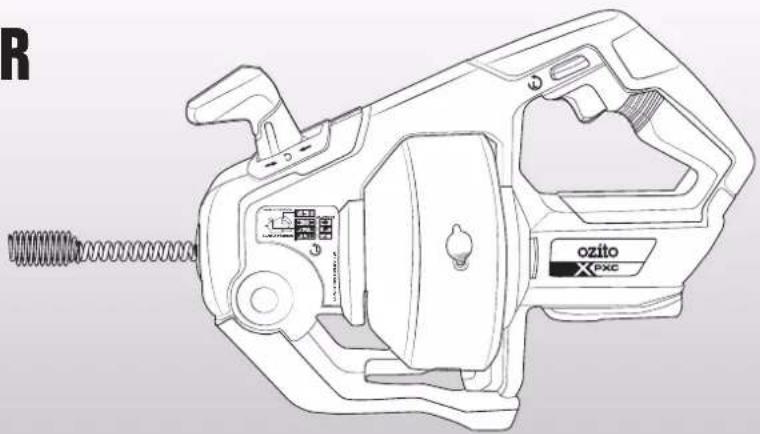
INSTRUCTION MANUAL
SPECIFICATIONS
Input: 18V
No Load Speed: 0-560/min
Coil Length: 7.6m
Coil Diameter: 7mm
Pipe Diameter: 16-55mm
Weight: 3.69kg
natural_image
Line drawing of a mechanical device with spring and control panel (no text or symbols)ozito.com.au
5 YEAR REPLACEMENT WARRANTY
PXDCS-018
WARRANTY
IN ORDER TO MAKE A CLAIM UNDER THIS WARRANTY YOU MUST RETURN THE PRODUCT TO YOUR NEAREST BUNNINGS WAREHOUSE WITH YOUR BUNNINGS REGISTER RECEIPT. PRIOR TO RETURNING YOUR PRODUCT FOR WARRANTY PLEASE TELEPHONE OUR CUSTOMER SERVICE HELPLINE:
Australia 1800 069 486
New Zealand 0508 069 486
TO ENSURE A SPEEDY RESPONSE PLEASE HAVE THE MODEL NUMBER AND DATE OF PURCHASE AVAILABLE. A CUSTOMER SERVICE REPRESENTATIVE WILL TAKE YOUR CALL AND ANSWER ANY QUESTIONS YOU MAY HAVE RELATING TO THE WARRANTY POLICY OR PROCEDURE.
WARNING
The following actions will result in the warranty being void.
- If the tool has been operated on a supply voltage other than that specified on the tool.
- If the tool shows signs of damage or defects caused by or resulting from abuse, accidents or alterations.
- Failure to perform maintenance as set out within the instruction manual.
- If the tool is disassembled or tampered with in any way.
The benefits provided under this warranty are in addition to other rights and remedies which are available to you at law.
Our goods come with guarantees that cannot be excluded at law. You are entitled to a replacement or refund for a major failure and for compensation for any other reasonably foreseeable loss or damage. You are also entitled to have the goods repaired or replaced if the goods fail to be of acceptable quality and the failure does not amount to a major failure.
Generally you will be responsible for all costs associated with a claim under this warranty, however, where you have suffered any additional direct loss as a result of a defective product you may be able to claim such expenses by contacting our customer service helpline above.
5 YEAR REPLACEMENT WARRANTY
Your Product is guaranteed for a period of 60 months from the original date of purchase and is intended for DIY (Do It Yourself) use only. If a product is defective it will be replaced in accordance with the terms of this warranty. Lithium Ion
batteries and chargers are covered by a 36 month
warranty and are excluded from the warranty extension. Warranty excludes consumable parts.
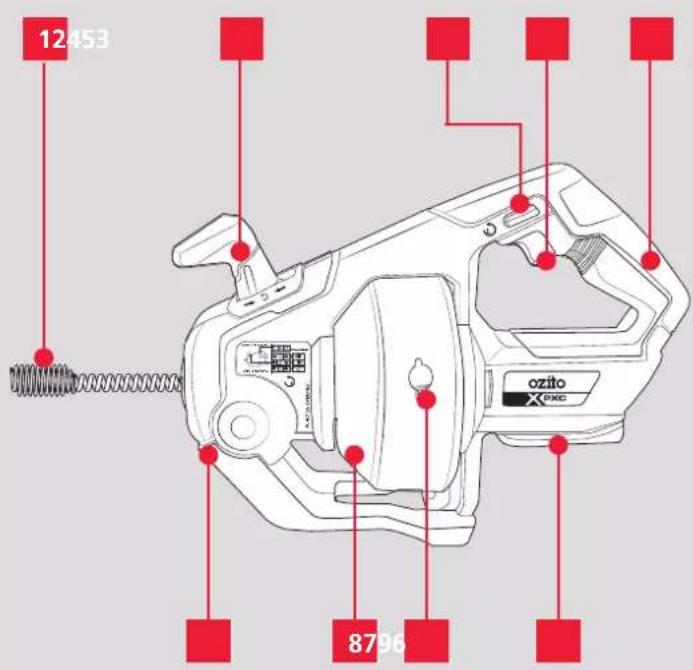
KNOW YOUR PRODUCT
-
Cleaning Coil
-
Variable Speed Trigger
-
Navigating Lever
-
Sure Grip Handle
-
Direction of rotation switch
-
Battery Seating
-
Cleaning/Emptying tab
-
LED Light
-
Storage Drum
BATTERY & CHARGER
This tool is compatible with all batteries & chargers from the Ozito PXC range.
ONLINE MANUAL
Scan this QR Code with your mobile device to take you to the online manual.

SETUP & PREPARATION
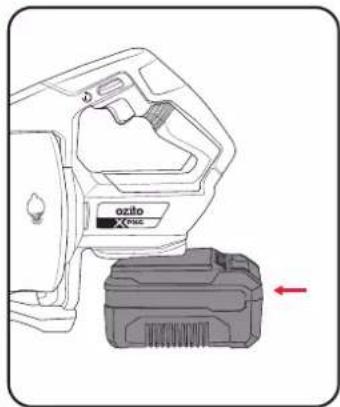
1. FITTING THE BATTERY
Installing The Battery Pack
- Slide the battery into the tool base until it clicks into place.
natural_image
Technical illustration of a ozilo printer with a separate base unit, showing no text or symbols on the device itself.Removing The Battery Pack
- Hold down the battery a)release button and then b)slide the battery out.
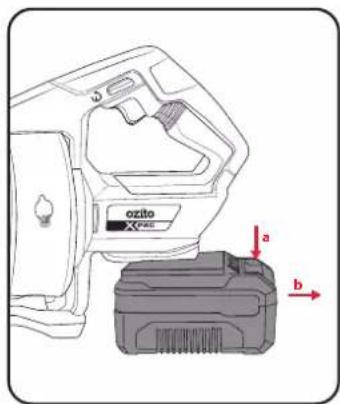
2. CONTROLS 3. USAGE

WARNING! ALWAYS REMOVE THE BATTERY BEFORE MAKING ADJUSTMENTS TO THE TOOL.
Adjusting the direction of rotation and movement of the cleaning coil
- The machine has two controls for adjusting the cleaning coil: the Forward/Neutral/Reverse lever (b) and the direction of rotation switch (c). The direction of rotation and movement of the cleaning coil (a) will change depending on how the controls are set.
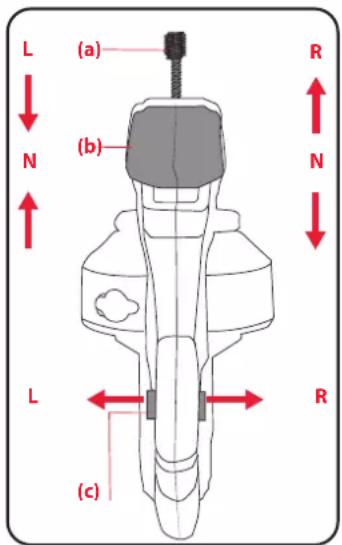
Note: (a) Refers to the cleaning coil, (b) Refers to the Forward/Neutral/Reverse lever, (c) refers to Right (R) or Left (L) control
On/Off Switch:
- Press (a) On/Off Switch to switch on and (b) release to switch off the tool. The speed varies depending on the amount of pressure you apply to the trigger.
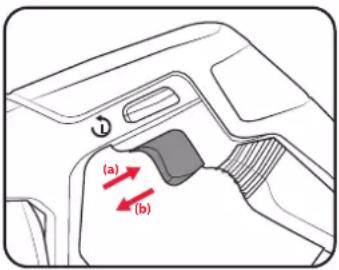
Note: Press the On/Off switch to switch on the LED light. You will then have a better view of thework area.
Note: When you let go of the On/Off switch the light will continue to shine for another 10 seconds or so before it goes out.

WARNING! THE CONTENTS OF THE DRAINAGE MIGHT BE INFECTIOUS AND/OR CONTAIN AGGRESSIVE SUBSTANCES. IT IS RECOMMENDED THEREFORE TO WEAR SAFETY GOGGLES AND MOUTH/FACE PROTECTION.
Direction of rotation switch (c) at setting L
- The cleaning coil (a) will always turn counter clockwise when pushed in from the L side as seen from the operator's position
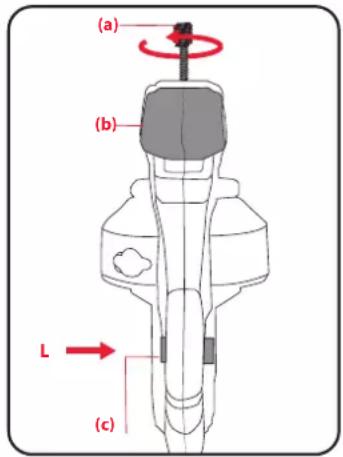
- Forward / Neutral / Reverse Lever (b) at:
Forward Setting: The cleaning coil (a) will be moved in.
Neutral Setting: The cleaning coil (a) will be moved neither out nor in
Reverse Setting: The cleaning coil (a) will be moved out.
Direction of rotation switch (c) at setting R
- The cleaning coil (a) will always turn clockwise when pushed in from the R side as seen from the operator's position.
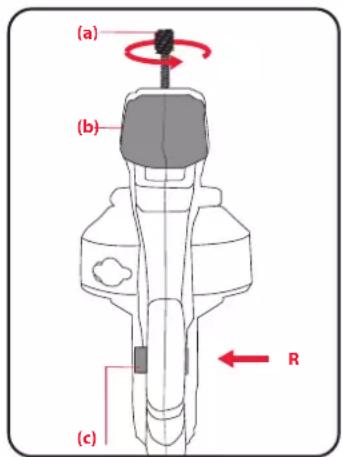
- Forward / Neutral / Reverse Lever (b) at:
Forward Setting: The cleaning coil (a) will be moved out.
Neutral Setting: The cleaning coil (a) will be moved neither out nor in
Reverse Setting: The cleaning coil (a) will be moved in
MAINTENANCE

WARNING! HIGHLY RECOMMENDED TO WEAR HAND, EYE, HEARING AND BREATHING PROTECTION.
Applying the Drain Cleaner
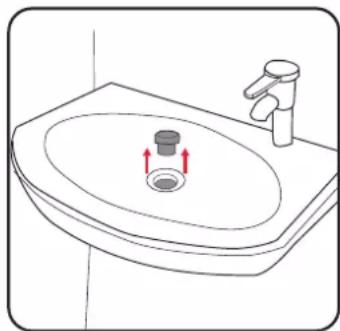
- Remove the stopper from the drain of the product of application to start cleaning.
natural_image
Line drawing of a sink with a drain and faucet, showing red arrows indicating flow direction (no text or symbols)Note: This method can be applied to products like basins, bathtubs, drain pipes, etc.

WARNING! ALWAYS WORK WITH THE MACHINE AS CLOSE AS POSSIBLE TO THE PIPE INLET WITHIN 100MM. THIS WILL PREVENT YOU FROM COMING INTO CONTACT WITH THE ROTATING CLEANING COIL WITH RISK OF INJURY.

WARNING! KEEP HANDS AND HEAD HAIR OUT OF THE ROTATING PARTS WHILE THE DRAIN CLEANER IS RUNNING
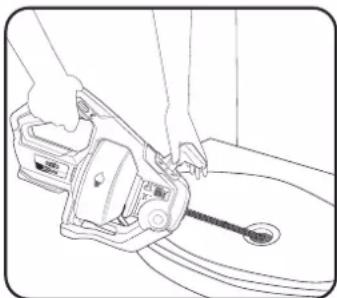
- Feed the cleaning coil into the drain slowly. Ensure one hand is on lever and one hand on handle and start the process choosing the direction of rotation switch and pressing the variable speed trigger. Cleaning coil may also be fed manually by shifting the lever to neutral and holding the handle with one hand while feeding the cleaning coil with the other.
natural_image
Line drawing of a hand using a tool to lift a car wheel (no text or symbols)- After the blockage has been cleared, check the result with enough water and repeat the technique as needed until the pipe is totally free again.
Note: When removing the cable from a drain, remove it slowly to avoid "splash back".
Note: Do not leave the cleaning coil running in forwards or reverse for long amounts of time. Failure to follow these directions may result in tool damage.
Note: At first, move the wire slowly. It can distort or become stuck if you move it too quickly.
Note: Operating the tool at greater distances can result in the cable twisting or binding.

WARNING! ENSURE THE TOOL IS SWITCHED OFF AND THE BATTERY IS REMOVED BEFORE PERFORMING ANY OF THE FOLLOWING TASKS.
Cleaning The Cleaning Coil :
- In this case move the Forward/Neutral/Reverse lever to the Neutral setting and then pull the coil out of the machine for cleaning.
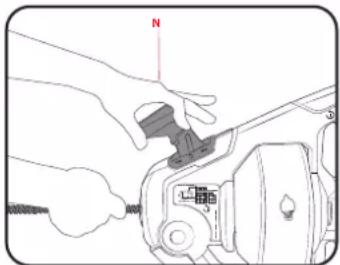
- When you have finished cleaning the pipe, you should clean and dry the cleaning coil thoroughly with a clean rag before you move it fully into the storage drum for the cleaning coil.
Note: Do not use the switch trigger to move or retract the cable unless it is in a drain pipe.
Emptying the Storage Drum
- Lift the two drain tabs on the sides of the drum while holding it at an angle. Allow any liquids inside the drum to drain or be disposed of in a liquid waste container. You may need to leave drain tabs open until storage drum has dried completely.
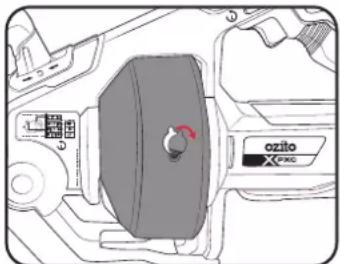
Note: If any dirt collects in the storage drum for the cleaning coil, you can rinse it out of the drum with clear water by opening the cleaning/emptying two openings of the storage drum and continue rinsing until there is no more dirt in the storage drum for the cleaning coil.
Replacing The Cleaning Coil :
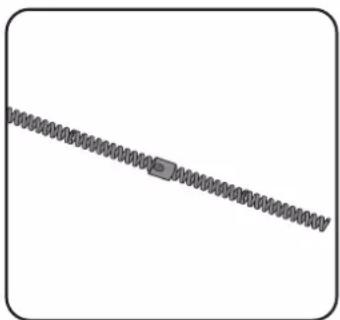
- A damaged or worn cleaning coil can be replaced by a new one. To do so, pull the cleaning coil out of the machine until you can see the connecting piece. The screw on the connecting piece must be undone. Now you can simply pull off the old cleaning coil and fit the new one in reverse order. Finally check that the screw on the connecting piece is tight. The new cleaning coil can now be moved into the storage drum for the cleaning coil.
natural_image
Pure diagram of a coiled spring without any text, numbers, or symbols- Storage
- DESCRIPTION OF SYMBOLS
- CARING FOR THE ENVIRONMENT
- SPARE PARTS
- ELECTRICAL SAFETY
- GENERAL POWER TOOL SAFETY WARNINGS
- DRAIN CLEANER SAFETY WARNINGS
- DRAIN CLEANER SKIN
- SPECIFICATIONS
- WARRANTY
- Australia 1800 069 486
- WARNING
- YEAR REPLACEMENT WARRANTY
- KNOW YOUR PRODUCT
- BATTERY & CHARGER
- SETUP & PREPARATION
- FITTING THE BATTERY
- Installing The Battery Pack
- Removing The Battery Pack
- CONTROLS 3. USAGE
- Adjusting the direction of rotation and movement of the cleaning coil
- On/Off Switch:
- Direction of rotation switch (c) at setting L
- Direction of rotation switch (c) at setting R
- MAINTENANCE
- Applying the Drain Cleaner
- Cleaning The Cleaning Coil :
- Emptying the Storage Drum
- Replacing The Cleaning Coil :
Brand : Ozito
Model : PXDCS-018
Category : Uncategorized