
USB-C224 - Uncategorized Mercury - Free user manual and instructions
Find the device manual for free USB-C224 Mercury in PDF.


| Type of Product | USB-C Multiport Adapter |
| Dimensions | 5.5 x 2.2 x 1.5 cm |
| Weight | 20 g |
| Power Source | USB bus powered (5V/0.9A max) |
| Ports | 1 x USB-C input, 2 x USB-A 3.0, 1 x USB-C PD |
| Data Transfer Speed | Up to 5 Gbps |
| Power Delivery | Up to 60W (PD 3.0) |
| Compatibility | Windows, macOS, Linux, Chrome OS |
| Material | Aluminum alloy and ABS |
| Color | Gray |
| LED Indicator | Yes, blue LED |
| Maximum Resolution | Not applicable (no video output) |
| Warranty | 1 year limited warranty |
| Safety Certifications | CE, FCC, RoHS |
| Operating Temperature | 0°C to 45°C |
| Storage Temperature | -20°C to 60°C |
| Maintenance | Keep dry, clean with a soft cloth |
| Safety | Do not use near water or in high humidity |
| Repairability | Non-user-serviceable; no spare parts available |
Frequently Asked Questions - USB-C224 Mercury
User questions about USB-C224 Mercury
0 question about this device. Answer the ones you know or ask your own.
Ask a new question about this device
Download the instructions for your Uncategorized in PDF format for free! Find your manual USB-C224 - Mercury and take your electronic device back in hand. On this page are published all the documents necessary for the use of your device. USB-C224 by Mercury.
USER MANUAL USB-C224 Mercury
natural_image
Electronic circuit board with a perforated top and gold-colored central component (no visible text or symbols)13.8Vdc Switch Mode Power Supplies
User Manual
Please read through this manual thoroughly before use, any damage caused by misuse of product will not be covered by warranty.
Series of 13.8Vdc switching power supplies. Ideal use for radio equipment, security systems, alarm systems, access control systems, 12Vdc LED Lighting systems and central monitoring systems. For indoor use only.
Features:
- Short circuit protection.
• Overload protection. - Auto reset.
- Easy installation, screw terminals.
• Fan cooling for higher power models.
• Higher power models with 2 or 3 outputs to facilitate easier wiring of multiple devices.
Specifications:
| Item Ref | Output Voltage | Output Current | Max. Power | IP Rating | Power Supply | Outputs | Dimensions | Weight |
| 650.755UK | 13.8V | 3.6A | 49.68W | IP20 | 240Vac/1.3A, 50Hz | 1 | 110 x 35 x 80mm | 0.22kg |
| 650.756UK | 13.8V | 5.4A | 74.52W | IP20 | 240Vac/1.3A, 50Hz | 1 | 110 x 35 x 80mm | 0.22kg |
| 650.759UK | 13.8V | 15A | 207W | IP20 | 240Vac/2.5A, 50Hz | 2 | 200 x 38 x 100mm | 0.54kg |
| 650.761UK | 13.8V | 25A | 345W | IP20 | 240Vac/4A, 50Hz | 3 | 220 x 50 x 115mm | 0.85kg |
| 650.762UK | 13.8V | 30A | 414W | IP20 | 240Vac/4A, 50Hz | 3 | 220 x 50 x 115mm | 0.85kg |
| 650.764UK | 13.8V | 43.5A | 600.3W | IP20 | 240Vac/6A, 50Hz | 3 | 240 x 65 x 125mm | 1.15kg |
Key Markings:
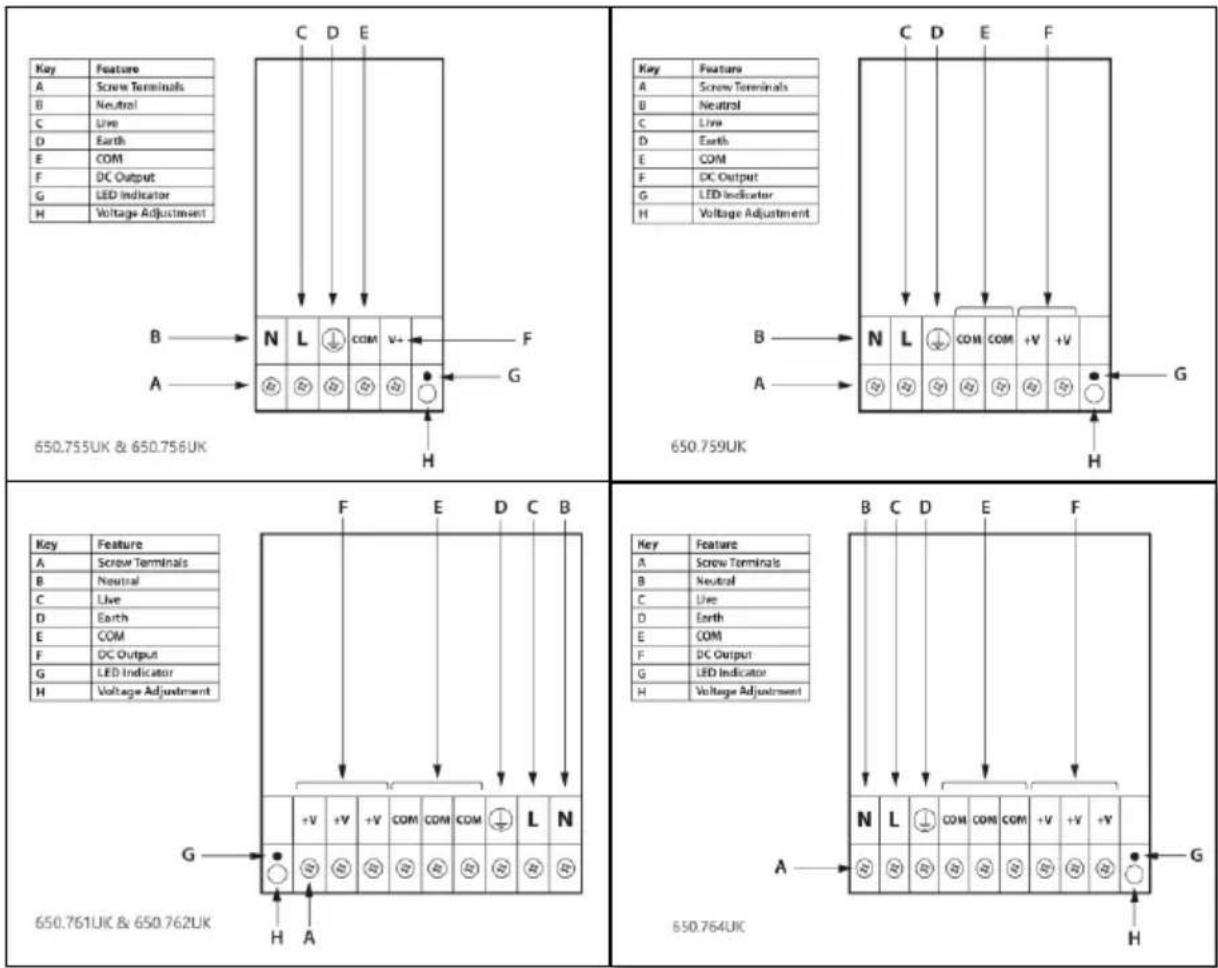
- AC input connections: "live" and "neutral", the markings are displayed as "L", "N".
- DC output connections "positive" and "negative", the markings are displayed as "+V", "-V".
- The markings of multi-DC output voltage are "+V1", "+V2", "+V3", "+V4" "-V1", "-V2", "-V3", "-V4".
- The common interface marking for multiple outputs is "COM".
- The earth symbol is ±
- Green LED indicator indicates power on.
- Adjust voltage marking is displayed as "+V ADJ". Voltage adjustment range is 10% (12.42V-15.18V).
Before Power On:
- Please check the input and output wires are wired correctly: live, neutral, earth wire for AC; positive, negative DC.
- Check whether the current rating of connecting cables is large enough.
- Please check the connection of screws are secure.
- Please check the earth wire is firmly connected for safety.
- When using large electrical equipment, please consider installing an AC filter.
- Full load working temperature is -10\~40°C. Above this temperature will reduce the output power, i.e at 70°C the output power will not exceed 50%. Below -10°C, the unit will not power on.
Wiring Diagrams:

CAUTION
RISK OF ELECTRIC SHOCK
DO NOT OPEN
AVIS
RISQUE DE CHOC
ELECTRIQUE NE PAS
OUVRIR


This symbol indicates that dangerous voltage constituting a risk of electric shock is present within this unit

This symbol indicates that there are important operating and maintenance instructions in the literature accompanying this unit.
Warnings:
- For indoor use ONLY
- This unit MUST be earthed.
- Risk of electric shock: do not open, this device contains no user serviceable parts.
- Do not cover the ventilation holes.
- Do not install land operate the device in extreme heat, moisture, or dusty environments.
- Unplug the power supply when not in use.
- The appliance is not for use by children and children should be supervised when around this unit.
- This appliance is for use by professional electrical installers only.

C
€
UK CA

This product is classed as Electrical or Electronic equipment and should not be disposed with other household or commercial waste at the end of its useful life. The goods must be disposed of according to your local council guidelines.
Errors and omissions excepted.
Copyright© 2023 AVSL Group Ltd, Unit 2 Bridgewater Park,
Taylor Road, Trafford Park, Manchester. M41 7JQ.
AVSL (Europe) Ltd, Unit 3D North Point House, North Point Bus. Park, New Mallow Road, Cork, Ireland.
Brand : Mercury
Model : USB-C224
Category : Uncategorized