
APDU1335T - Temperature Controller APC - Free user manual and instructions
Find the device manual for free APDU1335T APC in PDF.


| Product Type | Digital Temperature Controller |
| Model | APDU1335T |
| Brand | APC |
| Input Voltage | 24 VAC/VDC |
| Output Type | Relay (SPDT, 2A @ 30 VDC / 250 VAC) |
| Sensor Input | Thermocouple Type K or Pt100 RTD (selectable) |
| Display | Dual LED, 4-digit, red and green |
| Temperature Range | -200 to 1800 °C (depending on sensor) |
| Control Mode | ON/OFF or PID (selectable) |
| Setpoint Resolution | 0.1 °C |
| Accuracy | ±0.5% of full scale |
| Dimensions (W x H x D) | 48 x 48 x 90 mm |
| Panel Cutout | 45 x 45 mm |
| Weight | Approximately 150 g |
| Protection Rating | IP65 (front panel) |
| Operating Temperature | 0 to 50 °C |
| Storage Temperature | -20 to 70 °C |
| Humidity | 20% to 85% RH (non-condensing) |
| Key Functions | Setpoint adjustment, auto-tuning, alarm output |
| Maintenance | Wipe with dry cloth; avoid solvents |
| Safety Compliance | CE, RoHS |
| Spare Parts | Replacement sensor, mounting bracket, connector |
Frequently Asked Questions - APDU1335T APC
User questions about APDU1335T APC
0 question about this device. Answer the ones you know or ask your own.
Ask a new question about this device
Download the instructions for your Temperature Controller in PDF format for free! Find your manual APDU1335T - APC and take your electronic device back in hand. On this page are published all the documents necessary for the use of your device. APDU1335T by APC.
USER MANUAL APDU1335T APC
NetShelter Rack PDU Advanced Temperature and Temperature and Humidity Sensors
APDU1335T, APDU1335TH, APDU1335T3H Installation
Schneider Electric
Inventory
IMPORTANT INFORMATION
The Temperature and Humidity sensors are designed to add comprehensive environmental monitoring to a NetShelter® Rack PDU Advanced. To provide greater data accuracy, the sensors contain an embedded microchip that converts analog signals before sending the data to the NetShelter Rack PDU Advanced. The design enables easy plug and play installation. An RJ45 quick disconnect coupler and a RS-485 extension cable are included in each kit to allow for convenient location of sensors.
NOTICE
HAZARD OF EQUIPMENT DAMAGE
The Temperature Sensor and Temperature/Relative Humidity Sensors are designed to connect only to a NetShelter Rack PDU Advanced. Connecting the sensors to another device may result in damage.
Failure to follow these instructions can result in equipment damage.
NOTICE
An APDU1300 Sensor Hub (not provided) can be used to connect the APDU1335T Temperature Sensor Assembly or the APDU1335TH Temperature/Humidity Sensor Assembly to the NetShelter Rack PDU Advanced. Connecting the APDU1335T3H Temperature/Humidity Sensor Assemble to an APDU1300 Sensor Hub is not recommended.
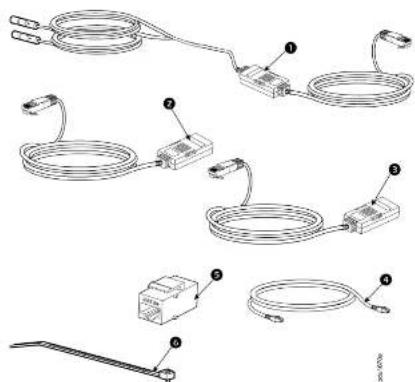
APDU1335T3H Temperature and Humidity Sensor Assembly. The assembly includes the temperature and humidity sensor, two (2) temperature probes, and the RS-485 cable (2m) with RJ45 connector.
② APDU1335TH Temperature and Humidity Sensor Assembly. The assembly includes the temperature and humidity sensor and RS-485 cable (2m) with RJ45 connector.
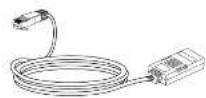
3 APDU1335T Temperature Sensor Assembly. The assembly includes the temperature sensor and the RS-485 cable (2m) with RJ45 connector.
RS-465 Extension Cable with RJ45 connector (Qty 1)
RJ45 Quick Disconnect Coupler (Qty 1)
6 Cable Ties (Qty 6)
4/2022
990-91601
© 2022 Schindler Electric. All rights reserved.
www.apc.com
Customer support and warranty information is available at
Worldwide Customer Support
Installation
APDU1335T and APDU1335TH
-
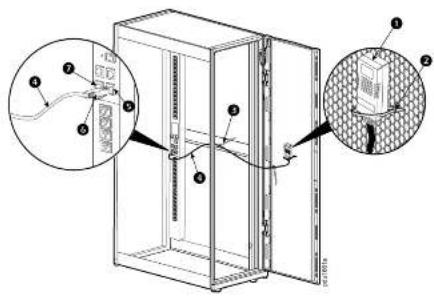
Secure the Sensor box ① to the perforated rack enclosure door with a Cable Tie ②. NOTE: The sensor box contains a magnet inside to help secure the sensor.
-
Plug the RJ45 Connector ⑥ on the Sensor Cable ① into Port 1 ⑦ or Port 2 ⑧ of the NetShelter Rack PDU Advanced.
-
Secure the Sensor Cable ① along the desired path to the NetSheller Rack PDU Advanced using the remaining Cable Ties ②.
NOTE: It may take from one (1) to three (3) minutes for the NetShelter Rack PDU. Advanced to recognize the sensor.
APDU1335T3H
-
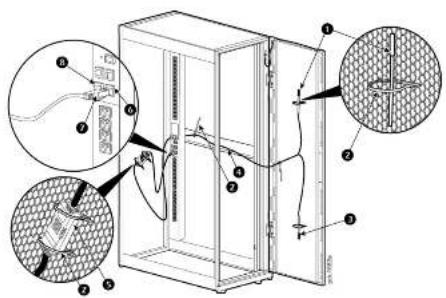
Secure the two (2) Temperature Probes ① and ② near the top and bottom of the perforated rack door using the provided Cable Ties ②.
-
Secure the Temperature/Humidity Sensor box Ⓠ to its desired location with the Cable Ties Ⓡ provided.
-
Secure the Sensor Cable ① to the interior of the rack with the provided Cable Ties ②.
- Plug the RJ45 Connector ⑦ into Port 1 ⑧ or Port 2 ⑨ on the NetShelter Rack PDU Advanced.
NOTE: It may take from one (1) to three (3) minutes for the NetShelter Rack PDU. Advanced to recognize the sensor.
Installation Options
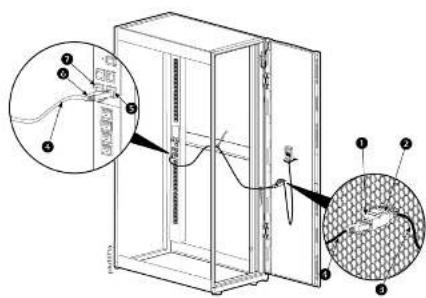
- Use the RJ45 Quick Disconnect Coupler ① and the provided 1.8m RS-495 Extension Cable ② or to serve as an easy disconnect point if the rack door is removed.
NOTE: A longer RS-485 cable with RJ45 connectors (not provided) may be used if required instead of the 1.8m RS-485 Extension Cable included in the kit.
- Plug the RJ45 Connector ⑥ on the RS-485 Extension Cable ④ into Port 1 ⑦ or Port 2 ⑧ on the NetSheller Rack PDU Advanced.
NOTE: It may take from one (1) to three (3) minutes for the NetShelter Rack PDU Advanced to recognize the sensor.
Brand : APC
Model : APDU1335T
Category : Temperature Controller