
CS653 - Loudspeaker Crunch - Free user manual and instructions
Find the device manual for free CS653 Crunch in PDF.


| Product Type | Portable Bluetooth Speaker |
| Brand | Crunch |
| Model | CS653 |
| Dimensions | 7.5 x 3.5 x 3.2 inches (190 x 90 x 80 mm) |
| Weight | 1.2 kg |
| Power Source | Rechargeable lithium-ion battery, USB-C charging |
| Battery Life | Up to 10 hours |
| Audio Output | 20W RMS |
| Bluetooth Version | 5.0 |
| Inputs | AUX 3.5mm, MicroSD card slot |
| Additional Functions | FM radio, Hands-free calling |
| Controls | Buttons for power, volume, playback, and pairing |
| Maintenance | Clean with a dry cloth; avoid moisture and direct sunlight |
| Safety | Do not expose to extreme temperatures; keep away from children |
| Spare Parts | Battery replacement available via support |
| Repairability | Modular design with accessible screws |
| Manual | PDF download available, 8 pages |
| Rating | 8.0/10 |
Frequently Asked Questions - CS653 Crunch
User questions about CS653 Crunch
0 question about this device. Answer the ones you know or ask your own.
Ask a new question about this device
Download the instructions for your Loudspeaker in PDF format for free! Find your manual CS653 - Crunch and take your electronic device back in hand. On this page are published all the documents necessary for the use of your device. CS653 by Crunch.
USER MANUAL CS653 Crunch
Congratulations on your purchase of the new Crunch Series speaker system. The Crunch speaker series offers superior sonic accuracy, intense high power sound quality with exotic build materials and outstanding good looks.
- Impact Resistant Tweeter Elements
- Neo Mylar Soft Dome Tweeter
● Installation Hardware Included
● Silver Alpha-Cellulose Cones - Spade Speaker Terminals
● Moisture Resistant Rubber Surround
● High Mid-Bass Impact
● Anti-Resonant Stamped Steel Basket
● Wide Nominal Power Range
As with all high quality car audio products, we recommend professional installation by an authorized Crunch dealer.
Your dealers knowledge and experience can ensure a problem free and cosmetically integrated installation.
If you choose to install the speakers yourself, please read the entire manual very carefully.
SPEAKER LOCATION AND MOUNTING TIPS
THE FIRST STEP IS THOROUGH PLANNING BEFORE THE INSTALLATION BEGINS.
THE SPEAKER SCREW HOLE CONFIGURATION WILL WORK WITH MOST DOMESTIC AND FOREIGN VEHICLES. FOLLOW THESE INSTRUCTIONS CAREFULLY TO ENSURE PROPER IMAGING AND MAXXIMUM PERFORMANCE.
Factory Speaker Replacement Location and Installation
- Before you alter the vehicle's interior materials, be sure there is adequate room and clearance for the speaker depth to clear the windows and other moving parts. (See speaker measurement page).
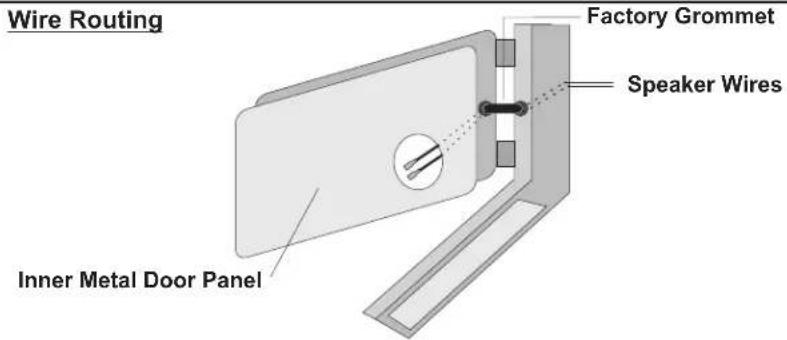
- If you are using the speaker wires provided in this kit, be sure to route wires through the factory door grommet as shown in the speaker mounting diagram.
- After securing the speaker and checking clearances, connect the red/black speaker audio wires to the correct speaker + and - spade terminals.
Custom Speaker Location and Installation
- Follow steps 1-5 above.
- Use the speaker mounting diagrams and speaker hole cut-out dimensions on the following pages.
- Always mount the left and right side speakers on the same plane.
This means that each speaker should be the same height from the floor and same distance from the firewall. Do not mount one speaker higher, lower, further forward or further behind the other.
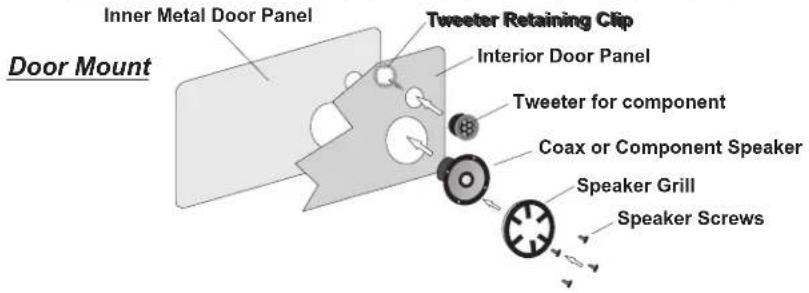
COAX & 3-WAY MOUNTING & WIRING PROCEDURES
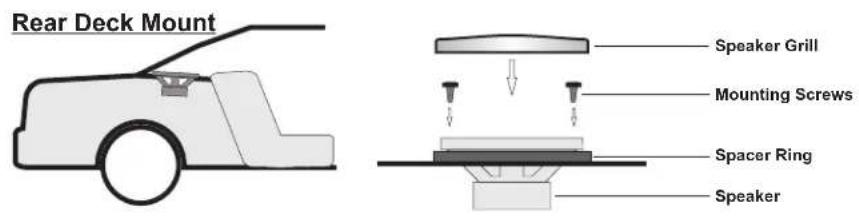
COAX & COMPONENT MOUNTING & WIRING PROCEDURES
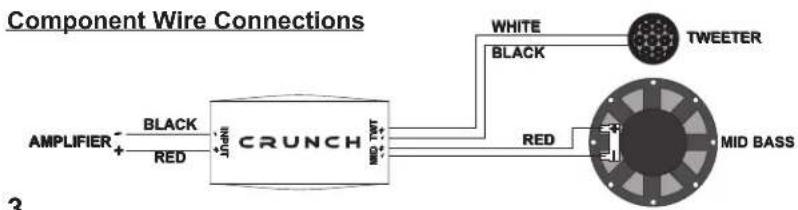
flowchart
graph LR
    A["AMPLIFIER"] -->|BLACK| B["CRUNCH"]
    C["RED"] --> B
    B --> D["WHITE"]
    B --> E["BLACK"]
    B --> F["MID BASS"]
    G["TWEETER"] --> H["Red"]
    I["MID BASS"] --> J["Red"]
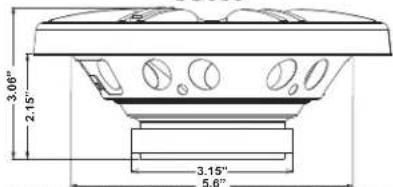
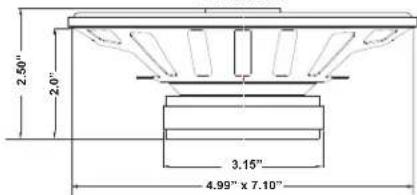
SPEAKER DIMENSIONS
CS35CX CS4CX
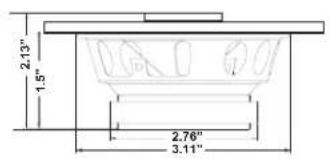
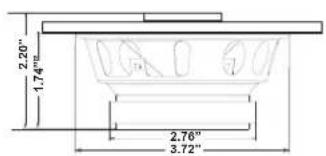
CS46CX CS525CX
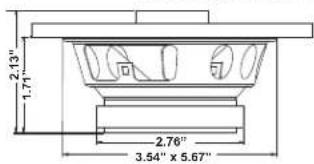
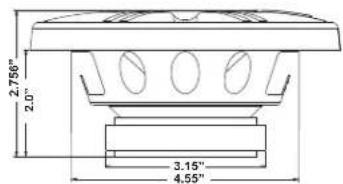
CS653
CS65CXS
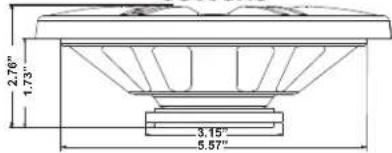
CS65C
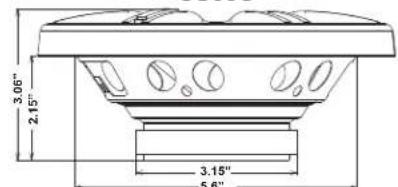
CS65C Tweeter
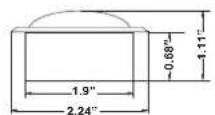
CS693
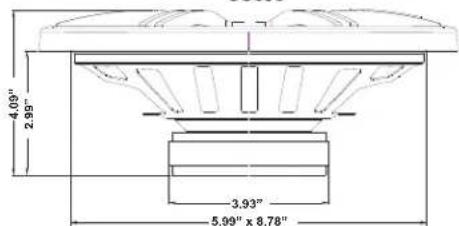
CS5768CX
CRUNCH FULL RANGE SPEAKER SPECIFICATIONS
| SPECIFICATIONS | CS35CX | CS4CX | CS46CX | CS525CX | CS5768CX |
| SIZE / TYPE | 3.5" Coax | 4" Coax | 4 x 6" Coax | 5.25" Coax | 5 x 7" Coax |
| IMPEDANCE | 4-Ohms | 4-Ohms | 4-Ohms | 4-Ohms | 4-Ohms |
| FREQ. RESPONSE | 64Hz- 19kHz | 64Hz - 19kHz | 58Hz - 20kHz | 60Hz - 20kHz | 60Hz - 20kHz |
| SENSITIVITY / SPL | 88dB | 88dB | 89dB | 89dB | 89dB |
| MOUNTING DEPTH | 1.50" 1.7 | 4" 1.71" 2.0" | 2.0" | ||
| MAXX POWER | 150 W | 200 W | 250 W | 250 W | 250 W |
| RMS POWER | 30 W | 40 W | 50 W | 50 W | 50 W |
| SPECIFICATIONS | CS65CXS | CS65C | CS653 | CS693 |
| SIZE / TYPE | 6.5" Coax Shallow | 6.5" Component | 6.5" 3-Way | 6 x 9" 3-Way |
| IMPEDANCE 4-Ohms | 4-Ohms | 4-Ohms | 4-Ohms | |
| FREQ. RESPONSE | 58Hz- 20kHz | 59Hz - 21 kHz | 58Hz - 20kHz | 46Hz - 20kHz |
| SENSITIVITY / SPL 88 dB | 90dB | 90dB | 89dB | |
| MOUNTING DEPTH | 1.73" 2.15" 2.15" 2.99" | |||
| MAXX POWER | 300 W | 300 W | 300 W | 400 W |
| RMS POWER | 60 W | 60 W | 60 W | 75 W |
NOTICE: All features subject to change with out notice.
Maxxsonics Limited Warranty
As the manufacturer of Maxxsonics, Autotek, MB Quart, Crunch and Hifonics car audio products, Maxxsonics USA Inc. Warrants to the original consumer purchaser the amplifier to be free from defects in material and workmanship for one (1) Year from date of purchase.
All other parts and accessories of the system are warranted to be free from defects in material and workmanship for one (1) year from date of purchase. Maxxsonics will repair or replace at its option and free of charge during the warranty period, any system component that proves defective in materials and workmanship under normal installation, use and service provided that the product is returned to the authorized Maxxsonics dealer from where it was purchased. A photo copy of the original receipt must accompany the product being returned.
Valid purchase receipts will contain the name and address of the authorized reseller.
Any damage to the product as a result of misuse, abuse, accident, incorrect wiring, improper installation, alteration of date code or bar code labels, revolution, natural disaster, or any sneaky stuff because someone messed up, repair or alteration out side of our factory or authorized service centers and any thing else you have done that you should not have done is not covered.
This warranty is limited to defective parts and specifically excludes any incidental or consequential damages connected therewith. This warranty is not to be construed as an insurance policy.
Warranty on installation labor, removal, re-installation and freight charges are not the responsibility of Maxxsonics USA Inc.
Warranty products damaged as a result of insufficient or improper packing materials are not covered by this limited warranty and such damaged product will be returned "as is" at the expense of the owner.

MAXXSONICS
Designed and Engineered In the USA
www.maxxsonics.com

natural_image
Abstract black ink brushstroke design on white background (no text or symbols)MAXXSONICS®
MBQUARTI®
AUTOTEK®
HIFONICS®
CRUNCH®
WWW.MAXXSONICS.COM
847.540.7700

Brand : Crunch
Model : CS653
Category : Loudspeaker