
VEX-B21L - Intercom ZKTeco - Free user manual and instructions
Find the device manual for free VEX-B21L ZKTeco in PDF.


| Product Type | Video Doorbell Intercom |
| Brand | ZKTeco |
| Model | VEX-B21L |
| Display | 7-inch TFT LCD touchscreen |
| Camera | 1/2.8" CMOS, 2MP, wide-angle lens |
| Night Vision | IR LEDs up to 5 meters |
| Audio | Full-duplex two-way audio with echo cancellation |
| Network | Ethernet (10/100 Mbps) and Wi-Fi 802.11 b/g/n |
| Power Supply | DC 12V, 2A (PoE optional) |
| Dimensions (Unit) | 140 mm x 90 mm x 25 mm (H x W x D) |
| Weight | 350 g |
| Operating Temperature | -10°C to 50°C |
| Storage Temperature | -20°C to 60°C |
| Protection Rating | IP54 (indoor unit) |
| Main Functions | Video doorbell, remote unlock, audio/video intercom, motion detection, snapshot, local recording (microSD up to 32GB) |
| App Support | ZDoor App (iOS/Android) |
| Storage | microSD up to 32GB (not included) |
| Mounting | Wall mount (screws included) |
| Package Contents | Main unit, mounting bracket, power adapter, Ethernet cable, screw kit, user manual |
| Cleaning and Maintenance | Wipe with a soft dry cloth; use mild soap if needed; avoid solvents |
| Security | Encrypted video stream, secure Wi-Fi protocols, password protection |
| Repairability | Contact authorized service center; no user-serviceable parts |
| Warranty | 1 year limited warranty |
Frequently Asked Questions - VEX-B21L ZKTeco
User questions about VEX-B21L ZKTeco
0 question about this device. Answer the ones you know or ask your own.
Ask a new question about this device
Download the instructions for your Intercom in PDF format for free! Find your manual VEX-B21L - ZKTeco and take your electronic device back in hand. On this page are published all the documents necessary for the use of your device. VEX-B21L by ZKTeco.
USER MANUAL VEX-B21L ZKTeco
Please follow the user manual for correct installation and testing. If there is any doubt please call our tech-supporting and customer center.
Our company applies ourselves to reformation and innovation of our products. No extra notice for any change. The illustration shown here is only for reference. If there is any difference, please take the actual product as the standard.
The product and batteries must be handled separately from household waste. When the product reaches the end of service life and needs to be discarded, please contact the local administrative department and put it in the designated collection points in order to avoid the damage to the environment and human health caused by any disposal. We encourage recycling and reusing the material resources.
CATALOG
Product Description....1
Pictures....1
Basic Function ......2
Technical Parameters....2
Product Standard 2
Package Contents....3
Basic Operation ....4
Basic Settings....6
Web Settings 11
System Configuration....17
System Diagram....18
Installation....20
Troubleshooting....21
Safety Precaution....22
Product Description
280 system outdoor panel is a digital device developed based on TCP / IP communication protocol, using SIP communication protocol. It is mainly used in building video intercom system and video monitoring, etc.
Pictures
Model: VEX-B21L

Basic Function
- Video intercom with indoor monitor and management center;
- Support unlocking by IC card;
- Outdoor panel can register IC card information and store up to 100,000 IC cards;
- Support password unlocking and Exit button unlocking;
Technical Parameters
- Working voltage: DC12V
- Rated power: 9W
12W(Heating membrane) - Standby power: 1.5W
4.5W(Heating membrane) - Display screen: 4.3"(480RGB*272)
- Working temperature: -10^ +70^ (Without heating membrane)
-40°C\~+70°C (Heating membrane) - Storage temperature: -10^ +60^
- Humidity: 20%\~93%
- CPU: 1GHz
- Camera: 1920*1080CMOS
Product Standard
◇ GA 1210-2014 "Security Technical Requirements for Building Intercom Systems".
GB/T 31070.1-2014 "Building Intercom Systems—Part 1: General Technical Requirements".
◇ GB 9254-2008 "Information Technology Equipment - Radio Disturbance Characteristics - Limits and Methods of Measurement".
GB/T 18239-2000 "Generic Specification for Integrated Circuit Card Reader(IC)".
DB31 294-2010 "Requirements of Intelligent Security Technology in Residential District (2010 Version)".
Package Contents
Model: VEX-B21L
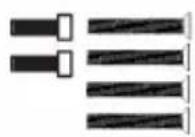
Screw
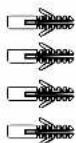
Expansion Tube

Screw Wrench
Basic Operation
After the outdoor panel is powered on, if it is set as the unit panel, the LCD display is as shown in figure (1); if it is set as the wall panel, the LCD display is as shown in figure (2):

Figure (1)

Figure (2)
1. Call management center by unit panel or wall panel
In a standby mode, inputting "0000"(4 digits) on unit panel, the LCD display is as shown in figure (3); inputting "0000"(4 digits) on wall panel, the LCD display is as shown in figure (4). Then press "#" to enter the call state.
Note: press " 🔊" to call management center directly. During ringing, press "*" key to cancel the call.

Figure (3)
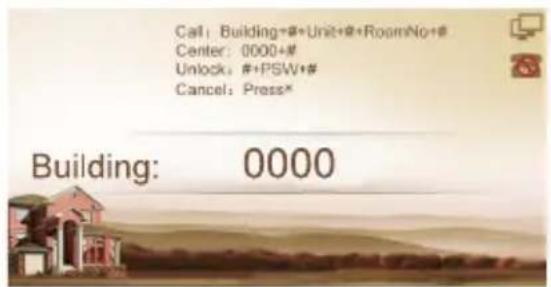
Figure (4)
2. Call indoor monitor
2.1 Call indoor monitor by unit panel
In a standby mode, press 2-dight floor No. + 2-digit room No. of the indoor monitor. For example, the floor No. is 13, the room No. is 12. Press "1312" directly, the LCD display is as shown in figure (5), and then press "#" key to start calling.

Figure (5)
2.2 Call indoor monitor by wall panel
In a standby mode, press 3-digit building No. + # +2-digit unit No. + # + 2-digit floor No. + # + 2-digit room No. + # . For example, the building No. is 0001, the unit No. is 01, the floor No. is 13, the room No. is 12. Press "1"+ "#" + "1" + "#" + "1312" directly, the LCD display is as shown in figure (6), figure (7), figure (8), and then press "#" key to start calling.
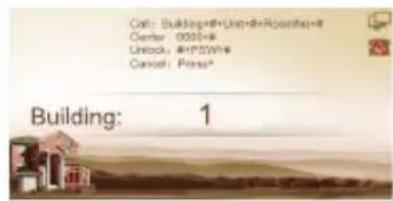
Figure (6)
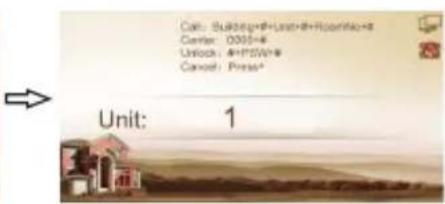
Figure (7)

Figure (8)
3. Unlock the door
3.1. Unlocking by access password
In the interface shown in Figure (1) or Figure (2), pressing "#" key and entering the access password(default is 0000), the unit panel is as shown in Figure (9), and the wall panel is as shown in Figure (10), then press "#" key to confirm. If the password is correct, the door will be unlocked; if not, it will make a sound like "Deng Deng".
Note: please refer to 3.3 Password in Basic Settings for password modification.

Figure (9)

Figure (10)
3.2. Unlocking by IC card
Put the registered IC card on card reader area of the outdoor panel. If successful, the door will be unlocked.
Basic Settings
In the interface shown in Figure (1) or Figure (2), pressing the "#" key twice, LCD display will show as below. Press six-digit admin password(default password: 123456) and go to settings.
Press the number key "2" or ▲icon to page up, press the number key "8" or ▼icon to page down; press "#" key to confirm; press "*" key to return. After selecting the item to be set, press the "#" key to go to the settings or press the "*" key to cancel the settings.
Outdoor panel enters the setting interface, and the LCD display is as shown in figure (11):
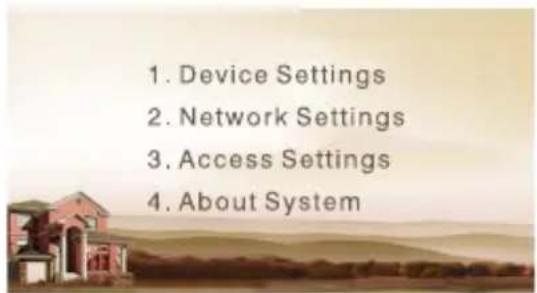
Figure (11)
1. Device Settings
Select "Device Settings" and press "#" key to enter the device settings submenu, the LCD display is as shown in Figure (12):
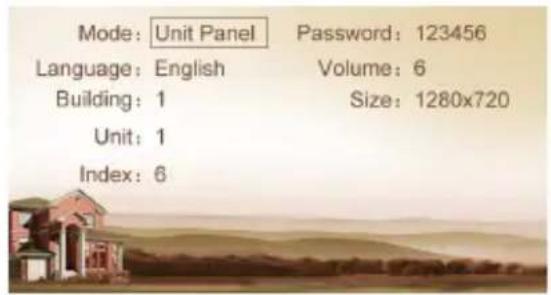
Figure (12)
Press "2" key or "▲" key to page up, press "8" key or "▼" key to page down; Press "#" key to confirm; press "*" key to return.
1.1 Device Mode
The device can be used as unit panel or wall panel. The device mode can be set through this item.
Press the key “#” to go to settings. The LCD screen will display as shown in Figure (13). Press the number key 2 or the icon ▲ to page up, and press the number key 8 or the icon ▼ to page down. If the device is used as unit panel, it can only call the indoor monitors in this unit. If the device is used as wall panel, it can call all the indoor monitors in the whole community.
Once it's selected, press the pound key “#” to confirm. When the outdoor panel gives an indication tone, it means that it is changed successfully. Press“*” to cancel the settings.
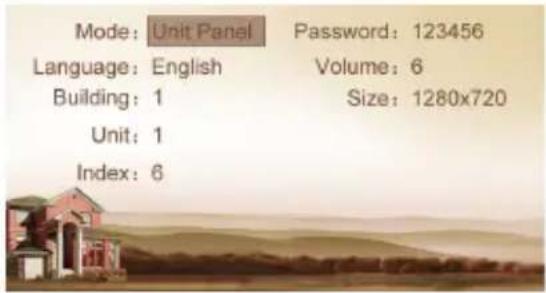
Figure (13)
1.2 Language, Volume and Size
The language, volume and size (resolution) are set in the same way as the settings of device mode.
"Language" is used to set the language to be shown on the outdoor panel, supporting simplified Chinese, English and traditional Chinese.
"Volume" is used to set the prompt tone of outdoor panel, including 1-6 volume levels selection.
There is 320x240, 640x480 or 1280x720 for the size.
1.3 Building No., Unit No., Index and Password
Select the item for setting Press the pound key “#” to go to settings Input the number to change Press the pound key “#” to confirm When the outdoor panel gives an indication tone, it means that it is changed successfully (Press the star key “*” to cancel the settings).
Note: Please keep the admin password confidential. If the password is forgotten, the user will not be able to log into the system. The password can only be recovered by resetting to factory defaults.
2. Network Settings
Select "Network Settings" and press the pound key "#" to access the submenu. The LCD screen will show as follows:
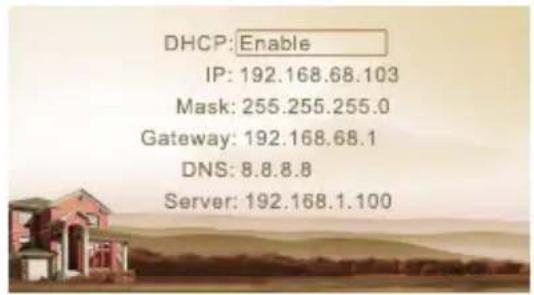
Figure (14)
2.1 DHCP
Select this item and press the pound key “#” for setting. The LCD screen will show as follows. The user can enable or disable the function.

Figure (15)
2.2 IP
The default IP address of the system is 192.168.68.90. The LCD screen will display as shown above. As for the devices which are connected on the same LAN (the same subnet of network segment), their IP addresses cannot be the same.
2.3 Mask
The system default is 255.255.255.0. The LCD screen will display as shown above.
2.4 Default Gateway
It refers to the gateway address for network segment of device's IP address. The system default is 192.168.68.1. The LCD screen will display as shown above.
2.5 DNS
The system default is 8.8.8.8. The LCD screen will display as shown above.
2.6 Server
The server address refers to the IP address of computer with management software. In case that management software isn't required for managing the intercom devices, this setting is invalid. The default IP address of server is 192.168.68.1. The LCD screen will display as shown above.
3. Access Settings
Select "Access Settings" and press the pound key "#" to access the submenu. The LCD screen will show as follows:
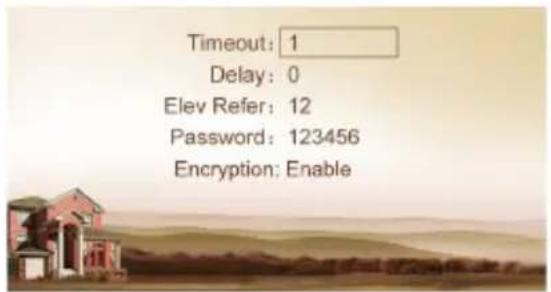
Figure (16)
3.1 Timeout
The item is used for controlling the unlocking time, namely, how long it will take the door to shut automatically after unlocking.
Select the item and press the pound key “#” to go to settings. The LCD screen will show as follows. Input any number from 1 to 9. If the user enters the number 8, it means the unlocking time is set at 8 seconds. Press the pound key “#” to confirm after inputting. When the outdoor panel gives an indication tone, it means that the time is changed successfully.
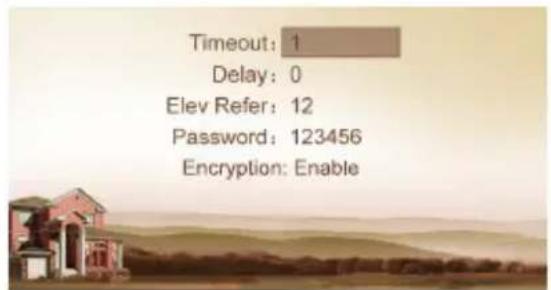
Figure (17)
3.2 Delay
The item is used for setting the delayed opening time, meaning how long it will delay unlocking the door after the user presses the unlock button on the indoor monitor.
Select the item and press the pound key “#” to go to settings. The LCD screen will display as shown above. Input any number from 0 to 9. If the user enters the number 5, it means the delayed opening time is set as 5 seconds.
Press the pound key “#” to confirm after inputting. When the outdoor panel gives an indication tone, it means that the time is changed successfully.
3.3 Password
The item is used for setting the password to unlock the door. Enter the passwords and then press the pound key “#” to confirm. The LCD screen will display as shown above.
3.4 Elev Refer (This item can only be used after connection to elevator control devices)
The item is used for setting the floor of outdoor panel.
Select the item and press the pound key “#” to go to settings. The LCD screen will display as shown above. Set the floor No. of outdoor panel ranging from 01 to 99. After the door is unlocked, the elevator will reach the floor of outdoor panel.
Press the pound key “#” to confirm after inputting. When the outdoor panel gives an indication tone, it means that it is changed successfully.
3.5 Encryption
Press this item to go to settings. Press "OK" to confirm after inputting. When the outdoor panel gives an indication tone, it means that it is changed successfully. The user can enable or disable the function.
4. About System
Select "About System" and press the pound key "#" to access the submenu. The LCD screen will show as follows:

Figure (18)
Web Settings
Connect outdoor panel and PC to the network switch on the same LAN. Input IP address of outdoor panel in the web browser of PC, then input the user name and password(the default name is admin, the password is 123456) to enter into the following interface:

1. Network Settings:
Click "Network" icon on the interface to enter into the following interface:

IP: IP address should be unique in the same Network.
Mask: the default Mask is 255.255.255.0.
Gateway: it depends on IP address.
DNS: it depends on Network.
Server IP: it is the same as the IP address of management PC.
Password: the password to connect management PC.
Usually, the communication among management center, indoor monitor and outdoor panel will be available in the same LAN; if they are not in the same Network, you need to set SIP server to support the communication.
Click "Submit" icon to confirm settings.
2. Device Settings:
Click "Device" icon on the interface to enter into the following interface:
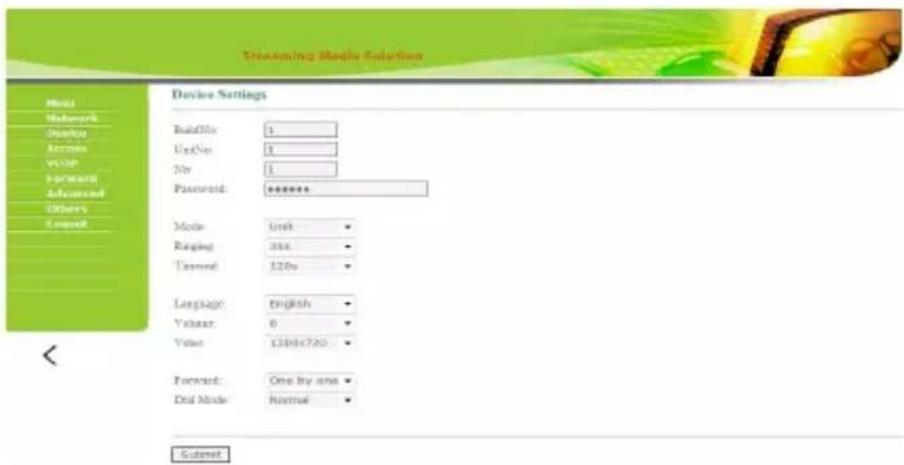
The settings of building and Unit No. should be the same as that of corresponding outdoor panel.
No.: It is unique number for the outdoor panel. You can have max.9 outdoor panels in one house, and you need to distinguish their numbers from 1 to 9.
Sys password: you can change the login password as you like (the default password is 123456).
Panel mode: unit panel, wall panel or outdoor panel for selection.
Language selection: only support simplified Chinese and English.
System volume: adjust the system volume with 6 levels for selection.
Video size: 320x240, 640x480 or 1280x720.
Call forwarding: the call can be made one by one or simultaneously.
Dial mode: the call mode can be set to normal or repeated.
After the setup is completed, click the icon "Submit" to enable the settings.
3. Access Settings:
Click "Access" icon on the interface to enter into the following interface:
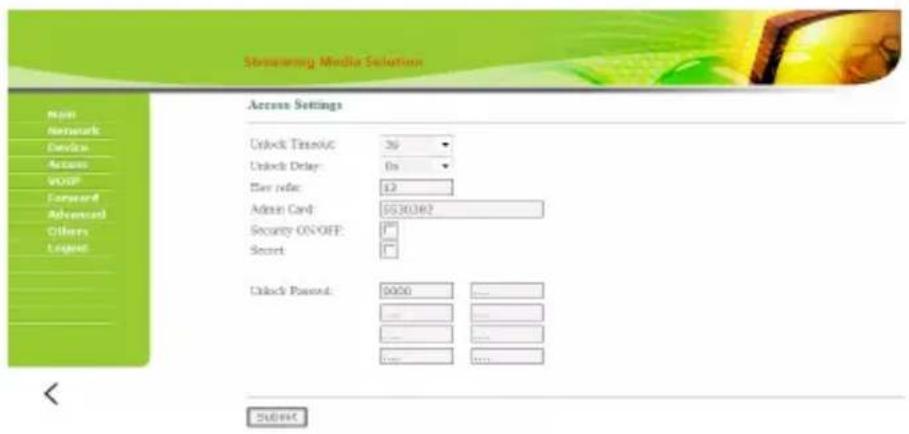
Unlock Timeout is used for controlling the unlocking time ranging from 1 to 9 seconds.
Unlock Delay refers to the delayed opening time ranging from 0 to 9 seconds.
Elev refer is used for setting the floor of outdoor panel ranging from 01 to 99.
Security ON/OFF: arming/disarming by card is only effective for secondary outdoor panel; unit panel only supports disarming by card.
Unlock Passwd: it's used for unlocking the door. The system default is 0000. Eight unlocking passwords can be added.
Card Registration:
The Admin Card is used for registering user card. There are two ways of registering the admin card:
- The user enters card No. of the admin card in the box after "Admin Card" and then click the key "Submit". In this case, the admin card is registered successfully.
- If the user isn't aware of admin card No., please enter 0 in the box first and click the key "Submit". Then place the admin card close to the swiping area. When the system gives an indication tone, it means that the card is registered successfully.
When registering the user card, the user shall swipe the admin card first. The system emits a beep. Then place the card to be registered near the swiping area within 10 seconds. If the system gives an indication tone, it means that the user card is registered successfully. When registering the user card, the card to be registered shall be swiped 10 seconds after the admin card is swiped. Once an user card is registered, it will postpone for 10 seconds. When there is no activity for 10 seconds, the system will exit from registration status automatically. To register a new user card, the user shall swipe the admin card again.
4. VOIP:
Click "VOIP" icon on the interface to enter into the following interface:

SIP enable: when SIP account No. is enabled, the SIP server of a third party is used.
Proxy: URL of SIP proxy server in format: sip:ip or sip: domain name.
Realm: realm of the device, generally the same as IP or domain name.
STUN IP and Port refer to the IP and port of public server for NAT traversal of audio and video.
User: user name assigned by SIP server
Password: password assigned by SIP server
H.264(102): 128K, 384K, 512K, 768K, 1M or 2M
Once this is set up, click the key "Submit" to enable new settings.
5. Forward (Call transfer):
Click "Forward" icon on the interface to enter into the following interface:

Room No. can be bound with phone number. When the visitor calls on the outdoor panel but there is no answer within 25 seconds, the system will forward the call to the phone. Please follow the detailed steps:
- Enter the room No. and then enter the account phone number to be bound;
- To delete this account, check the box;
- Once this is set up, click the key "Submit" to enable new settings.
(Note: This item requires support of extension module or local SIP service provider).
6. Advanced
Click "Advanced" icon on the interface to enter into the following interface:

Quick Call: Check the box to enable this function. It refers to the call to management center. Enter the SIP address of specified management center device in the box after URL. The device can be indoor monitor or SIP phone of other manufacturers.
Check the box of Voice GW to enable voice gateway. The settings are as follows:
- Connect LAN port of voice module to the computer through the switch, set the computer's IP address to 192.168.2.* , open IE browser, and enter http:
//192.168.2.1 and default password "admin" to the setting interface; - According to the internet situation, assign appropriate IP address to WAN port of voice module (IP of WAN port cannot be on the same network segment as the one of LAN port. If WAN port is set to 192.168.2.* , the gateway of LAN port will be adjusted automatically rather than 192.168.2.1). Enable the access permission of WAN port and click "Apply".
- FXO port settings: set SIP user ID for the port, set DTMF mode to RFC2833 and click "Apply".
- IP address of WAN port for voice gateway is the one of setting URL for system extension module of outdoor panel. The final port No. is default port of the system. The format of URL bar is: [SIP user ID of FXS port] @ [IP of WAN Port]: 5062.
Speed Dial: press one number key to give a direct call.
ONU Pass: check the box to enable ONU settings.
4G Dongle: check the box to enable 4G Internet.
RTSP Feed: check the box to bind media address of third-party video network management.
Once this is set up, click "Submit" to enable new settings.
7. Others
Click "Others" icon on the interface to enter into the following interface:

Click "Reboot" icon to reboot the system or click "Default" icon to reset to default settings.
8. Logout
Click "Logout" icon on the interface to enter into the following interface:

Click "Submit" icon to log out of the system.
System Configuration

flowchart
graph TD
    subgraph Wall Panel
        A["Terminal Power 220V"] --> B["Network Switch"]
        C["Terminal Power 220V"] --> D["Network Switch"]
        E["Terminal Power 220V"] --> F["Fiber Optical Transceiver"]
        G["Terminal Power 220V"] --> H["Outdoor Panel"]
        I["Terminal Power 220V"] --> J["Villa Area"]
        K["Terminal Power 220V"] --> L["Exit Button"]
        M["Terminal Power 220V"] --> N["Exit Button"]
        O["Terminal Power 220V"] --> P["Exit Button"]
        Q["Terminal Power 220V"] --> R["Exit Button"]
        S["Terminal Power 220V"] --> T["Exit Button"]
        U["Terminal Power 220V"] --> V["Exit Button"]
        W["Terminal Power 220V"] --> X["Exit Button"]
        Y["Terminal Power 220V"] --> Z["Exit Button"]
        AA["Terminal Power 220V"] --> AB["Exit Button"]
        AC["Terminal Power 220V"] --> AD["Exit Button"]
        AE["Terminal Power 220V"] --> AF["Exit Button"]
        AG["Terminal Power 220V"] --> AH["Exit Button"]
    end

    subgraph Villa Area
        AI["Terminal Power 1.0"] --> AJ["RVV2*1.0"]
        AK["Terminal Power 1.0"] --> AL["RVV2*1.0"]
        AM["Terminal Power 1.0"] --> AN["RVV2*1.0"]
        AO["Terminal Power 1.0"] --> AP["RVV2*1.0"]
        AQ["Terminal Power 1.0"] --> AR["RVV2*1.0"]
        AS["Terminal Power 1.0"] --> AT["RVV2*1.0"]
        AU["Terminal Power 1.0"] --> AV["RVV2*1.0"]
        AW["Terminal Power 1.0"] --> AX["RVV2*1.0"]
        AY["Terminal Power 1.0"] --> AZ["RVV2*1.0"]
        BA["Terminal Power 1.0"] --> BB["RVV2*1.0"]
        BC["Terminal Power 1.0"] --> BD["RVV2*1.0"]
        BE["Terminal Power 1.0"] --> BF["RVV2*1.0"]
        BG["Terminal Power 1.0"] --> BH["RVV2*1.0"]
        BI["Terminal Power 1.0"] --> BJ["RVV2*1.0"]
        BK["Terminal Power 1.0"] --> BL["RVV2*1.0"]
        BM["Terminal Power 1.0"] --> BN["RVV2*1.0"]
        BO["Terminal Power 1.0"] --> BP["RVV2*1.0"]
        BQ["Terminal Power 1.0"] --> BR["RVV2*1.0"]
        BS["Terminal Power 1.0"] --> BT["RVV2*1.0"]
        BU["Terminal Power 1.0"] --> BV["RVV2*1.0"]
        BW["Terminal Power 1.0"] --> BX["RVV2*1.0"]
        BY["Terminal Power 1.0"] --> BZ["RVV2*1.0"]
        CA["Terminal Power 1.0"] --> CB["RVV2*1.0"]
        CC["Terminal Power 1.0"] --> CD["RVV2*1.0"]
        DD["Terminal Power 1.0"] --> DJ["RVV2*1.0"]
        DK["Terminal Power 1.0"] --> DL["RVV2*1.0"]
        DV["Terminal Power 1.0"] --> DW["RVV2*1.0"]
        BX<fcel>TCAT-5e+RVV2*1.0
TCAT-5e+RVV2*1.0
TCAT-5e+RVV2*1.0
TCAT-5e+RVV2*1.0
TCAT-5e+RVV2*1.0
TCAT-5e+RVV2*1.0
TCAT-5e+RVV2*1.0
TCAT-5e+RVV2*1.0
TCAF-5e+RVV2*1.0
TCAF-5e+RVV2*1.0
TCAF-5e+RVV2*1.0
TCAF-5e+RVV2*1.0
TCAF-5e+RVV2*1.0
TCAF-5e+RVV2*1.0
TCAF-5e+RVV2*1.0
TCAF-3e+RVV2*1.0
TCAF-3e+RVV2*1.0
TCAF-3e+RVV2*1.0
TCAF-3e+RVV2*1.0
TCAF-3e+RVV2*1.0
TCAF-3e+RVV2*1.0
TCAF-3e+RVV2*1.0
TCAF-3e-RVV2*1.0
TCAF-3e-RVV2*1.0
TCAF-3e-RVV2*1.0
TCAF-3e-RVV2*1.0
TCAF-3e-RVV2*1.0
TCAF-3e-RVV2*1.0
TCAF-3e-RVV2*1.0
TCAF-3e-RVW2*1.0
TCAF-3e-RVW2*1.0
TCAF-3e-RVW2*1.0
TCAF-3e-RVW2*1.0
TCAF-3e-RVW2*1.0
TCAF-3e-RVW2*1.0
TCAF-3e-RVW2*1.0
TCAF-3e-RVW2*
TCAF-3e-RVW2*
TCAF-3e-RVW2*
TCAF-3e-RVW2*
TCAF-3e-RVW2*
TCAF-3e-RVW2*
TCAF-3e-RVW2*
TCAF-3e-RCF*
TCAF-3e-RCF*
TCAF-3e-RCF*
TCAF-3e-RCF*
TCAF-3e-RCF*
TCAF-3e-RCF*
TCAF-3e-RCF*
TCAF-3e-RCF*
TCAF-3e-RCF*
TCAF-3e-RCF*
TCAF-3e-RCF*
TCAF-3e-RCF
TCAF-3e-RCF*
TCAF-3e-RCF*
TCAF-3e-RCF*
TCAF-3e-RCF*
TCAF-3e-RCF*
TCAF-3e-RCF*
TCAF-3e-RCF*
TCAF-3e-RCF*
TCAF-3e-RCF*
TCAF-3e-RCF*
TCAF-3e-RCF*
FCAT-5e+RVV2*1.0
FCAT-5e+RVV2*1.0
FCAT-5e+RVV2*1.0
FCAT-5e+RVV2*1.0
FCAT-5e+RVV2*1.0
FCAT-5e+RVV2*1.0
FCAT-5e+RVV2*1.0
FCAT-5e+RVV2*1.0
FCCAT-5e+RVV2*1.0
FCAT-5e+RVV2*1.0
FCAT-5e+RVV2*1.0
FCAT-5e+RVV2*1.0
FCAT-5e+RVV2*1.0
FCAT-5e+RVV2*1.0
FCAT-5e+RVV2*1.0
FCAT-4EaRvWb*
FCAT-4EaRvWb*
FCAT-4EaRvWb*
FCAT-4EaRvWb*
FCAT-4EaRvWb*
FCAT-4EaRvWb*
FCAT -4EaRvWb*
FCAT -4EaRvWb*
FCAT -4EaRvWb*
FCAT -4EaRvWb*
FCAT -4EaRvWb*
FCAT -4EaRvWb*
FCAT -4EaRvWb*
FCAT -4EaRvWb*
FCAT -4EaRvWb*
FCAT -6EaRvWb*
FCAT -6EaRvWb*
FCAT -6EaRvWb*
FCAT -6EaRvWb*
FCAT -6EaRvWb*
FCAT -6EaRvWb*
FCAT -6EaRvWb*
FCAT -6EaRvWb*
FCAT -6EaRvWb*
FCAT -6C#RvWb*
FCAT -6C#RvWb*
FCAT -6C#RvWb*
FCAT -6C#RvWb*
FCAT -6C#RvWb*
FCAT -6C#RvWb*
FCAT -6C#RvWb*
FCAT -6C#RvWb*
FCAT -6C#RvWb*
FCAT -6C#LrWb*
FCAT -6C#RvWb*
FCAT -6C#RvWb*
FCAT -6C#RvWb*
FCAT -6C#RvWb*
FCAT -6C#RvWb*
FCAT -6C#RvWb*
FCAT -6C#RvWb*
FCAT -6C#RvWb*
FCAT -6C#RvH#
FCAT -6C#RvH#
FCAT -6C#RvH#
FCAT -6C#RvH#
FCAT -6C#RvH#
FCAT -6C#RvH#
FCAT -6C#RvH#
FCAT -6C#RvH#
FCAT -6C#RvH#
FCAT -6C#RvH#
FCAT -6C#RvH##
DCA: TCAT-5e+RVVb*
DCA: TCAT-5e+RVVb*
DCA: TCAT-5e+RVVb*
DCA: TCAT-5e+RVVb*
DCA: TCAT-5e+RVVb*
DCA: TCAT-5e+RVVb*
DCA: TCAT-5e+RVVb*
DCA: TCAT -4EaRvH#
DCA: TCAT -4EaRvH#
DCA: TCAT -4EaRvH#
DCA: TCAT -4EaRvH#
DCA: TCAT -4EaRvH#
DCA: TCAT -4EaRvH#
DCA: TCAT -4EaRvH#
DCA: TCAT -4EaRvH#
DCA: TCAT -4EcRvH#
DCA: TCAT -4EcRvH#
DCA: TCAT -4EcRvH#
DCA: TCAT -4EcRvH#
DCA: TCAT -4EcRvH#
DCA: TCAT -4EcRvH#
DCA: TCAT -4EcRvH#
DCA: TCAT -4EcRvH#
DCA: TCAMT-
DCA: TCAMT-
DCA: TCAMT-
DCA: TCAMT-
DCA: TCAMT-
DCA: TCAMT-
DCA: TCAMT-
DCA: TCAMT-
DCA: TCAMT-
DCA: TCAMT-
DCA: TCAMT-
DCA: TCAMT-
DCA: TCAMT-
DCA: TCAMT-
DCA: TCAMT-
DCAC: TCAMT-
DCAC: TCAMT-
DCAC: TCAMT-
DCAC: TCAMT-
DCAC: TCAMT-
DCAC: TCAMT-
DCAC: TCAMT-
DCAC: TCAMT-
DCAC: TCAMT-
DCAC: TCAMT-
DCAC: TCAMT-
DCAC: TCAMT-
DCAC: TCAMT-
DCAC: TCAMT-
DCAC: TBCP:
DCAC: TBCP:
DCAC: TBCP:
DCAC: TBCP:
DCAC: TBCP:
DCAC: TBCP:
DCAC: TBCP:
DCAC: TBCP:
DCAC: TBCP:
DCAC: TBCP:
DCAC: TBCP:
DCAC: TBCP:
DCAC: TBCP:
DCAC: TBCP:
DCAC: TBCP:
DCACA: TBCP:
DCACA: TBCP:
DCACA: TBCP:
DCACA: TBCP:
DCACA: TBCP:
DCACA: TBCP:
DCACA: TBCP:
DCACA: TBCP:
DCACA: TBCP:
DCACA: TBCP:
DCACA: TBCP:
DCACA: TBCP:
DCACA: TBCP:
DCACA: TBCP:
DCACA: TCAP:
DCACA: TCAP:
DCACA: TCAP:
DCACA: TCAP:
DCACA: TCAP:
DCACA: TCAP:
DCACA: TCAP:
DCACA: TCAP:
DCACA: TCAP:
DCACA: TCAP:
DCACA: TCAP:
DCACA: TCAP:
DCACA: TCAP:
DCACA: TCAP:
DCACA: TCAP:
DCACA: TCAP:
DCACA: TCAP:
DCACA : TCAP:
DCACA : TCAP:
DCACA : TCAP:
DCACA : TCAP:
DCACA : TCAP:
DCACA : TCAP:
DCACA : TCAP:
DCACA : TCAP:
DCACA : TCAP:
DCACA : TCAP:
DCACA : TCAP:
SCPC:
SCPC:
SCPC:
SCPC:
SCPC:
SCPC:
SCPC:
SCPC:
SCPC:
SCPC:
SCPC:
SCPC:
SCPC:
SCPC:
SCPC:
SCPC:
SCPC:
SCPC:
SCPC:
SCPC:
SCPC:
SCPC:
SCPC:
SCPC:
SCPC:
SCPC:
SCPC:
SCPC:
SCPC:
SCPC:
SCPC:
SCPC:
SCPC:
SCPC
SCPC
SCPC
SCPC
SCPC
SCPC
SCPC
SCPC
SCPC
SCPC
SCPC
SCPC
SCPC
SCPC
SCPC
SCPC
SCPC
SCPC
SCPC
SCPC
SCPC
SCPC
SCPC
SCPC
SCPC
SCPC
SCPC
SCPC
SCPC
SCPC
SCPC
SCPC
SCPC
SCPC
SICCA
SICCA
SICCA
SICCA
SICCA
SICCA
SICCA
SICCA
SICCA
SICCA
SICCA
SICCA
SICCA
SICCA
SICCA
SICCA
SICCA
SICCA
SICCA
SICCA
SICCA
SICCA
SICCA
SICCA
SICCA
SICCSCKBCCsCKsCKsCKsCKsCKsCKsCKsCKsCKsCKsCKsCKsCKsCKsCKsCKsCKsCKsCKsCKsCKsCKsCKsCKsCKsCKsCKsCKsCKsCKsCKsCKsCKsCKsCKsCKsCKsCKsCKsCKsCKsCKsCKsCKsCKsCKsCKsCKsCKsCKsSKSSkSSkSSkSSkSSkSSkSSkSSkSSkSSkSSkSSkSSkSSkSSkSSkSSkSSkSSkSSkSSkSSkSSkSSkSSkSSkSSkSSkSSkSSkSSkSSkSSkSSkSSkSSkSSkSSkSSkSSkSSkSSkSSkSSkSSkSSkSSkSSkSSkSSkSSgSSgSSgSSgSSgSSgSSgSSgSSgSSgSSgSSgSSgSSgSSgSSgSSgSSgSSgSSgSSgSSgSSgSSgSSgSSgSSgSSgSSgSSgSSgSSgSSgSSgSSgSSgSSgSSgSSgSSgSSgSSgSSgSSgSSgSSgSSgSSgSSgSSgSShsshsshsshsshsshsshsshsshsshsshsshsshsshsshsshsshsshsshsshsshsshsshsshsshsshsshsshsshsshsshsshsshsshsshsshsshsshsshsshsshsshsshsshsshsshsshsshsshsshsshnsshsshsshsshsshsshsshsshsshsshsshsshsshsshsshsshsshsshsshsshsshsshsshsshsshsshsshsshsshsshsshsshsshsshsshsshsshsshsshsshsshsshsshsshsshss hscshccshccshccshccshccshccshccshccshccshccshccshccshccshccshccshccshccshccshccshccshccshccshccshccshccshccshccshccshccshccshccshccshccshccshccshccshccshccshccshccshccshccshccshccshccshccshccshccshccshccshccc shccshcc shccshcc shccshcc shccshcc shccshcc shccshcc shccshcc shccshcc shccshcc shccshcc shccshcc shccshcc shccshcc shccshcc shccshcc shccshcc shccshcc shccshcc shccshcc shccshcc shccshcc shccshcc shccshcc shccshcc shccshcc shccshc shccshcc shccshc shccshcc shccshc shccshcc shccshc shccshcc shccshc shccshcc shccshc shccshcc shccshc shccshcc shccshc shccshcc shgccchscchscchscchscchscchscchscchscchscchscchscchscchscchscchscchscchscchscchscchscchscchscchscchscchscchscchscchscchscchscchscchscchscchscchscchscchscchscchscchscchscchscchscchscchscchscchscchscchscchscchseghca chgcahca chgcahca chgcahca chgcahca chgcahca chgcahca chgcahca chgcahca chgcahca chgcahca chgcahca chgcahca chgcahca chgcahca chgcahca chgcahca chgcahca chgcahca chgcahca chgcahca chgcahca chgcahca chgcahca chgcahca chgcahca chgcashca chgcashca chgcashca chgcashca chgcashca chgcashca chgcashca chgcashca chgcashca chgcashca chgcashca chgcashca chgcashca chgcashca chgcashca chgcashca chgcashca chgcashca chgcashca chgcashca chgcashca chgcashca chgcashca chgcashca chgcashca chgcashtca chgcashca chgcashca chgcashca chgcashca chgcashca chgcashca chgcashca chgcashca chgcashca chgcashca chgcashca chgcashca chgcashca chgcashca chgcashca chgcashca chgcashca chgcashca chgcashca chgcashca chgcashca chgcashca chgcashca chgcashca chgcasschcschcschcschcschcschcschcschcschcschcschcschcschcschcschcschcschcschcschcschcschcschcschcschcschcschcschcschcschcschcschcschcschcschcschcschcschcschcschcschcschcschcschcschcschcschcschcschcschcschcschctschcschcschcschcschcschcschcschcschcschcschcschcschcschcschcschcschcschcschcschcschcschcschcschcschcschcschcschcschcschcschcschcschcschcschcschcschcschcschcschcschcschcschcschcschcschcschcschcschcschcschesdctchesdctchesdctchesdctchesdctchesdctchesdctchesdctchesdctchesdctchesdctchesdctchesdctchesdctchesdctchesdctchesdctchesdctchesdctchesdctchesdctchesdctchesdctchesdctchesdctchesdctchesdctchesdctchesdctchesdctchesdctchesdctchesdctchesdctchemdscefflucersalineineineineineineineineineineineineineineineineineineineineineineineineineineineineineineineineineineineineineineineineineineineineineineineineineineineineineineineineineineineineineineineineineineineineineineineineineineineineineineineineineineineineineineineineineineineineineineineineineineineineinlineaseoneoneoneoneoneoneoneoneoneoneoneoneoneoneoneoneoneoneoneoneoneoneoneoneoneoneoneoneoneoneoneoneoneoneoneoneoneoneoneoneoneoneoneoneoneoneoneoneoneoneoneoneoneoneoneoneoneoneoneoneoneoneoneoneoneoneoneoneoneoneoneoneoneoneoneoneoneoneoneoneoneoneoneoneoneoneoneoneoneoneoneoneoneoneoneoneoneoneoneoneonlineaseoneonlineaseonlineaseonlineaseonlineaseonlineaseonlineaseonlineaseonlineaseonlineaseonlineaseonlineaseonlineaseonlineaseonlineaseonlineaseonlineaseonlineaseonlineaseonlineaseonlineaseonlineaseonlineaseonlineaseonlineaseonlineaseonlineaseonlineaseonlineaseonlineaseonlineaseonlineaseonlineaseonlineaseonlinease onlineaseonlineaseonlineaseonlineaseonlineaseonlineaseonlineaseonlineaseonlineaseonlineaseonlineaseonlineaseonlineaseonlineaseonlineaseonlineaseonlineaseonlineaseonlineaseonlineaseonlineaseonlineaseonlineaseonlineaseonlineaseonlineaseonlineaseonlineaseonlineaseonlineaseonlineaseonlineaseonlineaseon lineaseon lineaseon lineaseon lineaseon lineaseon lineaseon lineaseon lineaseon lineaseon lineaseon lineaseon lineaseon lineaseon lineaseon lineaseon lineaseon lineaseon lineaseon lineaseon lineaseon lineaseon lineaseon lineaseon lineaseon lineaseon lineaseon lineaseon lineaseon lineaseon lineaseon lineaseon lineaseon lineaseon lineasseen lineasseen lineasseen lineasseen lineasseen lineasseen lineasseen lineasseen lineasseen lineasseen lineasseen lineasseen lineasseen lineasseen lineasseen lineasseen lineasseen lineasseen lineasseen lineasseen lineasseen lineasseen lineasseen lineasseen lineasseen lineasseen lineasseen lineasseen lineasseen lineasseen lineasseen lineasseen lineasseen lineasseen LineageesLineAge Chart Chart
System Diagram
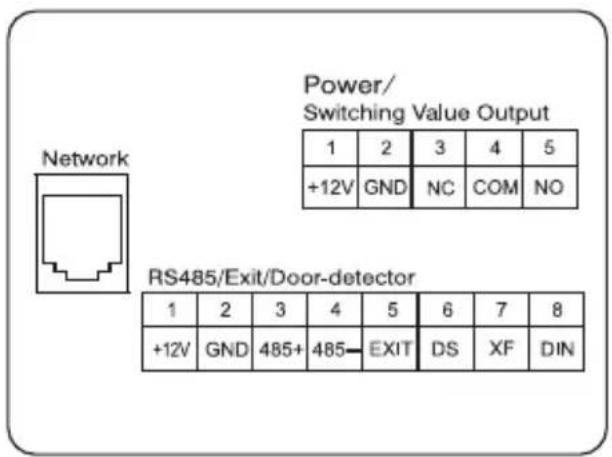
1. Power/ Switching Value Output
Power interface connects with 12V DC power.
Switching value output connects with electric lock. Relay terminal can withstand the lock current of max.3.5A. Independent power supply is required for the lock.
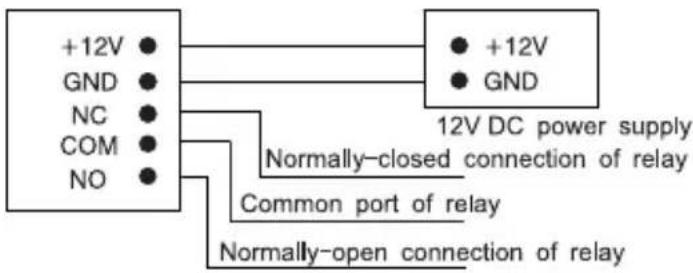
2. Network
Connect to PC, management center, indoor monitor or other network device through network switch.

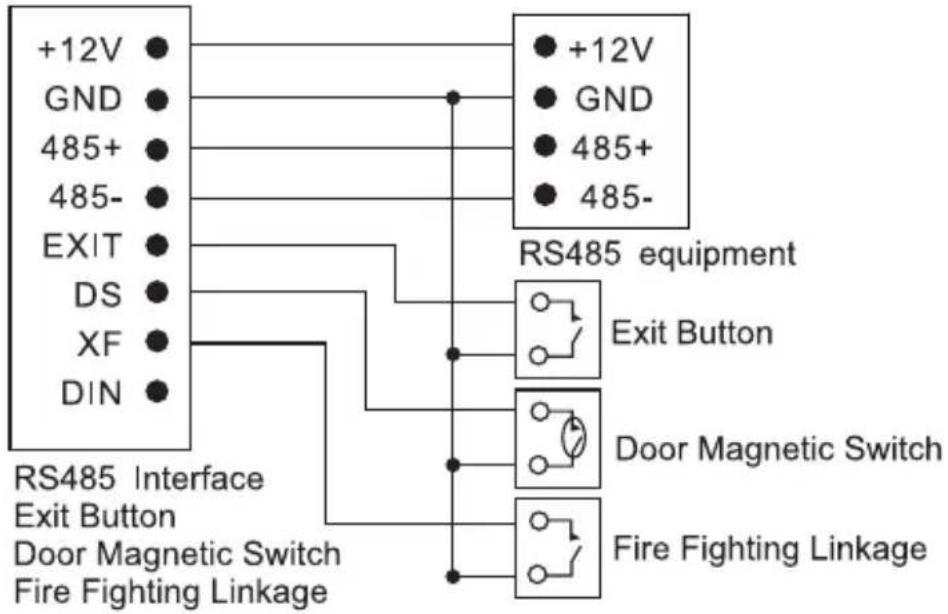
3. RS485 Interface/Exit Button/Door Magnetic Switch/Fire Fighting Linkage
RS485 interface can connect to the equipment with RS485 interface; DIN is reserved terminal, please don't connect it.
flowchart
graph TD
    A["+12V"] --> B["RS485 equipment"]
    C["GND"] --> B
    D["485+"] --> B
    E["485-"] --> B
    F["EXIT"] --> B
    G["DS"] --> B
    H["XF"] --> B
    I["DIN"] --> B
    J["RS485 Interface Exit Button"] --> K["Exit Button"]
    L["Door Magnetic Switch"] --> M["Door Magnetic Switch"]
    N["Fire Fighting Linkage"] --> O["Fire Fighting Linkage"]
Installation
Model: VEX-B21L
| Appearance dimension | Installation diagram |
 Dimensions: 158*380*55.7mmBuilt-in box size: 142*358*59.5mmInstallation dimension: 148*364*65mm Dimensions: 158*380*55.7mmBuilt-in box size: 142*358*59.5mmInstallation dimension: 148*364*65mm | 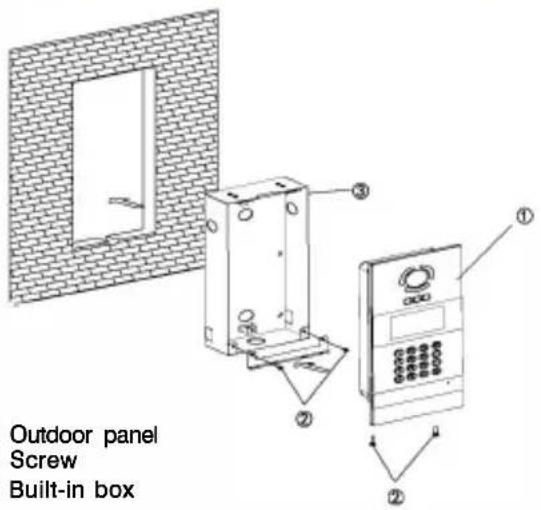 123 123 |
Installation method:
- According to the installation dimension of outdoor panel, dig a square groove at the appropriate position in the wall or door, and dig a hole (drainage hole) at the bottom;
- Open the threading holes at the bottom of the built-in box to facilitate drainage. Upward arrow is on the front of the built-in box. Embed the built-in box into the wall, then put the built-in box into the groove of the wall, and tighten four screws from top to bottom of the built-in box, or fix the built-in box in the wall with concrete;
- Assemble the outdoor panel into the built-in box, align the groove and the built-in box, tighten the screws, and finally inject the glass glue into the top, left and right sides of the outdoor panel (note: the glass glue cannot be injected into the bottom part that is reserved for the drainage hole at the bottom of outdoor panel).
Installation Instructions:

[Suggestion]: During the installation, the camera should be 1450\~1550mm above the ground. The camera tether for photographing human face should be the top priority.
Troubleshooting
Some common failures and troubleshooting methods are listed for your reference. In case of failure which cannot be repaired, do not disassemble or repair the product by yourself. Please contact the after-sales service department.
When unit panel or wall panel fails to call indoor monitor:
- When setting outdoor panel, please make sure building No. and unit No. of outdoor panel are the same as the ones of indoor monitor;
- Please check whether the network is connected;
- Please check if there are any security settings for the network, such as VLAN configuration;
When unit panel, wall panel or indoor monitor fails to call management center :
- Please check whether the network is connected;
- Please check if there are any security settings for the network, such as VLAN configuration;
Safety Precaution
In order to protect you and others from harm or your device from damage, please read the following information before using the device.
Do not install the device in the following places:
- Do not install the device in high-temperature and moist environment or the area close to magnetic field, such as the electric generator, transformer or magnet.
■ Do not place the device near the heating products such as electric heater or the fluid container.
■ Do not place the device in the sunshine or near the heat source. This might cause discoloration or deformation of the device.
■ Do not install the device in an unstable position to avoid the property losses or personal injury caused by the falling of device.
Guard against electric shock, fire and explosion
■ Do not use damaged power cord, plug or loose outlet.
■ Do not touch the power cord with wet hands or unplug the power cord by pulling.
■ Do not bend or damage the power cord.
■ Do not touch the device with wet hands.
■ Do not make the power supply slip or cause the impact.
■ Do not use the power supply without the manufacturer's approval.
■ Do not have the liquids such as water go into the device.
Clean Device Surface
■ Clean the device surfaces with soft cloth dipped in some water, and then rub the surface with dry cloth.
Other Tips
In order to prevent damage to the paint layer or the case, please do not expose the device to chemical products, such as the diluent, gasoline, alcohol, insect-resist agents, opacifying agent and insecticide.
■ Do not knock on the device with hard objects.
■ Do not press the screen surface. Overexertion might cause flopover or damage to the device.
■ Please be careful when standing up from under the device.
■ Do not disassemble, repair or modify the device at your own discretion. The arbitrary modification is not covered under warranty. When any repair required, please contact the customer service center.
■ If there is abnormal sound, smell or fume in the device, please unplug the power cord immediately and contact the customer service center.
- When the device isn't used for a long time, the adaptor and memory card can be removed and placed in dry environment.
■ When moving, please hand over the manual to new tenant for proper usage of the device.


- CATALOG
- Product Description
- Pictures
- Basic Function
- Technical Parameters
- Product Standard
- Package Contents
- Basic Operation
- Call management center by unit panel or wall panel
- Call indoor monitor
- Call indoor monitor by unit panel
- Call indoor monitor by wall panel
- Unlock the door
- Unlocking by access password
- Unlocking by IC card
- Basic Settings
- Device Settings
- Device Mode
- Language, Volume and Size
- Building No., Unit No., Index and Password
- Network Settings
- DHCP
- IP
- Mask
- Default Gateway
- DNS
- Server
- Access Settings
- Timeout
- Delay
- Password
- Elev Refer (This item can only be used after connection to elevator control devices)
- Encryption
- About System
- Web Settings
- Network Settings:
- Device Settings:
- Access Settings:
- Card Registration:
- VOIP:
- Forward (Call transfer):
- Advanced
- Others
- Logout
- System Configuration
- System Diagram
- Power/ Switching Value Output
- Network
- RS485 Interface/Exit Button/Door Magnetic Switch/Fire Fighting Linkage
- Installation
- Troubleshooting
- When unit panel or wall panel fails to call indoor monitor:
- When unit panel, wall panel or indoor monitor fails to call management center :
- Safety Precaution
- Other Tips
Brand : ZKTeco
Model : VEX-B21L
Category : Intercom