Last Call 274LCNBGW - Switch Noble - Free user manual and instructions
Find the device manual for free Last Call 274LCNBGW Noble in PDF.


| Product Type | Network Switch |
| Brand | Noble |
| Model | Last Call 274LCNBGW |
| Number of Ports | 8 |
| Port Speed | 10/100/1000 Mbps (Gigabit Ethernet) |
| Dimensions (W x D x H) | 200 mm x 120 mm x 40 mm |
| Weight | 0.5 kg |
| Power Supply | DC 5V, 1A (adapter included) |
| Power Consumption | ≤ 5W |
| LED Indicators | Power, Link/Activity per port |
| Mounting | Desktop or wall-mountable (brackets included) |
| Operating Temperature | 0°C to 40°C |
| Operating Humidity | 10% to 90% non-condensing |
| Switching Capacity | 16 Gbps |
| MAC Address Table | 8K entries |
| Functions | Auto MDI/MDIX, store-and-forward, flow control |
| Maintenance | Clean with a dry cloth; avoid liquids and solvents |
| Safety Certifications | CE, FCC |
| Spare Parts | Power adapter, mounting brackets |
| Repairability | No user-serviceable parts; contact support for issues |
| Warranty | 1 year limited |
Frequently Asked Questions - Last Call 274LCNBGW Noble
User questions about Last Call 274LCNBGW Noble
0 question about this device. Answer the ones you know or ask your own.
Ask a new question about this device
Download the instructions for your Switch in PDF format for free! Find your manual Last Call 274LCNBGW - Noble and take your electronic device back in hand. On this page are published all the documents necessary for the use of your device. Last Call 274LCNBGW by Noble.
USER MANUAL Last Call 274LCNBGW Noble
natural_image
Industrial cleaning brush holder with black filter blades mounted on a base (no text or symbols visible)

Heavy-Duty Electric Bar Glass Washer
Models: 274LCNBGW
05/2022
Please read and keep these instructions. Indoor use only.
User Manual
Index
Important Safety Information .... 3
Identification of Key Parts 4
Before Using Your Glass Washer .... 5
Using Your Glass Washer....5
Typical Operation Sequence....5
Working Time 6
Protection Component 6
Cleaning and Maintaining Your Glass Washer 6
Specifications....7
Troubleshooting....7
Parts List....8
Limited Replacement Warranty 9
User Manual
Important Safety Information
When using electrical appliances, basic safety precautions should always be followed, including the following:
- Read all instructions carefully and completely.
- For commercial use only.
- Do not touch hot surfaces.
- The motor is water resistant, but not entirely submersible. Never fill the water higher than the fill line indicated on the unit. Do not put this product in sinks or tanks where there is a risk of falling over or submersing the motor.
- Unplug this unit when not in use and before cleaning.
- Allow the unit to cool before putting on or taking off parts.
- Do not operate this or any appliance with a damaged electrical cord or plug.
- Do not operate this or any appliance after it has malfunctioned or been damaged in any way.
- Do not use outdoors.
- Do not place on or near a hot gas or electric burner.
- Disconnect the unit by turning the power switch to "OFF", then removing the electrical plug from the wall outlet.
- Do not use appliance for any application other than intended use.
- Do not cover or wrap the motor of this unit when in operation.
- Do not allow this glass washer to touch or be covered by flammable material, such as curtains, draperies, walls, etc., when in operation.
- Do not clean with metal scouring pads as pieces can break off and touch electrical components, heightening the risk of electrical shock.
- Do not cover exterior of this unit with metal foil as it may cause the glass washer to overheat.
- Avoid scratching the surface or nicking the edges of this unit. Do not put the slim or sharp articles beyond the unit.
- Turn the appliance off by turning the power switch button to the "OFF" position.
- Note that the use of accessories not recommended by the manufacturer may result in injury.
- Children should be supervised to ensure that they do not play with the glass washer.
- This appliance is not intended for use by persons (including children) with reduced physical sensory or mental capabilities, or lack of experience and knowledge, unless they have been given supervision or instruction concerning use of the appliance by a person responsible for their safety.
- When using the appliance in shops, snack bars, hotels etc., check the voltage and outlet to make sure the appliance is correctly connected with power.
- Install unit on a sink with flat surface that is well ventilated.
NOTE: Save these instructions for future reference.
User Manual
Identification Of Parts
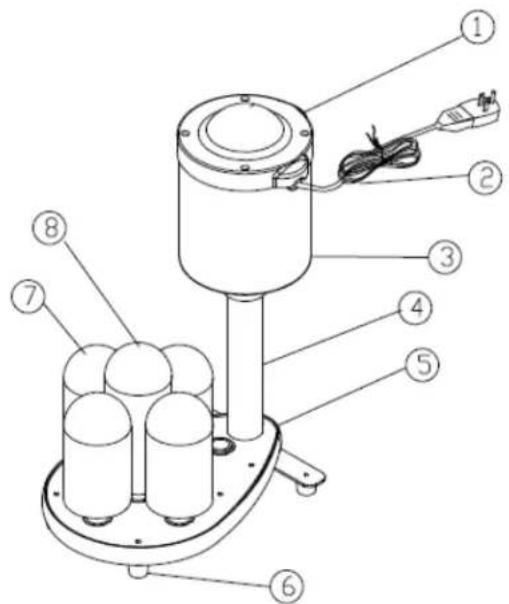
- Power Switch 2. Power Cord 3. Motor 4. Exterior Tube 5. Supporting Board 6. Foot 7. Small Brush 8. Big Brush
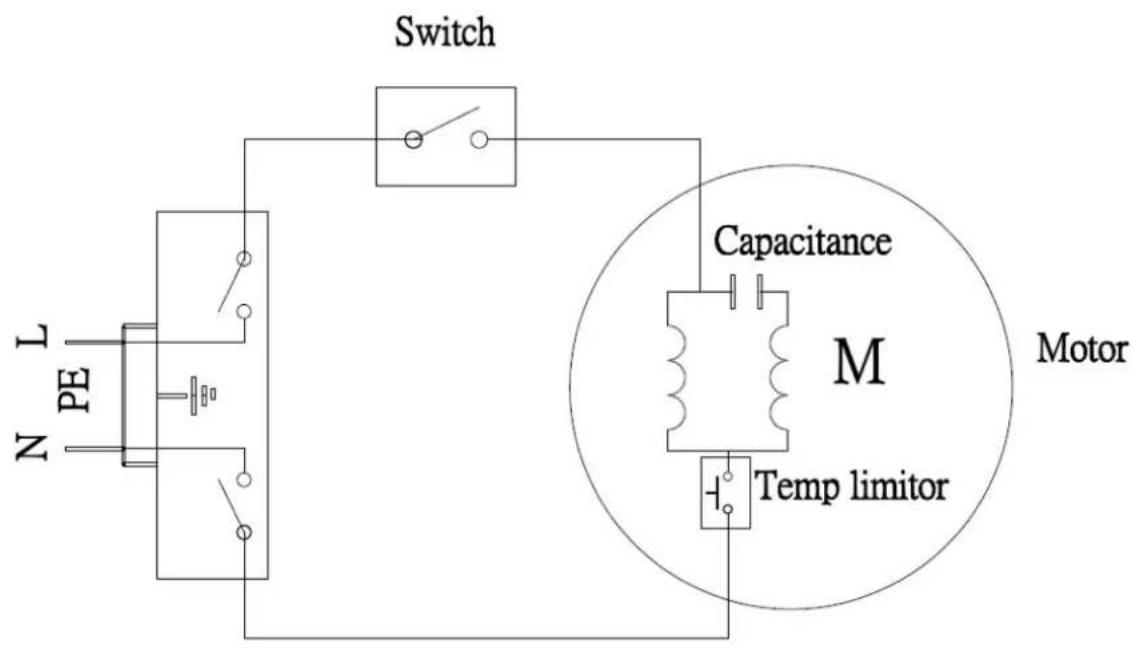
Circuit Diagram
User Manual
Before Using Your Glass Washer
Before using your glass washer, please follow these simple instructions. Failing to do so may cause injury to the user and damage the machine.
Install the machine on a flat surface of a sink and make sure the machine is upright and stable.
Assemble the brushes and check that they are securely in place.
Pour water into the sink and observe that the water level does not exceed the water line mark on the exterior tube.
Add some detergent for washing.
Plug the power cord in correctly.
Warning: Do not overfill the sinks/tanks or fully submerse the glass washer motor.
Warning: Plug the unit into grounded outlets only that match the unit's voltage and frequency listed on the motor. Outlet must be UL/CSA and G.F.C.I.
Warning: Check the electric cord and plug to make sure it is clean and dry before using.
Keep the power cord away from the brushes and water. Never use the machine if the power cord is cracked or damaged.
Warning: The SWITCH must NOT contact the water, keep it dry.
Caution: Check and make sure the brushes are securely in place before turning on the machine.
Caution: Do NOT use the machine for any other purpose than its intended design.
Using Your Glass Washer
To start the glass washer, plug in the power cord and switch on the machine. When the brushes start to spin, put the glass on top of the brush to wash. It is recommended to wash one glass at a time for the best results.
Warning: Do not operate the machine out of water.
Warning: Keep the machine upright. Do not use it if it is lying down.
Warning: Motor may get hot during and after operation; turn it off when it's not in use.
User Manual
Typical Operation Sequence
| Action Result | |
| Plug in your glass washer | Power is connected, but unit will only start after the machine is switched on |
| Switch On Unit starts to work; brushes start to spin | |
| Place glass over the brush The glass is cleaned | |
| Switch Off Unit stops working | |
| Unplug the unit No power is connected | |
Protection Component
This glass washer includes a capacitor motor. To protect the electronic components inside, the machine will shut off automatically if it begins to overheat.
Cleaning & Maintaining Your Glass Washer
To clean, first remove the power cord's plug from the wall outlet. Wait for the glass washer to cool down. Use a damp cloth or sponge to gently wipe down the unit. Avoid soaking the whole unit into water or washing it in running water as this will cause serious damage to the unit.
When closing for the day, drain sink and wipe off machine, let the machine dry overnight.
After use for a month, remove the base cover that protects the gears inside. Immerse the machine in water, add 1/2 cup of vinegar. Operate the machine for 10 minutes, rinse thoroughly and replace the base cover.
User Manual
Specifications
| Model # | Volt / Frequency | Dimension Unit Weight Power Plug | |||
| 274LCNBGW 12 | 0V 60HZ 8"W x | 12"D x 18"H | 23lbs.(26 lbs. shipping) | 1/3 HP N | EMA 5-15 |
Troubleshooting
Problem: The glass washer does not work after being switched on.
- Make sure glass washer is plugged in correctly.
- Be sure it is switched on.
- Check with service center.
Problem: There is a very loud noise when the glass washer is in use.
- Do not attempt to dismantle the glass washer.
- Contact your service agent right away to examine the motor and inside gears.
Problem: The brush spin cycle is slow and the glasses are not cleaned properly.
- Check to see if something is jammed inside the brushes.
User Manual
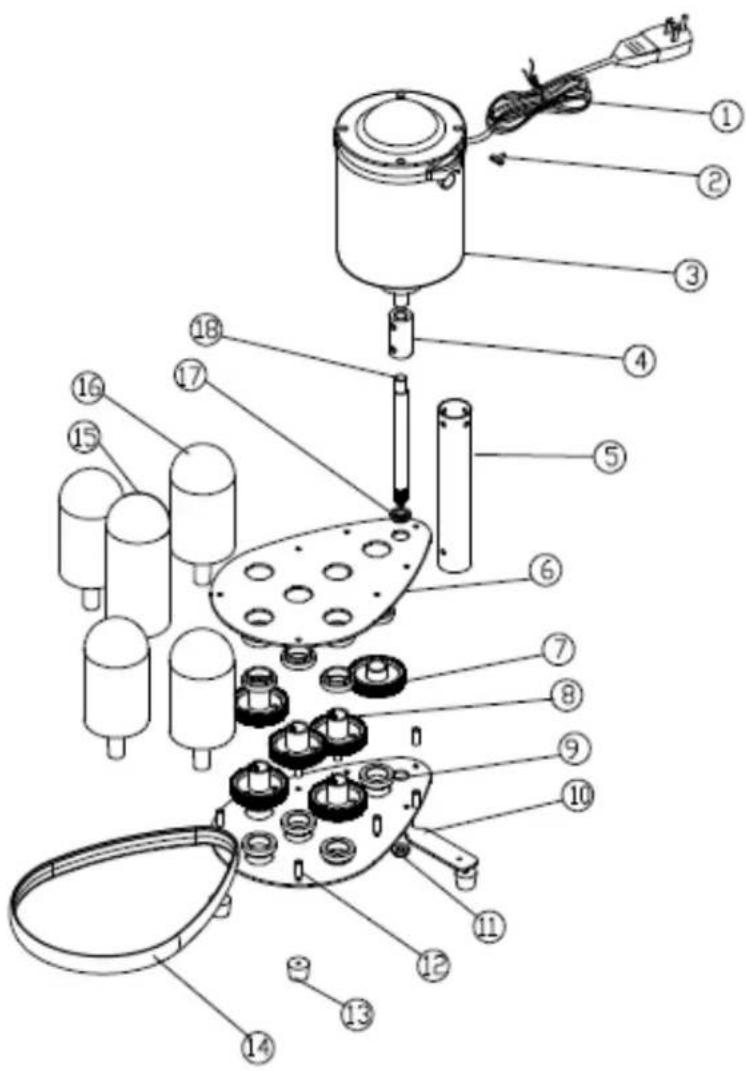
Part List
| NO PART NAME SPEC. | ||
| 1 | POWER CORD | 5-15 SJOW 16AWG |
| 2 | POWER SWITCH | 125V 15A |
| 3 | CAPACITOR MOTOR | 120V 240W |
| 4 | CONNECTION POLE | Aluminum |
| 5 | EXTERIOR TUBE | Stainless Steel |
| 6 | SUPPORTING BOARD | Stainless Steel |
| 7 | DRIVING WHEEL | Plastic |
| 8 | GEAR Plastic | |
| 9 | GEAR HUB Copper | |
| 10 | BASE BOARD | Stainless Steel |
| 11 | FOOT Rubber | |
| 12 | SEPTA PILLAR | Stainless Steel |
| 13 | LOWERING BEARING SHAFT | Rubber |
| 14 | BASE COVER Silicone | |
| 15 | BIG BRUSH Plastic | |
| 16 | SMALL BRUSH | Plastic |
| 17 | UPPER BEARING SHAFT | Rubber |
| 18 | DRIVING SHAFT | Stainless Steel |
User Manual
Equipment Limited Warranty
Noble Products warrants its equipment to be free from defects in material and workmanship for a period of 1 year. This is the sole and exclusive warranty made by Noble Products covering your Noble Products brand equipment. A claim under this warranty must be made within 1 year from the date of purchase of the equipment. Only the equipment's original purchaser may make a claim under this warranty. Noble Products reserves the right to approve or deny the repair or replacement of any part or repair request. The warranty is not transferable. Noble Products Equipment installed in/on a food truck or trailer will be limited to a period of 30 days from the original date of purchase.
To Make a Warranty Claim:
For Warranty Inquiries contact the location where you purchased the product:
• WebstaurantStore.com: Contact help@webstaurantstore.com. Please have your order number ready.
• The Restaurant Store: If you purchased this unit from your local store, please contact your store directly.
• TheRestaurantStore.com: Online purchases, call 717-392-7261. Please have your order number ready.
Failure to contact the designated location prior to obtaining equipment service may void your warranty.
Noble Products makes no other warranties, express or implied, statutory or otherwise, and HEREBY DISCLAIMS ALL IMPLIED WARRANTIES, INCLUDING THE IMPLIED WARRANTIES OF MERCHANTABILITY AND OF FITNESS FOR A PARTICULAR PURPOSE.
This Limited Warranty does not cover:
• Equipment sold or used outside the Continental United States
- Use of unfiltered water (if applicable)
- Noble Products has the sole discretion on wearable parts not covered under warranty
• Equipment not purchased directly from an authorized dealer
• Equipment used for residential or other non-commercial purposes
• Equipment that has been altered, modified, or repaired by anyone other than an authorized service agency
- Equipment where the serial number plate has been removed or altered.
- Damage or failure due to improper installation, improper utility connection or supply, and issues resulting from improper ventilation or airflow.
- Defects and damage due to improper maintenance, wear and tear, misuse, abuse, vandalism, or Act of God.
Any action for breach of this warranty must be commenced within 1 year of the date on which the breach occurred. No modification of this warranty, or waiver of its terms, shall be effective unless approved in a writing signed by the parties. The laws of the Commonwealth of Pennsylvania shall govern this warranty and the parties' rights and duties under it. Noble Products shall not under any circumstances be liable for incidental or consequential damages of any kind, including but not limited to loss of profits.

- Heavy-Duty Electric Bar Glass Washer
- User Manual
- Index
- Important Safety Information
- NOTE: Save these instructions for future reference.
- Identification Of Parts
- Circuit Diagram
- Before Using Your Glass Washer
- Using Your Glass Washer
- Typical Operation Sequence
- Protection Component
- Cleaning & Maintaining Your Glass Washer
- Specifications
- Troubleshooting
- Equipment Limited Warranty
- To Make a Warranty Claim:
- This Limited Warranty does not cover:
Brand : Noble
Model : Last Call 274LCNBGW
Category : Switch