
BLSTEG7890R - Blender OSTER - Free user manual and instructions
Find the device manual for free BLSTEG7890R OSTER in PDF.


| Product Type | Blender |
| Brand | Oster |
| Model | BLSTEG7890R |
| Power Consumption | 800 W |
| Jar Capacity | 1.5 L (48 oz) |
| Jar Material | Tritan plastic (BPA-free) |
| Blade Material | Stainless steel |
| Speed Settings | 3 speeds plus pulse |
| Functions | Blending, puree, ice crush, smoothie |
| Safety Features | Locking lid, non-slip base |
| Cleaning | Removable jar, lid, and blades are dishwasher safe |
| Dimensions (HxWxD) | 40 x 20 x 20 cm |
| Weight | 3.2 kg |
| Power Supply | 120 V / 60 Hz (North America) |
| Spare Parts Available | Jar, lid, blade assembly, gasket |
| Repairability Index | 7.5 / 10 |
| Warranty | 2 years limited |
Frequently Asked Questions - BLSTEG7890R OSTER
User questions about BLSTEG7890R OSTER
0 question about this device. Answer the ones you know or ask your own.
Ask a new question about this device
Download the instructions for your Blender in PDF format for free! Find your manual BLSTEG7890R - OSTER and take your electronic device back in hand. On this page are published all the documents necessary for the use of your device. BLSTEG7890R by OSTER.
USER MANUAL BLSTEG7890R OSTER
natural_image
Illustration of a blender with control panel and lid, no text or symbols presentMODELOS
MODELS
BLSTEG7890B
BLSTEG7890C
BLSTEG7890R
READ ALL INSTRUCTIONS BEFORE USING THIS APPLIANCE
MANUAL DE INSTRUÇÕES
LIQUIDIFICADOR COM TECNOLOGIA DE MOTOR REVERSÍVEL
LEIA TODAS AS INSTRUÇÕES ANTES DE USAR ESTE APARELHO
PRECAUCIONES IMPORTANTES
natural_image
Illustration of a hand holding a small object with a ribbon, mounted on a jar (no text or symbols)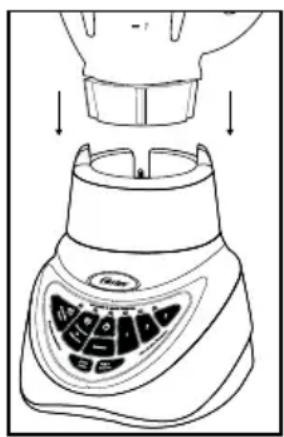
UTILIZANDO LOS PROGRAMAS AUTOMÁTICOS
natural_image
Line drawing of hands holding a glass with a ribbon, above a circular object (no text or symbols)natural_image
Line drawing of hands holding a bowl with a spatula, no text or symbols presentALMACENAMIENTO
Vuelva a armar la licuadora para guardarla.

natural_image
Line drawing of a hand pouring liquid into a blender (no text or symbols)When using electrical appliances, basic safety precautions should always be followed, including the following:
• READ AND KEEP ALL INSTRUCTIONS.
- Close supervision is necessary when any appliance is used by or near children, or incapacitated persons.
- Unplug from outlet when not in use, before putting on or taking off parts, and before cleaning.
- Avoid contact with moving parts.
- DO NOT operate any appliance with a damaged cord or plug or after the appliance malfunctions, or is dropped or damaged in any manner. Take the appliance to the nearest Authorized Oster Appliance Service Center for examination, repair or electrical or mechanical adjustment.
- The use of attachments, including canning and/or ordinary jars and processing assembly parts not recommended by the manufacturer, may cause a risk of injury to persons.
- Keep hands and utensils out of jar while blending to prevent the possibility of severe injury to persons and/or damage to the Blender. If scraping, folding, etc., is necessary, turn off and unplug the Blender, and only use a rubber spatula.
- Blades are sharp. Handle carefully.
- To reduce risk of injury to persons, never place cutting blades on base without Blender jar properly attached.
- Screw on jar bottom firmly. Injury can result if moving blades become exposed.
- Always operate Blender with cover in place.
- Make sure that the voltage in your outlet is the same as the voltage indicated on the appliance.
- Always hold jar while processing. If the jar should turn when the motor is switched on, switch off immediately and tighten Blender jar in threaded jar bottom. DO NOT leave Blender unattended while it is operating.
- Be careful if hot liquid is poured into the food processor or blender as it can be ejected out of the appliance due to a sudden steaming. When blending hot liquids, remove the feeder cap from the two piece cover. DO NOT fill Blender jar beyond the four cup level. On six-cup models, DO NOT fill beyond five-cup level. Always begin processing at the lowest speed setting. Keep hands and other exposed skin away from the cover opening to prevent possible burns.
- To protect against risk of electrical shock, do not put Blender base in water or other liquid. DO NOT let the cord hang over edge of table or countertop. DO NOT let cord rest against hot surfaces.
- This appliance is not intended for use by persons (including children) with reduced physical, sensory or mental capabilities, or lack of experience and knowledge, unless they have been given supervision or instruction concerning
use of the appliance by a person responsible for their safety. Children should be supervised to ensure that they DO NOT play with the appliance.
- This appliance is intended to be used in household and similar applications such as: staff kitchen areas in shops, offices and other working environments farm houses by clients in hotels, motels and other residential type environments bed and breakfast type environments.
- This appliance is not intended to be operated by means of an external timer or separate remote-control system. DO NOT use outdoors.
THIS UNIT IS FOR HOUSEHOLD USE ONLY.
The maximum rating as marked on the unit is based on the attachment that draws the greatest load. Other recommended attachments may draw significantly less power.
SAVE THESE INSTRUCTIONS
POWER CORD SPECIAL INSTRUCTIONS
- Try to position the blender near the power source to reduce the hazards associated with power cords (such as becoming entangled or tripping over a long power cord).
- Do not pull, twist or otherwise abuse the power cord.
- Do not wrap the power cord around the main body of the blender during or after use.
- Do not use an extension cord with this product.
DESCRIPTION OF THE APPLIANCE
flowchart
graph TD
    A["Granizados Fréplos"] --> B["Procesador de Alimentos"]
    B --> C["Detener"]
    C --> D["Pulsos Rapido"]
    D --> E["Pulsos Lento"]
    E --> F["Velocidades Minutales"]
    F --> G["2"]
    G --> H["1"]
    H --> I["Tecnología de Motor Reversible"]
    I --> J["d"]
    J --> K["b"]
    K --> L["e"]
    L --> M["c"]
    M --> N["a"]
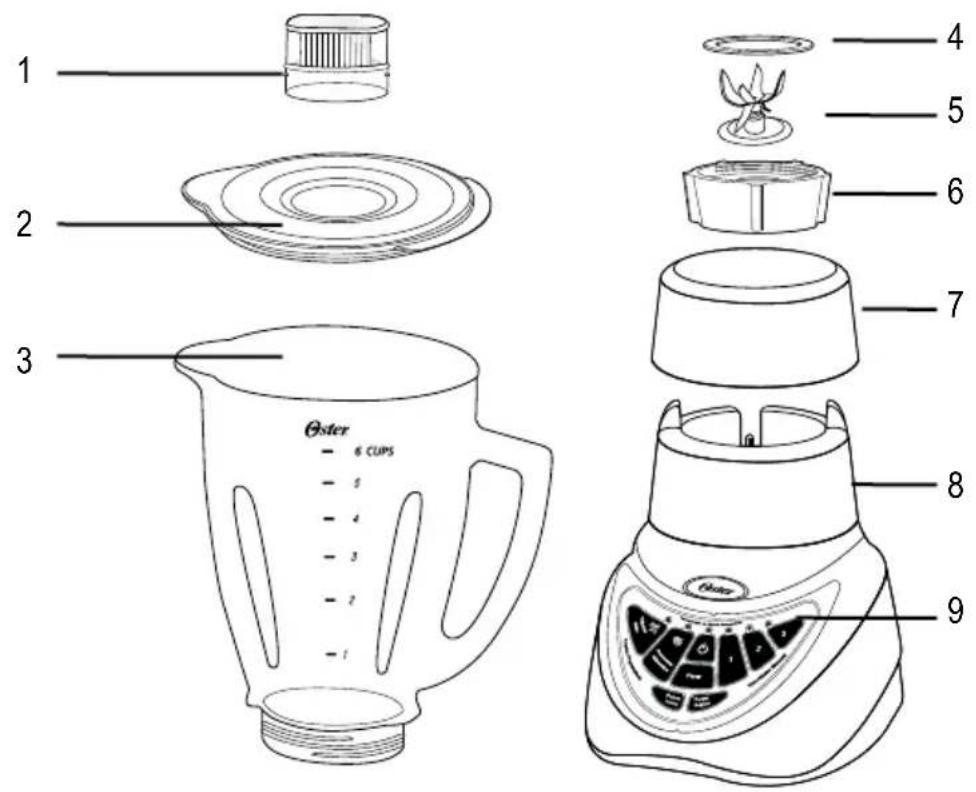
- Jar Lid Food Chute
- Jar lid
- 1.5 Liters (6 Cups) Heat-Resistant Boroclass® Glass Jar
- Sealing Ring
- Special 6-Point Blade
- Threaded Jar Bottom
- Jar Collar
- Motor Base
- Control Panel
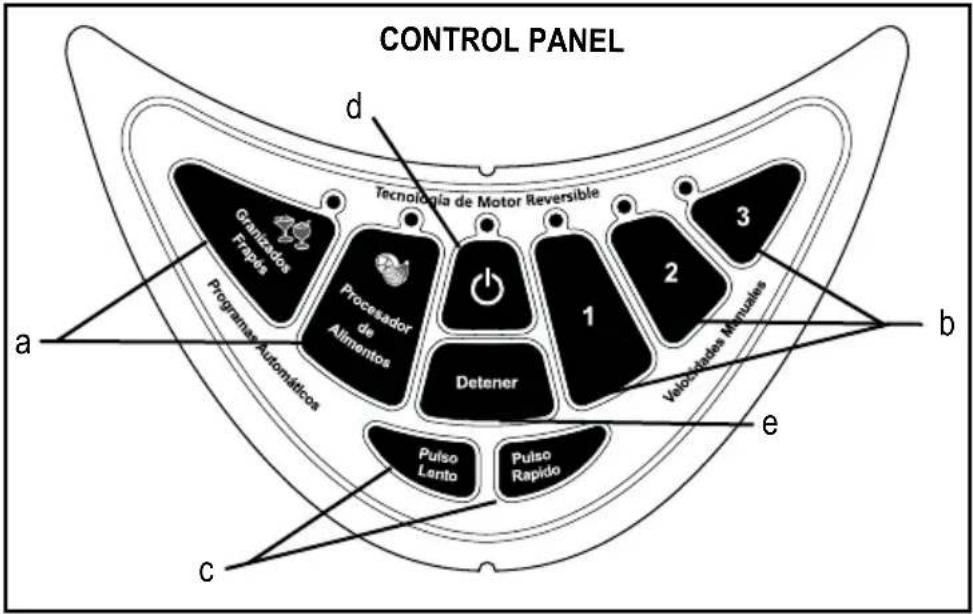
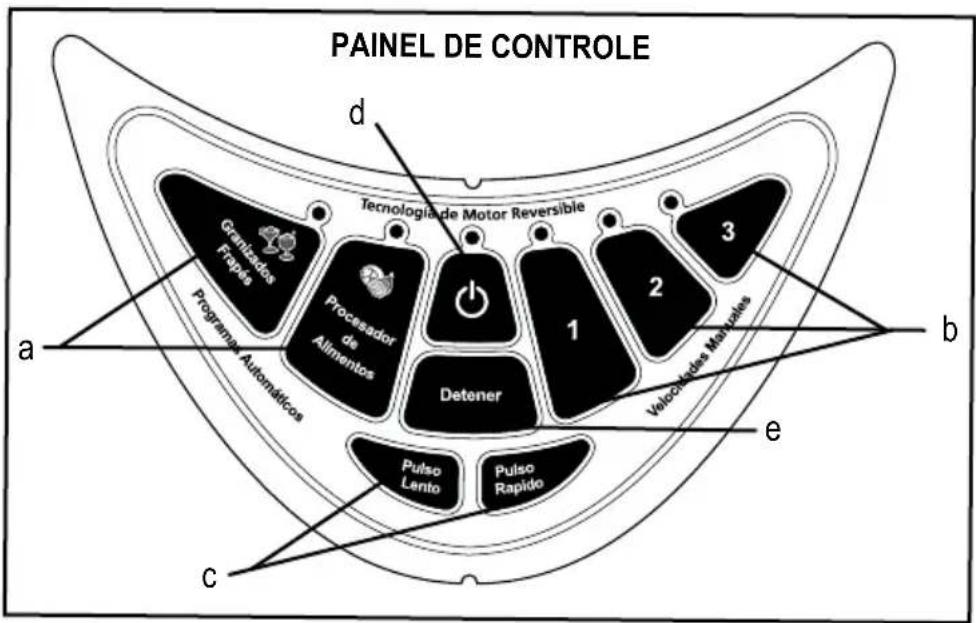
CONTROL PANEL
a. Pre-Programmed Settings
- Frozen Drinks & Shakes Button
- Food Processor Button
b. Manual Speeds 1, 2 & 3
c. Max Pulse & Low Pulse Button
d. Power Button ⏻
e. Stop Button
USING YOUR OSTER® BLENDER WITH REVERSIBLE MOTOR TECHNOLOGY
Your product includes the following technology and features:
- A user-friendly touchpad design gives you the option of Pre-Programmed Settings or Manual Controls.
- A multi-functional blade optimizes Pre-Programmed food and drink preparation.
- A powerful reversible motor keeps the ingredients near the blade by spinning at very low speeds and gradually speeding up to the Pre-Programmed level, ensuring optimum results from smooth to chunky.
- Manual Controls give you the flexibility to operate the blender for personal recipes.
- A jar lid food chute lets you add ingredients without removing the jar lid.
Before you use the product for the first time, separate the lid, jar lid food chute, and blade from the jar. Wash in warm, soapy water, or top rack in the dishwasher. Rinse and dry well.
ASSEMBLY
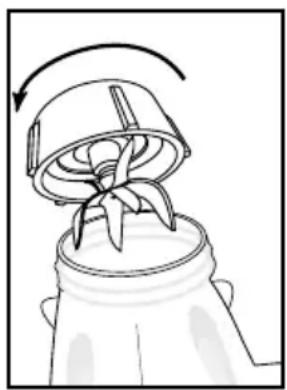
- Install these sealing ring over the multi-functional blade. Blade is sharp Handle with care.
- Turn the jar upside down so the small opening is at the top.
- Turn the multi-functional blade with sealing ring upside down and place into the bottom of the jar.
- Position the open end of the threaded jar bottom over the jar and sealing ring. Turn clockwise to tighten. Be sure the threaded jar bottom is locked securely to the jar before using.
- Slide the jar onto the base.
- Plug the power cord into a standard household outlet of the same voltage as the one indicated in the rating plate of your blender. You are now ready to start.
natural_image
Diagram of a hand holding a bag with a ribbon, showing a curved arrow indicating rotation (no text or symbols present)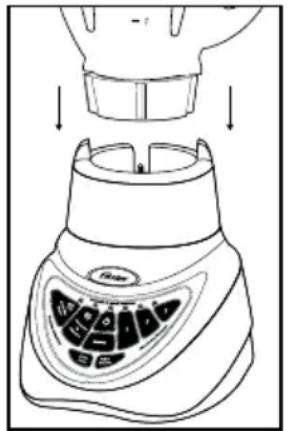
USING THE PRE-PROGRAMMED SETTINGS
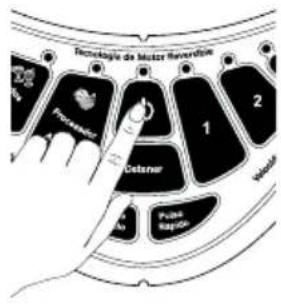
Use to select "Granizados, Frapés" (Frozen Drinks & Shakes) Function or "Procesador de Alimentos" (Food Processor) Function.
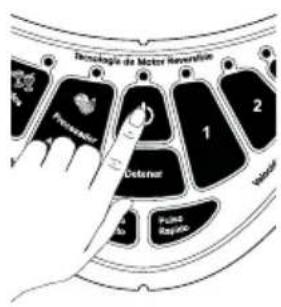
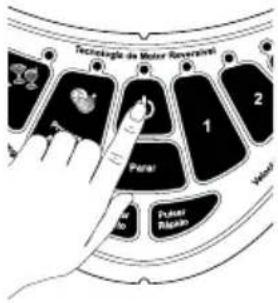
- Press the power button to turn the product on. The power light will to blink, meaning the product is active and ready to use.
- Choose a recipe from the recipe section of this manual or use one of your own.
- Put the ingredients into the jar.
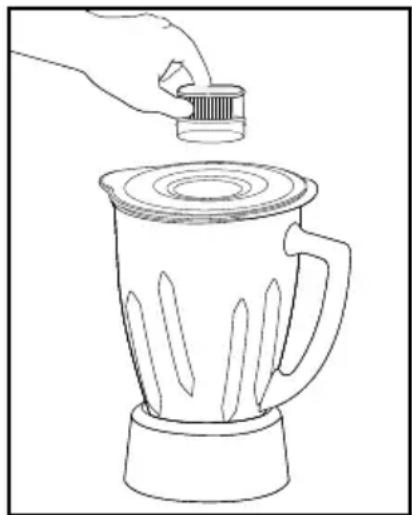
- Secure the lid and jar lid food chute.
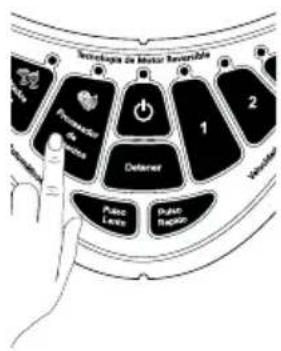
- Press one of the two Pre-Programmed Setting buttons appropriate for your recipe.
"Granizados, Frapés" (Frozen Drinks & Shakes) Button "Procesador de Alimentos" (Food Processor) Button
-
To change your selection, press Stop followed by another Pre-Programmed Setting button: "Granizados, Frapés" (Frozen Drinks & Shakes) or "Procesador de Alimentos" (Food Processor)
-
Once the program is finished the product automatically stops. Please note: You may press the "Detener" (Stop) button to cancel the program at any time. The blinking red light indicates that the blender is ready.
- Press the power button to turn the product off.
This product is pre-programmed to turn off automatically if not used for a period of several minutes. All lights will turn off when the unit automatically powers down.
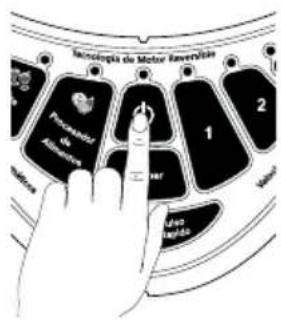
USING THE MANUAL CONTROLS
The Manual Controls include:
- Speed "3" - Max/Ice Crush (High speed)
- Speed "2" -Medium/Blend (Medium speed)
- Speed "1" -Low/Stir (Low speed)
• Max Pulse - "Pulso Rápido" - Low Pulse - "Pulso Lento"
Use these buttons for personal recipes or to continue mixing after a Pre-Programmed Setting is finished.
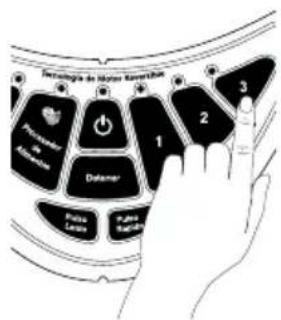
- Press the power button to turn the product on. The power light will blink, meaning the product is active and ready to use.
- Choose a recipe from the recipe section of this manual or use one of your own.
- Put the ingredients into the jar.
- Secure the lid and the jar filler cap
USING THE SPEED "3" BUTTON
- Press the Speed "3" button to run the product at a high speed.
- Press the "Detener" button to cancel the operation at any time.
- Press the power button to turn the product off.
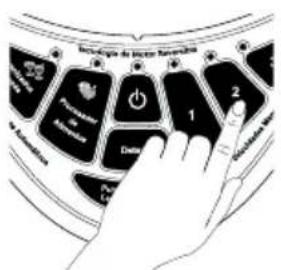
USING THE SPEED "2" BUTTON
- Press the speed "2" button to run the product at a medium speed.
- Press the "Detener" (Stop) button to cancel the program at any time.
- Press the power button to turn the product off.
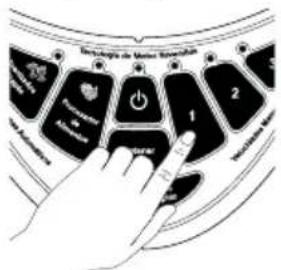
USING THE SPEED "1" BUTTON
- Press the speed "1" button to run the product at a low speed.
- Press the "Detener" (Stop) button to cancel the program at any time.
- Press the power button to turn the product off.
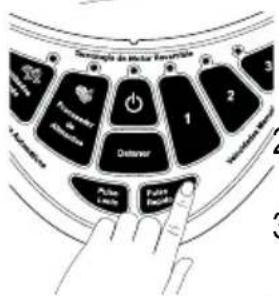
USING THE "PULSO RÁPIDO" (MAX PULSE)
- Press and hold the "Pulso Rápido" (Max Pulse) button.
- Release the pulse button to stop. Recommended for Ice crushing.
- Press the power button to turn the product off.
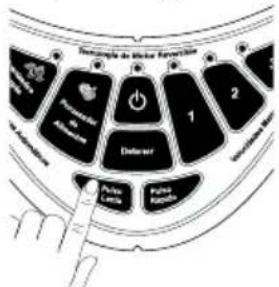
USING THE "PULSO LENTO" (LOW PULSE)
- Press and hold the "Pulso Lento" (Low Pulse) button.
- Release the pulse button to stop. Recommended for salsas.
- Press the power button to turn the product off.
Use lower pulse settings for food and higher pulse settings for drinks.
CARING AND MAINTAINING YOUR OSTER BLENDER WITH REVERSIBLE MOTOR
After Use:
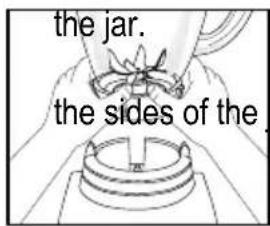
- Lift the jar straight up from the base, remove the lid and empty
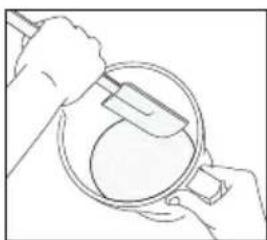
- If necessary, use a rubber spatula to scrape foods away from
CLEANING
Release the multi-functional blade from the bottom of the jar by turning the jar bottom cover counterclockwise.
natural_image
Line drawing of hands using a tool to clean or inspect a circular object (no text or symbols)The jar lid, jar lid food chute and blade are dishwasher safe. Use the top rack of the dishwasher for the jar lid, jar lid food chute, and blade.
Place sealing ring into bottom basket of dishwasher.
You can also wash the parts in warm, soapy water. Rinse well and dry. Wipe the base with a soft, damp cloth to clean. Never submerge the low profile base in a liquid. Check the parts as you put them back together.
STORING
Reassemble the blender for storage. Leave the lid open a gap so no odors are retained.

WARNING: Never put the jar, or any other parts, in a microwave oven. Never store foods or drinks in the jar.
BLENDING TIPS
Liquids
Put liquids into the jar first, unless the recipe says otherwise.
Using the jar lid food chute
Do not remove the lid while in use. Food may splatter if you do. Instead, open the jar lid food chute to add smaller ingredients.
Working with Hot Foods or Liquids

WARNING: When you work with HOT FOODS, remove the jar lid food chute to vent steam. Tilt the lid away from you partially covering the opening. Keep hands and other exposed skin away from the lid opening to prevent possible burns.
When you work with HOT LIQUIDS, remove the jar lid food chute and start at a low speed, and then gradually increase to a faster speed. Do not add liquid over the cup (1L) level. Always keep hands away from steam.
natural_image
Line drawing of a hand pouring liquid into a blender (no text or symbols)Ingredients Quantities
Use only the amount of food suggested in the recipes. If you want greater amounts, prepare in batches. Using larger amounts may overload and strain the motor. You might also get different results from those described.
Frequently Asked Questions
Why doesn't the blender/food processor turn on?
- Make sure the base is plugged in an active power receptacle.
- Verify blinking red light is active after pushing on/off button.
How can I prevent liquids from leaking out?
Check to see that the sealing ring is correctly assembled in between the jar blade and the jar.
PRECAUÇÕES IMPORTANTES
natural_image
Diagram of a hand holding a small object with a curved arrow indicating rotation (no text or symbols)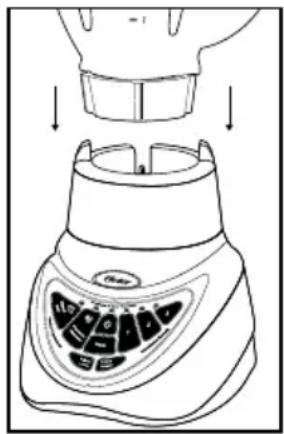
UTILIZANDO AS FUNÇÕES PRÉ-PROGRAMADAS
natural_image
Line drawing of hands holding a small object above a circular base (no text or symbols)Após o uso:
natural_image
Line drawing of hands using a tool to clean or inspect a circular object (no text or symbols)LIMPEZA
natural_image
Line drawing of a hand pouring liquid into a blender (no text or symbols)Quantidades de ingredientes
© 2016 Sunbeam Products, Inc. All rights reserved. Distributed by Sunbeam Latin America, LLC, 5200 Blue Lagoon Drive, Suite 860, Miami, FL 33126. One year limited warranty – please see insert for details.
- PRECAUCIONES IMPORTANTES
- UTILIZANDO LOS PROGRAMAS AUTOMÁTICOS
- ALMACENAMIENTO
- THIS UNIT IS FOR HOUSEHOLD USE ONLY.
- SAVE THESE INSTRUCTIONS
- POWER CORD SPECIAL INSTRUCTIONS
- DESCRIPTION OF THE APPLIANCE
- CONTROL PANEL
- USING YOUR OSTER® BLENDER WITH REVERSIBLE MOTOR TECHNOLOGY
- Your product includes the following technology and features:
- ASSEMBLY
- USING THE PRE-PROGRAMMED SETTINGS
- USING THE MANUAL CONTROLS
- USING THE SPEED "3" BUTTON
- USING THE SPEED "2" BUTTON
- USING THE SPEED "1" BUTTON
- USING THE "PULSO RÁPIDO" (MAX PULSE)
- USING THE "PULSO LENTO" (LOW PULSE)
- CARING AND MAINTAINING YOUR OSTER BLENDER WITH REVERSIBLE MOTOR
- After Use:
- CLEANING
- STORING
- BLENDING TIPS
- Liquids
- Using the jar lid food chute
- Working with Hot Foods or Liquids
- Ingredients Quantities
- Frequently Asked Questions
- PRECAUÇÕES IMPORTANTES
- UTILIZANDO AS FUNÇÕES PRÉ-PROGRAMADAS
- Após o uso:
- LIMPEZA
- Quantidades de ingredientes
Brand : OSTER
Model : BLSTEG7890R
Category : Blender