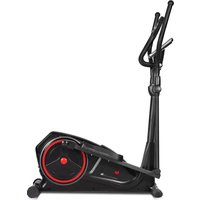
E2i+ - Elliptical bike LifeSpan - Free user manual and instructions
Find the device manual for free E2i+ LifeSpan in PDF.


| Product Type | Elliptical Trainer |
| Model | E2i+ |
| Brand | LifeSpan |
| Dimensions (L x W x H) | 80 x 28 x 66 inches |
| Weight | 150 lbs |
| Max User Weight | 350 lbs |
| Resistance System | Eddy current magnetic |
| Stride Length | 20 inches |
| Power Source | Self-powered (AC adapter optional) |
| Display | LCD with time, distance, calories, heart rate |
| Number of Programs | 12 |
| Heart Rate Monitoring | Contact and wireless (chest strap compatible) |
| Pedal Type | Articulating with cushion |
| Leveling Feet | Yes |
| Transport Wheels | Yes |
| Frame Warranty | Lifetime |
| Parts Warranty | 2 years |
| Labor Warranty | 1 year |
| Maintenance | Lubricate rails every 3 months; clean with damp cloth |
| Safety Features | Emergency stop magnet, stable base |
Frequently Asked Questions - E2i+ LifeSpan
User questions about E2i+ LifeSpan
0 question about this device. Answer the ones you know or ask your own.
Ask a new question about this device
Download the instructions for your Elliptical bike in PDF format for free! Find your manual E2i+ - LifeSpan and take your electronic device back in hand. On this page are published all the documents necessary for the use of your device. E2i+ by LifeSpan.
USER MANUAL E2i+ LifeSpan
E2i / E3i Elliptical Cross Trainers
Welcome
Congratulations on Purchasing Your LifeSpan Elliptical!
At LifeSpan we take pride in the quality, safety, and reliability of our products as well as the professionalism of our sales support and customer service teams.
Making it our number one priority that you have an exceptional experience using our products.
In support of this quality focus we pre-assemble parts on the manufacturing line whenever possible to reduce the number of steps and complexity of customer assembly, independently certify our products to comply with the latest industry Safety Standards, and use state of the art production processes and quality components.
Then we back LifeSpan products with excellent warranties and a responsive customer service department making it simple and easy to get assistance should the need arise.
This attention to quality, our high standard for customer service and focus on innovation has earned LifeSpan numerous awards and consistent praise from independent review groups, industry authorities and you the consumer.
Thanks for choosing LifeSpan.
Please thoroughly read this manual before you assemble or operate your elliptical. Neither LifeSpan nor its representatives can accept responsibility for any damages or injury incurred as a result of information presented in this manual except under the terms of the product warranty.
Contents
Welcome
Safety First 7
Safety First
About Your Elliptical 10
Specifications
Unique Features
Console Overview
Heart Rate Monitoring
Programs
Warranty / Registration
Grounding
Assembling Your Elliptical 22
Exploded View & Hardware
Assembly Instructions
Console Basics 36
Readout Display
Operating Keyboard
Date / Time / Quickstart
Using Programs 40
Preset Programs
Custom User
Using Heart Rate Control Programs
Saving Your Results 46
LifeSpan Club
Bluetooth / USB Plus
Maintenance and Tips 48
Personal Settings
General Maintenance
Moving
Troubleshooting
Safety First
When using exercise equipment, basic precautions should always be followed, including:
- Never drop or insert any object into any opening. If an object falls into an opening, turn the power off and unplug the power cord from the outlet. Remove the object or call customer service at 877.654.3837 option 4.
- Never operate this elliptical if it has been damaged or partially submersed in water.
- To reduce the risk of electric shock, unplug the elliptical from the wall outlet when not in use, before performing any maintenance, or before moving the elliptical.
- Do not use outdoors or in areas of high humidity or extreme temperature changes.
- Do not operate where aerosol spray products are being used or where oxygen is being administered.
- Never place the power cord under carpeting or place any object on top of the cord, this may pinch or damage the cord causing fire damage or personal injury.
- Use this exercise product for its intended use as described in this Owner's Manual. Do not use attachments that are not recommended by LifeSpan.
- Keep hands away from all moving parts
- Keep your elliptical on a solid, level surface. Do not operate elliptical on deeply padded, plush or shag carpeting. Damage to carpeting may occur.
Children and Pets
- When in use children and pets should be kept at least 10 feet (3m) away.
- This elliptical can be used by children ages 12 years and above and persons with reduced physical, sensory or lack of experience and knowledge if they have been given supervision or instruction concerning use of the appliance in a safe way and understand the hazards involved.
- Cleaning and user maintenance shall not be made by children without supervision.
- Keep children away from the elliptical. There are many pinch points and other caution areas that can cause harm and injury.
Safety Tips While in Use
• Always consult a physician before beginning an exercise program.
- If you experience chest pains, nausea, dizziness or shortness of breath, stop exercising immediately and consult your physician before continuing. Do not wear clothing or jewelry that might catch on any part of the elliptical.
- Wear shoes with high traction rubber soles. Do not wear shoes with heals, leather soles, cleats or spikes.
- Use caution while participating in other activities while using your elliptical such as watching television or reading. These distractions may cause you to lose balance which may result in injury.
- Heart Rate monitoring systems may be inaccurate. Various factors, including the user's movement may affect the accuracy of the heart rate readings. The pulse sensors are intended only as exercise aids in determining heart rate trend.
• Over exercising may result in serious injury or death. If you feel faint stop exercising immediately.
Note: Read all instructions and save for future reference.
About Your Elliptical
Specifications
Mechanical and Drive System
| Flywheel E2i - 29 lb (13 kg)E3i - 34 lb (15 kg) | |
| Resistance System Frict | onless Magnetic Resistance |
| Resistance Levels 20 | |
| Incline Ramp Levels 20 | |
| Stride Length 20" (50.8 cm) | |
| Roller Wheels E2i - Single Roller Wheel Per PedalE3i - Dual Roller Wheels Per Pedal | |
| Transport 2 Front Wheels | |
| Maximum User Weight | E2i: 350 lb (159 kg)E3i: 375 lb (170 kg) |
Console Features
| Readouts E2i/E3i: Time, | Speed, Calories, Heart Rate, Watts,Stride(step) Count, Ramp and Resistance Level,Date and Clock, and Core BalanceE3i Only: Average Watts, Stride Count Per Minute(CPM), Calorie Burn Rate Per Hour, Distance |
| Programs 2 Heart Rate, | 2 User Setup and 17 preset programs |
| Display 6" Blue Backlit L | CD (E2i)7.5" Blue Backlit LCD (E3i) |
| Heart Rate Contact Heart | rt Rate Sensors / Chest StrapCompatible |
| QuicksetTM 4 Buttons for | Ramp and Resistance Control |
| Advanced Audio | Audio-in Port and Dual Speakers |
| USB Plus | Charges Mobile Devices and Saves Exercise Results |
| Accessory Support | Water Bottle HolderTablet Holder / Reading Rack |
About Your Elliptical
Unique Features
As a leader in the fitness industry, LifeSpan has developed a number of unique features that make our products more engaging and easier to use.
You can learn more about how to use these features throughout this Owner's Manual.

Intelli-Key™
Console operation is simplified with sequential button illumination prompting you through program selection and setup.

Core Balance
Load Sensors built into the pedals identify the amount of weight and power coming from each leg to help you focus on equally balancing your weight distribution and effort level applied to each leg.

Club Membership
Every elliptical comes with a full membership in the Club, LifeSpan's award-winning health and fitness software. Keep track of all your activity and information in one secure location.

USB Plus
Dual-purpose USB port charges most of your mobile devices* and saves your exercise results for upload into your free Club account.

Bluetooth
Optional Bluetooth adapter allows for wireless data sync with the LifeSpan Active Trac™ and Train & Trac™ apps to get the most out of your workout and capture your exercise results.
* Does not charge iPad 1, iPad 2, and iPad 3.
About Your Elliptical
Console Overview
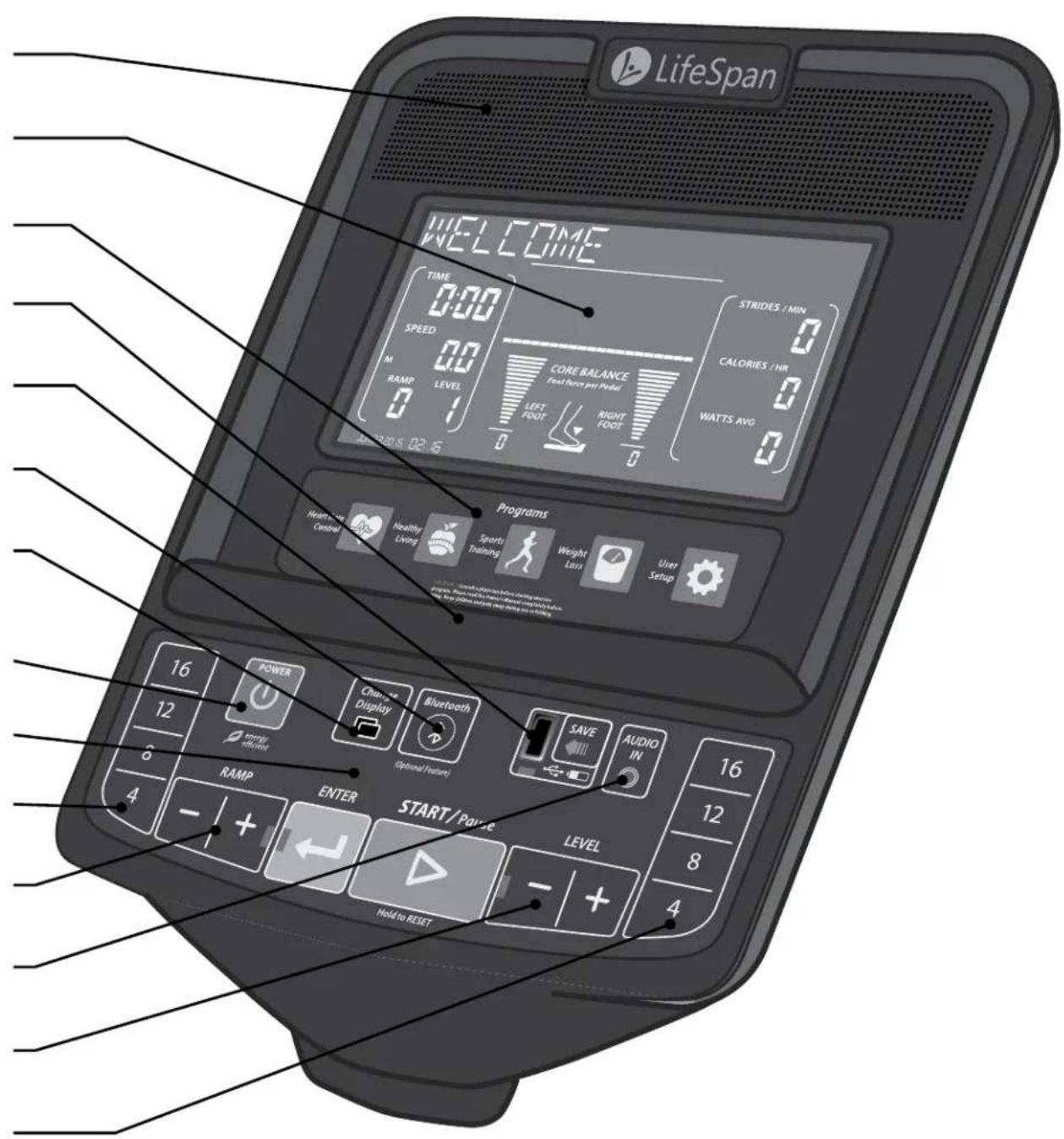
Built-in Speakers ____
Readout Display ____
Preset Programs (E3i)
Media Holder ____
USB Plus ____
Bluetooth Pairing (optional feature) ____
Alternate Readouts (E3i) ____
Power Button
Operating Keyboard
Quickset™ Ramp Controls ____
Incline Ramp Level ____
Audio Input ____
Resistance Level
Quickset™ Resistance Controls ____
About Your Elliptical
About Your Elliptical
Heart Rate Monitoring
bar_stacked
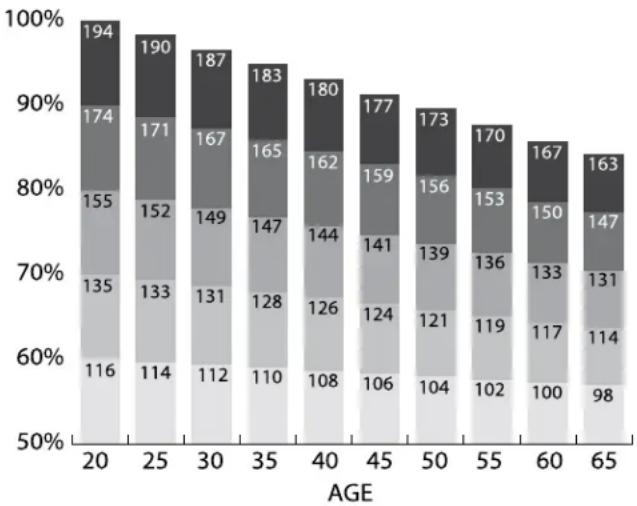
| AGE | 194 | 174 | 155 | 135 | 152 | 171 | 152 | 133 | 114 | 100 | |---|---|---|---|---|---|---|---|---|---|---| | 20 | 194 | 174 | 155 | 135 | 152 | 171 | 152 | 133 | 114 | 100 | | 25 | 190 | 187 | 167 | 149 | 131 | 167 | 149 | 131 | 112 | 100 | | 30 | 187 | 183 | 165 | 147 | 128 | 165 | 147 | 128 | 110 | 98 | | 35 | 183 | 180 | 162 | 144 | 126 | 162 | 144 | 128 | 110 | 88 | | 40 | 180 | 177 | 159 | 141 | 124 | 159 | 141 | 126 | 108 | 80 | | 45 | 177 | 173 | 156 | 139 | 121 | 156 | 139 | 124 | 106 | 78 | | 50 | 173 | 170 | 153 | 136 | 119 | 153 | 136 | 121 | 104 | 70 | | 55 | 170 | 167 | 150 | 133 | 117 | 150 | 133 | 119 | 102 | 68 | | 60 | 167 | 163 | 147 | 131 | 114 | 147 | 133 | 117 | 100 | 65 | | 65 | 163 | - | - | - | - | - | - | - | - | - | The chart displays a stacked bar chart with three segments (top, middle, bottom) representing different subgroups within each age group. The x-axis represents age in years (20 to 65), and the y-axis represents the percentage or count of each segment within that age group. Each segment is labeled with its numerical value. The total height of the bars is annotated on the left side.Seeing your heart rate while exercising will help you understand the intensity of your exercise and corresponding heart rate training zone, and predict health benefits found through repeated bouts of exercise. Refer to the information below to understand your heart rate training zones:
Zone 5 — Performance Redline Zone: 90% - 100% of your Max HR
The performance zone involves extreme effort, requiring the heart to beat at or near maximum capacity. Training bouts include intense incline or sprinting, benefiting speed, power, and anaerobic performance competency.
Zone 4 — Threshold Zone: 80% - 90% of your Max HR
The threshold zone involves intense jogging or sub-maximal sprinting, typically unsustainable for long periods of time. Benefits include highly-elevated calorie burn, speed and power performance enhancement, improved lactate removal capabilities, and enriched heart health.
Zone 3 — Aerobic Zone: 70% - 80% of your Max HR
The aerobic zone is ideal for cardiovascular training. Workouts in this zone are more intense, involving moderate jogging. Long-term benefits are improved heart health and cardiovascular performance, reductions in blood pressure and cholesterol, and increased calorie burn.
Zone 2 — Temperate Zone: 60% - 70% of your Max HR
The temperate zone consists of moderate-intensity exercise, typically as fast walking to slow jogging. Speaking is more difficult and breathing is elevated. Benefits are similar to those of the healthy heart rate zone, though caloric expenditure is higher.
Zone 1 — Healthy Heart Zone: 50% - 60% of your Max HR
The healthy heart zone involves safe, low-intensity activity, like medium-to-brisk walking. Full conversations can be held, despite a gentle increase in respiration. Benefits include reduced risk of heart and vascular disease, moderated blood pressure and cholesterol, and improved insulin sensitivity.
Hand Pulse Sensors

natural_image
Top-down view of a bicycle seatbelt with two black brake buttons and a gray top panel (no text or symbols visible)To use, grasp the sensors with a comfortable grip, with the palms of your hands placed over the sensors. If the sensors are having difficulty picking up your heart rate, use aloe or a moisturizer on your hands or further warm up as you exercise to increase the moisture in your hands. Dry hands do not transfer your pulse as effectively as moist hands.
Chest Strap
The E2i and E3i elliptical models have integrated heart rate receivers built into the console. To purchase a heart rate chest strap go to
www.LifeSpanFitness.com.
The chest strap should be worn as shown. When using a chest strap you may need to warm up first to increase the moisture in your skin. If this doesn't work use aloe or another moisturizer where the sensors on the chest strap are making contact with your skin.

natural_image
Illustration of a muscular man wearing a belt and holding a tool (no text or symbols)
natural_image
Illustration of a life span device with a circular label (no text or symbols on the device itself)Note: The heart rate monitoring system will vary due to your age, method of use, physiology and other factors. LifeSpan cannot guarantee the accuracy of the heart rate readings.
About Your Elliptical
Preset Programs
Preset programs automatically change the resistance or ramp level during a workout according to a preset pattern called a profile. This provides a better workout, since it uses a wider range of muscles and different intensities, a well-known benefit in the cross-training and interval-training world.
Each preset program can be set to change resistance level only, ramp level only, or both. Each has a suggested duration, but this can be adjusted to anywhere from 10 to 99 minutes. Two overall levels may be selected, which raises or lowers the program profile.
Changing the ramp level changes which muscles are used. Adjust the ramp level to your personal preferences, or to target different muscles.
Long Slow Distance
(40 minutes default)

bar
| Category | Value | |---|---| | 1 | 2 | | 2 | 3 | | 3 | 4 | | 4 | 5 | | 5 | 6 | | 6 | 7 | | 7 | 8 | | 8 | 9 | | 9 | 10 | | 10 | 11 | | 11 | 12 | | 12 | 13 | | 13 | 14 | | 14 | 15 | | 15 | 16 | | 16 | 17 | | 17 | 18 | | 18 | 19 | | 19 | 20 | | 20 | 21 | | 21 | 22 | | 22 | 23 | | 23 | 24 | | 24 | 25 | | 25 | 26 | | 26 | 27 | | 27 | 28 | | 28 | 29 | | 29 | 30 | | 30 | 31 | | 31 | 32 | | 32 | 33 | | 33 | 34 | | 34 | 35 | | 35 | 36 | | 36 | 37 | | 37 | 38 | | 38 | 39 | | 39 | 40 | | 40 | 41 | | 41 | 42 | | 42 | 43 | | 43 | 44 | | 44 | 45 | | 45 | 46 | | 46 | 47 | | 47 | 48 | | 48 | 49 | | 49 | 50 | | 50 | 51 | | 51 | 52 | | 52 | 53 | | 53 | 54 | | 54 | 55 | | 55 | 56 | | 56 | 57 | | 57 | 58 | | 58 | 59 | | 59 | 60 | | 60 | 61 | | 61 | 62 | | 62 | 63 | | 63 | 64 | | 64 | 65 | | 65 | 66 | | 66 | 67 | | 67 | 68 | | 68 | 69 | | 69 | 70 | | 70 | 71 | | 71 | 72 | | 72 | 73 | | 73 | 74 | | 74 | 75 | | 75 | 76 | | 76 | 77 | | 77 | 78 | | 78 | 79 | | 79 | 80 | | 80 | 81 | | 81 | 82 | | 82 | 83 | | 83 | 84 | | 84 | 85 | | 85 | 86 | | 86 | 87 | | 87 | 88 | | 88 | 89 | | 89 | 90 | | 90 | 91 | | 91 | 92 | | 92 | 93 | | 93 | 94 | | 94 | 95 | | 95 | 96 | | 96 | 97 | | 97 | 98 | | 98 | 99 | | Note: The actual values in the 'Value' column are not provided in the code. The 'Number' is estimated based on the 'Value' column. There is only one data series in this case. The values are estimated based on the 'Number' in the code format.This profile has small changes, allowing for a more consistent style of effort, maximizing the duration of your workout.
Short Interval
(20 minute default)

bar
| Category | Value | |---|---| | 1 | 3 | | 2 | 4 | | 3 | 5 | | 4 | 6 | | 5 | 7 | | 6 | 8 | | 7 | 9 | | 8 | 10 | | 9 | 11 | | 10 | 12 | | 11 | 13 | | 12 | 14 | | 13 | 15 | | 14 | 16 | | 15 | 17 | | 16 | 18 | | 17 | 19 | | 18 | 20 | | 19 | 21 | | 20 | 22 | | 21 | 23 | | 22 | 24 | | 23 | 25 | | 24 | 26 | | 25 | 27 | | 26 | 28 | | 27 | 29 | | 28 | 30 | | 29 | 31 | | 30 | 32 | | 31 | 33 | | 32 | 34 | | 33 | 35 | | 34 | 36 | | 35 | 37 | | 36 | 38 | | 37 | 39 | | 38 | 40 | | 39 | 41 | | 40 | 42 | | 41 | 43 | | 42 | 44 | | 43 | 45 | | 44 | 46 | | 45 | 47 | | 46 | 48 | | 47 | 49 | | 48 | 50 | | 49 | 51 | | 50 | 52 | | 51 | 53 | | 52 | 54 | | 53 | 55 | | 54 | 56 | | 55 | 57 | | 56 | 58 | | 57 | 59 | | 58 | 60 | | 59 | 61 | | 60 | 62 | | 61 | 63 | | 62 | 64 | | 63 | 65 | | 64 | 66 | | 65 | 67 | | 66 | 68 | | 67 | 69 | | 68 | 70 | | 69 | 71 | | 70 | 72 | | 71 | 73 | | 72 | 74 | | 73 | 75 | | 74 | 76 | | 75 | 77 | | 76 | 78 | | 77 | 79 | | 78 | 80 | | 79 | 81 | | 80 | 82 | | 81 | 83 | | 82 | 84 | | 83 | 85 | | 84 | 86 | | 85 | 87 | | 86 | 88 | | 87 | 89 | | 88 | 90 | | 89 | 91 | | 90 | 92 | | 91 | 93 | | 92 | 94 | | 93 | 95 | | 94 | 96 | | 95 | 97 | | 96 | 98 | | 97 | 99 | | Note: The actual values in the 'Value' column are not explicitly labeled in the code. The 'Number' in the 'Number' column is not specified in the 'Year' column. This is a placeholder for the 'Year' values. There is only one data point in the 'Year' column. The values in the 'Year' column are estimated based on the 'Year' value. There is no additional data series present in this image.This has the widest variation of resistance level and ramp level, and has the shortest default duration.
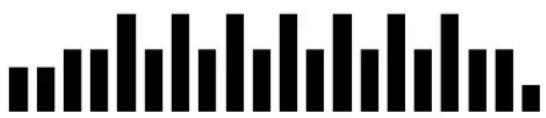
Moderate Interval
(30 minute default)
bar
| Category | Value | |---|---| | 1 | 2 | | 2 | 3 | | 3 | 4 | | 4 | 5 | | 5 | 6 | | 6 | 7 | | 7 | 8 | | 8 | 9 | | 9 | 10 | | 10 | 11 | | 11 | 12 | | 12 | 13 | | 13 | 14 | | 14 | 15 | | 15 | 16 | | 16 | 17 | | 17 | 18 | | 18 | 19 | | 19 | 20 | | 20 | 21 | | 21 | 22 | | 22 | 23 | | 23 | 24 | | 24 | 25 | | 25 | 26 | | 26 | 27 | | 27 | 28 | | 28 | 29 | | 29 | 30 | | 30 | 31 | | 31 | 32 | | 32 | 33 | | 33 | 34 | | 34 | 35 | | 35 | 36 | | 36 | 37 | | 37 | 38 | | 38 | 39 | | 39 | 40 | | 40 | 41 | | 41 | 42 | | 42 | 43 | | 43 | 44 | | 44 | 45 | | 45 | 46 | | 46 | 47 | | 47 | 48 | | 48 | 49 | | 49 | 50 | | 50 | 51 | | 51 | 52 | | 52 | 53 | | 53 | 54 | | 54 | 55 | | 55 | 56 | | 56 | 57 | | 57 | 58 | | 58 | 59 | | 59 | 60 | | 60 | 61 | | 61 | 62 | | 62 | 63 | | 63 | 64 | | 64 | 65 | | 65 | 66 | | 66 | 67 | | 67 | 68 | | 68 | 69 | | 69 | 70 | | 70 | 71 | | 71 | 72 | | 72 | 73 | | 73 | 74 | | 74 | 75 | | 75 | 76 | | 76 | 77 | | 77 | 78 | | 78 | 79 | | 79 | 80 | | 80 | -10000000000000000000000000000000000000000000000000000000000000000000000000000000000000000000000000000Smaller resistance and ramp changes than Short Interval, but greater overall duration, resulting in a longer workout.
Long Interval
(40 minute default)

bar
| Category | Value | |---|---| | 1 | 3 | | 2 | 4 | | 3 | 5 | | 4 | 6 | | 5 | 7 | | 6 | 8 | | 7 | 9 | | 8 | 10 | | 9 | 11 | | 10 | 12 | | 11 | 13 | | 12 | 14 | | 13 | 15 | | 14 | 16 | | 15 | 17 | | 16 | 18 | | 17 | 19 | | 18 | 20 | | 19 | 21 | | 20 | 22 | | 21 | 23 | | 22 | 24 | | 23 | 25 | | 24 | 26 | | 25 | 27 | | 26 | 28 | | 27 | 29 | | 28 | 30 | | 29 | 31 | | 30 | 32 | | 31 | 33 | | 32 | 34 | | 33 | 35 | | 34 | 36 | | 35 | 37 | | 36 | 38 | | 37 | 39 | | 38 | 40 | | 39 | 41 | | 40 | 42 | | 41 | 43 | | 42 | 44 | | 43 | 45 | | 44 | 46 | | 45 | 47 | | 46 | 48 | | 47 | 49 | | 48 | 50 | | 49 | 51 | | 50 | 52 | | 51 | 53 | | 52 | 54 | | 53 | 55 | | 54 | 56 | | 55 | 57 | | 56 | 58 | | 57 | 59 | | 58 | 60 | | 59 | 61 | | 60 | 62 | | 61 | 63 | | 62 | 64 | | 63 | 65 | | 64 | 66 | | 65 | 67 | | 66 | 68 | | 67 | 69 | | 68 | 70 | | 69 | 71 | | 70 | 72 | | 71 | 73 | | 72 | 74 | | 73 | 75 | | 74 | 76 | | 75 | 77 | | 76 | 78 | | 77 | 79 | | 78 | 80 | | 79 | 81 | | 80 | 82 | | 81 | 83 | | 82 | 84 | | 83 | 85 | | 84 | 86 | | 85 | 87 | | 86 | 88 | | 87 | 89 | | 88 | 90 | | 89 | 91 | | 90 | 92 | | 91 | 93 | | 92 | 94 | | 93 | 95 | | 94 | 96 | | 95 | 97 | | 96 | 98 | | 97 | 99 | | Note: The actual values in the 'Value' column are not explicitly labeled in the code. The 'Index' values are not explicitly labeled in the chart.The smallest resistance and ramp alterations of any of the interval workouts, allowing a longer overall duration.
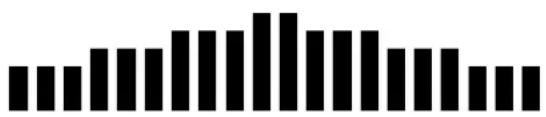
Negative Interval 1
(30 minute default)
bar
| Category | Value | |---|---| | 1 | 2 | | 2 | 3 | | 3 | 4 | | 4 | 5 | | 5 | 6 | | 6 | 7 | | 7 | 8 | | 8 | 9 | | 9 | 10 | | 10 | 11 | | 11 | 12 | | 12 | 13 | | 13 | 14 | | 14 | 15 | | 15 | 16 | | 16 | 17 | | 17 | 18 | | 18 | 19 | | 19 | 20 | | 20 | 21 | | 21 | 22 | | 22 | 23 | | 23 | 24 | | 24 | 25 | | 25 | 26 | | 26 | 27 | | 27 | 28 | | 28 | 29 | | 29 | 30 | | 30 | 31 | | 31 | 32 | | 32 | 33 | | 33 | 34 | | 34 | 35 | | 35 | 36 | | 36 | 37 | | 37 | 38 | | 38 | 39 | | 39 | 40 | | 40 | 41 | | 41 | 42 | | 42 | 43 | | 43 | 44 | | 44 | 45 | | 45 | 46 | | 46 | 47 | | 47 | 48 | | 48 | 49 | | 49 | 50 | | 50 | 51 | | 51 | 52 | | 52 | 53 | | 53 | 54 | | 54 | 55 | | 55 | 56 | | 56 | 57 | | 57 | 58 | | 58 | 59 | | 59 | 60 | | 60 | 61 | | 61 | 62 | | 62 | 63 | | 63 | 64 | | 64 | 65 | | 65 | 66 | | 66 | 67 | | 67 | 68 | | 68 | 69 | | 69 | 70 | | 70 | 71 | | 71 | 72 | | 72 | 73 | | 73 | 74 | | 74 | 75 | | 75 | 76 | | 76 | 77 | | 77 | 78 | | 78 | 79 | | 79 | 80 | | 80 | 81 | | 81 | 82 | | 82 | 83 | | 83 | 84 | | 84 | 85 | | 85 | 86 | | 86 | 87 | | 87 | 88 | | 88 | 89 | | 89 | 90 | | 90 | 91 | | 91 | 92 | | 92 | 93 | | 93 | 94 | | 94 | 95 | | 95 | 96 | | 96 | 97 | | 97 | 98 | | 98 | 99 | | Note: The actual values may vary due to the random nature of the data generation. The provided values are just an example.A good choice for someone new to interval training. Resistance and ramp levels decrease in the second half of the workout.
Negative Interval 2
(30 minute default)
A slightly higher-intensity version of Negative Interval 2.

bar
| Category | Value | |---|---| | 1 | 3 | | 2 | 3 | | 3 | 3 | | 4 | 5 | | 5 | 5 | | 6 | 7 | | 7 | 8 | | 8 | 7 | | 9 | 6 | | 10 | 6 | | 11 | 6 | | 12 | 5 | | 13 | 5 | | 14 | 5 | | 15 | 4 | | 16 | 4 | | 17 | 4 | | 18 | 3 | | 19 | 3 | | 20 | 3 | | 21 | 2 | | 22 | 2 |Fartlek
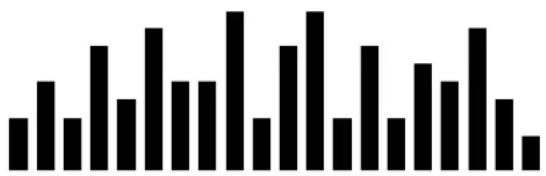
(30 minute default)
A Fartlek is a Swedish workout that inspires improved levels of fitness through unpredictable changes in programming. This profile purposefully has no predictable pattern to its profile.
bar
| Category | Value | |---|---| | 1 | 3 | | 2 | 5 | | 3 | 4 | | 4 | 7 | | 5 | 6 | | 6 | 8 | | 7 | 5 | | 8 | 9 | | 9 | 4 | | 10 | 7 | | 11 | 8 | | 12 | 5 | | 13 | 6 | | 14 | 5 | | 15 | 7 | | 16 | 6 | | 17 | 8 | | 18 | 5 | | 19 | 4 |Uphill Climb
(30 minute default)
A gradual increase, then corresponding decrease, of resistance and ramp level.

bar
| Category | Value | |---|---| | 1 | 2 | | 2 | 3 | | 3 | 4 | | 4 | 5 | | 5 | 6 | | 6 | 7 | | 7 | 8 | | 8 | 9 | | 9 | 10 | | 10 | 11 | | 11 | 12 | | 12 | 13 | | 13 | 14 | | 14 | 15 | | 15 | 16 | | 16 | 17 | | 17 | 18 | | 18 | 19 | | 19 | 20 | | 20 | 21 | | 21 | 22 | | 22 | 23 | | 23 | 24 | | 24 | 25 | | 25 | 26 | | 26 | 27 | | 27 | 28 | | 28 | 29 | | 29 | 30 | | 30 | 31 | | 31 | 32 | | 32 | 33 | | 33 | 34 | | 34 | 35 | | 35 | 36 | | 36 | 37 | | 37 | 38 | | 38 | 39 | | 39 | 40 | | 40 | 41 | | 41 | 42 | | 42 | 43 | | 43 | 44 | | 44 | 45 | | 45 | 46 | | 46 | 47 | | 47 | 48 | | 48 | 49 | | 49 | 50 | | 50 | 51 | | 51 | 52 | | 52 | 53 | | 53 | 54 | | 54 | 55 | | 55 | 56 | | 56 | 57 | | 57 | 58 | | 58 | 59 | | 59 | 60 | | 60 | 61 | | 61 | 62 | | 62 | 63 | | 63 | 64 | | 64 | 65 | | 65 | 66 | | 66 | 67 | | 67 | 68 | | 68 | 69 | | 69 | 70 | | 70 | 71 | | 71 | 72 | | 72 | 73 | | 73 | 74 | | 74 | 75 | | 75 | 76 | | 76 | 77 | | 77 | 78 | | 78 | 79 | | 79 | 80 | | 80 | 81 | | 81 | 82 | | 82 | 83 | | 83 | 84 | | 84 | 85 | | 85 | 86 | | 86 | 87 | | 87 | 88 | | 88 | 89 | | 89 | 90 | | 90 | 91 | | 91 | 92 | | 92 | 93 | | 93 | 94 | | 94 | 95 | | 95 | 96 | | 96 | 97 | | 97 | 98 | | 98 | 99 | | Note: The actual values may vary due to the random nature of the data generation. The provided values are just an example based on the visual representation of the bars. The actual values may be the result of the data generated by the code. There is only one data point for comparison. The actual values would be the result of the data generated by the code. Therefore, the output is estimated based on the formula and the label 'Value'.Pyramid Climb
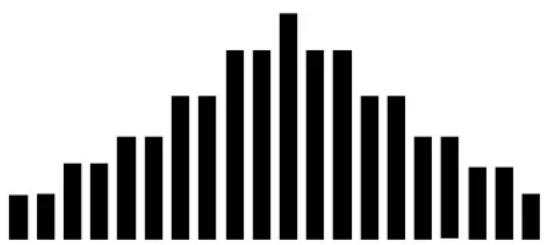
(30 minute default)
Similar to Uphill Climb but with less frequent changes.
bar
| Category | Value | |---|---| | 1 | 3 | | 2 | 4 | | 3 | 5 | | 4 | 6 | | 5 | 7 | | 6 | 8 | | 7 | 9 | | 8 | 10 | | 9 | 11 | | 10 | 12 | | 11 | 13 | | 12 | 14 | | 13 | 15 | | 14 | 16 | | 15 | 17 | | 16 | 18 | | 17 | 19 | | 18 | 20 | | 19 | 21 | | 20 | 22 | | 21 | 23 | | 22 | 24 | | 23 | 25 | | 24 | 26 | | 25 | 27 | | 26 | 28 | | 27 | 29 | | 28 | 30 | | 29 | 31 | | 30 | 32 | | 31 | 33 | | 32 | 34 | | 33 | 35 | | 34 | 36 | | 35 | 37 | | 36 | 38 | | 37 | 39 | | 38 | 40 | | 39 | 41 | | 40 | 42 | | 41 | 43 | | 42 | 44 | | 43 | 45 | | 44 | 46 | | 45 | 47 | | 46 | 48 | | 47 | 49 | | 48 | 50 | | 49 | 51 | | 50 | 52 | | 51 | 53 | | 52 | 54 | | 53 | 55 | | 54 | 56 | | 55 | 57 | | 56 | 58 | | 57 | 59 | | 58 | 60 | | 59 | 61 | | 60 | 62 | | 61 | 63 | | 62 | 64 | | 63 | 65 | | 64 | 66 | | 65 | 67 | | 66 | 68 | | 67 | 69 | | 68 | 70 | | 69 | 71 | | 70 | 72 | | 71 | 73 | | 72 | 74 | | 73 | 75 | | 74 | 76 | | 75 | 77 | | 76 | 78 | | 77 | 79 | | 78 | 80 | | 79 | 81 | | 80 | 82 | | 81 | 83 | | 82 | 84 | | 83 | 85 | | 84 | 86 | | 85 | 87 | | 86 | 88 | | 87 | 89 | | 88 | 90 | | 89 | 91 | | 90 | 92 | | 91 | 93 | | 92 | 94 | | 93 | 95 | | 94 | 96 | | 95 | 97 | | 96 | 98 | | 97 | 99 | | 98 | nan |Plateau Climb
(40 minute default)
A higher-intensity version of Long Slow Distance, with a steady level of effort comprising the majority of the profile.

bar
| Category | Value | |---|---| | 1 | 3 | | 2 | 3 | | 3 | 4 | | 4 | 6 | | 5 | 8 | | 6 | 10 | | 7 | 10 | | 8 | 10 | | 9 | 10 | | 10 | 10 | | 11 | 10 | | 12 | 10 | | 13 | 10 | | 14 | 9 | | 15 | 8 | | 16 | 6 | | 17 | 5 | | 18 | 4 | | 19 | 3 | | 20 | 2 |About Your Elliptical
Ladder
(30 minute default)
A form of interval training with longer, increasingly-intense

bar
| Category | Value | |---|---| | 1 | 3 | | 2 | 4 | | 3 | 5 | | 4 | 6 | | 5 | 7 | | 6 | 8 | | 7 | 9 | | 8 | 10 | | 9 | 11 | | 10 | 12 | | 11 | 13 | | 12 | 14 | | 13 | 15 | | 14 | 16 | | 15 | 17 | | 16 | 18 | | 17 | 19 | | 18 | 20 | | 19 | 21 | | 20 | 22 | | 21 | 23 | | 22 | 24 | | 23 | 25 | | 24 | 26 | | 25 | 27 | | 26 | 28 | | 27 | 29 | | 28 | 30 | | 29 | 31 | | 30 | 32 | | 31 | 33 | | 32 | 34 | | 33 | 35 | | 34 | 36 | | 35 | 37 | | 36 | 38 | | 37 | 39 | | 38 | 40 | | 39 | 41 | | 40 | 42 | | 41 | 43 | | 42 | 44 | | 43 | 45 | | 44 | 46 | | 45 | 47 | | 46 | 48 | | 47 | 49 | | 48 | 50 | | 49 | 51 | | 50 | 52 | | 51 | 53 | | 52 | 54 | | 53 | 55 | | 54 | 56 | | 55 | 57 | | 56 | 58 | | 57 | 59 | | 58 | 60 | | 59 | 61 | | 60 | 62 | | 61 | 63 | | 62 | 64 | | 63 | 65 | | 64 | 66 | | 65 | 67 | | 66 | 68 | | 67 | 69 | | 68 | 70 | | 69 | 71 | | 70 | 72 | | 71 | 73 | | 72 | 74 | | 73 | 75 | | 74 | 76 | | 75 | 77 | | 76 | 78 | | 77 | 79 | | 78 | 80 | | 79 | 81 | | 80 | 82 | | 81 | 83 | | 82 | 84 | | 83 | 85 | | 84 | 86 | | 85 | 87 | | 86 | 88 | | 87 | 89 | | 88 | 90 | | 89 | 91 | | 90 | 92 | | 91 | 93 | | 92 | 94 | | 93 | 95 | | 94 | 96 | | 95 | 97 | | 96 | 98 | | 97 | 99 | | Note: The actual values in the 'Value' column are not explicitly labeled in the code. The 'Index' values are not explicitly labeled in the chart.intervals. Each unique, altering level is designed to mimic a higher rung on a ladder. This is the most difficult of the preset programs.
Uphill Interval
(20 minute default)
Similar to Short Interval, but with more pronounced changes in intensity.

bar
| Category | Value | |---|---| | 1 | 10 | | 2 | 15 | | 3 | 20 | | 4 | 25 | | 5 | 30 | | 6 | 35 | | 7 | 40 | | 8 | 45 | | 9 | 50 | | 10 | 55 | | 11 | 60 | | 12 | 65 | | 13 | 70 | | 14 | 75 | | 15 | 80 | | 16 | 85 | | 17 | 90 | | 18 | 95 | | 19 | 100 | | 20 | 105 | | 21 | 110 | | 22 | 115 | | 23 | 120 | | 24 | 125 | | 25 | 130 | | 26 | 135 | | 27 | 140 | | 28 | 145 | | 29 | 150 | | 30 | 155 | | 31 | 160 | | 32 | 165 | | 33 | 170 | | 34 | 175 | | 35 | 180 | | 36 | 185 | | 37 | 190 | | 38 | 195 | | 39 | 200 | | 40 | 205 | | 41 | 210 | | 42 | 215 | | 43 | 220 | | 44 | 225 | | 45 | 230 | | 46 | 235 | | 47 | 240 | | 48 | 245 | | 49 | 250 | | 50 | 255 | | 51 | 260 | | 52 | 265 | | 53 | 270 | | 54 | 275 | | 55 | 280 | | 56 | 285 | | 57 | 290 | | 58 | 295 | | 59 | 300 | | 60 | 305 | | 61 | 310 | | 62 | 315 | | 63 | 320 | | 64 | 325 | | 65 | 330 | | 66 | 335 | | 67 | 340 | | 68 | 345 | | 69 | 350 | | 70 | 355 | | 71 | 360 | | 72 | 365 | | 73 | 370 | | 74 | 375 | | 75 | 380 | | 76 | 385 | | 77 | 390 | | 78 | 395 | | 79 | 400 | | 80 | 405 | | 81 | 410 | | 82 | 415 | | 83 | 420 | | 84 | 425 | | 85 | 430 | | 86 | 435 | | 87 | 440 | | 88 | 445 | | 89 | 450 | | 90 | 455 | | 91 | 460 | | 92 | 465 | | 93 | 470 | | 94 | 475 | | 95 | 480 | | 96 | 485 | | 97 | 490 | | 98 | 495 | | 99 | 500 | | Note: The actual values may vary due to the random nature of the data generation. The provided values are just an example based on the visual encoding system. The actual values may be the result of the random number generation. This is not a valid representation for the output.Steady Pace
(40 minute default)

bar
| Category | Value | |---|---| | 1 | 3 | | 2 | 4 | | 3 | 6 | | 4 | 5 | | 5 | 5 | | 6 | 5 | | 7 | 5 | | 8 | 5 | | 9 | 5 | | 10 | 5 | | 11 | 5 | | 12 | 5 | | 13 | 5 | | 14 | 5 | | 15 | 5 | | 16 | 5 | | 17 | 5 | | 18 | 5 | | 19 | 5 | | 20 | 5 | | 21 | 5 | | 22 | 5 | | 23 | 5 | | 24 | 5 | | 25 | 5 | | 26 | 5 | | 27 | 5 | | 28 | 5 | | 29 | 5 | | 30 | 5 | | 31 | 5 | | 32 | 5 | | 33 | 5 | | 34 | 5 | | 35 | 5 | | 36 | 5 | | 37 | 5 | | 38 | 5 | | 39 | 5 | | 40 | 5 | | 41 | 5 | | 42 | 5 | | 43 | 5 | | 44 | 5 | | 45 | 5 | | 46 | 5 | | 47 | 5 | | 48 | 5 | | 49 | 5 | | 50 | 5 | | 51 | 5 | | 52 | 5 | | 53 | 5 | | 54 | 5 | | 55 | 5 | | 56 | 5 | | 57 | 5 | | 58 | 5 | | 59 | 5 | | 60 | 5 | | 61 | 5 | | 62 | 5 | | 63 | 5 | | 64 | 5 | | 65 | 5 | | 66 | 5 | | 67 | 5 | | 68 | 5 | | 69 | 5 | | 70 | 5 | | 71 | 5 | | 72 | 5 | | 73 | 5 | | 74 | 5 | | 75 | 5 | | 76 | 5 | | 77 | 5 | | 78 | 5 | | 79 | 5 | | 80 | 5 | | 81 | 5 | | 82 | 5 | | 83 | 5 | | 84 | 5 | | 85 | 5 | | 86 | 5 | | 87 | 5 | | 88 | 5 | | 89 | 5 | | 90 | 5 | | Note: The actual values in the 'Value' column are not provided in the code. I have left blank values for all categories. You would need to run the code to get the actual values from the code list. Please note that this is an example of what you want to run the code. You would need to run the code if you want to run the code list.Similar to Long Slow Distance, but with a lower intensity, steady profile. This is the easiest of the preset programs.
Long Slow Distance 2
(40 minute default)

Similar to Long Slow Distance, but reaches maximum intensity more rapidly.
Cardio Run
(20 minute default)

bar
| Category | Value | |---|---| | 1 | 3 | | 2 | 4 | | 3 | 6 | | 4 | 5 | | 5 | 7 | | 6 | 6 | | 7 | 8 | | 8 | 5 | | 9 | 7 | | 10 | 6 | | 11 | 8 | | 12 | 5 | | 13 | 7 | | 14 | 6 | | 15 | 8 | | 16 | 5 | | 17 | 7 | | 18 | 6 | | 19 | 8 | | 20 | 5 | | 21 | 7 | | 22 | 6 | | 23 | 8 | | 24 | 5 | | 25 | 7 | | 26 | 6 | | 27 | 8 | | 28 | 5 | | 29 | 7 | | 30 | 6 | | 31 | 8 | | 32 | 5 | | 33 | 7 | | 34 | 6 | | 35 | 8 | | 36 | 5 | | 37 | 7 | | 38 | 6 | | 39 | 8 | | 40 | 5 | | 41 | 7 | | 42 | 6 | | 43 | 8 | | 44 | 5 | | 45 | 7 | | 46 | 6 | | 47 | 8 | | 48 | 5 | | 49 | 7 | | 50 | 6 | | 51 | 8 | | 52 | 5 | | 53 | 7 | | 54 | 6 | | 55 | 8 | | 56 | 5 | | 57 | 7 | | 58 | 6 | | 59 | 8 | | 60 | 5 | | 61 | 7 | | 62 | 6 | | 63 | 8 | | 64 | 5 | | 65 | 7 | | 66 | 6 | | 67 | 8 | | 68 | 5 | | 69 | 7 | | 70 | 6 | | 71 | 8 | | 72 | 5 | | 73 | 7 | | 74 | 6 | | 75 | 8 | | 76 | 5 | | 77 | 7 | | 78 | 6 | | 79 | 8 | | 80 | 5 | | 81 | 7 | | 82 | 6 | | 83 | 8 | | 84 | 5 | | 85 | 7 | | 86 | 6 | | 87 | 8 | | 88 | 5 | | 89 | 7 | | 90 | 6 | | 91 | 8 | | 92 | 5 | | 93 | 7 | | 94 | 6 | | 95 | 8 | | 96 | 5 | | 97 | 7 | | 98 | 6 | | 99 | 8 | | Note: The actual values may vary due to the random nature of the data generation. The provided values are placeholders. The actual values would be the result of the absence of the data generated by the code. [Unlabeled]A short, continuous workout with consistently high intensity.
Short Interval 2
(20 minute default)

bar
| Category | Value | |---|---| | 1 | 2 | | 2 | 3 | | 3 | 4 | | 4 | 5 | | 5 | 6 | | 6 | 7 | | 7 | 8 | | 8 | 9 | | 9 | 10 | | 10 | 11 | | 11 | 12 | | 12 | 13 | | 13 | 14 | | 14 | 15 | | 15 | 16 | | 16 | 17 | | 17 | 18 | | 18 | 19 | | 19 | 20 | | 20 | 21 |Similar to Short Interval, but with a more rapid buildup to the initial interval.
Uphill Walk
(30 minute default)
Gradually increases intensity throughout the entire workout.

bar
| Category | Value | |---|---| | 1 | 3 | | 2 | 3 | | 3 | 4 | | 4 | 5 | | 5 | 6 | | 6 | 7 | | 7 | 8 | | 8 | 9 | | 9 | 10 | | 10 | 11 | | 11 | 12 | | 12 | 13 | | 13 | 14 | | 14 | 15 | | 15 | 16 | | 16 | 17 | | 17 | 18 | | 18 | 19 | | 19 | 20 | | 20 | 21 | | 21 | 22 | | 22 | 23 | | 23 | 24 | | 24 | 25 | | 25 | 26 | | 26 | 27 | | 27 | 28 | | 28 | 29 | | 29 | 30 | | 30 | 31 | | 31 | 32 | | 32 | 33 | | 33 | 34 | | 34 | 35 | | 35 | 36 | | 36 | 37 | | 37 | 38 | | 38 | 39 | | 39 | 40 | | 40 | 41 | | 41 | 42 | | 42 | 43 | | 43 | 44 | | 44 | 45 | | 45 | 46 | | 46 | 47 | | 47 | 48 | | 48 | 49 | | 49 | 50 | | 50 | 51 | | 51 | 52 | | 52 | 53 | | 53 | 54 | | 54 | 55 | | 55 | 56 | | 56 | 57 | | 57 | 58 | | 58 | 59 | | 59 | 60 | | 60 | 61 | | 61 | 62 | | 62 | 63 | | 63 | 64 | | 64 | 65 | | 65 | 66 | | 66 | 67 | | 67 | 68 | | 68 | 69 | | 69 | 70 | | 70 | 71 | | 71 | 72 | | 72 | 73 | | 73 | 74 | | 74 | 75 | | 75 | 76 | | 76 | 77 | | 77 | 78 | | 78 | 79 | | 79 | 80 | | 80 | 81 | | 81 | 82 | | 82 | 83 | | 83 | 84 | | 84 | 85 | | 85 | 86 | | 86 | 87 | | 87 | 88 | | 88 | 89 | | 89 | 90 | | 90 | 91 | | 91 | 92 | | 92 | 93 | | 93 | 94 | | 94 | 95 | | 95 | 96 | | 96 | 97 | | 97 | 98 | | 98 | 99 | | Note: The actual values for 'Value' in the 'Value' column are not explicitly labeled in the code. The 'Value' values are estimated based on the 'Value' label in the chart.Custom User Programs
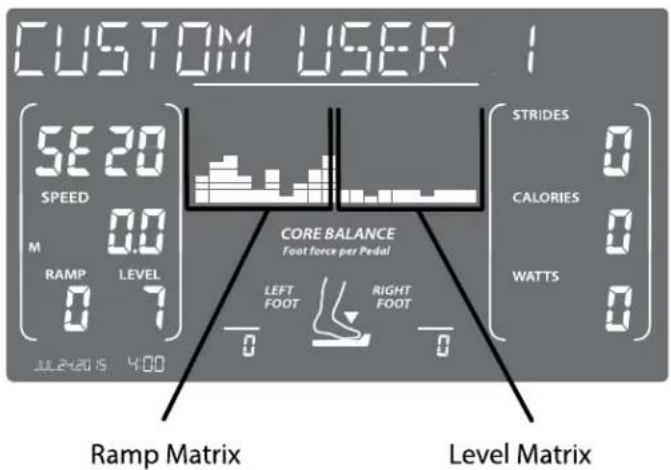
There are two user programs that provide you with the ability to build custom program profiles for your specific workout requirements. In Custom User Programs you set the workout time and then for each of the 20 program segments you set the resistance level and ramp level. This program is different than our preset programs in that both resistance level and ramp level can be controlled simultaneously. As such, the program matrix display readout will show both resistance level and ramp level at the same time with the ramp on the left portion of the matrix and the resistance level on the right portion of the matrix.
Heart Rate Control Programs
Constant Heart Rate
The Constant Heart Rate is a steady state program that lets you select a single heart rate to maintain throughout your workout. The elliptical will adjust the resistance level every 10 seconds during the workout to maintain your heart rate close to the target you've selected.
Interval Heart Rate
The Interval Heart Rate is designed to help you increase aerobic endurance and improve heart rate recovery. This program lets you select a LOW or recovery target heart rate and a High target. After the 3 minute warm-up the console will adjust the resistance level every 10 seconds to maintain your LOW target for 2 minutes. Then the console will adjust the resistance level to raise your heart rate to the high target selected and once again keep it at this level for 2 minutes. The process will repeat until the end of the workout. It is recommended that you set the workout time to 30 minutes or higher to use this program effectively.
Note: Remember that the console needs to receive your heart rate through the grip pulse or a heart rate chest strap during the course of the workout.
About Your Elliptical
Warranty
This LifeSpan elliptical comes with the following limited warranty valid in North America and the United Kingdom. If you are outside of these areas contact your local distributor for warranty information or visit www.LifeSpanFitness.com.
| Warranty Item | E2i | E3i |
| Elliptical Frame | Lifetime | Lifetime |
| Parts | 3 Years | 5 Years |
| Labor | 1 Year | 2 Years |
LifeSpan warrants that the equipment it manufactures is free from defects in materials and workmanship under normal use and services. The periods above are based on the date of purchase. During these periods, LifeSpan will repair or replace any defective part. Free labor is included on all parts that are not normally assembled or replaced by the customer within the labor period.
If within the time frames specified above, any part fails to operate properly, login to our website at www.LifeSpanFitness.com, click on "Customer Service" and complete the form to request assistance or call 877.654.3837 option 4 for a Customer Service Agent (please note that certain kinds of service should only be performed by a qualified service technician).
LifeSpan reserves the right to make changes and improvements to our products without incurring any obligations to similarly alter any product purchased. In order to insure our product warranty and to ensure the safe and efficient operation of your LifeSpan product, only authorized parts can be used. The warranty is void if any parts other than those provided by LifeSpan are used.
Exclusions and Limitations:
- This warranty does not apply to any defects caused by negligence, misuse, improper assembly, or maintenance, accident, or "act of God."
- This warranty does not apply to discoloration of paints or plastics.
- LifeSpan shall not be responsible for incidental or consequential damages.
- This warranty is non-transferable form the original owner.
Registration
Should you need to process a warranty claim make sure you retain your purchase receipt to verify the date of purchase and register your LifeSpan product online. To complete the registration go to www.LifeSpanFitness.com and select "Product Registration".
Proper Grounding
LifeSpan equipment must be grounded. Improper connection of the equipment's grounding conductor can result in the risk of electric shock. Check with a qualified electrician or service person if you are in doubt as to whether the outlet is properly grounded. Do not modify the plug provided with the product or use a ground plug adapter to adapt to a non-grounded outlet. If the plug will not fit in the outlet, have the proper outlet installed by a qualified electrician.
Power Cord Options
This elliptical should only be used with the proper power cord and power outlet. Several power cord options (shown below) are available from LifeSpan. We do our best do include the correct power cord with the elliptical for your area. In the event that the correct power cord is not included in the packaging please contact your local distributor.
Elliptical Outlet

Power Cord Options


Do not use extension cords between the elliptical and power outlet.

Do not plug into a GFI outlet or circuit as it may trip the breaker.
Assembling Your Elliptical
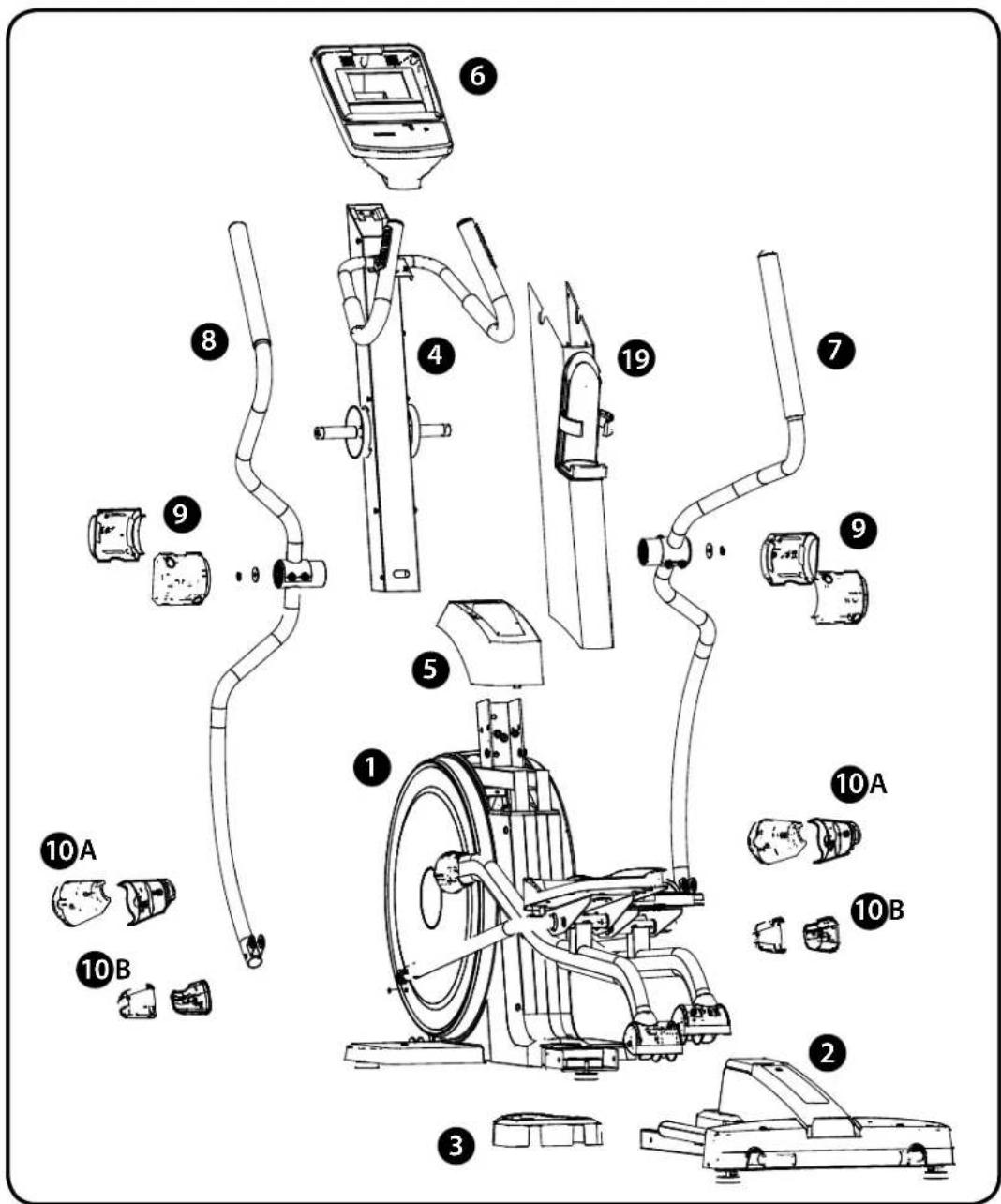
Exploded View
Prior to starting the assembly process take all of the parts out of the box. Remove plastic bags and lay them out on the floor to become familiar with the components.
Since your elliptical is a heavy piece of equipment it is recommended you use two people during assembly and follow these assembly instructions to reduce any problems that could occur.
Assembling Your Elliptical
Hardware Included
| Item# Part Description Item# Part Description | |||
| 1 Main Base 6 Console | |||
| 2 Ramp Base 7 Right Arm Assembly | |||
| 3 Base Connection Cover 8 Left Arm Assembly | |||
| 4 Console Mast 9 Mid Arm Joint Covers | |||
| 5 Base Top Cover | 10A10B | Lower Arm Joint Covers | |
Hardware Bag Contents
| Item # Qty. Hardware Description | ||
| N/A 2 1 | 3/17mm Wrench | |
| N/A 1 6 | mm Allen Wrench | |
| N/A | 1 5mm Allen Wrench w/Phillips Screwdriver | |
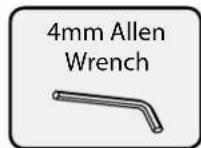
| N/A 1 | 4mm Allen Wrench | |

Pre-installed Hardware (not shown)
| Item # Pre-Installed Hardware | |
| 17 | M8 x 20L Bolt |
| 18 | M8 Washer |
| 19 | Console Mast Cover |
| 20 | M4 x 10L Screw |

Assembling Your Elliptical
Step 1: Unpacking Elliptical
A. Cut tape around the bottom edge of the box.
B. Lift top of box up and off.

natural_image
Diagram showing two 3D blocks labeled A and B with arrows indicating movement or force, no text or symbols present.C. Remove all separate parts from outside styrofoam packaging material.
D. Remove parts in layers working your way down to Main Base (1).

natural_image
Cross-sectional diagram of a mechanical device with internal components and directional arrows (no text or symbols)Assembling Your Elliptical
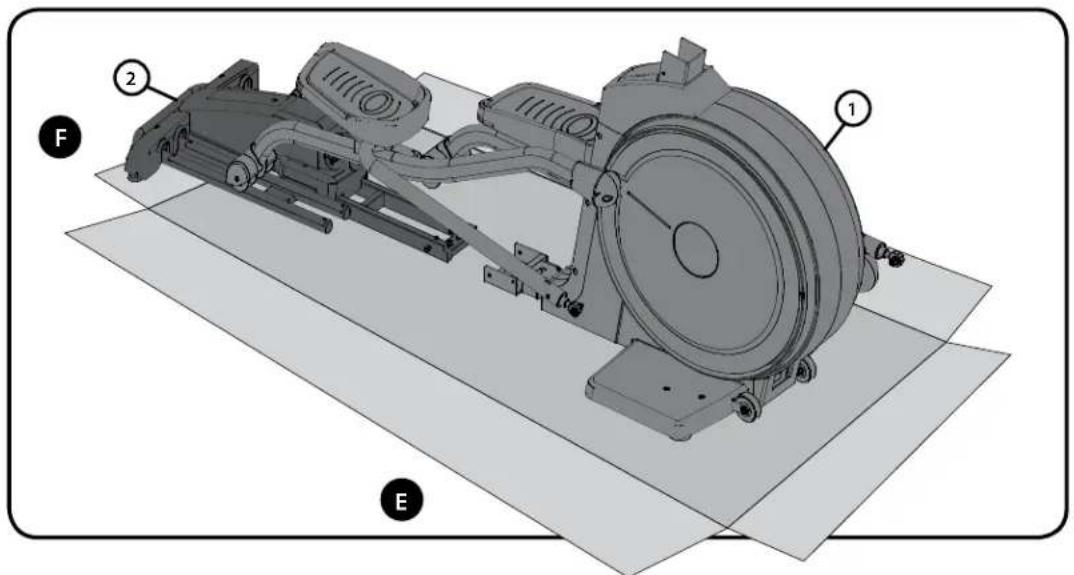
E. Cut the corners of the bottom box and remove all packaging.
F. Place Ramp Base (2) in position to Main Base (1).
Step 2: Hardware Loss Prevention Sheet
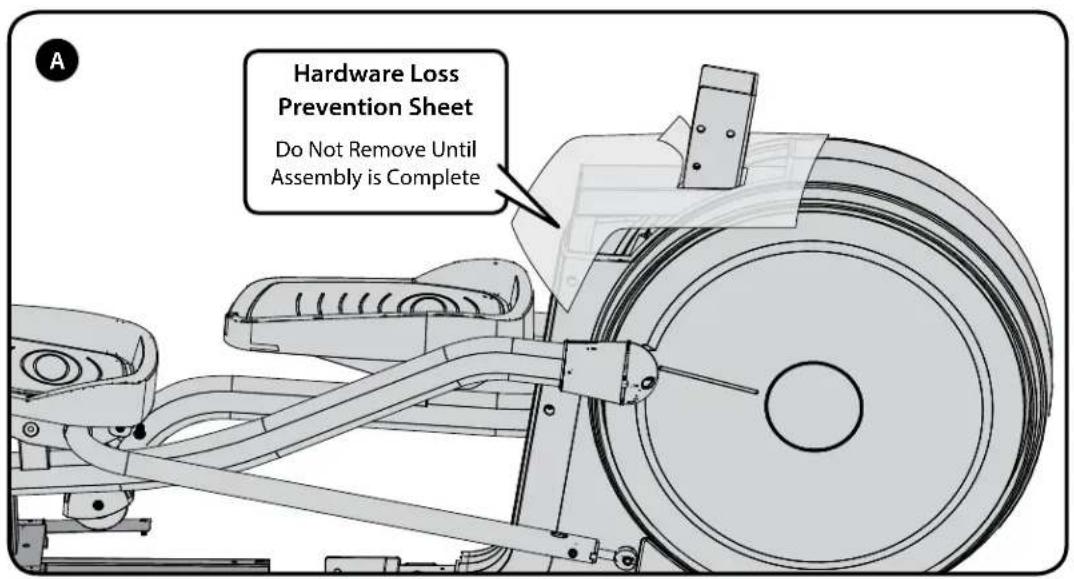
A. The Main Base (1) has the Hardware Loss Prevention Sheet draped around the Console Mast Support. The purpose of this paper is to act as a shield to prevent bolts, washers and screws from falling into the Main Base during assembly. Do not remove until assembly is complete. The paper tears off quite easily when done and can be thrown away.
Assembling Your Elliptical
Step 3: Base Assembly
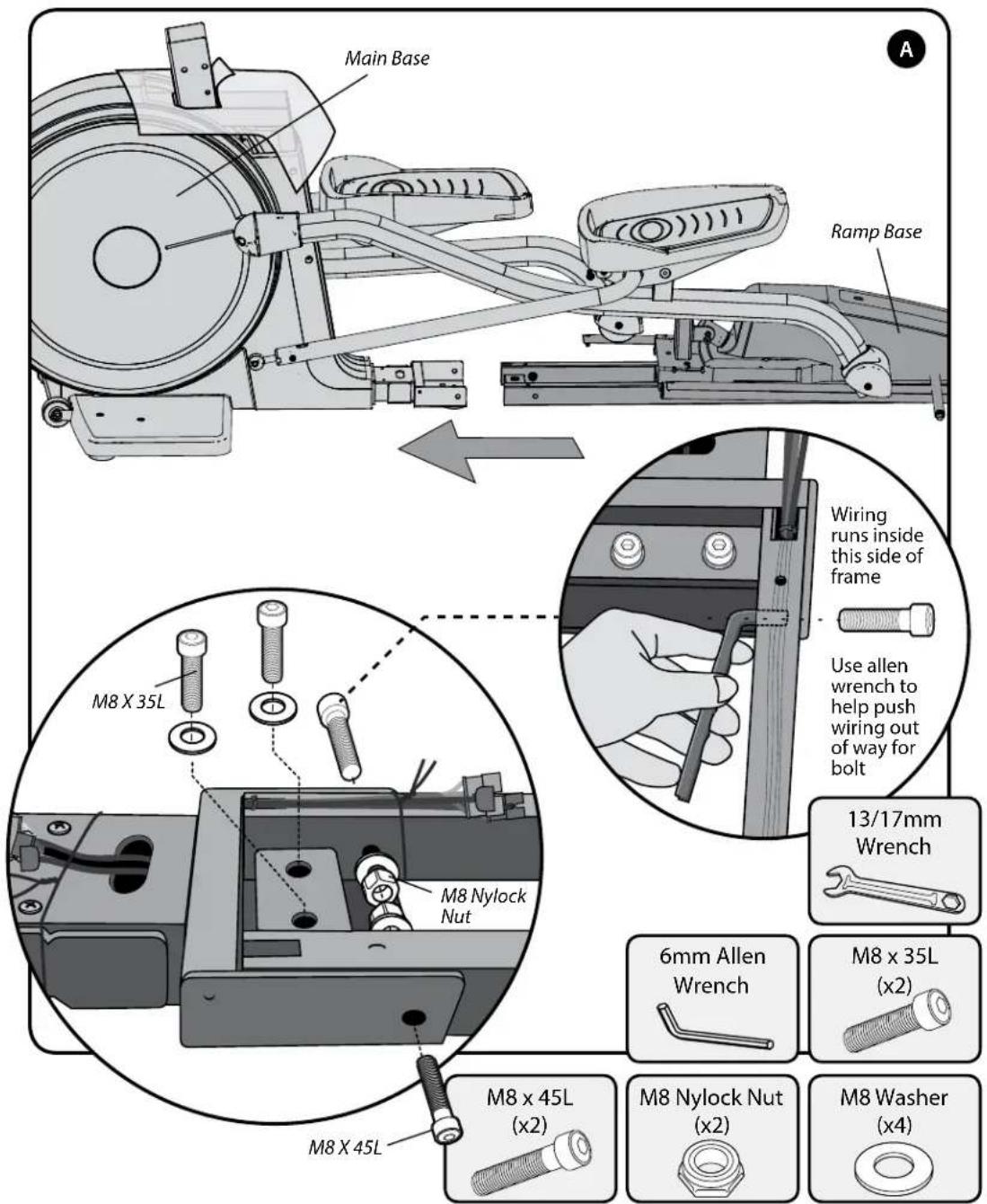
A. Slide the Ramp Base (2) into the Main Base (1) and bolt together using two M8x35L Bolts (14), Washers (13) and two M8x45 bolts (11), Washers (13), and Nylock Nuts (12). Help the bolt on the wire side of the frame go easily through by pushing the wires partially back into the frame of the Ramp Base (2) and using a 6mm Allen wrench to help push the cable inside frame away from the hole. See illustration below.
Assembling Your Elliptical
Step 3: Base Assembly (continued)
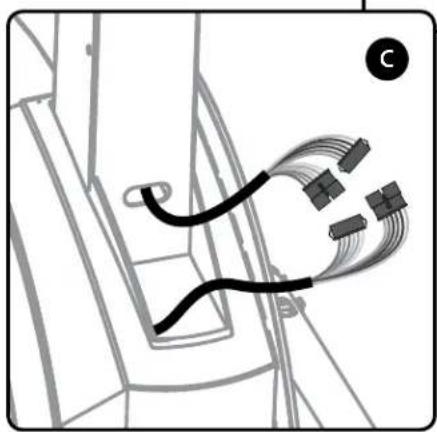
B. Connect ground wire, small 3-pin, and large 3 pin. Keep wires in groove to avoid damage. Tuck wires in covered space between rails.
C. Remove 2 pre-installed screws then attach Base Connection Cover (3) with four M4x10L screws (15) and Phillips head screwdriver.

natural_image
Mechanical assembly diagram showing a bracket with bolts and wiring, enclosed in a circular frame (no text or symbols)
Assembling Your Elliptical
Step 4: Attaching Console Mast
A. Remove the Console Mast Cover (18) first, then slip the Base Top Cover (5) onto the Console Mast (4) before installation.

Assembling Your Elliptical
Step 4: Attaching Console Mast (continued)
B. Slide Console Mast (4) onto support and attach M8x20L bolts (16) and M8 washers (13) with 6mm Allen wrench.

natural_image
Diagram of cable routing between two car seats, showing multiple connectors and wiring (no text or labels)C. Connect two 6-pin wire harnesses at base of Console Mast (4).
Assembling Your Elliptical
Step 5: Arm Attachment
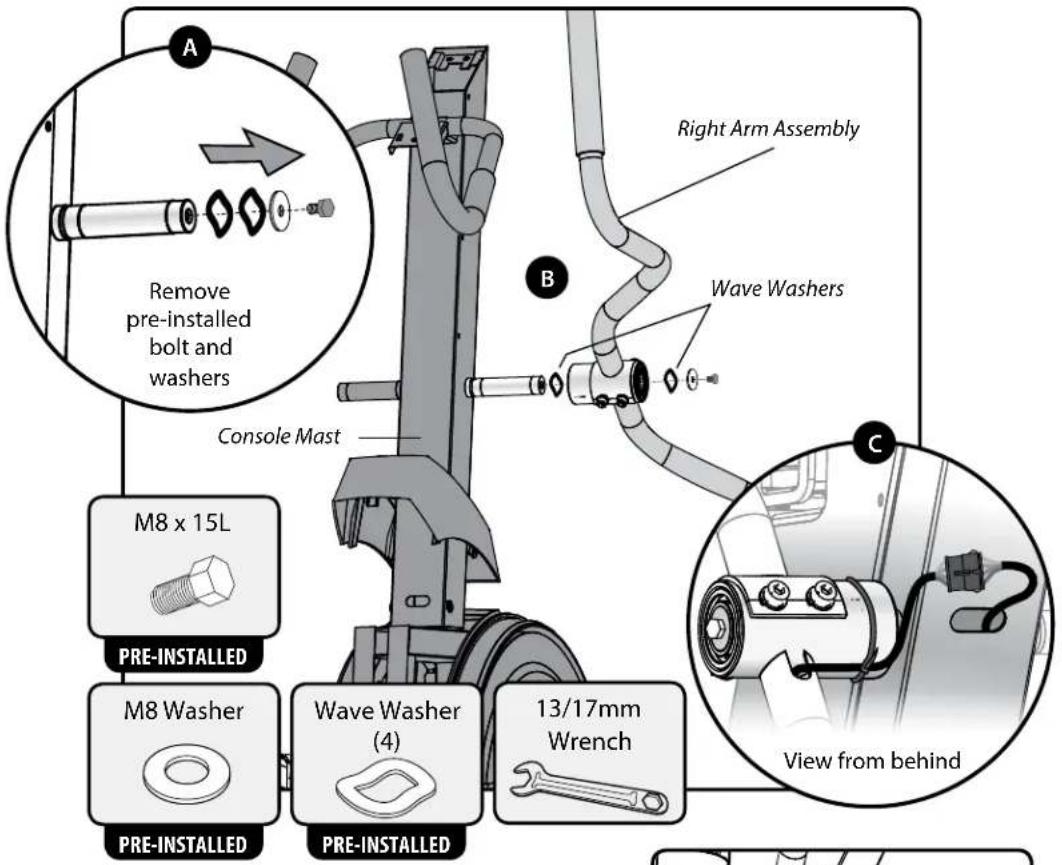
A. Remove pre-installed M8x15L bolt, flat washer and 2 wave washers from handlebar post on Console Mast (4).
B. Attach Right Arm Assembly (8) to Console Mast (4). Once installed use 13mm wrench to tighten M8x15 bolt.
C. Connect wire harness from Right Arm Assembly (8) handlebar to Console Mast (4). Do not remove zip tie holding wire harness to Right Arm Assembly (8)
D. Remove M4x10L screws from pre-assembled Mid Arm Joint Cover (9). Place both halves around arm assembly connection to post. Keep wires on underside of pivot post to prevent pinching them when attaching cover. Re-attach with Phillips head screwdriver.
E. Repeat steps A – D for left arm assembly.

Assembling Your Elliptical

Step 5: Arm Attachment (continued)
F. Using both 13mm wrenches remove pre-installed bolt and nut.
Attach lower arm bracket to pedal arm bearing with bolt and nut.
G. Connect pedal arm wire harness to lower arm wire harness.
Assembling Your Elliptical

H. The Lower Arm Joint Cover (10) comes in two parts. Remove M4x50L screws from pre-assembled Lower Arm Joint Cover (10A). Place both halves, shown above, around joint. Re-attach joint cover with Phillips head screwdriver and 13mm wrench, making sure nut is seeded in plastic recess. Make sure wires are not pinched and stay in open end in front of cover.

I. Remove M4x50L screws from pre-assembled Lower Arm Joint Cover (10B). Place both halves Joint Cover (10B), as shown above, over exposed wiring. This will overlap the front part of Joint Cover (10A) just completed in step H. Make sure to keep wiring inside. Use the Phillips head screwdriver, M4x50L screws and bolts to finish attaching.
J. Repeat steps F – I for other side.
Assembling Your Elliptical
Step 6: Console Attachment
A. Remove pre-installed M5x10L bolts and M5 washers from the back of Console (6) with 4mm Allen Wrench.

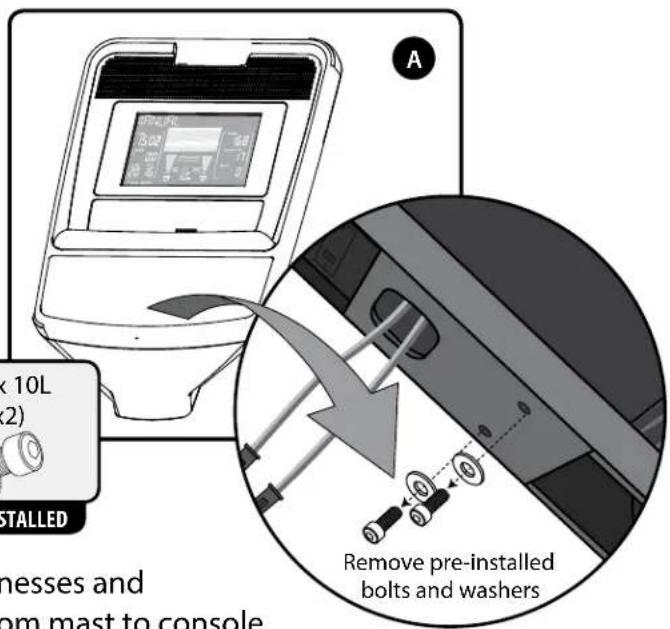
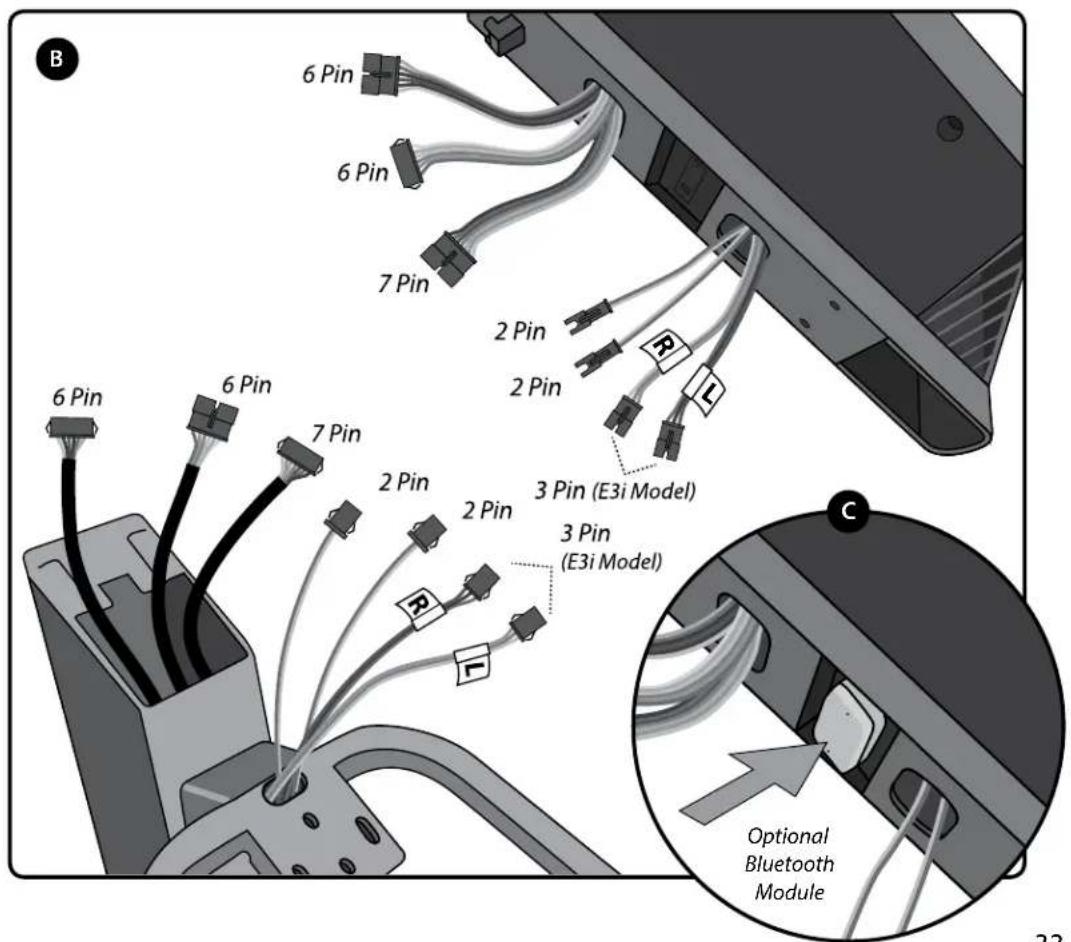
B. Connect two 6-pin wire harnesses and one 7-pin wire harness from mast to console. Connect two 2-pin pulse grip wires. The E3i model has two additional ramp and level 3 pin wires to connect marked "R" and "L".
C. Connect optional Bluetooth Module (sold separately) using instructions supplied.
Assembling Your Elliptical
Step 6: Console Attachment (continued)
D. Tuck wires inside Console (6) and Console Mast (4).
E. Slide Console (6) upwards so hook on back of console slides under holding plate to lock into position.
F. Attach Console (6) by using
4 mm Allen wrench and the two M5x10L bolts and M5 washers (that were pre-installed on back of console) through slots in upper mast.

D

G. Tear off Hardware Loss Prevention Sheet.
H. Push Base Top Cover down into position.
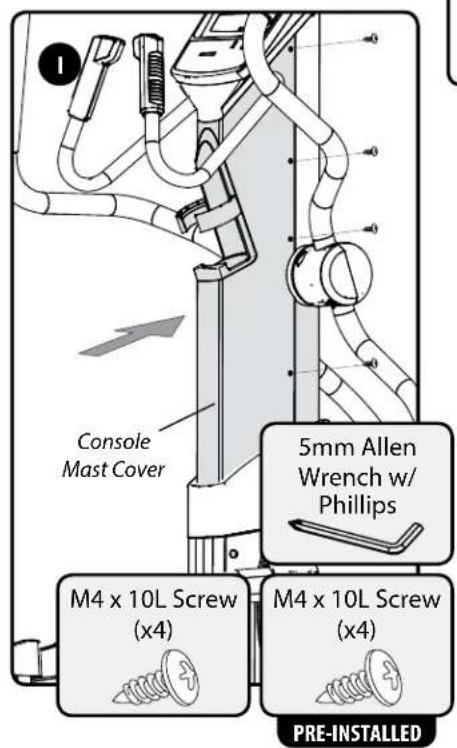
I. Attach Console Mast Cover (18) with the four M4x10L screws removed in step 4A and four more in the hardware bag for a total of eight. Tools needed: Phillips head screwdriver.
J. Inspect unit for excess packing material and check that the roller wheels are on the ramp rails.
Assembling Your Elliptical
Leveling
LifeSpan elliptical trainers come with five leveling feet - two in the front and two in the back. Locate your elliptical trainer on a solid, level surface. Make sure that the center adjustable foot, located on the center frame brace sits level on the floor. The Base Connection Cover (3) might need to be removed first to adjust and lock the center feet. Try to rock the elliptical in all directions to see if any of the feet are not touching the floor. If the elliptical rocks, adjust the feet that are not touching the floor upward to eliminate any rocking. Once the frame is completely stable, secure the feet in place by tightening the lock nut on each foot.


SAFETY TIP: Always keep feet fully inside the pedals. This will prevent the user from falling or a wheel from coming off a rail.
Console Basics
Readout Display
A blue backlit LCD display (E2i - 6", E3i - 7.5") provides all the information you need to monitor your exercise results and get the most out of your exercise program.
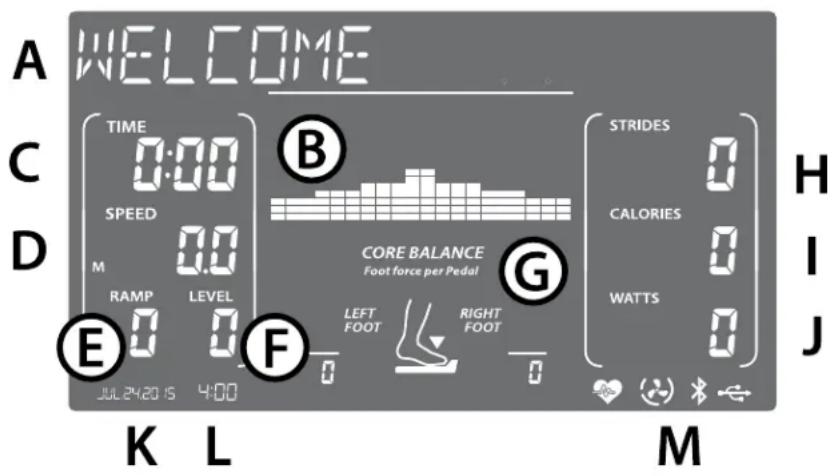
A. Message Window - This 16-character window helps step you through program setup, then displays the program selected while you exercise.
B. Program Matrix - Divides the workout programs into 20 segments with varying intensity levels. These programs can be viewed in levels of incline or speed.
C. Time - The workout time elapsed or the workout time remaining.
D. Speed - Estimated ground speed based on your stride rate and a 20-inch stride length.
D2. Distance - Estimated ground covered based on your stride count and a 20-inch stride (E3i only).
E. Ramp - Level of the pedal ramp, ranging from 0 to 20.
F. Level - Level of resistance on the pedals, ranging from 1 (180 watts at 60 rpm) to 20 (200 watts at 60 rpm).
G. Core Balance - A measurement of the total force you are placing on the pedals, based on a total of 100%. The ideal is 50% for your left foot and 50% for your right foot.
Console Basics
H. Strides - A count of your strides.
H2. Strides/Min - The rate of your pedaling.
I. Calories - An estimate of total calories burned.
12. Calories/HR - An estimated rate of your calorie burn.
J. Watts - An estimate of the power you are putting into the elliptical.
J2. Watts Ave - The average power over the duration of your exercise session.
K. Date - The date is presented as the month/day/year below the program matrix.
L. Time - The time of day is shown below the program matrix using a 24-hour reading.
M. Indicator icons:

HRC - This icon flashes when your pulse is being taken.

Bluetooth - Flashes when pairing with a mobile device.

USB - This will light up when your exercise data is being transferred to a USB flash drive.
Console Basics
Main Keyboard
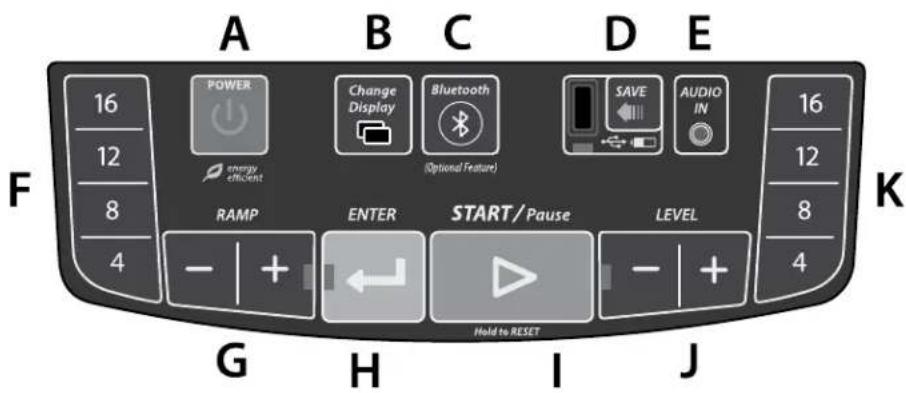
A. Power – This button can be used to turn the console "on" from Energy Saving mode and to turn the console "off" when in Standby mode.
B. Change Display - Change the type of data displayed in some of the readouts (E3i only).
C. Bluetooth - Pairs Bluetooth to your mobile device.
D. Exercise Data Save - This saves your workout results to a USB flash drive.
E. Audio In - Audio-in port and dual speakers.
F. Quickset ^TM Ramp - Select an ramp setting of 4, 8, 12 or 16.
G. Ramp - Raise and lower the ramp.
H. Enter - Confirm a selection.
I. Start/Pause - Start the elliptical/Pause the elliptical.
J. Resistance Level - Adjust the resistance on the pedals.
K. Quickset ^TM Resistance - Select a resistance setting of 4, 8, 12, or 16.
Top Keyboard

flowchart
graph LR
    A["Heart Rate Control"] --> B["Healthy Living"]
    B --> C["Sports Training"]
    C --> D["Weight Loss"]
    D --> E["User Setup"]
A. Program Group - Choose from HRC (Heart Rate Control), Healthy Living, Sport Training, Weight Loss, and User Set Up (Not on E2i).
Console Basics
Setting the Date and Time
Before getting started using your elliptical make sure the date and time are properly set on the console to ensure that your exercise data is properly recorded.
To set the date and time in your console follow these steps:
A. When the console says "WELCOME," press any of the Quick Resistance keys.
B. Display shows "Clock." Press ENTER.
C. Display shows "UPDATE CALENDAR." Press ENTER.
D. Press the +/- buttons to select the correct Year. Press ENTER.
E. Press the +/- buttons to select the correct Month. Press ENTER.
F. Press the +/- buttons to select the correct Day. Press ENTER.
G. Press the +/- buttons to set the Hour. Press ENTER.
H. Press the +/- buttons to set the Minute. Press ENTER.
QuickSTART
The quickest way to get started with a workout is to press the START button. This will start the elliptical in manual mode with the time counting up from 00:00. You can also set a desired workout Time and update your Weight in the console for more accurate calorie calculation by following these steps:
A. Press ENTER to select manual mode.
B. Select the amount of time (in minutes) you want to use the manual program by pressing the resistance +/- buttons. Press ENTER.
C. Use the resistance +/- buttons to set your weight. Your weight is used to more accurately calculate calories burned. Press ENTER.
D. Press START and the elliptical will start with the time counting down from the preset time.
E. To increase resistance press the + button.
Using Programs
Preset Programs
There are numerous programs available to help you add structure and variety to your exercise program. For more information about these programs please refer to the About Your Elliptical section of this Owner's Manual. To use one of the Preset Programs follow the steps below:
A. Select Program – Press the Level + / - buttons on the keyboard to cycle through the program list, or use the Program Buttons to find your desired program then press Enter to complete the selection.
B. Select Level or Ramp Mode – You can choose to run each program in either Level or Ramp mode. Press the +/- buttons on the keyboard to make your selection and then press Enter.
C. Set Program Level – There are 2 levels of intensity with each preset program (1 being the easiest and 2 being the most difficult). Press the Level +/- buttons to select the desired level then press Enter.
D. Set Time – Set the program Time of your workout by pressing the Level +/- buttons then press Enter.
E. Set Weight – Set your Weight in the console for more accurate calorie calculation by pressing the Level +/- buttons then press Enter.
F. Press the Start button to begin your workout.
Custom User Set-up Programs
There are 2 user programs that provide you with the ability to establish customized program profiles specific to your workout requirements. Once these programs are completed they are saved by the console and can be selected like any other preset program. Complete the following steps to set up a user program:
A. Select USER1 or USER2 Programs – Press the Level +/- buttons to select the USER1 or USER2 programs then press Enter.
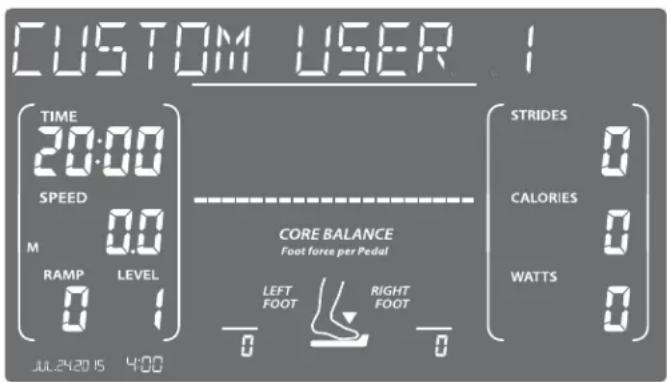
Using Programs
B. Set Time – Set the program Time of your workout pressing the Level +/- buttons then press Enter.

C. Set Weight – Set your Weight in the console for more accurate calorie calculation by pressing the Level +/- buttons then press Enter.

Using Programs
D. Set Level – Use the Ramp up/down buttons to set the Ramp level of the first program segment and the Level +/- buttons to set the desired Level of the first program segment. You can also use the Quickset™ buttons for Ramp and Level to expedite the process. Press Enter.
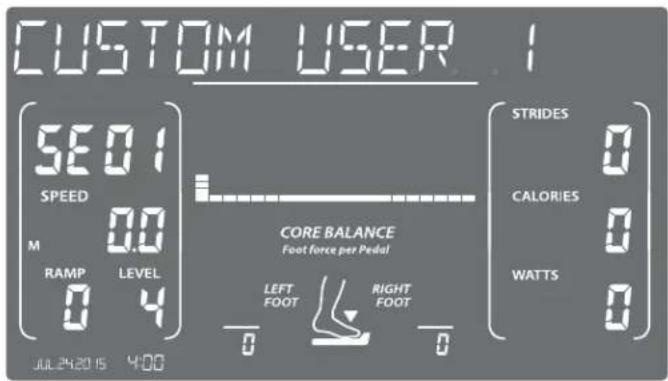
E. Repeat - Repeat Step D until the 20 segments are complete. The twentieth segment will be shown in the Time window as shown below.

Using Programs
Once the program has been set up, simply scroll to the USER1 or USER2 program and press Start. Both Ramp and Level are shown in the program matrix with the Ramp on the left and the Level on the right.
Using Programs
Using Heart Rate Control Programs
Two heart rate control programs are available on your console: Constant and Interval. When using these programs the console will need to receive your heart rate throughout the entire workout. Please review the Heart Rate Monitoring section of this Owner's Manual for more information.

natural_image
Top-down view of a stationary bike with front and rear legs showing steering wheel (no text or symbols visible)
natural_image
Close-up of a black athletic headband with 'LifeSpan' branding on the central button (no other text or symbols visible)HRC - Constant
The Constant program lets you select a single heart rate that you want to maintain throughout your workout and the elliptical will maintain this heart rate for you by either adjusting the Level or Ramp.
To use this program:
A. Select HRC Constant – Press the Level +/- buttons to select the HRC Constant program, then press Enter.
B. Set Time – Set the program Time by pressing the Level +/- buttons then press Enter. The program will include 3-minutes of warm up.
C. Set Weight – Enter Weight by pressing the Level +/- buttons, then press Enter.
D. Set Age – Enter Age by pressing the Level +/- buttons, then press Enter.
E. Set Target Heart Rate – Set your target heart rate by pressing the Level +/- buttons then press Enter.
F. Press the Start button to begin your workout.
HRC - Interval
The Interval program is designed to help you increase your aerobic endurance and improve heart rate recovery. This program lets you select a Low (or recover target heart rate) and a High target. After a 3-minute warm-up the console will adjust the Level every 10 seconds to maintain your Low target for 2 minutes. Then the console will adjust the Level to raise your heart rate to the High target that you selected and once again keep it at this level for 2 minutes and then repeat the process until the end of the workout. It is recommended that you set the workout time to 20 minutes or higher to use this program effectively.
To use this program:
A. Select HRC Interval – Press the Level +/- buttons to select the HRC Interval program then press Enter.
B. Set Time – Set the program Time by pressing the Level +/- buttons then press Enter. The program will include 3 minutes of warm-up.
C. Set Weight – Enter Weight by pressing the Level +/- buttons, then press Enter.
D. Set Age – Enter Age by pressing the Level +/- buttons, then press Enter.
E. Set High Target Heart Rate – Set your High Interval training rate by pressing the Level +/- buttons, then press Enter.
F. Set Low Target Heart Rate – Set your Low Interval training rate by pressing the Level +/- buttons, then press Enter.
G. Press the Start button to begin your workout.

WARNING: Heart rate monitoring may be inaccurate. Over exercising may result in serious injury or death. If you feel faint stop exercising immediately.
Saving Your Results
There are 2 ways to save your exercise results when using your elliptical. The first is using the USB port built into your console and your own USB drive and the second is using the Bluetooth adapter and either the Active Trac or Train & Trac app. Once Saved, use the LifeSpan Club to consolidate and compare all your results.
LifeSpan Club
Your elliptical includes a free membership to the LifeSpan Club. This membership number is located on the front cover of this Owner's Manual. With this account you can consolidate all your exercise results in one place, track your weight and other metrics and get more information about your health and fitness.
If you plan on using:
- A USB drive to save your exercise results, download the IDC app from your LifeSpan Club account. This app works with your Windows or Mac computer letting you upload your exercise results from your USB flash drive into your LifeSpan Club account.
- A LifeSpan app visit www.LifeSpanFitness.com for a list of the available apps and which mobile devices are supported.
Bluetooth Adapter
When paired with LifeSpan's optional Bluetooth adapter, your elliptical can connect with your mobile device to wirelessly sync all of your exercise history to your LifeSpan Club account. To learn more about which apps are available and mobile devices supported visit www.LifeSpanFitness.com.

Saving Your Results
USB Plus
Your LifeSpan elliptical saves a record of your exercise for up to 2 hours. All you need is a standard USB drive. Almost any brand or model will work. Remember, it's important that you Set the Date and Time (page 33) on your elliptical console first so your exercise results are accurately date and time stamped.
You can insert the USB drive, into the USB Plus port anytime during your workout or after you've stopped or paused the elliptical. Just insert a drive and press the "save" button. You can also charge your phone or other mobile device while you exercise and then remove the device you're charging and replace it with the USB drive to save your data.
When you Stop or Pause a workout or when your workout time ends, the console will prompt you to "Insert Drive" if you haven't already done so. If there is already a USB drive installed or if you install a USB drive after stopping the elliptical, the console will automatically save your workout data and a message "Workout Saved" will show on the display. You can also press the "Save" button anytime and any data currently saved in the console's internal memory will be saved to the USB drive.
If however, the elliptical goes into Energy Savings mode at any time without, your exercise results first being saved onto a USB drive your exercise data will be cleared from the console's internal memory.
*Charging feature does not work with the iPad 1, iPad 2, or iPad 3.

Maintenance and Tips
Personal Settings
The E2i and E3i come with the ability for you to personalize several console settings including:
English or Metric - Used for both Speed and Distance in miles or kilometers shown on the display.
Calendar - Date and Time are shown on the display readouts, but can be turned off with this setting. We recommend you keep date and time turned on to accurately track your results.
Energy Savings - Turn the Energy Saving feature ON or OFF.
Audible Beep - Turns off the audible alert that beeps for speed and incline changes or when the elliptical is starting or stopping.

WARNING: The audible alert is turned on from the manufacturer to warn the user that the elliptical is starting or the speed is changing. Turning this alert off is done at the sole discretion of the user.
Follow the steps below to make changes to the Personal Settings options.
| Configuration Steps Information Displayed | |
| Press and hold START and then LEVEL + for 3 seconds to enter Personal Settings Mode. The first screen shows Load Cell Feature. (Do not modify)Press ENTER to continue | Engineering Mode10 491517.7.2014 |
| Press LEVEL + / - to change from English (EN) to Metric (SI).Press ENTER to continue. | Select the unitsEN or SI |
| Press LEVEL +/- or to turn Energy Saving mode on or off. Press ENTER to continue | Power Saving On or Off |
| This screen shows the Total Distance exercised in miles or kilometers.Press ENTER to continue | Total Distance0 000 |
| This screen shows Total Hours of use.Press ENTER to continue | Total Hours0 000 |
| Roller Size is displayed. (Do not modify)Press ENTER to continue | Roller600 |
| Press LEVEL +/- to turn Calendar on or off.(Do not modify)Press ENTER to continue | Set Calendar On or Off |
| Press LEVEL +/- to turn Audible Beep on or off. Press ENTER to continue | Beep On or Off |
Maintenance and Tips
General Maintenance
- Keep the elliptical clean and dry. It is a good idea to wipe the elliptical down after each workout.
- Make sure the ramp rails are clean. Even if you can't see anything on them, wipe the rails with a clean dry cloth about once a week.
Moving the Elliptical
- Make sure the ON/OFF switch is turned OFF and the power cord is removed from the wall.
- Make sure nothing is on or near your elliptical which might spill, be knocked off, or prevent the elliptical from moving.
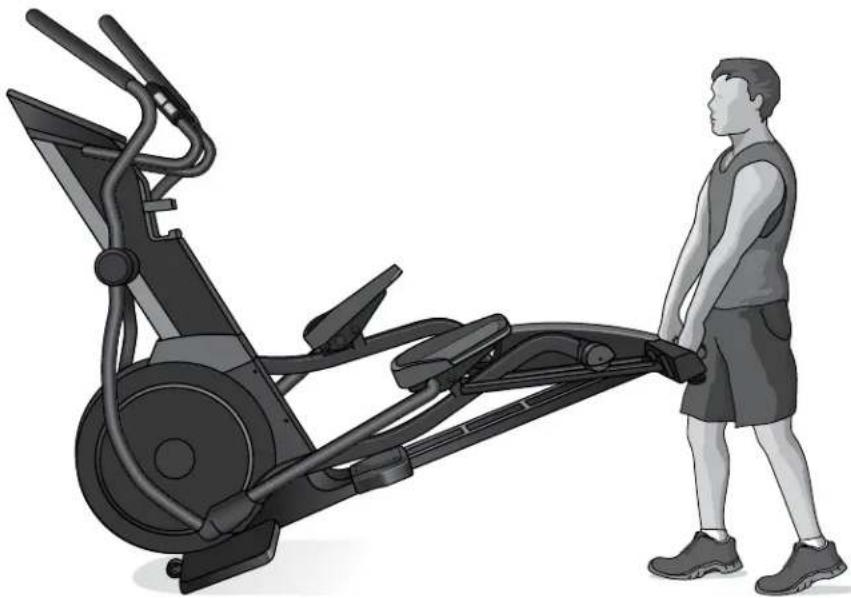
- Place both hands under the support bar located under the back of the elliptical to make sure you have a solid lifting point.
- Lift the back of the elliptical and roll to the desired location.
natural_image
Illustration of a person standing beside an easking machine (no text or symbols visible)CAUTION: When lifting, use proper safety precautions and lifting techniques. Bend your knees and elbows, keep your back straight and pull up evenly with both arms.
Maintenance and Tips
Troubleshooting
If you have a question that isn't answered in this Owner's Manual, visit our website at www.LifeSpanFitness.com or call us at 877.654.3837 option 4.
The elliptical is designed and manufactured to be reliable and easy-to-use. However, if you have a problem, these troubleshooting steps may help you find the cause.
Problem: Elliptical is unstable or rocks while in use.
Solution: Make sure the elliptical is on a solid, level surface. Adjust the front, rear, and middle feet until all 5 feet are sitting solid on the floor.
Problem: No lights on the console.
Solution: Make sure both ends of the power cord are solidly plugged in. Press the Power key on the console. If the console still does not light up, contact LifeSpan Customer Service.
Problem: Rough feeling in pedals.
Solution: Clean the ramp rails with a clean, dry cloth. Any debris on the rails will give a rough feeling during use.
Troubleshooting
Problem: The Core Balance values seem incorrect, such as when you stand in a balanced way on the pedals, without pedaling, produces differing values.
Solution: Recalibrate the Core Balance sensors in the pedals.
Procedure:
- Enter Engineering Mode by pressing and holding the START and LEVEL + (up) for three seconds. The display shows ENGINEERING MODE.
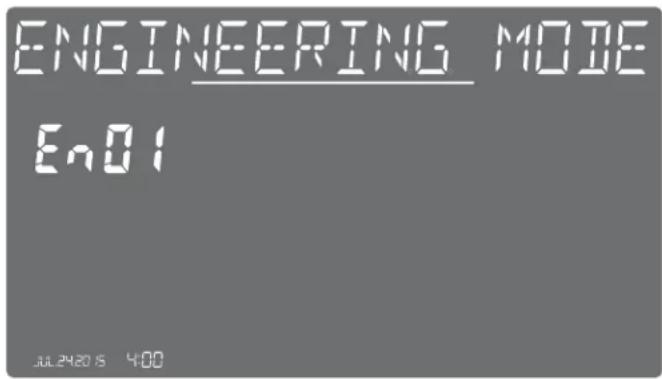
- Press ENTER. The display shows LOADCELL SETUP.

- Press START. Stand on your left foot only. Use the handlebars for balance only. Stand this way for four seconds.
- Press START again. Stand on your right foot only. Use the handlebars for balance only. Stand this way for four seconds.
- Press START a third time. Stand normally.
- Press ENTER repeatedly until you exit Engineering Mode.
The right and left Core Balance sensors will now show the same value when the same pressure is applied.


- Welcome
- Congratulations on Purchasing Your LifeSpan Elliptical!
- Contents
- Safety First 7
- About Your Elliptical 10
- Assembling Your Elliptical 22
- Console Basics 36
- Using Programs 40
- Saving Your Results 46
- Maintenance and Tips 48
- Safety First
- Children and Pets
- Safety Tips While in Use
- About Your Elliptical
- Specifications
- Unique Features
- Intelli-Key™
- Core Balance
- Club Membership
- USB Plus
- Bluetooth
- Console Overview
- Zone 5 — Performance Redline Zone: 90% - 100% of your Max HR
- Zone 4 — Threshold Zone: 80% - 90% of your Max HR
- Zone 3 — Aerobic Zone: 70% - 80% of your Max HR
- Zone 2 — Temperate Zone: 60% - 70% of your Max HR
- Zone 1 — Healthy Heart Zone: 50% - 60% of your Max HR
- Hand Pulse Sensors
- Chest Strap
- Preset Programs
- Long Slow Distance
- Short Interval
- Moderate Interval
- Long Interval
- Negative Interval 1
- Negative Interval 2
- Fartlek
- Uphill Climb
- Pyramid Climb
- Plateau Climb
- Ladder
- Uphill Interval
- Steady Pace
- Long Slow Distance 2
- Cardio Run
- Short Interval 2
- Uphill Walk
- Custom User Programs
- Heart Rate Control Programs
- Constant Heart Rate
- Interval Heart Rate
- Warranty
- Registration
- Proper Grounding
- Power Cord Options
- Assembling Your Elliptical
- Exploded View
- Step 1: Unpacking Elliptical
- Step 3: Base Assembly
- Step 3: Base Assembly (continued)
- Step 4: Attaching Console Mast
- Step 4: Attaching Console Mast (continued)
- Step 5: Arm Attachment
- Step 6: Console Attachment
- Step 6: Console Attachment (continued)
- Leveling
- Console Basics
- Readout Display
- Main Keyboard
- Top Keyboard
- Setting the Date and Time
- QuickSTART
- Using Programs
- Custom User Set-up Programs
- Using Heart Rate Control Programs
- HRC - Constant
- HRC - Interval
- To use this program:
- Saving Your Results
- LifeSpan Club
- Bluetooth Adapter
- Maintenance and Tips
- Personal Settings
- General Maintenance
- Moving the Elliptical
- Troubleshooting
- Problem: Elliptical is unstable or rocks while in use.
- Problem: No lights on the console.
- Problem: Rough feeling in pedals.
- Procedure:
Brand : LifeSpan
Model : E2i+
Category : Elliptical bike