
EW1613 - Toothbrush PANASONIC - Free user manual and instructions
Find the device manual for free EW1613 PANASONIC in PDF.


| Product Type | Oral Irrigator (Dental Water Jet) |
| Brand | Panasonic |
| Model | EW1613 |
| Dimensions (with nozzle) | 285 mm (H) × 125 mm (W) × 140 mm (D) |
| Dimensions (without nozzle) | 200 mm (H) × 125 mm (W) × 140 mm (D) |
| Weight | Approx. 970 g (including nozzle) |
| Power Source | Automatic voltage conversion (see name plate) |
| Power Consumption | 18 W |
| Water Tank Capacity | Approx. 600 mL |
| Operation Time (full tank) | Approx. 180 seconds (ultrasonic nozzle, level 10) |
| Water Pressure Levels | 10 adjustable levels |
| Modes | Jet (continuous) and Stop (pause) |
| Included Nozzles | Ultrasonic nozzle and Orthodontic nozzle |
| Nozzle Replacement Interval | Ultrasonic: every 6 months; Orthodontic: every 3 months or sooner if bristles bent |
| Safety Features | Auto shut-off after 10 minutes, water pressure memory, overheat protection |
| Cleaning | Water tank dishwasher-safe; main unit wipe with damp cloth; do not immerse or wash with water |
| Intended Use | Household oral cleaning (gums, teeth, orthodontic brackets) |
| Warranty | Refer to manufacturer; includes repair at authorized service center |
Frequently Asked Questions - EW1613 PANASONIC
User questions about EW1613 PANASONIC
0 question about this device. Answer the ones you know or ask your own.
Ask a new question about this device
Download the instructions for your Toothbrush in PDF format for free! Find your manual EW1613 - PANASONIC and take your electronic device back in hand. On this page are published all the documents necessary for the use of your device. EW1613 by PANASONIC.
USER MANUAL EW1613 PANASONIC
natural_image
Color gradient bar transitioning from black to white with no text or symbols

Panasonic®
Operating Instructions
(Household use) Oral Irrigator
Model No. EW1613
Contents
Safety precautions...... 4 After use......12
Intended use ....7 Specifications ....13
Parts identification....8 Troubleshooting....14
How to use....9 Changing the nozzle
Points of care....11 (Sold separately)....15
natural_image
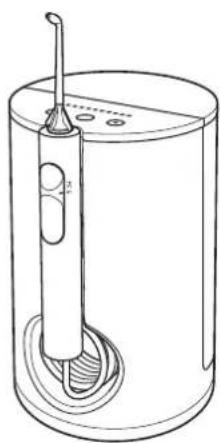
Line drawing of a cylindrical container with a vertical rod inserted into the middle, showing internal components and a base (no text or symbols)Thank you for purchasing this Panasonic product.
Before operating this unit, please read these instructions completely and save them for future use.
natural_image
Color gradient bar transitioning from black to white, no text or symbols present

Safety precautions
To reduce the risk of injury, loss of life, electric shock, fire, and damage to property, always observe the following safety precautions.
Explanation of symbols
The following symbols are used to classify and describe the level of hazard, injury, and property damage caused when the denotation is disregarded and improper use is performed.

WARNING
Denotes a potential hazard that could result in serious injury or death.

CAUTION
Denotes a hazard that could result in minor injury or property damage.
The following symbols are used to classify and describe the type of instructions to be observed.

This symbol is used to alert users to a specific operating procedure that must not be performed.

This symbol is used to alert users to a specific operating procedure that must be followed in order to operate the unit safely.
WARNING
▶ Preventing accidents
Do not store within the reach of children or infants. Do not let them use it.

- Doing so may cause an accident or injury due to accidental ingestion of removable parts.
▶ Power supply

Do not connect or disconnect the power plug to a household outlet with a wet hand.
- Doing so may cause electric shock or injury.
Do not immerse the appliance in water or wash it with water. Do not use the appliance near a bath tub or inside a shower room. Do not use when the cord or the power plug is damaged or when the fitting into the household outlet is loose.
Do not damage the power plug.
Do not damage, modify, forcefully bend, pull, twist, or bundle the cord.
Do not allow pins or trash to adhere to the power plug.
Also, do not place anything heavy on or pinch the cord.
Doing so may cause electric shock or fire due to a short circuit.



WARNING

Do not use in a way exceeding the rating of the household outlet or the wiring.
- Exceeding the rating by connecting too many power plugs to one household outlet may cause fire due to overheating.

Always ensure the appliance is operated on an electric power source matched to the rated voltage indicated on the appliance. Fully insert the power plug.
- Failure to do so may cause fire, electric shock, or injury.

The supply cord cannot be replaced. If the cord is damaged, the appliance should be scrapped.
- Failure to do so may cause an accident or injury.
▶ In case of an abnormality or malfunction Immediately stop using and remove the power plug if there is an abnormality or malfunction.
- Failure to do so may cause fire, electric shock, or injury.
- The main unit or cord is deformed or abnormally hot.
- The main unit or cord smells of burning.
- There is an abnormal sound during use of the main unit or cord.
-Immediately request inspection or repair at an authorized service center.
▶This product

Do not drop or subject to shock.
- Doing so may cause electric shock or fire.

Do not modify, disassemble or repair.
- Doing so may cause injury due to fire or malfunction.
→ Contact an authorized service center for repair.
This appliance is not intended for use by persons (including children) with reduced physical, sensory or mental capabilities, or lack of experience and knowledge,

unless they have been given supervision or instruction concerning use of the appliance by a person responsible for their safety. Children should be supervised to ensure that they do not play with the appliance.
- Failure to do so may cause an accident or injury.
▶ Cleaning
Always unplug the power plug from a household outlet when cleaning the power plug.

Before using the appliance again, wipe off any moisture from the power plug.
- Failure to do so may cause electric shock or injury.
Regularly clean the power plug to prevent dust from accumulating.

- Failure to do so may cause fire due to insulation failure caused by humidity.
→ Disconnect the power plug and wipe with a dry cloth.
natural_image
Color gradient bar transitioning from black to white with no text or symbols


CAUTION
▶ Preventing damage to teeth and gums People who are unable to operate should not use this appliance.

People with weak oral senses should not use this appliance.
- Doing so may cause injury or damage to teeth and gums.

People who may have periodontal disease, or concerned about symptoms within their mouth should consult a dentist before use.
- Failure to do so may cause injury or damage to teeth and gums.
▶ This product
Never use for a purpose other than oral cleaning.

- Doing so may cause an accident or injury when the stream of water is pointed toward the eyes, nose, ears, or throat.

Do not fill the tank with water warmer than 40 °C.
- Doing so may cause burns.

Do not share nozzle with your family or other people.
- Doing so may cause infection or inflammation.
▶ Note the following precautions
Do not wrap the cord around the appliance when storing.

- Doing so may cause the wire in the cord to break with the load, and may cause fire due to a short circuit.

Disconnect the power plug from the household outlet when not using for extended period of time.
- Failure to do so may cause electric shock or fire due to electrical leakage resulting from insulation deterioration.

Disconnect the power plug by holding onto it instead of the cord.
- Failure to do so may cause electric shock or fire due to a short circuit.

Clean and dry the water tank and nozzle after each use.
- Failure to do so may cause damage to your health if used without keeping it sanitized due to propagation of mold and bacteria.
natural_image
Color gradient bar transitioning from black to white with no text or symbols

Intended use
▶ Notice
- When you first begin using the appliance, you may experience slight bleeding of the gums even though your gums may be healthy. This is because your gums are receiving stimulation by the appliance for the first time. The bleeding should stop after one or two weeks of use. Bleeding that persists for more than two weeks may be indication of an abnormal condition of your gums, such as periodontal disease. In this case, stop using the appliance and consult your dentist.
- Do not put salt, mouthwash or other chemicals into the water tank. Doing so may cause malfunction.
- Do not dry the main unit with a dryer or a fan heater. Doing so may cause malfunction or deformation of the parts.
- Store the appliance in a place with low humidity after use. Failure to do so may cause malfunction.

natural_image
Three horizontal bar designs with grayscale shades and a central crosshair (no text or symbols)Parts identification
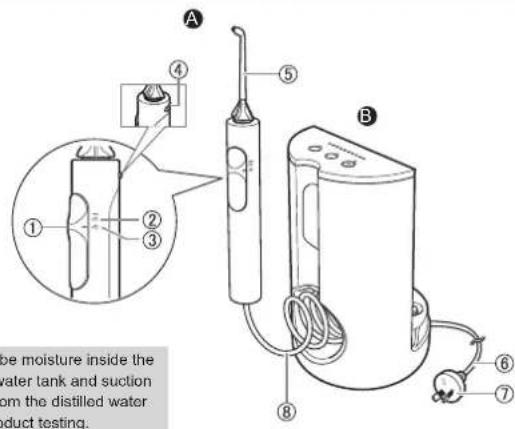
A Handle
① Stop/Jet switch
② Jet mode
③ Stop mode "n"
④ Nozzle release button
⑤ Nozzle
B Main unit
⑥Cord
⑦ Power plug
⑧Suctionhose
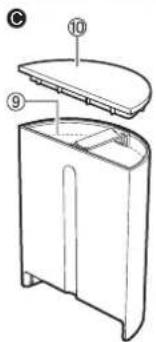
©Water tank
⑨ Upper water level limit
⑩ Water tank cap
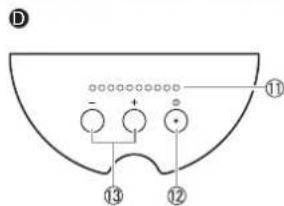
Operation panel
⑪Waterpressure level LED indicator (1\~10 levels)
⑫ Power switch ①”
⑬Waterpressure regulator switch
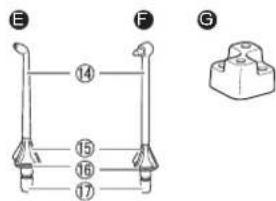
E Ultrasonic nozzle
F Orthodontic nozzle
• The nozzle is a consumable.
⑭ Nozzle
⑮ Nozzle Handle
⑯ Identification ring
⑰ Nozzle insertion port
Accessory
© Nozzle stand
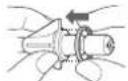
■ When the identification ring is
coming off
As shown in the figure, align the nozzle with any direction of the identification ring to install it.
• Even if the identification ring is not attached, it does not affect the performance of the nozzle.
natural_image
Color gradient bar transitioning from black to white with no text or symbols

How to use
Prepare
Place the main unit on a flat and stable surface.
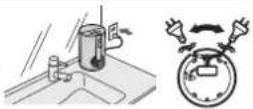
1 Plug in the power plug. • The cord can be pulled out from either the right or the left.
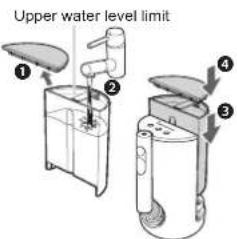
2 Fill the water tank with water.
① Open the water tank cap. ② Remove the water tank, and fill it with water. • When filling water, be sure not to exceed the upper water level limit. ③ Set the tank to the main unit firmly. ④ Attach the water tank cap.
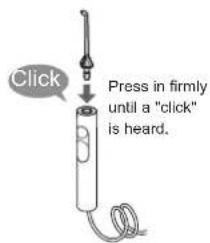
3 Install the nozzle. • Choose a nozzle for your purpose. (See page 9.)
4 Press the power switch "①
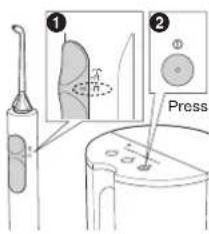
① Ensure the Stop/Jet switch is set to “ ” (stop mode). ② Press the power switch “①” to turn on the power. • The water pressure level LED indicator lights on. • The power will be cut off after about 10 minutes to avoid forgetting to turn off. (The function for avoiding forgetting to turn off.)
5 Press the water pressure regulator switch to select the water pressure level.
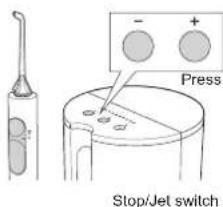
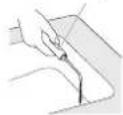
① With the nozzle facing the basin, set the Stop/Jet switch to “☐” (jet mode) to jet water.

natural_image
Color palette bar with grayscale gradient and a central crosshair (no text or symbols)② Press “+” or “-” on the water pressure regulator switch until the desired flow intensity is reached.
- Keep pressing "+" or "-" will continuously change the water pressure.
③ Set the Stop/Jet switch to “n” (stop mode) to stop jetting temporarily.
■ Water pressure level memory function The last selected water pressure level will be remembered from the second time onward.
6 Clean inside your mouth with water jet.
① Place the nozzle in your mouth.
② Close your mouth gently.
③ Set the Stop/Jet switch to “☐” (jet mode).
- If you want to pause the water jet, set the Stop/Jet switch to “ ” (stop mode).
- You can switch the water pressure level by pressing the water pressure regulator switch even while using the appliance.
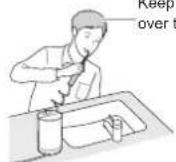
Keep your face over the basin.
▶ Operation time with full water: approx. 180 seconds (When the ultrasonic nozzle is used and the water pressure level is set to 10)
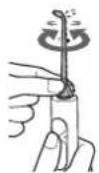
▶ To adjust the orientation of the nozzle
You can adjust the direction of water jet by rotating the nozzle handle.
Notes
• Always use new tap water or lukewarm water.
- If water is cold, use lukewarm water with temperature 40^ or below.
- Do not turn on the power switch “①” when the water tank is empty (except discharging the water inside the main unit). (Doing so may cause malfunction.)
- The recommended operating temperature of the appliance is 5 °C - 40 °C. If the indoor temperature is over or lower than the recommended temperature, the appliance may stop operating.
- When the Stop/Jet switch is set to “ ” (stop mode) for more than 1 minute, turn off the power switch “①”. (Doing so may cause malfunction.)
- When you use the appliance for the first time, please start with water pressure level 1.
- Do not push the tip of the nozzle too hard against the teeth or gums. (Excluding the orthodontic nozzle.)
- When you feel that the irritation is strong, set the Stop/Jet switch to “ ” (stop mode) and use the appliance from the water pressure level 1.
natural_image
Color gradient bar transitioning from black to white, no text or symbols present

Points of care
If you are concerned about sensitive gums, stimulate with a gentle water jet setting.
With the water jet and orthodontic nozzle, clean every nook and cranny of areas that are hard to reach by the toothbrush.
Change the way you use and move the unit depending on the purpose and the area you want to clean.

Ultrasonic nozzle
To clean with the water jet.
▶ Interdental cleaning
- Direct the water jet onto the space between the teeth.
- Direct from the front and rear sides of the teeth.
▶ Periodontal pocket cleaning
- Aim the water jet at the space between teeth and gums.
- Slowly shift the water jet along the gums.
- Clean the front and back of the teeth and behind the molars as well.
▶ Gums care
• Stimulate the gums.
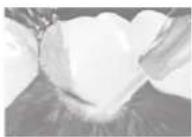
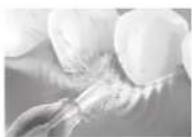

Orthodontic nozzle
When cleaning crooked teeth and orthodontic bracket area with the brush and water flow.
Lightly place the brush tip on the teeth and wiggle the brush.
▶ For crooked teeth
- Place the brush tip on the area that is difficult for a toothbrush to reach and tends to remain unpolished.
- Wiggle the brush mainly in interdental spaces.
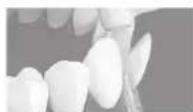
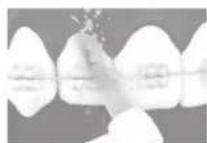
-For orthodontic bracket area

Ultrasonic nozzle
- Direct the water jet around orthodontic brackets and bridges.
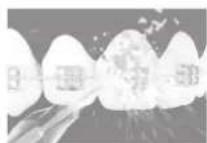

Orthodontic nozzle
- Insert the brush to the gap between the teeth and the orthodontic bracket.
- Wiggle the brush tip.


After use
Please clean the appliance after each use.
• The main unit cannot be washed with water.
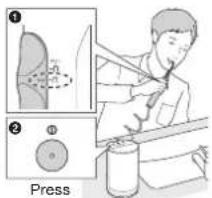
1 To prevent the water from splashing about, stop the water jet while keeping the nozzle in your mouth.
① Stop the water jet by setting the Stop/Jet switch to “☐” (stop mode).
2 Press the power switch "①" to turn off the power.
• The water pressure level LED indicator keeps flashing for 30 seconds and then goes off.
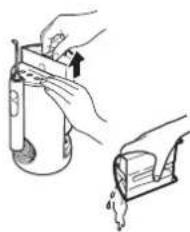
2 Throw away the remaining water.
① Remove the water tank, and throw away the remaining water.
- While removing the water tank, press the main unit by hand.
- Change the water every time when you use the appliance.
② Wash the water tank.
natural_image
Illustration of two hands performing a manual task: one handling a container with an arrow, the other holding a container with a handle (no text or symbols present)3 Remove the remaining water from the main unit.
① Install the water tank, and turn on the power switch “①”.
② With the nozzle facing the basin, set the Stop/Jet switch to “☐” (jet mode) to remove the remaining water from the main unit.
③ When there is no water coming out, set the Stop/Jet switch to “ ” (stop mode), and turn off the power switch “①”.
4 Disconnect the power plug from the household outlet.
② Stop/Jet switch
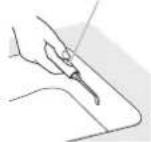
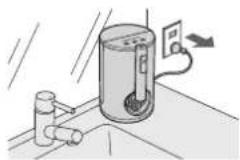
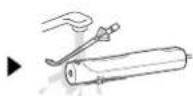
5 Clean the handle.
Pull out the nozzle while pressing the button.
Nozzle release button
natural_image
Color gradient bar transitioning from black to white with no text or symbols

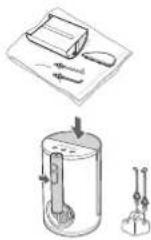
6 Store it after it is dry.
① Wipe off any moisture with a towel and dry in a well-ventilated shade.
② Store the appliance.
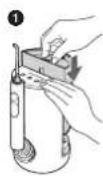
• Mount the handle and water tank to the main unit, and place the nozzle on the nozzle stand.
Notes
- Remove the dirt inside the water tank with a sponge brush etc.
- Only the water tank can be washed in a dish washer. The nozzle, the nozzle stand, and the water tank cap cannot be cleaned in a dish washer.
- Do not wipe with thinners, benzine, alcohol etc. (Doing so may cause malfunction, cracking or discoloration of the parts.)
- Use neutral kitchen detergent and rinse well with water to ensure no detergent remains after cleaning.
- Do not use lukewarm water exceeding 50 °C to wash the nozzle, the nozzle stand, and the water tank cap.
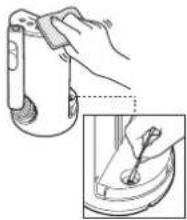
Clean the dirt on the main unit
When wiping stains away from the main unit with a cloth that has been soaked in soap water and then wrung out.
(Do not wash the main unit with water.)
- Use cotton swabs to clean any part that is inaccessible to the cloth.
natural_image
Illustration of a hand using a tool to adjust a mechanical component, with an inset showing the same part (no text or symbols present)Specifications
| Power Source | See the name plate on the product (Automatic voltage conversion) |
| Power consumption | 18 W |
| Date of production | See engraving on the commodity |
| Water tank volume | Approx. 600 mL(For approx. 180 seconds of operation when the ultrasonic nozzle is used and the water pressure level is set to 10)(For approx. 130 seconds of operation when the orthodontic nozzle is used and the water pressure level is set to 10) |
| Dimensions | Main unit:285 (H) × 125 (W) × 140 (D) mm(Including nozzle)200 (H) × 125 (W) × 140 (D) mm(Not including nozzle) |
| Mass | Main unit: Approx. 970 g(Including nozzle) |
This product is intended for household use only.
natural_image
Color gradient bar transitioning from black to white with no text or symbols

Troubleshooting
| Problem Possible cause Action | |||
| While using | No water comes out, or the water jet power is weak. | The Stop/Jet switch is left in “ ☐ (stop mode) while the power is on.→Take the following steps:1 Fill the water tank with water halfway.2 Press the power switch ☐ to turn on the power and press “+” to set the water pressure level 10.3 Set the Stop/Jet switch to “ ☐ (jet mode).4 Insert and remove the water tank for several times.5 Install the water tank and wait for a few seconds until the water pressure is restored.* Repeat Steps 4 and 5 if the water pressure is not restored.• Once the water pressure is restored, you can use the appliance as usual. | 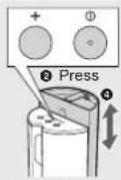  |
| The nozzle comes off during use. | The nozzle is clogged. | Replace the nozzle.The outlet of | |
| The nozzle is deformed. | |||
| Fail to remember the water pressure level. | The power plug is pulled out from the household outlet before the power switch “ ☐ ” is turned off. | Before pulling out the power plug from the household outlet, turn off the power switch “ ☐ ”. | |
| Motor sound changes after the Stop/Jet switch is set to “ ☐ ”(stop mode). | This is not an abnormality.→Please use the appliance as usual.* It may occur particularly in a low-temperature environment. | ||
| The power is cut off automatically. | The function for avoiding forgetting to turn off is activated. | This is not an abnormality.(See page 7.) | |
| The water pressure level LED indicator still flashes after the power switch “ ☐ ” is turned off. | This is not an abnormality.→The indicator will go off after 30 seconds. (See page 10.) | ||
| The nozzle is hard to install. | Apply water to the nozzle insertion port. | ||
If the problems still cannot be solved, contact the store where you purchased the unit or a service center authorized by Panasonic for repair.
natural_image
Color gradient bar transitioning from black to white, no text or symbols present

Changing the nozzle (Sold separately)
▶ Ultrasonic nozzle
- If the tip of the nozzle gets deformed, please replace the nozzle with a new one.
- The nozzle should be replaced once every 6 months or so due to hygiene reasons, even if it is not deformed.
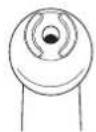
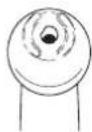
New nozzle (tip) Deformed (worn) nozzle (tip)
▶ Orthodontic nozzle
- Replace the orthodontic nozzle in approx. 3 months. If the brush bristles are bent out, replace it even within 3 months.
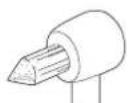
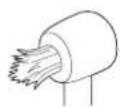
New nozzle (tip) Nozzle with bent out bristles
| Part number Replacement Nozzle for EW1613 | ||
| WEW0983 | Ultrasonic nozzle | 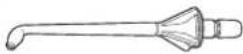 |
| WEW0984 | Orthodontic nozzle | 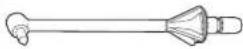 |

natural_image
Three horizontal bar designs with grayscale shades and a central crosshair (no text or symbols)MEMO

natural_image
Pure geometric lines and cross symbols without any text, numbers, or labels14

PB020224 - EW1613 澳洲向说明书_(01EN)_ (1206) .irdd 14 2021/12/6 14:02:10
natural_image
Color gradient bar transitioning from black to white with no text or symbols

Panasonic Corporation
http://www.panasonic.com
© Panasonic Corporation 2022
YEN
Printed in China
EW970016131541 S0522-0
PB020224-FW1613澳洲向说明[5_(01EN)_(1206).irdd 16 2021/12/6 14:02:10
- Panasonic®
- Contents
- Safety precautions
- Explanation of symbols
- WARNING
- CAUTION
- ▶ Preventing accidents
- ▶ Power supply
- Do not damage the power plug.
- Intended use
- ▶ Notice
- A Handle
- B Main unit
- ©Water tank
- Operation panel
- E Ultrasonic nozzle
- F Orthodontic nozzle
- ■ When the identification ring is
- How to use
- Prepare
- Points of care
- Ultrasonic nozzle
- Orthodontic nozzle
- -For orthodontic bracket area
- After use
- Store it after it is dry.
- Notes
- Clean the dirt on the main unit
- Changing the nozzle (Sold separately)
- ▶ Ultrasonic nozzle
- ▶ Orthodontic nozzle
Brand : PANASONIC
Model : EW1613
Category : Toothbrush