
FOHLS995 - Home Automation JUNG - Free user manual and instructions
Find the device manual for free FOHLS995 JUNG in PDF.


| Brand | JUNG |
| Model | FOHLS995 |
| Product Category | Home Automation |
| Product Type | Radio Transmitter / Actuator |
| Dimensions (H x W x D) | 80 x 80 x 40 mm |
| Weight | 150 g |
| Power Supply | 230 V AC, 50 Hz |
| Protection Rating | IP20 |
| Operating Temperature | -5°C to +45°C |
| Radio Frequency | 868.3 MHz (Europe) |
| Number of Channels | 1 (typically) |
| Main Functions | Switching, dimming, shade control, scene recall |
| Control Type | Radiant control (push button, remote) |
| Maintenance | Wipe with a dry cloth; no liquid cleaners |
| Safety | Installation by qualified electrician; disconnect power before servicing |
| Spare Parts and Repairability | Available through JUNG service; repair by authorized technicians |
| Compatibility | JUNG Home Automation systems and KNX (if applicable) |
| Warranty | 2 years (subject to terms) |
| Manual Languages | EN, DE, FR, etc. |
Frequently Asked Questions - FOHLS995 JUNG
User questions about FOHLS995 JUNG
0 question about this device. Answer the ones you know or ask your own.
Ask a new question about this device
Download the instructions for your Home Automation in PDF format for free! Find your manual FOHLS995 - JUNG and take your electronic device back in hand. On this page are published all the documents necessary for the use of your device. FOHLS995 by JUNG.
USER MANUAL FOHLS995 JUNG
Friends of Hue radio transmitter
GB
Ref.-no.: FOH A 595 .., FOH LS 995 .., FOH .. 2995-L
Friends of Hue radio transmitter set
Ref.-no.: FOHS A 550 595 .., FOHS LS 995 ..
Operating instructions
1 Safety instructions

Electrical devices may only be mounted and connected by electrically skilled persons.
Serious injuries, fire or property damage possible. Please read and follow manual fully.
The radio communication takes place via a non-exclusively available transmission path, and is therefore not suitable for safety-related applications, such as emergency stop and emergency call.
These instructions are an integral part of the product and must remain with the end customer.
2 Device components
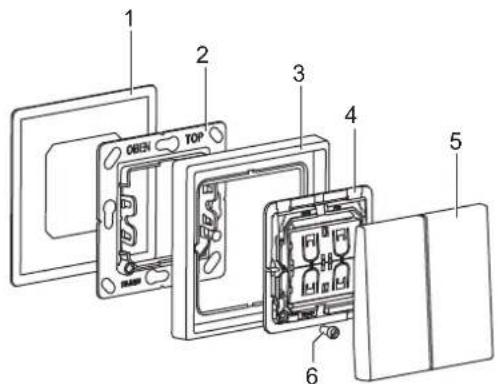
Fig. 1: Device components
(1) Adhesive film
(2) Holder plate
(3) Frame (included in set ref.-no. FOHS ..)
(4) Radio module
(5) Rockers
(6) Retaining screw
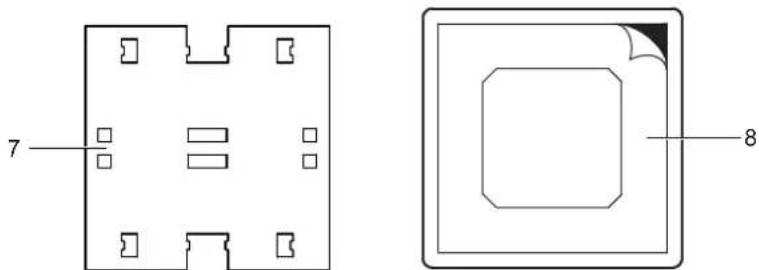
Fig. 2 and fig. 3: Transport lock and protective film
(7) Transport lock for rockers
(8) Protective film for holder plate
3 Function
Intended use
- Smart switch for wireless remote control of Philips Hue lamps
- For switching, dimming and controlling individual light scenes
- For residential use only
- Mounting on appliance box according to EN 60670-1, screw fixing on walls or adhesive fixing on smooth, even surfaces (glass). Adhesive film included.
Product characteristics
- Battery-free device without external power supply
- Transmitting energy is generated from mechanical energy of actuation (energy harvesting)
- Encrypted transmission with device-specific code
- Wireless standard ZigBee Green Power, compatible with Friends of Hue and Apple HomeKit
- Automatic range extension via Philips Hue lamps
- Simple commissioning and configuration via Philips Hue app and Hue Bridge V2 or higher
4 Information for electrically skilled persons
Installation and electrical connection

DANGER
Electrical shock on contact with live parts in the installation environment. Electrical shocks can be fatal.
Before working on the device, disconnect the power and cover live parts in the area!
Installation location
The radio range in buildings is approx. 20 m without wall penetration.
A maximum of one wall penetration is recommended, because it attenuates the radio signal.
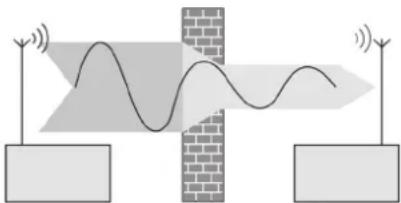
Fig. 4: Installation location
If several walls have to be penetrated the receiver may not be able to receive the signal from the transmitter correctly. Metal parts at the installation site (e.g. metal door frames) or moisture (e.g. in outdoor areas) can also have a negative effect on the radio transmission. The range can be extended with Philips Hue lamps (in each room).
Fitting the device
- Fix holder plate (2) with adhesive pad (1) at the installation location. (see section „Adhesive fixing“)
Alternatively, screw the holder plate onto an appliance box or directly onto the wall.
Note marking „Top“ - Push frame (3) onto holder plate.
- Snap radio module (4) onto holder plate.
arrow on sticker (rear side of radio module) points upwards (or „O“ is up and „I“ is down). - Optional: Secure the radio module with the enclosed screw (6).
- Snap on rockers (5).
Note marking „Top“.
The transport lock (7) behind the rockers must be removed beforehand. (fig. 2)
Adhesive fixing
Important:
The final strength of the adhesive is only reached after 24 hours.
• After gluing the holder plate, let the adhesive cure a little.
Important:
The installation location cannot be changed after the adhesive fixing.
- To test the range, carry out commissioning before adhesive fixing.
Prerequisite:
Surface is dry, clean, stable and even.
Suitable cleaning agents:
water, degreaser, glass cleaner, methylated spirit
Not suitable for cleaning:
Bath or all-purpose cleaner, aggressive detergents
- Remove the protective film from the back of the adhesive film (1).
- Stick the adhesive film aligned on the surface.
Press firmly for about 10 seconds. - Remove the protective film (8) for the holder plate (2).
Do not remove the remaining protective films. - Stick the holder plate onto the adhesive film.
5 Operation
Operating elements
The radio transmitter is operated via two rockers (4-channel).
The functions of the rockers (switching, push-button or dimming) are not configured in the factory settings of the device.
6 Commissioning
In the following description the commissioning of the radio transmitter is referred to as „teaching“ in the Philips Hue Bridge. The radio signal of the transmitter has to be taught in the Philips Hue Bridge as receiver. After teaching, the Philips Hue Bridge can clearly assign the signals of the transmitter.
Teaching-in the radio transmitter in the Philips Hue Bridge
Requirements:
- Philips Hue Bridge is ready for operation and is within range of the radio transmitter.
- Philips Hue app is installed.
- Select „Settings“ > „Set up accessories“ > „Add accessories“ > „Friends of Hue switch“ in Philips Hue app. All compatible Friends of Hue switches are displayed.
- Select „JUNG Friends of Hue Switch“.
- Operate rockers (5) of the radio transmitter as described in the app. The radio transmitter is taught-in and is added as accessory in the app. The radio transmitter can now be configured in the app.
7 Configuration
The functions of the rockers (switching, push-button or dimming) must be configured in the Philips Hue app. Max. 4 light scenes can be configured.
Configuring the radio transmitter in the Philips Hue app
Requirements:
- The radio transmitter is taught in the Philips Hue Bridge.
- Philips Hue lamps are ready for use.
- Assign radio transmitter to lamps and rooms as described in the app and configure them.
- Save the configuration.
8 Technical data
Radio frequency 2.402 ... 2.480 GHz
Transmission range
in free field up to 175 m
in buildings approx. 20 m
Transmitting power 7 dBm / 5 mW
Ambient temperature -5 ... +45 °C
Storage/transport temperature -25 ... +65 °C
Atmospheric humidity 0 ... 95 % (no condensation)
9 Conformity
Albrecht Jung GmbH & Co. KG hereby declares that the radio system type art. no. FOH A 595 ..., FOH LS 995 ..., FOH .. 2995-L, FOHS A 550 595 .. and FOHS LS 995 .. meets the directive 2014/53/EU. You can find the full article number on the device. The complete text of the EU Declaration of Conformity is available under the Internet address: www.jung.de/ce
10 Warranty
The warranty follows about the specialty store in between the legal framework as provided for by law.
- Friends of Hue radio transmitter
- Friends of Hue radio transmitter set
- Operating instructions
- Safety instructions
- Device components
- Function
- Intended use
- Product characteristics
- Information for electrically skilled persons
- Installation and electrical connection
- DANGER
- Installation location
- Fitting the device
- Adhesive fixing
- Operation
- Operating elements
- Commissioning
- Teaching-in the radio transmitter in the Philips Hue Bridge
- Configuration
- Configuring the radio transmitter in the Philips Hue app
- Technical data
- Conformity
- Warranty
Brand : JUNG
Model : FOHLS995
Category : Home Automation