
BTLC1521FSE - Home Automation JUNG - Free user manual and instructions
Find the device manual for free BTLC1521FSE JUNG in PDF.


| Product Type | Home Automation Socket (French/Belgian system) |
| Model | BTLC1521FSE (JUNG HOME socket Energy) |
| Rated Voltage | AC 220 ... 250 V ~ |
| Mains Frequency | 50/60 Hz |
| Standby Power | max. 0.25 W |
| Switching Current (Ohmic) | 16 A at 25 °C |
| Connected Load (Incandescent) | 2300 W |
| Power Measurement Range | -3680 ... +3680 W (Energy socket only) |
| Energy Measurement | -999,999 ... 999,999 kWh |
| Radio Frequency | 2.402 ... 2.480 GHz |
| Transmission Range (Indoor) | typ. 30 m |
| Installation Depth | 42 mm |
| Ambient Temperature | -5 ... +45 °C |
| Relative Humidity | 20 ... 70% (no condensation) |
| Power Reserve | min. 4 hours |
| Time Accuracy | ±13 s per month |
| Wireless Protocol | Bluetooth SIG Mesh |
| Functions | Switching, time programs, power measurement (Energy), master/slave, power-save, overcurrent protection |
| Status LED Indications | Green (on), Orange (off), Red (disabled), Blue flashing (time not set), etc. |
| Installation | In appliance box min. 50 mm depth, by qualified electrician |
| Spare Parts / Accessories | Frame 28 mm structure height (A558..HBF.., LS98..HBF..) for shallow boxes |
| Repairability | Not user-serviceable; professional replacement required |
| Safety | Observe 5 safety rules; not for safety-critical applications; overcurrent protection |
Frequently Asked Questions - BTLC1521FSE JUNG
User questions about BTLC1521FSE JUNG
0 question about this device. Answer the ones you know or ask your own.
Ask a new question about this device
Download the instructions for your Home Automation in PDF format for free! Find your manual BTLC1521FSE - JUNG and take your electronic device back in hand. On this page are published all the documents necessary for the use of your device. BTLC1521FSE by JUNG.
USER MANUAL BTLC1521FSE JUNG
Operating instructions
JUNG HOME socket, French/Belgian system
Art. no. BT..1521FS..
JUNG HOME socket Energy, French/Belgian system
Art. no. BT..1521FSE..

natural_image
White electrical socket with three circular ports and a small screw, mounted on a square frame (no text or symbols visible)ALBRECHT JUNG GMBH & CO. KG
Vollmestraße 1
58579 Schalksmühle
GERMANY
Telefon: +49 2355 806-0
Telefax: +49 2355 806-204
kundencenter@jung.de
www.jung.de
Table of contents
1 Safety instructions .... 3
2 Device components 4
3 Intended use.... 4
4 Product characteristics .... 5
5 Operation....6
6 Mounting and electrical connection 6
7 Commissioning with app.... 7
8 Resetting the device to the factory setting.... 9
9 Technical data 10
10 List of functions and parameters 11
11 Troubleshooting.... 17
12 Accessories 17
13 Conformity 17
14 Warranty 18
1 Safety instructions
Serious injuries, fire or property damage are possible. Please read and follow the manual fully.

Installation only by persons with appropriate electrotechnical knowledge and experience in the following areas:
- The "5 safety rules" to be observed are: disconnect; secure against reconnection; determine that no voltage is present; ground and short-circuit; cover or block off adjacent live parts
– Selection of suitable tools, measuring devices and, if necessary, personal protective equipment
– Evaluation of the measurement results
– Selection of the electrical installation material to ensure the shutdown conditions
– IP protection ratings
– Installation of the electrical installation material - Type of mains supply (TN system, IT system, TT system) and the resulting connection requirements (classic earthing, protective earthing, necessary additional measures, etc.)
Improper installation endangers your own life and the lives of users of the electrical system and there is a risk of serious damage to property, e.g. through fire. You are at risk of personal liability for personal injury and damage to property.
Contact an electrical fitter!
The device must not be used in connection with consumers that could lead to danger to life or limb or damage to property, e.g. heaters or electrical machines.
The device must not be used for applications from the field of safety engineering, such as emergency stop, emergency call or smoke extraction.
Danger of electric shock. If the device exhibits any visible damage, it must not be used any longer. Immediately disconnect device from mains by switching off all associated circuit breakers.
Danger of electric shock. Device is not suitable for disconnection from supply voltage because mains potential even is applied on the load when the device is switched off. Before carrying out work on the device or load, switch off all corresponding circuit breakers.

You can find more information on JUNG HOME at www.jung.de/JUNGHOME
This manual is an integral part of the product, and must remain with the customer.
2 Device components
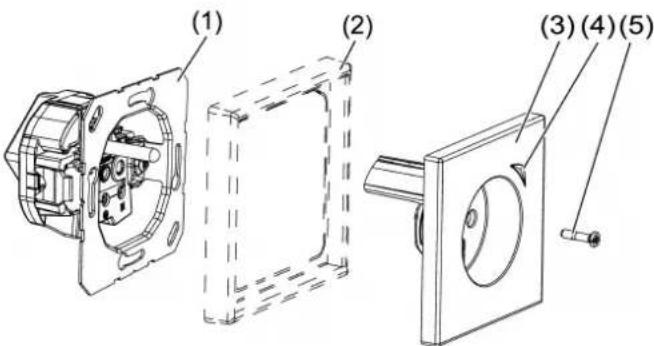
Image 1: Device components
(1) Insert
(2) Design frame
(3) Cover
(4) Button with status LED
(5) Central screw
LED indication during operation
| Green* Load is switched on |
| Orange* Load is switched off |
| Red Disabling function active, e. g. continuously ON/OFF |
| Blue, triple flashing Time is not set, e. g. due to an extended power failure |
| Flashing green/red Device update is being performed |
| Red, triple flashing Error message:- Insert combined with wrong cover.- Overcurrent switch-off, eliminate error and switch on device again with button (4) (JUNG HOME socket Energy, French/Belgian system). |
* Colour adjustable
3 Intended use
- Manual or automatic switching of lighting and common household devices
– Power (W) and energy measurement (kWh) of connected devices, only JUNG HOME socket Energy, French/Belgian system
– Wireless connection to devices from the JUNG HOME system - Use in dry interiors
- Mounting in appliance box with dimensions according to DIN 49073
- Use an appliance box with an installation depth of min. 50 mm
4 Product characteristics
- Commissioning and operation using JUNG HOME app on mobile end device (smartphone or tablet) via Bluetooth
- Button for switching
- Multi-colour status indication with optional night mode
– Disabling of local operation - Up to 16 time programs
- Integration of the load into areas (groups), main functions and scenes
- Activate/deactivate automatic functions with the JUNG HOME app
– Automatic date and time update when connecting with smartphone - Integrated switch actuator with 16 A
- Bluetooth SIG Mesh for fully encrypted wireless communication and repeater function
- Updating via JUNG HOME app
Additionally for JUNG HOME socket Energy, French/Belgian system
– Power measurement of 0.1 to 3680 watts and energy measurement (kWh)
– Recording of the energy curve of the last 24 hours and last 31 days (charting)
– Operating hours counter, period of energy measurement
– Power-save function (switch-off of standby consumers)
- Master/slave function (switch on a wirelessly linked consumer depending on the connected consumer)
– Overcurrent protection cut-off
Available by update in the future:
- Disabling function and restraint guidance: continuously ON/OFF or ON/OFF for fixed time
– Time programs with sunrise and sunset (astro timer)
– Time programs with random time
– Supplied power of -0.1 to -3680 watts and supplied energy (kWh)
You can find information on updates and dates at www.jung.de/JUNGHOME
Behaviour after a mains voltage failure
All settings and time programs are retained. Missed switching times are not performed later. The load output is switched off, provided the parameter "Switching state after the mains voltage returns" is set to its default setting.
If the device was not previously added to a Bluetooth Mesh network (project) by means of the JUNG HOME app, it will switch to pairing mode for two minutes after the mains voltage returns and the status LED will flash slowly at a regular interval in blue.
Power failure shorter than power reserve (min. 4 hours)
– Time and date are up to date
– The following time programs are performed normally again
Power failure longer than power reserve (min. 4 hours)
- If active time programs are present in the device, the LED flashes in blue three times repeatedly until the time is automatically updated when connecting with the app
- The time programs are not executed as long as the time is not set
- No recording of measurement data as long as the time is not set (JUNG HOME socket Energy, French/Belgian system)
5 Operation
All settings and operations of the socket can be configured individually using the JUNG HOME app.
Switching the socket alternately on and off
■ Press button (4) for less than 4 seconds.
Wireless operation
Wireless operation is carried out with linked JUNG HOME devices or via the JUNG HOME App, which is also used to link JUNG HOME devices (see ‘Commissioning with app’).
6 Mounting and electrical connection
The communication of the JUNG HOME devices and linked mobile end devices is carried out in wireless mode within the range of the Bluetooth Mesh network.
Wireless signals can be affected in their range through:
– Number, thickness, position of ceilings, walls and other objects
– Material type of these objects
– High-frequency interfering signals
Observe the following fitting instructions to maximise the range:
- Plan the positions and number of JUNG HOME devices to keep the number of ceilings and walls between two devices as low as possible
-
If JUNG HOME devices are installed on both sides of a solid wall, they should be positioned as close as possible to each other on the opposite sides of the wall. This keeps the attenuation of the wireless signal through the wall as low as possible.
-
When planning, observe that the number of building materials and objects that attenuate the wireless signal strongly (e. g. concrete, glass, metal, insulated walls, water tanks, pipelines, mirrors, book cabinets, storage rooms and refrigerators) on the connection line between JUNG HOME devices is as low as possible
- Keep a distance of at least 1 m from devices that emit high-frequency signals (e.g. microwave, motors) or run with wireless signals at 2.4 GHz (e.g. WLAN router, baby monitor, IP cameras, wireless loudspeakers etc.)

DANGER!
Electric shock when live parts are touched.
Electric shocks can be fatal.
Always disconnect before carrying out work on the device or load. For this, switch off all corresponding circuit breakers, secure against being switched on again and check that there is no voltage. Cover up adjacent live parts.

Image 2: Connection
■ Connect the socket (1) according to connection diagram (see figure 2). Observe the clampable conductor cross-sections (see chapter "Technical data" Page 10) (see figure 5).
■ Install the socket in the appliance box. Observe the installation depth (see chapter "Technical data" ▶ Page 10).
■ Mount the design frame (2) and cover (3) (see figure 1). Ensure the correct combination of insert and cover. Otherwise the socket will not function.
Use Frame 28 mm structure height if you have an existing appliance box with insufficient depth (see accessories)
7 Commissioning with app
Prerequisite: the JUNG HOME device has not yet been made a participant in a Bluetooth Mesh network; otherwise reset the device to factory defaults.
If a Bluetooth Mesh network (project) does not yet exist, start by creating a new project for the first JUNG HOME device in the JUNG HOME app.
If a Bluetooth Mesh network already exists, the project file for this network must be opened in order to pair the new device.
i After switching on the mains voltage, the device is automatically in pairing mode for two minutes.
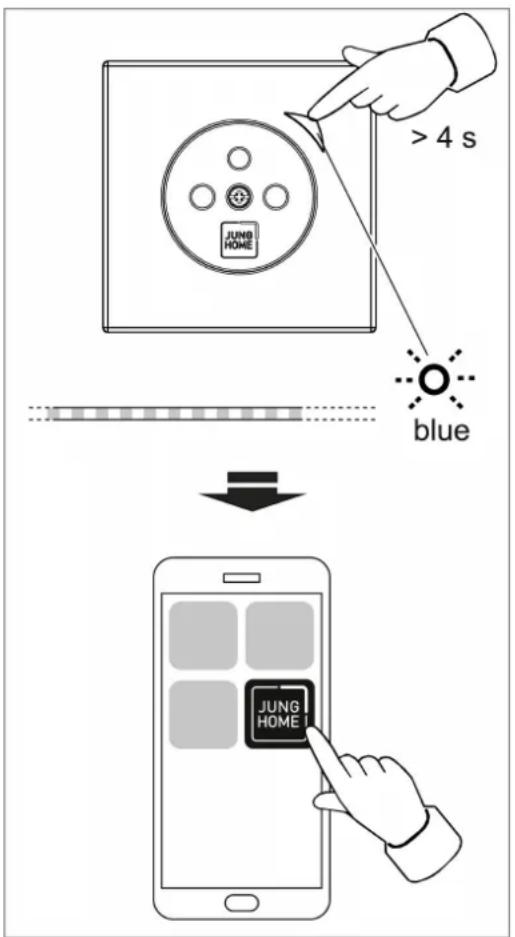
Image 3: Commissioning
■ Activate pairing mode manually:
Press the button (4) for more than four seconds (see figure 3).
The status LED (4) flashes slowly in blue. Pairing mode is active for two minutes.
■ Start the JUNG HOME app (see figure 3).
■ The app shows all devices in pairing mode.
■ Select a device in the app.
To identify the selected device, its status LED flashes more quickly in blue.
■ Add the device to the project.
The status LED lights up in blue for five seconds to confirm that pairing was successful.
If the status LED flashes red very fast, pairing has failed and needs to be re-tried.
The JUNG HOME app can then be used to link devices wirelessly and configure the parameters and operation (see list of functions and parameters).
Once the commissioning of the JUNG HOME project has been completed, hand over the project file to the owner.
Besides basic commissioning, the JUNG HOME app enables device updates and convenient operation of further individual configuration options:
- Link: A button, binary input or motion sensor can be controlled by linking it to a load (e.g. dimmer, switching output, relay, shutter, etc.). Several loads can be controlled together by linking them to an area or scene.
– Area: Different loads (e.g. dimmer, socket, switching output, shutter, etc.) can be grouped in an area to allow them to be controlled together. - Scene: Different loads (e. g. dimmer, socket, switching output, shutter, etc.) can be grouped in a scene so that, by calling up a scene, each load assumes the load status stored in the scene.
- Automatic function: An automatic function can be used to control the locally connected load (no wireless link) by means of time programs. Depending on the device type, there are further automatic functions in JUNG HOME, such as hotel function, night light function, holiday program or switching thresholds.
8 Resetting the device to the factory setting
If the button (4) is disabled with the operating lock parameter, you can reset to the default setting only within two minutes after switching on the mains voltage.
If the device has already been added to a project with the JUNG HOME app, it can be deleted from the app with the "delete device" function and simultaneously reset to the default setting.
If the device cannot be reset to the default settings with the app, reset the device as follows:
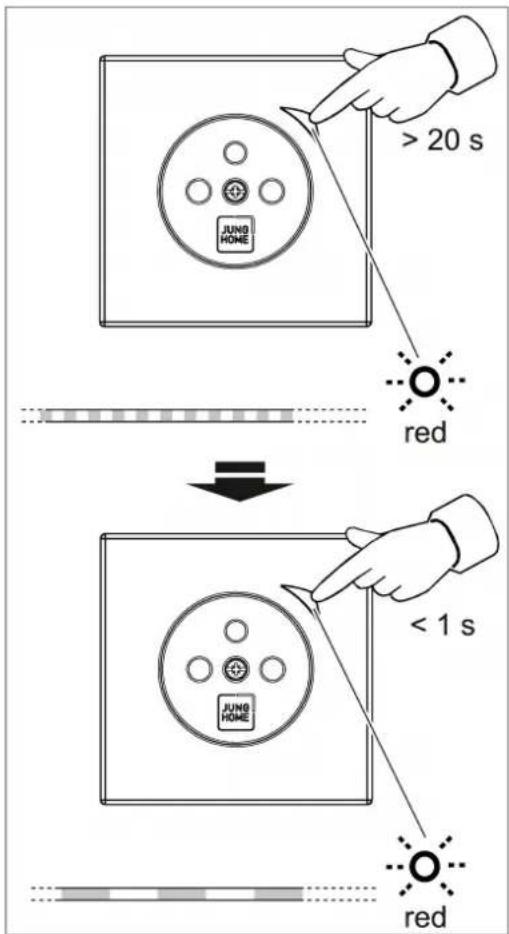
Image 4: Factory reset
■ Press the button (4) for more than 20 seconds until the status LED quickly flashes in red (see figure 4).
■ Release the button (4) and press it briefly again within ten seconds (see figure 4).
The status LED flashes in red more slowly for approx. five seconds. The device has been reset to the default setting.
i After resetting the device to the default setting, it must be removed from the JUNG HOME app provided it has not already been deleted from the app.
9 Technical data
Rated voltage AC 220 ... 250 V \~
Mains frequency 50 / 60 Hz
Standby power max. 0.25 W
Ambient temperature -5 ... +45°C
Transport temperature -25 ... +70°C
Storage temperature -5 ... +45°C
Relative humidity 20 ... 70% (no moisture condensation)
Accuracy per month ± 13 s
Power reserve min. 4 h
i The time is updated with every connection to the app
Measured values, only JUNG HOME socket Energy, French/Belgian system
Effective power -3680 ... +3680 W
Accuracy (power) 1% ±0.1 W
Active energy -999,999 ... 999,999 kWh
Switching current at 25 °C
Ohmic 16 A
Motors 4.3 A (@ cos φ 0.6)
Connected load
Incandescent lamps 2300 W
HV halogen lamps 2300 W
Electronic transformers 1500 W
Inductive transformers 1000 VA
HV-LED lamps typ. 400 W
Compact fluorescent lamps typ. 400 W
Fluorescent lamps, uncompensated 920 VA
Clampable conductor cross-section (see figure 5)


Image 5: Clampable conductor cross-section
Installation depth 42 μm
Radio frequency 2.402 ... 2.480 GHz
Transmission capacity max. 10 mW, Class 1.5
Transmission range (inside building)
typ. 30 m

This device includes an integrated battery. At the end of its useful life, dispose of the device together with the battery in accordance with the environmental regulations. Do not throw device into household waste. Consult your local authorities about environmentally friendly disposal. According to statutory provisions, the end consumer is obligated to return the device.
10 List of functions and parameters
The JUNG HOME app can be used to configure all functions of the JUNG HOME device and its behaviour in the Bluetooth Mesh project for the respective individual purposes.
When commissioning with the app, a device is created in the app, which maps the load control with all the corresponding functions and parameters.
All devices created in the JUNG HOME app can be used independently and set separately.
button settings
| Parameters Setting | ing options, default setting | Explanation |
| Behaviour of the status LED when switched on | Colour selectionDefault setting: green | LED colour and brightness** when load is switched on. |
| Behaviour of the status LED when switched off | Colour selectionDefault setting: orange | LED colour and brightness** when load is switched off. |
| Night mode** On | , offDefault setting: Off | In night mode, the status LED is lit up only for max. five seconds after operation, not permanently.Note: If night mode is activated, it cannot be clearly seen whether the device is switched on and hence mains voltage applied to the load. |
| Operating lock** | No lock, factory reset lock**, operating lockDefault setting: no lock | Factory reset lock: prevents resetting on the device and hence the removal from a project and pairing again by unauthorised persons. After the mains voltage returns, the factory reset lock is deactivated for two minutes.Operating lock: prevents normal operation on the device and hence the load from being controlled. This lock can be used, for example, to restrict manual access temporarily.Operation via the app remains possible. The operating lock cannot be deactivated on the device. |
** Available by update in the future: You can find notes on updates and dates at www.jung.de/JUNGHOME
Load control settings 📄
Settings for automatic functions ⏻
| Parameters Setting | Options,Default setting | Explanations |
| Time programs Load | load status, time and weekdays | The load status can be changed at defined times (weekdays and time) depending on the system insert. |
| Astro timer** Off, | sunrise or sunsetDefault setting: Off | The astro timer shows the sunrise and sunset times in the course of a calendar year. Depending on the location, load statuses can be changed with the position of the sun, for example to switch on the outdoor lighting at sunset and switch it off again at sunrise. |
| Astro timer** time shift | 0 (off) ... 120 minutes before or after sunrise and sunsetDefault setting: Off | Astro times represent the sunrise and sunset times in the course of a calendar year.If you want the time program to be executed in the early morning before the start of twilight or only at full brightness, this can be implemented with the "sun-rise" shift.If you want the time program to be executed in the evening at the start of twilight or only at full darkness, this can be implemented with the "sunset" shift. Displaces the load actuation time by the set value. |
| Astro timer** limit range | Off, earliest time, latest time default setting: off | To narrow the time range of an astro timer down to an earliest and/or latest execution time.For example, the garden lighting can be switched off at the latest at 9:00 pm even if the sun does not set until 10:00 pm. |
| Set location** Geographic location The astro | Geographic location The astro | to timer in the JUNG HOME devices needs the geographic location of the project to calculate the sunrise or sunset time. The astro timer is calculated once a week for the localised place. |
| Only JUNG HOME socket Energy, French/Belgian system | ||
| Energy consumption and operating hours of switched on load | Reading out the stored measured values kWh of the last 24 hours, reading out the stored measured values kWh of the last 31 days, resetting the energy consumption and operating hours | The energy consumption and the operating hours of the switched-on load since the last reset are displayed in the app. These values can be reset to 0 to start a new measurement. The energy consumption of the last 24 hours and the last 31 days is graphically displayed. For this purpose, the measured power is averaged over a period of 60 minutes each for the last 24 hours and over 24 hours each for the last 31 days and displayed as active energy in kWh. |
| Switch-on threshold | 0.3 .... + 3,680 W,1 s... 60 minDefault setting: none | The loads of the JUNG HOME devices selected in the app are switched on if the power value exceeds the value set for the set period. This automatic operation can be used as a master/slave function: If the energy socket detects that a connected load is switched on, a second wirelessly linked JUNG HOME device can be switched on automatically. |
| Switch-off threshold | 0.3 .... + 3,680 W,1 s... 60 minDefault setting: none | The loads of the JUNG HOME devices selected in the app are switched off if the power value exceeds the value set for the set period. This automatic operation can be used as a power-save function. If the energy socket detects that a connected load is set to standby mode, this device can be deenergised automatically. |
** Available by update in the future: You can find notes on updates and dates at www.jung.de/JUNGHOME
Additional load output settings 📷
| Parameters Setting | Options, default setting | Explanation |
| Switch-on delay | 0 s (off) ... 240 minDefault setting: Off | Switches on the load after a switch-on command, delayed by the value. Re-peated switch-on commands during the current delay do not start the delay again. If the load has not yet been switched on due to the delay, the load remains switched off when a switch-off command arrives. |
| Switch-off delay | 0 s (off) ... 240 minDefault setting: Off | Switches off the load after a switch-off command, delayed by the value. A switch-off command during the current delay immediately switches the load off. If the load has not yet been switched off due to the delay when a switch-on command comes, then the load will remain on. |
| Run-on time (load) | 0 s (off) ... 240 minDefault setting: Off | Ensures that the load is switched off after the set run-on time expires instead of remaining permanently switched on after a switch-on command.If a movement is detected by a linked JUNG HOME sensor cover during the run-on time or the operating cover is switched on again by operating an extension or a linked JUNG HOME operating cover, the run-on time is restarted and the light remains on.The load can be switched off early during a running run-on time only if the "Manual switch-off during run-on time" parameter is set to "On" or a disabling function (continuous OFF) is started. |
| Manual switch-off during run-on time | Off, OnDefault setting: On | If this parameter is set to "On", it is possible to switch off the load manually during a current "run-on time (load)".For an automatic staircase lighting controlled by JUNG HOME operating and/or sensor covers, this parameter should be set to "Off" to prevent the light from being switched off by a second person. |
| Parameters Setting | ing options, default setting | Explanation |
| Presentation function** | Off, OnDefault setting: Off | The presentation function is used in combination with a linked JUNG HOME presence detector. The presentation function can be switched on or off with the app or a linked JUNG HOME push-button.With the presentation function switched on, the light is switched off and movements detected by a JUNG HOME presence detector are prevented from switching on the light for a defined locking time.Not only sensor signals from JUNG HOME presence detectors, but also sensor signals from JUNG HOME motion detectors, switch-on and switch-off commands via extensions, wireless control with the app and other JUNG HOME devices restart the locking time.The presentation function is automatically ended at the end of the locking time. Alternatively, the presentation function can be switched off manually. |
| Locking time presentation function** | 3 ... 240 minDefault setting: 3 min | Defines the locking time during which the light remains off with the "presentation function" switched on.Sensor signals from JUNG HOME presence detectors and JUNG HOME motion detectors, switch-on and switch-off commands via extensions, wireless control with the app and other JUNG HOME devices restart the locking time. |
| Minimum switching repeat time** | 100 ms ... 10 sDefault setting: 100 ms | Limits the switching speed of the device by increasing the value, in order to protect the connected load, for example. Only when the set time has elapsed is switching possible again. The last command during the blocking time is executed after a delay. The switching repeat time starts after each switching operation. |
| Behaviour after mains voltage return | Switched off, switched on, previous statusDefault setting: Off | Behaviour of the load output after the mains voltage returns.Note: Do not use the "switched on" setting in combination with consumers that could lead to danger to life or limb or damage to property. |
| Disabling function (restraint guidance)** | Deactivated, continuously ON, continuously OFF, for fixed time ON/OFFDefault setting: deactivated | The disabling function switches the load output to the desired status and blocks it against control by the motion sensor, extension operation, time programs and wireless control with the app and other JUNG HOME devices. The lock applies for an adjustable time or until the disabling function is deactivated again. |
** Available by update in the future: You can find notes on updates and dates at www.jung.de/JUNGHOME
11 Troubleshooting
Device has no function after mounting, status LED (4) repeatedly flashes red three times
Cause: An incorrect cover type was mounted on the insert.
There are switchable sockets BT..1521FS.. and switchable measuring sockets BT..1521FSE... The insert and cover must be of the same type.
Replace the cover with a cover type that matches the insert.
Load is switched off, device cannot be operated, status LED (4) repeatedly flashes red three times
Cause: The overcurrent protection has tripped, only JUNG HOME socket Energy, French/Belgian system.
Eliminate the cause.
Acknowledge fault elimination via button (4). The device can then be switched on again.
12 Accessories
If you have an existing appliance box with insufficient depth:
Frame 28 mm structure height A558..HBF..
Frame 28 mm structure height LS98..HBF..
13 Conformity
Albrecht Jung GmbH & Co. KG hereby declares that the radio system type, art. no. BT..1521FS., BT..1521FSE.. meets the directive 2014/53/EU. You can find the full article number on the device. The complete text of the EU Declaration of Conformity is available under the Internet address: www.jung.de/ce
14 Warranty
The warranty is provided by the specialist trade in accordance with statutory requirements.
ALBRECHT JUNG GMBH & CO. KG
Vollmestraße 1
58579 Schalksmühle
GERMANY
Telefon: +49 2355 806-0
Telefax: +49 2355 806-204
kundencenter@jung.de
www.jung.de
- Operating instructions
- Table of contents
- Safety instructions
- Device components
- Intended use
- Product characteristics
- Behaviour after a mains voltage failure
- Operation
- Mounting and electrical connection
- DANGER!
- Commissioning with app
- Resetting the device to the factory setting
- Technical data
- List of functions and parameters
- Troubleshooting
- Accessories
- Conformity
- Warranty
Brand : JUNG
Model : BTLC1521FSE
Category : Home Automation