
1103-1WTGA - Telephone RCA - Free user manual and instructions
Find the device manual for free 1103-1WTGA RCA in PDF.


| Product Type | Cordless Phone |
| Brand | RCA |
| Model | 1103-1WTGA |
| Dimensions (Handset) | 7.5 x 2.5 x 1.5 inches |
| Weight (Handset) | 0.3 lbs |
| Power Source | 2 AAA Ni-MH rechargeable batteries |
| Battery Life | Up to 10 hours talk time, 100 hours standby |
| Range | Up to 300 ft outdoors |
| Display | Backlit LCD with caller ID |
| Key Features | Caller ID, Call Waiting, Speakerphone, Redial, Mute, Intercom |
| Number of Handsets | 1 (expandable up to 5) |
| Ringer Types | 10 polyphonic ringtones, 5 volume levels |
| Phonebook | Up to 50 entries |
| Call Log | Up to 50 entries (missed, received, dialed) |
| Voice Mail Waiting Indicator | Yes |
| Headset Jack | 2.5 mm |
| Mounting Options | Desk or wall mountable |
| Cleaning Instructions | Wipe with a soft, dry cloth. Do not use liquids or cleaners. |
| Safety | Keep away from water and moisture. Use only the included power adapter. |
| Warranty | 1 year limited |
Frequently Asked Questions - 1103-1WTGA RCA
User questions about 1103-1WTGA RCA
0 question about this device. Answer the ones you know or ask your own.
Ask a new question about this device
Download the instructions for your Telephone in PDF format for free! Find your manual 1103-1WTGA - RCA and take your electronic device back in hand. On this page are published all the documents necessary for the use of your device. 1103-1WTGA by RCA.
USER MANUAL 1103-1WTGA RCA
Slimline Phone User's Guide
Please read this manual before operating product for the first time.
Visit the RCA web site at www.rocahones.com
Model 1103
Equipment Approval Information
Your telephone equipment is approved for connection to the Public Switched Telephone Network and is in compliance with ports 15 and 88, FCC Rules and Regulations and the Technical Requirements for Telephone Terminal Equipment published by ACTA.
1 Notification to the Local Telephone Company
On the bottom of this acquisition is a local indexing, among other information, the US number and Ringer Equivalence Number (R2N) for the equipment... you must, upon request, provide this information to your telephone company. The R2N is useful in determining the number of devices you may connect to your telephone line and still have all of these devices ranging when your telephone number is called. In most but not all places, the sum of the R2Ns of devices connected to one line should not exceed it. To be certain of the number of devices you may connect to your line as determined by the R2N, you should contact your local telephone company.
A plug and jack used to connect the equipment to the premises wiring and telephone network must comply with the applicable FCC Part. 611 rules and requirements adapted by the ACTA. A compliant telephone cord and modular plug is provided with this product, it is designed to be connected to a compatible modular lock that is also compliant. See installation instructions for details
- This equipment may not be used on coin service provided by the telephone company.
- Party lines are subject to store tariffs, and therefore, you may not be able to use your own telephone equipment if you are on a party line. Check with your local telephone company.
permanent disconnect on/ of your telephone line in your line. - If your home has specially wired alarm equipment connected to the telephone line, ensure the installation of this product does not disclose your alarm equipment. If you have questions about what will disable alarm equipment, consult your telephone company at a qualified retailer.
- This cardad share is a type that is not intended to be repaired by customer (user).
US Number is located on the cabinet bottom. REV Number is located on the cabinet bottom.
Visit the RCA web site at www.roo4phones.com
Please do not send any products to the individual's address listed in this manual or on the carton. This will only add delays in service for your product.
1201 Printed in China 10.16
2 Rights of the Telephone Company
Should your equipment cause trouble or your line which may harm the telephone network, the telephone company shall, where it is preferable, notify you then temporary discontinuance of service may be required. Where prior notice is not predictable and the circumstances warrant such action, the telephone company may temporarily discontinue service immediately. In case of such temporary discontinuance, the telephone company must 120 promptly notify you of such temporary discontinuance; 120 allowed you the opportunity to correct, the situation; and 61 inform you of your right to bring in account to the Commission pursuant to procedures set forth in Subpart I of Part 58- FCC Rules and Regulations.
The telephone company may make changes in its communications facilities equipment, operations or procedures where such action is required in the operation of its business and non-accratic start with FCC Rules and Regulations. If these changes are expected, it affects the use or performance of your telephone equipment, the telephone company must give you adequate notice, in writing, or allow you to maintain uninterrupted service.
Interference Information
This device comates with Part 15 of the FCC Rules. Operation is subject in the following two conditions (1). This device may not cause harmful interference, and (2). This device must accept any interference received, including interference that may cause undesired operation.
This equipment has been tested and found to comply with the limits for a Class 2 digital device, pursuant to Part. 15 of the FCC Rules. These limits are designed to provide reasonable protection against harmful interference in a residential installation. This equipment generates, uses, and contributes radio
frequency energy and, if not traditional data. Procedance with the instructions, may cause harmful interference to radio communications. However, there is no guarantee that interference will not occur in a particular installation. Privacy of Communications may not be ensured when using this product. If this equipment does cause harmful interference at radio or television reception, which can be determined by turning the equipment off and on. The user is encouraged to try to correct the interference by one or more of the following measures:
- Reorient ar roce to the receiving antenna that is, the antenna for radio or television tho. s 'receiving' the mani enercet
- Recruit or re-cote and increase the separation between the telecommunications equipment and receiving antenna. - Connect the telecommunications equipment into on outlet on a circuit different from that to which the receiving one node is connected.
If these measures do not aminate the interference, please consult your dealer or an experienced radio/elevision technician for additional suggestions. Also the Federal Communications Commission has prepared a helpful booklet, "How To Identify and Resolve Radio/TV Interference Problems." This booklet is available from the U.S. Government Printing Office, Washington, D.C., 20402. Please specify stock number 000,000,003-5-4 when ordering copies.
Notice: The changes or modifications not expressly approved by the party responsible for compliance could void the user's authority to operate the equipment.
Hearing Aid Compatibility (HAC)
This telephone system meets FCC standards for Hearing Aid Compatibility
FCC RF Radiation Exposure Statement
This equipment complies with PCC RT radiation exposure limits set forth for an uncontrolled environment. This equipment should be installed and operated with a minimum distance of 20 centimeter between the detector and your body. This transmission must not be co-locked or operated in conjunction with any other antenna or transmitter.
Industry Canada (I.C.) Notice
This product meets the applicable Industry Console technical specifications.
The Ringer Equivalence Number is an indication of the maximum number of terminals allowed to be connected to a telephone interface. The termination on an interface may consist of any combination of devices subject only to the requirement that the sum of the Ringer Equivalence Numbers of all the devices does not exceed five.
IMPORTANT SAFETY INSTRUCTIONS
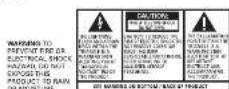
When using your telephone equipment, basic soap precisions should always be followed to reduce the raw of fire, electric shock and injury as persons, including the following: 1. Do not use this product near water, for example, near a both bar, oven book, kitchen sink or laundry bus, in a wet basement or near a semi-ning tool; 2. Word using a telephone rather than a coldless type during an electric storm. There may be a remote risk of electric shock from lightning. 3. Do not use the telephone to report a gas leak in the vicinity of the leak.
Introduction
Your telephone is designed to give you flexibility in use and high quality performance. To get the news, from your new telephone, we suggest that you take a few minutes right now to read through this instruction manual.
CAUTION: When using telephone equipment, there are basic safety instructions that should always be followed. Refer to the IMPORTANT SAFETY INSTRUCTIONS provided with this product and save them for future reference.
NOTE: This phone uses Touch-Tone dialing service only. For this telephone to function properly, you must use Touch-Tone service available through your local telephone company.
Before You Begin
Telephone Jack Requirements To use this phone, you need on RJ11C type modular telephone jack, which might look like the one pictured here, installed in your home. If you don't have a modular jack, call your local phone company to find out how it get one
Important Installation Information
- Never install telephone wiring during a lightning storm. - Never install telephone jacks in wet locations unless the jack is specifically designed for wet locations.
- Never touch non-insulated telephone were at terminals unless the telephone line has been disconnected or the network interface.
- Use colour when installing or modifying telephone lines - Temporarily disconnect any equipment connected to the phone such as boxes, other phones, or modems.
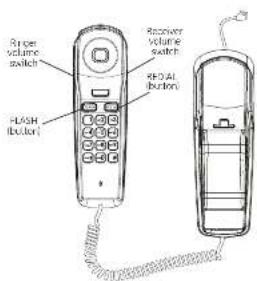
Handset Layout
Installing the Phone
Your telephone should no process on a level surface such as a desk or table too, or you can mount it on a wall. A desktop/well mounting padata is built into the hose of the phone.
-
Slide the RINGER volume switch (on the nonsell to the desired volume.
-
Set the receiver volume switch for the handset to the desire listening volume
-
Plug the telephone line cord into a mode or wall phone jack
- Store the extra cord in the grooves in the base Wall Mount Installation
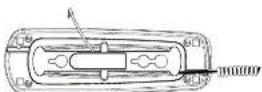
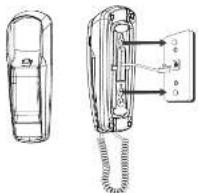
Your telephone may also be mounted on a wall plate hot included. NOTE: In desktop or wall mount mode, you may want to wrap the excess telephone line cord around the mounting bracket on the bottom of the base.
-
Plug the telephone line cord into a modular wall phone jack.
-
Slip the mounting holes on the base over the well pole has been firmly slide the one down into price (well plate not included)
Telephone Operation
Redial This unit redicts up to 32 digits. To automatically redia the last
-
Pick up the handset and wait for a collar tone.
-
Press the redcl button,
Press the flash button to activate custom calling services such as call waiting or call transfer. Custom calling services are provided by the phone company.
Receiver Volume
you may control the listening level with the volume switch on the bottom of the handset. It has 3 levels to mix, and high
Ringer Volume
You may control the finger volume level with the switch located below the redial button on the handset.
- ringer lone will be loud
- ringer tone will be low
- telephone will not run
Troubleshooting Tips
No cial rang - Press and release the book switch. Check the book switch. Date
It fully extend when the handset is Irish from the cradle? Phone doesn't ring.
- Make sure RINGER switch located on the handset is set to loud or low.
- Are you using too many phones on one line? The total REN of all phones on the same line should not be greater than the maximum REN for your calling area. See Equipment Approval Information.
Other party cannot hear you
- Make sure phone cord is securely plugged in - Make sure extension phones are on the hook at the same time you're using the phone. It is normal for the volume to crop when additional extension phones can be used at the same time.
Phone "knows" when nanose, is placed near the base and handset volume one is too high.
- This is normal feedback due to nonuse, volume level being set to maximum
General Product Care
To keep your telephone warning and looking good, follow these guidelines.
- Avoid putting the phone near heating appliances and devices that generate electrical noise for example, provors or
fluorescent lamps.
• Do not expose to direct sunlight or moisture
- Avoid dropping and other rough treatment to the phone - Clean white soft cloth
• 2017-10-25
This will damage the finish.
- Retain the original packaging in case you need to ship the phone at a later date.
Warranty Assistance
your sales receipt will be required in democratic proof of purchase in order to validate your warranty eligibility. You may want to attach either the original, or a photocopy, of your sales receipt to his market for future reference.
If this product was received as a gift, it is suggested you got down the date of gift receipt, as this information will be valuable should service be required during the warranty period. If the equipment is causing harm to the telehome network, the telephone company may require that you disconnect the equipment until the problem is resolved.
Purchase Date or Date Received as G/L
Name of State For instructions on how to obtain warranty service, you may call Cus
tomar Care or 1-877-272-4906 or you may visit our website www.realphones.com. If you prefer, you may write to us on Supreme Power USA LLC
PC Box 501045
Please do not send products to this address as it only adds delays in service and may result in lost or damaged product. This PO BOX is for written communication only.
If the equipment is causing harm to the telephone network, the telephone company may require that you disconnect the equipment until the problem is resolved.
Limited Warranty
What your limited warranty covers:
- Defects in materials or waste chain
For now long after your purchase:
- One year, from date of purchase. Please return your sales receipt, as that will not as your proof of purchase in order to validate warranty status.
What we will do:
• Provide you with a new or, at our option, a refurbished exchange
of it is sure of similar model. The exchange model is under warranty for the remainder of the original product's one-year warranty, at 90 days from the date the replacement product was shipped by us who shares in millions.
Our shipped to you, whichever is larger. How to get necessary:
- Call Customer Care on 1-877-722-4908. Please have your product with you and please have your model number and date code available when calling us. The mode number and date code can be found on the underside of the base unit.
If you are within your limited warranty period and it is determined that service is required:
- We will ask that you properly pack your product to avoid shipping damage. We recommend that you use the original canon and packing materials.
- We will ask you to include with your product the following: - Your name, return shipping address and daytime phone number, available at a brand or capital of your
- A legible copy of your sales receipt I please do not send the original sales receipt.
- Ship your product prepaid, to the address we provide. We suggest shipping your product via a traceable carrier, as we are not responsible for last, this direction or damaged shipments. You may want to write the date shipped, carrier and tracking number here.
- Upon receipt of your product, we will validate your product is under warranty and if determined your product is warranty eligible, we will ship to you a new or, at our option, a refurbished exchange unit of some or similar mode. This exchange unit will be shipped to you at no cost.
What your limited warranty does not cover
- Customer instruction pour owners - casual provides information regarding operating and install instructions. Additional
Information may be obtained by contacting the required
• Installation and setup service adjustments
• batteries
- damage from misuse, neglect, uncontrolled repair. - Products which have been modified or incorporated
- Products
- Products that have been serviced by an unauthorized service
- Products purchased or serviced outside the USA or Canada - Acts of nature, such as but not limited to, lightning damage. Limitation of Warranty:
- THIS LIMITED WARRANTY IS THE ONLY WARRANTY APPLICABLE TO THIS PRODUCT. ALL OTHER WARRANTIES, EXPRESS OR IMPLIED (INCLUDING ALL IMPLIED WARRANTIES OF MERCHANTABILITY OR FITNESS FOR A PARTICULAR PURPOSE) ARE HEREBY DISCLAIMED. NO VERBAL OR WRITTEN INFORMATION GIVEN BY SUPREME POWER USA LLC ITS AGENTS, EMPLOYEES, RETAIL DEALERS OR INDEPENDENT CONTRACTORS SHALL CREATE A GUARANTY OR IN ANY WAY INCREASE THE SCOPE OF THIS WARRANTY.
- REPAIR OR REPLACEMENT AS PROVIDED UNDER THE WARRANTY IS THE EXCLUSIVE REMEDY OF THE CONSUMER, SUPREME POWER USA LLC SHALL NOT BE LIABLE FOR INCIDENTAL OR CONSEQUENTIAL DAMAGES RESULTING FROM THE USE OF THIS PRODUCT OR ARISING OUT OF ANY BREACH OF ANY EXPRESS OR IMPLIED WARRANTY ON THIS PRODUCT. THIS DISCLAIMER OF WARRANTIES AND LIMITED WARRANTY ARE GOVERNIBLE BY THE LAWS OF THE STATE OF INDIANA EXCEPT TO THE EXTENT PROHIBITED BY APPLICABLE LAW, ANY IMPLIED WARRANTY OF MERCHANTABILITY OR FITNESS FOR A PARTICULAR PURPOSE ON THIS PRODUCT IS LIMITED TO THE
APPLICABLE WARRANTY PERIOD SET FORTH ABOVE.
some states do not allow the exclusion or limitation of incidental or consequential damages, or limitations on how long or implied warranty calls so the above limitations or exclusions may no apply to you.
This warranty gives you specific legal rights, and you also may have other rights that vary from scale to state. If you purchased your product outside the USA or Canada: This warranty does not apply. Contact your dealer for warranty formation.
Product Registration
- Please complete and mail the Product Registration on Card packed with your product or visit www.malphones.com to register your own receipt. Product waiting on your app, required for
your new product product is not only for reached or warranty coverage but does allow us to contact you should it be necessary.
- Equipment Approval Information
- Visit the RCA web site at www.roo4phones.com
- Interference Information
- Hearing Aid Compatibility (HAC)
- IMPORTANT SAFETY INSTRUCTIONS
- Introduction
- Before You Begin
- Important Installation Information
- Installing the Phone
- Telephone Operation
- Troubleshooting Tips
- General Product Care
- Warranty Assistance
- Limited Warranty
Brand : RCA
Model : 1103-1WTGA
Category : Telephone