
Kone Pure SEL - Mouse ROCCAT - Free user manual and instructions
Find the device manual for free Kone Pure SEL ROCCAT in PDF.


| Product Type | Wired Gaming Mouse |
| Brand | ROCCAT |
| Model | Kone Pure SEL |
| Weight | 80 g |
| Dimensions (L x W x H) | 119 mm x 70 mm x 39 mm |
| Connection Type | Wired USB 2.0 |
| Cable Length | 1.8 m |
| Sensor Type | Optical |
| DPI Range | Up to 4000 DPI |
| Button Count | 8 programmable buttons |
| Switch Lifespan | 50 million clicks |
| Polling Rate | 1000 Hz |
| Software | ROCCAT Swarm |
| Lighting | No lighting |
| Operating System | Windows 7 or later |
| Maintenance | Clean with a dry, soft cloth |
| Safety | Keep away from liquids and extreme temperatures |
| Reparability | Not user-serviceable; contact ROCCAT support |
Frequently Asked Questions - Kone Pure SEL ROCCAT
User questions about Kone Pure SEL ROCCAT
0 question about this device. Answer the ones you know or ask your own.
Ask a new question about this device
Download the instructions for your Mouse in PDF format for free! Find your manual Kone Pure SEL - ROCCAT and take your electronic device back in hand. On this page are published all the documents necessary for the use of your device. Kone Pure SEL by ROCCAT.
USER MANUAL Kone Pure SEL ROCCAT
DEFAULT
BUTTON ASSIGNMENT
[на фітинг ізектів]
STANDARD
1 = Click
□ = Many
□ 5.4000/2017
5 - 2018.4.2
4 = 证 F#N##S
5 = (E Backward)
6 = 50000
7 = Spread down
8 = 001/10
2. 10. 1
12. 2017-1035

WHAT'S
ROCCAT® SWARM?

Swarm provides next-level ROCCAT® product integration. It works a unified driver suite where you can keep tabs on all of your ROCCAT® devices in one place. Say goodbye to multiple tray icons - with Swarm you have a veritable gaming command HQ for every weapon in your arsenal.

FAN-FAVORITE
KONE SHAPE
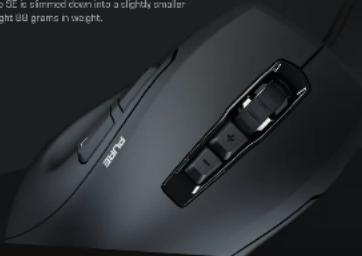
The Kane Pure SE represents the little brother in the Kane series. It retains the fan-favors Kane shape but is only 51% the size of its sibling. It features the same winning formula of comfortable streamlined ergonomics coupled with precision optics. The Kane Pure SE is slimmed down into a slightly smaller package and weighs a remarkably light 80 grams in weight.
natural_image
Close-up of a black audio mouse with a car slot and 200 grams weight indicator (no text or symbols on the mouse itself)ANLEITUNG
- Plug the USB connector on your RDCCAT®
- East your computer and command to the internet.
- Navigate to www.nocat.org/reoservarm and download the web server of Pharm.
- Start the software installation process and follow the on-screen instructions.
INSTRUCCIONES
![Kova[+] ROCCAT](/assets/img/1059240.jpg)
Brand : ROCCAT
Model : Kone Pure SEL
Category : Mouse