
MCR2433 - Lawn mower McGregor - Free user manual and instructions
Find the device manual for free MCR2433 McGregor in PDF.


| Product Type | Lawn Mower |
| Brand | McGregor |
| Model | MCR2433 |
| Power Source | Petrol (4-stroke engine) |
| Engine Displacement | 140 cc |
| Cutting Width | 46 cm (18 inches) |
| Cutting Height Adjustment | 5 positions (20-75 mm) |
| Grass Collection Bag Capacity | 60 liters |
| Dimensions (L x W x H) | 1400 x 500 x 900 mm |
| Weight | 25 kg |
| Fuel Type | Unleaded petrol |
| Oil Type | SAE 30 (4-stroke engine oil) |
| Starting System | Recoil start (pull cord) |
| Handle Type | Foldable, adjustable height |
| Wheel Size | Front: 8 inches, Rear: 10 inches |
| Safety Features | Blade brake, safety stop switch, handle operator presence control |
| Mulching Function | Yes (mulching plug included) |
| Side Discharge | Yes (chute included) |
| Maintenance | Sharpen blade annually, clean air filter every 25 hours, change oil every 50 hours |
| Spare Parts Available | Blade, air filter, spark plug, oil, wheel assembly |
| Repairability | User-serviceable parts, supported by McGregor service centers |
| Warranty | 2 years limited warranty |
| Noise Level | 96 dB(A) (operator ear protection recommended) |
| Vibration Level | 7.5 m/s² |
| Certification | CE, RoHS |
Frequently Asked Questions - MCR2433 McGregor
User questions about MCR2433 McGregor
0 question about this device. Answer the ones you know or ask your own.
Ask a new question about this device
Download the instructions for your Lawn mower in PDF format for free! Find your manual MCR2433 - McGregor and take your electronic device back in hand. On this page are published all the documents necessary for the use of your device. MCR2433 by McGregor.
USER MANUAL MCR2433 McGregor
natural_image
Green Megregor lawn mower with attached circuit board (no visible text or symbols)McGregor 24V
Electric Rotary Mower
7345696 (Model: MCR2433)
Important - Please read these instructions fully before starting assembly
These instructions contain important information that will help you get the best from your mower, ensuring it is assembled correctly and safely. If you need help or have damaged or missing parts, call the Customer Helpline on 0345 605 2063
AFTER SALES SUPPORT
0345 605 2063
Contents
Safety Information....3
Warning Symbols 3
General Safety....5
Work Area Safety 6
Electrical Safety 6
Personal Safety 7
Isolator Key Safety 11
Battery Safety 11
Charger Safety 13
Operating and Maintenance Safety 14
Maintenance and Storage Safety 17
Intended Purpose 17
In the Box 18
Parts 18
Assemble....19
Step 1 - Handle Assemble ...... 19
Step 2 - Grass Bag Assemble ...... 20
Step 3 - Fitting 21
Prepare 22
Check Battery Capacity 22
Battery Charging....22
Fitting the Battery 23
Setting the Cutting Heights.... 25
Operate 26
Step 1 - On/Off Operation....26
Step 2 - Grass Collection Bag Full Indicator 26
Step 3 - Indicator panel ...... 27
Maintenance....28
Blade Maintenance 28
Storing 29
Technical Data 30
Technical Date Table 30
Part List ...... 30
Recycling and disposal 31
Troubleshooting 32
General Troubleshooting 32
Getting Help 34
Customer Helpline 34
Guarantee 34

Safety Information
Important - Please read these instructions fully before starting assembly
Warnings Symbols
The following warning symbols appear throughout this manual and indicate the appropriate safety measures you should take when assembling and operating the mower.

Take extra care, beware of hazards.

Do not use the machine in the rain or leave it outdoors when it is raining.

Pay attention that bystanders are not injured by foreign objects or debris thrown out from the machine.

Keep bystanders a safe distance away from the machine.

Sharp blade. Beware of injury to toes or fingers.

Disconnect from the mains supply before any maintenance work.

Switch off and remove the isolator key before adjusting, cleaning or before leaving the product unattended for any period.

Warning! Beware of electric shocks.

Wait until all moving parts have stopped completely before touching them. The blade may continue to rotate after the machine is switched off, a rotating blade can cause injury.

Safety Information
Important - Please read these instructions fully before starting assembly
Warnings Symbols (continued)

Read instruction handbook before operating this machine.

The charger is for indoor use only.

Double insulation.

Fuse.

Waste electrical products should not be disposed of with household waste. Please recycle where facilities exist. Check your Local Authority or retailer for recycling advice.

Batteries contain Li-ion. Do not dispose of waste batteries as unsorted municipal waste.

Do not dispose of batteries in rivers or immerse in water.

Do not litter to fire.

Do not subject the battery to direct sunlight or leave in proximity of strong heat sources.

IMPORTANT! When using equipment, the following safety precautions must be followed to avoid injuries and damage.

Safety Information
Important - Please read these instructions fully before starting assembly
General Safety
- Read all operating instructions carefully and comply with them. It is important to understand these instructions and to acquaint yourself with the machine, its correct usage and all safety requirements.
- Keep this manual in a safe place so that the information is available at all times.
- If you give the equipment to any other person, give them these operating instructions as well.
- Never allow children or others who are not familiar with the operating instructions to use the lawn mower. Local regulations may stipulate the minimum age of the user of this type of machinery.
- This appliance is not intended for use by persons (including children) with reduced physical, sensory or mental capabilities, or lack of experience and knowledge, unless they have been given supervision or instruction concerning use of the appliance by a person responsible for their safety.
- Children should be supervised to ensure that they do not play with the appliance.
- We accept no liability for damage or accidents which result from non-compliance with these instructions.

Safety Information
Important - Please read these instructions fully before starting assembly
Work Area Safety
- Inspect the area where the machine is to be used and remove all objects which can be thrown by the machine. If objects are hidden while operating stop the motor and remove them.
- Do not operate the machine in explosive atmospheres, such as in the presence of flammable liquids, gases or dust. Power tools create sparks which may ignite the dust or fumes.
- Keep children and bystanders away while operating a power tool. Distractions can cause you to lose control.
Electrical Safety
- The plug must match the outlet. Never modify the plug in any way. Do not use any adapter plugs with earthed (grounded) power tools. Unmodified plugs and matching outlets will reduce the risk of electric shock.
- Avoid body contact with earthed or grounded surfaces, such as pipes, radiators, ranges and refrigerators. There is an increased risk of electric shock if your body is earthed or grounded.
- Do not expose power tools to rain or wet conditions. Water entering a power tool will increase the risk of electric shock.
- Do not abuse the cord of charge. Never use the cord for carrying, pulling or unplugging the power tool. Keep the cord away from heat, oil, sharp edges or moving parts. Damaged or entangled cords increase the risk of electric shock.
- Use a residual current device (RCD) protected supply. Use of an RCD reduces the risk of electric shock. The maximum operating current of the RCD must be less

Safety Information
Important - Please read these instructions fully before starting assembly
Electrical Safety (continued)
than 30mA.
- The voltage indicated on the rating plate must correspond to the voltage of the power source.
- Only use or replace power supply cables for this unit which correspond to the types indicated by the manufacturer. See the operating instructions for the order no. and types.
- Never touch the mains plug with wet hands.
- Do not run over, crush or pull the power supply cable or extension lead, otherwise it may be damaged. Protect the cable from heat, oil and sharp edges.
Personal Safety
• Always check the mower for signs of damage before each usage.
- Always disconnect the isolator key from the electrical supply before carrying out any inspection, servicing or maintenance work.
- Ensure that all the guards are securely fitted and in good working order.
- Check the grass collector bag at regular intervals for signs of wear and to ensure that it is always in perfect working order.
- Before each use, inspect the mower to check the cutting blade, fastening bolts and the entire cutting unit for any signs of wear or damage. To prevent imbalance or vibration, worn or damaged cutting blades and fastening bolts must always be replaced in full.
- Damaged parts on the mower must be replaced by
qualified personnel.
- Repair work on the electrical parts of the lawn mower may only be carried out by a qualified electrician.
- Follow the instructions to fit or remove the blade and wear protective gloves.
- The user remains responsible for any injury to third parties within the working area of the lawn mower whilst the lawnmower is being used.
- Only work in good daylight or appropriate and adequate artificial light.
- Never use the mower when you are tired.
- Never run the mower in enclosed or poorly ventilated rooms or if there are inflammable or explosive fluids, vapours or gases nearby.
- Switch off the motor and disconnect the isolator key before clearing blockages in the grass ejection area and before you inspect it if the mower has struck a foreign body.
- Check the site on which you intend to use the lawn mower and remove all objects that may be caught or thrown up by the mower. Foreign bodies must be removed before you start mowing. Keep an eye of the power cable and keep it away from the cutting blade at all times.
- Never lift the lawn mower when you start the motor.
- Before you lift the lawn mower to transport it, switch off the motor, disconnect the isolator key and wait until the blade has come to a complete standstill.
- When you start the motor, the lawn mower should not

Safety Information
Important - Please read these instructions fully before starting assembly
Personal Safety (continued)
be tilted unless the grass is particularly long. In this case only tilt it up as far as is really necessary and only raise the side that is furthest away from the user.
- Never reach towards rotating parts with your hands or feet. Always keep away from the discharge chute.
- Before you attach or empty the grass bag, switch off the motor and wait until the blade has come to a complete standstill.
- Make sure you keep your feet at a safe distance from the mower blade at all times! Do not stand near the grass ejection chute if the grass bag is not fitted.
- The safety distance from the moving blade produced by the push handle must be maintained at all times.
- If you use the mower on a small incline, mow across the slope (not in an up and down direction). Always be sure of your footing on slopes.
- Be particularly careful when changing direction with the mower whilst working on a slope.
- Do not use the lawn mower on gradients of over 15 degrees.
- Ensure that you have safe footing at all times whilst working with the mower.
- Always wear strong, anti-slip footwear and long trousers when using the mower. Never mow in bare feet or in open-toed sandals.
- When the mower is running ensure that no person or pet, particularly children and animals, is in the immediate vicinity of the lawn mower. Ensure that you keep everybody at least 10 meters away from the mower when it is working.

Safety Information
Important - Please read these instructions fully before starting assembly
Personal Safety (continued)
- Switch off the motor and disconnect theisolator key if the mower strikes a foreign body. Check the mower for signs of damage and carry out all necessary repair work before you start the mower again.
- If the lawn mower begins to vibrate abnormally, switch it off immediately, disconnect the isolator key immediately and check it carefully. Ensure that all the nuts, bolts and screws are tight and that the mower is in a safe condition for use.
- Do not leave the mower out in the rain. The lawn must not be wet or very damp.
- Be particularly careful when you change the direction of the mower or pull it towards you. Avoid pulling it towards you while the blade is moving.
- Switch off the mower if it has to be pushed over surfaces other than grass, and when moving the mower to and from the area you wish to mow.
- Carefully actuate the starter switch in accordance with the instructions. (See Operating Instructions)
- Do not switch the mower on and off frequently over a short period of time, and in particular do not play with the ON/OFF switch.
- Never lift or carry the mower whilst the motor is running.
- Switch off the motor and disconnect the isolator key whenever you leave the lawn mower.
- Keep the lawn mower in a dry place which is inaccessible to children at all times.

Safety Information
Important - Please read these instructions fully before starting assembly
Isolator Key Safety
- Remove the isolator key;
-Whenever you leave the machine,
-Before clearing a blockage,
-Before checking, cleaning or working on the machine,
-After striking a foreign object. Inspect the machine for damage and make repairs as necessary,
-If the machine starts to vibrate abnormally (and check immediately).
Battery Safety
- Ensure the switch is in the ‘off’ position and the Key removed before inserting the battery pack. Inserting the battery pack into a machine while the key is inserted could result in an accident.
- Keep the battery charger away from rain or Moisture. Water penetration inside the battery charger increases the risk of an electric shock. Store in a dry environment.
- Recharge only with the charger specified by the Manufacturer. A charger that is suitable for one type of battery pack may create a risk of fire when used with another battery pack.
- Do not charge other batteries with this charger. This is could cause fire or an explosion.
- Keep the battery charger clean. Contamination can Lead to danger of an electric shock.
- Before each use, check the battery charger, Cable and plug. If damage is detected, do not Use the battery charger. Never open the battery Charger yourself.
Have repairs performed only by A qualified technician and only using original spare Parts. Damaged battery chargers, cables and plugs Increase the risk of an electric shock.
- Do not operate the battery charger on easily Inflammable surfaces (e. G. Paper, textiles, etc.) Or Surroundings. The heating of the battery charger during the charging process could pose a fire hazard.
- When the battery pack is not in use, keep it away From other metal objects such as paper clips, Coins, keys, nails, screws or other small metal Objects that could create a connection from one terminal to another. Shorting the battery terminals Together can cause burns or a fire.
- Under abusive conditions, liquid may be ejected From the battery. Avoid any contact with this liquid. If contact accidentally occurs, flush with water. If Liquid contacts eyes, also seek medical help. Liquid Ejected from the battery may cause irritations or burns.
- Do not open the battery. Danger of short-circuiting.
- Protect the battery from heat, continuous intense Sunlight, fire or other heat source. This may cause an Increase danger of explosion.
- Do not short-circuit the battery. There is danger of Explosion.
- In case of damage or improper use of the battery, Vapours may be emitted. Ensure the area is well ventilated and seek medical help in case of Complaints. The vapours can irritate the respiratory System.
- Store the battery only within a temperature range Between 0^ and 25^ .

Safety Information
Important - Please read these instructions fully before starting assembly
Battery Safety (continued)
- Occasionally clean the venting slots of the battery using a soft, clean and dry brush.
Charger Safety
- Before using the charger, read all the instructions and cautionary markings on the charger and battery pack.
- Do not attempt to charge battery packs other than supplied. The charger and battery pack supplied with it are specifically designed to work together.
- Ensure the battery pack is charged indoors only in a dry cool and well ventilated environment.
- Do not charge non-rechargeable batteries.
- Protect the charger against moisture and wet conditions. There is a danger of electric shock.
- Do not place any object on top of the charger as it could cause overheating. Do not place the charger near any heat source.
- Do not use an extension cord unless it is absolutely necessary. The use of an improper extension cord could cause the risk of fire, electric shock or electrocution.
- Do not use the charger if it has been subjected to a heavy knock, dropped or otherwise damaged in any way. Have the charger checked and repaired by an authorised service centre.
- Do not disassemble the charger. Incorrect re assembly may result in the risk of fire, electric shock or electrocution.
- Disconnect the charger from the power supply before attempting to clean it to reduce the risk of an electric

Safety Information
Important - Please read these instructions fully before starting assembly
Charger Safety (continued)
shock. Removing the battery pack alone does not reduce the risk.
Operating and Maintenance Safety
- Read the instructions carefully. Be familiar with the controls and the proper use of the machine.
- Never allow people unfamiliar with these instructions or children to use the product. Local regulations can restrict the age of the operator.
- Never use the lawnmower while people, especially children, or pets are nearby. Keep in mind that the operator or user is responsible for accidents or hazards occurring to other people or their property.
- While operating the lawnmower always wear substantial footwear and long trousers. Do not operate the machine when barefoot or wearing open sandals. Avoid wearing clothing that is loose fitting or that has hanging cords or ties.
- Thoroughly inspect the area where the lawnmower is to be used and remove all objects which can be thrown by the machine.
- Before using, always visually inspect to see that the blade, blade bolt and the blade assembly are not worn or damaged. Replace worn or damaged components in sets to preserve balance. Replace damaged or unreadable labels.
- Before use check the battery pack for signs of damage or aging. If the battery becomes damaged during use, remove the isolator key from the supply immediately.

Safety Information
Important - Please read these instructions fully before starting assembly
Operating and Maintenance Safety (continued)
- Never operate the machine with defective guards or shields, or without safety in place.
- Do not put hands or feet near or under rotating parts. Keep clear of the discharge opening at all times.
- Before use check the controls and correct operation of the product.
- Before using the product or after any impact, check for signs of wear or damage and repair as necessary.
• Always disconnect the product from the power supply (i.e. remove the plug from the power supply or the battery pack)
– Whenever leaving the product unattended;
– Before clearing a blockage;
– Before checking, cleaning or working on the product
– After striking a foreign object;
- Whenever the product starts vibrating abnormally.
• Always ensure that the air vents are kept clear of debris.
- Never use replacement parts or accessories not provided or compatible.
- Warning! The cutting blade may continue to move after the product is switched off.
• Always be sure of your footing on slopes.
- Walk, never run.
- Mow across the face of slopes, never up and down.
- Exercise extreme caution when changing direction on slopes.
- Do not mow excessively steep slopes.

Safety Information
Important - Please read these instructions fully before starting assembly
Operating and Maintenance Safety (continued)
- Use extreme caution when reversing or pulling the machine towards you.
- Stop the blade(s) if the machine has to be tilted for transportation when crossing surfaces other than grass, and when transporting the machine to and from the area to be used.
- Do not tilt the machine when switching on the motor, except if the machine has to be tilted for starting. In this case, do not tilt it more than absolutely necessary and lift only the part, which is away from the operator.
- Do not start the machine when standing in front of the discharge opening.
- Do not transport the machine while the cutting blade is running. Stop the machine, and remove the key/battery pack from the machine. Make sure that all moving parts have come to a complete stop.
- WARNING! Familiarize yourself with the use of this lawnmower by means of this instruction manual. This will help to prevent risks and hazards.
• Always be alert when using the machine, so that you can recognize and handle risks early. Fast intervention can prevent serious injury and damage to property. - Switch off and disconnect from the power supply if there is any malfunction. Have the machine checked by a qualified specialist and repaired, if necessary before you put it into operation again.

Safety Information
Important - Please read these instructions fully before starting assembly
Maintenance and Storage Safety
- Keep all nuts, bolts and screws tight to be sure the machine is in safe working condition.
- Check the grass collector frequently for wear or deterioration.
- Be careful during adjustment of the machine to prevent entrapment of the fingers between moving blades and fixed parts of the machine.
• Always allow the machine to cool down before storing. - When servicing the blades, be aware that, even though the power source is switched off, the blades can still be moved.
- Replace worn or damaged parts for safety.
Intended Purpose
This lawnmower is designed for domestic use only:
- This electric lawnmower is intended for mowing lawns in domestic and hobby gardens.
- This product is not to be used in wet weather conditions and may not be used to mow wet or unusually high grass, e. g. pasture grass or for shredding leaves.
- This product is intended for private domestic use only, not for any commercial trade use. It must not be used for any purposes other than those described. Any use of the machine that deviates from its intended use and is not included in these.
In the Box
Parts
1 Lock-off safety button
2 Switch levers
3 Switch box
4 Upper handle bar
5 Wing knob
6 Middle handle bar
7 Grass bag top cover
8 Lower handle bar
9 Grass collection bag
10 Cutting height adjuster
11 Grass bag handle
12 Safety guard
13 Carrying handle
14 Battery compartment cover
15a Front wheels
15b Rear wheels
16 Deck
17 Battery
18 Charger
19 Battery charger mains plug
20 Isolator Key

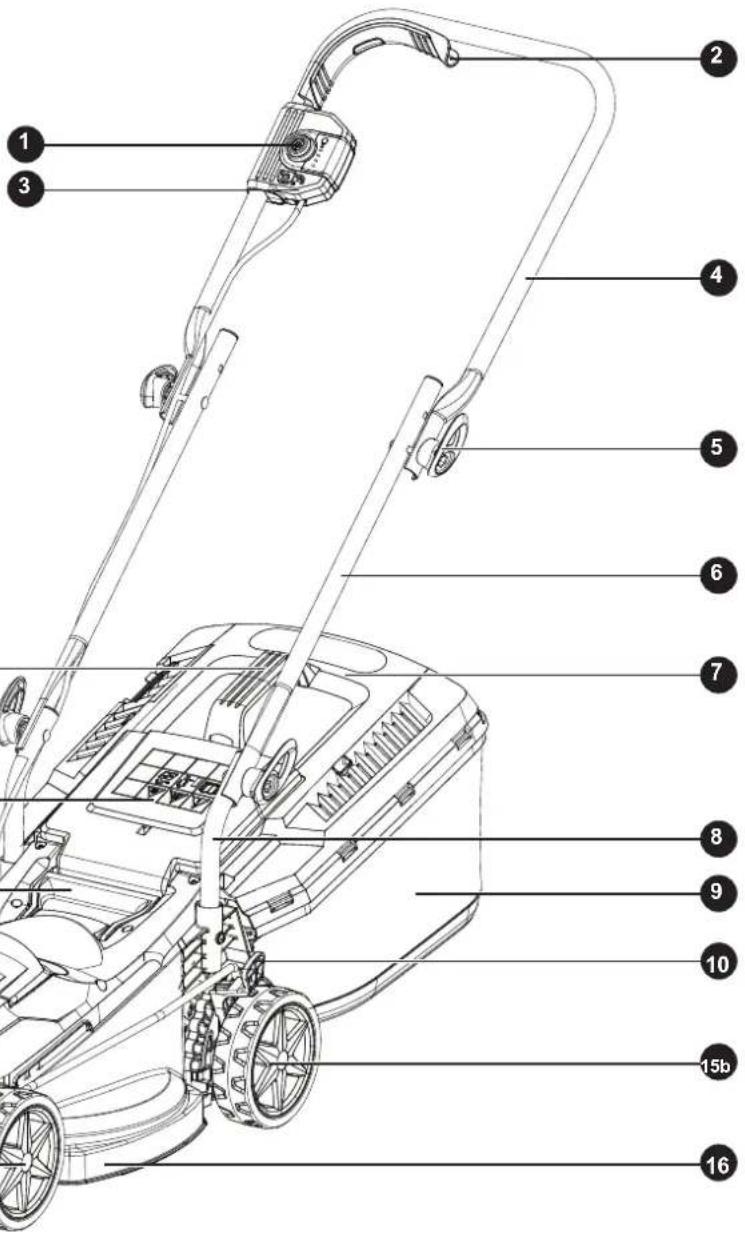
11
12
13
20
14
15a
Assemble
Step 1 - Handle Assembly

natural_image
Technical line drawing of a tractor's front view showing structural components and motion arrows (no text or symbols)- Insert the Lower Handle Bar into the slot on the mower deck. Fasten in position with the 2 screws provided.
To tighten - turn clockwise or to loosen- turn anticlockwise, before folding them.

natural_image
Diagram of a mechanical device with multiple curved arms and adjustment knobs, showing rotational motion (no text or symbols)- Attach the Middle handle bar to the lower handle bar using bolts and wingknobs.
Assemble
Step 2 - Grass Bag Assemble
natural_image
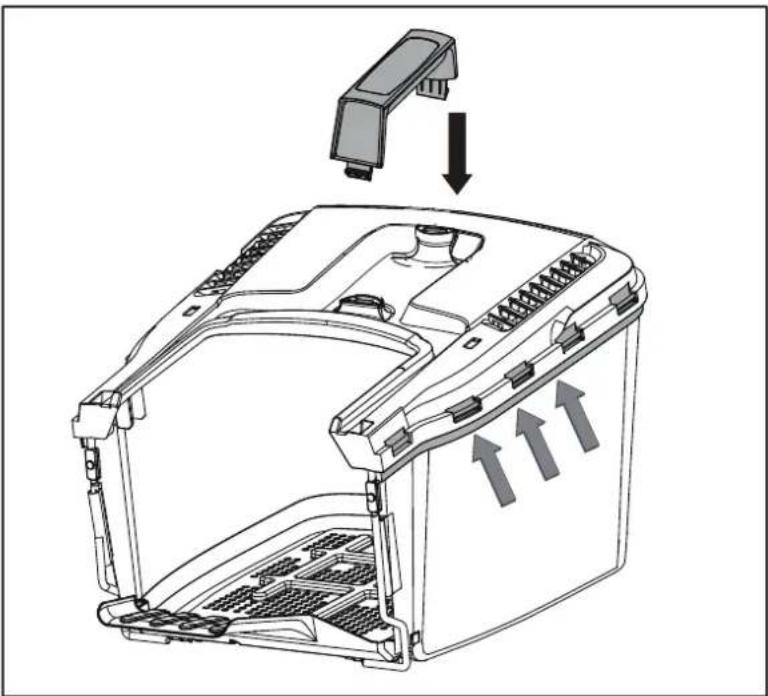
Diagram of a device interior showing internal components and directional arrows indicating flow or movement (no text or symbols present)- Insert the collector handle into the grass bag, Clip the plastic retainers onto the metal frame.
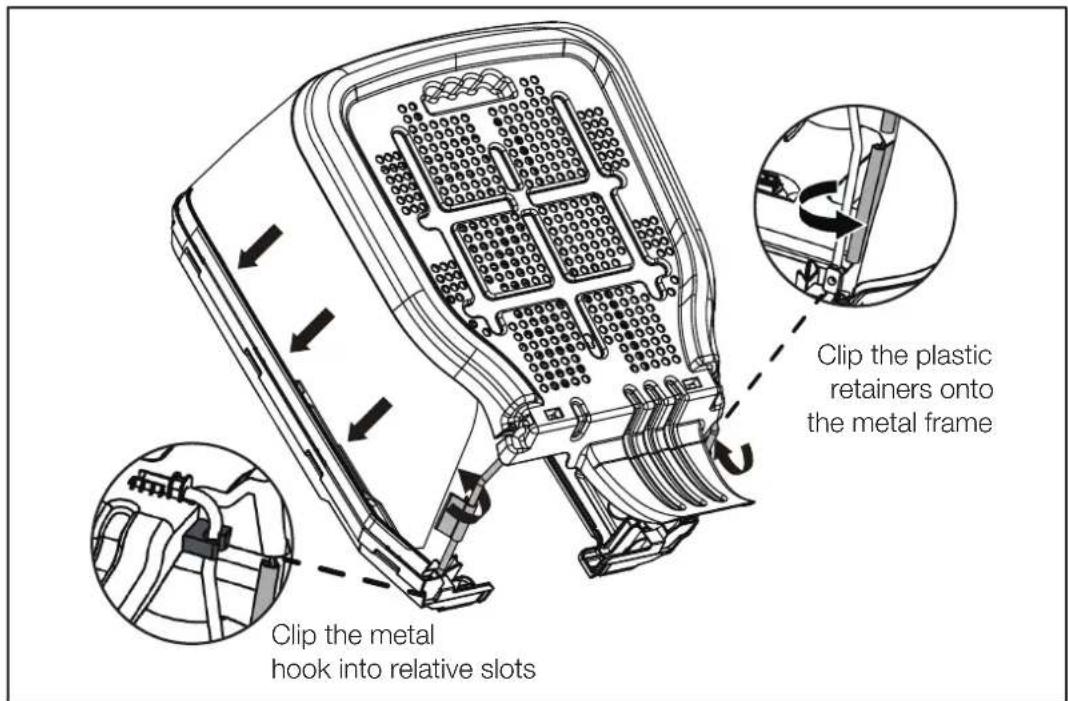
- Clip the plastic retainers onto the metal frame Ensure the side clamping sleeves are properly fixed on the frame.
Assemble
Step 3 - Fitting

natural_image
Technical illustration of a robotic arm lifting a tool into a toolbox (no text or symbols present)- Life the safety guard, then fit the grass bag onto the rear of the Mower, then release the safety guard. Ensure the safety guard fits firmly onto the grass bag.
Prepare
Check Battery Capacity
Push the power indicator to show remaining battery capacity. The battery is equipped with a charge-level indicator panel which indicates its' charge condition. This charge-level indicator panel consists of 4 LEDs on the battery. Press and hold the charge indicator button on the battery to actuate the charge level indicator. The charge level indicator LEDs go out after releasing the button. The battery's charge level can be checked either when the battery is fitted on the machine or removed from the machine.
| LED indicators on battery Battery Capacity | |
| Continuous lighting of 4 LEDs (inc 2 green) Fully charged | |
| Continuous lighting of 3 LEDs (inc 1 green) ≥ 50% | |
| Continuous lighting of 2 LEDs (orange & red) ≥ 25% | |
| Continuous lighting of 1 LED (red only) ≤ 25%. Recharge required. | |
Battery Charging
natural_image
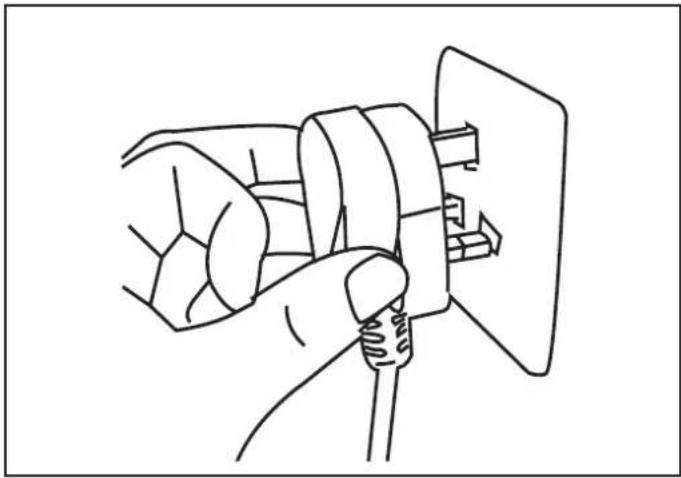
Line drawing of a hand holding a coiled cable or wire, with no visible text or symbols- Plug the charger into an appropriate AC power outlet.

natural_image
Line drawing of a device with an arrow indicating transformation or assembly (no text or symbols present)- Mount the battery pack onto the charge by sliding into the guide rails.
Battery Charging (continued)
The indicator lights on the charger show the charger status:
| Symbol Indicator lights Status | ||||
 | 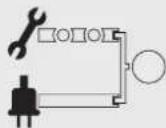 | red, flashing | charging paused, see instructions below. | |
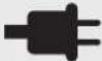 | red, continuous | connected to power supply | ||
 | 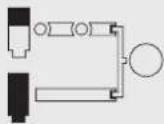 | green, flashing | charging | |
 | green, continuous | fully charged | ||
The intelligent charger measures the charge level of the battery and charges the battery accordingly with the required current and voltage, based on battery temperature and voltage. This ensure maximum battery life, charge the battery fully before storage.
A flashing red LED light on the charger indicates that the battery temperature is not within the charging temperature range of -5^-50^ or the charging current is too high. As soon as the permitted temperature and the charging current ranges are reached, the battery charger will automatically switch to charging.
After continuous or repeated charging cycles without interruption, the charger may warm up. This is normal and does not indicate a technical defect of the battery charger.
Rapidly flashing green LED's indicates that the battery voltage is low, the battery will receive an extended charge cycle approximately 30 minutes longer. This does not indicate a defect with the battery.
Fitting the Battery

natural_image
Technical line drawing of a car engine compartment with open hood and internal components, showing no text or symbols- To remove the battery, stop the lawnmower, lift the battery cover and remove the isolator key. Active the release latch on the battery and slide the battery out from the chamber.
- Lift the battery cover on the lawnmower deck, slide the battery along the guide rails ensuring that it locks into position.
Prepare
Fitting the Battery (continued)

natural_image
Technical line drawing of a car engine compartment with an open hood and downward arrow indicating motion (no text or symbols)- Insert the isolator key.
Prepare
Setting the Cutting Heights

natural_image
Technical line drawing of a mechanical component with labeled parts (no readable text or symbols)When cutting longer grass always raise the cutting height and cut the grass in 2 or more passes by lowering the cutting height gradually at each pass, never cutting the grass by more than half its height.
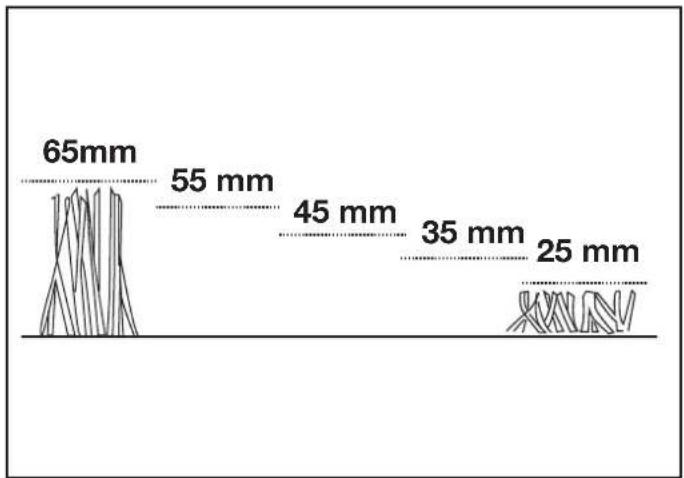
line
| Dimension | Value | | --------- | ----- | | Top Left | 65mm | | Middle | 55 mm | | Bottom | 45 mm | | Right | 35 mm | | Bottom Right | 25 mm || Cutting position Cutting height | |
| 1 25mm | |
| 2 35mm | |
| 3 45mm | |
| 4 55mm | |
| 5 65mm | |
Operate
Step 1 - On/Off Operation
natural_image
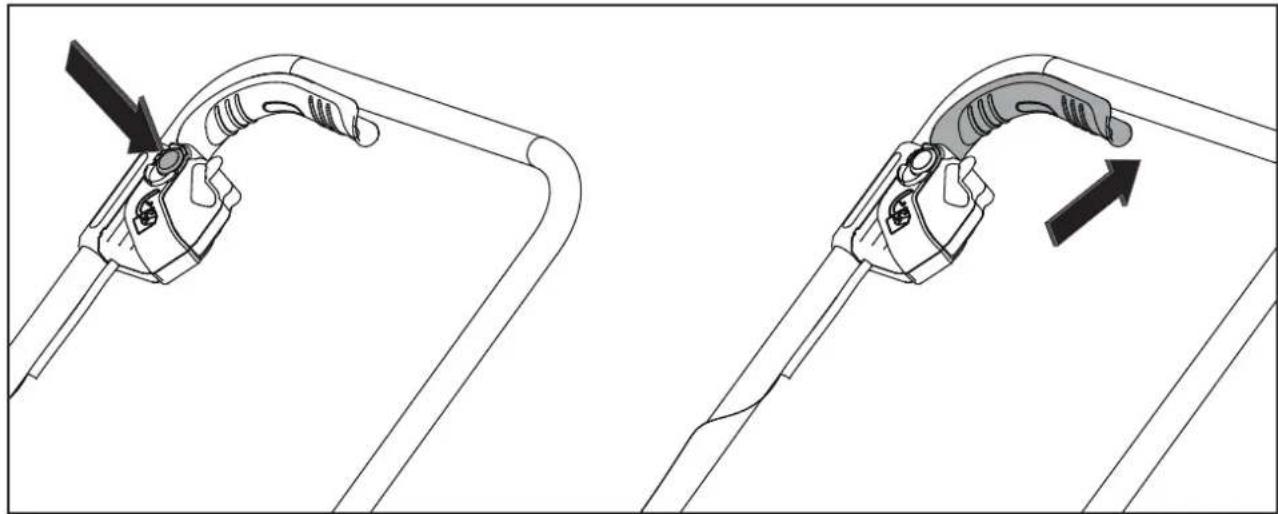
Diagram showing two mechanical clamping or bracketing steps with an arrow indicating direction (no text or symbols present)- To switch on, press the safety lock-off button on the handle, then activate the start/stop switch lever. Release the lock-off button.
• To switch off, release the start/stop switch lever. - Warning! After switching off the equipment, the blade may continue to turn for several seconds. Do not touch the moving blade. There is a risk of serious injury.
Step 2 - Grass Collector Bag Full Indicator

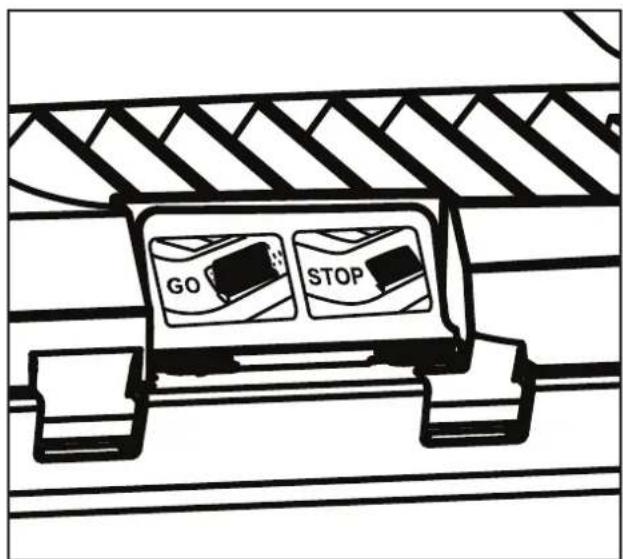
- When this flap remains open as you work, it means that the grass collector is not full (air flowing freely through the grass collector).
- When this flap remains closed it means that the grass collector is full and needs to be emptied (no airflow through the grass collector).
Step 3 - Indicator panel
Battery indicator
flowchart
graph LR
    A[" "] --> B[" "]
    B --> C[" "]
    C --> D[" "]
    D --> E[" "]
    E --> F[" "]
    style A fill:#fff,stroke:#000
    style B fill:#fff,stroke:#000
    style C fill:#fff,stroke:#000
    style D fill:#fff,stroke:#000
    style E fill:#000,stroke:#000
    style F fill:#000,stroke:#000
Battery indicator
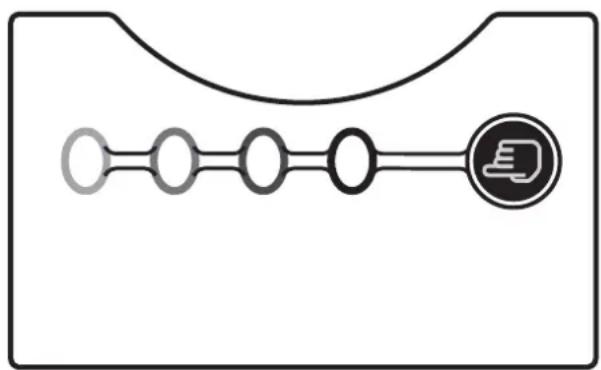
- Battery indicator on the switch box can be used to indicate the battery status.
- Push the press button to check on the battery status, 4 lights indicate a fully battery, 1 light indicates the battery need to be charged.
| LED indicators on Panel Battery Capacity | |
| Continuous lighting of 4 LEDs (inc 2 green) Fully charged | |
| Continuous lighting of 3 LEDs (inc 1 green) ≥ 50% | |
| Continuous lighting of 2 LEDs (orange & red) ≥ 25% | |
| Continuous lighting of 1 LED (red only) ≤ 25% Recharge required |
natural_image
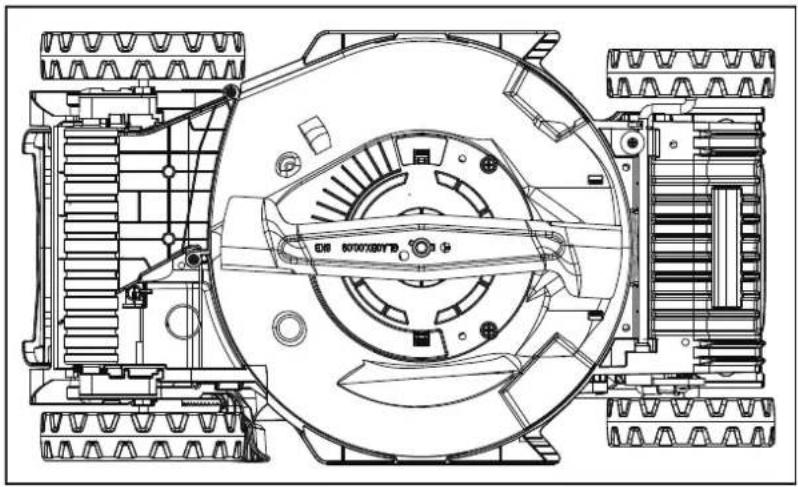
Technical line drawing of a mechanical assembly with gears and a central hub (no text or symbols)If the blade is blunt, it can be sharpened in a specialised workshop. If the blade is damaged or showing signs of imbalance, it must be replaced.
Carry out the following steps to change the blade:
- Turn the mower over and rest it carefully on its side.
- Use safety gloves and hold the blade firmly. Turn the blade bolt anticlockwise to remove the blade.
- Install the new blade in the reverse order. Ensure that the blade is positioned correctly and the screw tightened firmly. The blade's wings should be angled upwards (towards the mower).
- Tighten the fastening bolt. The tightening torque should be approx. 25 Nm.

IMPORTANT! Always wear safety gloves when engaging in any maintenance work.
Only replace the blade with a suitable replacement blade as this will ensure top performance and safety under all conditions.
Maintenance
Storing

natural_image
Line drawing of a lawn mower with extended blades and mounting bracket (no text or symbols)- The handles can be folded for easy storage. Make sure the lawnmower is switched off and the isolator key removed.
- Loosen (turn anti-clockwise) the two wing knobs on the upper handle assembly to allow for folding.
- Unfold the quick release levers on the lower handle section and turn anti-clockwise to loosen.
- Ensure the power cable is not caught between the folding sections.
- Switch the product off and remove the battery from the product.
- Protect the product from any heavy impact or strong vibrations which may occur during transportation in vehicles.
- Secure the product to prevent it from slipping or falling over.
- Transport the battery in a sealed dry plastic bag to prevent any contamination to the contacts and to prevent any electrical short circuits.
Technical Data
Technical Data Table
| Model MCR2433 | |
| Voltage 24V | --- |
| No load speed 3200/min | |
| Cutting width 33cm | |
| Height of cut 25/35/45/55/65mm | |
| Net weight 8.2kg | |
| Grass collector capacity 33L |
| Charger | |
| Model no. 24LFC12 | |
| Charger input 220-240V~50-60Hz 110W | |
| Charger output 24V 4A | --- |
| Charging Period (battery fully discharged) 60min | |
| Permitted charging temperature range (for charger) | -5°C~50°C |
| Weight of charger 0.6kg | |
| Insulation protection of Charger | □ |
| Battery pack | |
| Battery model 24LB4005 | |
| Battery type Lithium-Ion | |
| Rated Voltage of battery | 24V --- |
| Capacity of battery | 4.0Ah |
Part List
| Part number Accessories | |
| 211002109 | Blade |
| 211002134 | Battery |
| 211002121 | Charger |
| 211034113 | Isolator Key |
| 211034111 | Grass Collection Bag |
| 111228107 | Wing knobs |
Technical Data
Recycling and disposal
- Recycle unwanted materials instead of disposing of them as waste. All tools, hoses and packaging should be sorted, taken to the local recycling centre and disposed of in an environmentally safe way.
- Recycle rather than dispose of unwanted material in landfill whenever possible. The machine must be delivered in rigid packaging to avoid damage during transportation. The packaging and the machine itself are manufactured from recyclable materials and should be disposed of accordingly.
- Only dispose of electrical/electronic/battery terms in separate collection schemes, which cater for the recovery and recycling of materials contained within. Your cooperation is vital to ensure the success of these schemes and for the protection of the environment.
Recycle packaging where facilities exist.
- This symbol is known as the Crossed out Wheelie Bin Symbol. When this symbol is marked on a product or battery, it means that it should not be disposed of with your general household waste. Some chemicals contained within electrical/electronic products or batteries can be harmful to health.
Li-Ion batteries:
- Do not dispose of with household waste.
- Dispose of safely according to local legal requirements.
- Due to a program of continuous product improvement features and instructions are liable to change without notice.
Troubleshooting
General Troubleshooting

WARNING! Only perform the steps described within these instructions! All further inspection, maintenance and repair work must be performed by an qualified specialist.
Gloves and appropriate protective clothing must be worn when performing these instructions. When inspecting the blade always remove the battery from the mower.
| Fault Possible Cause Solution | ||
| Mower fails to operate Possible | clogging Check underneath the | mower and clear as necessary (always wear gardening gloves) |
| Battery not fully charged Charge | battery | |
| Battery not inserted (properly) | Ensure battery is correctly inserted | |
| Grass too long Increase height | of cut and tilt garden product to reduce starting load | |
| Battery too hot/cold Allow to cool/warm | ||
| Isolator key not inserted correctly/fully | Fit key correctly | |
| There is a short delay in the motor starting after engaging the On/Off switch | This is normal. Hold On/Off switch for 1–3secs to start motor. | |
| Motor starts and stops immediately | Battery not fully charged Charge | battery |
| Isolator key not inserted correctly/fully | Fit correctly | |
| Battery not inserted (properly) | Ensure battery is correctly inserted | |
| Battery too hot/cold Allow to cool/warm Increase height of cut | ||
| Garden product functions intermittently | Motor protector has activated | Allow motor to cool and increase height of cut |
| Lawnmower leaves ragged cut | Height of cut too low Increase | height of cut |
| Cutting blade blunt Replace the blade | ||
| Poor cutting or motor labours | Possible clogging Check under | eath the mower and clear out as necessary (always thick gardening gloves) |
| Blade fitted upside down | Refit blade correctly | |
General Troubleshooting (continued)
| Fault Possible Cause Solution | ||
| Area of cut (battery duration) not large enough | Height of cut too low Increase | height of cut and walk slower |
| Grass too high Increase height | of cut and walk slower | |
| Grass wet or damp Wait until grass | grass is dry and walk slower | |
| Grass is dense Increase height | of cut, walk slower and cut more frequently | |
| Cutting blade not rotating while garden product switched on | Cutting blade obstructed Switch | h off garden productClear obstruction (always wear gardening gloves) |
| Blade nut/bolt loose Tighten blade | ade nut/bolt (17 Nm) | |
| Excessive vibrations/noise Blade | de nut/bolt loose Tighten blade | nut/bolt (17 Nm) |
| Cutting blade damaged Replace the blade | ||
| No charging procedure possible | Battery contacts contaminated | Clean the battery contacts (e.g. by inserting and removing the battery several times) or replace the battery |
| The battery is defective, due to a disconnection in the battery (individual cells) | Replace the battery | |
| The charge control LED do not light up after inserting the mains plug into the socket | Mains plug of battery charger not plugged in (properly) | Insert mains plug (fully) into the socket outlet |
| Socket outlet, mains cable or battery charger defective | Check the mains voltage and if necessary, have the battery charger checked by an authorized customer service station | |
| The Green LED flashing rapidly on the charger | Battery in a low voltage status and needs a recovery charge | Leave the battery charging for an extra 30mins, the battery will awaken and the charger will complete charging |
| No Charging possible flashing red LED | Charging paused - Battery too hot or too cold | Allow battery to rest at room temperature until charging can resume |
Getting Help
Customer Helpline
Our dedicated UK based customer helpline can assist you with assembly, parts queries and technical support.
Our experts are here to get you back enjoying your garden in no time.
Calling our service does not affect your statutory rights.
After sales helpline number: 0345 605 2063
Guarantee
Dear Customer,
In the unlikely event that your device develops a fault, please contact our Customer service department on the telephone number shown below.
- These guarantee terms cover additional guarantee rights and do not affect your statutory warranty rights. Claims must be accompanied by Proof of Purchase. This must be in the form of a Sales receipt or Bank statement and must show that the product has been purchased within 2 years prior to the claim, from the retailer that it was originally sold to.
- Our guarantee covers problems caused by material or manufacturing defects, and will result in the repair of these defects or replacement of the device with a like for like or similar article. Please note that our devices have not been designed for use in commercial, trade or industrial applications. Consequently, the guarantee is invalidated if the equipment is used in commercial, trade or industrial applications or for other equivalent activities.
- The following are also excluded from our guarantee :
A. Faults due to accidents, customer misuse or unauthorized repairs
B. Failure due to lack of routine maintenance.
C. Failure as a result of not using the equipment in accordance with the manual and safety instructions
D. Accidental damage or wear to any cables or the blade.
E. Accidental damage to the charger or any batteries supplied.
-
The guarantee is valid for a period of 2 years starting from the purchase date of the device. Guarantee claims should be submitted before the end of the guarantee period within two weeks of the defect being noticed. No guarantee claims will be accepted after the end of the guarantee period. The original guarantee period remains applicable to the device even if repairs are carried out or parts are replaced. In such cases, the work performed or parts fitted will not result in an extension of the guarantee period, and no new guarantee will become active for the work performed or parts fitted. This also applies when an on-site Service is used.
-
Please keep your sales receipt in a safe place.


- Contents
- Safety Information....3
- In the Box 18
- Assemble....19
- Prepare 22
- Operate 26
- Maintenance....28
- Technical Data 30
- Troubleshooting 32
- Getting Help 34
- Safety Information
- Important - Please read these instructions fully before starting assembly
- General Safety
- Work Area Safety
- Electrical Safety
- Electrical Safety (continued)
- than 30mA.
- Personal Safety
- Personal Safety (continued)
- Isolator Key Safety
- Battery Safety
- Battery Safety (continued)
- Charger Safety
- Charger Safety (continued)
- Operating and Maintenance Safety
- Operating and Maintenance Safety (continued)
- Maintenance and Storage Safety
- Intended Purpose
- In the Box
- Parts
- Assemble
- Step 1 - Handle Assembly
- Step 2 - Grass Bag Assemble
- Step 3 - Fitting
- Prepare
- Check Battery Capacity
- Battery Charging
- Battery Charging (continued)
- Fitting the Battery
- Fitting the Battery (continued)
- Setting the Cutting Heights
- Operate
- Step 1 - On/Off Operation
- Step 2 - Grass Collector Bag Full Indicator
- Step 3 - Indicator panel
- Battery indicator
- Maintenance
- Storing
- Technical Data
- Recycling and disposal
- Recycle packaging where facilities exist.
- Li-Ion batteries:
- Troubleshooting
- General Troubleshooting
- General Troubleshooting (continued)
- Getting Help
- Customer Helpline
- Guarantee
Brand : McGregor
Model : MCR2433
Category : Lawn mower