C-035 - Webcam Kunft - Free user manual and instructions
Find the device manual for free C-035 Kunft in PDF.


| Product Type | Webcam |
| Brand | Kunft |
| Model | C-035 |
| Dimensions (approx.) | 8 cm x 5 cm x 5 cm |
| Weight (approx.) | 100 g |
| Power Supply | USB powered |
| Connection Type | USB |
| Maximum Video Resolution | 720p (assumed) |
| Lens | Fixed focus, built-in lens |
| Compatibility | Windows, Mac OS |
| Installation | Plug and play, driver installation may be required |
| Cleaning Instructions | Unplug, clean with soft dry cloth, do not use cleaning products |
| Safety Precautions | Do not use in moist environments, avoid water exposure, unplug when not in use |
| Moisture Protection | Do not expose to water or moisture (risk of fire/electric shock) |
| Intended Use | Household use only, not for commercial |
| Warranty | 2 years against manufacturing defects (from date of purchase) |
| Spare Parts and Repairability | Repairs only by qualified technicians; unauthorized repair voids warranty |
| Environmental Disposal | Recyclable material; follow local regulations |
Frequently Asked Questions - C-035 Kunft
User questions about C-035 Kunft
0 question about this device. Answer the ones you know or ask your own.
Ask a new question about this device
Download the instructions for your Webcam in PDF format for free! Find your manual C-035 - Kunft and take your electronic device back in hand. On this page are published all the documents necessary for the use of your device. C-035 by Kunft.
USER MANUAL C-035 Kunft
INSTRUCTIONS' MANUAL
MANUAL DE INSTRUÇÕES

natural_image
Close-up of a KUNFT digital camera with visible lens and control knob (no text or symbols on body)webcam
C-035
Dear client,
We thank you for purchasing this product.
This appliance was submitted to several laboratorial tests, which certify its quality. To simplify the use of this appliance, this instruction manual has been provided. The instructions must ensure a quick and safe use.
Please read carefully the instructions and safety measures described in this manual.
We wish our clients great satisfaction in using their new appliance.
INDEX
- SAFETY INSTRUCTIONS ....4
1.1. Power Cord and Other Cables .....5
1.2. Moisture and Water ....5
1.3. Cleaning 5
1.4 General Precautions ....5
-
OPERATING INSTRUCTIONS ......6
-
AFTERMARKET 11
-
ENVIRONMENT CONSERVATION ...... 12

area
| Position | Value | |---|---| | Top Peak | 2 | | Bottom Peak | 3 |1. SAFETY INSTRUCTIONS
Important Warnings
Before using your appliance, read carefully this instruction manual and keep it in a safe place, as you may need it for future consultations.
Before you start your appliance, and to ensure a correct use, do not use it if:
It has fallen on the ground;
You notice any evidence of damage;
Any anomaly occurs during its operation;
To avoid hazards and deterioration of your appliance by an incorrect use, it is advisable to read the instructions carefully and attentively.
Your appliance must not be used to other ends than the ones foreseen in the instructions manual. Your safety is only guaranteed in a household use and not for commercial use. The incorrect use will not be covered and automatically cancels the right to warranty.
Assistance
Be sure that, in case of malfunction, you take your appliance to a qualified technician for assistance.
DO NOT ALLOW CHILDREN TO USE ELECTRIC APPLIANCES WITHOUT SUPERVISION.
DO NOT ALLOW CHILDREN OR ADULTS WITH REDUCED PHYSICAL, SENSORIAL OR MENTAL CAPACITIES, OR PEOPLE WITHOUT EXPERIENCE/KNOWLEDGE, TO USE ELECTRICAL APPLIANCES WITHOUT SUPERVISION.
1.1. Power Cord and Other Cables
Unplug your appliance whenever you are not using it.
Do not roll nor pull the cable to unplug the appliance. Keep the power cord away from hot surfaces.
Never use this appliance if it has a damaged cord or plug, nor if it is not working correctly.
If the power cord is damaged, do not use your appliance, take it to an authorized technical assistance to be replaced.
1.2. Moisture and Water
Do not use your appliance in moist environments. Do not let your appliance subject to get wet in any way, since it may be dangerous. TO AVOID FIRE OR ELECTRIC HAZARD DO NOT EXPOSE THE APPLIANCE TO WATER NOR MOISTURE. Do not put your appliance under water (for example, to wash it).
1.3. Cleaning
Unplug the appliance before you clean it. Later, clean it with a soft and dry cloth. Do not use cleaning products.
1.4 General Precautions
- Do not touch the camera lens with your fingers or sharp objects.
- Avoid using the camera in environments with excessive dust
2. OPERATING INSTRUCTIONS
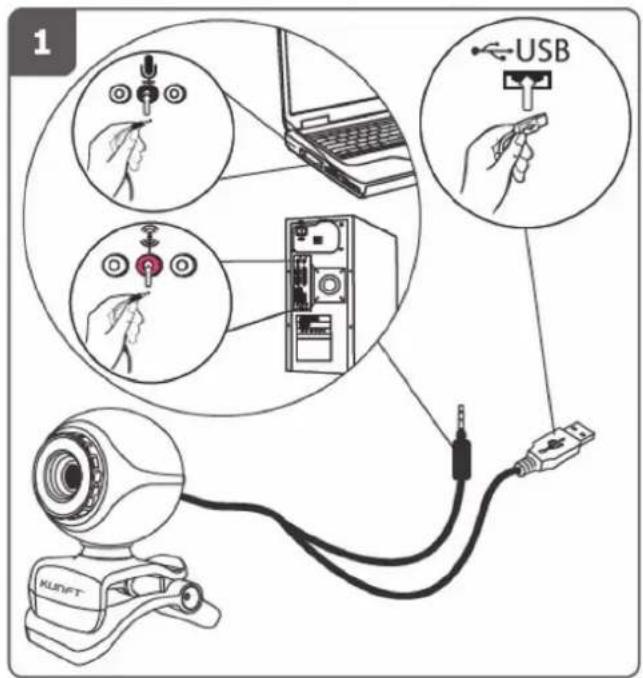
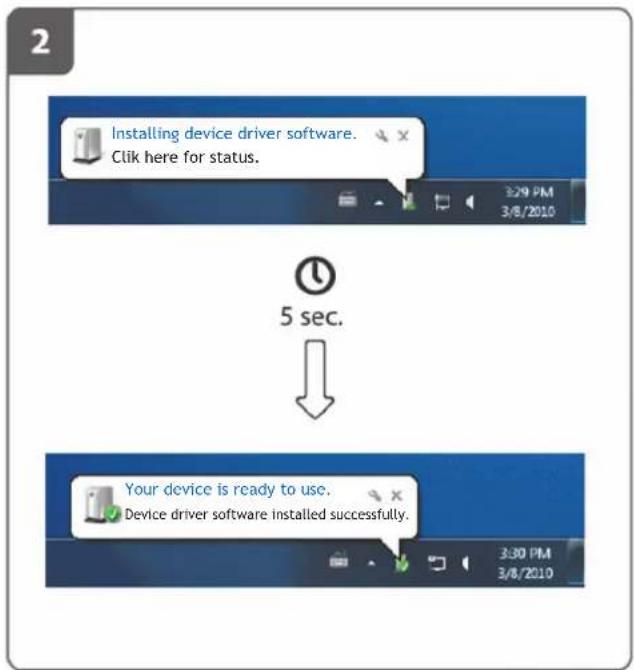
flowchart
graph TD
    A["Installing device driver software. Click here for status."] --> B["5 sec."]
    B --> C["Your device is ready to use. Device driver software installed successfully."]

area
| Position | Value | |---|---| | 1 | 6 | | 2 | 7 |Webcam C-035
KUNFT®
3
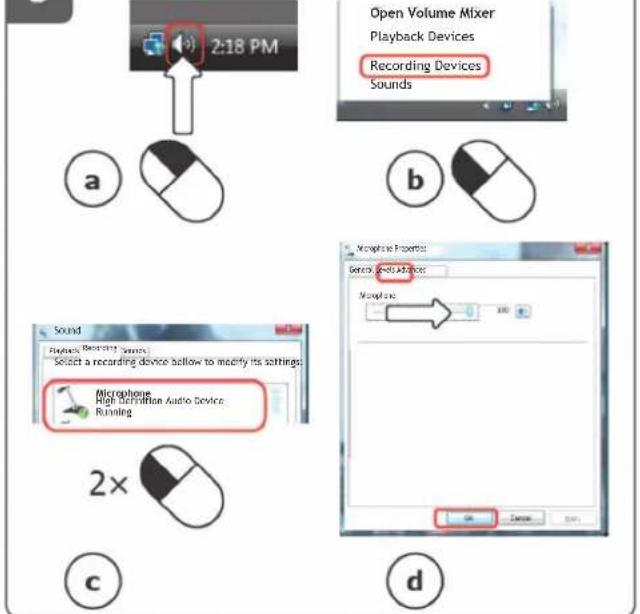
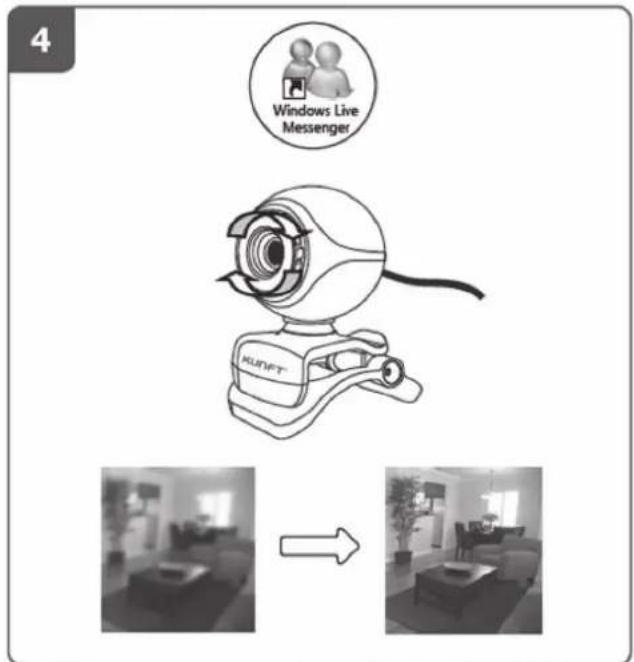
natural_image
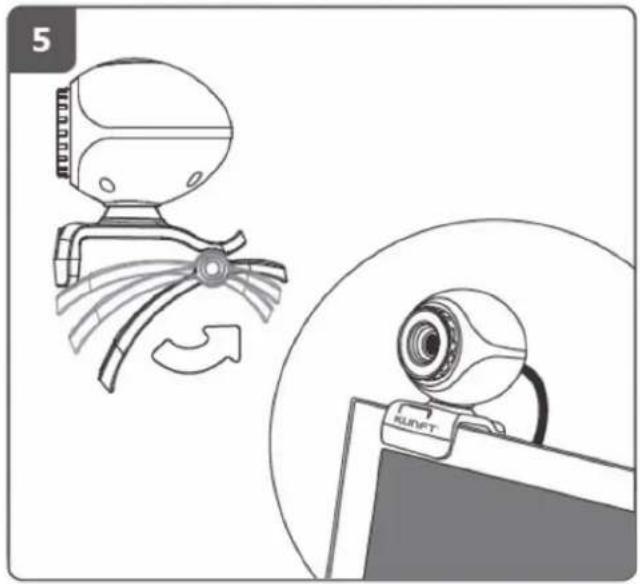
Illustration of a wind turbine and a webcam on a computer monitor, showing mechanical components and motion indicators (no text or symbols)3. AFTERMARKET
Kunft has designed this appliance in order to guarantee the maximum reliability. However, if a problem occurs, by following the procedures suggested in this section you may be able to determine its cause.
Do not attempt to open the appliance - there is a risk of electrical shock.
If you are not able to solve the problem, please contact your seller or manufacturer.
All users must be familiarized with this section. Knowing what could go wrong can help you avoid the occurrence of problems.
WARNING: any attempt of fixing the appliance without contacting the manufacturer will nullify the warranty.
In case the problem persists, take your appliance to an aftermarket section of any Worten, Modelo or Continente store in order to solve the problem.
Worten Equipamentos para o Lar ensures for a period of 2 years, counting from the date of purchase of this appliance, a warranty against any found manufacturing defect. The warranty supposes a correct use and maintenance of the appliance, namely according to the instructions expressed in this manual. In case otherwise identified, the malfunctions will not be under the warranty.
The repairing of electrical appliances must only be made by qualified technicians, as otherwise there may occur future complications on the appliances.
To avoid unnecessary risks, in case there are any malfunctions on the wires or on another type of components, repairing must be made on the specialized locations of technical assistance, as appropriate tools are needed.
Webcam C-035
KUNFT®
4. ENVIRONMENT CONSERVATION
Aiming to protect the environment, we try to reduce to a maximum the volume of the packages which are confined to three easy separation materials: cardboard, paper and plastic.
The appliance is made of recyclable material, once disassembled by a specialized company. Follow the local legislation concerning recycling of all materials.
natural_image
Line drawing of a computer webcam with a head-mounted lens (no text or symbols)

5
natural_image
Technical line drawing of a mechanical component with curved blades and a central hub (no text or symbols)
natural_image
Line drawing of a computer webcam on a stand (no text or symbols)Webcam C-035
KUNFT®
3. POSTVENTA
natural_image
Illustration of a wind turbine and a RUNFT webcam on a computer monitor, showing mechanical components and motion arrows (no text or symbols)3. PÓS-VENDA
Imported, produced and distributed by:
Brand : Kunft
Model : C-035
Category : Webcam