
AG+ AirProtect 20100 - Air purifier Gastroback - Free user manual and instructions
Find the device manual for free AG+ AirProtect 20100 Gastroback in PDF.


| Product Type | Air Purifier |
| Brand | Gastroback |
| Model | AG+ AirProtect 20100 |
| Recommended Room Size | Up to 50 m² |
| Filtration System | Pre-filter, HEPA filter, activated carbon filter, UV-C light |
| CADR (Particles) | 200 m³/h |
| Noise Level | 20 – 50 dB |
| Power Consumption | 45 W |
| Power Supply | 220-240 V, 50/60 Hz |
| Dimensions (H x W x D) | 50 x 30 x 30 cm |
| Weight | 5 kg |
| Modes | Auto, Sleep, Turbo, Timer |
| Air Quality Indicator | Yes, color-coded (blue, green, yellow, red) |
| Filter Replacement Indicator | Yes |
| Pre-filter Cleaning | Washable (every 2-4 weeks) |
| HEPA Filter Lifetime | Approx. 12 months |
| Carbon Filter Lifetime | Approx. 6 months |
| Safety Features | Overheat protection, child lock, tip-over switch |
| Spare Parts | Replacement filter sets available |
| Energy Efficiency Class | C |
| Certifications | CE, RoHS |
Frequently Asked Questions - AG+ AirProtect 20100 Gastroback
User questions about AG+ AirProtect 20100 Gastroback
0 question about this device. Answer the ones you know or ask your own.
Ask a new question about this device
Download the instructions for your Air purifier in PDF format for free! Find your manual AG+ AirProtect 20100 - Gastroback and take your electronic device back in hand. On this page are published all the documents necessary for the use of your device. AG+ AirProtect 20100 by Gastroback.
USER MANUAL AG+ AirProtect 20100 Gastroback
natural_image
Exterior view of a white industrial device with a grid pattern and 'GASTROBACE' branding (no readable text beyond branding)BEDIENUNGSANLEITUNG
Art.- Nr. 20100 » Luftreiniger AG+ AirProtect «
natural_image
Line drawing of a rectangular device with an upward arrow inside, enclosed in a transparent box (no text or symbols)natural_image
Line drawing of a hand holding a rectangular device with a downward arrow indicating compression or disassembly (no text or symbols)natural_image
Diagram of a hexagonal grid structure with internal curved lines, no text or symbols presentnatural_image
Technical line drawing of a mechanical device with a hexagonal panel and internal gear mechanism (no text or symbols)natural_image
Technical line drawing of a server rack with hexagonal ventilation slots and a door, showing internal structure without any text or symbols.natural_image
Line drawing of a door with hands holding the lid and an arrow indicating left motion (no text or symbols)natural_image
Simple line drawing of a rectangular device with a switch and cable, no text or symbols presentnatural_image
Hand inserting a plug into an electrical outlet with a power cord, showing a downward arrow (no text or symbols)natural_image
Line drawing of a hand opening a large rectangular device with lid and ventilation slots (no text or symbols)natural_image
Diagram of a wall-mounted air filter structure with numbered components (no text or symbols)
natural_image
Exterior view of a white industrial device with a grid pattern and 'GASTROBACE' branding (no readable text beyond branding)OPERATING INSTRUCTIONS
Art.- No. 20100 » Air Purifier AG+ AirProtect «
Read all provided instructions before first usage!
Model and attachments are subject to change
For household use only!
Deutsch
English
TABLE OF CONTENTS
Important Safeguards 29
General Safety Instructions....29
Important Safeguards for Electrical Appliances 32
Technical Specifications.... 33
Quick Start Guide 34
Knowing Your Air Purifier AG+ AirProtect 35
Properties of Your New Air Purifier AG+ AirProtect 36
Display 37
Before First Use....37
Selecting the Workspace 38
Operation 39
Selecting the Fan Speed 40
Solving Problems 41
Care and Cleaning 42
General Notes for Cleaning 42
Preparations....43
Cleaning the Appliance 43
Storage 45
Notes for Disposal....46
Information and Service 46
Warranty 47
IMPORTANT NOTE!
We attach a certain importance to your health and safety. Please, keep in mind, that the air purifier needs a little care from you to operate efficiently, if you follow strictly to all provided instructions and information in this booklet. Otherwise, the filter and disinfection systems of the appliance may become ineffective or get even damaged.
Mobile air purifiers are a supportive measure to reduce aerosols in the room air. They do not replace the rules (keep your distance, hygiene measures and everyday mask) and ventilation.
Monday to friday (except on holidays) from 8am to 4pm
E-Mail: info@gastroback.de
DEAR CUSTOMER!
Your new Air Purifier AG+ AirProtect can remove harmful fumes and vapours of volatile organic compounds (VOC) like benzene, solvents or formaldehyde (e.g. given off from coatings, cleaners, home fabrics, furniture and electrical devices), unpleasant odours and a lot of allergens. Moreover, even viruses, bacteria and the spores of mould can be removed and/or destroyed effectively via the disinfection systems of the appliance. This way the air purifier helps to maintain a healthy room climate in your living rooms and home office.
For solving these important tasks, the appliance needs only a little support form you during handling, selection of the workspace, and cleaning.
Therefore, please read these instructions carefully, for making it easy to enjoy the benefits of your new Air Purifier AG+ AirProtect.
Please, stay in best health.
On improper handling and cleaning, the Air Purifier AG+ AirProtect may get ineffective, loose its protective properties and/or even harmful particles could be released. Therefore, carefully read all information and instructions, before operating this appliance.
Save the instructions for further reference. Do not attempt to use this appliance or its parts in any other way and for any other purpose, than described in these instructions (intended use). Any other use, especially misuse, can cause severe injuries or damage by electric shock, heat, harmful micro-organisms, or fire. These instructions are an essential part of the appliance. Do not pass the appliance without this booklet to third parties.
Any operation, repair, exchange of unremovable parts, and technical maintenance of the appliance or any part of it other than described in these instructions may only be performed at an authorised service centre. Do not attempt to repair the power cord or use any power cord not designated for the appliance. Do not attempt to use a power cord, when it is damaged. If required, please contact your vendor.

GENERAL SAFETY INSTRUCTIONS
- The appliance is designed for partly unattended use. However, always unplug the appliance, before moving, or cleaning the appliance, or assembling or disassembling any parts, and when the appliance is not in use. Do not hold the appliance by the power cord for moving the appliance.
- This appliance is only for usage in living rooms, bedrooms and in environments with comparable load of dust, fumes, vapour and humidity. The appliance is NOT intended for use in moving vehicles. Do not operate or store the appliance in humid or wet areas (e.g. bathroom, wash house) or outdoors. Do not use or operate the appliance in any environment with excessive load of dust and vapours of oil, solvents, benzene or the like (e.g. workshop, garage, tool shed, storeroom for chemicals).
- Any use of accessories, attachments or spare parts that are not recommended by the manufacturer or damaged in any way may result in injuries to persons and/or damage. Do not use any parts of the appli-
ance for any other device or for any purpose, not described in these instructions. Check the entire appliance regularly for proper operation (e.g. damaged power cord, distortion, pollution or corrosion at the pins of the electrical connectors, damaged housing). To avoid risk of fire, electric shock or any other injuries to persons and/or damage:
Do not operate the appliance, when the appliance or any part of it is likely to be damaged or not working properly (e.g. overheating, liquids on or in the housing, mechanical or electric shock, unusual smell, vibration or noise, malfunction of the controller). In any case of malfunction during operation, immediately unplug the appliance. Get in contact with an authorized service centre for examination and/or repair. Do not attempt to repair any part of the appliance on your own. For disinfection, the appliance generates intense UV radiation and uses a plasma device. On improper treatment severe damage to your eyes and skin are possible. DO NOT open the housing or remove the filter units, while the appliance is still live. Do not operate the appliance with the housing damaged or not closed correctly in any way. Do not place the appliance or any part of it (e.g. power cord, filter units) in, on or near hot surfaces (e.g. burner, heater, fireplace, or oven).
- The appliance does not remove combustion gases (e.g. carbon monoxid, carbon dioxide, CO2). Therefore, the appliance is not suited for air purification in rooms with open fire. Do not place the appliance, where high pollution via vapours of oil, fat or water or smoke and dust is possible (e.g. bathroom, workshop). The appliance may not be used as an extractor or fume hood.
- Do not place the appliance near the edge of the workspace. Do not place any clothes on or under the appliance during operation. Operate the appliance on a well accessible, stable, level, dry, and suitable large workspace. Unhindered air circulation is essential for correct operation of the appliance.
- During operation, keep the appliance in an appropriate distance to any inflammable or objects that could be moved via the air flow of the appliance (e.g. curtains). The used power outlet must always be accessible.
- Switch off the appliance, before using an atomizer or spray bottle (e.g. insecticide, odours, paint). Aerosols affect the filter units and PM2.5 sensor. After using a spray bottle, air the room thoroughly, before switching on the appliance again.
- Before operating the appliance, always ensure that the appliance is assembled completely and correctly according to the instructions in this booklet. To ensure correct operation, the filter units must be installed in correct sequence and the front panel must be closed correctly.
- This appliance can be used by persons with reduced physical, sensory or mental capabilities or lack of experience and knowledge (including children aged from 8 years), if they have been given supervision or instruction concerning the use of the appliance in a safe way and understand and consider the hazards involved. Cleaning may not be made by children or persons especially prone to illness. Children must always be supervised to ensure that they do not play with the appliance or any parts of the appliance or the packaging. Always keep the appliance where it is dry, frost-free, and clean, and where children younger than 8 years and animals cannot reach it. Do not leave the appliance or any part of it unattended, when it is in reach of young children.
- Improper treatment and cleaning may put the appliance in an ineffective condition. To avoid the exposure to harmful particles and micro-organisms, it is essential to adhere strictly to the instructions for cleaning, given in this booklet (see: 'Care and Cleaning'). Do not use any hard or sharp-edged utensils for cleaning. Do not clean the appliance or any part of it (e.g. filter, sensor or housing) via abrasive, corrosive or highly perfumed cleaners or solvents.
- Do not place any hard and/or sharp-edged objects in or on the appliance or its parts. The filter system may get damaged via improper treatment and the appliance may no longer protect you against harmful pollutants.

IMPORTANT SAFEGUARDS FOR ELECTRICAL APPLIANCES
The appliance is operated electrically. Place the appliance near a suitable wall power outlet with properly installed protective conductor (earth/ground). Ensure that the ratings of your mains power supply correspond to the requirements of the appliance (220 - 240 V, 50/60 Hz, AC). The installation of a residual current operated circuit breaker (r.c.c.b.) with a maximum rated residual operating current of 30 mA in the supplying electrical circuit is strongly recommended. If in doubt, contact your electrician for further information. In various foreign countries, the specifications for power supplies are subject to incompatible norms. Therefore, it is possible that power supplies in foreign countries do not meet the requirements for safe operation of the appliance. Thus, before operating the appliance abroad, ensure that safe operation is possible. Do not use any desk top multi socket outlet, external timer, extension cord, or remote control systems.
When laying power cords, always ensure that no one will step on the power cord or trip over the power cord. No tension may be applied to any part of the power cord. To disconnect: Always unplug the power cord from the power supply first, before removing the power cord from the appliance.
- The pins of the plugs must be smooth and clean. Always completely unwind the power cord, before use. The power cord may never touch hot surfaces or sharp edges. Do not let the plug or power cord hang over the edge of the table or counter. Ensure that no one will pull the appliance by the power cord or gets entangled in the power cord. Power cords may never be knotted, twisted, pulled, strained or squeezed. Always grasp the plug to disconnect the power cord.
- Do not touch the power plug with wet hands, when the appliance is connected to the power supply. DO NOT pour or spill any liquids on or in the appliance, the power cord or the filter units. Do not place or immerse the appliance, power cord or filter units in water or other liquids. Always keep the appliance and the workspace clean and dry.
TECHNICAL SPECIFICATIONS
| Model: | Art.- No.: 20100 – Air Purifier AG+ AirProtect |
| Power supply: | 220-240 V AC, 50/60 Hz |
| Maximum power consumption: | 95 W |
| Weight: | approx. 8.3 kg |
| Dimensions: | approx. 390 x 211 x 628 mm (W x D x H) |
| Filter unit lifetime (until replacement): | approx. 6-8 months; approx. 2000 Betriebsstunden |
| Maximum particulate clean air delivery rate (CADR): | approx. 370 m3/h (cubic meter per hour) approx. 221 CFM |
| Maximum room size | 40-50 m2 |
| Sensor type: | PM2.5 sensor; suitable for particle matter up to 2.5 μm effective size. |
| Sensor detection (particle size): | >0.01 μm (PM2.5) |
| Noise level: | Fan speed 1: ≤35 dBA Fan speed 2: ≤45 dBA Fan speed 3: ≤58 dBA |
| Certificates: | CE |
These specifications may change without notice.
QUICK START GUIDE
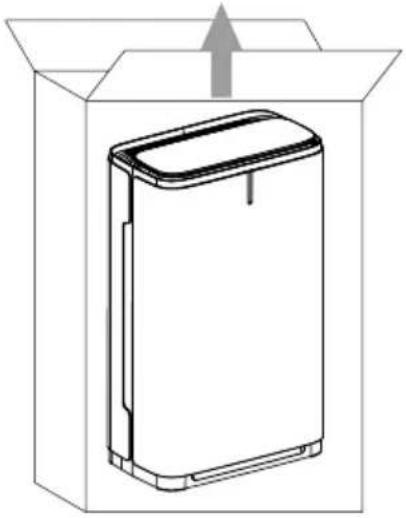
natural_image
Line drawing of a rectangular electronic device with an upward arrow, enclosed in a transparent box (no text or symbols)- Carefully unpack your air purifier.
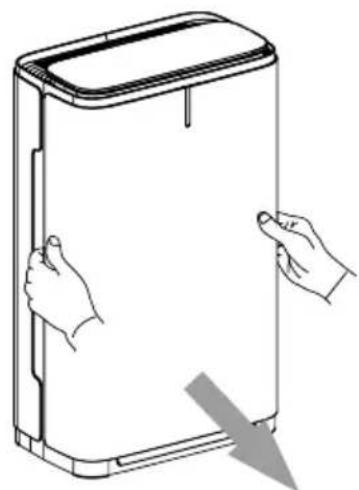
natural_image
Line drawing of a hand holding a rectangular device with a downward arrow indicating compression or disassembly (no text or symbols)- Remove the front panel.
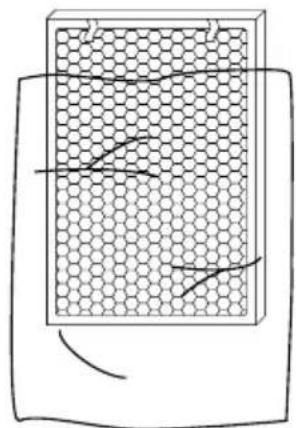
natural_image
Diagram of a hexagonal grid structure with internal curved lines, no text or symbols present- Remove filters from protective plastic wrap.
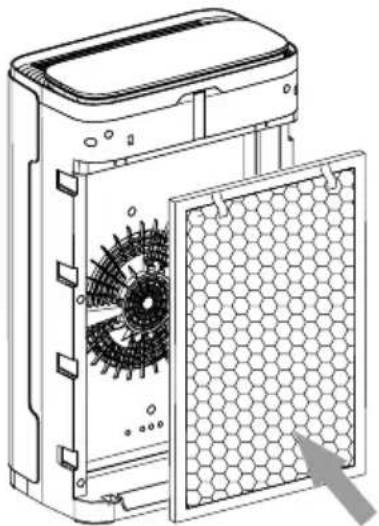
natural_image
Technical line drawing of a mechanical device with hexagonal panel and internal gear mechanism (no text or symbols)- Insert the nano-crystalline filter.
natural_image
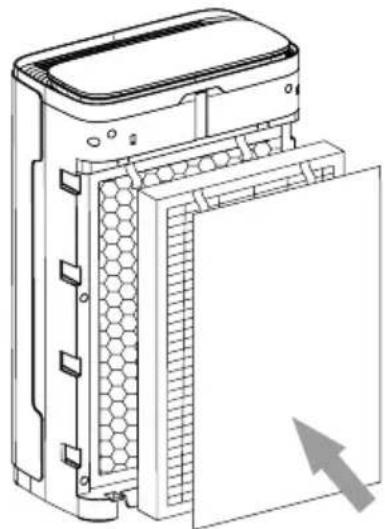
Technical line drawing of a server rack with hexagonal ventilation slots and a door, showing internal structure without any text or symbols.- Insert the pre-filter and high efficiency silver ion air filter.
natural_image
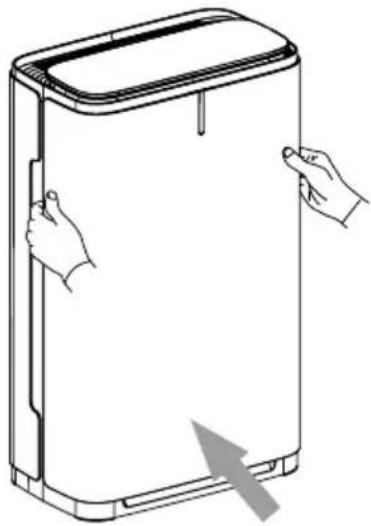
Line drawing of a door with hands holding the lid and an arrow indicating left-hand rule (no text or symbols)- Insert the front panel.
natural_image
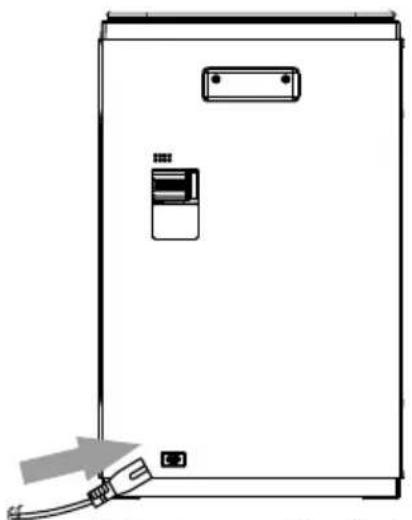
Line drawing of a rectangular electronic device with a switch and cable, no text or symbols present- Plug the power cable to the air purifier.
natural_image
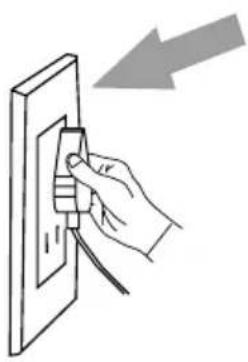
Hand inserting a plug into an electrical outlet with a power cord, showing a downward arrow (no text or symbols)- Insert the power cable into an electrical outlet.
natural_image
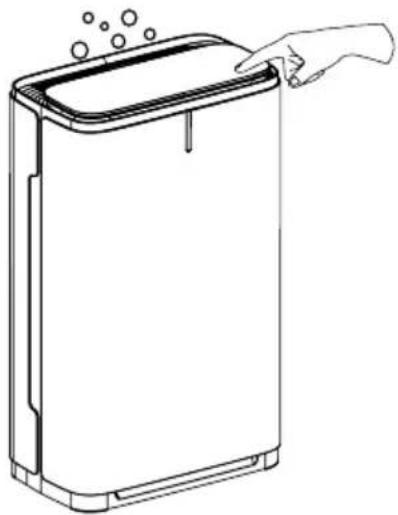
Line drawing of a hand opening a large rectangular device with lid and ventilation slots (no text or symbols)- Press on/off button to switch on the air purifier.
KNOWING YOUR AIR PURIFIER AG+ AIRPROTECT
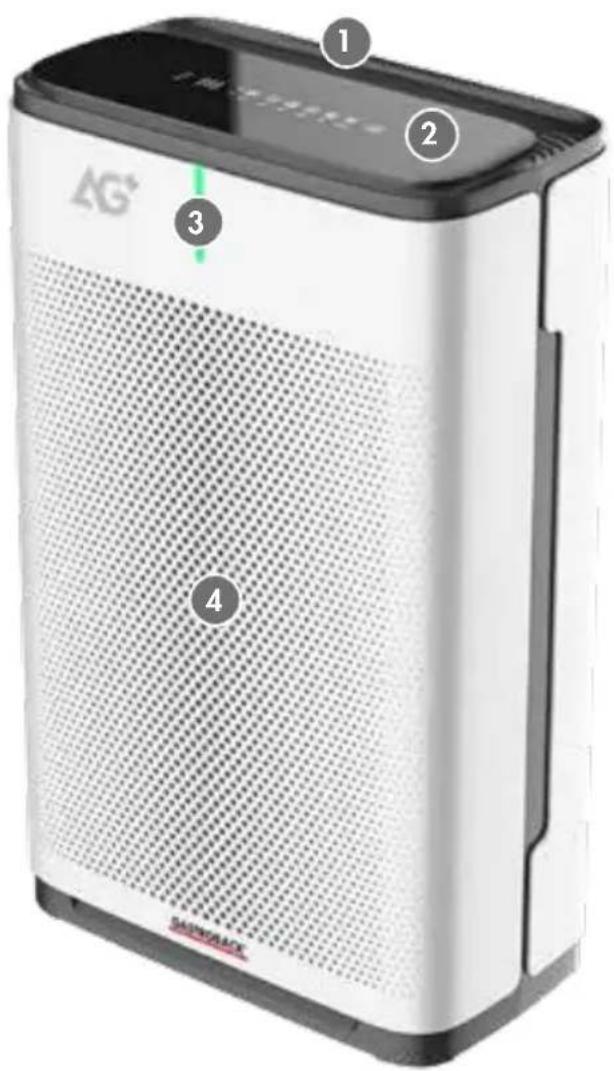
1 AIR OUTLET
for purified air
2 CONTROLLER
with touch buttons and display area
3 AIR QUALITY INDICATOR
changing colour depending on the quality of the outgoing air
4 FRONT PANEL
covers the filter chamber that is holding the filter units
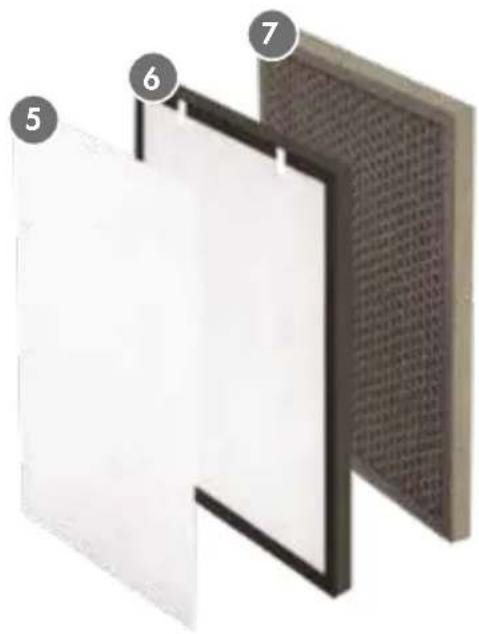
5 PRE-FILTER
6 HIGH EFFICIENCY SILVER ION FILTER
7 NANOCRISTALLINE FILTER
natural_image
Diagram of a wall-mounted air filter structure with numbered components (no text or symbols)
SPEED - Changing fan speed
TIMER - Set the timer
SLEEP - Use sleep mode
STERILIZE - Use UV-Sterilizer
CHILD LOCK - Set the child lock
PLASMA - Switch on plasma
PROPERTIES OF YOUR NEW AIR PURIFIER AG+ AIR-PROTECT
The GASTROBACK Air Purifier AG+ AirProtect will actively help to protect your health and well-being by removing many harmful pollutants, unpleasant odours, a lot of allergens and infective micro-organisms (bacteria, viruses, spores of mould) from the air in your living rooms. For this, the appliance uses 3 different filter units:
NOTE
PM2.5 denotes dust with the particle size between 0.01 m and 2.5 m.
- Pre-filter: catches most of the coarse parts of the dust (e.g. fine hairs, fibres, dandruffs). You may clean the pre-filter via a vacuum cleaner and replace it, when the other filter units need replacement.
- High efficiency silver ion filter: This HEPA filter meats the European Norms concerning the removal of very small particles (e.g. smoke). Only little amounts of fine PM2.5 particles penetrate this type of filter, although the capacity of this filter is high.
Via an additional silver ion coating of the filter surfaces, more than 99% of microorganisms are destroyed within 30 minutes. This effect has been proved in tests even for the human corona virus.
- Nano cristalline filter: This filter is made of non-toxic natural minerals. The nano cristalline surface removes harmful gases and vapours: formaldehyde (e.g. from furniture, home fabrics, electrical devices and adhesives), benzene, other solvents and ammonia (e.g. from paints, coatings, and cleaners) as well as unpleasant odours.
The finely textured surface removes even smallest particles.
Due to the particular physico-chemical properties of the nanocrystalline surface, the particles react with air to harmless gases, when the filter is exposed to sunlight. This is the basis of the cleaning method for this filter unit.
Furthermore, 2 additional sterilisation systems can be activated for destroying any mikro-organisms that penetrated the filter units:
• UV disinfection: Mikro-organisms are killed via intense UV radiation.
- Plasma disinfection: The plasma chamber generates highly reactive particles from normal compounds of the air. Via this particles, mikro-organisms are destroyed and therefore no longer infective.
DISPLAY
The air quality indicator is illuminated whenever the appliance is switched on:
GREEN (best air quality)
BLUE (medium air quality) or
RED (bad air quality).
Surrounding the digits of the display area, one of various icons is shown for indicating the type of displayed value: fan SPEED, PM2.5 value, activation of the TIMER (only when sleep mode is on), filter replacement (filter icon), or selected hours of operation until automatic shut-off ("H"; only with the timer activated). As a default, the PM2.5 value is displayed.
IMPORTANT - When the filter icon on the right upper edge of the display is illuminated, the filter units have been used for 2000 hours and need to be replaced (see: 'Care and Cleaning').
When a function is activated, the corresponding indicator of the function button is illuminated on the controller.
NOTE
In sleep mode, only the indicator of the sleep button is illuminated and with the timer activated, "TIMER" is shown. All other indicators are dark.
BEFORE FIRST USE
⚠ WARNING – DO NOT let children play with the appliance, or any part of it, or the packaging! Always unplug from the power outlet, before cleaning, moving, or assembling/disassembling any parts of the appliance.
- Carefully unpack the appliance and all accessories. Check that all parts are in proper working order (see: 'Knowing Your New Air Purifier AG+ AirProtect').
- Pull out the front panel for getting access to the filter chamber. Take the filter units out of the packaging. Doing so, hold the filter units only by their frame.
NOTE
There are 2 flaps at the frame of the nanocrystalline filter and silver ion filter. With the filter unit installed correctly, these flaps are on the upper side facing to you. Ensure that the dark foam at the rim is not damaged: no dents and tears. Otherwise the purification function of the appliance may be corrupted. For operation, the pre-filter has to cover the silver ion filter completely.
NOTE
Two holders at the bottom of the front cover must be inserted in the appropriate holes in the bottom of the housing. Otherwise, the front cover cannot be closed correctly.
- At first, place the nanocrystalline filter into the filter chamber. Push the frame of the filter into the filter chamber until it settles at the back panel of the filter chamber.
- Ensure that the pre-filter (white foam mat) is installed correctly on the silver ion filter. If required, spread the pre-filter on the silver ion filter. The silver ion filter must be covered completely via the pre-filter without any gaps or wrinkles. Only the flaps on top of the filter frame must be freely accessible.
- Thereafter, insert the silver ion filter with the pre-filter facing towards you. Push the silver ion filter into the filter chamber.
- Insert the holders at the bottom of the front panel into the holes in the housing and carefully close the front panel. The front panel must fit closely in the housing. If you cannot close the front panel, check if the holders are inserted correctly. When inserted correctly, the front panel closes easily without applying any force.
- Carefully select an appropriate workspace (see below: 'Selecting the Workspace').
- Insert the small plug of the power cable in the cable port at the rear of the appliance. Then insert the other plug into a suitable wall power outlet (see: 'Important Safeguards for Electrical Appliances').
The appliance is ready for use, now.
SELECTING THE WORKSPACE
Please adhere to the following instructions, when selecting an appropriate workspace for the air purifier:
- Place the appliance on a free space in the room, where good air circulation is guaranteed. Do not place the appliance near walls, curtains, other devices, decorations, or furniture.
- Ensure that no one will trip over the appliance or the power cord.
- Do not place the appliance in the air flow of ventilation systems or draught. Do not place the appliance near any sources of heat (e.g. heater, oven, or fireplace).
- Do not store or operate the appliance in places with high humidity or high load of dust or vapours of oil or solvents (e.g. bathroom, workshop, heating room).
- Do not direct the outgoing air of the appliance at persons to avoid any unpleasant influence to their health via draught.
- Close the window during operation, but frequently air the room thoroughly for some minutes with the appliance switched off.
OPERATION
WARNING – Always ensure that the appliance and all its parts and accessories are out of reach of children younger than 8 years and animals. Your Air Purifier is intended for cleaning the air of living rooms and bedrooms. To avoid risk of overheating and fire: Do not place any clothes on or under the appliance during operation and ensure good air circulation. Do not place the appliance near sources of heat (e.g. oven, heater), or near inflammable objects or any objects that could be moved by draught (e.g. curtains; see: 'Before First Use').
IMPORTANT - Ventilate the room thoroughly, before using the appliance. During operation, keep the windows closed and switch off ventilators and air-conditioning systems, if possible. There is no need to leave the appliance operate the whole day and night long. Instead, activate the appliance each day for some time, after airing the room and on special occasions. For example: when many persons stay in the room and/or special activities whirled up dust (e.g. vacuumizing the room, making the beds). Activate the appliance more frequently and for an elongated time with the disinfection systems running, when persons taken ill with an infectious disease or persons prone to illness stay in the room. If required, use the timer (see below).
- Switch on the air purifier by touching the power button ⏻. After switching on, three dashes “---” are shown on the display area. Wait approx. 10 seconds, until the PM2.5 value is displayed. As a default, the automatic mode is activated. You can switch to another mode of operation via the fan button.
NOTE
For normal use of the air purifier, we recommend the automatic mode (PO).
- Select the desired settings according to the following table.
| Icon Function Remarks | ||
 | POWER BUTTON | |
  | FAN “SPEED” BUTTON"TIMER" CONTROL BUTTON | For controlling the air flow: Select a fan speed level P1 (slowly) to P3 (fast) or the automatic mode (P0) by touching the button several times (see below: ‘Selecting the Fan Speed’).Touch the button several times, until the desired number of hours is displayed (1-12 hours) or the timer is deactivated again. After setting a time duration, the appliance will switch off automatically, as soon as the set time elapsed. Otherwise, you need to switch off the appliance manually. Regularly, the timer setting will be shown on the display ("H"). |
 | "SLEEP" MODE BUTTON | Activation of the sleep mode. In this mode, only the "SLEEP" mode indicator is illuminated on the controller and, with the timer activated, "TIMER" is shown. Additionally, the fan speed is set automatically to speed level 1 (slowly), resulting in the best cleaning efficiency. Deactivate the sleep mode by touching any button on the controller. |
 | UV "STERILIZE" BUTTON | Use this button to activate or deactivate the UV sterilizer, destroying most micro-organisms in the air. |
 | "CHILD LOCK" BUTTON | With the child lock activated, all other buttons on the controller are inactiv. You switch back to normal operation by holding your finger on the "CHILD LOCK" button for approx. 3 seconds. Thereafter, you can make other entries. Note: With the child lock deactivated, the hours of operation can be shown on the display area by holding the child lock button touched for approx. 3 seconds. |
 | „PLASMA" STERILIZER BUTTON | Use this button to activate the plasma generation for destroying and removing almost all micro-organisms in the air. |
SELECTING THE FAN SPEED
The higher the fan speed is set, the lower is the filtering performance of the appliance. Via the lowest fan speed level 1 the maximum filtering performance is reached, because only little particles will be swept away by the air flow generated via the fan. However, the air purifying speed of this level is low and a good air circulation at the workspace of the appliance is essential.
Especially when cleaning the air in a large room (up to 50 m ^2 ), you may need to select a somewhat higher fan speed for getting a sufficient air flow within the room.
The automatic mode selects the optimum fan speed automatically. For normal use, you should select this mode.
| Fan Speed Level | PM2.5 Value | Colour of the Air Quality Indicator | Outgoing Air Quality |
| 1 10-79 green very good | |||
| 2 80-199 blue medium | |||
| 3 200-500 red low |
SOLVING PROBLEMS
Most problems during use can be solved easily via the hints in the following table.
| Problem The Easy Solution | |
| The appliance does not work, when switched on or the controller does not work. | Check the following items:– is the appliance connected correctly to the power supply.– is the power outlet live (connect a lamp).– is the front panel closed correctly (see: ‘Before First Use’).– is the child lock activated (see: ‘Operation’). |
| In automatic mode: .the air quality indicator is always red, the PM2.5 value is always high. | 1. The appliance may be affected by high humidity or moisture, oil residues, smoke, fumes, aerosols.– Place the appliance in a clean environment and check the result. The air in your room is highly polluted, if the displayed values change at the other location. Air the room thoroughly, then close the windows and try again.Leave the appliance operate for a sufficient time duration, before checking the values again.– Clean the lens of the sensor (see: ‘Care and Cleaning’).– Reduce the fan speed (see: ‘Operation’).2. The filter units need to be replaced or are damaged. |
| Unpleasant smell is not removed. | – Check, if the filter units need to be replaced (after approx. 2000 hours of operation; see: ‘Operation’).– Clean the appliance (see: ‘Care and Cleaning’).– If the problem persists, replace the filter units (see: ‘Care and Cleaning’). |
| Particles in the air are not removed and/or the noise level is unusually high. | – Check, if the filter units need to be replaced (after approx. 2000 hours of operation; see: ‘Operation’).– Clean the appliance (see: ‘Care and Cleaning’).– Check, if the pre-filter is damaged or not inserted correctly. The pre-filter must cover the silver ion filter completely without any wrinkles or tears (see: ‘Care and Cleaning’).– If the problem persists, replace the filter units (see: ‘Care and Cleaning’). |
| The air purifier does not respond to air pollutants. | The appliance is placed in an unsuited workspace. The air circulation is hindered (see: ‘Before First Use’).– Select another workspace.– Increase the fan speed to maximum (level 3; see: ‘Operation’). |
| An icon on the right upper edge of the display is illuminated. | The filter units need to be changed (see: ‘Care and Cleaning’). |
CARE AND CLEANING
WARNING – Via improper handling or cleaning the appliance may get ineffective and dust contaminated with harmful micro-organisms, allergens and harmful substances may be released and damage your health. Adhere strictly to the instructions given for cleaning the appliance to maintain the protection via the appliance and avoid releasing harmful dust. Always ensure that the appliance and all its parts are out of reach of children younger than 8 years and animals.
CAUTION – Do not use any hard or sharp-edged objects, abrasive cleaners, corrosive chemicals or solvents for cleaning the appliance or any parts of it to avoid damage to the filters, sensor and disinfection systems. Do not place or immerse the housing, filter units, or power cord in water or any liquid. Do not spill or drip any liquids on or in the housing, filter units, or power cord.
CAUTION – Care and cleaning of air purifiers for prevention of infection may NOT be performed in living rooms or bedrooms or in any place, where food or drugs are stored, prepared or consumed. This holds especially for rooms, where persons prone to illness stay. These persons may not clean the appliance or replace the filter units.
While cleaning the appliance indoors, ensure good ventilation during cleaning and some time thereafter. Whenever possible, there should be no objects that could be cleaned only hardly and imperfectly (e.g. curtains, carpets). Adhere strictly to the health regulations.
GENERAL NOTES FOR CLEANING
For maintaining the best performance, the appliance should be cleaned according to the following instructions every 1-2 months.
IMPORTANT - Depending on the pollution of the air and frequency of usage, the filter units may be used for 6 - 8 months. After 2000 hours of operation, the appliance issues a message to replace the filter units. However, if the pollution of the air is high, the intervals for replacement should be shorter. Order a set of new filter units in time.
CAUTION – Only use the filter units recommended by the manufacturer. Other filters may defeat the performance of the appliance, causing risk of over-heating, fire and releasing harmful dust. Clean the appliance, when replacing the filter units.
For cleaning, you will need the following items:
- Consumables: Surgical mask (from the pharmacy) and disposable gloves, some soft kitchen towels, some cotton buds.
• Vacuum cleaner (e.g. for cars), soft brush.
⚠️ CAUTION – Under no circumstances, use the vacuum cleaner for cleaning rooms, where persons stay.
• Clear, lukewarm water and a splash of a washing-up liquid.
• A small, air-tight plastic bag for the consumables.
When replacing the filter units by new ones: a sufficiently large plastic bag (e.g. rubbish bag) for disposal of the old filter units.
- Additionally, you should wear a suited white coat that can be washed after cleaning the appliance.
PREPARATIONS
NOTE
When it is possible without jeopardizing other persons and the weather is good (calm, no rain/snow, low humidity), you may clean the appliance outdoors. Ensure that the wind does not blow any dust released when opening the appliance towards persons (including you). However, DO NOT leave the appliance outdoors.
- Switch off the appliance (touch the power button) and unplug from the power outlet and appliance. Wait for at least 30 minutes, before moving, disassembling and cleaning the appliance. This time duration is required for destroying at least 99% of the micro-organisms on the silver ion filter.
- Via the handle, cary the appliance to a place, suited for cleaning the appliance. Make the required utilities ready (see: 'General Notes for Cleaning'). Ensure good ventilation.
- Put on the surgical mask and desposable gloves.
CLEANING THE APPLIANCE
CAUTION – For maintaining the efficiency of the appliance and avoiding damage, the filter units may not be washed! The silver ion filter cannot be cleaned and must be replaced at the latest, when the corresponding message is issued via the appliance.
The fan in the filter chamber is an essential part of the appliance. Do not poke in the opening of the fan to avoid damage.
- Pull off the front panel. Pull out the pre-filter, silver ion filter and nanocrystalline filter via the flaps on top of the frames.
- Replacing the filter units with new ones: Immediately, put the old filter units into a suited plastic bag and close the bag thoroughly.
- For cleaning the pre-filter: Use the vacuum cleaner for carefully vacuumizing the pre-filter at the side that has been facing to the front panel. Ensure that the outgoing air of the vacuum cleaner is not blown towards persons (including you).
- For cleaning the nanocrystalline filter: Place the filter unit for 1-3 hours in direct sunlight. The radiation of the sun may not be obstructed by glass or transparent plastics. Due to the particular physico-chemical properties of the nanocrystalline surface, the particles react with air to harmless gases, when the filter is exposed to direct sunlight, destroying harmful vapours and particles.
- Thoroughly wipe the exterior and interior of the appliance via a moist non-dripping kitchen towel. Thoroughly wipe dry via a dry kitchen towel and leave the parts dry naturally for some minutes, where they are out of reach of young children and animals.
- Use this time for cleaning the openings of the front panel via a soft brush.
- Remove the sensor cover by pushing the latch to the left while pulling it out. Clean the sensor chamber via cotton buds, moistened with some clear water. Dry the surfaces with dry cotton buds. Then replace the sensor cover.
- Clean the power cord via a moist cloth. Thoroughly wipe dry.
CAUTION – Only use the filter units dedicated for the appliance. When using any other filter materials, the performance of the appliance will be affected seriously, causing risk of severe damage. To ensure correct operation of the appliance, the filter units must be inserted in the correct sequence. Avoid interchanging the filter units and close the front panel correctly, after assembling the filter units.
IMPORTANT - Before assembling the appliance, ensure that the filter units are in proper working order. Otherwise, the appliance will lose its performance and the protection against harmful pollutants in the air is lost. When using new filter units, remove the packaging carefully (see: 'Before First Use'). Within the appliance, the flaps on the frames of the filter units must face upwards and towards you.
-
First install the nanocrystalline filter in the filter chamber and push the frame of the filter carefully into the filter chamber.
-
Spread the pre-filter on the silver ion filter, ensuring that the pre-filter covers the silver ion filter completely; but leave the flaps on the frame of the silver ion filter freely accessible. Push the silver ion filter into the filter chamber with the pre-filter facing towards you.
- Close the filter chamber via the front panel and push it slightly into place (see: 'Before First Use'). The appliance is now ready for use again.
- Clean the workspace. Put the consumables (surgical mask, gloves, cotton buds and towels) in a plastic bag and close the bag air-tightly. Dispose of the bags holding old filter units and consumables in domestic waste. Dispose of the filter bag of the vacuum cleaner and the brush or, if applicable, wash these parts via boiling water. Discard the water for cleaning and wash or dispose of the vessel. Wasch the white coat in a washing machine. Thoroughly disinfect or wash your hands.
STORAGE
WARNING – Children must always be supervised that they do not play with the appliance or any part of it. Always switch off (touch the power button) and unplug the appliance, when is not in use and before cleaning and moving the appliance for storage. Clean the appliance before storing (see: 'Care and Cleaning').
⚠️ CAUTION – For moving the appliance, do not hold the appliance by the power cord. Always ensure that no one will pull the appliance by the power cord. Do not place any hard or heavy objects on or in the appliance or any part of it to avoid damage. Do not use any part or accessory of the appliance for any purpose or in any way, not described in this booklet.
Grasp the appliance by the handle at the rear of the housing for moving the appliance.
Place the appliance and the power cord on a suitable surface, where it is clean, dry, frost-free and protected against inadmissible strain and out of reach of young children and animals.
NOTES FOR DISPOSAL
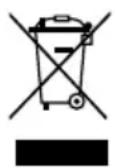
Do not dispose of electrical appliances as unsorted municipal waste. Dispose of the appliance and packaging must be effected in accordance with the corresponding local regulations and requirements for electrical appliances and packaging. Use separate collection facilities. Please contact your local disposal company.
When replacing old appliances with new once, the retailer is legally obligated to take back your old appliance for disposal at least for free of charge.
Dispose of old filter units and consumables, you have been used for cleaning (e.g. surgical mask, desposable gloves, towels) immediately after usage in an air-tight closed bag in domestic waste. Do not leave these parts lying around.
INFORMATION AND SERVICE
Please check www.gastroback.de for further information. For technical support, please contact GASTROBACK Customer Care Center by phone: +49 (0) 4165/22 25 - 0 or e-mail info@gastroback.de.
WARRANTY
We guarantee that all our products are free of defects at the time of purchase. Any demonstrable manufacturing or material defects will be to the exclusion of any further claim and within 2 years after purchasing the appliance free of charge repaired or substituted. There is no Warranty claim of the purchaser if the damage or defect of the appliance is caused by inappropriate treatment, over loading or installation mistakes. The Warranty claim expires if there is any technical interference of a third party without a written agreement. The purchaser has to present the sales slip in assertion-of-claim and has to bear all charges of costs and risk of the transport. This appliance may be used in household and similar environments, such as:
– the recreation rooms in shops, offices, and similar working areas;
- in hotels, motels, bed and breakfast type environments and other residential environments.
On this type of commercial use, the warranty period is reduced to 1 year.
NOTE
For repair and service, please send Gastroback products to the following address: Gastroback GmbH, Gewerbestr. 20, 21279 Hollenstedt, Germany.
Please agree that we cannot bear the charge of receipt. Submission of appliances: Please ensure packing the appliance ready for shipment without accessories and attachments. Add the sales slip and a short fault description. The processing time after receipt of the defective appliance will be approx. 2 weeks; we will inform you automatically. After the warranty period, please send defective appliances to the given address. You will get a free quotation and, thereafter, can decide, whether we shall repair the appliance to the costs possibly accrued, send back the defective appliance for free of charge, or dispose of the appliance for free of charge.
The appliance is intended for household use only and not suited for commercial, industrial or trade usage. Do not attempt to use this appliance in any other way or for any other purpose than the intended use, described in these instructions. Any other use is regarded as unintended use or misuse, and can cause severe injuries or damage. There is no warranty claim of the purchaser if any injuries or damages are caused by unintended use.
GASTROBACK®
GASTROBACK GmbH
- BEDIENUNGSANLEITUNG
- OPERATING INSTRUCTIONS
- TABLE OF CONTENTS
- IMPORTANT NOTE!
- DEAR CUSTOMER!
- GENERAL SAFETY INSTRUCTIONS
- IMPORTANT SAFEGUARDS FOR ELECTRICAL APPLIANCES
- QUICK START GUIDE
- KNOWING YOUR AIR PURIFIER AG+ AIRPROTECT
- PROPERTIES OF YOUR NEW AIR PURIFIER AG+ AIR-PROTECT
- NOTE
- DISPLAY
- BEFORE FIRST USE
- SELECTING THE WORKSPACE
- OPERATION
- SELECTING THE FAN SPEED
- SOLVING PROBLEMS
- CARE AND CLEANING
- GENERAL NOTES FOR CLEANING
- ⚠️ CAUTION – Under no circumstances, use the vacuum cleaner for cleaning rooms, where persons stay.
- PREPARATIONS
- CLEANING THE APPLIANCE
- STORAGE
- NOTES FOR DISPOSAL
- INFORMATION AND SERVICE
- WARRANTY
- GASTROBACK GmbH
Brand : Gastroback
Model : AG+ AirProtect 20100
Category : Air purifier