
ADD6911L - Water dispenser PHILIPS - Free user manual and instructions
Find the device manual for free ADD6911L PHILIPS in PDF.


| Product Type | Water Dispenser |
| Brand | Philips |
| Model | ADD6911L |
| Dimensions (L x W x H) | 30 x 30 x 40 cm |
| Weight | 5 kg |
| Power Supply | 220-240 V ~ 50/60 Hz |
| Power Consumption | 2200 W (heating) / 100 W (cooling) |
| Water Tank Capacity | 2.5 L (hot) / 1 L (cold) |
| Hot Water Temperature | ≥ 95 °C |
| Cold Water Temperature | 5-10 °C |
| Filtration System | UV-C LED purification |
| Water Source | Bottled or direct water line |
| Child Lock | Yes (hot water button) |
| Self-Cleaning | Yes (auto-clean cycle) |
| Dispensing Modes | Hot, Cold, Room temperature |
| Display | Touch panel with LED indicators |
| Material | ABS plastic, stainless steel |
| Color | White with silver accents |
| Noise Level | < 45 dB(A) |
| Warranty | 2 years |
| Certification | CE, RoHS |
Frequently Asked Questions - ADD6911L PHILIPS
User questions about ADD6911L PHILIPS
0 question about this device. Answer the ones you know or ask your own.
Ask a new question about this device
Download the instructions for your Water dispenser in PDF format for free! Find your manual ADD6911L - PHILIPS and take your electronic device back in hand. On this page are published all the documents necessary for the use of your device. ADD6911L by PHILIPS.
USER MANUAL ADD6911L PHILIPS
User manual
1-10
使用說明書
11-20
English
CONTENTS
1 Product introduction 1
2 Main technical specifications 1
3 Product overview 2
4 User interface 2
5 Installation 3
6 Usage instruction 3
7 Precautions 6
8 Routine maintenance 7
9 Filter cartridge change 7
10 Trouble shooting 8
11 Guarantee & Service 10
12 Packing list 10
1 Product introduction
This is a countertop RO water dispenser. With instant heating technology, it provides hot water of different temperatures within seconds. The innovative AquaShiled all-in-one RO filtration system removes 110 kinds of harmful substances that may exist in the tap water*.
*The removal rate of 101 substances are tested by international certification and testing agency SGS/BV under laboratory conditions, and other 9 substances are tested by internal laboratory.
2 Main technical specifications
| Product model | ADD6911L |
| Rated voltage | 220 V – 240 V ~ |
| Total rated power | 2200 W |
| Heating power | 2100 W |
| Filter cartridge total rated water purification amount | 2000 L |
| Applicable water source | Municipal tap water |
| Inlet water pressure | 0 – 0.06 MPa |
| Inlet water temperature | 5 – 38°C |
| Water filtration flow rate | 0.13 L/min |
* Tested by international certification and testing agency SGS under laboratory conditions.
** Tested by international certification and testing agency BV under laboratory conditions.
3 Product overview

4 User interface

**There could be a temperature deviation of ±3°C, ***There could be a volume deviation of ±10%, the actual temperature and volume depends on usage environment and local tap water quality.
5 Installation
(1) Set-up
- Please put the dispenser on a cool, well-ventilated and stable place. Keep away from heat.
Take out the raw water tank and fill it with water. Install it back to the dispenser and cover the lid. - Plug in. The dispenser beeps and icons on display panel will be on once it has been set up.


(2) First time using
During first time use, please check if any water leaks from or gathers around the dispenser, if there is any strange noise, burnt smell or smoke coming out from the product, please disconnect the power cord and contact customer services if you find any of the situations above.
For the first time use, or if the dispenser has not been used for a long time, fill the water tank and wait until the filtering indicator is off. Continuously extract the water until the water tank is empty by pressing "U" (85°C button) and "U" (300ml button) for 3 seconds. Repeat this twice. Please prepare a container larger than 2L for the discharged water.
Note: When the dispenser starts to heat up the water, in order to avoid dry-heating and protect the machine, please extract some ambient water before choosing hot water.
6 Usage instruction
(1) Filtering water
- If the inner water tank for the filtered water is at a low water level, the dispenser will automatically start to filter the raw water until the filtration is done. When the “ ♂ ” (Indicator of water filtration) is on, water can still be extracted. When the “ ♂ ” (Indicator of water filtration) flashes, water cannot be extracted.
(2) Extracting water
- Select the water temperature and volume needed. Press the "💡" (Safety Lock button) to unlock. This step is not needed if ambient water is selected. Tap the extraction button once to get the water you choose. Tap it again or tap any other button to stop.
- Continuous water extraction: Long press water extraction button for 3 seconds. The maximum volume extracted is 1 L for a time.
- Note: To avoid being scalded, keep the distance from the nozzle during extracting hot water.


- Customization: If the extraction process is stopped in halfway, press the “©” (Customize button) and the dispenser will memorize the water temperature and volume extracted at this time. The dispenser will go back to standby mode if no button is pressed within 10 seconds. Next time if you want to extract water of the customized temperature and volume as originally selected, press the “©” (Customize button) and then the “💡” (Safety Lock button) to unlock (this step is not needed if ambient water is selected), the dispenser will extract the customized water when you press the extraction button.

Water quality detection
The color of the extraction indicator light shows the quality of the water being extracted.
· Blue: Good quality
- Red: Poor quality. Please follow section (5) below to empty the filtered water tank and change the water in the raw water tank.
App customization mode
- Set the water temperature and volume in the customization mode on the app.
- Press the Safety Lock button on the machine to unlock (automatic unlock for ambient water).
- Press the extraction button to extract water.
(3) Changing water
- When "△" (Indicator of changing water) flashes, the water in the raw water tank needs to be changed, which will happen in the following conditions;
· Water in the raw water tank is at or less than the lowest water level;
· TDS value in the tank is high;
· Water in the tank is not changed for over 48 hours.
Empty and refill the raw water tank in these cases.
Note: Never refill the raw water tank before emptying it. Cover the raw water tank lid after changing the water, otherwise the “△” (Indicator of changing water) will keep flashing.


(4) Rinsing
The dispenser will do auto rinsing before and after water filtration once it is connected with power supply and the raw water tank is covered.
- Forced rinsing: long press "∪" (Ambient water) + "☐" (Safety Lock button) for 3 seconds, the dispenser will rinse for 3 minutes.
Forced rinsing cannot be performed when the inner water tank for the filter water is full.

(5) Emptying the inner water tank for the filtered water
- Long press "∪" (85°C button) + "∪" (300ml button) for 3 seconds. The dispenser will extract water until the inner water tank for the filtered water is empty.
- Note: Please prepare a container larger than 2L for the discharged water.

(6) Winter mode
- When the raw water temperature is lower than 10°C , winter mode can be set.
- Long press "∪" (Ambient water) for 3 seconds, and then tap the water extraction icon to get 25°C filtered water, and this operation is only valid for a single use.
- When the inlet water temperature is lower than 10°C, you may activate the winter mode on the app. It will heat up water to 25°C when extracting ambient water.

(7) Sterilization
- The UV-LED sterilization will start to work for an hour once the dispenser is plugged in.
- Automatic sterilization: one hour after connecting power, the UV-LED will be on for 10 minutes in every 50 minutes.
- “◎” (Indicator of UV-LED sterilization) will light up during UV-LED sterilization, otherwise it will be off.

(8) Sleep mode
- If no operation in 1 minute, the dispenser will automatically go to sleep mode.
- When the dispenser is in sleep mode, the lights of all buttons are off except the "☐" (Safety Lock button).
- Touch any button to end the sleep mode.
· Any operation of the app could wake up the machine.
(9) Rotating base
- The dispenser has a 180° rotating base. It's easy to extract water and refill the water tank from both sides.
7 Precautions
Warning
· Use municipal tap water as the source. Do not use any water of unknown source.
- Keep the dispenser away from children.
- Be sure to handle the dispenser gently and carefully. Do not modify or drop the filter cartridge. If it has been modified, externally damaged or dropped, replace it.
· This dispenser is intended for domestic use only.
Cautions
· Handle it gently to avoid damage.
· This dispenser should be placed on a stable and horizontal surface.
The dispenser should be placed in a cool and well-ventilated indoor environment. Keep away from direct sunlight, heating elements, or hot surface.
· The dispenser shall not be placed in an environment that may have inflammable gas leakage.
· To avoid electric shock, do not touch the power plug with wet hands.
- To avoid damage, do not disassemble or modify the machine or put any heavy objects on it.
- If the dispenser will not be used for a long time, please make sure it is disconnected from the power supply, and empty the water tank.
The inlet water temperature should be 5° C- 38° C. If the temperature is higher than 38° C, the filter cartridge will be damaged and unable to work. If the temperature is lower than 5° C, the dispenser might be frozen and the elements of the dispenser will be damaged.
- The dispenser can only be installed and used indoor and with power supply of reliable grounding.
For the first time use, or if the machine hasn't been used for a long time, fill the water tank and wait until the filtering indicator is off. Continuously extract the water until the filtered water tank is empty by pressing the 85°C and 300ml buttons for 3 seconds. Repeat this twice.
· Always use certified elements and accessories for the repairment and maintenance of the dispenser.
Organic solvent such as gasoline shall not be used for wiping the housing of the dispenser. If cleaning is required, please gently wipe the surface of the product with wet cloth after it is disconnected from power supply.
- If there is any abnormality, unplug the product from power supply immediately, and do not leave the defective dispenser in working mode.
- With upgrade of the product, certain words or pictures on the manual may be different from the actual product, and the actual product shall govern in this case.
· The dispenser is suggested to be used in areas whose altitude are no higher than 1,200 m.
- If the user intends to extract ambient water or water of 45°C immediately after extracting hot water, some hot water may come out at the beginning, if so please watch out to avoid being burnt by the hot water.
- If the power cord appears to be damaged, please stop using the product. To avoid risks of danger, the power cord must be replaced by the manufacturer.
Do not disassemble or repair the dispenser by yourself, nor hand it over to any person not authorized to repair, as improper repairing may cause risks of danger.
8 Routine maintenance
(1) If the product is not used for over two days, it is suggested to change water in the raw water tank and then empty the inner water tank for the filtered water (Long press "∪" (85°C button) + "∪" (300ml button) for 3 seconds) Repeat the process twice.
(2) If the product will not be used for around or more than one week, please empty the water in it and disconnect the dispenser from power supply. Seal the filter cartridge and store it in the refrigerator (2-5°C, do not put it in the freezer). When you use it again, please follow the procedures above-mentioned to clean both water tanks.
(3) Cleaning of raw water tank If there are obvious impurities at the bottom of the raw water tank, please rinse it with water and clean it with the cleaning brush provided. Clean the raw water tank with the brush at least once per week.

9 Filter cartridge replacement
Please change the filter cartridge according to the filter lifetime indicator on the display panel, or the suggested replacement cycle. New filter cartridge can be purchased from authorized retailers and service centers. The model code is ADD550.
| Name | Model | Suggested Replacement Cycle |
| All-in-one RO filter (AquaShield) | ADD550 | 1 year |
Only the original Philips filter cartridge can be used for replacement.
(1) Indicator of filter lifetime
The color of "■" (Indicator of filter lifetime) shows the remaining lifetime for the filter cartridge as follows:
Blue: more than 10% lifetime left
Purple: less than 10% lifetime left
Red: less than 7-day lifetime left

(2) Filter cartridge replacement instruction
· Unplug the product from power supply;
- Press the button on the cover of filter cartridge and the cover will pop up;
· Rotate the old filter cartridge counterclockwise to the unlocked position and take it out;
- Insert the new filter cartridge into the dispenser. Rotate it clockwise to the locking position and cover the lid;
- Plug in. The dispenser will automatically identify the filter cartridge and reset. The filter lifetime indicator will return to blue.
- Rinse the filter cartridge same as the first-time use.


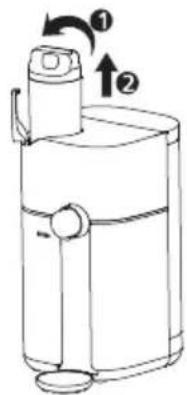
Take out

Install
10 Trouble shooting
| Error | Causes | Solutions |
| Cannot extract ambient water | The product is not connected with the power supply | Check if the dispenser is well connected with power supply |
| Button is not pressed properly | Press the water extraction button again | |
| Not enough filtered water in the inner water tank | If the “♂” (Indicator of changing water) flashes, please change the water in the raw water tank. Extract water after filtration finishes | |
| Cannot extract hot water | The dispenser is dry-heating | Extract ambient water for several times first, and then extract hot water |
| Not enough filtered water in the inner water tank | Wait for a while till “♂” (Indicator of water filtration) stops flashing | |
| Cannot filter water | Raw water tank lid is not well-covered | Check the raw water tank lid and cover it |
| The water in the raw water tank is at low level | Change water in the raw water tank. Check if there is any strange noise when filtering | |
| Raw water tank is not installed properly | Check the raw water tank and install it properly | |
| Filter cartridge is not installed properly | Disconnect the dispenser from the power supply. Open the filter cartridge lid and take out the filter cartridge, then install it properly | |
| Strange noise when filtering | The water in the raw water tank is at low water level | Change the water in the raw water tank. Check if any strange noise when filtering |
| Filtering system is blocked by air | Force rinsing for 1~3 times | |
| The quality of the raw water does not meet the requirement and the filter cartridge is blocked earlier than expected | Change the filter cartridge and check it again | |
| Leakage | The removable drip tray is full | Empty the removable drip tray |
| The check valve on raw water tank base is blocked or rinsed out | Put the check valve back to original place with a thimble, or contact customer services to change it | |
| The sealing valve at the bottom of the raw water tank is blocked | Hold the sealing valve with a thimble or a finger, remove the blockage | |
| Water oozes from the dispenser | Disconnect power supply and water source. Please contact customer services | |
| Odd taste of the water | The dispenser is new | Fill the raw water tank, filter the water and empty the filtered water tank. Repeat the process twice |
| The dispenser has not been used for a long time | Fill the raw water tank, filter the water and empty the filtered water tank. Repeat the process twice | |
| Filter cartridge is not changed as required | Change the filter cartridge. | |
| Leakage of electricity | Bad grounding | Must use power socket with reliable grounding |
| The power cord is damaged | Please contact customer services | |
| Button/display panel does not respond | Damaged parts | Please contact customer services |
| The system halts | Disconnect the dispenser from power supply for 1~2 minutes and then plug it in again | |
| The extraction indicator light is in red | Poor water quality or water quality monitoring components failure | Empty the filtered water tank. Extract water again. If the light is still in red, please contact after-sales personnel |
| Filter cartridge life expired | Please replace the filter cartridge |
Error code
| Error code | What does it mean | Solutions |
| E1 | Abnormality in raw mater temperature detector | Please contact the after-sales personnel |
| E2 | Abnormality in heating element temperature detector | Please contact the after-sales personnel |
| E3 | The raw water temperature exceeds 45°C | Change the water in the raw water tank. The applicable inlet water temperature is 5-38 °C |
| E4 | Abnormality in heating element | Please contact the after-sales personnel |
| E6 | Abnormality in water extraction | Please contact the after-sales personnel |
| E7 | Abnormality of the TDS detector in the filtered water tank | Please contact the after-sales personnel |
| E9 | Overflow alarm | Extract 300ml of ambient water. If the alarm still cannot be eliminated, please contact after-sales personnel |
| EF | The filter cartridge is unidentifiable | Please use the original Philips filter cartridge ADD553. If the filter cartridge is still unidentifiable, please contact the after-sales personnel. |
| EH | High temperature of heating element | Stop using the dispenser. Wait for the heating element to cool down.The alarm will automatically stop. If the problem still exists, please contact the after-sales personnel |
| EU | Display panel malfunction | Please contact the after-sales personnel |
11 Guarantee & Service
If you need information or if you have any problems, please visit www.philips.com/support or contact the consumer care center in your country. If there is no consumer care center in your country, go to a local dealer. Within two years from the date of purchase, you will receive free warranty service for any damage caused by the manufacturing process, or components under normal operation confirmed by our maintenance service. The warranty service does not include frequently replaced consumable components, auxiliary devices, transportation fees, and door-to-door service. Please show the proof of purchase to the service personnel during maintenance.
12 Packing list
| Dispenser | 1x |
| Removable drip tray | 1x |
| User manual | 1x |
| Quick start guide | 1x |
| App connection guide | 1x |
繁體中文
目錄

(2) 首次使用
(7) 抑菌功能
9 濾芯更換


取出

安装
10 故障診斷
Register your product and learn more in the website link below:
www.philips.com/water
Specifications are subject to change without notice
© 2021 AquaShield
All rights reserved.
The Philips trademark and the Philips Shield Emblem are registered trademarks of Koninklijke Philips N.V. used under license.
This product has been manufactured by and is sold under the responsibility of Hong Kong AquaShield Health
Technology Company Limited and Hong Kong AquaShield Health Technology Company Limited is the warrantor in relation to this product.
Rev A NOV 22




- ENGLISH
- CONTENTS
- 1 PRODUCT INTRODUCTION
- 3 PRODUCT OVERVIEW
- 4 USER INTERFACE
- 5 INSTALLATION
- SET-UP
- FIRST TIME USING
- 6 USAGE INSTRUCTION
- FILTERING WATER
- EXTRACTING WATER
- WATER QUALITY DETECTION
- APP CUSTOMIZATION MODE
- 7 PRECAUTIONS
- WARNING
- CAUTIONS
- 8 ROUTINE MAINTENANCE
- 9 FILTER CARTRIDGE REPLACEMENT
- 11 GUARANTEE & SERVICE
- 12 PACKING LIST
- 繁體中文
- 目錄
- 首次使用
- 抑菌功能
- 9 濾芯更換
Brand : PHILIPS
Model : ADD6911L
Category : Water dispenser