
ACT206 - Sports Watch ACME - Free user manual and instructions
Find the device manual for free ACT206 ACME in PDF.


| Product Type | Sports Watch |
| Model | ACT206 |
| Brand | Acme |
| Display Type | Digital LCD |
| Case Diameter | 45 mm |
| Case Thickness | 12 mm |
| Weight | 50 g |
| Strap Material | Silicone |
| Strap Width | 22 mm |
| Water Resistance | 5 ATM (50 meters) |
| Battery Type | CR2032 |
| Battery Life | Approximately 2 years |
| Functions | Time, Date, Stopwatch, Countdown Timer, Alarm, Backlight |
| Backlight | LED |
| Alarm | Daily alarm with snooze |
| Stopwatch | 1/100 second, up to 24 hours |
| Countdown Timer | Up to 24 hours |
| Case Material | Stainless Steel |
| Crystal Material | Mineral Glass |
| Operating Temperature | -10°C to 50°C |
| Care Instructions | Clean with a soft damp cloth. Avoid contact with solvents. |
| Safety Warning | Do not expose to extreme temperatures. Remove battery if not in use for extended period. |
| Spare Parts | Battery CR2032, strap |
| Repair Information | Contact customer service. No user-serviceable parts except battery. |
| Manual Availability | Free PDF download on notice-facile.com |
Frequently Asked Questions - ACT206 ACME
User questions about ACT206 ACME
0 question about this device. Answer the ones you know or ask your own.
Ask a new question about this device
Download the instructions for your Sports Watch in PDF format for free! Find your manual ACT206 - ACME and take your electronic device back in hand. On this page are published all the documents necessary for the use of your device. ACT206 by ACME.
USER MANUAL ACT206 ACME
natural_image
Line drawing of two hands holding a thin object, no text or symbols present
natural_image
Line drawing of two hands holding a small object, no text or symbols presentGB Fitness activity tracker
USER MANUAL
Specifications
Connection: Bluetooth v4.0
Frequency range: 2.4–2.48 GHz
Maximal output radio frequency power: 3.65 dBm (2.317 mW)
Display: 0.86" OLED
Vibration: yes
G-sensor: yes
Battery: Li-ion 3.7 V, 45 mAh
Charging: via USB, up to 1h, integrated USB plug
Working time: up to 7 days
Strap material: TPE
Compatibility: Smartphones only, Android 4.4 and above, iOS 7.1 and above, Bluetooth v4.0 and above
APP: VeryFitPro
Ingress protection: IP67 water-proof
Weight: unit + strap 20 g

This device is designed to provide you with the data of your movements by tracking your daily activities. It is not intended to be a medical device, thus, small oversights may occur (in the provided data). Driving, cycling and other physical activities involving movements of hands also may be counted as
steps. However, influence of these movements on daily activity results is minimal.
Installing the application
The activity tracker needs a special application to connect to the smartphone. There are two different ways to download this:
- Search for "VeryFitPro" in the Google Play Store or Apple's App Store.
- Scan the QR code below to go directly to the application (selecting the appropriate one for your smartphone's operating system).
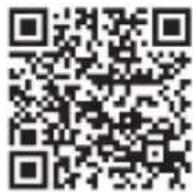
iOS

Android
Google Play is a trademark of Google Inc. App Store is a trademark of Apple Inc.
Charging
- Remove the activity tracker from its strap.
- Plug the integrated USB connector into any powered USB port (a computer USB port, USB wall charger, power bank, etc.).
- Charging takes up to 1 hour.
Battery status indicators
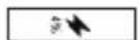
The battery is nearly empty – you need to recharge it.

The battery is being charged. A red LED indicator will glow on the tracker.

LED indicator will become less bright. The battery is fully charged. You can remove the tracker from the USB charging port.
Pairing

This device is designed to work with smartphones, supporting Bluetooth 4.0 or higher versions.
Be sure that your smartphone's Bluetooth hardware and software is working properly; otherwise it may not be able to pair with the activity tracker or the connection
may be unstable.
- Make sure that the smartphone's Bluetooth connection is ON.
- Open the "VeryFitPro" application and it will start searching for the activity tracker (or use the "Bind" function under the device section in the app).
- Touch the on-screen button of the activity tracker for a few seconds in order to activate it.
- The application will find the device automatically, select its name and connect it to the application.
* Please accept all security requests of the "VeryFitPro" app. For some Android smartphones you will have to activate the location service manually.
To ensure the proper operation of some activity tracker functions, VeryFitPro app must be started and working in background mode of your smartphone operating system. Do no not disable Bluetooth connection and do not close the app in the background applications list*. If the Bluetooth connection is lost, you will have to open "VeryFitPro" app manually and perform the synchronization operation – both devices will be reconnected. In case, the devices are not able to reconnect, please restart the phone and try again or unpair the activity tracker from the app and perform the pairing operation.
*Some smartphone models may have a function of auto closing of background apps-processes, so you have to disable this function and relaunch "VeryFitPro" app manually after it was closed automatically.
Using
Once the device has successfully connected to the app, it will automatically record and analyse your activities and your sleep. Press touch sensitive on-screen button to switch between the different modes.
Clock mode Calorie mode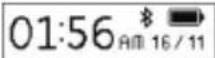 *The time will be set automatically after pairing the tracker with a phone. *The time will be set automatically after pairing the tracker with a phone. | 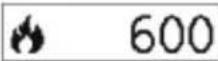 *The count of burned calories is directly based on the number of counted steps. *The count of burned calories is directly based on the number of counted steps. |
Activity time mode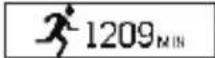 | Pedometer mode |
Distance mode Alarm mode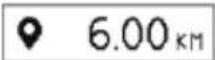 |  |
Notification mode Heart rate mode |  |
Using heart rate mode
Factors that affect heart rate test results
Non-standard way of wearing (such as display toward wrist inner side) would affect heart rate signal measuring, such as:
• the green light not fully cover your skin
• arm swing and the slight movement of device on wrist
• too tight wearing
- raising the arm high and clenching the fist would affect blood circulation and affect the heart rate signal as well.
As with all heart-rate tracking technology, whether a chest heart rate belt or a wrist-based sensor, the accuracy is affected by personal physiology, location of wear, and type of movement.

The data of heart rate meter should not be considered as medical accuracy results and it cannot be used as an accurate indication of your health condition.
Notification mode
When the corresponding functions are enabled in the "VeryFitPro" app, your activity tracker can inform you about the following events: Incoming calls, incoming messages, reminder alerts, physical inactivity (sedentary alert), achievement of the activity target (user-specified number of steps) and loss of the phone*.
* The device vibrates when the smartphone is beyond the range of Bluetooth (more than 5–10 metres).
Q Find phone mode
Turn on the "Find Your Phone" function on the app. Select the "Find Phone" mode on your tracker, then press and keep touch sensitive button for 2 seconds and your phone will start to ring.
*More options regarding these modes and other functions can be found in the "VeryFitPro" application.
**Some modes will be displayed on the device only if these functions are turned ON in "VeryFitPro" application and it has to be active or running in background mode.
"VeryFitPro" app
It is recommended to use the most recent version of the app. The user interface and app functionalities may change with the updates of the application. When you open the app, you will have to swipe down from the top of the app screen to sync the newest data from the tracker with the app.
There are four main sections in the "VeryFitPro" app.
| Mainpage | Here you can see the information about your recent activities and sleep. |
| Details | Here you can see the history of your activities and sleep. |
| Device | Here you can enable/disable and adjust various functions of the activity tracker and the app. |
| User | Here you can access your activity target settings, as well as your personal information and system settings. |
Troubleshooting and updates
1. Problem: the device can't be found when pairing
- Please make sure the smartphone's Bluetooth function is ON and that your device meets the minimum requirements.
- Please make sure that the distance between the phone and device is no more than 0.5 metres.
- Please make sure that the device is sufficiently charged.
2. Problem: the device won't connect with the application
Try rebooting the phone and make sure that the smartphone's Bluetooth connection is on.
Care and maintenance
- Regularly clean your band and tracker –especially after working out or sweating. Make sure your device is completely dry after cleaning.
- Be sure your skin is dry before you put your tracker on.
• Do not swim or shower with your tracker. - Do not expose the tracker to liquid, dampness or humidity to prevent its internal circuit from being affected.
• Do not use abrasive solvents to clean the tracker. - Do not expose the tracker to extremely high or low temperatures because this will shorten the life of electronic devices, destroy the battery or distort certain plastic parts.
• Do not dispose of the tracker using fire because this will result in an explosion. - Do not expose the tracker to contact with sharp objects because this will cause scratches and damage.
- Do not attempt to disassemble the tracker because this may damage it if you are not professionally skilled in this area.
Waste Electrical and Electronic Equipment (WEEE) Symbol

The use of the WEEE symbol indicates that this product may not be treated as household waste. By ensuring this product is disposed of correctly, you will help protect the environment. For more detailed information about the recycling of this product, please contact your local authority, your household waste disposal
service provider or the shop where you purchased the product.
LT Aktyvumo sekimo apyranké
NAUDOTOJO VADOVAS
Ypatybès
ACME Europe hereby declares that this equipment is in compliance with the essential requirements and other relevant provisions of:
RED 2014/53/EU Directive
RoHS 2011/65/EU Directive
The declaration of conformity can be accessed at:
http://www.acme.eu/en-us/declarations-conformity
LT ES atitikties deklaracija
| Product Product model | |
| Product purchase date Seller name, address | |
| Failures (date, description, position of the person who accepts the product, first name, last name and signature) | |
1. Warranty period
Warranty enters into force starting with the day when the buyer acquires the product from the seller. Warranty period is indicated on the package of the product.
2. Warranty conditions
The warranty is valid only by providing an original document of the product acquisition and this warranty sheet, which includes name of the product model, product purchase date, name and address of the seller.
If it is noticed during the warranty period that the product has faults and these faults where not caused by any of the reasons when the warranty is not applied as indicated in the paragraphs below, manufacturer undertakes to replace the product.
The warranty is not applied to regular testing, maintenance and repair or replacement of the parts which are worn out naturally.
The warranty is not applied if damage or failures occurred due to the following reasons:
- Inappropriate installation of the product, inappropriate usage and/or operati product without following the manual, technical requirements and safety standards as provided by the manufacturer, and additionally, inappropriate warehousing, falling from heights as well as hard strikes.
• Corrosion, mud, water and sand.
- Repair works, modifications or cleaning, which were performed by a authorised by the manufacturer.
- Usage of the spare parts, software or consumptive materials which do not apply to the product.
- Accidents or events or any other reasons which do not depend on the manufacturer, which includes lightning, water, fire, magnetic field and inappropriate ventilation.
- If the product does not meet standards and specifications of a particular country which it was not bought. Any attempt to adjust the product in order to meet technical and safety requirements such as those in the other countries withdraws all the rights to the warranty service.
If no failures are detected in the product, all the expenses in relation to the service are covered by the buyer.
www.acme.eu

natural_image
Solid light green circular shape on a solid teal background (no text or symbols)- GB Fitness activity tracker
- USER MANUAL
- Specifications
- Installing the application
- Charging
- Battery status indicators
- Pairing
- Using
- Using heart rate mode
- Factors that affect heart rate test results
- Notification mode
- Q Find phone mode
- "VeryFitPro" app
- Troubleshooting and updates
- Problem: the device can't be found when pairing
- Problem: the device won't connect with the application
- Care and maintenance
- Waste Electrical and Electronic Equipment (WEEE) Symbol
- LT Aktyvumo sekimo apyranké
- NAUDOTOJO VADOVAS
- Ypatybès
- LT ES atitikties deklaracija
- Warranty period
- Warranty conditions
Brand : ACME
Model : ACT206
Category : Sports Watch