
AN-196 - Receiver Nexa - Free user manual and instructions
Find the device manual for free AN-196 Nexa in PDF.


| Product Type | Wireless Receiver |
| Brand | Nexa |
| Model | AN-196 |
| Operating Frequency | 433.92 MHz |
| Number of Channels | 1 |
| Power Supply | 230 V AC, 50 Hz |
| Max Load | 1000 W (resistive) |
| Dimensions (W x H x D) | 50 x 30 x 20 mm |
| Weight | 30 g |
| Range (free field) | Up to 30 m |
| Enclosure Rating | IP20 |
| Operating Temperature | -10°C to +40°C |
| Maintenance | Clean with a dry cloth; do not use solvents. |
| Safety Instructions | Disconnect power before installation; keep away from moisture. |
| Spare Parts & Repairability | No user-serviceable parts; contact Nexa support for repairs. |
| Compatible Transmitters | Nexa wireless remotes and sensors |
| Installation Type | Wall mount or flush mount |
| Warranty | 2 years |
Frequently Asked Questions - AN-196 Nexa
User questions about AN-196 Nexa
0 question about this device. Answer the ones you know or ask your own.
Ask a new question about this device
Download the instructions for your Receiver in PDF format for free! Find your manual AN-196 - Nexa and take your electronic device back in hand. On this page are published all the documents necessary for the use of your device. AN-196 by Nexa.
USER MANUAL AN-196 Nexa
Max, last 2 x 100% W R
Fukkova Z/Nan (868-42 MHz)
Backside: 100-11.30 m
Strontobrukking • 1 W Islandby
IP Klassifacing Incumbenk
Hm H2 × 1 × 10^43 × 42 × 18 mm
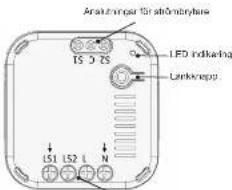
Aristinger for spanning
NEXA
NEXA 48, DATANÄGEN 378. 459 32 ASIKOV, SWEDEN
无法识别
SVENSKA
AN-138 for all of S-hateman-HPK-04, intakeshatal
AN-196 relay module supports three 7-wave Association Group
Group 1: Association with 5 gallons per liter.
Group 2: Association with nodes
(1) 2013. Australia: With 10 days
Group 1 commands
- When the unit is powered up for first time, a Notification Report
will be sent to the board of Group.
- When performing factory, Resell, a business operation will be created to the parts of Group 1
1.2.3.1 MY LAM = 0.178 M TIAO OF CHOPA 1.
- When lead is scored through the band, the unit. An send a copy: Scottish Report to the parts of Figure 1.
2018, 3 March Report on the Board of Group
Group 2
- When switch 1 is pressed, a BASIC SET command containing
a value will be sent to the nodes of Group 2 (when relay is off,
Basic Set Value=0.00, which relay is on, Basic Set Value=0.01.
- When switch 2 is pressed, a BASIC SET command containing
a value will be sent to the node of Group 3 (When relay is off.
Basic Set Value_0x00, when relay is on, Basic Set Value_0xFF
Z-WAVE PLUS INFO (Root/Endpoint1/Endpoint2)
| Role Type Node Type | User Installer Icon User Icon | ||
| Gree Name On | 2-None Plan node | On/OI Power Switch | On/OI Power Switch Via Outlet |
VERSION
| Protocol Library | 3 Slave Enhance 232 Library |
| Protocol Version | 0.01 (0.51.02) |
MANUFACTURER
| Manufacturer ID | Product Type | Product ID |
| 0x006C | 0x0034 | 0x003E |
AGI (ASSOCIATION GROUP INFORMATION) TABLE
| Group | Profile | Command Class & Command (Loty Noyce) | Group Name (UTF-8) |
| 1 | General, NA | Binary Server Report Notification Report, Devices, Renter Locality Notification | Life Inc |
| 2 | Control | Basic Set | On Off terminal Button 1 |
| 3 | Control | Basic Set | On Off terminal Button 2 |
BASIC COMMANDS
| Command | Description |
| Basic Set | Include about the status of the device |
| Basic Report | Report the status of the device. |
| Basic Set | Set the status of the device value: 0817 (XIN) CoBE (CIF) |
NOTIFICATION
| Event Type Event | Event Parameters Length | ||
| Power applied for line time | IIc01 | IIc01 | 0x00 |
CONFIGURATION
The configurable value are as following:
| Parameter Number | Parameter Function | Size | Range | Default |
| 1 | Balance Type 1 | 1 | 0-1 | 0(8) Momentary 1. Toploid |
| 2 | Balance Type 2 | 1 | 0-1 | 0(8) Momentary 1. Toploid |
| 3 | Ruby 1 Auto Off Time | 4 | 0-420000000 | 0 (Not auto off)Max 12 hours |
| 4 | Ruby 2 Auto Off Time | 4 | 0-420000000 | 0 (Not auto off)Max 12 hours |
| 5 | Set whether to remember the not answer of Hyde 1 | 1 | 1/6 | (Remember)0 (do not remember) |
| 6 | Set whether to remember the not answer of Hyde 2 | 1 | 1/6 | (Remember)0 (do not remember) |
COMMAND CLASSES
The module supports Command Classes including -
• COLDMARKS CLASS 79/AVEPTUS INC
• COMMAND_CLASS_ASSOCATION_V2
• COMMAND_CLASS_ASSOCIATION_GRP_INFO
• COMMAND_CLASS_MULT_CHANNEL_ASSOCIATION_92
• COMMAND CLASS MULT CHANNEL
• COMMAND_CLASS_TRANSPORT_SERVICE_V2
• COMMAND_CLASS_VERSION_V2
• COMMAND_CLASS_MANUFACTOPER_SPECIFIC_92
• COMMAND CLASS DEVICE RESET TIXCATT
• COMMAND CLASS POWERLED
• COMMAND_CERS_SECURITY
• COMPANY CLASS SECURITY
• OCHNARO CLAS: SOU-CHOSKIN
• COMMAND CLASS FINANCIAL UPDATE 12/04
- COMPARO CLASS NOTIFICATION
• COMPANY-CLASS CORPORATION
• OSMAROS CLASS SWITCHER
END POINT 1/2
• COMMAND CLASS ZWAVEPLUS INFO 19
• COMMAND CLASS SWITCH BINARY
• COMMAND CLASS ASSOCIATION V2
• COMMAND CLASS ASSOCIATION GRP INFO
• COMMAND CLASS MULTI CHANNEL ASSOCIATION VS
• COMMAND_CLASS_SUPERVISION
ADDITIONAL COMMAND CLASSES SUPPORTED
• Binary Switch: Refer to Basic
- Mut Channel: To control 2 relay independently.
• Firmware Update: For OTA function.
NEXA


AN-196
Built-in receiver On/Off, 2 channels
TECHNICAL DATA
AN-178
From source: 2014-2015
Max. charge 2 x 000 W/B
Frequency: Z'WAN 0958.42 MHz
Bargu un in 30 m
Power consumption • 1 W/stand-1
IP retic indoor use
D-methanol (A'×H×O, 43×42×18 mm
Connections for power switch

Connections for voltage
NEXA
XPA AB, DATAVACEN, 378, 418, 52904, SAVETEN
[Unreadable due to severe distortion and noise]
ENGLISH
Built-in receiver for permanent installation. Small, compact side for placing in a junction box or switchbox. Can be connected to existing switch. The receiver needs both phase and neutral. The receiver is fully compatible with the 7-Wave Plus standard.
SAFETY
Dead through the entire instruction first. Engage a professional if so required. None cannot be held liable if the product is used for any purpose other than the one for which it is designed, or if there is failure to comply with the Instruction.
Never connect bulbs or equipment exceeding the recover's maximum stated load – this may lead to faults, short-circuiting or fire. Do not attempt to repair the product. The product contains no reasonable parts.
INSTALLATION
Make sure that the conductors are powered down by turning off the power in the distribution box.
Connect Phase to L, LoadIgnition wire to LS1/LS2 and Zero Conductor to N.
AN 195 can be connected to power switches, even momentary switches, for control, also see wiring diagram.
Please note that switches connected to AN-108 must be potential free. i.e. fully insulated from 230 V.
CONNECT TO A Z-WAVE NETWORK
Smart Star / Auto-inclusion: AN 195 has support for the Smart Star functions, including
The 100 has support for the 6-hare data, functions is, and starts automatically when the unit is powered up and repeats at a dynamic interval for as long as the unit is not part of a Z-Wave network. Z-Wave SmartStart is based on Z-Wave SDK 8.8x and requires the controller to have support for this.
If the controller does not support the SmartStart function, the unit can be added to the Z-Wave network by manual inclusion, or by scanning the DSC QR code, or by entering a 5-digit "Device Specific Code" (DSC) when requested by the gateway.
- Put the Z-Wave controller in inclusion mode base the controller a manual;
- Connect AN-196 to voltage and the unit is included.
Manual Inclusion:
- Put the Z-Wave controller in inclusion mode (see the controller a manual)
- Press S times on the Line button within 1.5 seconds
Exclusion:
- Put the Z-Wave controller in exclusion mode (see the controller's manual)
- Press 3 times on the Link button within 1.5 seconds.
Restore to factory settings:
- Press 3 times on the Link button within 1.5 seconds
-
Within 1 second after stop 1 above, press and hold down the Link button until the LED goes put, approx. 5 seconds.
-
Node ID is deleted and the unit restored in factory settings.
USE
The outputs on AW 186 can be wirelessly controlled by a Z-Wave controller and by connected power switch
Consult the manual for your Z-Wave controller for more information.
LOAD MAX POWER
Energetische Hüb am. Dörlandkosten [2017] 13029/2026-240 V
Hslogen Ighos (290 V) 490V / 220-240 V
LED & Low energy per unit (250 V)
19047:220-240(140W×3)
SAFETY AND INFORMATION
Range indicates up to 30 m (optimal conditions). The range is very dependent on the local conditions, for example, if there are more in the vicinity. For example, the thin metal cooling in energy glass with low osmolarity has a negative influence on the range of the radio signals. There may be medications on the use of the unit outside the EU. If appropriate, you should check that the unit complies with local regulations.
Max load: Never connect lights or equipment that exceed the receiver's maximum load. This could lead to faults, short circuiting or fire.
Life-support equipment: Never use Nexa's products with life-support equipment or other devices where faults or interference could have life-threatening consequences.
Interference: All wireless units can suffer from interference that can affect the performance and range. For this reason, the minimum distance between two receivers should be at least 30 cm. Repair: Do not attempt to repair the product, it does not contain any repairable parts.
Waterproofing: The product is not waterproof. Make sure it is dry at all times. Damp causes the electronics inside to corrode and the could lead to short-circuiting, faults and a risk for electric shocks.
Cleaning: Clean the product with a dry cloth. Do not use chemicals, solvents or strong cleaning contents.
Environment: Do not exceed the product to intense heat or cold, because it could damage or shorten the service line of the electric circuit.
WIRING DIAGRAM


PROGRAMMING
Z-WAVE GROUP SUPPORT
AN-196 relay module supports three 7-week Association Group
The following table provides the information in a specific format.
Group 2: Association with 5 nodes
2.1.2.3.4.5.6.7.8.9.10.11.12.13.14.15.16.17.18.19.20.21.
Флакт Госниниях
- When the unit is powered up for first time, a Notification Report will be sent to the node of Group 1.
- When performing Factory Reset, a Device
action will be sent to the node of Group 1.
- When relay is activated through the switch, the unit will send a Binary Sketch Report to the node of Group 1.
Group 2 commands:
- When switch 1 is pressed, a ENSK SET command containing a value will be sent to the node of Group 2. When relay is off,
Basis set value = Base, Weighted, is on, Basic set value = 0.17
Group 3 commands
- When switch 2 is pressed, a BASIC SET command containing a value will be sent to the node of Group 3. When relay is off, Basic Set Value = 0x00 when relay is on, Basic Set Value = 0xFF
Z-WAVE PLUS INFO (Boot/Endpoint1/Endpoint2)
| Role Type Node Type | Input Installer Icon User Icon | ||
| Gree Name On | 2-None Plan node | OnOil Power Switch | OnOil Power Switch Wall outlet |
VERSION
| Protocol Library | 3 [Show Enhance 232 Library |
| Protocol Version | 6.01 (5.81.07) |
MANUFACTURER
| Manufacturer ID | Product Type | Product ID |
| 0x006C | 0x003H | 0x002E |
AGI (ASSOCIATION GROUP INFORMATION) TABLE
| Group | Profile | Command Class & Command(Lost Noyce) | Group Name (UTF-8) |
| 1 | General, NA | Binary Server ReportNotification Report,Device Reset Locality Notification | Life Inc |
| 2 | Control | Basic Set | On Off centralButton 1 |
| 3 | Control | Basic Set | On Off centralButton 2 |
BASIC COMMANDS
| Command | Description |
| Basic Get | Inquire about the status of the device |
| Basic Report | Report the status of the device. |
| Basic Set | Set the status of the device (Value=30FF, CIN, CaCO, CFF) |
NOTIFICATION
| Events | Type | Events | Event Parameters Length |
| Power applied for line time | IIc/III | IIc/II | 0x10 |
CONFIGURATION
The configurable value are as following:
| Parameter Number | Parameter Function | Size | Range | Default |
| 1 | Starter 1 Type | 1 | 3-1 | C(9) Momentary 1. Tagged |
| 2 | Starter 2 Type | 1 | 3-1 | C(9) Momentary 1. Tagged |
| 3 | Ruby 1 Auto On Time | 4 | 0-43200000 | C (Not only off)Max 12 hours |
| 4 | Ruby 2 Auto On Time | 4 | 0-43200000 | C (Not only off)Max 12 hours |
| 5 | Dot whether to transmit the net address of IDs 1 | 1 | 1/6 | (Remember)(0 do not transmit) |
| 6 | Dot whether to transmit the net address of IDs 2 | 1 | 1/6 | (Remember)(0 do not transmit) |
COMMAND CLASSES
The module supports Command Classes including -
• COLDMARKS CLASS 79/AVEPTUS INC
• COMMAND_CLASS_ASSOCATION_V2
• COMMAND_CLASS_ASSOCIATION_GRP_INFO
• COMMAND_CLASS_MOLT_CHANNEL_ASSOCIATION_02
• COMMAND CLASS MULT CHANNEL
• COMMAND_CLASS_TRANSPORT_SERVICE_V2
• COMMAND_CLASS_VERSION_V2
• COMMAND_CLASS_MANUFACTOLER_SPECIFIC_92
• ODMANS/CLASS_DEVICE/NEAST/ELOMATE
• COMMAND CLASS POWERLEVEL
• COMMAND_CERS_SECURITY
• COMPANY CLASS SECURITY
• CHINAPO CLASS 50+CHUSKIN
• COMMAND CLASS TINNRALE UPDATE INDIA
- COMPARO CLASS NOTIFICATION
• COMPANY-CLASS-CONHOCATION
• COMPARATION CLASS SWITCH
LND POINT 1/2
• COMMAND CLASS ZWAVEPLUS INFO 19
• COMMAND CLASS SWITCH BINARY
• COMMAND CLASS ASSOCIATION V2
• COMMAND CLASS ASSOCIATION GRP INFO
• COMMAND CLASS MULTI CHANNEL ASSOCIATION 92
• COMMAND_CLASS_SUPERVISION
ADDITIONAL COMMAND CLASSES SUPPORTED
• Binary Switch: Refer to Basic
• MJE Channel: To control 2 days independently.
• Firmware Update: For OTA function.
NEXA

Mole, belasting 2 x 1000 W P
Fukkova Z'Nan (868-42 MHz)
Beckweden appl.30 m
Stromfortruk : 1 W/vertemod.
IP Basellating Instructors bruk
H2O × H2O × 43 × 42 × 16 mm
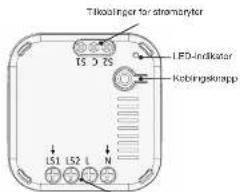
Tilkoolinger for spenning
NEXA
MENA AB, DATAVACEN 370 418 2 APPOX, SAVITEN
[Unreadable due to severe distortion and noise]
NORSK
Smart share/automotive immusion:
AN-190 har blocks for Smartstart-filmogram - Inkulejo-Starter
dutor hauh na efficien spent ingesies of gjernus You by la ma jeterales a apex ophoton idra as lekukatist 7 Wave network
7-Wave Super-Sword er besogen, pp 7-Wave SOK 6.8a, no kpreen al
Kity (DGK) pa foroeporsel fra gatovskyen
-
Sell 2-3-Maxi-kyssenbateri i kupapetamnus (se slasentnabor s händiski)
-
Koble AN-196: I spening, 24 inkludene einsten
Manuell inklusion:
-
Sott 7-Wave-stywnthaven Linkusjumomotus (so stywnhetera handbole)
-
Trykk 3 ganger på keblingskrappen innen 1,5 sekunde
Eksklusion
-
Sall 7-7000-styphenidien i elskinaaromndas (estypenid sowa klandok)
-
Trykk 3 ganger på keblingsknappen innen 1,5 sekunde.
- Appraisal model by amniolite has the spatially
virkang på gelasienelenes rskkavldes. Det kan flaves
bespruchter for bris so substen abnifer EU. Oen seued, bar
du kontrollere at erneien overhöder lokale forekriter.
Maks. belsstning: Kotls aich of amper eller utaly som
overskridar motlakarana makaimala balsstring. Dette kan fare til
all, consisting and small.
Livreddende utstyr: Bruk avril Nova-produktar til Ivreddende
Ibstruendel fijoser
Forstyrreiser: Alle trådlose enholer kan utsettes for forstyrreiser.
zom kan påvise både ydelse og nøkjavlden. Deritrade
AN-196 relay module supports three 2-wave Association Groups
Group 1: Association with Social Media
Group 2: Association with nodes
SROAD S. Australia With 10 Nodes
Флакт 1 санчимий
- When the unit is powered up for first time, a Notification Report
will be sent to the node of Group
- When performing Factory Reset, a Device
• Vishan pubes is setting and through the security, the unit will avail a
Ding: Dutch Expert in the node of Figure 1
Group 2 commands.
- When switch 1 is pressed, a BASIC SET command containing
a value will be sent to the node of Group 2 When relay is off,
Basic Set Value=0x00, when relay is on, Basic Set Value=0xFF.
Group 3 commands
- When switch 2 is pressed, a BASIC SET command containing
a value will be sent to the node of Group 3 (When relay is off.
Basic Set Value, On 10. When relay is no, Basic Set Value, On 15.
Z-WAVE PLUS INFO (Root/Endpoint1/Endpoint2)
| Role Type Node Type | Instalier Icon | User Icon | |
| Gree Name On | 2-None Plus node | OnOII Power Switch | OnOII Power Switch Via Outlet |
VERSION
| Protocol Library | 3 (Slave Entrance 232 Library |
| Protocol Version | 6.00 [5.81.05] |
MANUFACTURER
| Manufacturer ID | Product Type | Product ID |
| 0x006C | 0x0034 | 0x003E |
AGI (ASSOCIATION GROUP INFORMATION) TABLE
| Group | Profile | Command Class & Command (Lot) N bytes | Group Name (UTF-8) |
| 1 | General, NA | Binary Server Report Notification Report, Device Reset Locally Notification | Life Inc |
| 2 | Control | Basic Set | On OFF central Button 1 |
| 3 | Control | Basic Set | On OFF central Button 2 |
BASIC COMMANDS
| Command | Description |
| Basic Set | Income about the status of the device |
| Basic Report Report the status of the device. | |
| Basic Set | Set the status of the device (Value=30FF, CIN, CaCO, CFP) |
NOTIFICATION
| Events | Type | Events | Event Parameters Length |
| Power applied for line time | 1000 | Call | Call |
CONFIGURATION
The configurable value are as following:
| Parameter Number | Parameter Function | Size | Range | Default |
| 1 | Starter 1 Type | 1 | 0-1 | C(9) Momentary 1. Tagged |
| 2 | Starter 2 Type | 1 | 0-1 | C(9) Momentary 1. Tagged |
| 3 | Ruby 1 Auto On Time | 4 | 0-42000000 | C (Not only off)Max 12 hours |
| 4 | Ruby 2 Auto On Time | 4 | 0-42000000 | C (Not only off)Max 12 hours |
| 5 | Dot whether to transmit the net address of IDs 1 | 1 | 1/6 | (Remember)(0 do not transmit) |
| 6 | Dot whether to transmit the net address of IDs 2 | 1 | 1/6 | (Remember)(0 do not transmit) |
COMMAND CLASSES
The module supports Command Classes including -
• COLDMANO CLASS 2014EPTUS INC
• COMMERCELLATION
• COMMAND_CLASS_MULT_CHANNEL_ASSOCI
• CINNAMO CLMS MIL TEL CHANNEL
• COMMAND CLASS TRANSPORT SET
• COMMAND CLASS VERSION 12
• COMMAND CLASS MANUFACTURER SPECIFIC V2
• COMMAND_CLASS_DEVICE_RESET_LOCALLY
• COMMAND CLASS POWERLEVEL
• COMMAND_CLASS_SECURITY
• COMMAND CLASS SECURITY 2
• COMMAND CLASS SUPERVISION
• COMMAND CLASS FIRMWARE UPDATE MD 74
• COMMAND CLASS NOTIFICATION
• COMMAND_CLASS_CONFIGURATION
• COMMAND CLASS SWITCH RINARY
LND POINT 1/2
• COMMAND_CLASS_ZWAVEPLUS_INFO_V2
• COMMAND CLASS SWITCH_BINARY
• COMMAND CLASS ASSOCIATION V2
• COMMAND CLASS ASSOCIATION GRP INFO
• COMMAND CLASS MULTI CHANNEL ASSOCIATION 92
• COMMAND_CLASS_SUPERVISION
ADDITIONAL COMMAND CLASSES SUPPORTED
• Binary Switch: Refer to Basic
• MJE Channel: To control 2 days independently.
• Firmware Update: For OTA function.
NEXA


AN-196
Tajima Z-Wave 18842 MHz
Ketima Fp.31m
713-100% 41% 50%
Mn11.6K=81.0K/2.018mm
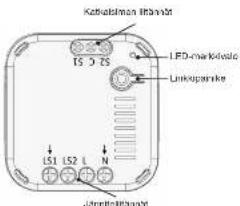
NEXA
NDA 45, DATAIACEN 378, 418-32 ASIN, SAVITEN TEL: 06961601 | 20021804198
SUOMI
Z-Wave Smart Start point in HJ Z-Wave 8DK 6.8x50n. [a
vascim foscima cri, adhi objain buose tibi
AN-196 relay module supports three Z-wave Association Groups
GROUP 2. Association with Schools
- A 2022 (2023) 4-70
Group 1: Company
- When the unit is powered up for first time, a Notification Report
will be sent to the nodes of group 1.
- When performing Factory Reset, a Device Reset Locally Nomination will be sent to the node of Group 1.
- When rels is achieved through the switches, then put will send a
Binary Switch Report to the node of Group 1.
Згота 2 синимости
- When switch 1 is pressed, a BASIC SET command containing
a value will be sent to the node of Group 2 (When relay is off,
Basic Set Value=0x00, when relay is on, Basic Set Value=0xFF
Онали 3 схепняжек
- When switch 2 is pressed, a BASIC SET command containing
a value will be sent to the node of Group 3 (When relay is off,
Basic Set Value,0x00, when rawy is on, Basic Set Value,0xFF
Z-WAVE PLUS INFO (Root/Endpoint1/Endpoint2)
| Rule Type | Node Types | Installer Icon | User Icon |
| Sewer A##m#r On | 2-Queue Plan node | CnOCH Power Switch | On/OH Power Switch Wa I outlet |
VERSION
| Protocol Library | 3 Slave Enhance 232 Library |
| Protocol Version | R.O. (5.81.42) |
MANUFACTURER
| Manufacturer ID | Product Type | Product ID |
| C4009C | C4009H | B600CE |
AGI (ASSOCIATION GROUP INFORMATION) TABLE
| Group | Profile | Command Class & Command (Lot) N bytes | Group Name (UTF-8) |
| 1 | General/NA | Binary Switch Report Notification Report, Dovec Row 2 Locally Notification | Life Ino |
| 2 | Control | Basic Set | On/DT control Button 1 |
| 3 | Control | Basic Set | On/DT control Button 2 |
BASIC COM
| Command | Description |
| Basic Set Inquire | about the status of the device |
| Basic Report | Present the status of the device. |
| Basic Set | Set the status of the device (Value: 2017, XCM, CoIC, XCF) |
NOTIFICATION
| Events Type Events | Event Parameters Length | ||
| Power applied for first time (Call Call) Cost | |||
CONFIGURATION
The configurable values are as follows:
| Parameter Number | Parameter Function | Size | Range | Default |
| 1 | Starter 1 type | 1 | 0~1 | C(8) Momentary T. Tagula |
| 2 | Starter 2 type | 1 | 0~1 | C(8) Momentary T. Tagula |
| 3 | Indler 1 Acter Off Time | 4 | 0~45000000 | C Not too offMax 12 hours |
| 4 | Indler 2 Acter Off Time | 4 | 0~45000000 | C Not too offMax 12 hours |
| 5 | Set whether to Chemicals 2 or not absent of Indler 1 | 1 | 1.0 | Cmember(9) do not complete |
| 6 | Set whether to Chemicals 2 or not absent of Indler 2 | 1 | 1.0 | Cmember(9) do not complete |
COMMAND CLASSES
The mobile supports Command Classes including
• COMMAND CLASS ZWAVEPLUS INFO
• COMMAND_CLASS_ASSOCIATION_V2
• COMMAND_CLASS_ASSOCIATION_GRP_INFO
• COMMAND_CLASS_MULTI_CHANNEL_ASSOCIATION_VS
• COMMAND CLASS MULTI CHANNEL
• COMMAND CLASS TRANSPORT SERVICE V2
• COMMAND_CLASS_VERSION_V2
• COMMAND_CLASS_MANUFACTOPER_SPECIFIC_V2
• COMMAND CLASS DEVICE RESET LOCALITY
• COMMAND CLASS POWERLEVEL
• COMMAND CLASS SECURITY
• COMMAND_CLASS_SECURITY_2
• (CHINA) CHASE 5.0-101524
• COMMAND CLASS FIRMWARE UPDATE MD VI
• COMMAND CLASS NOTIFICATION VI
• COMMAND_CLASS_CONFIGURATION
• COMMAND_CLASS_SWITCH_BINARY
END POINT 1/2
• COMMAND CLASS ZWAVEPLUS INFO V2
• COMMAND CLASS SWITCH BINARY
• COMMAND CLASS ASSOCIATION V2
• COMMAND CLASS ASSOCIATION GRP INFO
• COMMAND CLASS MULTI CHANNEL ASSOCIATION 72
• COMMAND_CLASS_SUPERVISION
ADDITIONAL COMMAND CLASSES SUPPORTED
• Binary Switch: Refer to Basic.
• Multi Channel: To control 2 rows independent
• Firmware Update: For OTA function.
Brand : Nexa
Model : AN-196
Category : Receiver