
BMG7030W - Security Camera Epcom - Free user manual and instructions
Find the device manual for free BMG7030W Epcom in PDF.


| Product Type | Security Camera (Bullet) |
| Brand | Epcom |
| Model | BMG7030W |
| Dimensions | 180 x 70 x 70 mm (approx.) |
| Weight | 500 g (approx.) |
| Power Supply | DC 12V, 1A |
| Resolution | 1080p Full HD (1920x1080) |
| Night Vision | IR LEDs, up to 30m range |
| Weatherproof Rating | IP66 |
| Motion Detection | Yes, with adjustable sensitivity |
| Remote Viewing | Via smartphone app (iOS/Android) |
| Storage | MicroSD card slot (up to 128GB) |
| Field of View | 90° diagonal angle |
| Audio | Built-in microphone and speaker (two-way audio) |
| Mounting | Wall or ceiling mount included |
| Indoor/Outdoor Use | Outdoor (weatherproof) |
| Material | Aluminum alloy housing |
| Operating Temperature | -20°C to 50°C |
| Cleaning | Wipe with a soft, dry cloth; avoid chemicals |
| Safety | Low voltage DC, CE compliant |
| Spare Parts Availability | Adapter, mounting kit, and screws available from Epcom |
| Repairability | Limited; contact Epcom support for service options |
Frequently Asked Questions - BMG7030W Epcom
User questions about BMG7030W Epcom
0 question about this device. Answer the ones you know or ask your own.
Ask a new question about this device
Download the instructions for your Security Camera in PDF format for free! Find your manual BMG7030W - Epcom and take your electronic device back in hand. On this page are published all the documents necessary for the use of your device. BMG7030W by Epcom.
USER MANUAL BMG7030W Epcom
PILLOW TFT LCD COLOR MONITOR

natural_image
Close-up of soccer players' legs and foot on a field, no visible text or symbolsperating instructions
Before operating this set, please read these instructions completely
POWER Selection
- Automobile storage battery :12V-24V
Use automobile adapter(suitable for vehicles with negative grounding) to supply power to the monitor for the automobile's battery
- Battery pack power supply (12V-24V DC)
Connection and Installation
(1) Red to +12V
(2)Black to ground
(3)Video 1(yellow)
(4)Video 2(yellow)
(5)Green for rear view

Thanks to use this series of LCD color monitor.
Caution
- Do not try to repair the device by yourself. If there is any problem. Please switch off the monitor immediately and then inform our company or our dealers. This monitor is comprised of many storage precision electronic components. Disassembling or self renovation may damage it or make it break.
- Do not expose the monitor to moisture, dust, oil smog, direct sunshine or environment affections.
- Do not use diluents or other chemical detergents. Use soft cloth to remove dust or dirt on the monitor.
- Keep the monitor away from over hot or over cold locations. The monitor's operation temperature range is 0^ C- 40^ C. The monitor's storage temperature range is -20^ C- 60^ C.
- Use the AC adapter, battery pack and auto mobile adapter that come with the monitor only.
Cauton:
For your safely, do not watch MONITOR to turn the monitor on while driving.
It is against the law to watch and operate a MONITOR while driving
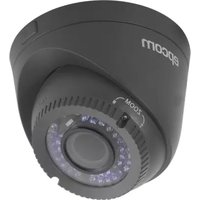
Brand : Epcom
Model : BMG7030W
Category : Security Camera