
MD BRPCV05 - Wall mount IIYAMA - Free user manual and instructions
Find the device manual for free MD BRPCV05 IIYAMA in PDF.


| Product Type | Fixed Wall Mount |
| Brand | Iiyama |
| Model | MD BRPCV05 |
| VESA Compatibility | 100 x 100 mm / 200 x 200 mm |
| Maximum Load Capacity | 30 kg (66 lbs) |
| Material | Steel / Aluminum |
| Color | Black |
| Dimensions (W x H x D) | 240 x 240 x 50 mm (9.4 x 9.4 x 2.0 in) |
| Weight | 1.5 kg (3.3 lbs) |
| Compatible Screen Sizes | 20" to 55" |
| Distance from Wall | 20 mm (0.79 in) |
| Tilt Range | 0° (Fixed) |
| Swivel Range | None (Fixed) |
| Installation Type | Wall mounting with anchor bolts |
| Included Accessories | Mounting brackets, screws, anchors, manual |
| Power Supply | None (passive) |
| Operating Temperature | -10°C to 50°C (14°F to 122°F) |
| Certifications | CE, RoHS |
| Maintenance | Wipe with dry cloth; avoid harsh chemicals |
| Safety Feature | Security screws to prevent tampering |
| Spare Parts Availability | Contact Iiyama support |
| General Information | Designed for flat screens; ensures stable mounting |
Frequently Asked Questions - MD BRPCV05 IIYAMA
User questions about MD BRPCV05 IIYAMA
0 question about this device. Answer the ones you know or ask your own.
Ask a new question about this device
Download the instructions for your Wall mount in PDF format for free! Find your manual MD BRPCV05 - IIYAMA and take your electronic device back in hand. On this page are published all the documents necessary for the use of your device. MD BRPCV05 by IIYAMA.
USER MANUAL MD BRPCV05 IIYAMA
The MD BRPCV03/04 bracket allows for easy installation of a small form factor device to the back of a compatible height adjustable iiyama monitor. Your device can be mounted either directly to the bracket (option 1) or requires the use of an additional plate/bracket which is mounted to the MD BRPCV03/04 bracket (option 2).
natural_image
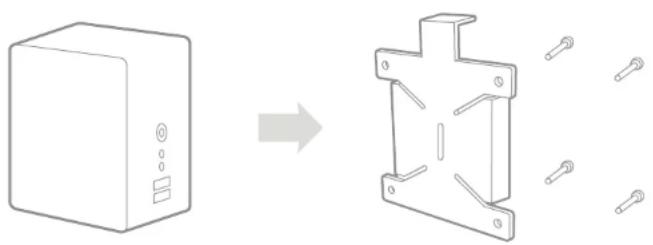
Diagram showing a device box transforming into a mechanical bracket with pins (no text or symbols)Option 1: For VESA* compatible devices.
Put the device and the bracket together, aligning the positions of the holes. Screw the two together using the screws supplied.
natural_image
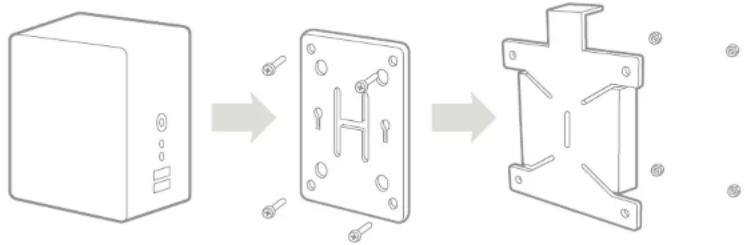
Diagram showing a device transformation from a box to a metal bracket with internal components (no text or symbols)Option 2: For devices supplied with VESA* compliant bracket.
Mount your VESA compliant bracket to the MD BRPCV03/04 bracket and then attach your device to the set.
* VESA 100x100
natural_image
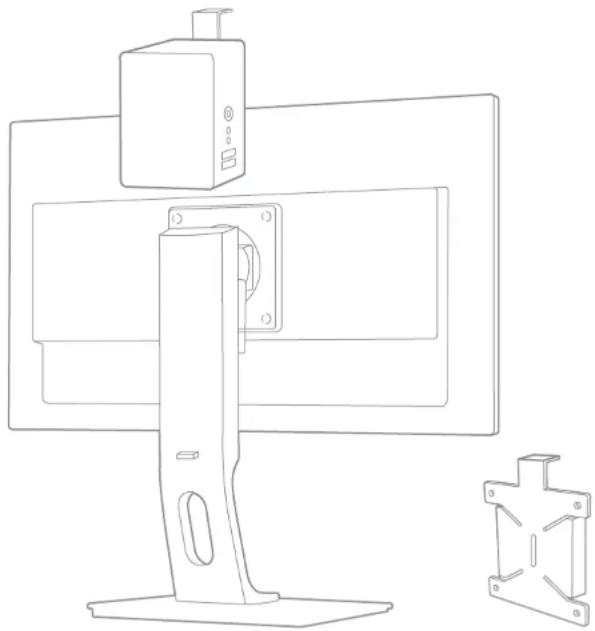
Line drawing of a desktop computer monitor with a mounted device and a separate metal bracket (no text or symbols)Final STEP
Slide the MD BRPCV03/04 bracket with the mounted device on top of the stand of a compatible iiyama height adjustable monitor.
Brand : IIYAMA
Model : MD BRPCV05
Category : Wall mount