
OMK1-1 - Wall mount IIYAMA - Free user manual and instructions
Find the device manual for free OMK1-1 IIYAMA in PDF.


| Product Type | Wall Mount |
| Brand | Iiyama |
| Model | OMK1-1 |
| VESA Compatibility | 75x75mm, 100x100mm |
| Maximum Screen Size | 32 inches |
| Weight Capacity | Up to 20 kg (44 lbs) |
| Material | Steel (SPCC) |
| Surface Finish | Black powder coated |
| Distance from Wall | Approximately 10 mm |
| Tilt Adjustment | Fixed (no tilt) |
| Swivel | No swivel |
| Rotation | No rotation |
| Installation | Wall mount with included hardware |
| Mounting Standard | VESA MIS-D |
| Warranty | 2 years |
| Compatibility | Iiyama monitors with VESA holes |
| Package Contents | Wall plate, bracket, screws, anchors, manual |
| Weight (Product Only) | 0.45 kg (1 lb) |
| Dimensions (Product Only) | 115 x 115 x 10 mm |
| Color | Black |
| Security Cable Slot | Not included |
| Installation Tools Required | Phillips screwdriver, drill, level |
| Certifications | CE, TÜV |
Frequently Asked Questions - OMK1-1 IIYAMA
User questions about OMK1-1 IIYAMA
0 question about this device. Answer the ones you know or ask your own.
Ask a new question about this device
Download the instructions for your Wall mount in PDF format for free! Find your manual OMK1-1 - IIYAMA and take your electronic device back in hand. On this page are published all the documents necessary for the use of your device. OMK1-1 by IIYAMA.
USER MANUAL OMK1-1 IIYAMA
For ProLite TF1534MC, ProLite TF1634MC, ProLite TF1734MC, ProLite TF1934MC, ProLite TF2234MC
CHECKING THE CONTENTS OF THE PACKAGE
The following accessories are included in your package. Check to see if they are enclosed with the monitor. If anything is missing or damaged, please contact your local iiyama dealer or regional iiyama office.
■ Mount-Bracket (Bracket A) : 4pcs (7221316A101: 2pcs for ProLite TF1534MC / ProLite TF1634MC / ProLite TF1734MC / ProLite TF1934MC, 7221354A101: 2pcs for ProLite TF2234MC)
L-Bracket (Bracket B): 2pcs (7221317A0101:2pcs for ProLite TF1534MC / ProLite TF1634MC / ProLite TF1734MC / ProLite TF1934MC / ProLite TF2234MC)
■ Bracket Screw M4x8 : 8pcs (8pcs for ProLite TF1534MC / ProLite TF1634MC / ProLite TF1734MC / ProLite TF1934MC / ProLite TF2234MC)
■ User Manual (this document)
SPECIAL NOTES
Mount-Brackets, L-Brackets and screws are necessary to install an open frame monitor.
CAUTION
The Mount-Brackets and L-Brackets are designed to be mounted to specific wall types and hardware, in accordance with the installation instructions supplied with the Mounting Kit.
■ Using Mount-Brackets, L-Brackets or screws other than those specified in the installation instructions may damage the monitor.
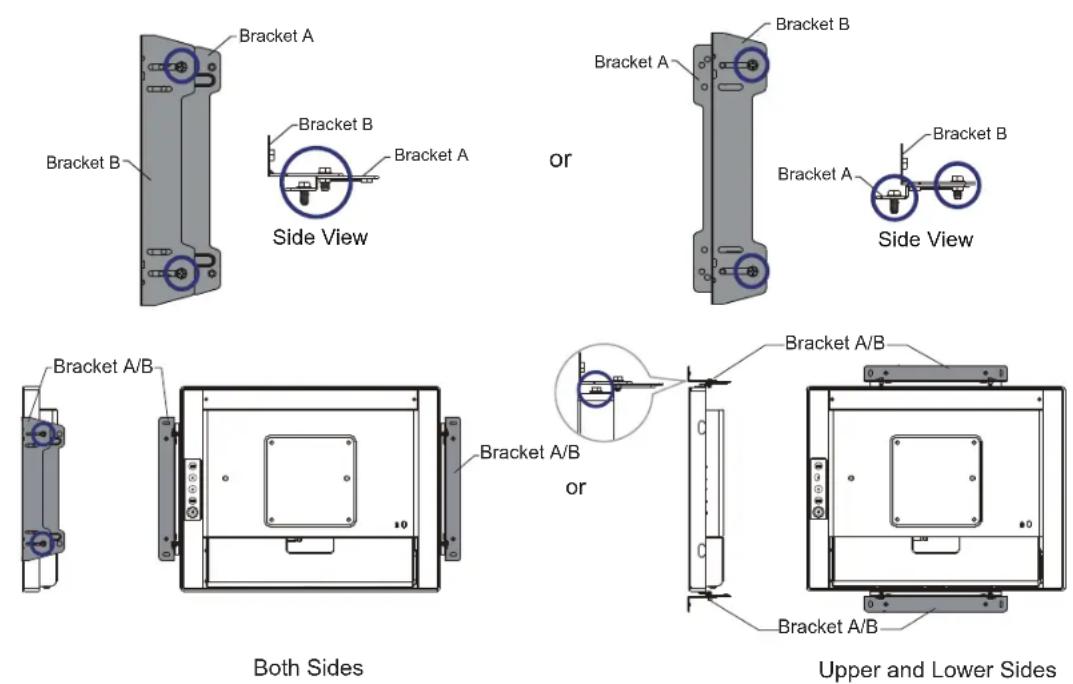
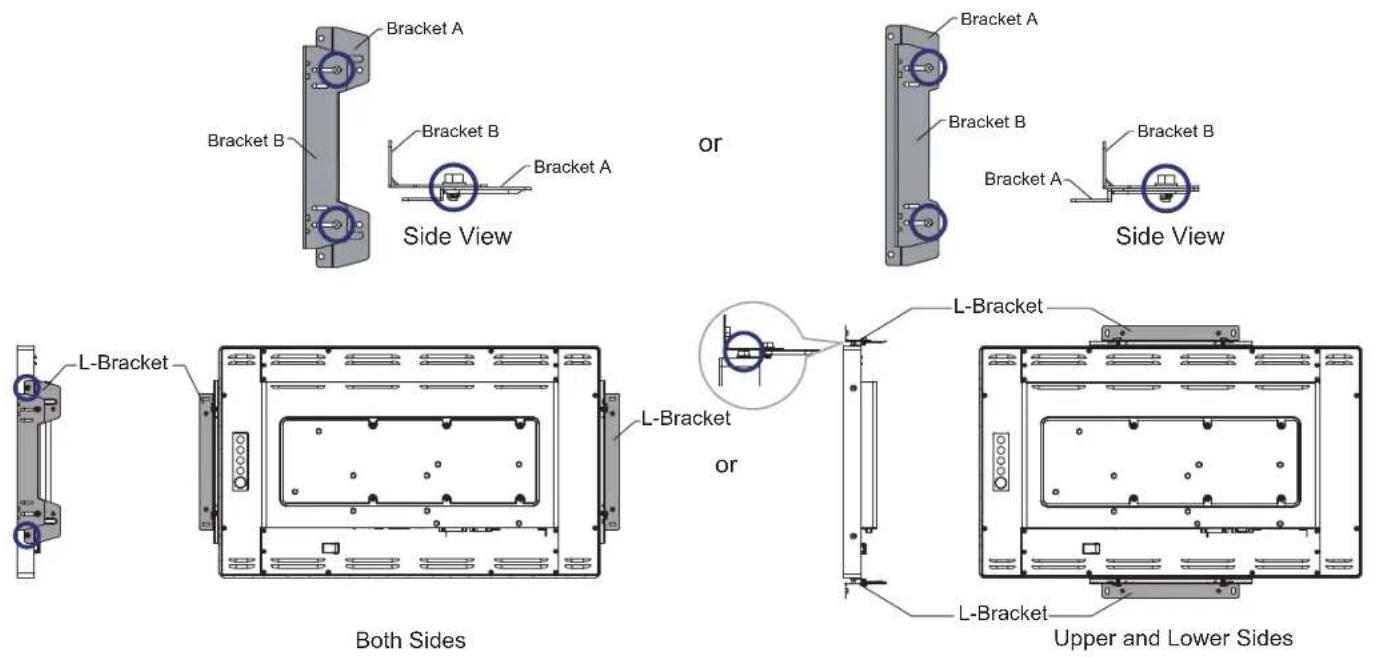
- Depending on the monitor orientation (portrait or landscape) you choose, mount the Brackets A to the left and right hand sides or the upper and lower sides of the monitor and tighten them with screws supplied (2 pairs of 2 pcs).
- As shown in Figure below, tighten Bracket B to A using the screws supplied (2 pairs of 2 pcs).
■ ProLite TF1534MC, ProLite TF1634MC, ProLite TF1734MC, ProLite TF1934MC
■ ProLite TF2234MC
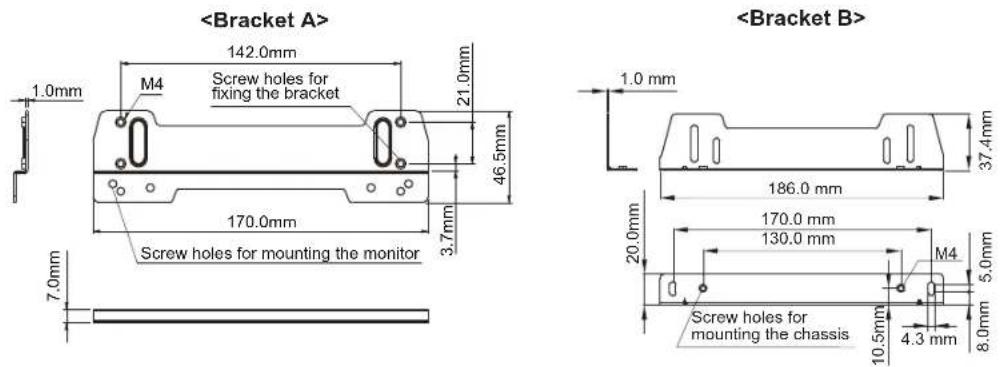
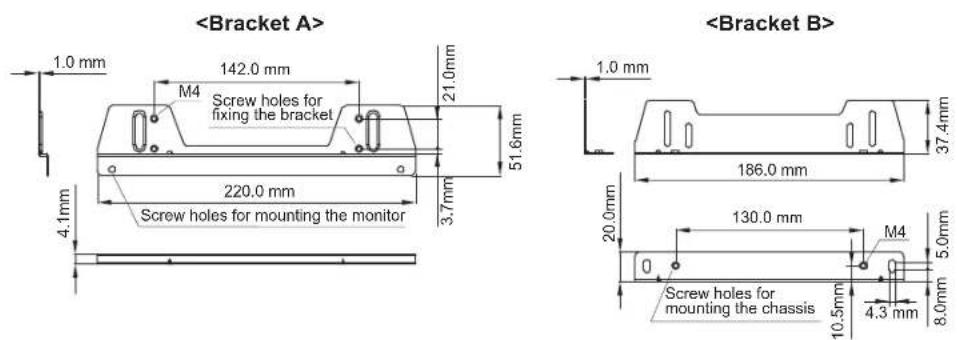
● Bracket dimensions
■ ProLite TF1534MC, ProLite TF1634MC, ProLite TF1734MC, ProLite TF1934MC
■ ProLite TF2234MC
NOTE
■ You will need a screwdriver to mount the Bracket A/B.
■ Brackets A/B and screws are necessary to install an open frame monitor. For details regarding open frame monitor temperature and humidity operating conditions, see the User Manual on IIYAMA website. http://www.iiyama.com.
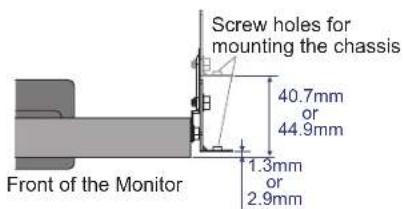
■ ProLite TF1534MC, ProLite TF1634MC:
The position of the L-bracket can be either 1.3 mm or 40.7 mm from the front of the monitor depending on which screw holes you choose for mounting it.
■ ProLite TF1734MC, ProLite TF1934MC, ProLite TF2234MC:
The position of the L-bracket can be either 2.9 mm or 44.9 mm from the front of the monitor depending on which screw holes you choose for mounting it.
Brand : IIYAMA
Model : OMK1-1
Category : Wall mount