
BAT402 - Uncategorized Mercury - Free user manual and instructions
Find the device manual for free BAT402 Mercury in PDF.


| Product Type | Digital Thermometer / Hygrometer |
| Brand | Mercury |
| Model | BAT402 |
| Dimensions | 10.5 x 5.2 x 1.8 cm |
| Weight | 85 g (including batteries) |
| Power Supply | 2 x AAA batteries (1.5 V) |
| Display | LCD screen, 4-digit |
| Temperature Range | -10°C to 50°C (14°F to 122°F) |
| Humidity Range | 20% to 95% RH |
| Accuracy (Temperature) | ±1°C |
| Accuracy (Humidity) | ±5% RH |
| Functions | Temperature & Humidity Display, Min/Max Memory, Comfort Indicator |
| Mounting | Table stand or wall mount |
| Material | ABS plastic |
| Cleaning | Wipe with a soft, dry cloth. Do not use abrasive cleaners. |
| Safety Precautions | Do not immerse in water. Keep away from direct sunlight and heat sources. |
| Spare Parts / Repairability | Replaceable batteries (standard AAA). No user-serviceable parts inside. |
| Battery Life | Approximately 12 months with normal use |
| Operating Temperature | 0°C to 40°C (32°F to 104°F) |
Frequently Asked Questions - BAT402 Mercury
User questions about BAT402 Mercury
0 question about this device. Answer the ones you know or ask your own.
Ask a new question about this device
Download the instructions for your Uncategorized in PDF format for free! Find your manual BAT402 - Mercury and take your electronic device back in hand. On this page are published all the documents necessary for the use of your device. BAT402 by Mercury.
USER MANUAL BAT402 Mercury
Universal Battery Tester
A multi-purpose battery condition checker with an LCD display to indicate status of relevant battery.
This product is suitable for batteries; AA, AAA, C, D, 9V PP3 batteries, 1.5V and 3V button cells.
Can also test digital camera batteries; CR123A, CR2, CR-V3, 2CR5 and CR-P2.
The dimensions are 118 x 88 x 23mm.
All buttons and slots are clearly marked to indicate the location of the battery.
Before checking the condition of the battery ensure you know the size so that you can easily locate which button/slot you need.
Please ensure you observe the correct polarity when inserting the battery.
How do you turn the tester on?
-
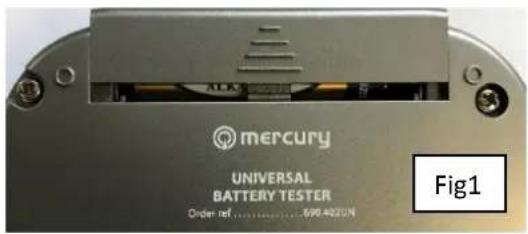
Open the battery compartment by sliding the cover forward (see Fig1)
-
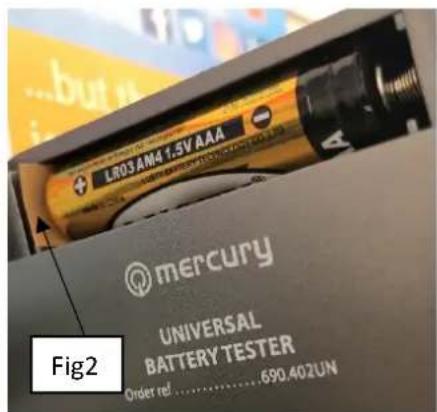
Once open, remove the cardboard insulator (see Fig2) from the compartment from the bottom of the battery.
-
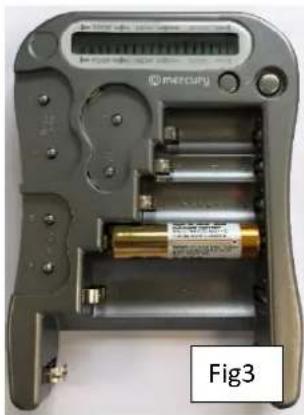
For the LCD display to give a status there must be a relevant battery being measured in the tester (see Fig3)
natural_image
Interior view of a Mercury D�� with battery modules and a digital display (no visible text or symbols)What readings does the tester give you?
- Good.
- Weak.
- Poor.
Brand : Mercury
Model : BAT402
Category : Uncategorized