
MiniBrite PO-55 - Magnifying lamp Carson - Free user manual and instructions
Find the device manual for free MiniBrite PO-55 Carson in PDF.


| Product Type | Illuminated Magnifier |
| Model | MiniBrite PO-55 |
| Brand | Carson |
| Magnification Power | 5x |
| Lens Diameter | 1.5 inches (38 mm) |
| Lens Material | Optical grade acrylic |
| Light Source | LED |
| Power Source | 2 AAA batteries (included) |
| Body Material | Plastic |
| Dimensions | 6.0 x 2.5 x 1.0 inches |
| Weight | 2.5 oz (70 g) with batteries |
| Color | Black/White |
| Battery Life | Up to 15 hours continuous use |
| On/Off Switch | Slide switch |
| Included Accessories | Carrying pouch, lens cloth |
| Cleaning | Wipe lens with soft, dry cloth |
| Storage | Store in protective pouch when not in use |
| Warranty | Limited lifetime warranty |
Frequently Asked Questions - MiniBrite PO-55 Carson
User questions about MiniBrite PO-55 Carson
0 question about this device. Answer the ones you know or ask your own.
Ask a new question about this device
Download the instructions for your Magnifying lamp in PDF format for free! Find your manual MiniBrite PO-55 - Carson and take your electronic device back in hand. On this page are published all the documents necessary for the use of your device. MiniBrite PO-55 by Carson.
USER MANUAL MiniBrite PO-55 Carson
Instructions for use:
PO-55

natural_image
Technical line drawing of a rectangular mechanical housing or enclosure with internal compartments and mounting points (no text or symbols)Installing Batteries
Slide up protective sleeve to reveal battery door (Fig. 1). Slide battery door back and pull up to remove (Fig. 2). Insert three AAA batteries according to polarity indicators marked inside battery compartment (Fig. 3). Batteries must click into place. Replace battery door (Fig. 4).

natural_image
Technical line drawing of a mechanical component with directional arrows indicating movement (no text or symbols)
natural_image
Line drawing of a mechanical device with directional arrows indicating movement (no text or symbols)
natural_image
Technical line drawing of a mechanical component with internal channels and mounting holes (no text or symbols)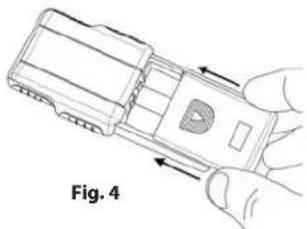
natural_image
Illustration of a hand holding a device with directional arrows indicating movement (no text or symbols)To Activate LED Light
Slide down protective sleeve until you hear a click. This will reveal lens and activate LED light (Fig. 5). When not in use, slide protective sleeve over lens to turn off light and protect lens from damage during storage (Fig. 6).

natural_image
Technical line drawing of a mechanical housing component with directional arrows indicating movement (no text or symbols)
natural_image
Technical line drawing of a mechanical component with arrows indicating direction (no text or symbols)Warning: Use only alkaline batteries. Mixing old and new, different brands or types within brands may cause batteries to leak, overheat or explode. Keep away from fire or excessive heat. Inspect batteries for corrosion or leakage. Insert in direction indicated. Rechargeable batteries not recommended.
Cleaning Your Magnifier
Clean lens with a soft, clean microfiber cloth by rubbing gently in a circular motion. Moisten the lens cloth with water if needed. Do not use harsh chemicals, solvents or abrasives as they may damage the lens.
Customer Service:
If you experience any difficulties, please contact us and we will be happy to help you.
In the U.S.A.
Phone: 1-631-963-5000
Email: info@carson.com
In the U.K.
Phone: +44 (0) 1938 557440
Email: uksupport@carson.com
In the E.U.
Phone: +44 (0) 1938 557440
Email: eusupport@carson.com
For warranty information, visit www.carson.com/warranty


Brand : Carson
Model : MiniBrite PO-55
Category : Magnifying lamp