
HF-11 - Magnifying lamp Carson - Free user manual and instructions
Find the device manual for free HF-11 Carson in PDF.


| Product Type | Magnifying Glass with LED Light |
| Brand | Carson |
| Model | HF-11 |
| Power Source | 2 AAA batteries (alkaline recommended) |
| Battery Orientation | Follow polarity indicators inside battery compartment |
| Light Source | LED |
| Light Activation | Slide switch on top of handle up to turn on, down to turn off |
| Neck Strap Included | Yes, stored inside left handle |
| Hands-Free Capability | Yes, with neck strap and handles in split position |
| Handheld Use | Yes, push handles together |
| Lens Cleaning | Use soft microfiber cloth; moisten with water if needed; avoid harsh chemicals |
| Safety Warnings | Use only alkaline batteries; do not mix old/new or different brands; keep away from fire/heat; inspect for corrosion; rechargeable not recommended |
| Customer Service (USA) | Phone: 1-631-963-5000; Email: info@carson.com |
| Customer Service (UK) | Phone: +44 (0) 1938 557440; Email: uksupport@carson.com |
| Customer Service (EU) | Phone: +44 (0) 1938 557440; Email: eusupport@carson.com |
| Warranty Information | Visit www.carson.com/warranty |
Frequently Asked Questions - HF-11 Carson
User questions about HF-11 Carson
0 question about this device. Answer the ones you know or ask your own.
Ask a new question about this device
Download the instructions for your Magnifying lamp in PDF format for free! Find your manual HF-11 - Carson and take your electronic device back in hand. On this page are published all the documents necessary for the use of your device. HF-11 by Carson.
USER MANUAL HF-11 Carson
Instructions for use:
HF-11

natural_image
Line drawing of a magnifying glass with handle and grip (no text or symbols)Installing Batteries
Pull apart handle into split position to reveal battery compartment (Fig. 1). Slide down to remove battery cover located on inside of right handle (Fig. 2). Insert 2 AAA batteries into battery compartment according to polarity indicators marked inside it (Fig. 3). Replace battery door when done (Fig. 4).

Warning: Use only alkaline batteries. Mixing old and new, different brands or types within brands may cause batteries to leak, overheat or explode. Keep away from fire or excessive heat. Inspect batteries for corrosion or leakage. Insert in direction indicated. Rechargeable batteries not recommended.
To Activate LED Light
To turn light on, slide switch located on top of handle up (Fig. 5). Turn light off when not in use.

Attaching Neck Strap
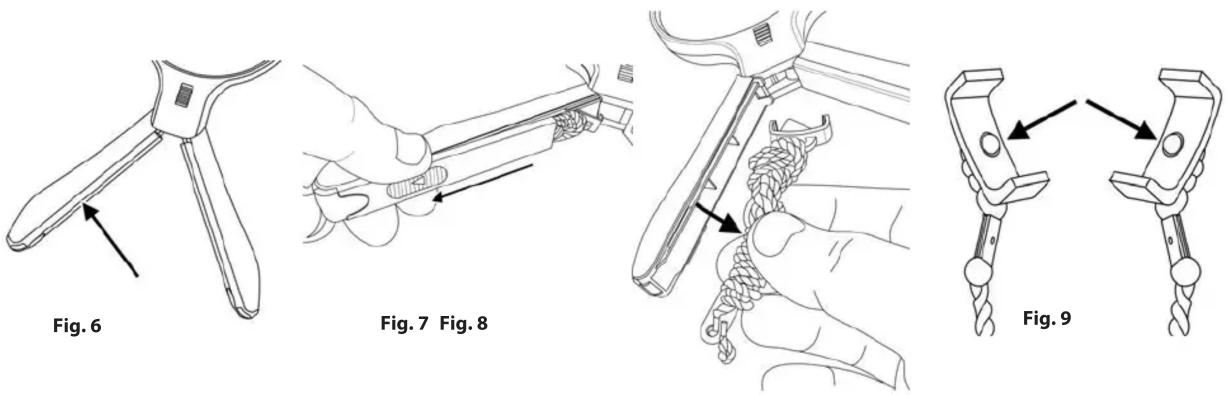
Neck strap is stored inside left handle (Fig. 6). Slide down and remove cover located on inside of left handle (Fig. 7). Remove strap (Fig. 8) and replace cover. Unravel neck strap and locate C clamps on each side of strap (Fig. 9).
Snap clamps into place on each side of the magnifier lens frame (Fig. 10-11). Note: Circular bumps on inside of clamps should line up with indents on sides of lens frame (Fig. 12).

natural_image
Illustration of a hand holding a coiled cable with a loop, labeled Fig. 10 (no text or symbols on the diagram itself)
natural_image
Line drawing of a hand holding a coiled cable or wire, labeled Fig. 11 (no text or symbols on the diagram itself)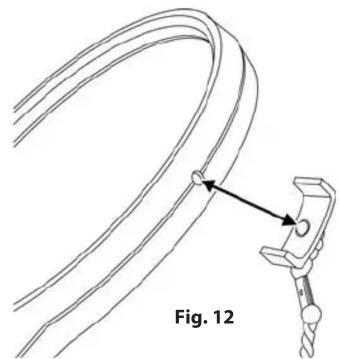
natural_image
Diagram of a cable being inserted into a clamp, labeled Fig. 12 (no text or symbols on the diagram itself)To Use Hands Free
With neck strap attached and handles in split position (Fig. 13), place strap around neck and rest ends of handles on chest (Fig. 14). Rubber tips on ends of handles will keep magnifier from slipping. Adjust length of neck strap as desired.

natural_image
Line drawing of a magnifying glass with three handles, labeled Fig. 13 (no text or symbols on the diagram itself)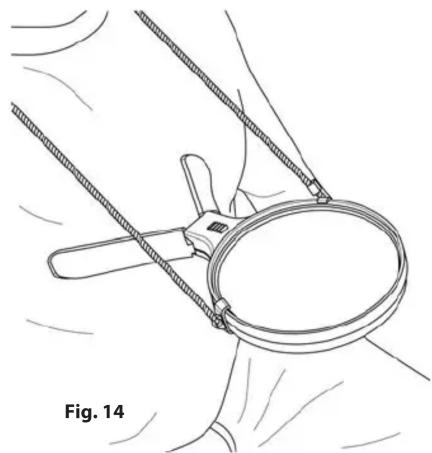
natural_image
Line drawing of a hand holding a magnifying glass with ropes, labeled Fig. 14 (no text or symbols on the diagram itself)To Use Hand Held
Remove neck strap and push sides of handles together to form one large handle (Fig. 15).

natural_image
Line drawing of a magnifying glass with a handle, labeled Fig. 15 (no text or symbols on the diagram itself)Cleaning Your Magnifier
Clean lens with a soft, clean microfiber cloth by rubbing gently in a circular motion. Moisten the lens cloth with water if needed. Do not use harsh chemicals, solvents or abrasives as they may damage the lens.
Customer Service:
If you experience any difficulties, please contact us and we will be happy to help you.
In the U.S.A.
Phone: 1-631-963-5000
Email: info@carson.com
In the U.K.
Phone: +44 (0) 1938 557440
Email: uksupport@carson.com
In the E.U.
Phone: +44 (0) 1938 557440
Email: eusupport@carson.com
For warranty information, visit www.carson.com/warranty


Brand : Carson
Model : HF-11
Category : Magnifying lamp