
RFM - Home Automation DIMPLEX - Free user manual and instructions
Find the device manual for free RFM DIMPLEX in PDF.


| Product Type | Home Automation Controller / Thermostat |
| Brand | Dimplex |
| Model | RFM |
| Dimensions (approx.) | 120 x 80 x 25 mm |
| Weight | 150 g |
| Power Supply | 2 x AAA batteries (1.5V) |
| Battery Life | Up to 1 year under normal use |
| Wireless Protocol | RF 868 MHz (proprietary) |
| Range | Up to 30 m indoors |
| Main Functions | Temperature control, scheduling, manual override, frost protection |
| Display | LCD with backlight |
| Operating Temperature | 0°C to 40°C |
| Storage Temperature | -10°C to 50°C |
| Compatibility | Dimplex heating systems with RFM receiver |
| Mounting | Wall-mount or table stand |
| Degree of Protection | IP20 (indoor use only) |
| Maintenance | Clean with dry cloth; replace batteries when low |
| Safety Features | Battery low indicator, child lock option |
| Spare Parts | Batteries, wall bracket (available from Dimplex service) |
| Repairability | Battery compartment accessible; no user-serviceable parts inside |
| General Information | Designed for residential heating control; complies with relevant EU directives |
Frequently Asked Questions - RFM DIMPLEX
User questions about RFM DIMPLEX
0 question about this device. Answer the ones you know or ask your own.
Ask a new question about this device
Download the instructions for your Home Automation in PDF format for free! Find your manual RFM - DIMPLEX and take your electronic device back in hand. On this page are published all the documents necessary for the use of your device. RFM by DIMPLEX.
USER MANUAL RFM DIMPLEX
For installation and compatibility, check your product's manual by following the instruction below.
Your product's model code and series letter will be listed on the rating label on your product. Visit Dimplex.co.uk and enter the model code into the search field.
Open the product page for your product's model code and look for the manuals and guides section. The 'Maintenance' section of the manual will list how to replace the existing tray with the radio frequency module. You do not need to replace the battery when you do this.
The installation process for most units is as follows, but please confirm using our website before attempting installation
natural_image
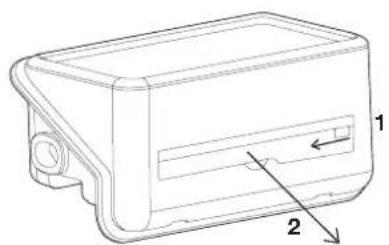
Technical line drawing of a rectangular electronic component with labeled parts (1 and 2), no text or symbols present.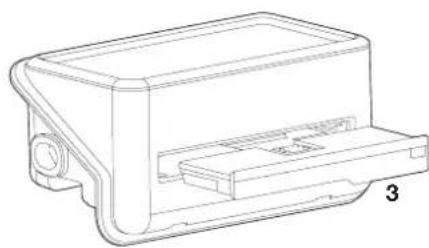
natural_image
Technical line drawing of a mechanical housing or enclosure component (no text or symbols)WARNING: Ensure power to the product is isolated at the mains before installation
- Slide the lock tab across.
- Pull the tray out using the indentation. You may need a small, flat screwdriver for this.
- Replace the tray with the radio frequency module.
- Power the product on and make sure that the RF comms are enabled.
Comms settings will be located in the settings menu (please check your product's instruction manual for more information).
To connect your product to a Dimplex Control system, tap 'add a product' on the app and follow the instructions.
Contact: Dimplex.co.uk/support
Recycling

For electrical products sold within the European Community. At the end of the electrical products useful life it should not be disposed of with household waste. Please recycle where facilities exist. Check with a Local Authority or retailer for recycling advice in your country. Batteries should be disposed of or recycled in accordance with WEEE Directive 2012/19/EU. Packaging should be recycled where possible.
What does a Dimplex Guarantee Cover?
Dimplex products deliver reliable service for normal, household use in domestic settings. All Dimplex products are individually tested before leaving the factory.
If you are a consumer and you experience a problem with your Dimplex product, which is found to be defective due to faulty materials or workmanship within the Guarantee Period, this Dimplex Guarantee will cover repair or - at the discretion of Dimplex - replacement with a functionally equivalent Dimplex product.
The Dimplex Guarantee Period is three calendar years from the date of purchase of your Dimplex product, or the date of delivery of the product, if later. The Dimplex Guarantee is conditional upon you providing the original purchase receipt as proof of purchase. Please therefore retain your receipt as proof of purchase.
If you do experience a problem with your Dimplex product please call the Helpline on +44 (0)344 879 3588 or visit https://www.dimplex.co.uk/support. For ROI please email serviceireland@glendimplex.com or call +353(0)1842 833. We will need details of your Dimplex product, its serial number and a description of the fault which has occurred. You can find the model number and serial number for your Dimplex product on the heaters side. Once we receive your information and proof of purchase we will contact you to make the necessary arrangements.
If your Dimplex product is not covered by this Dimplex Guarantee there may be a charge to repair your product. However, we will contact you for agreement to any charges before any chargeable service is carried out.
What is not covered by a Dimplex Guarantee?
The Dimplex Guarantee does not cover any of the following:
- Any fault or damage to your Dimplex product due to faulty materials or workmanship occurring outside the three-year Guarantee Period.
- Any fault or damage occurring to any pre-owned Dimplex product or to any other equipment or property.
- Accidental damage to your Dimplex product or damage to your Dimplex product from external sources (for example, transit, weather, electrical outages or power surges).
-
Fault or damage to your Dimplex product which is:
-
Not due to faulty materials or workmanship or which is due to circumstances outside Dimplex's control.
- Caused by use of your Dimplex product for anything other than normal domestic household purposes in the country where it was purchased.
- Caused by any misuse, abuse or negligent use of the Dimplex product, including but not limited to any failure to use it in accordance with the Operating Instructions supplied with the product.
- Caused by any failure to assemble, install clean and maintain your Dimplex product in accordance with the Operating Instructions supplied with the product unless this was carried out by Dimplex or its authorised dealers.
- Caused by repairs or alterations to your Dimplex product not carried out by Dimplex service personnel or its authorised dealer(s).
- Caused by use of any consumables or spare parts for your Dimplex product which are not Dimplex -specified.
Terms and Conditions
- The Dimplex Guarantee is valid for Dimplex from the date of purchase of your Dimplex product from a recognised retailer in the country of purchase and use, or the date of delivery of the product if later, always provided the original receipt has been retained and is produced as proof of purchase.
- You must provide to Dimplex or its authorised agents on request the original receipt as proof of purchase and - if required by Dimplex - proof of delivery. If you are unable to provide this documentation, you will be required to pay for any repair work required.
- Any repair work under the Dimplex Guarantee will be carried out by Dimplex or its authorised dealer(s) and any parts that are replaced will become the property of Dimplex. Any repairs performed under the Dimplex Guarantee will not extend the Guarantee Period.
- Any replacement of your Dimplex product by Dimplex during the Guarantee Period will start the three-year Guarantee Period afresh from the date of delivery of the replacement Dimplex product to you.
- The Dimplex Guarantee does not entitle you to recovery of any indirect or consequential loss or damage including but not limited to loss or damage to any other property.
- The Dimplex Guarantee is in addition to your statutory rights as a consumer and your statutory rights are not affected by this Dimplex Guarantee.
DCimplex·Control
Customer Helpline: 0344 879 3588
aftersales@dimplex.co.uk
www.dimplex.co.uk
Glen Dimplex Heating & Ventilation
Millbrook House, Grange Drive, Hedge End, Southampton, SO30 2DF
Brand : DIMPLEX
Model : RFM
Category : Home Automation