
RXRBTI - Uncategorized DIMPLEX - Free user manual and instructions
Find the device manual for free RXRBTI DIMPLEX in PDF.


| Product Type | Runback Timer (Accessory) |
| Brand | Dimplex |
| Model | RXRBTI |
| Compatibility | Dimplex heaters with right-side slide-in compartment |
| Runback Period Range | 30 minutes to 4 hours (30-minute steps) |
| Timer Functions | Standard (run then off) or Special (Comfort → Setback 24h → Frost) |
| Dip Switches | 4 switches for period and mode selection |
| Neon Indicator | Lights when timer is active (standard) or in Comfort mode (special) |
| Power Supply | Via heater mains (230V AC, 50Hz) |
| Installation | Plug into heater compartment, secure with screw |
| Safety | Screw lock prevents removal from heater |
| Operating Modes | Comfort (user temp), Setback (5°C below user temp), Frost (<5°C) |
| Temperature Control | Managed by heater thermostat; timer only controls duration |
| Dimensions | Approx. 60 x 40 x 25 mm (plug-in module) |
| Weight | Approx. 50 g |
Frequently Asked Questions - RXRBTI DIMPLEX
User questions about RXRBTI DIMPLEX
0 question about this device. Answer the ones you know or ask your own.
Ask a new question about this device
Download the instructions for your Uncategorized in PDF format for free! Find your manual RXRBTI - DIMPLEX and take your electronic device back in hand. On this page are published all the documents necessary for the use of your device. RXRBTI by DIMPLEX.
USER MANUAL RXRBTI DIMPLEX
RXTIRB - Runback Timer
TIDN60R001 Issue 0
IMPORTANT: THESE INSTRUCTIONS SHOULD BE READ CAREFULLY AND RETAINED FOR FUTURE REFERENCE
Installation
Switch the heater off and remove the plug-in protective cover from the right hand side of the thermostat unit at the back of the heater. Remove the Runback timer from its box, set the required runback period as detailed below and plug the timer into the slide in compartment now exposed. Switch the heater on at the mains supply.
Note: In order to prevent the timer being removed from the heater, fit the supplied screw to hole at rear of timer enclosure after the timer has been inserted. The heater needs to be removed from the wall for this operation - see Fig. 1.
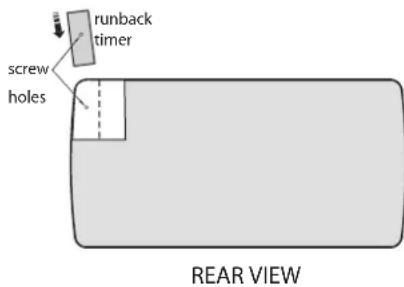
This locks the timer to the heater body.
Fig. 1
Setting the Standard Runback Timer Function
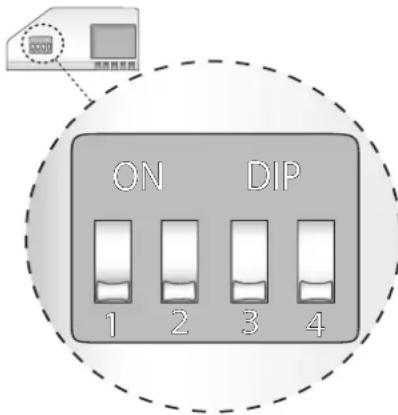
The runback timer can be set for a run period from 30 minutes to 4 hours (30-minute steps only). To set the runback period on the timer, adjust the dip switches located at the back of the timer - see Fig. 2.
Fig. 2
To set the desired runback period switches 2, 3 and 4 have to be set either up or down according to Table 1. Switch 1 should always be left down (↓) to run the standard runback timer function.
Table 1
| 1 2 3 4 Runback | Period | |||
| ↓ | ↓ | ↓ | ↓ | 12 hour |
| ↓ | ↓ | ↓ | ↑ | 1 hour |
| ↓ | ↓ | ↑ | ↓ | 112 hours |
| ↓ | ↓ | ↑ | ↑ | 2 hours |
| ↓ | ↑ | ↓ | ↓ | 212 hours |
| ↓ | ↑ | ↓ | ↑ | 3 hours |
| ↓ | ↑ | ↑ | ↓ | 312 hours |
| ↓ | ↑ | ↑ | ↑ | 4 hours |
Starting theTimer
Once the unit has been inserted into the heater and the heater is powered on, to start the runback timer the button at the top of the plug in timer must be pressed. Once pressed, the runback timer will switch on (the neon light on runback timer will go on) for the runback period set previously.
Stopping the Timer
To cancel the runback timer press the button at the top of the timer. Once pressed the runback timer will turn the heating off and the neon light will switch off.
Runback Timer's special function
The special function runs in COMFORT mode for the runback period selected. It then switches automatically to SETBACK for 24hrs, after which it switches to FROST mode indefinitely.
When in COMFORT mode the heater operates at the user selected temperature.
When in SETBACK mode the heater operates at 5°C below the user selected temperature.
When in FROST mode the heater only switches on when the ambient temperature of the heater is below 5^ C, independent of user selected temperature.
Setting the Runback Timer in Special function mode
Set switch 1 to the up (↑) position. Set the desired period by setting the switches 2, 3 and 4 either up or down according to Table 2.
Table 2
| 1 2 | 3 4 Runback | Period | |||
| ↑ | ↓ | ↓ | ↓ | 12 hour | |
| ↑ | ↓ | ↓ | ↑ | 1 hour | |
| ↑ | ↓ | ↑ | ↓ | 112 hours | |
| ↑ | ↓ | ↑ | ↑ | 2 hours | |
| ↑ | ↑ | ↓ | ↓ | 212 hours | |
| ↑ | ↑ | ↓ | ↑ | 3 hours | |
| ↑ | ↑ | ↑ | ↓ | 312 hours | |
| ↑ | ↑ | ↑ | ↑ | 4 hours | |
Once the period has been set, the unit is plugged into the heater and mains is switched on, the runback timer functions as follows:
-
On initial power ON the runback timer causes the heater to be permanently in FROST mode, the default setting, Runback timer neon light is off.
-
The runback timer button, once pressed causes the heater to run the COMFORT setting (light on), for the set runback period selected. It then switches automatically to SETBACK for 24hrs (light off), after which it switches to FROST mode indefinitely.
Manually Selecting Setback and Frost modes
The SETBACK mode can be selected manually by pressing the button on the top of the timer while the heater is in COMFORT mode, the setback mode then operates for it's 24 hour period after which it will switch automatically to FROST mode. The FROST mode can be selected manually by pressing the button on the top of the timer twice when the heater is in COMFORT mode (or once when it is in SETBACK mode), heater will remain in FROST mode.
Brand : DIMPLEX
Model : RXRBTI
Category : Uncategorized