
TPC-703 3G - Graphic tablet Vivax - Free user manual and instructions
Find the device manual for free TPC-703 3G Vivax in PDF.


| Product Type | Graphic Tablet (Android Tablet) |
| Brand | Vivax |
| Model | TPC-703 3G |
| Display Size | 7 inches |
| Resolution | 1024 x 600 pixels |
| Processor | Quad-core 1.3 GHz |
| RAM | 1 GB |
| Internal Storage | 16 GB (expandable via microSD) |
| Operating System | Android (version unknown) |
| Connectivity | 3G, Wi-Fi 802.11 b/g/n, Bluetooth 4.0 |
| Cameras | Front VGA, Rear 2 MP |
| Battery | Li-Ion 3000 mAh |
| Dimensions | 190 x 110 x 10 mm |
| Weight | 300 g |
| Power Supply | 5V/2A via micro USB |
| Care & Maintenance | Clean with soft dry cloth; avoid liquids |
| Safety | Do not expose to water or extreme temperatures |
| Spare Parts & Repairability | Battery and screen replaceable by service center |
| General Information | Tablet for graphic use with stylus support (stylus not included) |
Frequently Asked Questions - TPC-703 3G Vivax
User questions about TPC-703 3G Vivax
0 question about this device. Answer the ones you know or ask your own.
Ask a new question about this device
Download the instructions for your Graphic tablet in PDF format for free! Find your manual TPC-703 3G - Vivax and take your electronic device back in hand. On this page are published all the documents necessary for the use of your device. TPC-703 3G by Vivax.
USER MANUAL TPC-703 3G Vivax
User manual / Service points
EN
User manual
TPC-703 3G
HR BIH CG
Upute za uporabu
Tablet
Mjere opreza
Ovaj korisnički priručnik posebno je dizajniran kako bi Vas vodio kroz funkcije i karakteristike Vašeg uređaja.
1) Molimo da pažljivo pročitate ovaj priručnik prije korištenja uređaja kako bi osigurali sigurnu i ispravnu uporabu.
2) Opisi u ovom priručniku zasnovani su na tvorničkim postavkama Vašeg uređaja.
3) Nemojte ovaj aparat koristiti blizu vode. Ne stavljajte iznad aparata bilo kakav spremnik koji sadrži tekućinu.
4) Molimo da ne stavljate svoj uređaj na mjesta s visokom temperaturom, vlagom ili puno prašine. Tablet nije otporan na vodu.
5) Izbjegavajte padanje ili nasilne sudare. Nemojte silovito tresti ekran jer bi to moglo dovesti do štete ili krivog prikaza.
6) Ako se sustav automatski ugasi, to znači da je baterija možda potrošena i da je potrebno punjenje baterije.
7) Molimo da redovno punite tablet ako ga ne koristite dulje vrijeme kako bi izbjegli štetu uzrokovanu prekomjernom potrošnjom baterije.
8) Nemojte rastavljati ili koristiti alkohol, razrjeđivač ili benzin za brisanje površine proizvoda.
9) Molimo da ne koristite tablet pri vožnji ili hodanju ulicom. U suprotnom, to može dovesti do nesreće.
10) Molimo da odaberete prikladnu glasnoću. Ako čujete zujanje u ušima, stišajte uređaj ili ga prestanite koristiti.
11) Memorija koja je dostupna je nominalna, budući da sam Android sustav zauzima dio memorije i rad programa će, također, zauzeti mjesta.
12) Kapacitet pohrane je nominalan, budući da Android sustav zauzima stotine MB kapaciteta pohrane. Kako bi instalirali potreban softver, sustav mora rezervirati određeni kapacitet za pohranu pa je stvarni iskoristivi prostor manji od nominalnog.
13) Kada CPU radi velikom brzinom, posebice pri igranju 3D igara ili puštanju HD video zapisa dulje vrijeme, trup će se zagrijati.
14) Molimo da zadržite ovaj priručnik za buduće reference.
Sadržaj
Poglavlje jedan (pregled)
1.1 Izgled 1
1.2 Tipke 2

1.2 Tipke
Tipka za paljenje
Input URL: Touch the input area to get the soft keyboard, then input the URL.

This user manual has been specially designed to guide you through the functions and features of your device.
1) Please read this manual carefully before using your device to ensure safe and correct use.
2) The descriptions in this manual are based on the default settings of your device.
3) Do not use this unit near water. Do not place over the unit any container with liquid inside.
4) Please do not put your device in high temperature, moisture or dust place. The tablet is not waterproof.
5) Avoid falling or violent collision. Do not violently shake the touch screen, otherwise, it could lead to damage or display abnormal.
6) If system shutdown automatically, it means the battery may used up, battery charging is required.
7) Please charge the tablet regularly if not in use for a long time to avoid the damage caused by the excessive consumption of battery.
8) Do not disassemble or use alcohol, thinner or benzene class to swab product surface.
9) Please do not use the tablet when driving or walking in the street, otherwise it may lead an accident.
10) Please choose the appropriate volume, if had tinnitus, please lower the volume or stop using.
11) Memory space available is nominal, as the android system itself takes up part of the memory space and the operation of the program will also take up space.
12) Storage capacity available is nominal, as the android system occupies about hundreds of MB storage capacity. And in order to install the software needs, the system must reserve certain storage capacity, so the actual usable space is less than nominal space.
13) When CPU operates in high speed, especially playing 3D games or High-definition video for a long time, the fuselage will have fever.
14) Please keep this manual for future reference.
| Catalog | Chapter One(overview) | ||
| 1.1 | Appearance | 1 | |
| 1.2 | Buttons | 2 | |
| 1.3 | Power on and off | 2 | |
| 1.4 | Open and close standby mode | 2 | |
| 1.5 | Lock and unlock the screen | 2 | |
| 1.6 | Homepage information bar | 3 | |
| 1.7 | Text input | 3 | |
| 1.8 | Reset | 4 | |
| 1.9 | USB connection | 4 | |
| 1.10 | Accessories | 4 | |
| Chapter Two (Internet) | |||
| 2.1 | Browser | 4 | |
| Chapter Three (Application) | |||
| 3.1 | File manager | 5 | |
| 3.2 | Downloads | 5 | |
| Chapter Four (System setting) | |||
| 4.1 | Wireless networks setting | 6 | |
| 4.2 | Sound setting | 6 | |
| 4.3 | Display setting | 6 | |
| 4.4 | Apps setting | 6 | |
| 4.5 | Security setting | 6 | |
| 4.6 | Language and input setting | 6 | |
| 4.7 | Date & time setting | 6 | |
| Chapter Five (Specification) | 7 |
Catalog
Chapter One : Overview
1.1 Appearance

1.2 Buttons
Power button
Long press the power button 2-3 seconds to turn the unit on. When the tablet is in operation, short press power button to enter the off-screen state and short press it again to light up the screen.
Volume
Press Volume+/- to adjust the volume.
1.3 Power on and off
Power on
Long press the power button 2-3 seconds, pictures will show up until to the interface.
Power off
Long press the power button, choose "Power off" and press OK to shut down.
1.4 Open and close standby mode
Open the standby mode
When the tablet is in operation, you can press the power button to go to the standby mode which can save power.
Close the standby mode
When the tablet is in standby mode, you can press the power button to light up the screen and the unit will back to normal state.
1.5 Lock and unlock the screen
Lock
You can set the sleep time in the system of display.
The system will sleep automatically and lock the screen to the standby mode if without any activity when reaches the preset standby time.
Unlock
Drag 🔒 to unlock the screen and enter the application interface.
1.7 Text Input
When use the tablet, you can use the virtual keyboard to input text, number, symbols directly by touching screen. After selecting the Android input method, the default keyboard show as below:
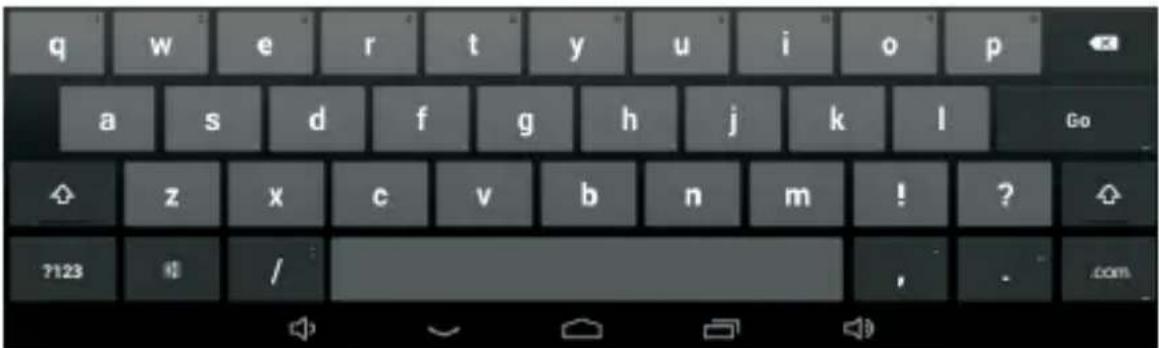
To switch the numbers and letters, press ?123 To switch the capital and lowercase letter, press
1.8 Reset
Holding the power button for 8s, then your device will shut down. You need to press the power button to turn on the unit.
1.9 USB connection
Use the USB cable to connect the tablet with PC, you will see 📋 on your tablet, click this sign and turn on USB storage to connect your device. Turn off USB storage to disconnect your device with PC.
1.10 Accessories
| Power Adapter | 1 |
| USB Cable | 1 |
| User manual | 1 |
Chapter two: Internet
2.1 Browser
Require network support before using a web browser, if there are network supporting problems, please contact your network operator or the service provider.
Tablet's web browser can connect to the Internet via WiFi to satisfy your business and individual network needs.
Please touch 🎨 (Settings) to set up the WiFi so that you can use the browser normally.
Touch 📄 (Browser) in the application list to enter the browser pages.
Browser supports the following features.

Input URL: Touch the input area to get the soft keyboard, then input the URL.
Touch ☆ to add a bookmark.
Touch 🙏 to read the favorite website that collected
Touch to search the internet
Touch + to add new browser
Touch ✗ to close the browser
Chapter three: Application
3.1 File Manager
Touch (Explorer), you can copy files among SD card, USB and internal memory.
3.2 Downloads
Touch , you can preview the downloading and downloaded documents. You can stop the downloading file or delete the downloaded file.
Chapter Four: System setting
Click 🎨 (Settings) to enter the system setting interface.
4.1 Wireless networks setting
Set WiFi ON, the system will scan the available wireless network automatically and display the wireless local area network in the list. If the local area network has the sign 🔔, it represents the network has been encrypted, it needs password for connection. While the sign 🔔 represents the network is unlocked and can be connected directly.
4.2 Sound setting
Set the system volume, the default notification sound, enable or disable the touch sound and screen lock sound.
4.3 Display setting
Set the brightness, wallpaper, sleep time and fontsize.
4.4 Apps setting
Display the applications. Choose one application, the relevant information will show up, then you can choose force stop or uninstall. You can also choose to clear the cache, unloaded program and default value.
4.5 Security setting
Set the system securities.
4.6 Language& input setting
Set the default language and input method.
4.7 Date & time setting
Set date and time manually or set automatic date and time by using network-provided time.
Chapter Five (Specification)
| Dimension(mm*mm*mm) | 188.4x108.2x11.1 |
| Weight | Approx 280g |
| LCD | 7 "1024 × 600 |
| OS | Android 6.0 |
| Processor | 1.3GHz Quad Core |
| Memory | 1GB DDR3 RAM, 8GB internal |
| WI-FI | 802.11b/g/n |
| Connections | Micro-USB, Micro-SD (up to 32GB), Headphone Jack |
| Battery | 3.7V 2100mAh Li-Poly |
| Service time | Up to 15h music mode, 2.5h internet, 3.2h video |
| Operating temperature | Between 0 °Cet 40 °C |

If at any time in the future you should need to dispose of this product please note that waste electrical products should not be disposed of with household waste. Please recycle where facilities exist. Check with your Local Authority or retailer for recycling advice. (Waste Electrical and Electronic equipment Directive)

Owing to continuous improvement, no prior notice will be given regarding changes on above feature and spec.
POŠTOVANI!
Zahvalujemo na kupnji Vivax uređaja i nadamo sa da čete biti zadovoljni odablirom. Ako u jamstvenom periodu buda potreben popravak proizvoda, mohm savjetuje se sa ovlštenim prodavačem koji Vam je proizvod prodo ili nas kontaktirajte na do je navedene brojeve i adrese. MOLIMO VAS DA PRIJE UPOTREBE PROIZVODA PAŽLIVO PROČITATE TEHNIČKU DOKUMENTACIJU I UPUTE KOJISU PRILOŽENI UZ PROIZVODI
JAMSTVENI LIST
VIVAX
HR
MODEL UREĐAJA
SERIJSKI BROJ DATUM PRODAJE BROJ RAČUNA PRODAVATELJA
POTPIS | PEČAT PRODAVATELJA
- Ovim jamstvom jamči proizvođač proizvoda, preko M SAN GRUPA d.d, kao uvoznika i davatelja jamstva u Republici Hrvatskoj besplatan popravak istog u skladu s važećim propisima i u skladu s uvjećima opisanim u ovom jamstvenom listu. Ovim jamstvom jamčimo da će predmet ovog jamstva raditi bez greške uzrokovane eventushom lošom izradom i lošim materijalom izrade. Svi eventualno nastali kvarovi biti će besplatno otklonjeni u ovlaštenom servisu u jamstvenom roku.
- UVJETI JAMSTVA Jamstveni rok počnje teći od dana kupnje proizvoda i traje 12 mjesed.
- U slučaju kvara na proizvodu koji je predmet ovog jamstva, obavezujemo se da ćemo isti popraviti u razumnom roku - 45 dana. Ako se proizvod ne može popraviti ili se ne popravi u razumnom roku - 45 dana, biti će zamijenjen novim. Jamstva na uređaj se produžuje za ono vrijeme koliko traje popravak uređaja.
- Jamstvo se priznaje samo uz račun o kupnji, te uz ovaj jamstveni list koji mora biti ispravno popunjen odnosno mora sadržavati datum prodaje, pečat i potpis prodavatelja.
- JAMSTVO NE OBUHVAĆA Redovnu provjenu, održavanje uz zamjenu dijelova koji se troše normalnom upotrebom. Prilago čavanje ili promjene za pobolšanje proizvoda za primjenu koj nisu opisane u tehničkim uputama za korištenje, osim ako je za te preirake predočena suglasnost M SAN GRUPA d.d.
- Jamstvo se ne priznaje u sljedećim slučajevima: Ako kupac ne predoči ispravan jamstveni list i račun o kupnj. Ako se kupac nije pridrž avao uputa o korištenju proizvoda. Ako je proizvod otvaran, prepravljan ili popravljan od neovlasštene osobe. Ako su kvarovi na proizvodu nastali djelovanjem više sile kao što su udar groma, strujni udari u električnoj mreži elementame nepogode i sično. Ako su kvarovi nastali ošlečivanjem zbog nepropisane upotrebe ili nepravilnim transportiranjem. Ako je kvar nastao gneškom u sustanu na koji je proizvod priključen.
- Ovo jamstvo ne mijenja zakonska potrošačka prava važeća u Republiči Hrvatskoj u odnosu na ona koja propisuje proizvođač.
- Izjavu o sukladnosti i presliku izvorne Izjave sukladnosti (EC Declaration of Conformity) možate jednostavno preuzeti na našoj internetskoj stranici www.msan.hridokumentacijsartikala
Naziv tvrtke davatelja jamstva : M SAN Grupa d.d., Buzinski prilaz 10, 10010 Zagreb-Buzin, tel: 01/3654-961
CENTRALNI SERVIS: MR SERVIS d.o.o. Dugoselska cesta 5, 10370 Rugvica, Tel. 01/6401-111 Fax: 01/3654-982 E-mail: info@mrservis.hr
SERVIS
| DATUM PRIMITKAUREDAJA U SERVIS | ||
| DATUM POPRAVKA | ||
| DATUM PRIMITKAUREDAJA U SERVIS | ||
| DATUM POPRAVKA | ||
| DATUM PRIMITKAUREDAJA U SERVIS | ||
| DATUM POPRAVKA | ||
Centralni servis Rugvica
Dugoselska cesta 5,
HR-10370 Rugvica
Tel. (01) 640 1111
Fax. (01) 3654 982
Radno vrijeme: 9:00 do 17:00 sati, pon-pet
Prijem Zagreb
Avenija Većeslava Holjevca 40 (poslovni centar Recro)
HR-10000 Zagreb
Tel. (01) 640 1111,
Fax. (01) 3654 982
Radno vrijeme: 9:00 do 17:00 sati, pon-pet
Servis Split
- brigade 1B, (Mejaši)
HR-21000 Split
Tel. (021) 684 000,
Fax. (021) 684 001
Radno vrijeme: 9:00 do 17:00 sati, pon-pet
POSTOVANII
Zahvaljujemo na kupnji Vlivaxuređaja i nadamo se da čete biti zadovoljni odabirom. Ako u garantnom roku bude potreban popravak proizvoda, molm savjelujte se sa ovlaštenim prodavačem koji Vamje proizvod prodao ili nas kontaktirajte na dolje navedene brojeve i adrese. MOLIMO VAS DA PRIJE UPOTREBE PROIZVODA PAŽLJIVO PROĆITATE TEHNICKU DOKUMENTACIJI U PUTE KOJI SU PRILOŽENI UZ PROIZVODI
GARANTNI LIST
VIVAX
BIH
MODEL UREDAJA
SERIJSKI BROJ
DATUM PRODAJE
BROJ RAČUNA PRODAVATELJA
POTPIS I PEČAT PRODAVATELJA
- Ovom garancijom garantira
proizvođač proizvoda, preko KIM TEC d.o.o., kao uvoznika i davatelja garancije u Republici Bosni i Hercegovini besplatan popravak istog u skladu s važećim propisima i u skladu s uvjetima opisanim u ovom garantnom listu. Ovom garancijom garantiramo da će predmet ove garancije raditi bez greške uzrokovane eventualnom lošom izradom i lošim materijalom izrade. Svi eventualno nastali kvarovi biti će besplatno otklonjeni u ovlaštenom servisu u garantnom roku.
-
UVJETI GARANCIJE Garantni rok počinje teći od dana kupnje proizvoda i i traje 12 mjeseci.
-
U slučaju kvara na proizvodu koji je predmet ove garancije, obavezujemo se da ćemo isti popraviti u najkraćem mogućem roku, a najkasnije u roku od 45 dana. Ako se proizvod ne može popraviti ili se ne popravi u roku od 45 dana, biti će zamljenjen novim. Ako popravak proizvoda traje duže od 10 dana, garancija će se produžiti za vrijeme trajanja popravka.
-
Garancija se priznaje samo uz načun o kupnji, te uz ovaj garantni list koji mora biti ispravno popunjen odnoeno mora sadržavađ datum prodaje, pečat i potpis prodevateja.
-
Davalac garancijo osigurava servis i rezervne dijelove 7 godina od datuma kupnje.
-
GARANCIJA NE OBUHVAĆA
Kosova Electronic Service Center
Kosova Electronic Service Center
-VIVAX Air Conditions; White Goods and Small Home Appliances
VIVAX

- MJERE OPREZA
- SADRŽAJ
- POGLAVLJE JEDAN (PREGLED)
- 1.2 TIPKE
- TIPKA ZA PALJENJE
- CATALOG
- CHAPTER ONE : OVERVIEW
- 1.1 APPEARANCE
- 1.2 BUTTONS
- POWER BUTTON
- VOLUME
- 1.3 POWER ON AND OFF
- POWER ON
- POWER OFF
- 1.4 OPEN AND CLOSE STANDBY MODE
- OPEN THE STANDBY MODE
- CLOSE THE STANDBY MODE
- 1.5 LOCK AND UNLOCK THE SCREEN
- LOCK
- UNLOCK
- 1.7 TEXT INPUT
- 1.8 RESET
- 1.9 USB CONNECTION
- 1.10 ACCESSORIES
- CHAPTER TWO: INTERNET
- 2.1 BROWSER
- CHAPTER THREE: APPLICATION
- 3.1 FILE MANAGER
- 3.2 DOWNLOADS
- CHAPTER FOUR: SYSTEM SETTING
- 4.1 WIRELESS NETWORKS SETTING
- 4.2 SOUND SETTING
- 4.3 DISPLAY SETTING
- 4.4 APPS SETTING
- 4.5 SECURITY SETTING
- 4.6 LANGUAGE& INPUT SETTING
- 4.7 DATE & TIME SETTING
- CHAPTER FIVE (SPECIFICATION)
- POŠTOVANI
- JAMSTVENI LIST
- VIVAX
- HR
- MODEL UREĐAJA
- POTPIS | PEČAT PRODAVATELJA
- POSTOVANII
- GARANTNI LIST
- BIH
- MODEL UREDAJA
- SERIJSKI BROJ
- DATUM PRODAJE
- BROJ RAČUNA PRODAVATELJA
- POTPIS I PEČAT PRODAVATELJA
- KOSOVA ELECTRONIC SERVICE CENTER
Brand : Vivax
Model : TPC-703 3G
Category : Graphic tablet