
MK-200 - Microphone Sven - Free user manual and instructions
Find the device manual for free MK-200 Sven in PDF.


| Product Type | Microphone |
| Brand | Sven |
| Model | MK-200 |
| Type | Dynamic |
| Polar Pattern | Cardioid |
| Frequency Response | 50 Hz - 15 kHz |
| Sensitivity | -54 dB ± 3 dB |
| Impedance | 600 Ω |
| Cable Length | 1.8 m |
| Connector | 3.5 mm jack |
| Weight | 200 g |
| Dimensions | 150 x 50 mm (L x D) |
| Material | Metal mesh grille, plastic body |
| Color | Black |
| Use | Voice recording, gaming, karaoke, live streaming |
| Compatibility | PC, laptop, audio interface (with adapter) |
| Included Accessories | Microphone, desktop stand, instruction manual |
| Power Source | No external power required (plug and play) |
| Signal-to-Noise Ratio | > 60 dB |
| Operating Temperature | 0°C - 40°C |
| Storage Temperature | -20°C - 60°C |
| Certification | CE, RoHS |
| Warranty | 1 year |
| Cleaning | Wipe with a dry cloth; keep away from moisture |
Frequently Asked Questions - MK-200 Sven
User questions about MK-200 Sven
0 question about this device. Answer the ones you know or ask your own.
Ask a new question about this device
Download the instructions for your Microphone in PDF format for free! Find your manual MK-200 - Sven and take your electronic device back in hand. On this page are published all the documents necessary for the use of your device. MK-200 by Sven.
USER MANUAL MK-200 Sven
natural_image
Black desktop desk lamp with curved arm and stand (no visible text or symbols)Congratulations on your purchase of the Sven microphone!
Before operation of the device read this Manual through carefully and save it for the future reference.
COPYRIGHT
© 2014. SVEN PTE. LTD. Version 1.0 (V 1.0).
This Manual and information contained in it are copyrighted. All rights reserved.
TRADEMARKS
All trademarks are the property of their legal holders.
NOTICE OF RESPONSIBILITY RESTRICTION
Despite the exerted efforts to make this Manual more exact, some discrepancies may occur. The information in this Manual is given on “as is” terms. The author and the publisher do not bear any liability to a person or an organization for loss or damage which has arisen from the information contained in this Manual.
PURPOSE
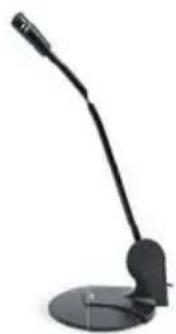
MK-200 microphone is designed for comfortable online communication, recording words and phrases and controlling pronunciation in distance foreign language learning. The model fits equally well for home and office use.
The microphone capsule is installed on a stand with a wide round-shaped base enhancing its stability. The adjustable holder enables to change the tilt of the microphone and locate it at comfortable distance for a user. The device is supplied with an extra fixture component to fix SVEN MK-200 on a monitor.
FEATURES
- Desktop/monitor mountable
- Adjustable tilt angle
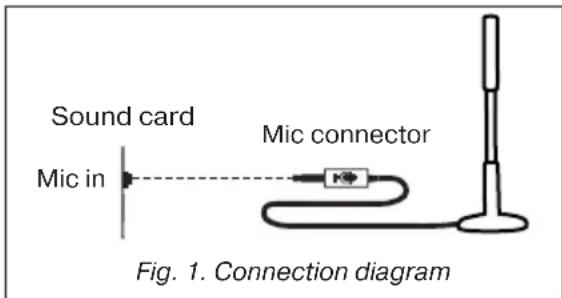
- Connect the microphone plug to the microphone input of a signal source (PC, notebook), as shown in Fig. 1. Turn on the signal source.
SAFETY PRECAUTIONS
- Do not place in environment of possible ingress of liquid, moisture, dust and exposure to high temperatures.
- Do not open and do not repair on your own. In case of a device malfunction, consult your nearest service center.
TECHNICAL SPECIFICATIONS
| Sensitivity, dB | -60 ± 3 |
| Frequency response, Hz | 50 – 16,000 |
| Microphone module size, mm | 9 × 7 |
| Connector | ∅ 3.5 mm (3 pin) mini-jack |
| Cable length, m | 1.8 |
| Weight, g | 63 |
Notes:
- Technical specifications given in this table are supplemental information and cannot give occasion to claims.
- Technical specifications are subject to change without notice due to improvement of SVEN production.
Desktop Microphone
SVEN®
YOU WANT - WE CAN
natural_image
Black desktop microphone with adjustable arm and stand (no visible text or symbols)Модель: MK-200
Manufacturer: SVEN PTE. LTD, 176 Joo Chiat Road, N° 02-02, Singapore, 427447. Produced under the control of Oy Sven Scandinavia Ltd. 15, Kotolahdentie, Kotka, Finland, 48310. Made in China.
® Registered Trademark of Oy SVEN Scandinavia Ltd. Finland.
MK-200
Brand : Sven
Model : MK-200
Category : Microphone