
Kasic - Keyboard Krom - Free user manual and instructions
Find the device manual for free Kasic Krom in PDF.


| Product Type | Keyboard |
| Brand | Krom |
| Model | Kasic |
| Keyboard Layout | Full-size QWERTY |
| Connectivity | Wired USB |
| Dimensions (L x W x H) | 440 x 140 x 30 mm |
| Weight | 800 g |
| Cable Length | 1.5 m |
| Power Supply | USB-powered (5V DC) |
| Key Switch Type | Membrane |
| Multimedia Keys | Yes (volume, play/pause, etc.) |
| Numeric Keypad | Yes |
| Water Resistance | No |
| Compatible Systems | Windows, macOS, Linux |
| Cleaning Instructions | Wipe with a soft, dry cloth |
| Safety Precautions | Avoid liquids; do not disassemble |
| Spare Parts Availability | Keycaps may be replaced |
| Repair Information | Contact Krom support |
| Warranty | Standard 1-year |
Frequently Asked Questions - Kasic Krom
User questions about Kasic Krom
0 question about this device. Answer the ones you know or ask your own.
Ask a new question about this device
Download the instructions for your Keyboard in PDF format for free! Find your manual Kasic - Krom and take your electronic device back in hand. On this page are published all the documents necessary for the use of your device. Kasic by Krom.
USER MANUAL Kasic Krom
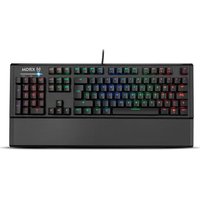
Mechanical Rainbow Gaming Keyboard
![Esc F1 F2 F3 F4 F5 F6 F7 F8 F9 F10 F11 F12 Isony Ibox Pens U1 1: 2*0 3: 3 4: 4 5: 5 6: 6 7: 7 8: 8 9: 9 0= ? 41 ← heat hexo hurt HDD HDD / * - == Q W E R T Y U I O P ^[ +&] Sprf Pin write T 8: 9 + Bqq May05 A S D F G H J K L N ""( C) Q <> Z X C V H N M ' : - - O + 1 2+ 3 Ctrl Win G All = ABCr Fn Ctrl + + → 0 less Supr Intro](/content/2026/05/977625/images/11686ef5d2abef59c7a0b3dd424b823d7f1a5150b51fb01a9f6f19d5e146a0fd.jpg)
QuickGuide Installation
DEFAULT FUNCTIONS & ELEMENTS


Multimedia keys

Brightness controls

Gaming mode

Speed controls

Color modes

WASD / Arrows switch
Backlight speed adjustment. Total 3 levels
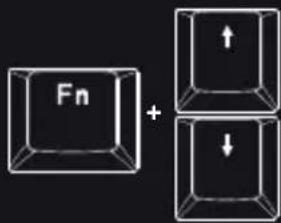
chemical
Chemical reaction diagram showing formation of a fluorinated compound with two directional arrowsBacklight brightness adjustment
KEYBOARD FUNCTIONS

Media

Play / Pause
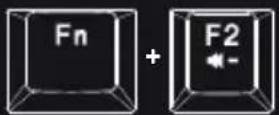
Volume - Next track


Volume + Email


Mute Browser web
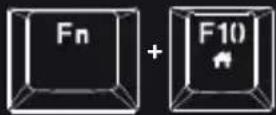

Stop Lock keys


Previous track Calculator

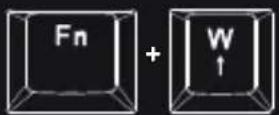
Interchangeable WASD and arrow keys

Restore factory default

Game mode
EU DIRECTIVES
CE STATEMENT OF COMPLIANCE WITH EUROPEAN UNION DIRECTIVES
Krom declares that this product is in compliance with the essential requirements and other relevant provisions from the following Directives: 2014/30/EC; 2011/65/EC, as applicable. The technical documentation required by the Conformity Evaluation process is in Krom's possession and can be requested through the email info@kromgaming.com.

DISPOSAL OF BATTERIES AND ELECTRICAL OR ELECTRONIC EQUIPMENT WASTE
The existence of this symbol on the product, batteries or respective packaging, signifies that this product and the contained batteries can not be disposed as domestic waste. It is the user's responsibility to deliver this product at a battery, electrical or electronic recycling pick-up point. The pick-up and separate recycling contributes for the preservation of natural resources and suppresses potential negative consequences for the human health and the environment resultant of inadequate disposal of dangerous substances contained in batteries and electrical or electronic equipment. For additional information regarding batteries, electrical or electronic recycling pick-up points, please contact your local municipal services.
WARRANTY
Who does the warranty protect:
This warranty is valid for the original purchaser only.
What does the warranty protect:
For warranty claims, please contact Krom's overseas distribution partners in your country.
Find the distribution partner list at www.kromgaming.com
Warranty: 2 years from the purchasing date. [Depending on the laws of each country]
URL: www.kromgaming.com
E-mail: support@kromgaming.com
What doesn't the warranty cover:
- Any product, on which the serial number has been defaced, modified or removed.
- Accident, misuse, neglect, fire, water, lightning, or other acts of nature, unauthorized product modification, or failure to follow instructions supplied with the product.
- Repair or attempted repair by anyone not authorized by Krom.
- Damage to or loss of any programs, data or removable storage media.
- Software or data loss occurring during repair or replacement.
- Any damage of the product due to shipment.
- Removal or installation of the product.
- External causes, such as electric power fluctuations or failure.
- Use of supplies or parts not meeting Krom's specifications.
- Normal wear and tear.
- Any other cause which does not relate to a product defect.
If you have any questions regarding technical problems, please contact us via our website:
Krom reserves the right for any modifications in text and/or images.

natural_image
Abstract orange geometric pattern on black background (no text or symbols)KROM


Brand : Krom
Model : Kasic
Category : Keyboard