
CDBB-303BT - Hi-Fi System Laser - Free user manual and instructions
Find the device manual for free CDBB-303BT Laser in PDF.


| Product Type | Hi-Fi System |
| Brand | Laser |
| Model | CDBB-303BT |
| Color | Black |
| Dimensions (W x H x D) | 250 mm x 150 mm x 200 mm |
| Weight | 2.5 kg |
| Power Supply | AC 220-240 V, 50/60 Hz |
| Power Consumption | 30 W |
| Supported Media | CD, CD-R/RW |
| Radio Bands | FM |
| Bluetooth Version | 4.0 |
| USB Playback | Yes |
| Output Power (RMS) | 20 W |
| Number of Speakers | 2 |
| Remote Control | Included |
| Display | LED |
| Audio Inputs | Aux (3.5 mm) |
| Headphone Jack | Yes |
| Clock / Timer | Yes |
| Equalizer Presets | 5 (Rock, Pop, Jazz, Classic, Flat) |
| Warranty | 1 year |
Frequently Asked Questions - CDBB-303BT Laser
User questions about CDBB-303BT Laser
0 question about this device. Answer the ones you know or ask your own.
Ask a new question about this device
Download the instructions for your Hi-Fi System in PDF format for free! Find your manual CDBB-303BT - Laser and take your electronic device back in hand. On this page are published all the documents necessary for the use of your device. CDBB-303BT by Laser.
USER MANUAL CDBB-303BT Laser
natural_image
Black outdoor portable radio with laser, USB, and MP3 folders (no visible text or symbols on device body)
CD PLAYER
AM/FM RADIO

AUXILIARY
INPUT / OUTPUT
DIGITAL DISPLAY

BUILT-IN
STEREO SPEAKER

MP3 PLAYER
USB
COMPATIBLE
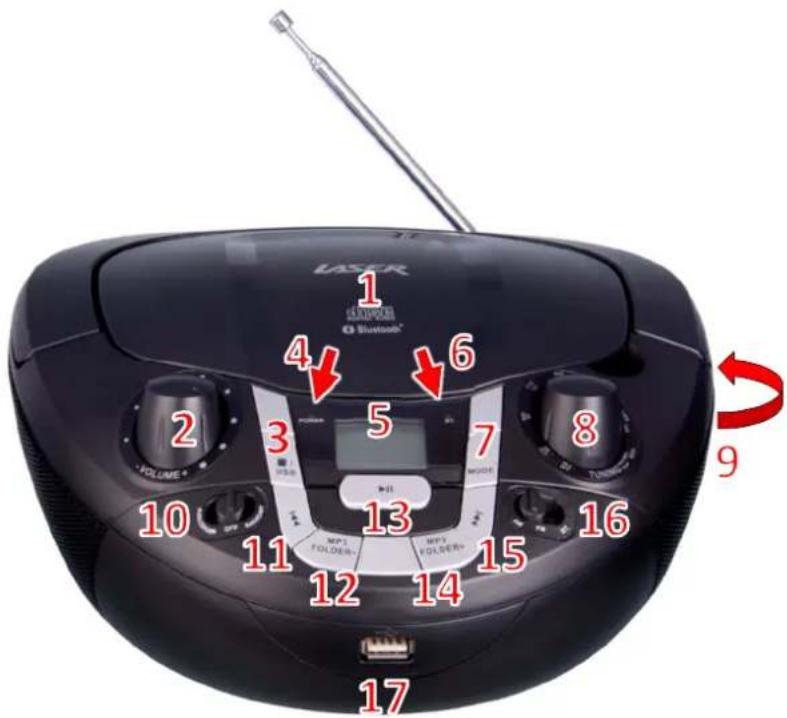
| No | Button Function / Option | |
| 1 | CD Compartment Playback for | audio CD's |
| 2 | Volume Control Adjust volume | |
| 3 | Stop / USB Stop playback / Press and hold to select USB playback | |
| 4 | Power indicator RED indicator when turned ON | |
| 5 | LCD Display Displays playback information | |
| 6 | Bluetooth indicator BLUE indicator when turned ON | |
| 7 | Mode (MP3 playback only) Repeat options; current, [MP3] directory, all or random | |
| 8 | Radio tuning knob Radio station manual tuning | |
| 9 | AUX and Headphone Input Connection for headphones or Auxiliary audio line in | |
| 10 | Power switch Selector for AUX/CD, OFF and Radio | |
| 11 | Previous Track Select previous track for playback | |
| 12 | MP3 Folder - | Move to previous MP3 folder |
| 13 | Play / Pause | Play or Pause music playback |
| 14 | MP3 / Folder + | Move to next MP3 folder |
| 15 | Next Track | Select next track for playback |
| 16 | Radio and Bluetooth switch | Selector for AM, FM radio or Bluetooth playback |
| 17 | USB Socket | Insert USB drive for playback |
WHATS IN THE BOX
1 x CD BoomBox, 1 x Mains Power Cable, 1 x User Manual
INSERTING BATTERIES
- Disconnect the AC cord and insert 6 x C size batteries into the battery compartment noting the correct polarity as shown inside the battery compartment.
RADIO RECEPTION
- For best reception, fully extend the FM antenna to receive FM stations.
- For AM reception, as the BoomBox has an internal AM antenna you may need to position for best reception.
RADIO OPERATION
- Switch selector to RADIO.
- Switch to either AM or FM.
- Rotate the TUNING knob to tune to your desired radio station.
- Adjust the sound level by rotating the VOLUME control.
- Turn the radio off, by selecting OFF.
CD OPERATION
- Switch selector to AUX/CD.
- Insert a CD disc and close the CD door. The unit will start reading the disc and display the total number of tracks of the disc.
- To start playback, press the PLAY/PAUSE button.
- Adjust the VOLUME knob to the desired volume level.
- To stop playback, press the PLAY/PAUSE button.
SKIP MODE
- During Playback (or while paused), press the Next Track button to go to the next track.
- During Playback (or while paused), press the Previous Track button to go to the start of the current track.
- During Playback mode, press the Previous Track button twice to go to the previous track.
MP3/ AUX IN CONNECTION
Note: A 3.5mm to 3.5mm audio jack cable is required (not supplied)
- Insert one side of the audio cable into the AUX line-out jack of your audio device and the other end into your BoomBox.
- Turn the BoomBox ON and slide the selector to the AUX/CD position.
- Turn your Audio device ON and begin playback.
BLUETOOTH MODE
- Switch selector to RADIO and the other to BLUETOOTH. The POWER indicator will turn ON and the BLUETOOTH indicator will begin flashing (pairing mode).
- Turn the Bluetooth Function ON on your Bluetooth device, e.g. Mobile Phone or Tablet.
- Enable search or scan function to find your CDBB-303BT
- Select CDBB-303BT to pair the Boombox with your Bluetooth device. A confirmation chime will then sound and the Bluetooth indicator will turn to solid, rather than flashing.
- After successfully pairing, you can select the PLAY/PAUSE button on your Bluetooth device to play the music wirelessly from the Boombox.
- Switch selector to AUX/CD position. The POWER LED indicator will turn ON.
- Insert the CD or MP3-CD disc in the CD compartment and close the CD door. The unit will start reading the disc and display the total number of folders (eg F01) and then the amount of tracks (eg 015).
[Playback will then start automatically]
- Adjust the VOLUME knob to the desired volume level.
- To pause playback of the CD or MP3-CD, press the PLAY/PAUSE button once.
- To resume playing, press the PLAY/PAUSE button again.
- To stop playing the CD or MP3-CD, press the STOP button.
SKIP FOLDER MODE (For MP3-CD only)
- During Playback (or while on pause), press the MP3 Folder + button to go to the next folder.
- During Playback (or while on pause), press the MP3 Folder - button to go to the previous folder.
MODE BUTTON (REPEAT OPTIONS for MP3 and CD)
During playback, press the MODE button to display the following options.
| Number of presses | Display | Function |
| Press once | Display “REP 1” | Playback current track |
| Press twice | Display “REP DIR” (For MP3-CD only) | Repeat one folder |
| Press three times | Display “REP ALL”. | Repeat whole CD Disc |
| Press four times | Display “RAN” (For MP3-CD only) | Random playback |
| Press five times | [no display options] | Repeat options cancelled |
USB OPERATION
- Switch selector to AUX/CD then press and hold the STOP/USB button.
- Insert a USB drive containing MP3 music into the USB slot. The Boombox will then start reading the USB and display the tracks contained.
[Playback will start automatically.]
- Adjust the VOLUME knob to the desired volume level.
- To stop playback, press the STOP button.
Note: If you want to switch to USB playing during CD playing, just press & hold the Stop/USB button for few seconds, the Boombox will automatically switch to the USB playing mode.
SPECIFICATIONS
Frequency Range: AM 530 - 1600 KHz, FM 88 - 108 MHz
Power Supply: AC 240V \~ 50Hz, or 6 x C size batteries
For further product information and instructions please visit our product web page at www.laserco.com.au or email www.laserco.com.au/supports/email.php
Please note: As continuous improvements are made to this product, slight operational differences may occur. For the most up-to-date user manual, please visit our web site.
Warranty Against Defects
Laser Corporation Pty Ltd (“Laser”) warrants your new product to be free from defects in materials and workmanship for 12 months, from the date of purchase, provided that the product is used in accordance with accompanying recommendations or instructions where provided. The benefit of this warranty is in addition to your rights under the Australian Consumer Law and to other rights and remedies of the consumer under a law in relation to the goods or services to which the warranty relates.
Through a network of retailers and resellers, Laser will provide you with your choice of a repair, exchange (where possible) or refund (within Dead on Arrival period) for this product if it becomes defective within the warranty period.
This warranty will no longer apply where the defect is a result of alteration, accident, misuse, abuse, normal wear and tear, neglect or improper storage.
Please retain your receipt as proof of purchase.
How to make a product warranty claim:
Step 1: Find your receipt which proves the date of purchase. Where the date of purchase cannot be verified, your place of purchase or Laser will make an assessment based on the date of manufacture, the condition of the Laser product and the type of defect.
Step 2a): Contact your place of purchase. They will assess the nature of the fault and repair, replace or refund the product as per their store refund or warranty policy.
Step 2b): If your place of purchase cannot be contacted, then you can contact Laser Customer
Service with details of your defective Laser Product Phone (02) 9870 3388; or Email:
service@laserco.com.au or online www.laserco.com.au/warranty (click on "Consumers (End Users)").
Our business address is: Unit 1/6-8 Byfield Street, North Ryde, NSW 2113
Step 3: Laser will issue you with a Return Authorisation (RA) number within 48 hours. When requested, send us the defective product and a copy of your receipt. Laser will cover the cost of the return delivery.
Step 4: Wait for us to contact you. Once we have received your defective Laser product for inspection, we will inform you of our assessment of your claim within 7 days. When we contact you, we will firstly let you know whether you have a valid claim under this Warranty, and if so, we will inform you whether your defective Laser product will be replaced or repaired, together with the number of days you can expect to wait to receive your replaced or repaired Laser product.
Step 5: For further details on warranty cover and returns, please check Terms and Conditions for Warranty Returns section at www.laserco.com.au/warranty (Consumers Section).
Our goods come with guarantees that cannot be excluded under the Australian Consumer Law. You are entitled to a replacement or refund for a major failure and compensation for any other reasonably foreseeable loss or damage. You are also entitled to have the goods repaired or replaced if the goods fail to be of acceptable quality and the failure does not amount to a major failure.

Brand : Laser
Model : CDBB-303BT
Category : Hi-Fi System