
IL A1.UK - Freezer INDESIT - Free user manual and instructions
Find the device manual for free IL A1.UK INDESIT in PDF.
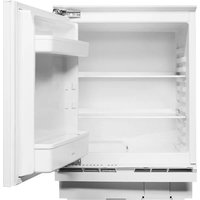


| Brand | Indesit |
| Model | IL A1.UK |
| Product Type | Freezer |
| Energy Efficiency Class | E (estimated) |
| Annual Energy Consumption | 221 kWh (estimated) |
| Total Net Capacity | 90 L (estimated) |
| Freezing Capacity | 4 kg/24h (estimated) |
| Storage Time during Power Failure | 13 h (estimated) |
| Noise Level | 41 dB(A) (estimated) |
| Climate Class | N-ST (estimated) |
| Defrost Type | Manual |
| Temperature Control | Mechanical dial |
| Door Open Alarm | No (not typical for this class) |
| Interior Light | Yes (estimated) |
| Adjustable Feet | Yes |
| Reversible Door | Yes |
| Dimensions (HxWxD) | 85 x 55 x 56 cm (estimated) |
| Weight | 28 kg (estimated) |
| Power Supply | 220-240 V, 50 Hz |
| Accessories Included | Ice cube tray, storage basket |
Frequently Asked Questions - IL A1.UK INDESIT
User questions about IL A1.UK INDESIT
0 question about this device. Answer the ones you know or ask your own.
Ask a new question about this device
Download the instructions for your Freezer in PDF format for free! Find your manual IL A1.UK - INDESIT and take your electronic device back in hand. On this page are published all the documents necessary for the use of your device. IL A1.UK by INDESIT.
USER MANUAL IL A1.UK INDESIT
THANK YOU FOR BUYING AN INDESIT PRODUCT In order to receive more complete assistance, please register your product on www.indesit.com/register

Before using the appliance, carefully read the Safety Instructions.
PRODUCT DESCRIPTION
FIRST TIME USE
Wait at least two hours after installation before connecting the appliance to the power supply.
Connect the appliance to the power supply and turn the thermostat knob to switch on the appliance.
After turning the appliance on, you must wait for 4-6 hours for the correct storage temperature to be reached for a normally filled appliance. Position the antibacterial anti-odour filter in the fan as demonstrated in the filter packaging (if available).
CONTROL PANEL

FREEZING FRESH FOOD
Place fresh food to be frozen on the grid in the freezer compartment, avoiding direct contact with food that is already frozen.
The quantity of fresh food that can be frozen in 24 hours is written on the rating plate.
To freeze fresh food, place the freezer compartment grid in the upper position.
FREEZER AND REFRIGERATOR COMPARTMENT TEMPERATURE
This Fridge/Freezer is switched on by means of the thermostat located inside the refrigerator compartment.
The temperature of both compartments is adjusted by turning the thermostat knob.
Thermostat set to 1/2: minimum refrigeration
Thermostat set to 3-5: medium refrigeration
Thermostat set to 6/7: maximum refrigeration
Thermostat set to ●: no refrigeration, no light
Setting the thermostat knob to ● turns the whole appliance off. Recommended setting:
- Refrigerator compartment: MEDIUM
To avoid food waste, please refer to the recommended setting and storage times found in the online user manual.
HOW TO STORE FOOD AND BEVERAGE

Legend
COLDEST ZONE

LEAST COLD ZONE
REFRIGERATOR COMPARTMENT
Light system (depending on model)
 | This product contains a light source of energy efficiency class G |  | This product contains 4 lateral light sources of energy efficiency class F |
 | This product contains a light source of energy efficiency class G |  | This product contains 4 lateral light sources of energy efficiency class F and a top light source of energy class G |
 | This product contains a top light source of energy efficiency class G | ||
FREEZER COMPARTMENT
Freezing fresh food
- It is advisable to set the temperature colder or turn on the Fast Freeze/Fast Cool* at least four hours before removing the food from the freezer compartment, to prolong the preservation of the food during the defrosting phase.
- To defrost, unplug the appliance and remove the drawers. Leave the door open to allow the frost to melt. To prevent the water from escaping during the defrost, it is advised that you place an absorbent cloth on the bottom of the freezer compartment and wring it out regularly.
- Clean the inside of the freezer compartment and dry it carefully.
- Turn the appliance back on and put the food back inside. To remove the frost on the STOP FROST* accessory, follow the CLEANING.
Ice cubes*
Fill 2/3 of the ice tray with water and put it back in the freezer compartment. Do not, under any circumstances, use sharp or pointed objects to remove the ice.
The quantity of fresh food that can be frozen in a specific time period is indicated on the rating plate.
Load limits are determined by baskets, flaps, drawers, shelves etc. Make sure that these components can still close easily after loading.
GENERAL INFORMATION
The drawers, baskets and shelves should be kept in their current position unless otherwise specified in this quick guide. The light system inside the refrigerator compartment uses LED lights, allowing for better lighting than with traditional light bulbs, as well as for very low energy consumption.
Doors and lids of the refrigeration appliance should be removed before disposal in the landfill, to avoid children or animals getting trapped inside.
What to do if... Possible reasons Solutions
| The appliance doesn’t work. | There may be an appliance power supply problem. | Make sure:there is not a power failure;the plug is properly inserted in the power socket and the double-pole switch (if present) is in the correct position (on);the household electrical system protection devices function;the power cable is not broken;the thermostat knob is not turned to “●”. |
| The inside light does not work. | It may be necessary to replace the light bulb. | Disconnect the appliance from the power supply and contact the Technical Assistance Service if you need a replacement. |
| The internal temperature of the compartments is not cold enough. | The reasons could vary (see “Solution”) column. | Check that:the doors are closed properly;the appliance is not installed near a heat source;the temperature is appropriately set;the circulation of air through the ventilation grilles on the base of the appliance is not obstructed. |
| There is water on the bottom of the refrigerator compartment. | The defrost water drain is blocked. | Clean the defrosting water drain (see section “Cleaning and Maintenance”). |
| Excessive amount of frost in the freezer compartment. | The door to the freezer compartment is not closed properly. | Check that there is nothing preventing the door from closing properly.Defrost the freezer compartment.Make sure the appliance has been correctly installed. |
| The front edge of the appliance that the door gaskets seal against is hot. | This is not a problem. It prevents condensation from forming. | A solution is not needed. |
| The temperature of the refrigerator compartment is too cold. | The set temperature is too cold.A large amount of fresh food may have been placed in the freezer compartment. | Try to set a less cold temperature.If fresh food has been put in the freezer compartment, wait until the freezing has been completed.Turn off the fan (if present) described in the paragraph “FAN”. |

Policies, standard documentation and additional product information can be found by:
- Visiting our website docs.indesit.eu
- Using QR Code • Alternatively, contact our After-sales Service (see phone number in the warranty booklet). When contacting our After-sales Service, please state the codes provided on your product's identification plate. The model information can be retrieved using the QR-Code indicated on the energy label. The label also includes the model identifier that can be used to consult the https://eprel.ec.europa.eu database portal.

Brand : INDESIT
Model : IL A1.UK
Category : Freezer