IPU-108 - Uncategorized Auray - Free user manual and instructions
Find the device manual for free IPU-108 Auray in PDF.


| Product Type | Portable Bluetooth Speaker |
| Brand | Auray |
| Model | IPU-108 |
| Dimensions | 7.5 x 3.5 x 3.5 inches (19 x 9 x 9 cm) |
| Weight | 1.2 lbs (0.54 kg) |
| Power Source | Built-in rechargeable lithium-ion battery, 5V DC input via micro USB |
| Battery Capacity | 2000 mAh |
| Charging Time | Approximately 2-3 hours |
| Playback Time | Up to 10 hours at moderate volume |
| Bluetooth Version | 5.0 |
| Wireless Range | Up to 33 feet (10 meters) |
| Speaker Output | 10W RMS |
| Frequency Response | 100 Hz - 20 kHz |
| Driver Size | 2 x 5W full-range drivers |
| Water Resistance | IPX5 (splash-proof) |
| Controls | Power, Volume +/- , Play/Pause, Bluetooth pairing, Multi-function button |
| Connectivity | Bluetooth, AUX 3.5mm input, MicroSD card slot |
| Compatible Devices | Smartphones, tablets, laptops, and other Bluetooth-enabled devices |
| Included Accessories | Micro USB charging cable, AUX cable, user manual |
| Maintenance and Cleaning | Wipe with a dry soft cloth. Do not use harsh chemicals. |
| Safety Features | Overcharge, over-discharge, short circuit, and temperature protection |
| Spare Parts | Battery replacement available through authorized service centers |
| Warranty | 1-year limited warranty |
Frequently Asked Questions - IPU-108 Auray
User questions about IPU-108 Auray
0 question about this device. Answer the ones you know or ask your own.
Ask a new question about this device
Download the instructions for your Uncategorized in PDF format for free! Find your manual IPU-108 - Auray and take your electronic device back in hand. On this page are published all the documents necessary for the use of your device. IPU-108 by Auray.
USER MANUAL IPU-108 Auray
natural_image
Black-and-white photo of a desktop microphone setup with a tablet and stand (no text or symbols visible)Thank you for choosing Auray.
The Auray Universal Tablet Holder mounts your tablet onto a microphone stand's shaft or threaded mount for hands-free viewing while onstage or in the studio. The adjustable bracket ensures safe and easy support for your tablet. The holder is designed to provide 180° tilt and 360° rotation for optimal landscape or portrait orientation. With your tablet mounted on the IPU-108, you'll have control of your sheet music, lyric charts, and apps during performances and recording sessions.
Precautions

Please read and follow these instructions, and keep this manual in a safe place.
- Do not attempt to disassemble or repair this product.
- Clean this product with only a soft, dry cloth.
- Use only parts provided by the manufacturer.
- Make sure everything is secure before proceeding.
- Make sure that this product is intact and that there are no missing parts.
- Unless instructed otherwise, make sure not to un-screw any of the locking knobs all the way, or they will fall off.
- To avoid damage to this product, be careful not to overtighten or improperly thread any of the threaded fittings.
- Do not insert your iPad or tablet into the bracket until after you have successfully mounted the IPU-108 onto the microphone stand.
- All images are for illustrative purposes only.
Overview
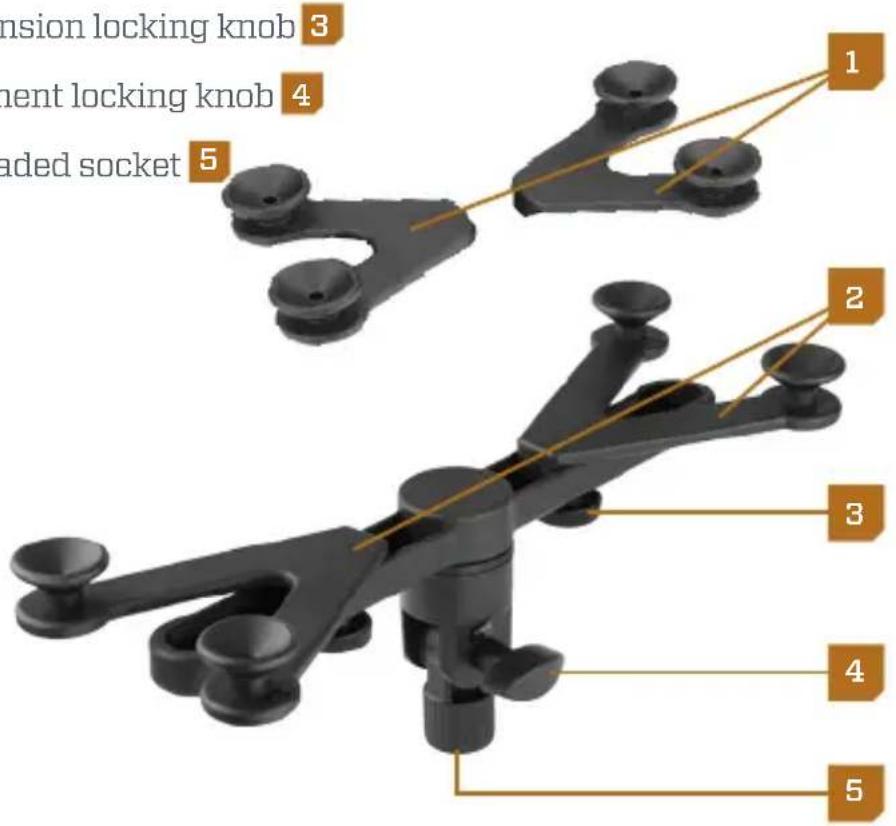
Holder
Small V-arm extension (7 to 11 in. tablets) 1
Large V-arm extension (10 to 14 in. tablets)
2
V-arm extension locking knob 3
Tilt adjustment locking knob 4
5/8 in. threaded socket 5
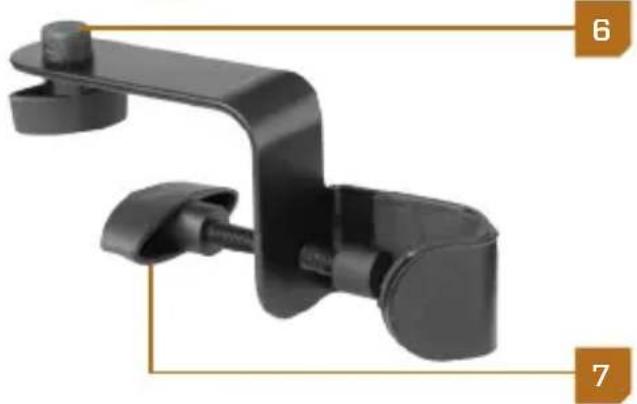
Clamp
5/8 in. threaded post & locking knob 6
Clamp locking knob 7
natural_image
Black metal clamp bracket with attached clips, labeled 6 and 7 (no text or symbols on the clamp body)Instructions
Mounting the IPU-108 to a Microphone Stand's Threaded Mount
Important! Do not insert your tablet into the bracket until you have successfully mounted the IPU-108 onto the microphone stand.
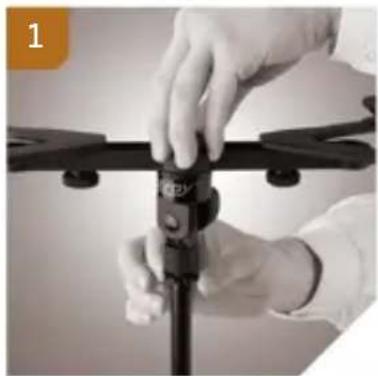
Align the 5/8 in. threaded socket with the microphone stand's threaded mount, and screw the universal tablet holder on until secure. 1
natural_image
Close-up of hands adjusting a black drone component (no visible text or symbols)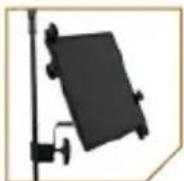
Adding the Clamp to the Tablet Holder
To mount the IPU-108 to a microphone stand shaft, the clamp must first be attached to the tablet holder.
-
Align the 5/8 in. threaded socket with the clamp's 5/8 in. threaded post and locking knob.
-
Screw the clamp into the tablet holder by turning the locking knob until secure.
Mounting the IPU-108 to a Microphone-Stand Shaft
-
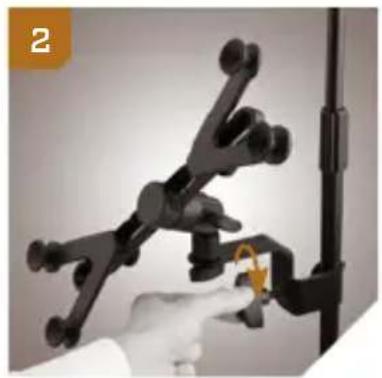
Loosen the clamp locking knob, and then fit it around the microphone-stand shaft.
-
Close the clamp by tightening the clamp locking knob until secure. 2
natural_image
Hand holding a black mechanical clamp with a yellow angle indicator (no text or symbols visible)Selecting or Swapping the V-arm Extensions for Your Tablet
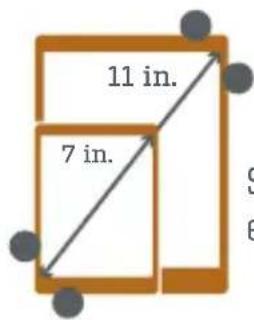
Small V-arm extensions
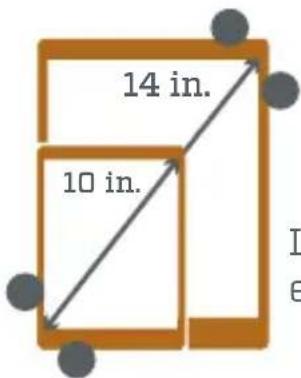
Large V-arm extensions
To attach or swap the V-arm extensions, follow these steps:
-
Unscrew both V-extension locking knobs, and remove the V-arm extensions from the brackets. Exchange them for the other size of V-arm extensions.
-
Fit the mounting sockets into the bracket slots, making sure that the V-arm extension nodes face away from the center of the bracket.
-
Secure the V-arm extensions by screwing in the locking knobs from the underside of the bracket.
Inserting Your Tablet into the Bracket
Important! Do not insert your tablet into the bracket until you have successfully mounted the IPU-108 onto the microphone stand.
-
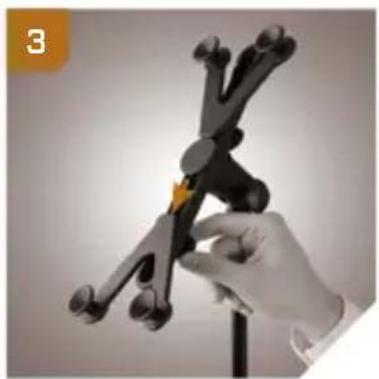
With the bracket in a partially vertical position, loosen the bottom V-arm extension locking knob. Slide the extension wide enough to accommodate one corner of the tablet. 3
-
Tighten the bottom V-arm extension locking knob until secure.
-
Loosen the top V-arm extension locking knob, and slide it to a wide position. 4
-
Place any corner of the tablet between the bottom V-arm extension nodes. 5
-
Slide the top V-arm extension down onto the tablet's diagonal corner until it's secure and not moving.
-
Tighten the V-arm extension knob until it's secure. 6
You may need to repeat these steps in order to adjust the bracket for a proper fit.
natural_image
Hand holding a black wind vane with multiple blades, no visible text or symbols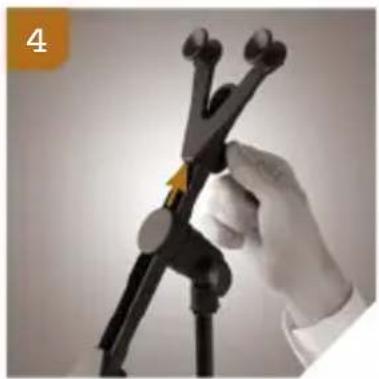
natural_image
Close-up of a hand holding a black plastic measuring tool with multiple probes (no visible text or symbols)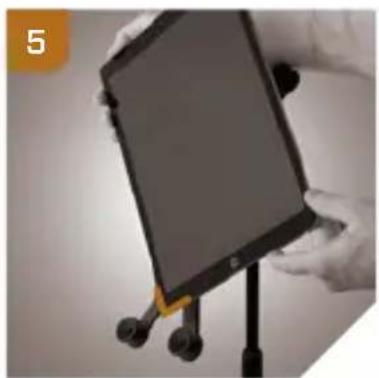
natural_image
Close-up of a person holding a tablet device with a yellow clip, standing on a stand (no visible text or symbols)
natural_image
Hand holding a white object mounted on a black stand, no visible text or symbolsPositioning the IPU-108
Rotation
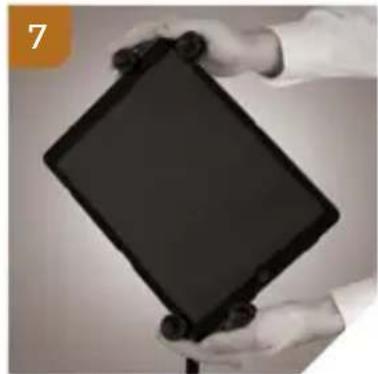
The Auray Universal Tablet Holder has the ability to rotate a full 360°. Turn the tablet to the desired orientation. The V-arm extension nodes will securely hold the tablet in place. 7
Tilt
The Auray Universal Tablet Holder has a tilt capacity of 180^ whether mounted onto the microphone stand's threaded mount, or mounted onto the stand's shaft. 8
To adjust the tilt, loosen the tilt adjustment locking knob, and set the tablet at the desired angle. Then retighten the locking knob.
Important! Always keep one hand on your tablet when loosening the tilt adjustment locking knob.
natural_image
Close-up of hands holding a black tablet device (no visible text or symbols)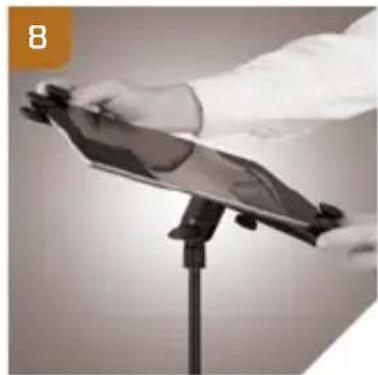
natural_image
Person holding a tablet device on a stand, no visible text or symbolsSpecifications
Weight capacity: 6.6 lb. (3 kg)
Rotation: 360^
Tilt: 180^
Clamp range: Small V-arm extensions: 7 to 11 in. (17.78 to 27.94 cm) Large V-arm extensions: 10 to 14 in. (25.4 to 35.5 cm)
Weight: 1.25 lb. (567 g)
Compatibility: 7 to 14 in. (17.78 to 35.5 cm) tablets
Three-Year Limited Warranty
This Auray product is warranted to the original purchaser to be free from defects in materials and workmanship under normal consumer use for a period of three (3) years from the original purchase date or thirty (30) days after replacement, whichever occurs later. The warranty provider's responsibility with respect to this limited warranty shall be limited solely to repair or replacement, at the provider's discretion, of any product that fails during normal use of this product in its intended manner and in its intended environment. Inoperability of the product or part(s) shall be determined by the warranty provider. If the product has been discontinued, the warranty provider reserves the right to replace it with a model of equivalent quality and function.
This warranty does not cover damage or defect caused by misuse, neglect, accident, alteration, abuse, improper installation or maintenance. EXCEPT AS PROVIDED HEREIN, THE WARRANTY PROVIDER MAKES NEITHER ANY EXPRESS WARRANTIES NOR ANY IMPLIED WARRANTIES, INCLUDING BUT NOT LIMITED TO ANY IMPLIED WARRANTY OF MERCHANTABILITY OR FITNESS FOR A PARTICULAR PURPOSE. This warranty provides you with specific legal rights, and you may also have additional rights that vary from state to state.
To obtain warranty coverage, contact the Auray Customer Service Department to obtain a return merchandise authorization (“RMA”) number, and return the defective product to Auray along with the RMA number and proof of purchase. Shipment of the defective product is at the purchaser’s own risk and expense.
For more information or to arrange service, visit www.aurayaudio.com or call Customer Service at 212-594-2353.
Product warranty provided by the Gradus Group.
www.gradusgroup.com
AURAY is a registered trademark of the Gradus Group.
© 2017 Gradus Group LLC. All Rights Reserved.

AURAY®
A Gradus Group Brand
- Thank you for choosing Auray.
- Precautions
- Overview
- Holder
- Clamp
- Instructions
- Mounting the IPU-108 to a Microphone Stand's Threaded Mount
- Adding the Clamp to the Tablet Holder
- Mounting the IPU-108 to a Microphone-Stand Shaft
- Selecting or Swapping the V-arm Extensions for Your Tablet
- Inserting Your Tablet into the Bracket
- Positioning the IPU-108
- Rotation
- Tilt
- Specifications
- Three-Year Limited Warranty
Brand : Auray
Model : IPU-108
Category : Uncategorized